서론
weaviate를 사용중인데 현재 필자는 batch fixed 만 사용해서 데이터를 적재했는데 이것 외에 다른 방법들에 대해서 궁금해서 찾아보고 정리하고자 한다.
기본
기본적으로 데이터를 저장하려면 아래와 같이 넣는다.
data_rows = [
    {"title": f"Object {i+1}"} for i in range(5)
]

collection = client.collections.get("MyCollection")

with collection.batch.dynamic() as batch:
    for data_row in data_rows:
        batch.add_object(
            properties=data_row,
        )
당연히 json 형식으로 적재하고 title이라는 속성이 MyCollection에 있다.
하지만 gRPC API가 REST API보다 빠르다고 하니 관련 문서를 확인해서 속도 향상을 위해 수정해볼 수 있다.
gRPC, REST API의 차이
REST API (Representational State Transfer)
- 프로토콜: HTTP/HTTPS
- 데이터 형식: 일반적으로 JSON (JavaScript Object Notation)
- 통신 방식: 요청-응답(Request-Response) 모델
- 장점:
- 광범위한 지원: 대부분의 언어와 플랫폼에서 쉽게 사용 가능
- 가독성: JSON 형식은 사람이 읽고 쓰기 쉬움
- 캐싱: HTTP 프로토콜을 통해 응답을 캐싱할 수 있음- 단점:
- 데이터 오버헤드: JSON 형식의 데이터는 부가 정보(예: 태그 등)로 인해 크기가 큼
- 속도: 텍스트 기반의 JSON 파싱은 상대적으로 느림
gRPC (gRPC Remote Procedure Calls)
- 프로토콜: HTTP/2
- 데이터 형식: 프로토콜 버퍼스 (Protocol Buffers, Protobuf)
- 통신 방식: 스트리밍과 요청-응답 모델 모두 지원
- 장점:
- 속도: 바이너리 형식의 프로토콜 버퍼스는 JSON보다 작고 빠르게 직렬화/역직렬화 가능
- 효율성: HTTP/2의 멀티플렉싱과 헤더 압축 덕분에 더 효율적
- 스트리밍 지원: 클라이언트와 서버 간의 양방향 스트리밍을 지원
- 정의된 인터페이스: 서비스 인터페이스를 명확하게 정의 (gRPC IDL)- 단점:
- 복잡성: 설정과 사용이 REST보다 복잡
- 지원: REST만큼 널리 사용되지 않아 일부 언어/플랫폼에서는 지원이 제한적
속도 차이의 이유
- 데이터 직렬화
REST API는 JSON 텍스트 기반으로 크기가 크고 파싱속도가 느리지만 gRPC 프로토콜 버퍼스는 바이너리 형식으로 크기가 작고 파싱속도가 바르다. - 네트워크 효율성
REST API는 HTTP/1.1 을 사용해 각 요청마다 새로운 연결을 설정할 수 있다. 그래서 오버헤드가 발생한다. gRPC는 HTTP/2를 사용해 멀티플렉싱(한 연결에서 여러 메시지를 동시에 전송)을 지원하고 헤더 압축으로 네트워크 효율성을 높인다. - 통신 방식
REST API는 주로 요청-응답 모델만 지원하나 gRPC는 요청-응답 모델 외에도 스트리밍을 지원해 실시간 통신에 유리하다.
ID, vector 값 지정
weaviate는 각 오브젝트에 대해 uuid를 생성한다. 객체 ID는 고유해야 한다.
from weaviate.util import generate_uuid5  # Generate a deterministic ID

data_rows = [{"title": f"Object {i+1}"} for i in range(5)]

collection = client.collections.get("MyCollection")

with collection.batch.dynamic() as batch:
    for data_row in data_rows:
        obj_uuid = generate_uuid5(data_row)
        batch.add_object(
            properties=data_row,
            uuid=obj_uuid
        )
python에서 제공해주는 라이브러리로 결정론적 id를 생성할 수 있다. 사실 이렇게 uuid 를 생성하고 넣지 않아도 weaviate에서 자동으로 uuid를 생성해 넣어준다.
data_rows = [{
    "title": f"Object {i+1}",
    "body": f"Body {i+1}"
} for i in range(5)]

title_vectors = [[0.12] * 1536 for _ in range(5)]
body_vectors = [[0.34] * 1536 for _ in range(5)]

collection = client.collections.get("MyCollection")

with collection.batch.dynamic() as batch:
    for i, data_row in enumerate(data_rows):
        batch.add_object(
            properties=data_row,
            vector={
                "title": title_vectors[i],
                "body": body_vectors[i],
            }
        )
이렇게 사용자가 직접 벡터를 생성해 넣어줄 수 있다. 이는 벡터를 미리 계산해 저장하면 weaviate가 벡터화 작업을 수행할 필요가 없어 데이터 저장 및 검색 성능을 향상시킬 수 있다. 그리고 weaviate에서 제공하는 내장 벡터화모델 외에 특정 벡터화 모델을 사용하고자 할때 해당 모델로 벡터를 계산해 저장할 수 있다.
데이터를 저장하는 방법
용량이 큰 경우
import ijson

# Settings for displaying the import progress
counter = 0
interval = 100  # print progress every this many records; should be bigger than the batch_size

print("JSON streaming, to avoid running out of memory on large files...")
with client.batch.fixed_size(batch_size=200) as batch:
    with open("jeopardy_1k.json", "rb") as f:
        objects = ijson.items(f, "item")
        for obj in objects:
            properties = {
                "question": obj["Question"],
                "answer": obj["Answer"],
            }
            batch.add_object(
                collection="JeopardyQuestion",
                properties=properties,
                # If you Bring Your Own Vectors, add the `vector` parameter here
                # vector=obj.vector["default"]
            )

            # Calculate and display progress
            counter += 1
            if counter % interval == 0:
                print(f"Imported {counter} articles...")


print(f"Finished importing {counter} articles.")
이렇게 배치 사이즈를 지정해놔서 out-of-memory 이슈를 해결할 수 있다.
모델 config
from weaviate.classes.config import Integrations

integrations = [
    # 각 모델 제공자는 서로 다른 매개변수를 노출할 수 있음
    Integrations.cohere(
        api_key=cohere_key,
        requests_per_minute_embeddings=rpm_embeddings,
    ),
    Integrations.openai(
        api_key=openai_key,
        requests_per_minute_embeddings=rpm_embeddings,
        tokens_per_minute_embeddings=tpm_embeddings,  # 예: OpenAI는 임베딩에 대해 분당 토큰 수도 노출함
    ),
]
client.integrations.configure(integrations)
이건 Integrations 클래스를 사용해 Cohere과 OpenAI와의 통합을 설정하고 있다.
openai쪽을 보면 api_key를 통해 OpenAI API키를 설정하고 requests_per_minute_embeddigs를 통해서 분당 임베딩 요청 수를 설정한다. 그래서 API의 속도 제한을 관리한다. 그래서 속도 제한 초과로 인한 오류를 방지한다. tokens_per_minute_embeddings를 통해 분당 처리할 수 있는 토큰 수를 설정한다. 그래서 임베딩 생성 시에 토큰 처리량을 관리한다.
Batch imports 서브모듈
대량의 데이터를 한번에 불러오는 배치(import) 작업을 수행하는 방법은 두가지가 있다.
- Client 객체를 통한 배치 작업 : 이는 여러 컬렉션이나 테넌트에 걸쳐 데이터를 불러올 때 유용하다.
- Collection 객체를 통한 배치 작업 : 단일 컬렉션이나 테넌트 내에서 데이터를 불러올 때 추천된다.
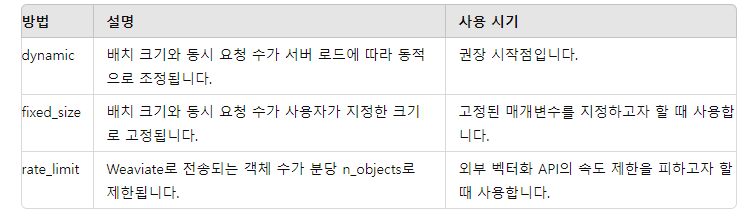
그리고 방법으로는 dynamic, fixed_size , rate_limit가 존재한다.
import weaviate

client = weaviate.connect_to_local()

try:
    with client.batch.dynamic() as batch:  # or <collection>.batch.dynamic()
        # Batch import objects/references - e.g.:
        batch.add_object(properties={"title": "Multitenancy"}, collection="WikiArticle", uuid=src_uuid)
        batch.add_object(properties={"title": "Database schema"}, collection="WikiArticle", uuid=tgt_uuid)
        batch.add_reference(from_collection="WikiArticle", from_uuid=src_uuid, from_property="linkedArticle", to=tgt_uuid)

finally:
    client.close()
그래서 이렇게 사용을 할 수 있다. 이건 dynamic 방법이다.
그리고 add_reference로 참조를 추가할 수 있다.
data 서브모듈
batch의 경우 다량의 데이터를 한번에 처리하는데 사용된다. data는 개별 데이터 객체를 저장, 업데이트, 삭제하는데 사용된다. 그래서 각 요청은 단일 객체에 대해 수행된다.
# insert
questions = client.collections.get("JeopardyQuestion")

new_uuid = questions.data.insert(
    properties={
        "question": "This is the capital of Australia."
    },
    references={  # For adding cross-references
        "hasCategory": target_uuid
    }
)


# insert many
questions = client.collections.get("JeopardyQuestion")

properties = [{"question": f"Test Question {i+1}"} for i in range(5)]
response = questions.data.insert_many(properties)

# insert many with DataObjects
from weaviate.util import generate_uuid5

questions = client.collections.get("JeopardyQuestion")

data_objects = list()
for i in range(5):
    properties = {"question": f"Test Question {i+1}"}
    data_object = wvc.data.DataObject(
        properties=properties,
        uuid=generate_uuid5(properties)
    )
    data_objects.append(data_object)

response = questions.data.insert_many(data_objects)
이렇게 단일 insert 와 여러개의 insert를 할 수 있다.
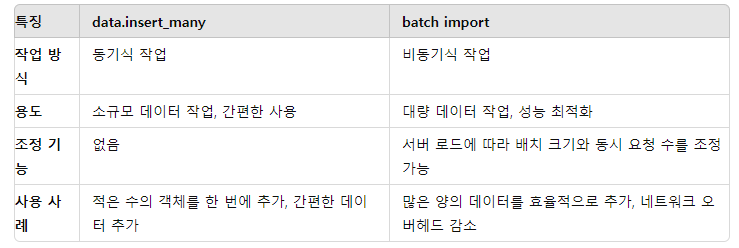
복수개의 데이터를 저장하는 방식으로는 이렇게 차이가 존재하니 각자의 태스크에 맞춰 설정하면 될 것 같다.