Python으로 publisher와 subscriber node 생성 및 실행하기!
1. Concept Understanding and Flowchart
해당 실습에서는 Python으로 빌드한 workspace 내에서 topic 통신을 통해 publisher와 subscriber 간의 message 전송을 구현하고자 한다.
- Node:특정 작업을 수행가능한 최소 프로세서 단위 --> publisher & subcriber 역할
- topic: 비동기식 단방향 메시지 송수신 방식, msg 인터페이스 사용
- message: 전송되는 데이터의 형태, std_msgs/msg/String(문자열 데이터)
2. Feature to be Implemented
- 새 메시지가 수신될 때까지 대기
- callback()을 이용하여 백그라운드에서 새 메시지 처리
- 노드 간 통신을 확인할 수 있는 시각적 출력
위와 같은 기능을 구현하기 위하여
ROS2 workspace --> package --> build --> file edit --> execution
순으로 과정을 진행한다.
3. Create workspace and package
(1) workspace folder 생성
mkdir ros2_ws_study # ros2_ws_study = [workspace_name](2) src 폴더 생성
src 폴더는 패키지를생성하고 소스 코드를 저장하는 디렉토리이므로 반드시 생성해야함
cd workspace/ros2_ws_study
mkdir src
(3) package generate
package 생성 시 아래의 옵션을 참고하여 작성합니다.
- --build-type : 패키지의 빌드 시스템 지정
ros2 pkg create my_cpp_pkg --build-type ament_cmake
ros2 pkg create my_python_pkg --build-type ament_python- --dependencies : 패키지 생성 시 의존성을 미리 지정
ros2 pkg create my_robot --build-type ament_cmake --dependencies rclcpp std_msgs # rclpp와 std_msgs에 대한 의존성 필요 시package 이름 규칙 - 소문자 알파벳, 숫자, 언더스코어(_)만 사용가능
package 생성 시 ROS2 워크스페이스의 src 폴더 안에서 명령을 실행해야합니다
cd workspace/ros2_ws_study/src
ros2 pkg create --build-type ament_python py_pubsub # pubsub = [package folder name]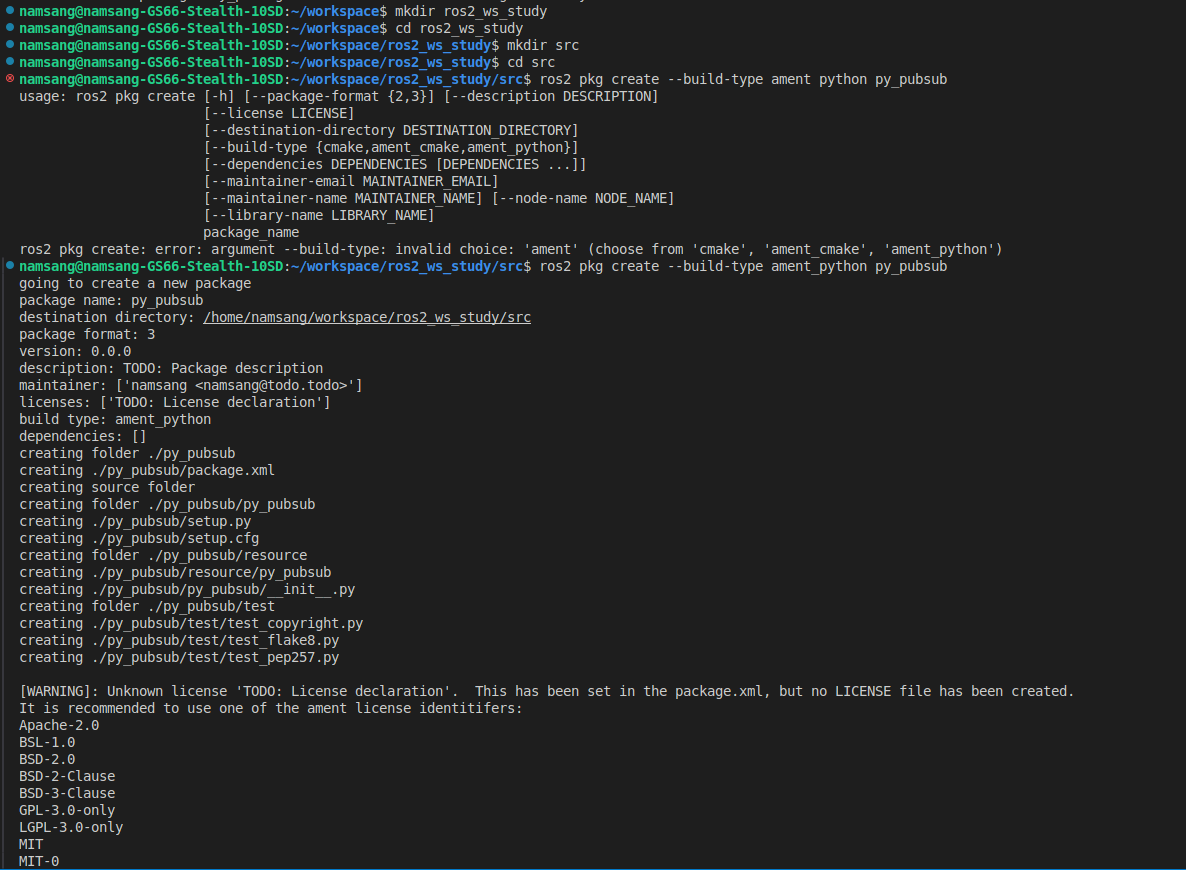
여기까지 완료되면 ROS2를 실행하기 위한 기본 세팅은 완료된 상태이다. tree 기능을 이용하여 구조를 확인해보면 아래와 같다
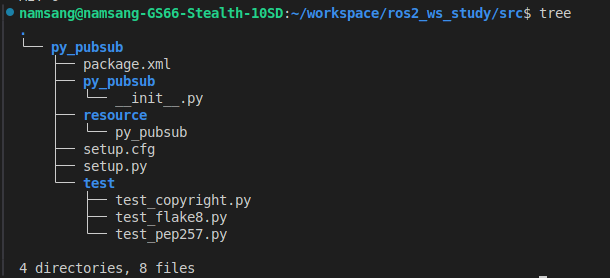
생성된 파일과 폴더를 수정하고 새로 생성하면서 원하는 기능을 구현해보겠다.
(4) publisher source code - code 해석
publisher_member_function.py라는 publisher의 기능을 수행할 수 있도록 하는 파일을 생성한다. 아래는 해당 코드와 주석을 포함한 전체 코드이다.
import rclpy                    # ros2 python 클라이언트 라이브러리
from rclpy.node import Node     # ros2 노드 클래스
from std_msgs.msg import String # std_msgs/string 메시지 형식 임포트

class MinimalPublisher(Node):   # rclpy의 node로부터 상속되는 클래스의 선언
    def __init__(self):         # 생성자를 정의
        super().__init__('minimal_publisher') # 부모 클래스 호출

        # topic이라는 이름의 토픽응로 메시지를 발행하기 위한 publisher 생성
        # string 메시지 형식을 사용하여 topic 토픽에 발행하는 발행자 생성
        self.publisher_ = self.create_publisher(String, 'topic', 10)

        timer_period = 0.5  # seconds, 발행주기 설정
        self.timer = self.create_timer(timer_period, self.timer_callback) # 주기적으로 timer_callback() 함수 호출
        self.i = 0.0 # 카운트 변수 초기화

    """
    timer_callback()
    - 타이머에 의해 주기적으로 호출
    - Hello World: [count] 형식의 메시지 생성 및 발행
    - 해당 메시지를 로깅하여 화면에 출력
    """
    def timer_callback(self):
        msg = String()                          # string 메세지 객체 생성
        msg.data = 'Hello World: %d' % self.i   # 메시지 데이터 설정
        self.publisher_.publish(msg)            # publisher를 사용하여 메시지를 'topic' 토픽에 발생
        self.get_logger().info('Publishing: "%s"' % msg.data) # 로그에 발행한 메시지 출력
        self.i += 1.0 # 카운트 증가

"""
main()
- ROS2 초기화
- MinimalPulisher 클래스의 인스턴스 생성
- rclpy.spin()을 이용하여 노드 실행
- 노드와 ROS2 종료
"""
def main(args=None):
    rclpy.init(args=args) # ros2 초기화
    minimal_publisher = MinimalPublisher() # minimalpublisher 클래스 인스턴스화
    rclpy.spin(minimal_publisher) # 노드실행 및 이벤트 루프 시작
    # Destroy the node explicitly, 명시적으로 노드 파괴
    # (optional - otherwise it will be done automatically, 선택사항 - 그렇지 않으면 가비지 컬렉터가 노드 객체를 파괴할 때 자동으로 수행됨
    # when the garbage collector destroys the node object)
    minimal_publisher.destroy_node()
    rclpy.shutdown() # ros2 종료

if __name__ == '__main__':
    main()
####(5) package.xml edit
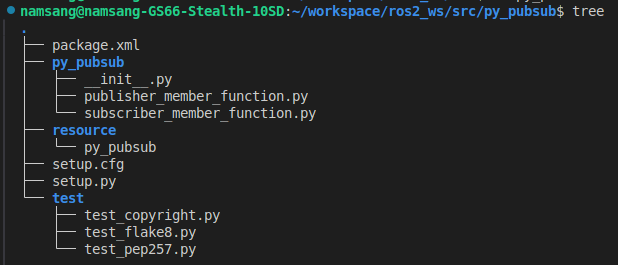
- XML : ROS2의 패키지 설정 파일, 패키지 정의, 의존성, 유지관리자, 라이선스 등의 정보 포함
<?xml version="1.0"?> <!-- 버전 -->
<?xml-model href="http://download.ros.org/schema/package_format3.xsd" schematypens="http://www.w3.org/2001/XMLSchema"?>
<package format="3"> <!-- 패키지의 형식 버전 -->
  <name>py_pubsub</name> <!-- 패키지 이름 -->
  <version>0.0.0</version>
  <description>TODO: Package description/subscriber using rclpy</description>
  <maintainer email="namsang@todo.todo">namsang</maintainer>
  <license>Apache License 2.0</license>

  <!-- 의존성: 패키지를 빌드하거나 실행할 때 필요한 외부 패키지나 라이브러리를 ROS 빌드 도구에게 알려주는 역할 -->
  <exec_depend>rclpy</exec_depend> <!-- 의존 패키지 설정 -->
  <exec_depend>std_msgs</exec_depend> <!-- 메시지 타입 라이브러리 -->

  <test_depend>ament_copyright</test_depend>
  <test_depend>ament_flake8</test_depend>
  <test_depend>ament_pep257</test_depend>
  <test_depend>python3-pytest</test_depend>

  <export>
    <build_type>ament_python</build_type>
  </export>
</package>| tag | 설명 |
|---|---|
| test_depend | 빌드 및 실행 과정 중이 아닌 테스트 단계에서만 필요한 종속성을 지정 |
| ament_copyright | 소스 코드 파일 내에 저작권 고지 및 라이센스 헤더가 포함되어 있는지 검사 |
| ament_flake8 | python 코드의 스타일을 검사하는 도구, PEP 8--Python 스타일 가이드를 준수하는지 확인하여 코드의 일관성과 가독성을 높이는데 도움 |
| ament_pep257 | Python 코드 내의 docstrings이 PEP257--docstring 규칙을 따르는지 검사 |
| python3-pytest | Python 코드를 위한 강력한 테스팅 프레임워크 |
(6) setup.py & setup.cfg edit
- setup.py : ROS2 패키지를 설치(setuptools)하고 배포(package)하는데 사용
--> 주의점: entry_points 옵션의 console_script 키를 사용한 실행 파일 설정
from setuptools import find_packages, setup

package_name = 'py_pubsub'

setup(
    name=package_name,
    version='0.0.0',
    packages=find_packages(exclude=['test']),
    data_files=[
        ('share/ament_index/resource_index/packages',
            ['resource/' + package_name]),
        ('share/' + package_name, ['package.xml']),
    ],
    install_requires=['setuptools'],
    zip_safe=True,

    # package.xml 파일과 동일 작성 부분
    maintainer='namsang',
    maintainer_email='your_email@example.com',
    description='Examples of minimal publisher and subscriber using rclpy',
    license='Apache License 2.0',

    tests_require=['pytest'],

    # entry_points: 파이썬의 setuptools에서 사용되는 설정의 일부, 패키지 설치시, 커맨드 라인 스크립트를 자동으로 생성하도록 지시하는데 사용
    # consloe_scripts: entry_points의 하위 항목으로 커맨드 라인에서 실행할 수 있는 스크립트를 지정
    entry_points={
        'console_scripts': [
            'talker = py_pubsub.publisher_member_function:main',
            'listener = py_pubsub.subscriber_member_function:main',
        ],
    },
)- console_scripts의 명령어 작성시 일반 구조
'command_name = package.module:function'

# talker라는 명칭의 명령어는 py_pubsub.publisher_member_function 패키지의 main 함수를 실행
'talker = py_pubsub.publisher_member_function:main',

# listener라는 명칭의 명령어는 py_pubsub.subscriber_member_function 패키지의 main 함수를 실행
'listener = py_pubsub.subscriber_member_function:main',- setup.cfg 설정
setup.cfg 파일은 python 패키지를 설정할 때 사용하는 구성파링로, 설치에 관련된 옵션을 설정할 수 있음
cat setup.cfg- [develop] : 개발 모드로 설치 시 설정 지정
- $base: 현재 패키지가 설치된 기본 경로
- lib/py_pubsub: 하위 경로에 스크립트 설치
--> 개발 중 sudo python3 setup.py develop 명령어 실행시, 지정된 디렉토리에 스크립트를 설치하여 코드 변경 사항이 즉시 반영되도록 설정 가능
- [install]: 패지지 설치 시 설정 지정
[develop]
script_dir=$base/lib/py_pubsub # scripts 설치 디렉토리 위치 지정
[install]
install_scripts=$base/lib/py_pubsub
위의 코드는 결좌적으로 setuptools 실행 시 lib 하위 dir에 실행 스크립트를 추가하라는 것이며 ros2 run 실행 시, path 탐색을 위한 dir을 지정한다.
(7) subcriber source code download - code 해석
import rclpy # ros2 client library
from rclpy.node import Node # ros2 node package
from std_msgs.msg import String # string type msg

# class definition
class MinimalSubscriber(Node): # define class, inheritant Node --> 해당 클래스는 Node의 모든 기능 사용 가능
    def __init__(self): # create class instance, reset node and setting subscriber
        super().__init__('minimal_subscriber') # call Node constructor(__init__), setting node name
        '''
        - self.subscription: creates subscriber and allocate it to self.subscriber
        - String: subcribe msg type
        - 'topic': ROS2 Topic name
        - self.listener_callback: callback func when msg is subscribed
        - 10: msg cue size
        '''
        self.subscription = self.create_subscription(
            String,
            'topic',
            self.listener_callback,
            10)
        # 파이썬에서 변수를 정의했지만 사용하지 않으면 사용하지 않는 변수 경고가 발생할 있어 작성됨
        self.subscription # 사용하지 않는 변수 경고를 방지하기 위해 subscription 변수를 참조

    def listener_callback(self, msg): # topic callback func, print out subscribed msg
        '''
        - msg: String type
        - self.get_logger().info()/error()/warn()
        - '%s' % msg.data --> formatting msg data to string type
        '''
        self.get_logger().info('I heard: "%s"' % msg.data) # return node logger

# this main fucntion is responsible for initializing and running a ROS 2 node
def main(args=None): # parameter args defualt value = None
    rclpy.init(args=args) # ROS2 reset
    minimal_subscriber = MinimalSubscriber() # create subscriber node by initializing the MininalSubscriber class defined previously

    rclpy.spin(minimal_subscriber) # spin the ROS2 node until node
    destorying, start eventloop and call callback()
    minimal_subscriber.destroy_node()

    rclpy.shutdown()

if __name__ == '__main__':
    main()
(8) build and run
- 의존성 체크
# 의존성 체크
cd [workspace]
rosdep install -i --from-path src --rosdistro humble -y- -i: --ignore-src의 약어, 소스 패키지의 의존성을 무시하고 설치할 수 잇는 바이너리 패키지에 대해서만 의존성을 설치하도록 지정
- --from-path src: src directory의 모든 ros package에서 의존성을 찾아 설치
- --rosdistro [ros2 name]: 사용하는 ros 배포판 지정

- build new package
colcon build 시 --packages, s를 꼭 붙일것(계속 오타냈다...)
colcon build --packages-select [package name]
source install/setup.bash
- run
아래의 코드를 각기 다른 터미널에서 실행한다.
ros2 run py_pubsub talkerros2 run py_pubsub listener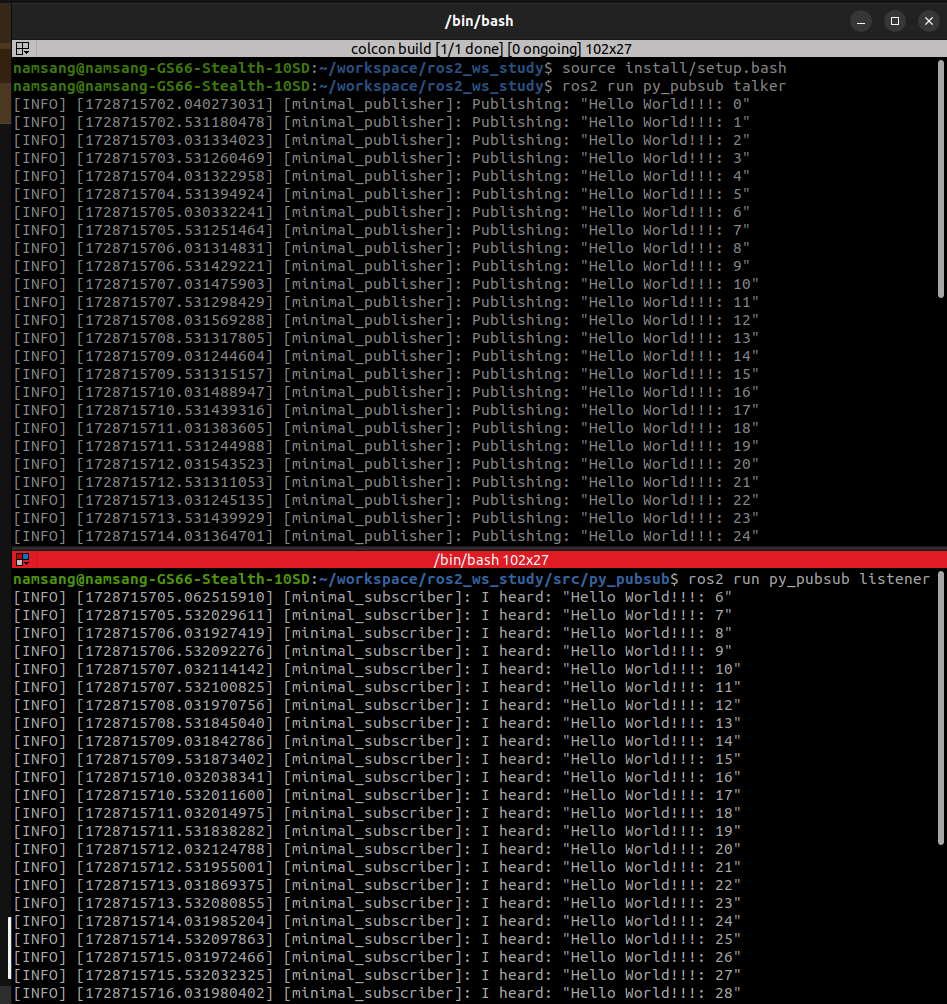
4. 정리
이번 실습을 통해 ros2를 통한 topic 구독, 수신 시스템을 작성하여 실행해보았다. 아래의 파일들이 package 생성 후 기능을 생성하기 위해 수정해야 하는 파일들로 주요 기능을 확인하고 편집해야 한다.
-
package.xml: ROS2 패키지의 메타데이터(이름, 버전, 의존성 및 라이선스 정보) 포함 파일
---> 의존성 추가XML <exec_depend>[package]<exec_depend> -
setup.py & cfg: 파이썬으로 패키지 빌드 및 설치 시 설정을 정의하는 파일
---> setup.py
entry_points={
        'console_scripts': [
            'command_name = package.module:function',
        ],
}- publisher & subscriber.py: ROS2 topic에 메시지를 발행 및 수신하는 스크립트
---> callback 함수 및 main 함수 구성