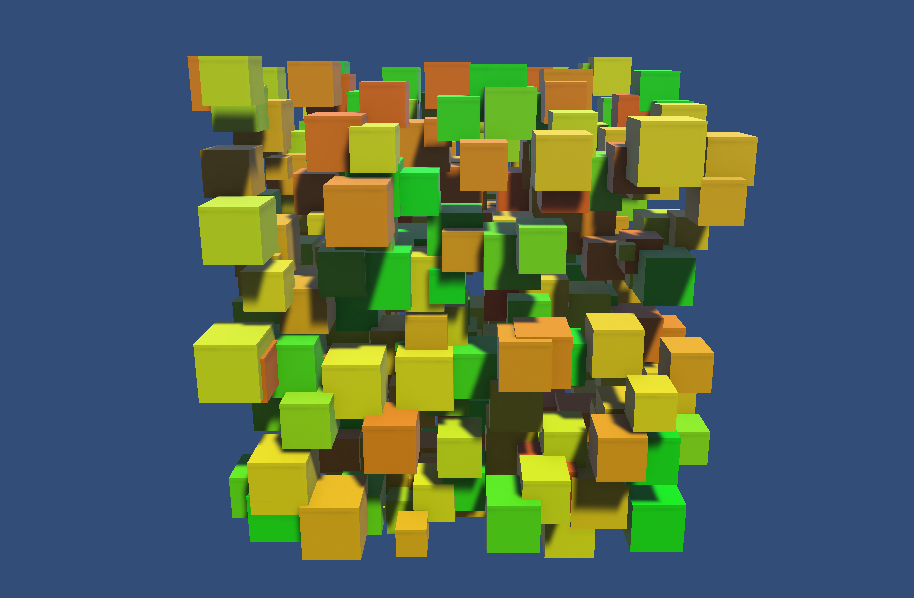
Prefab Spawner에 인터랙션 가미
- 미리 Prefab을 만들어서 Assets > Prefabs 폴더에 넣어 관리합니다.
- 무작위로 생성된 Prefab을 클릭하면 색이 변합니다.
- 클릭 이벤트에 반응할 Collider가 Prefab 오브젝트에 추가되어 있어야 합니다.
초기 Scene 설정
1. 마우스 클릭을 위한 Event System 추가
Hierarchy에서 Create → UI → Event System
2. Physics Raycaster 추가
Main Camera 선택 → Add Component → Physics Raycaster
📄PrefabSpawnerInteraction.cs
using UnityEngine;

public class PrefabSpawnerInteraction : MonoBehaviour
{
  public GameObject prefab;
  public float spawnRate = 0.5f;

  [Header("Hue Range")]
  [Range(0f, 1f)] public float minHue = 0f;
  [Range(0f, 1f)] public float maxHue = 1f;

  private float nextSpawnTime;

  void Update()
  {
    if (Time.time > nextSpawnTime)
    {
      Spawn();
      nextSpawnTime = Time.time + spawnRate;
    }
  }

  void Spawn()
  {
    Vector3 randomPos = transform.position + new Vector3(
        Random.Range(-2.5f, 2.5f),
        Random.Range(-2.5f, 2.5f),
        Random.Range(-2.5f, 2.5f)
    );

    GameObject newObj = Instantiate(prefab, randomPos, Quaternion.identity);

    Interaction interaction = newObj.AddComponent<Interaction>();
    interaction.Initialize(
        hue: Random.Range(minHue, maxHue),
        lifetime: Random.Range(3f, 5f)
    );
  }
}
📄Interaction.cs
- 생성된 프리팹 오브젝트의 수명, 색상, 클릭 반응을 담당하는 컴포넌트
PrefabSpawnerInteraction.Spawn()에서AddComponent후Initialize()호출로 시작- 씬에 EventSystem과 Main Camera의 Physics Raycaster 컴포넌트가 필요
using UnityEngine;
using UnityEngine.EventSystems;
using System.Collections;

// 생성된 프리팹 오브젝트의 수명, 색상, 클릭 반응을 담당하는 컴포넌트
// PrefabSpawnerInteraction.Spawn() 에서 AddComponent 후 Initialize() 호출로 시작
// 씬에 EventSystem과 Main Camera의 Physics Raycaster 컴포넌트가 필요
public class Interaction : MonoBehaviour, IPointerClickHandler
{
  private Renderer rend;
  private bool isDying = false;

  public void Initialize(float hue, float lifetime)
  {
    rend = GetComponent<Renderer>();

    // hue 값을 받아 채도·명도 최대치의 단색으로 머티리얼 설정
    if (rend != null)
      rend.material.color = Color.HSVToRGB(hue, 1f, 1f);

    StartCoroutine(LifecycleRoutine(lifetime));
  }

  // IPointerClickHandler 구현 — New Input System과 호환되는 클릭 감지
  public void OnPointerClick(PointerEventData eventData)
  {
    if (isDying) return;
    isDying = true;

    StopAllCoroutines();
    StartCoroutine(ClickDieRoutine());
  }

  // 일반 라이프사이클: 커짐 → 대기(lifetime) → 작아짐 → 제거
  IEnumerator LifecycleRoutine(float lifetime)
  {
    float finalScale = Random.Range(0.4f, 0.6f);
    const float animSpeed = 0.3f;

    yield return StartCoroutine(ScaleTo(Vector3.zero, Vector3.one * finalScale, animSpeed));
    yield return new WaitForSeconds(lifetime);
    yield return StartCoroutine(ScaleTo(Vector3.one * finalScale, Vector3.zero, animSpeed));

    Destroy(gameObject);
  }

  // 클릭 시: 하얗게 변경 후 빠르게 축소 제거
  IEnumerator ClickDieRoutine()
  {
    if (rend != null)
      rend.material.color = Color.white;

    Vector3 currentScale = transform.localScale;
    yield return StartCoroutine(ScaleTo(currentScale, Vector3.zero, 0.2f));

    Destroy(gameObject);
  }

  // 스케일을 from에서 to로 duration초 동안 선형 보간
  IEnumerator ScaleTo(Vector3 from, Vector3 to, float duration)
  {
    float elapsed = 0f;
    while (elapsed < duration)
    {
      elapsed += Time.deltaTime;
      transform.localScale = Vector3.Lerp(from, to, elapsed / duration);
      yield return null;
    }
    transform.localScale = to;
  }
}
Coding Art with Blender / oF / Processing / p5.js / nannou