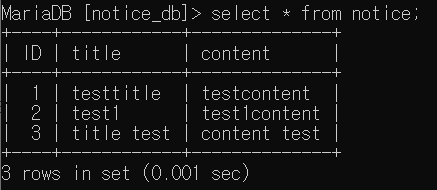
react로 단순한 게시판 업로드 양식을 만들고 title과 content를 입력받아 express로 전송할 것이다.
React 파트
react 프로젝트를 생성한다.
npx create-react-app notice_react네 파일 모두 같은 폴더에 위치한다.
notice_main.js
import {useState} from 'react';
import {newPosting} from './submit';


const Notice_main = () => {
    const [title, Setitle] = useState('');
    const [content, Setcontent] = useState('');

const savetitle = event => {
Setitle(event.target.value);
}

const savecontent = event => {
    Setcontent(event.target.value);
}
return (
<div style={{textAlign : 'center', margin : '0 auto'}}>
    <input
    className='title'
    type='text'
    style={input_title}
    placeholder='게시글 제목을 입력하세요'
    value={title}
    onChange={savetitle}
    ></input>
    <input
    className='content'
    type='text'
    style={input_content}
    placeholder='게시글 내용을 입력하세요'
    value={content}
    onChange={savecontent}
    ></input>
    <button
    style={button_style}
    onClick={() => newPosting({title, content})}
    >등록</button>
    <div>{title}</div>
    <div>{content}</div>
</div>
)
}

const input_title = {
    width : '50%',
    height : '25px',
    marginTop : '30px'
}
const input_content = {
    width : '50%',
    height : '500px',
    marginTop : '10px'
}
const button_style = {
    textAlign : "center",
    marginTop : "10px",
    width : "50%",
    height : "25px",
}

export default Notice_main;
title과 content를 useState에 저장하고 submit버튼을 누를 때 newPosting을 호출하며 값을 넘긴다.
submit.js
import axios from 'axios';

const newPosting = (props) =>{
    console.log(props);
    axios.post('http://localhost:3001/questions',{
      params: {
        post_title : props.title,
        post_content : props.content,
      }
    })
      .then(res => {
        console.log(res.data)
        alert("글 작성이 완료되었습니다.")
        document.location.href = '/'
      })
      .catch(function(error){
       console.log(error);
    })
}

export {newPosting};
express 서버를 3001번 포트로 열고 /questions 라우터를 연결할 것이다. 3001번 포트로 content와 title을 post한다.
Header.js
const Header = () => {
    return(
    <div style={header_style}>
        <h1 style={{margin : 0}}>간단한 CRUD 게시판</h1>
    </div>
    )
}

const header_style = {
    backgroundColor : "blue",
    width : "100%",
    height : "60px",

}

export default Header;
App.js
import Notice_main from "./notice_main";
import Header from "./header";

function App() {
  return (
    <>
    <Header/>
    <Notice_main/>
    </>
  );
}

export default App;
Express 파트
express 프로젝트를 생성한다
express notice_express3000번 포트를 react에서 사용하므로 Express를 3001번 포트로 변경해준다.
bin/www의
var port = normalizePort(process.env.PORT || '3000');구문에서 3000 => 3001로 바꾼다.
route/index.js
var express = require('express');
var router = express.Router();

const maria = require('../database/connect/maria'); //maria.js 경로 입력

/* GET home page. */
router.get('/', function(req, res, next) {
  res.render('index', { title: 'Express' });
});

//글 작성
router.post('/questions', (req, res) => {
  console.log(req.body);
  //파라미터를 받아오는 부분
  let post_title = req.body.params.post_title;
  let post_content = req.body.params.post_content;
  let values = [ post_title, post_content]

  //SQL 코드
  const sql = "INSERT INTO notice_db.notice(title, content) VALUES(?, ?)"
  maria.query(sql,values,
      (err, result) => {
          if (err)
              console.log(err);
          else
              res.send(result);
      });
});

module.exports = router;
이전 시리즈에서 MariaDB를 express에 연동했었다.
fouter.post를 통해 /questions에 post가 들어오면 파라미터를 나눠 쿼리문에 넣는다.
INSERT INTO notice_db.notice(title, content) VALUES(?, ?) notice_db 데이터베이스의 notice테이블에 title과 content데이터를 insert한다. ID는 AUTO_INCREMENT 옵션을 넣어줬기 때문에 명시하지 않아도 된다.
서버 실행
react express 두 프로젝트 모두 npm start로 서버를 켜준다.
localhost:3000으로 접속하고 title과 content를 입력하고 등록을 누르면 글 작성이 완료되었습니다라는 alert창이 뜬다.
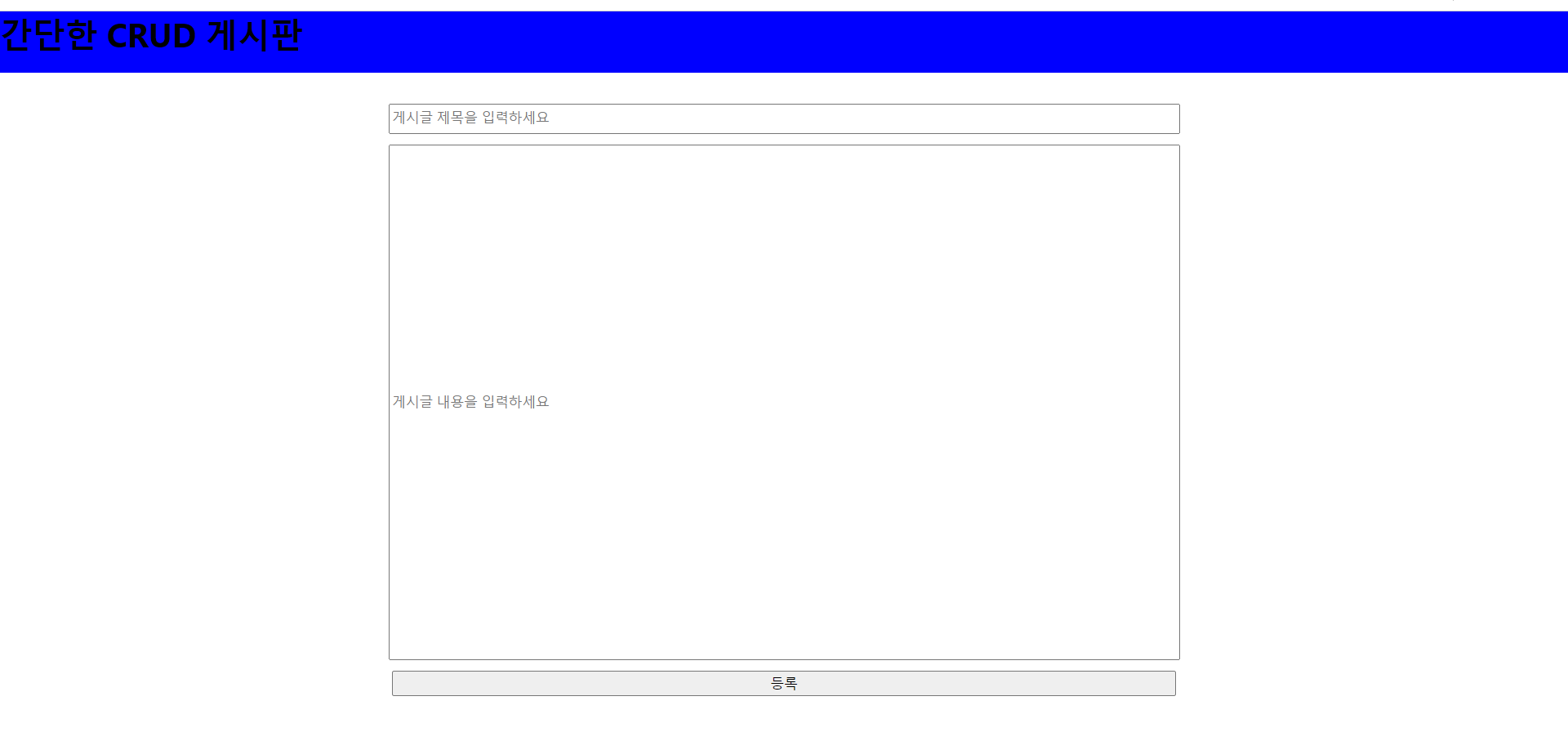
DB에 접근해서 확인해보면 데이터가 잘 insert됨을 알 수 있다.
USE notice_db
select * from notice