개요
iOS 와의 협업을 위해 로그인을 REST API 로 만들고자하여 Spring Security 시작부터 JWT, 소셜로그인까지 적용을 목표로 공부 중입니다. Spring Boot 3으로는 처음 해봐서 다음에도 적용을 위해 유튜브 보면 내용 정리중 입니다.
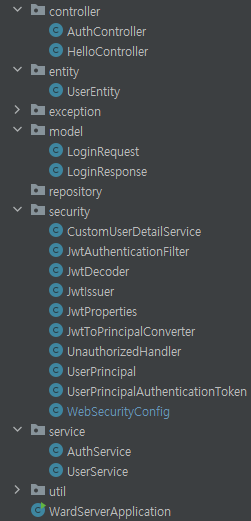
UserEntity, UserService, CustomUserDetailService 등을 생성하여 로그인 기능을 만듭니다.
"/auth/login" 경로 요청 시 AuthController 에서 AuthService 의 attemtLogin()을 통해 로그인을 시도합니다.
UserService는 UserEntity를 반환하고, CustomUserDetailService는 UserPrincipal을 반환합니다. UserService, UserEntity를 통해 데이터베이스에 저장된 회원 정보를 가져와서 UserPrincipal로 만듭니다.
이 UserPrincipal 을 통해
공부 중이므로 틀린 내용, 의견, 질문 있으시면 댓글 남겨주시면 감사하겠습니다
전체 구조
Real login
그 전 단계까지 fake login 으로 JWT 토큰에 정보를 담아 발급받고 decode 과정을 거졌다. 이번에는 real login을 만든다. db연결은 하지 않지만 유사하게 만들어 추후에 쉽게 연결 가능하도록 한다.
1. HelloController 수정
사용자가 로그인한 경우 해당 사용자의 정보를 반환하는 "/secured" 엔드포인트 내용 추가했습니다. /secured 엔드포인트에 접근하려면 사용자가 로그인되어 있어야 하며, 로그인한 사용자의 정보는 UserPrincipal 객체를 통해 접근할 수 있습니다.
1.1. 코드
package com.ward.ward_server.controller;

import com.ward.ward_server.security.UserPrincipal;
import lombok.RequiredArgsConstructor;
import org.springframework.security.core.annotation.AuthenticationPrincipal;
import org.springframework.web.bind.annotation.GetMapping;
import org.springframework.web.bind.annotation.RestController;

@RestController
@RequiredArgsConstructor
public class HelloController {

    @GetMapping("/")
    public String greeting(){
        return "Hello, World";
    }

    @GetMapping("/secured")
    public String secured(@AuthenticationPrincipal UserPrincipal principal) {
        return "If you see this, then you're logged in as user " + principal.getEmail()
                + " User ID: " + principal.getUserId();
    }
}
1.2. 설명
- @AuthenticationPrincipal 어노테이션:
- @AuthenticationPrincipal: 현재 사용자의 Principal 정보를 주입받을 수 있도록 하는 Spring Security 어노테이션입니다. 여기서는 UserPrincipal을 주입받아 사용합니다.
2. UserEnitity.java 추가
UserEntity 클래스는 사용자 정보를 표현하는 엔터티 클래스입니다. 각 필드는 사용자의 다양한 속성을 나타내며, @JsonIgnore 어노테이션이 사용된 password 필드는 JSON 직렬화 시에 해당 필드를 무시하도록 지정합니다. 이렇게 함으로써 클라이언트에게 민감한 정보인 비밀번호를 노출시키지 않도록 합니다.
2.1. 코드
package com.ward.ward_server.entity;

import com.fasterxml.jackson.annotation.JsonIgnore;
import lombok.Getter;
import lombok.Setter;

@Getter
@Setter
public class UserEntity {
    private long id;
    private String email;

    @JsonIgnore
    private String password;

    private String role;

    private String extraInfo;
}
2.2. 설명
- @JsonIgnore 어노테이션은 Jackson 라이브러리에서 사용되며, 해당 어노테이션이 적용된 필드는 JSON 직렬화 및 역직렬화 과정에서 무시됩니다. 이 어노테이션을 사용하여 개인정보나 보안 관련 정보 등을 JSON으로 변환할 때 노출되지 않도록 할 수 있습니다. @JsonIgnore를 사용하여 비밀번호 필드를 JSON으로 노출되지 않도록 설정하는 것은 보안 상의 좋은 습관 중 하나입니다.
3. UserService.java 생성
3.1. 코드
package com.ward.ward_server.service;

import com.ward.ward_server.entity.UserEntity;
import org.springframework.stereotype.Service;

import java.util.Optional;

@Service
public class UserService {
    private static final String EXISTING_EMAIL = "test@test.com";

    public Optional<UserEntity> findByEmail(String email) {
        // TODO : Move this to a dataabase
        if (! EXISTING_EMAIL.equalsIgnoreCase(email)) return Optional.empty();

        var user = new UserEntity();
        user.setId(1L);
        user.setEmail(EXISTING_EMAIL);
        user.setPassword("$2a$12$phGOFjE6gXYMWSOgSj2qFe6CuYhH7v5KWF8mmyp01FGXJ4KtfSSxi"); // test
        user.setRole("ROLE_ADMIN");
        user.setExtraInfo("My nice admin");
        return Optional.of(user);
    }
}
3.2. 방법
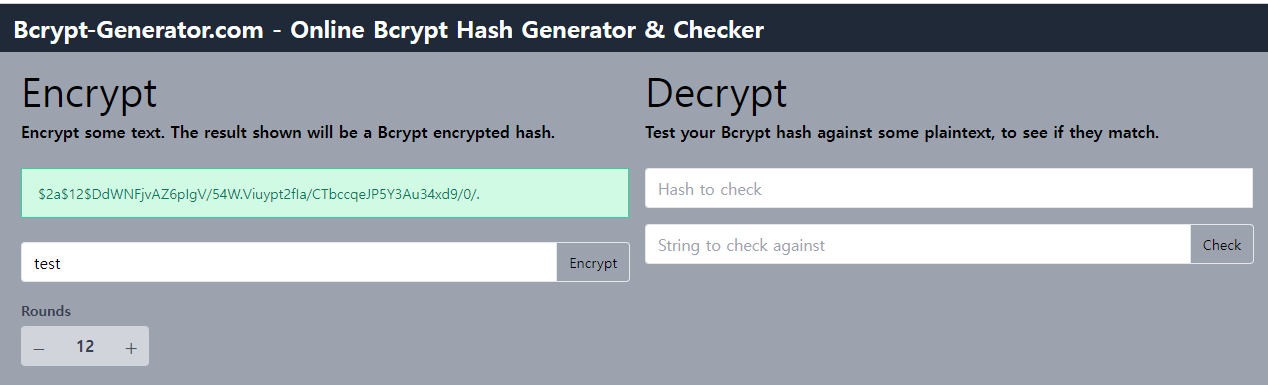
- Bcypt-Generator에서 비밀번호 암호화 해서 입력해야 됩니다.(6분57초) 해시 함수를 사용하여 비밀번호를 암호화할 떄 일반적으로 비밀번호의 원본 텍스트를 해싱하여 얻은 해시값이 데이터베이스에 저장됩니다. 이 해시값은 원본 비밀번호를 복구할 수 없는 일방향 변환된 값이며, 보안 상 이점을 제공합니다. test를 비밀번호로 입력했다고 가정하고 해싱한 데이터를 코드에 입력하라.
3.3. 설명
- @Service: 스프링에게 이 클래스가 서비스 역할을 한다고 알려주는 어노테이션입니다.
- findByEmail(String email): 이메일을 기반으로 사용자를 찾아오는 메서드입니다. 현재는 간단한 가상의 데이터로 동작하며, 나중에 데이터베이스에서 조회하는 로직으로 변경되어야 합니다.
- email 로 찾아서 UserEntity로 만들어서 반환해줍니다.
- 이제 이 Service를 Spring Security 에 연결
4. CustomUserDetailService.java 생성
CustomUserDetailService 클래스는 Spring Security의 UserDetailsService 인터페이스를 구현한 사용자 정의 서비스입니다. 이 서비스는 사용자의 정보를 가져와 Spring Security가 이를 활용하여 사용자를 인증하는 데 사용됩니다.
4.1. 코드
package com.ward.ward_server.security;

import com.ward.ward_server.service.UserService;
import lombok.RequiredArgsConstructor;
import org.springframework.security.core.authority.SimpleGrantedAuthority;
import org.springframework.security.core.userdetails.UserDetails;
import org.springframework.security.core.userdetails.UserDetailsService;
import org.springframework.security.core.userdetails.UsernameNotFoundException;
import org.springframework.stereotype.Component;

import java.util.List;

@Component
@RequiredArgsConstructor
public class CustomUserDetailService implements UserDetailsService {
    private final UserService userService;
    @Override
    public UserDetails loadUserByUsername(String username) throws UsernameNotFoundException {
        var user = userService.findByEmail(username).orElseThrow();
        return UserPrincipal.builder()
                .userId(user.getId())
                .email(user.getEmail())
                .authorities(List.of(new SimpleGrantedAuthority(user.getRole())))
                .password(user.getPassword())
                .build();
    }
}
4.2. 방법
implements UserDetailsServiceuses to loads user specific data- overide
- 어노테이션 추가
- UserService 의존성 주입
- This UserDetails is actually what is implemented in UserPrincipal
- 위 코드에서 *CustomUserDetailService 클래스는 Spring Security의 UserDetailsService를 구현한 클래스입니다. UserDetailsService는 사용자 정보를 로드하는 역할을 합니다. loadUserByUsername 메서드에서는 주어진 사용자 이름(username)을 기반으로 실제 사용자 정보를 로드하고, 이 정보를 UserDetails 인터페이스를 구현한 객체로 반환해야 합니다.
- CustomUserDetailService에서 loadUserByUsername 메서드 내부에서 이 UserPrincipal을 반환하도록 구현하면 됩니다. 실제로는 사용자 이름(username)을 받아와서 UserService를 통해 사용자 정보를 조회하고, 조회된 정보를 UserPrincipal로 변환하여 반환하면 됩니다.
- loadUserByUsername 에서 변환해보자.
var user = userService.findByEmail(username).orElseThrow();email로 user 찾거나 없으면 예외와 함꼐 종료- authorities 리스트로(?) UserEntity는 single role인데 List 로도 쓸 수 있으니 나중에 해보라는건가??
- 아무튼 UserPrincipal에 password 추가
- 이제 이 CustomUserDetailService 를 Spring Security 에 연결
4.3. 설명
- <중요> UserService 는 UserEntity 를 반환하고, CustomUserDetailService는 UserPrincipal를 반환한다.
- UserDetailsService 인터페이스를 구현합니다. 이 인터페이스는 사용자 정보를 로드하는 메서드 loadUserByUsername을 제공합니다.
- loadUserByUsername 메서드: 주어진 사용자 이름(여기서는 이메일)을 기반으로 데이터베이스에서 사용자 정보를 조회합니다. userService.findByEmail(username) 을 통해 이메일을 사용하여 사용자 정보를 가져오고, 만약 사용자가 존재하지 않으면 UsernameNotFoundException을 던집니다.
- 조회된 사용자 정보를 기반으로 UserPrincipal 객체를 생성하여 반환합니다. UserPrincipal은 Spring Security의 UserDetails 인터페이스를 구현한 사용자의 세부 정보를 나타냅니다. UserPrincipal.builder() 를 사용하여 빌더 패턴을 통해 객체를 생성하고, 사용자의 아이디, 이메일, 권한 등을 설정합니다.
5. UserPrincipal.java 에 password 추가
5.1. 코드
package com.ward.ward_server.security;

import com.fasterxml.jackson.annotation.JsonIgnore;
import lombok.Builder;
import lombok.Getter;
import org.springframework.security.core.GrantedAuthority;
import org.springframework.security.core.userdetails.UserDetails;

import java.util.Collection;

@Getter
@Builder
public class UserPrincipal implements UserDetails {
    private final Long userId;
    private final String email;
    @JsonIgnore
    private final String password;
    private final Collection<? extends GrantedAuthority> authorities;

    // 사용자에게 부여된 권한 목록을 반환한다.
    @Override
    public Collection<? extends GrantedAuthority> getAuthorities() {
        return authorities;
    }

    // 사용자의 비밀번호를 반환한다.
    @Override
    public String getPassword() {
        return password;
    }

    // 사용자의 이름(아이디)를 반환한다.
    @Override
    public String getUsername() {
        return email;
    }

    // 계정이 만료되지 않았는지?
    @Override
    public boolean isAccountNonExpired() {
        return true; // true: 만료되자 않았다.
    }
    // 계정이 잠겨있지 않은지?
    @Override
    public boolean isAccountNonLocked() {
        return true; // true: 잠겨있지 않다.
    }

    // 자격 증명이 만료되지 않았는지?
    @Override
    public boolean isCredentialsNonExpired() {
        return true; // 만료되지 않았다.
    }

    // 활성화되어 있는지?
    @Override
    public boolean isEnabled() {
        return true; // 활성화 되어있다
    }
}
5.2. 설명
- @JsonIgnore 잊지말기
private final String password;이 내용 추가- getPassword() 메서드에 return password 추가
6. WebSecurityConfig 에 연결하기
6.1. 코드
package com.ward.ward_server.security;

import lombok.RequiredArgsConstructor;
import org.springframework.context.annotation.Bean;
import org.springframework.context.annotation.Configuration;
import org.springframework.security.authentication.AuthenticationManager;
import org.springframework.security.config.annotation.authentication.builders.AuthenticationManagerBuilder;
import org.springframework.security.config.annotation.web.builders.HttpSecurity;
import org.springframework.security.config.annotation.web.configuration.EnableWebSecurity;
import org.springframework.security.config.annotation.web.configurers.AbstractHttpConfigurer;
import org.springframework.security.config.http.SessionCreationPolicy;
import org.springframework.security.crypto.bcrypt.BCryptPasswordEncoder;
import org.springframework.security.crypto.password.PasswordEncoder;
import org.springframework.security.web.SecurityFilterChain;
import org.springframework.security.web.authentication.UsernamePasswordAuthenticationFilter;

@Configuration
@EnableWebSecurity
@RequiredArgsConstructor
public class WebSecurityConfig {
    private final JwtAuthenticationFilter jwtAuthenticationFilter;
    private final CustomUserDetailService customUserDetailService;

    @Bean
    public SecurityFilterChain applicationSecurity(HttpSecurity http) throws Exception {
        http.addFilterBefore(jwtAuthenticationFilter, UsernamePasswordAuthenticationFilter.class);

        http
                .cors(AbstractHttpConfigurer::disable)
                .csrf(AbstractHttpConfigurer::disable)
                .securityMatcher("/**") // map current config to given resource path
                .sessionManagement(sessionManagementConfigurer
                        -> sessionManagementConfigurer.sessionCreationPolicy(SessionCreationPolicy.STATELESS))
                .formLogin(AbstractHttpConfigurer::disable)
                .authorizeHttpRequests(registry -> registry // 요청에 대한 권한 설정 메서드
                        .requestMatchers("/").permitAll() // / 경로 요청에 대한 권한을 설정. permitAll() 모든 사용자, 인증되지않은 사용자에게 허용
                        .requestMatchers("/auth/login").permitAll()
                        .anyRequest().authenticated() // 다른 나머지 모든 요청에 대한 권한 설정, authenticated()는 인증된 사용자에게만 허용, 로그인해야만 접근 가능
                );

        return http.build();
    }

    @Bean
    public PasswordEncoder passwordEncoder() {
        return new BCryptPasswordEncoder();
    }

    @Bean
    public AuthenticationManager authenticationManager(HttpSecurity http) throws Exception {
        return http.getSharedObject(AuthenticationManagerBuilder.class)
                .userDetailsService(customUserDetailService)
                .passwordEncoder(passwordEncoder())
                .and().build();
    }
}
6.2. 방법
private final CustomUserDetailService customUserDetailService;- @Bean 추가
passwordEncorder()추가/ 원본 텍스트가 아니라 해싱됐는지 확실히 해야합니다. - @Bean 추가
authenticationManager(HttpSecurity http)추가 - <주의> return http.getSharedObject(AuthenticationManagerBuilder.class) 여기서 *Builder.class 인거 확실하게 확인해야합니다.
- actual login에 wire 되었다.
6.3. 설명
-
authenticationManager():
-
이 부분은 AuthenticationManager 빈을 구성하는 부분입니다. AuthenticationManager는 스프링 시큐리티에서 인증(authentication) 을 수행하는 핵심 컴포넌트입니다. 인증 매니저는 사용자가 제공한 인증 정보(일반적으로 사용자 이름과 비밀번호)를 기반으로 사용자를 인증하는 역할을 합니다.
-
여기서 AuthenticationManagerBuilder 클래스를 사용하여 AuthenticationManager를 구성하고 있습니다. AuthenticationManagerBuilder는 빌더 디자인 패턴을 사용하여 다양한 인증 관련 설정을 제공하며, 그 중에는 사용자 정보 가져오기 및 패스워드 인코딩 설정이 포함됩니다.
-
구체적으로 다음과 같은 설정이 이루어집니다:
userDetailsService(customUserDetailService): customUserDetailService를 사용하여 사용자 정보를 가져올 수 있도록 설정합니다. 이 서비스는 UserDetailsService 인터페이스를 구현하며, 사용자 정보를 제공하는 메서드를 구현합니다. -
passwordEncoder(passwordEncoder()): 비밀번호를 인코딩할 때 사용할 PasswordEncoder를 설정합니다. 이 경우 BCryptPasswordEncoder를 사용하도록 설정되어 있습니다.
-
.and().build(): 앞서 설정한 정보를 바탕으로 AuthenticationManager를 빌드합니다.
-
- 이렇게 설정된 AuthenticationManager는 나중에 로그인 요청이 있을 때 사용되어, 제공된 사용자 정보와 패스워드를 기반으로 사용자를 인증하고, 성공하면 Authentication 객체를 반환합니다. 이렇게 반환된 Authentication 객체는 SecurityContextHolder에 저장되어 현재 사용자의 인증 정보를 유지하게 됩니다.
-
passwordEncorder():
-
이 부분은 스프링 시큐리티에서 사용자의 비밀번호를 안전하게 저장하기 위해 패스워드를 인코딩하는 데 사용되는 PasswordEncoder를 빈으로 설정하는 부분입니다.
-
PasswordEncoder는 사용자의 비밀번호를 해시(hashing) 하거나 인코딩(encoding) 하는 데 사용됩니다. 이는 암호를 안전하게 저장하기 위해 평문 비밀번호를 해시 값으로 변경하고, 나중에 로그인 시 입력된 비밀번호를 같은 방식으로 해시하여 저장된 해시 값과 비교함으로써 인증을 수행합니다.
-
여기서는 BCryptPasswordEncoder를 사용하도록 설정하고 있습니다. BCryptPasswordEncoder는 강력한 해시 알고리즘인 BCrypt를 사용하여 비밀번호를 안전하게 저장합니다. BCrypt는 단방향 해시 함수로, 같은 입력에 대해 항상 동일한 해시 값을 생성하지만, 해시 값을 역으로 추론하는 것이 매우 어렵기 때문에 안전한 방법으로 비밀번호를 저장할 수 있습니다.
-
설정된 BCryptPasswordEncoder 빈은 나중에 AuthenticationManagerBuilder에서 사용자 정보를 가져올 때와, 사용자가 비밀번호를 변경할 때, 그리고 다양한 보안 관련 기능에서 사용될 수 있습니다.
-
- AuthenticationManager 빈을 등록하고, 이를 통해 사용자 정보를 가져오고 비밀번호를 비교할 때 사용할 UserDetailsService와 PasswordEncoder를 설정합니다. 이는 인증 관련 작업에 사용됩니다.
7. AuthController 수정
로그인 요청하면 Spring Security 를 통하도록
7.1. 코드
package com.ward.ward_server.controller;

import com.ward.ward_server.model.LoginRequest;
import com.ward.ward_server.model.LoginResponse;
import com.ward.ward_server.security.JwtIssuer;
import com.ward.ward_server.security.UserPrincipal;
import lombok.RequiredArgsConstructor;
import org.springframework.security.authentication.AuthenticationManager;
import org.springframework.security.authentication.UsernamePasswordAuthenticationToken;
import org.springframework.security.core.GrantedAuthority;
import org.springframework.security.core.context.SecurityContextHolder;
import org.springframework.validation.annotation.Validated;
import org.springframework.web.bind.annotation.PostMapping;
import org.springframework.web.bind.annotation.RequestBody;
import org.springframework.web.bind.annotation.RestController;

import java.util.List;

@RestController
@RequiredArgsConstructor
public class AuthController {
    private final JwtIssuer jwtIssuer;
    private final AuthenticationManager authenticationManager;

    @PostMapping("/auth/login")
    public LoginResponse login(@RequestBody @Validated LoginRequest request){
        var authentication = authenticationManager.authenticate(
                new UsernamePasswordAuthenticationToken(request.getEmail(), request.getPassword())
        );
        SecurityContextHolder.getContext().setAuthentication(authentication);
        var principal = (UserPrincipal) authentication.getPrincipal();

        var roles = principal.getAuthorities().stream()
                .map(GrantedAuthority::getAuthority)
                .toList();

        var token = jwtIssuer.issue(principal.getUserId(), principal.getEmail(), roles);
        return LoginResponse.builder()
                .accessToken(token)
                .build();
    }
}
7.2. 방법
private final AuthenticationManager authenticationManager;inject- 이 부분 추가
        var authentication = authenticationManager.authenticate(
                new UsernamePasswordAuthenticationToken(request.getEmail(), request.getPassword())
);- user 가 유효하지 않은 credentials 로 입장하려한다면 여기서 실패, 유효하다면 새로운 권한이 생성될것이다 with userPrincipal.
- 혹시나 나중에 추가 서비스를 필요로한다면
SecurityContextHolder.getContext().setAuthentication(authentication);
var principal = (UserPrincipal) authentication.getPrincipal(); - 내용 추가 SecurityContextHolder.getContext().setAuthentication(authentication);
var principal = (UserPrincipal) authentication.getPrincipal(); - 하드코딩 된 부분 변경
var token = jwtIssuer.issue(principal.getUserId(), principal.getEmail(), roles);principal.getAuthorities()불가능. jwtIssuer 가 List String role 을 필요로해서.- 이를 해결하기위해 아래 내용 추가하여 사용
var roles = principal.getAuthorities().stream()
                .map(GrantedAuthority::getAuthority)
                .toList();
7.3. 설명
- AuthenticationManager: Spring Security에서 제공하는 인터페이스로, 인증을 처리하는데 사용됩니다. authenticationManager 필드가 주입되어 사용됩니다.
- login 메서드: 사용자의 로그인을 처리합니다.
- authenticationManager.authenticate(...): 사용자의 인증을 시도하고, 인증이 성공하면 Authentication 객체를 반환합니다.
- SecurityContextHolder.getContext().setAuthentication(authentication): Spring Security의 SecurityContextHolder를 통해 현재 사용자의 인증 정보를 설정합니다.
- var principal = (UserPrincipal) authentication.getPrincipal(): 현재 사용자의 UserPrincipal을 가져옵니다.
- principal.getAuthorities(): 현재 사용자의 권한 목록을 가져옵니다.
- roles: 권한 목록을 문자열 리스트로 변환합니다.
- var token = jwtIssuer.issue(...): JwtIssuer를 사용하여 JWT 토큰을 발급합니다.
- LoginResponse.builder()...: JWT 토큰을 포함한 응답을 생성합니다.
8. 테스트
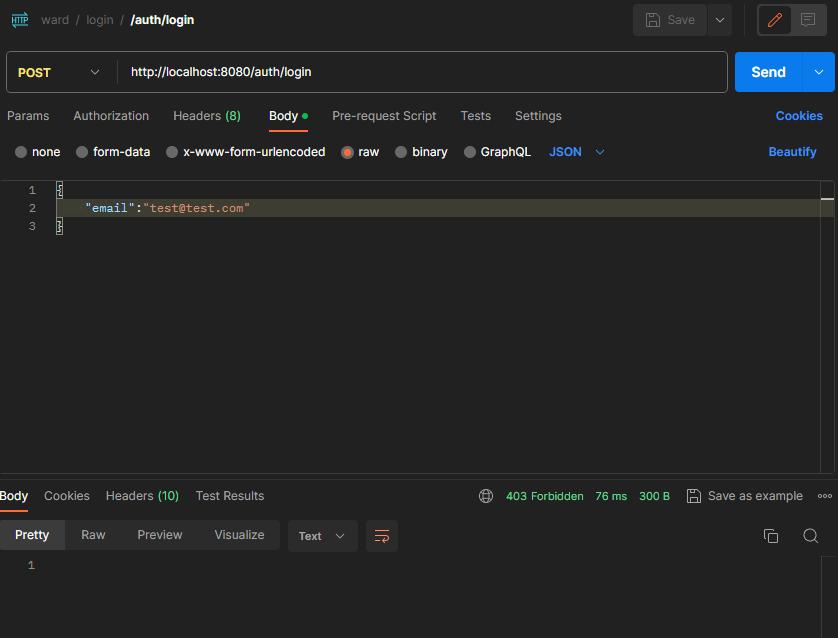
- postman 으로 email 아무값만 보내기

결과: 403 forbidden - email test@test.com 해도 여전히 403 forbidden 비밀번호도 입력해야되니까
- email 이랑 password 다 입력하면 성공
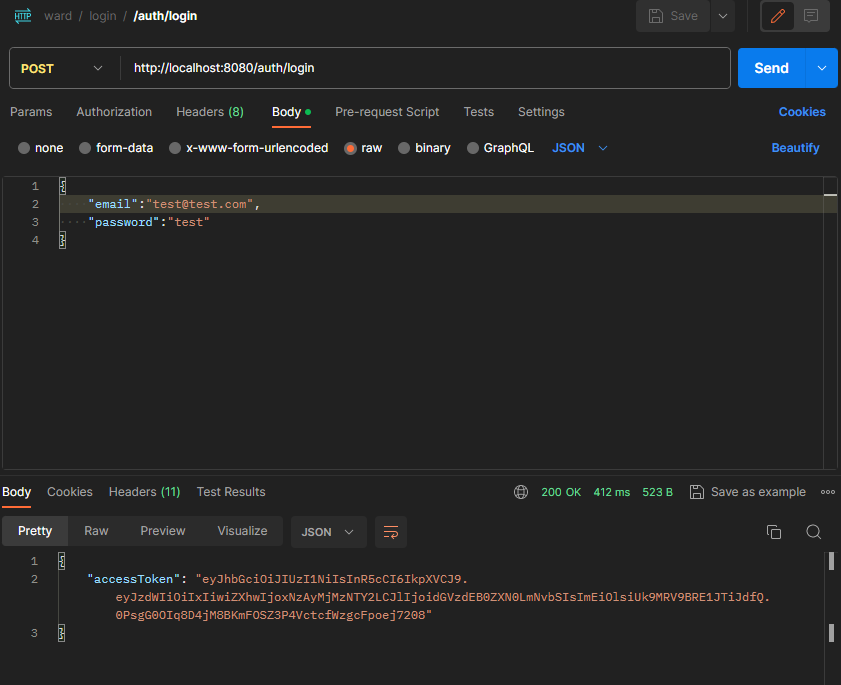
- 발급받은 토큰을 로그인 필요한 창에 테스트 성공

참고