📌 환경변수 설정 방법
# pod-definition.yaml

apiVersion: v1
kind:
metadata:
  name: myapp-pod
spec:
  containers:
  - name: myapp-container
    image: nginx
    env:
      - name: myenv
        value: 1.9.1
✅ 환경 변수 타입
- Plain Key Value
env:
  - name: APP_COLOR
value: pink- ConfigMap
env:
  - name: APP_COLOR
    valueFrom:
configMapKeyRef:- Secrets
env:
  - name: APP_COLOR
    valueFrom:
      secretKeyRef:
🗺️ ConfigMaps
- pod 정의 파일에서 데이터를 갖고 와 configMaps를 통해 중앙에서 관리
- 컨테이너 안에 호스팅된 응용 프로그램을 위해 사용되는 키, 값 쌍의 데이터
- pod가 생성되면 configMap을 삽입해 키, 값 쌍이 환경 변수로 사용될 수 있게 함
📋 ConfigMap 구성 단계
- Create ConfigMap
# Imerative

$ kubectl create configmap <config-name> --from-literal<key>=<value>
$ kubectl create configmap \
      app-config --from-literal=APP_COLOR=blue

# --from-literal 옵션은 자체에서 키 값 쌍을 지정하는데 사용된다.
# 만약 키 값 쌍을 추가하고싶다면 단순히 --from-literal 옵션을 추가하면 된다.
# 하지만 구성 항목이 너무 많다면 복잡해질 수 있다.

$ kubectl create configmap <config-name> --from-file=<path-to-file>
$ kubectl create configmap app-config --from-file=app_config_properties
# --from-literal이 아닌 --from-file 옵션으로 파일을 통해서 구성 데이터를 입력 할 수있다.

# Declarative (선언적 접근)

$ kubectl create -f

# config-map.yaml

apiVersion: v1
kind: ConfigMap
metadata:
  name: app-config

# spec 대신 data 가 들어간다
# data 아래 키 값 포맷을 입력한다

data:
  APP_COLOR: blue
  APP_MODE: prod

$ kubectl create -f config-map.yaml
⚙️ 다양한 종류의 configMap을 만들 수 있다
# app-config
APP_COLOR: blue
APP_MODE: prod

# mysql-config
port: 3306
max_allowed_packet: 128M

# redis-config
port: 6379
rdb-compression: yes- 때문에 configMap에 이름을 적절히 붙이는 것이 중요하다.
- 이름을 이용해 pod에 inject 해야하기 때문
⌨️ View ConfigMaps
$ kubectl get configmaps
$ kubectl describe configmaps- Inject into Pod
# pod-definition.yaml

apiVersion: v1
kind: pod
metadata:
  name: simple-webapp-color
  labels:
    name: simple-webapp-color
spec:
  containers:
  - name: simple-webapp-color
    image: simple-webapp-color
    ports:
      - containerPort: 8080
    envFrom:                   // 이 부분 구문 참조
      - configMapRef:
          name: app-config

# app-config는 위에 정의되어 있고 이 때문에 blue 변수를 전달한다.

$ kubectl create -f pod-definition.yaml
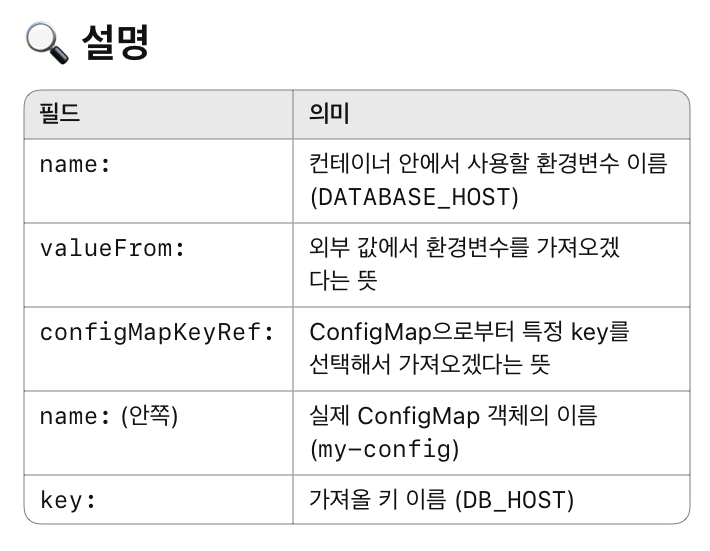
💡configMap에서 하나의 키, 값 쌍만 사용하는 방법
apiVersion: v1
kind: Pod
metadata:
  name: single-env-var-pod
spec:
  containers:
    - name: my-container
      image: nginx
      env:
        - name: DATABASE_HOST
          valueFrom:
            configMapKeyRef:
              name: my-config
              key: DB_HOST
💉 ConfigMap in Pods (환경변수 적용 방법)
- 데이터 파일을 pod에 주입하는 방법
- 단일 환경변수(SINGLE ENV)로 넣는 방법
- 데이터를 파일로 볼륨에 넣는 방법

React, Node.js, AWS, Git, Github, Github Action, Docker, K8S