❖ smtplib 모듈로 이메일 보내기
smtplib — SMTP protocol client
SMTP(Simple Mail Transfer Protocol)- 이메일 수신과 전송 방법을 결정하는 모든 규칙
- 우체부처럼 이메일을 처리 및 전달하는 역할
- 메일 전송 단계
(💌 전송 → 🏣 전송자의 메일 서버 → 🏣 수신자의 메일 서버 → 📬 수신자의 컴퓨터)
- 파이썬 내장 모듈로, 파이썬 코드를 이용하여 이메일을 전송할 수 있음
- 파일 열기처럼
with와as키워드로 연결을 생성하면, 닫지 않아도 자동으로 연결 종료
import smtplib

from_email = '보내는 이메일@gmail.com'
password = '26자리 앱 비밀번호'
to_email = '받는 이메일@naver.com'

# 1. 이메일 제공자의 SMTP 이메일 서버에 연결
with smtplib.SMTP("smtp.gmail.com") as connection:
    # 2. tls(Transport Layer Security) : 이메일 서버와의 연결을 안전하게 만드는 방식
    connection.starttls()
    # 3. 로그인
    connection.login(user=from_email, password=password)
    # 4. 이메일 전송
    connection.sendmail(from_addr=from_email,
                        to_addrs=to_email,
                        msg="Subject:Hello\n\n"
                            "This is the body of my email."
)❗️에러 발생 시 체크할 것
- 이메일 서비스 제공 업체의 SMTP 주소가 맞는지 확인
- Gmail: smtp.gmail.com
- Hotmail: smtp.live.com
- Outlook: outlook.office365.com
- 다른 업체 사용 : 구글에서 해당 업체의 smtp 주소를 검색
- 구글 SMTP 포트 설정 순서
- Gmail → 설정 → 전달 및 POP/IMAP → IMAP 사용 체크
- 계정 → 보안 → 2단계 인증 활성화 → 검색:
앱 비밀번호 - 앱 이름을 임의로 적으면 생성되는 기기용 앱 비밀번호로 파이썬 코드의 password 대체
- Gmail → 받은 메일함의 보안 메일 → '활동 확인' 버튼 클릭
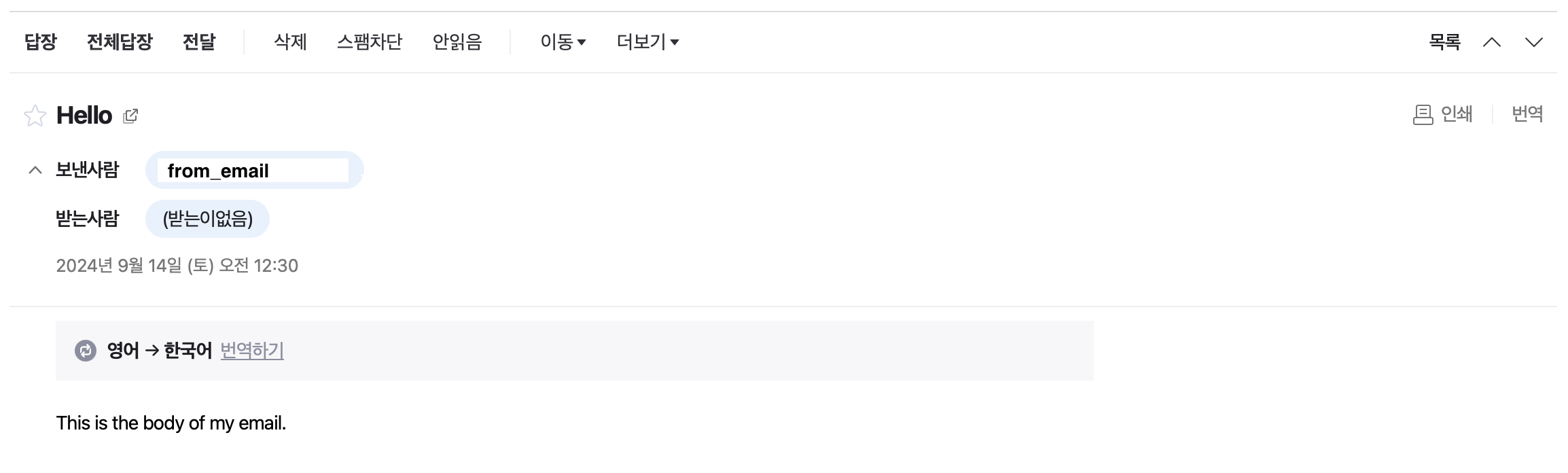
📬 naver 받은메일함
❖ datetime 모듈
날짜와 시간을 다룰 수 있는 모듈로, 내장되어 있음 (datetime — Basic date and time types)
import datetime as dt

# 현재 시각
now = dt.datetime.now()
print(now)

year = now.year                 # 년
print(year)
month = now.month               # 월
print(month)
day = now.day                   # 일
print(day)
weekday = now.weekday()         # 주일에서 n번째 요일(월요일: 0)
print(weekday)
hour = now.hour                 # 시
print(hour)
minute = now.minute             # 분
print(minute)
second = now.second             # 초
print(second)

# datetime 객체 생성
date_of_birth = dt.datetime(year=1995, month=12, day=15)  # 필수 인자만 작성
print(date_of_birth)
#
2024-09-14 00:58:51.646276
#
2024
9
14
5
0
58
51
#
1995-12-15 00:00:00
datetime.timedelta( parameter=data )
- datetime 객체의 날짜에 원하는 기간을
+,-할 수 있음 - 매개변수
weeks: 주days: 일hours: 시간minutes: 분seconds: 초milliseconds: 밀리초(1밀리초=1000마이크로초)microseconds: 마이크로초
❖ 이메일로 월요일 동기부여 명언 전송
📄 quotes.txt
"Either you run the day or the day runs you." - Jim Rohn
…
⌨️ main.py
import smtplib
import datetime as dt
import random

from_email = '보내는 이메일@gmail.com'
password = '26자리 앱 비밀번호'
to_email = '받는 이메일@naver.com'

now = dt.datetime.now()
weekday = now.weekday()

# 다른 요일에 테스트하려면 숫자를 변경해서 실행하기
if weekday == 0:
    with open("quotes.txt") as file:
        all_quotes = file.readlines()
        quote = random.choice(all_quotes)

    with smtplib.SMTP("smtp.gmail.com") as connection:
        connection.starttls()
        connection.login(user=from_email, password=password)
        connection.sendmail(from_addr=from_email, to_addrs=from_email,
                            msg=f"Subject:Monday Motivation\n\n{quote}"
        )
🗂️ Day32 프로젝트: 생일 자동축하기
그날 생일인 사람에게 축하 이메일을 자동으로 전송하는 프로그램
🔍 유의 사항
- 📄 birthday.csv의 모든 날짜에 대해 확인 후 오늘 날짜와 일치하는 사람에게 편지 전송
- 편지 양식 중 하나를 랜덤으로 고르기
- 양식의 [NAME] 부분을 해당 사람의 이름으로 변경
- 보내는 이메일, 생일인 사람들의 받는 이메일은 모두 똑같이 설정해서 실습
📄 birthday.csv
name,email,year,month,day
Test1,test1@email.com,1961,12,21
Willy,실습용이메일@gmail.com,1988,9,14
Test2,test2@email.com,1975,4,9
Billy,실습용이메일@gmail.com,1993,9,14
Test3,test2@email.com,2001,8,30
📄 letter_1.txt
Dear [NAME],

Happy birthday!

All the best for the year!

JY
📄 letter_2.txt
Hey [NAME],

Happy birthday! Have a wonderful time today and eat lots of cake!

Lots of love,

JY
📄 letter_3.txt
Dear [NAME],

It's your birthday! Have a great day!

All my love,

JY
⌨️ main.py
import smtplib
from datetime import datetime
import pandas
import random

from_email = '실습용이메일@gmail.com'
PASSWORD = '16자리 앱 비밀번호'

# 1. Update the birthdays.csv
data = pandas.read_csv("birthdays.csv")
data_dict = data.to_dict(orient="records")

# 2. Check if today matches a birthday in the birthdays.csv
today = (datetime.now().month, datetime.now().day)

birthday_people = []

for i in data_dict:
    if i['month'] == today[0] and i['day'] == today[1]:
        birthday_people.append((i['name'], i['email']))

# 3. If step 2 is true, pick a random letter from letter templates
# and replace the [NAME] with the person's actual name from birthdays.csv
for person in birthday_people:
    file_path = f"letter_templates/letter_{random.randint(1, 3)}.txt"
    with open(file_path) as file:
        letter = file.read()
        new_letter = letter.replace("[NAME]", person[0])

    # 4. Send the letter generated in step 3 to that person's email address.
    with smtplib.SMTP("smtp.gmail.com") as connection:
        connection.starttls()
        connection.login(user=from_email, password=PASSWORD)
        connection.sendmail(from_addr=from_email, to_addrs=person[1],
                            msg=f"Subject:Happy Birthday!\n\n{new_letter}"
        )
🖍️ 답안
from datetime import datetime
import pandas
import random
import smtplib

MY_EMAIL = "YOUR EMAIL"
MY_PASSWORD = "YOUR PASSWORD"

today = datetime.now()
today_tuple = (today.month, today.day)

data = pandas.read_csv("birthdays.csv")
birthdays_dict = {(data_row["month"], data_row["day"]): data_row for (index, data_row) in data.iterrows()}
if today_tuple in birthdays_dict:
    birthday_person = birthdays_dict[today_tuple]
    file_path = f"letter_templates/letter_{random.randint(1,3)}.txt"
    with open(file_path) as letter_file:
        contents = letter_file.read()
        contents = contents.replace("[NAME]", birthday_person["name"])

    with smtplib.SMTP("YOUR EMAIL PROVIDER SMTP SERVER ADDRESS") as connection:
        connection.starttls()
        connection.login(MY_EMAIL, MY_PASSWORD)
        connection.sendmail(
            from_addr=MY_EMAIL,
            to_addrs=birthday_person["email"],
            msg=f"Subject:Happy Birthday!\n\n{contents}"
        )
birthdays_dict 생성
키(튜플) : (생일인 달, 생일인 일)
값(전체 데이터 열) : 이름,이메일,년,월,일
❖ 클라우드에서 파이썬 코드 실행
Python anywhere로 코드를 클라우드에서 무료 호스팅 가능
- 계정 생성 후 로그인
- Files → 실행에 필요한 파일들 모두 업로드
(폴더 안에 넣어야 할 경우 새 디렉토리 생성 후, 디렉토리 안에 업로드) - 방법1: Consoles → Bash → $ 뒤에
python3 main.py입력
방법2: 업로드 된main.py클릭 →$ Bash console here→ $ 뒤에python3 main.py입력 - Task → 특정 시각(UTC 기준) 선택 → run 뒤에
python3 main.py입력 → create - 매일 지정된 시간에 코드 실행
(무료 계정으로는 하나의 작업만 스케줄링 가능)
