❖ API란
API(Application Programming Interface)
- 일련의 명령, 함수, 프로토콜, 객체로 구성
- 나의 프로그램과 외부 시스템 사이에 있는 장벽과 같음
- 소프트웨어를 생성
- 외부 시스템과 상호작용
- 나의 프로그램에서 API가 규정한 규칙들을 이용하여 외부 시스템에 데이터 요청
- 요청이 모든 요구조건에 맞을 경우, 외부 시스템이 응답하여 데이터 전송
🗣️ → 📖 → 🤵♂️ ⇄ 🍅
← 🍝 ←
- 🗣️
- 손님 = 사용자
- 손님이 레스토랑에서 음식을 주문 = 사용자가 인터넷 서버에 요청을 전송
- 메뉴에 있는 것만 주문(요청)해야 한다
- 주문할 때 레스토랑 서버가 알아들을 수 있는 언어를 사용해야 하듯 맞는 서버 언어를 사용해야 함
- HTTP(HTTPS), FTP 등의 서버 언어
- 🤵♂️
- 레스토랑 = 외부 시스템(인터넷 서버)
- 손님이 주문한 음식이 메뉴에 있는지 확인하듯 사용자의 요청을 검토
- 손님의 요청이 유효할 경우 다음 두 가지 작업을 통해 결과를 가져다 준다
- 수치 계산과 코드 실행으로 결과 내기
- 데이터베이스와 소통하여 사영자가 요청한 데이터 가져오기
- 📖
- 메뉴 = API
- 사용자와 외부 시스템 사이의 인터페이스로, 주문 가능한 것들을 알려주는 역할
- 손님의 주문에 응답 가능한 것들만 메뉴 품목으로 정하게 됨
- 🍝
- 음식 = 데이터(리소스)
- 사용자가 얻을 수 있는 것
- 🍅
- 식재료 = 가공 전 데이터
- 사용자가 요청한 데이터를 만들기 위한 재료
- 사용자가 접근할 수 없는 것
❖ API 엔드포인트와 API 호출
외부 서비스에서 데이터를 얻을 때 필요한 것 2가지
API endpoint- 💵돈을 인출하기 위해 해당 🏦은행의 주소가 필요한 것과 같음
- 특정 외부 서비스에서 얻으려는 데이터가 저장된 위치
- 보통 URL 형식
- 주소의 ? 앞에 있는 모든 것이 API 엔드포인트가 됨
- ? 뒤는 각종 매개변수 값
API request- 🏦은행에 가서 🙋♂️직원을 통해 💵돈을 인출하는 것과 같음
- 인터넷을 통해 데이터를 요청하는 것
- 간단한 데이터 요청 : 🙋♂️직원에게 은행 개점시간을 묻는 것처럼 아무나 가능
- 인증이 필요한 데이터 요청 : 🙋♂️직원이 신분증을 보고 돈을 인출할 수 있는지 판단
# requests 모듈(설치 필요)
import requests

# get 메소드로 요청
response = requests.get(url='http://api.open-notify.org/iss-now.json')
print(response)
<Response [200]>
❖ 응답 다루기
◇ HTTP 코드
HTTP Status Codes Glossary
상태 코드의 첫 번째 숫자로 요약 가능
예) 200 : OK
예) 404 : Not Found
import requests

# 요청 성공
response = requests.get(url='http://api.open-notify.org/iss-now.json')
print(response.status_code)

# 요청 실패(URL 주소 오타)
response = requests.get(url='http://api.open-notify.org/is-now.json')
print(response.status_code)
#
200
#
404
상황에 맞는 응답 코드가 출력됨
◇ 예외처리
요청을 보내서 실패 상태 코드가 리턴되면 HTTP 에러 생성하기
import requests
# URL 주소 오타
response = requests.get(url='http://api.open-notify.org/is-now.json')
response.raise_for_status()
requests.exceptions.HTTPError: 404 Client Error: Not Found for url: http://api.open-notify.org/is-now.json
◇ JSON 데이터
import requests

response = requests.get(url='http://api.open-notify.org/iss-now.json')
response.raise_for_status()

# 파이썬 딕셔너리처럼 사용 가능
all_data = response.json()
print(all_data)

# 원하는 부분만 출력 가능
position_data = response.json()["iss_position"]
print(position_data)

# 경도값, 위도값만 구하기
longitude = all_data["iss_position"]["longitude"]
latitude = all_data["iss_position"]["latitude"]

iss_position = (longitude, latitude)
print(iss_position)
#
{'iss_position': {'longitude': '52.0758', 'latitude': '-4.6473'}, 'message': 'success', 'timestamp': 1726315965}
#
{'longitude': '52.0758', 'latitude': '-4.6473'}
#
('52.0758', '-4.6473')
🗂️ 유명인의 명언 앱 구축하기
🔍 유의 사항
- kanye.rest API 사용
- 얼굴 버튼을 누를 때마다 명언 출력하기
🖼️ background.png

🖼️ kanye.png

⌨️ main.py
from tkinter import *
import requests

def get_quote():
    response = requests.get(url="https://api.kanye.rest")
    response.raise_for_status()
    quote = response.json()['quote']
    canvas.itemconfig(quote_text, text=quote)


window = Tk()
window.title("Kanye Says...")
window.config(padx=50, pady=50)

canvas = Canvas(width=300, height=414)
background_img = PhotoImage(file="background.png")
canvas.create_image(150, 207, image=background_img)
quote_text = canvas.create_text(150, 207, text="Kanye Quote Goes HERE",
                                width=250, font=("Arial", 30, "bold"), fill="white")
canvas.grid(row=0, column=0)

kanye_img = PhotoImage(file="kanye.png")
kanye_button = Button(image=kanye_img, highlightthickness=0, command=get_quote)
kanye_button.grid(row=1, column=0)

get_quote()

window.mainloop()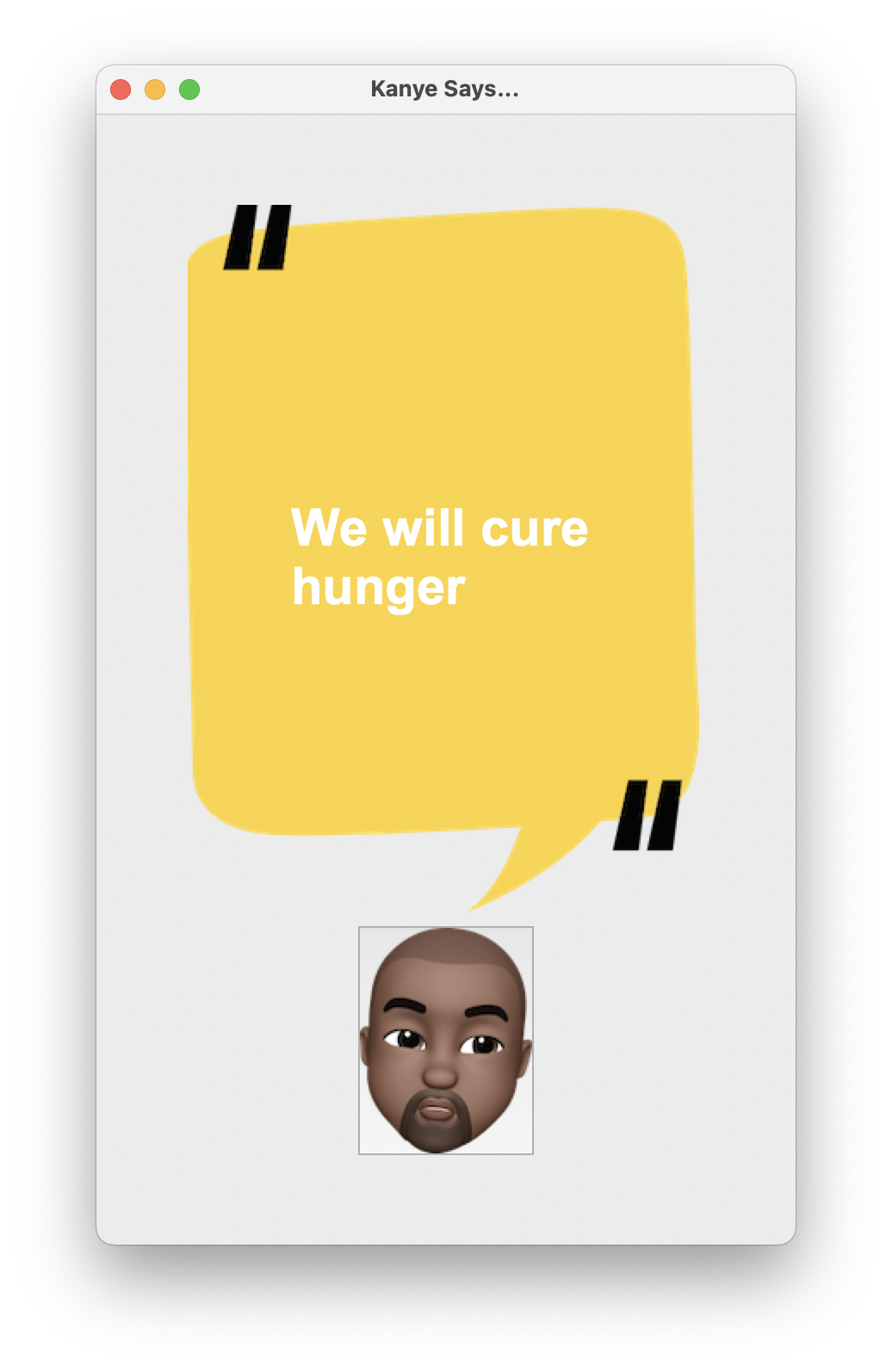
❖ API 매개변수(parameters)
- 매개변수로 제공한 입력에 따라 원하는 특정한 정보를 얻을 수 있음
- 매개변수가 없는 단순한 API도 존재
- 사용자가 매개변수를 제공하는 API 예시 : Sunset and sunrise times API
- 현재 위치의 일출 시간, 일몰 시간 제공(UTC 기준)
- 문서를 통해 매개변수에 대한 정보 얻기
- latlong.net
- 특정 경도와 위도로 세계 지도에서 어느 장소인지 검색 가능
- 세계 지도의 특정 장소로 경도와 위도를 검색 가능
- string.split( separator, maxsplit ) : 문자열을 나누어 리스트로 만드는 메소드
separator: 지정한 문자열을 기준으로 나누며, 생략 시 공백 기준 ( 디폴트 값 = "" )maxsplit: 지정한 횟수만큼만 쪼개며, 생략 시 모든 구간에 적용 ( 디폴트 값 = -1 )
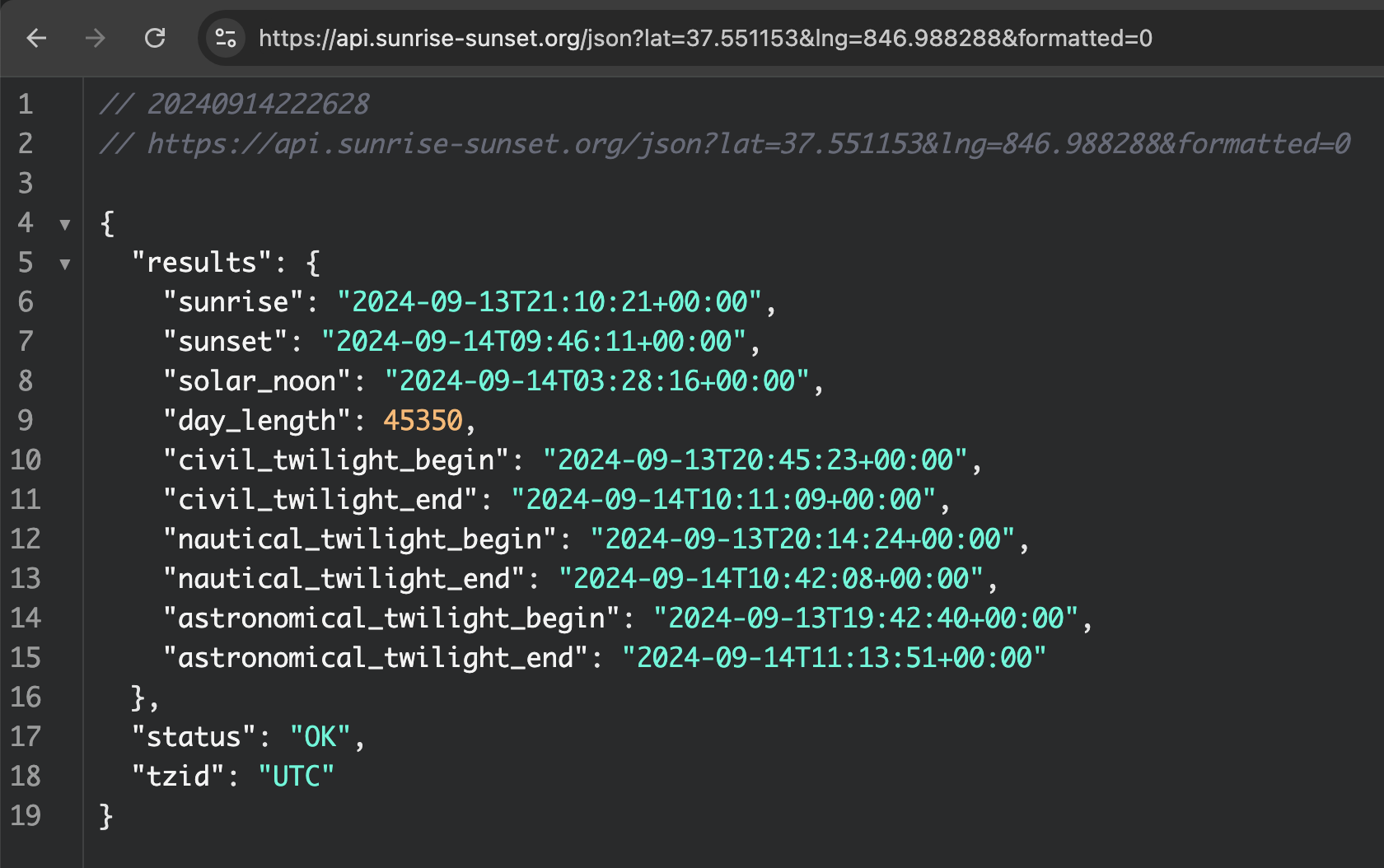
- Chrome 확장프로그램
- 브라우저 주소창에 JSON 데이터를 입력하여 사용
- JSON 데이터가 브라우저 안에서 렌더링되면 정돈된 트리 구조로 표시
(JSON은 이케아에서 파는 조립 가구와 비슷, 가져와서 파이썬 딕셔너리 등으로 재조립 가능)
import requests
from datetime import datetime

MY_LAT = 37.551153
MY_LONG = 846.988288

parameters = {
    "lat": MY_LAT,
    "lng": MY_LONG,
    "formatted": 0,
}
response = requests.get("https://api.sunrise-sunset.org/json", params=parameters)
response.raise_for_status()
data = response.json()
sunrise = data['results']['sunrise'].split("T")[1].split(":")[0]
sunset = data['results']['sunset'].split("T")[1].split(":")[0]

time_now = datetime.now()

print(f"sunrise hour : {sunrise},  "
      f"sunset hour : {sunset},  "
      f"hour now : {time_now.hour}")
sunrise hour : 21, sunset hour : 09, hour now : 22
🗂️ Day33 프로젝트 : ISS 머리 위 알리미
ISS(국제우주정거장)의 위치를 추적하고 사용자의 머리 위에 있을 때 이메일을 전송하는 프로그램
🔍 유의 사항
- International Space Station Current Location
- 국제우주정거장의 현재 위치를 알려주는 API
- JSON 형식으로 리턴
- ISS가 현재 위치에 가까워져 있고, 지금이 밤이라면 하늘을 보라는 이메일을 자동 전송
- 위치 오차는 ±5정도 허용
- datetime.now( timezone.utc )
- UTC 오프셋이 적용된 시간 객체
- 그냥
datetime.now()는 현재 로컬 시스템 시간을 반환하므로 시간대를 알 수 없음- 코드가 60초마다 한 번씩 실행되도록 하기
- while문에 이메일 보내는 코드 넣기
- time 모듈로 반복 실행 속도 낮추기
⌨️ main.py
import requests
from datetime import datetime, timezone
import smtplib
import time

MY_LAT = 37.551153
MY_LONG = 846.988288
MY_EMAIL = 'tjwndus92@gmail.com'
PASSWORD = 'jfpd ylmy fdqh ihmw'

def is_iss_overhead():
    response = requests.get(url="http://api.open-notify.org/iss-now.json")
    response.raise_for_status()
    data = response.json()

    iss_latitude = float(data["iss_position"]["latitude"])
    iss_longitude = float(data["iss_position"]["longitude"])

    #Your position is within +5 or -5 degrees of the ISS position.
    if MY_LAT-5 <= iss_latitude <= MY_LAT+5 and MY_LONG-5 <= iss_longitude <= MY_LONG+5:
        return True

def is_night():
    parameters = {
        "lat": MY_LAT,
        "lng": MY_LONG,
        "formatted": 0,
    }

    response = requests.get("https://api.sunrise-sunset.org/json", params=parameters)
    response.raise_for_status()
    data = response.json()
    sunrise = int(data["results"]["sunrise"].split("T")[1].split(":")[0])
    sunset = int(data["results"]["sunset"].split("T")[1].split(":")[0])

    # 지금 시간의 UTC 시간 구하기
    time_now = datetime.now(timezone.utc)
    time_now_hour = int(time_now.strftime("%H"))
    if time_now_hour >= sunset or time_now_hour <= sunrise:
        return True

# BONUS: run the code every 60 seconds.
while True:
    time.sleep(60)
    # If the ISS is close to my current position and it is currently dark
    if is_iss_overhead() and is_night():
        # Then send me an email to tell me to look up.
        connection = smtplib.SMTP("smtp.gmail.com")
        connection.starttls()
        connection.login(MY_EMAIL, PASSWORD)
        connection.sendmail(from_addr=MY_EMAIL, to_addrs=MY_EMAIL,
                            msg="Subject:Look up👆\n\nThe ISS is above you in the sky.")
코드를 실행하면 백그라운드에서 계속 유지되며 60초마다 다시 실행
(결과값을 당장 확인하기는 힘듦)
