함수의 유형
- 괄호 안에 아무 것도 없는 함수
a. 가장 기본적이고 간단한 유형
b. 반복적으로 실행하려는 명령어가 있을 때 사용 - 괄호 안의 인자를 매개변수로 전달하는 함수
a. 입력값에 따라 함수 내부의 코드가 수정됨
b. 매번 다른 작업을 수행해야할 때 사용 - 출력값이 있는 함수
a. 괄호 안은 비어 있든 값이 있든 상관없음
b. 함수가 끝난 후, 그 결과로 나온 값을 return 키워드로 입력
c. 리턴값은 함수가 호출된 코드의 줄을 대체
d. 리턴값을 다른 변수에 저장 가능
입 력: 🫙 (빈 유리병)
프로세싱: 🏭 (병입 과정)
출 력: 🥛 (우유로 채운 병)
❖ 출력값이 있는 함수
- output = function(input) : 지금까지 사용해 온 내장 함수들의 작동 방식
예)word_length = len("apple")→word_length = 5 - string.title()
- 문자열에서 단어마다 첫 글자만 대문자, 나머지는 소문자로 변경하는 방법
- 각 단어는 공백을 기준으로 구분됨
# 이름과 성을 입력하면 각 단어의 첫 번째 글자는 대문자, 나머지는 소문자로 변경하는 함수
# 1. 리턴 키워트를 가진 함수 생성

def format_name(f_name , l_name):
    formated_f_name = f_name.title()
    formated_l_name = l_name.title()

    return f"{formated_f_name} {formated_l_name}"	# 리턴

formated_string = format_name("JoN", "skEEt")
print(formated_string)
Jon Skeet
💡 출력 vs 반환
콘솔로 무언가를 출력하는 것 vs 함수의 출력으로 무언가를 반환하는 것
- 위의 코드에서
f"{formated_f_name} {formated_l_name}"를 그냥 print 하고 함수를 호출해도 되지만,
print 대신 return 키워드를 쓰면 다른 변수에 함수의 출력을 저장하여 사용 가능- 다른 코드 예시
def outer_function(a, b):
	 def inner_function(c, d):
	 	return c + d
    return inner_function(a, b)
 result = outer_function(5, 10)
 print(result)
15
inner_function의 출력 값은outer_function의 출력 값이 됨
(리턴 키워드를 사용하면 다른 함수에서 해당 함수를 편리하게 호출할 수 있음)
❖ 다양한 리턴값
- 리턴 키워드 = 함수 종료
(return 뒤의 나머지 코드는 실행 x) - 입력값에 따라 여러 개의 리턴 키워드를 사용해 함수를 조기에 종료 가능
- 빈(아무것도 포함하지 않은) 리턴 키워드도 가능
- None 출력
- 가능하면 빈 리턴보다는 의미 있는 메세지를 넣어서 진행 상황을 파악할 수 있게 하는 것이 더 좋음
# 이름과 성을 입력하면 각 단어의 첫 번째 글자는 대문자, 나머지는 소문자로 변경하는 함수
# 2. 이름이나 성을 입력하지 않고 지나갔을 경우 조기 종료하기

def format_name(f_name , l_name):
    if f_name == "" or l_name == "":
        return "You didn't provide valid inputs."
    formated_f_name = f_name.title()
    formated_l_name = l_name.title()
    return f"{formated_f_name} {formated_l_name}"

print(format_name(input("What's your first name? : "), input("What's your last name? : ")))
What's your first name? : ❚
What's your last name? : ❚
You didn't provide valid inputs.
- 함수의 리턴을 다른 변수에 저장하는 대신 바로 print로 출력하는 것도 가능
💯 coding exercises
Days in Month
연도와 월을 입력하면 해당 월의 일수를 출력하는 프로그램
- 윤년의 2월은 28일까지가 아니라 29일까지 있음
- Leap Year 의 코드 활용
- 윤년인지 아닌지 출력하는 대신
- 윤년일 때는, True 값을 반환
- 윤년이 아닐 때는, False 값을 반환
- month_days 리스트에 모든 월의 표준 일수가 저장되어 있음
- 입력 연도가 윤년일 때는, 입력 월에 맞는 표준 일수 반환
- 입력 연도가 윤년이 아닐 때는, 입력 월을 확인
- 2월이라면, 표준 일수 28이 아닌 29를 출력해야 함
- 2월이 아니라면, 입력 월에 맞는 표준 일수 반환
- 리스트의 인덱스는 0부터 시작하는 것에 주의
def is_leap(year):
  if year % 4 == 0:
    if year % 100 == 0:
      if year % 400 == 0:
        return True
      else:
        return False
    else:
      return True
  else:
    return False

# TODO: Add more code here 👇
def days_in_month(year, month):
  month_days = [31, 28, 31, 30, 31, 30, 31, 31, 30, 31, 30, 31]

  if is_leap(year) and month == 2:
    return 29
  else:
    return month_days[month - 1]

#🚨 Do NOT change any of the code below
year = int(input()) # Enter a year
month = int(input()) # Enter a month
days = days_in_month(year, month)
print(days)❚2020
❚2
29
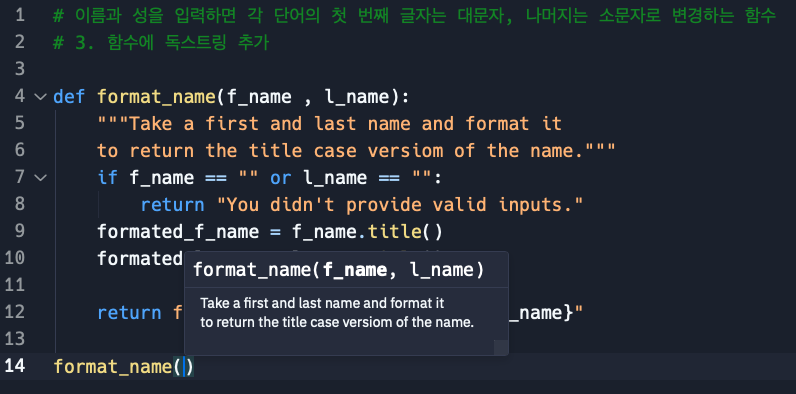
❖ 독스트링(Docstrings)
- 함수 또는 기타 코드 블록으로 코드 작성 시 뜨는 작은 문서창 → 함수의 문서화
- 추가 방법
- 선언 뒤에 이어지는 (들여쓰기를 한) 첫 번째 줄에 독스트링 작성
- 작성할 내용 시작과 끝에 각각 """를 붙임
- 해당 함수가 수행하는 역할이나, 사용자가 알아야 할 것들에 대한 설명을 작성
- 여러 줄의 문자열로 작성 가능
🗂️ Day10 프로젝트 : 계산기
숫자, 연산자, 숫자 순으로 입력하면 두 숫자를 연산한 결과가 나오고,
이전 결과값에 이어서 계산을 이어나갈 수 있는 계산기 프로그램
◇ 딕셔너리와 함수 결합
🔍 유의 사항
- 연산 딕셔너리로 사칙연산을 정의한 함수를 호출하기
{"부호": 해당 연산을 정의한 함수 이름}- 키로 값을 호출한 결과를 변수 calculation에 저장하면,
키만 바꿔서 사칙연산 함수(add, subtract, multiply, divide) 모두 사용 가능
⌨️ 작성한 코드
# 사칙연산 정의 함수
def add(n1, n2):
    return n1 + n2
def subtract(n1, n2):
    return n1 - n2
def multiply(n1, n2):
    return n1 * n2
def divide(n1, n2):
    return n1 / n2

# 연산 딕셔너리
operations = {"+": add, "-": subtract, "*": multiply, "/": divide}

num1 = int(input("What's the first number? : "))
for symbol in operations:
    print(symbol)
operation_symbol = input("Pick an operation from the line above : ")
num2 = int(input("What's the second number? : "))

calculation = operations[operation_symbol]
answer = calculation(num1, num2)

print(f"{num1} {operation_symbol} {num2} = {answer}")
What's the first number? : ❚46
+
-
*
/
Pick an operation from the line above : ❚+
What's the second number? : ❚71
46 + 71 = 117
◇ 이전 결과값으로 다음 계산 수행
⌨️ 버그 발생 코드
# 사칙연산
def add(n1, n2):
    return n1 + n2
def subtract(n1, n2):
    return n1 - n2
def multiply(n1, n2):
    return n1 * n2
def divide(n1, n2):
    return n1 / n2

# 연산 딕셔너리
operations = {"+": add, "-": subtract, "*": multiply, "/": divide}

# 첫 번째 연산
num1 = int(input("What's the first number? : "))
for symbol in operations:
    print(symbol)
operation_symbol = input("Pick an operation from the line above : ")
num2 = int(input("What's the second number? : "))
calculation = operations[operation_symbol]
first_answer = calculation(num1, num2)
print(f"{num1} {operation_symbol} {num2} = {first_answer}")

# 두 번째 연산
operation_symbol = input("Pick another operation : ")
num3 = int(input("What's the next number? : "))
calculation = operations[operation_symbol]

# 버그 발생
second_answer = calculation(calculation(num1, num2), num3)
print(f"{first_answer} {operation_symbol} {num3} = {second_answer}")
What's the first number? : ❚3
+
-
*
/
Pick an operation from the line above : ❚+
What's the second number? : ❚5
3 + 5 = 8
Pick another operation : ❚*
What's the next number? : ❚3
8 * 3 = 45
calculation(num1, num2)을 그대로 넣을 경우 calculation은 multiply로 바뀌었기 때문에,
(3 * 5) * 3 = 45가 되어버림
🐞디버그
# ...중략...
second_answer = calculation(first_answer, num3)
print(f"{first_answer} {operation_symbol} {num3} = {second_answer}")
What's the first number? : ❚3
+
-
*
/
Pick an operation from the line above : ❚+
What's the second number? : ❚5
3 + 5 = 8
Pick another operation : ❚*
What's the next number? : ❚3
8 * 3 = 24
calculation(num1, num2)의 리턴값을 first_answer에 저장했기 때문에,
(3 + 5) * 3 = 24가 됨
◇ While 반복문, 플래그, 재귀
🔍 유의 사항
- 코드 1은 while문 사용
- 코드 2는 재귀 사용
⌨️ 작성한 코드1 (계산 결과에 계속 이어서 계산하기)
# 사칙연산
def add(n1, n2):
    return n1 + n2
def subtract(n1, n2):
    return n1 - n2
def multiply(n1, n2):
    return n1 * n2
def divide(n1, n2):
    return n1 / n2

# 연산 딕셔너리
operations = {"+": add, "-": subtract, "*": multiply, "/": divide}

# 첫 번째 숫자
num1 = int(input("What's the first number? : "))
for symbol in operations:
    print(symbol, end=" ")
print("")
should_countinue = True

# while문
while should_countinue:
    operation_symbol = input("Pick an operation : ")
    num2 = int(input("What's the next number? : "))
    calculation = operations[operation_symbol]
    answer = calculation(num1, num2)
    print(f"{num1} {operation_symbol} {num2} = {answer}")

    if input(f"Type 'y' to continue with {answer}, or type 'n' to exit : ") == 'y':
        num1 = answer
    else:
        should_countinue = False
        print("Goodbye")
What's the first number? : ❚6
+ - * /
Pick an operation : ❚-
What's the next number? : 3
6 - 3 = 3
Type 'y' to continue with 3, or type 'n' to exit : ❚y
Pick an operation : ❚*
What's the next number? : ❚6
3 * 6 = 18
Type 'y' to continue with 18, or type 'n' to exit : ❚n
Goodbye
⌨️ 작성한 코드2 (계산 결과를 싹 지우고 새 계산 시작하기)
# 사칙연산
def add(n1, n2):
    return n1 + n2
def subtract(n1, n2):
    return n1 - n2
def multiply(n1, n2):
    return n1 * n2
def divide(n1, n2):
    return n1 / n2

# 연산 딕셔너리
operations = {"+": add, "-": subtract, "*": multiply, "/": divide}

# 계산기 함수 정의
def calculator():
    num1 = int(input("What's the first number? : "))
    for symbol in operations:
        print(symbol, end=" ")
    print("")
    should_countinue = True

    while should_countinue:
        operation_symbol = input("Pick an operation : ")
        num2 = int(input("What's the next number? : "))
        calculation = operations[operation_symbol]
        answer = calculation(num1, num2)
        print(f"{num1} {operation_symbol} {num2} = {answer}")

        y_or_n = input(f"Type 'y' to continue with {answer}, 'n' to start a new calculation : ")
        if y_or_n == 'y':
            num1 = answer
        else:
            should_countinue = False
            # 계산기 함수 재귀 호출 -> 모든 것을 초기화하고 새 계산 시작
            calculator()

# 계산기 함수 호출
calculator()
What's the first number? : ❚6
+ - * /
Pick an operation : ❚/
What's the next number? : ❚4
16 / 4 = 4.0
Type 'y' to continue with 4.0, 'n' to start a new calculation : ❚n
What's the first number? : ❚5
+ - * /
Pick an operation : ❚+
What's the next number? : ❚6
5 + 6 = 11
Type 'y' to continue with 11, 'n' to start a new calculation : ...무한 반복...
◇ 계산기 마감 작업, 버그 수정
🔍 유의 사항
- 소수점이 있는 숫자를 입력하면 에러 발생하는 부분 수정하기
- 입력한 숫자를 int가 아닌 float으로 형변환하기
- 계산을 초기화하고 처음부터 시작할 때, 콘솔창도 지우도록 clear() 사용
📄 art.py
아스키 로고 아트 저장⌨️ 작성한 코드
from replit import clear
from art import logo

# 사칙연산
def add(n1, n2):
    return n1 + n2
def subtract(n1, n2):
    return n1 - n2
def multiply(n1, n2):
    return n1 * n2
def divide(n1, n2):
    return n1 / n2

# 연산 딕셔너리
operations = {"+": add, "-": subtract, "*": multiply, "/": divide}

# 계산기 함수 정의
def calculator():
    print(logo)

    num1 = float(input("What's the first number? : "))
    for symbol in operations:
        print(symbol, end=" ")
    print("")
    should_countinue = True

    while should_countinue:
        operation_symbol = input("Pick an operation : ")
        num2 = float(input("What's the next number? : "))
        calculation = operations[operation_symbol]
        answer = calculation(num1, num2)
        print(f"{num1} {operation_symbol} {num2} = {answer}")

        y_or_n = input(f"Type 'y' to continue with {answer}, 'n' to start a new calculation : ")
        if y_or_n == 'y':
            num1 = answer
        else:
            should_countinue = False
            clear()
            calculator()

# 계산기 함수 호출
calculator()
[ 출력 결과 ]
_____________________
| _________________ |
| | Pythonista 0. | | .----------------. .----------------. .----------------. .----------------.
| |_________________| | | .--------------. || .--------------. || .--------------. || .--------------. |
| ___ ___ ___ ___ | | | ______ | || | __ | || | _____ | || | ______ | |
| | 7 | 8 | 9 | | + | | | | .' ___ | | || | / \ | || | |_ _| | || | .' ___ | | |
| |___|___|___| |___| | | | / .' \_| | || | / /\ \ | || | | | | || | / .' \_| | |
| | 4 | 5 | 6 | | - | | | | | | | || | / ____ \ | || | | | _ | || | | | | |
| |___|___|___| |___| | | | \ `.___.'\ | || | _/ / \ \_ | || | _| |__/ | | || | \ `.___.'\ | |
| | 1 | 2 | 3 | | x | | | | `._____.' | || ||____| |____|| || | |________| | || | `._____.' | |
| |___|___|___| |___| | | | | || | | || | | || | | |
| | . | 0 | = | | / | | | '--------------' || '--------------' || '--------------' || '--------------' |
| |___|___|___| |___| | '----------------' '----------------' '----------------' '----------------'
|_____________________|
What's the first number? : 4
+ - * /
Pick an operation : *
What's the next number? : 15
4.0 * 15.0 = 60.0
Type 'y' to continue with 60.0, 'n' to start a new calculation : ...무한 반복 생략...