❖ 플라스크 서버로 POST 요청 처리

HTML 입력 양식
HTML 입력양식에 데이터 입력 후 Ok버튼을 누르면 작동되도록 하기
- 입력된 데이터를 POST 요청방식으로 "/login" 경로에 전달
a.<form>태그에action(경로),method(전송 방식) 추가하기
b. 서버가 호스트 되는 장치에 따라 "/login" 경로가 변경될 수 있으므로 동적 URL 사용 추천<form action="경로" method="post">대신<form action="{{ url_for('함수이름') }}" method="post">사용하기
- 입력양식 제출 후 서버에서 POST 요청 받도록 하기
a. 입력양식의 각 입력 값에name속성 필요 - main.py에 POST 요청을 받았을 때 처리하는 데코레이터 생성
a. methods 매개변수는 딕셔너리 형 가능(하나의 제출 경로에 여러 메소드 방식 가능) - 입력된 데이터를 플라스크의
request메소드로 다시 클라이언트로 보내서 출력해보기
a. ❗️requests 모듈과 헷갈리지 않게 주의
b. 서버로 전송된 요청 매개변수를 활용하는 메소드
⌨️ main.py
from flask import Flask, render_template, request

app = Flask(__name__)

@app.route('/')
def home():
    return render_template("index.html")

@app.route("/login", methods=["POST"])
def receive_data():
    username = request.form["username"]
    password = request.form["password"]
    return f"<h1>Name: {username}, Password: {password}</h1>"

if __name__ == "__main__":
    app.run(debug=True)
🏗️ index.html
<!DOCTYPE html>
<html lang="en">
<head>
  <meta charset="UTF-8">
  <title>Title</title>
</head>

<body>
  <form action="{{ url_for('receive_data') }}" method="post">
    <label>Name</label>
    <input type="text" placeholder="name" name="username">
    <label>Password</label>
    <input type="text" placeholder="password" name="password">
    <button type="submit">Ok</button>
  </form>
</body>
</html>
🗂️ Day60 프로젝트: 블로그 문의양식
🗂️ Day59 프로젝트: 블로그에 스타일 추가의 문의 양식이 실제 동작되도록 완성
1. 문의 양식 작동시키기
🔍 유의 사항
- 새로운 예제 양식으로 진행(Day59와 동일하지만 contact.html 파일이 단순화됨)
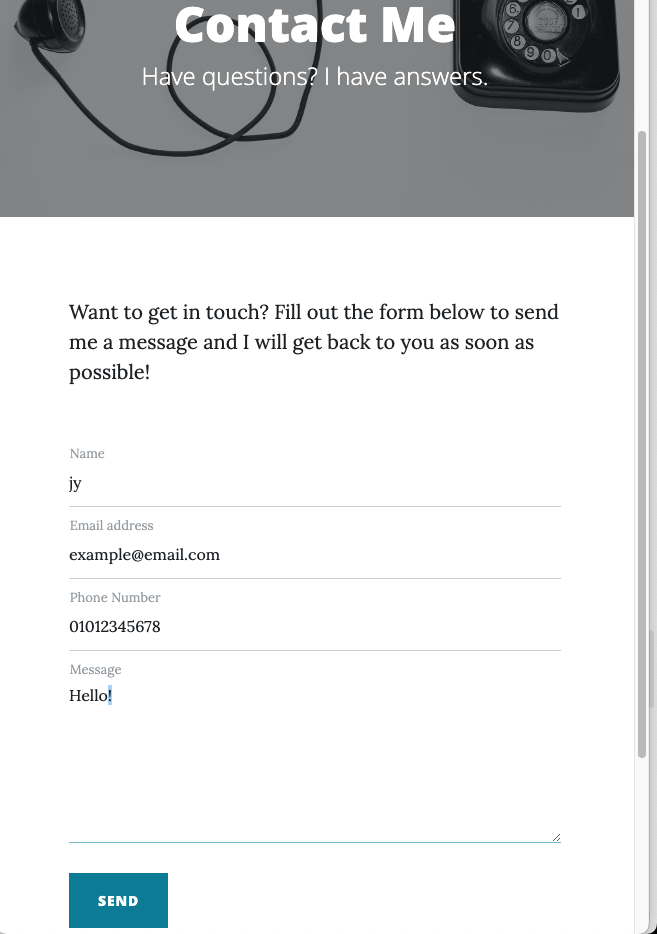
- "/contact" 경로에서 메소드 방식(GET/POST)에 따라 올바르게 요청을 처리하도록 변경
- 양식을 처음 열었을 때 GET 요청, 양식을 제출했을 때 POST 요청
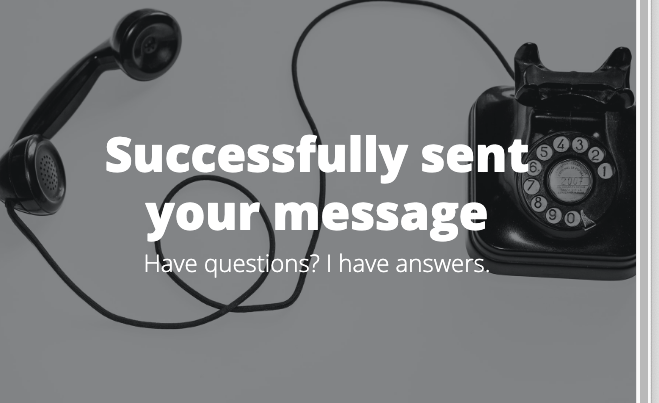
request.method로 어떤 메소드 방식으로 해당 경로에 데이터가 전달됐는지 확인 가능- 변수 msg_sent로 메시지 전송 성공 여부를 가려서 상황에 맞는 문구 출력하기
2. smtplib로 이메일 전송
🔍 유의 사항
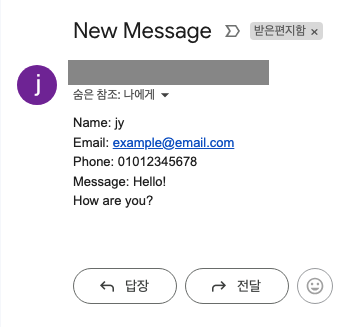
- 입력한 내용이 실제로 이메일로 전송되도록 변경
⌨️ main.py
from flask import Flask, render_template, request
import requests
import smtplib

# USE YOUR OWN npoint LINK! ADD AN IMAGE URL FOR YOUR POST. 👇
posts = requests.get("https://api.npoint.io/c790b4d5cab58020d391").json()

EMAIL = '전송할 이메일'
PASSWORD = '지메일 16자리 앱 비밀번호'

app = Flask(__name__)

…

@app.route("/contact", methods=["GET", "POST"])
def contact():
    if request.method == "POST":
        data = request.form
        send_email(data["name"], data["email"], data["phone"], data["message"])
        return render_template("contact.html", msg_sent=True)
    return render_template("contact.html", msg_sent=False)

def send_email(name, email, phone, message):
    email_message = (f"Subject:New Message\n\n"
                     f"Name: {name}\nEmail: {email}\nPhone: {phone}\nMessage: {message}")
    with smtplib.SMTP("smtp.gmail.com") as connection:
        connection.starttls()
        connection.login(EMAIL, PASSWORD)
        connection.sendmail(EMAIL, EMAIL, email_message)

…

if __name__ == "__main__":
    app.run(debug=True, port=5001)
🏗️ contact.html
{% include "header.html" %}

<!-- Page Header-->
<header
  class="masthead"
  style="background-image: url('../static/assets/img/contact-bg.jpg')"
>
  <div class="container position-relative px-4 px-lg-5">
    <div class="row gx-4 gx-lg-5 justify-content-center">
      <div class="col-md-10 col-lg-8 col-xl-7">
        <div class="page-heading">
          <!-- msg_sent가 True이면 메세지가 전송됐다는 의미 -->
          {% if msg_sent: %}
            <h1>Successfully sent your message</h1>
          {% else: %}
            <h1>Contact Me</h1>
          {% endif %}
          <span class="subheading">Have questions? I have answers.</span>
        </div>
      </div>
    </div>
  </div>
</header>

<!-- Main Content-->
<main class="mb-4">
  <div class="container px-4 px-lg-5">
    <div class="row gx-4 gx-lg-5 justify-content-center">
      <div class="col-md-10 col-lg-8 col-xl-7">
        <p>
          Want to get in touch? Fill out the form below to send me a message and
          I will get back to you as soon as possible!
        </p>
        <div class="my-5">
          <!-- * * * * * * * * * * * * * * *-->
          <!-- * * Simplified SB Contact Form for the Tutorial* *-->
          <!-- TODO: add an "action" and a "method" to link this form to your main.py -->
          <form
            id="contactForm"
            name="sentMessage"
            action="{{ url_for('contact') }}"
            method="post"
          >
            <div class="form-floating">
              <input
                class="form-control"
                id="name"
                name="name"
                type="text"
                placeholder="Enter your name..."
                required
              />
              <label for="name">Name</label>
            </div>
            <div class="form-floating">
              <input
                class="form-control"
                id="email"
                name="email"
                type="email"
                placeholder="Enter your email..."
                required
              />
              <label for="email">Email address</label>
            </div>
            <div class="form-floating">
              <input
                class="form-control"
                id="phone"
                name="phone"
                type="tel"
                placeholder="Enter your phone number..."
                required
              />
              <label for="phone">Phone Number</label>
            </div>
            <div class="form-floating">
              <textarea
                class="form-control"
                id="message"
                name="message"
                placeholder="Enter your message here..."
                required
                style="height: 12rem"
              ></textarea>
              <label for="message">Message</label>
            </div>
            <br />
            <button
              class="btn btn-primary text-uppercase"
              id="submitButton"
              type="submit"
            >
              Send
            </button>
          </form>
        </div>
      </div>
    </div>
  </div>
</main>

{% include "footer.html" %}