디자인
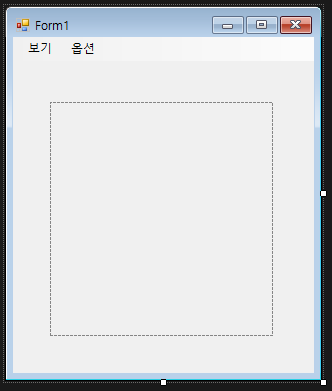
Tooltip과 Panel을 생성한다.
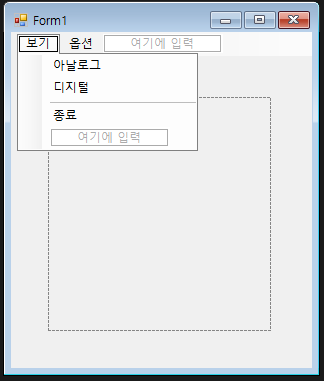
보기에는 아날로그, 디지털, 종료를 생성하고 Separator로 구분선을 지어준다.
소스 코드
using System;
using System.Collections.Generic;
using System.ComponentModel;
using System.Data;
using System.Drawing;
using System.IO;
using System.Linq;
using System.Text;
using System.Threading.Tasks;
using System.Windows.Forms;

namespace _022_daClock
{
    public partial class Form1 : Form
    {
        // 필드(멤버 변수) / 모두 앞에 private가 생략되어있는 것. ex) private Graphics g;
        Graphics g;
        bool aClock_Flag = true;
        Point center; // 중심점
        int radius; // 반지름
        int hourHand; // 시침의 길이
        int minHand; // 분침의 길이
        int secHand; // 초침

        const int clientSize = 300;
        const int clockSize = 200;

        private Font fDate;     // 날짜 폰트
        private Font fTime;     // 시간 폰트
        private Brush bDate;    //
        private Brush bTime;    //

        Point panelCenter;

        // 생성자
        public Form1()
        {
            InitializeComponent();

            this.ClientSize
                = new Size(clientSize, clientSize + menuStrip1.Height);
            this.Text = "My Form Clock";

            // panel 지정
            panel1.BackColor = Color.WhiteSmoke;
            panel1.Width = clockSize + 1;
            panel1.Height = clockSize + 1;
            panel1.Location = new Point(
                clientSize / 2 - clockSize / 2,
                clientSize / 2 - clockSize / 2 + menuStrip1.Height);


            g = panel1.CreateGraphics(); // panel1에서 그려주는 그래픽 객체

            aClockSetting(); // 아날로그 시계 세팅
            dClockSetting(); // 디지털 시계 세팅
            TimerSetting(); // 타이머 세팅
        }

        private void dClockSetting()
        {
            fDate = new Font("맑은 고딕", 12, FontStyle.Bold);
            fTime = new Font("맑은 고딕", 32, FontStyle.Bold | FontStyle.Italic);
            bDate = Brushes.SkyBlue;
            bTime = Brushes.SteelBlue;
        }

        private void TimerSetting()
        {
            Timer t = new Timer(); // 타이머

            t.Interval = 1000;
            t.Tick += T_Tick;
            t.Start();
        }

        private void T_Tick(object sender, EventArgs e)
        {
            DateTime c = DateTime.Now; // 현재 시간

            panel1.Refresh(); // 패널 지우기

            if (aClock_Flag == true) // 아날로그
            {
                DrawClockFace(); // 시계판

                // 시계바늘 각도
                double radHr
                    = (c.Hour % 12 + c.Minute / 60.0) * 30 * Math.PI / 180;
                double radMin
                    = (c.Minute + c.Second / 60.0) * 6 * Math.PI / 180;
                double radSec
                    = c.Second * 6 * Math.PI / 180;

                DrawHands(radHr, radMin, radSec);
            }
            else // 디지털 시계
            {
                string date = DateTime.Today.ToString("D");
                string time = string.Format("{0:D2}:{1:D2}:{2:D2}",
                    c.Hour, c.Minute, c.Second);

                g.DrawString(date, fDate, bDate, new Point(10, 70));
                g.DrawString(time, fTime, bTime, new Point(5, 100));
            }
        }

        private void DrawHands(double radHr, double radMin, double radSec)
        {

        }

        private void DrawClockFace()
        {
            const int penWidth = 30;
            Pen p = new Pen(Brushes.LightSteelBlue, penWidth);
            g.DrawEllipse(p, penWidth/2, penWidth/2, clockSize - penWidth, clockSize - penWidth);
        }

        private void aClockSetting()
        {
            center = new Point(clientSize / 2, clientSize / 2);
            radius = clockSize / 2;

            hourHand = (int)(radius * 0.45);
            minHand = (int)(radius * 0.55);
            secHand = (int)(radius * 0.65);
        }
    }
}
const int clientSize = 300;
const int clockSize = 200; 로 클라이언트 사이즈와 시계 사이즈를 설정한다.
DateTime.Now;로 현재 시간을 불러올 수 있다.
this.Text = "My Form Clock"; 로 Form1의 Text를 변경해줄 수 있다.
panel1.Location = new Point(
clientSize / 2 - clockSize / 2,
clientSize / 2 - clockSize / 2 + menuStrip1.Height);
위치를 지정할 때, 고려할 부분이 있다.
x축은 상관없지만 y축은 menuStrip 높이를 더해주어야 클라이언트에서 깔끔하게 패널이 위치할 것이다.