디자인
<Window x:Class="_035_EIS.MainWindow"
        xmlns="http://schemas.microsoft.com/winfx/2006/xaml/presentation"
        xmlns:x="http://schemas.microsoft.com/winfx/2006/xaml"
        xmlns:d="http://schemas.microsoft.com/expression/blend/2008"
        xmlns:mc="http://schemas.openxmlformats.org/markup-compatibility/2006"
        xmlns:local="clr-namespace:_035_EIS"
        mc:Ignorable="d"
        Title="EIS" Height="550" Width="850"
        Background="AliceBlue">
    <StackPanel Margin="20">
        <StackPanel Orientation="Horizontal" HorizontalAlignment="Center">
            <Image Source="images/employee.png"
                   Width="50" Height="50" Margin="0 0 0 10"></Image>
            <TextBlock FontSize="30" Margin="20 0 0 0">Employee Information System 1.0</TextBlock>
        </StackPanel>
        <StackPanel Orientation="Horizontal">
            <StackPanel>
                <StackPanel Orientation="Horizontal" Margin="5">
                    <TextBlock Width="80">사번: </TextBlock>
                    <TextBox x:Name="txtEid" Width="150"></TextBox>
                </StackPanel>
                <StackPanel Orientation="Horizontal" Margin="5">
                    <TextBlock Width="80">이름: </TextBlock>
                    <TextBox x:Name="txtName" Width="150"></TextBox>
                </StackPanel>
                <StackPanel Orientation="Horizontal" Margin="5">
                    <TextBlock Width="80">부서: </TextBlock>
                    <ComboBox x:Name="cbDept" Width="150">
                        <ComboBoxItem>개발팀</ComboBoxItem>
                        <ComboBoxItem>마케팅팀</ComboBoxItem>
                        <ComboBoxItem>기획팀</ComboBoxItem>
                        <ComboBoxItem>총무팀</ComboBoxItem>
                        <ComboBoxItem>해외사업팀</ComboBoxItem>
                    </ComboBox>
                </StackPanel>
                <StackPanel Orientation="Horizontal" Margin="5">
                    <TextBlock Width="80">직급: </TextBlock>
                    <ComboBox x:Name="cbPos" Width="150">
                        <ComboBoxItem>이사</ComboBoxItem>
                        <ComboBoxItem>부장</ComboBoxItem>
                        <ComboBoxItem>과장</ComboBoxItem>
                        <ComboBoxItem>과장</ComboBoxItem>
                        <ComboBoxItem>팀장</ComboBoxItem>
                        <ComboBoxItem>대리</ComboBoxItem>
                        <ComboBoxItem>사원</ComboBoxItem>
                    </ComboBox>
                </StackPanel>
                <StackPanel Orientation="Horizontal" Margin="5">
                    <TextBlock Width="80">성별:</TextBlock>
                    <RadioButton x:Name="rbMale" Width="50">남</RadioButton>
                    <RadioButton x:Name="rbFemale" Width="50">여</RadioButton>
                </StackPanel>
                <StackPanel Orientation="Horizontal" Margin="5">
                    <TextBlock Width="80">입사일:</TextBlock>
                    <DatePicker x:Name="dpEnter" Width="150"></DatePicker>
                </StackPanel>
                <StackPanel Orientation="Horizontal" Margin="5">
                    <TextBlock Width="80">퇴사일:</TextBlock>
                    <DatePicker x:Name="dpExit" Width="150"></DatePicker>
                </StackPanel>
                <StackPanel Orientation="Horizontal" Margin="5">
                    <TextBlock Width="80">연락처:</TextBlock>
                    <TextBox x:Name="txtContact" Width="150"></TextBox>
                </StackPanel>
                <StackPanel Orientation="Horizontal" Margin="5">
                    <TextBlock Width="80">기타:</TextBlock>
                    <TextBox x:Name="txtComment" Width="150" Height="80"
                   AcceptsReturn="True"
                   AcceptsTab="True"
                   TextWrapping="Wrap"
                   VerticalScrollBarVisibility="Auto"/>
                </StackPanel>
                <StackPanel Orientation="Horizontal"
                            HorizontalAlignment="Center"
                            Margin="5">
                    <Button x:Name="btnInsert" Width="80">Insert</Button>
                    <TextBlock Width="20"/>
                    <Button x:Name="btnUpdate" Width="80">Update</Button>
                </StackPanel>
                <StackPanel Orientation="Horizontal"
                            HorizontalAlignment="Center"
                            Margin="5">
                    <Button x:Name="btnDelete" Width="80">Delete</Button>
                    <TextBlock Width="20"/>
                    <Button x:Name="btnLoad" Width="80">LoadData</Button>
                </StackPanel>
            </StackPanel>
            <DataGrid x:Name="dataGrid" Margin="5" Width="540"></DataGrid>
        </StackPanel>
    </StackPanel>
</Window>
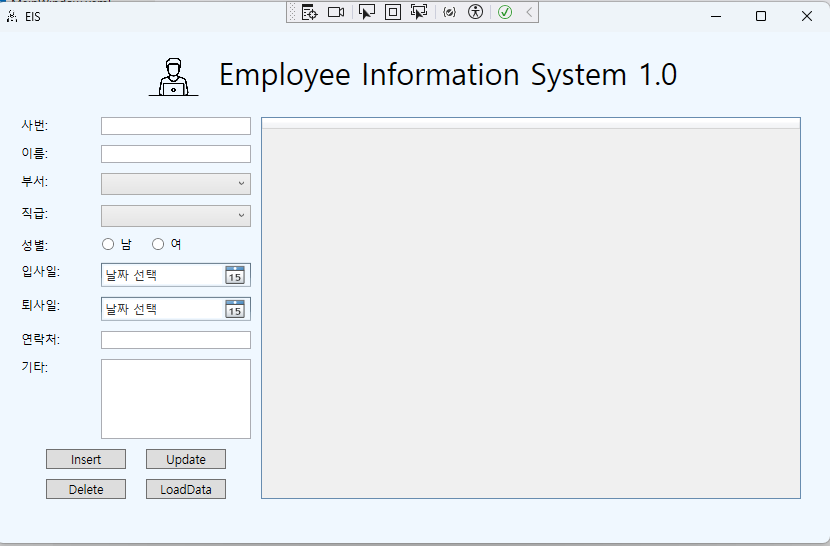
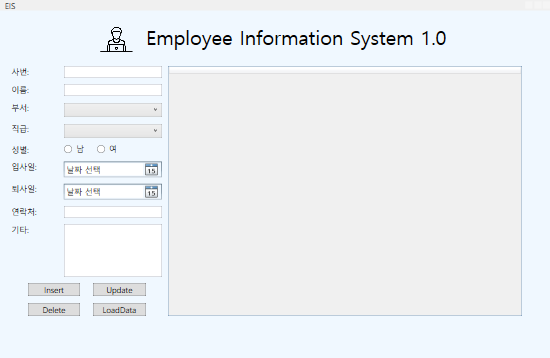
사번, 이름, 연락처, 기타 등의 텍스트를 입력할 수 있는 상자를 표시하기 위해 텍스트 박스 태그를 넣었다.
Image 태그를 이용해 이미지를 삽입할 수 있었다. Source= 속성으로 삽입할 이미지의 파일 경로를 지정할 수 있다.
StackPanel을 통해서 표시될 구간을 수직으로 나눌 수 있다.
x:Name 속성으로 각각 이름을 지정하여 사용자가 입력한 정보들의 TextBox의 내용을 다룰 수 있도록 준비하였다.
번외
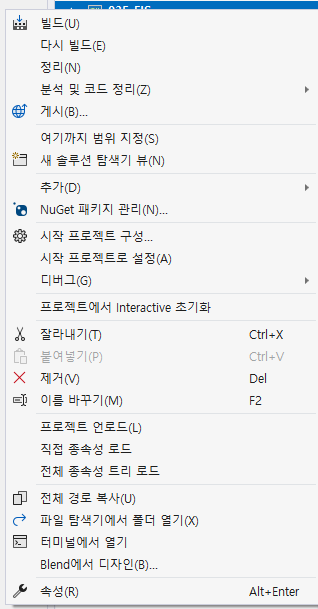
해당 프로젝트를 우클릭 하여 속성 탭에 들어가면 아이콘을 바꿀 수 있는 탭을 확인할 수 있다.
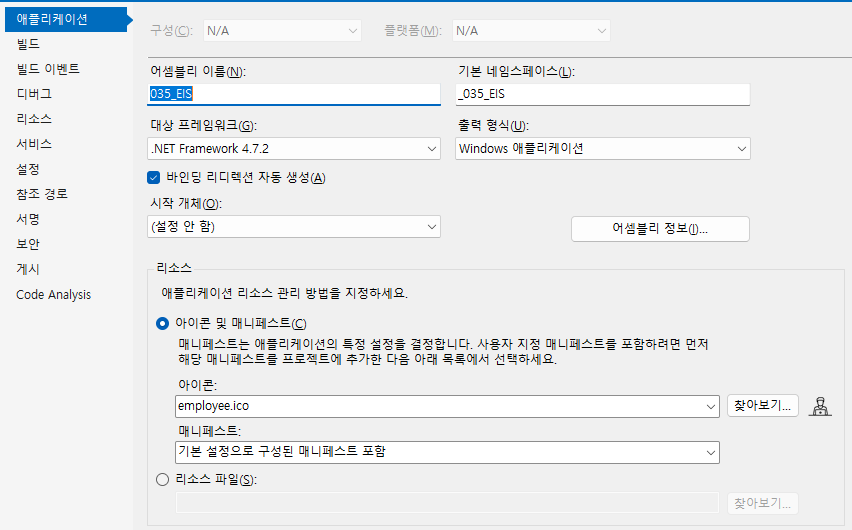
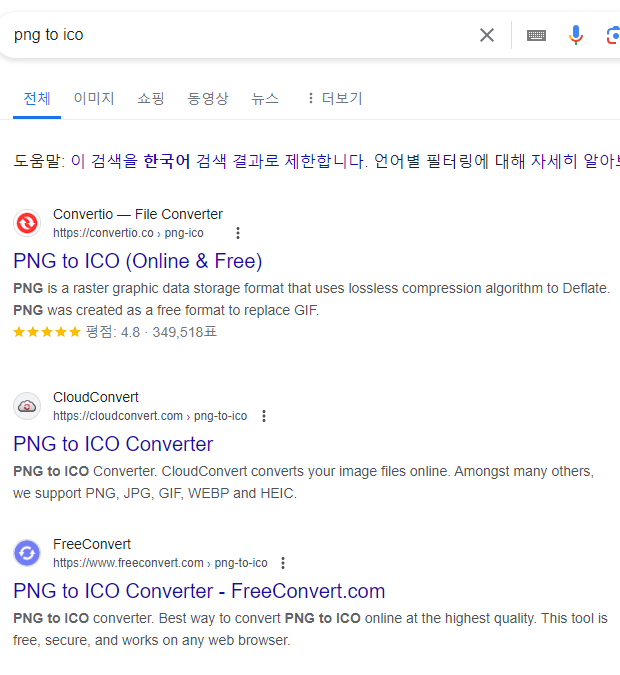
.png 사진 파일을 .ico 아이콘 확장자로 변경하려면 구글에 png to ico를 검색하여 원하는 사이트에 접속해서 확장자를 변경할 수 있다.
실행결과