delegate & event
delegate(대리자)
A delegate is a type that safely encapsulates a method, similar to a function pointer in C and C++. Unlike C function pointers, delegates are object-oriented, type safe, and secure.
다음 예제에서는 string을 인수로 사용하고 void를 반환하는 메서드를 캡슐화할 수 있는 Callback 대리자를 선언합니다.
public delegate void Callback(string message);특징
- 여러 대리자를 연결할 수 있습니다.
- 콜백 메서드를 정의할 수 있습니다.
- 메서드를 매개 변수로 전달할 수 있습니다.
- !메서드는 대리자 형식과 정확히 일치하지 않아도 됩니다.
- 람다식 델리게이트로 사용 가능, 무명 함수도 사용가능하다.
사용법
1. delegate int CalculateDelegate(int a, int b);

2-1. CalculateDelegate Plus = new CalculateDelegate(Add);
2-2. CalculateDelegate Minus = Subtract

3. DebugLog(1, 2, Plus);
3. DebugLog(4, 3, Minus);

4. void DebugLog(int a, int b, CalculateDelegate calculateDelegate)
{
	 var res = calculateDelegate.Invoke();
	 print(res);
}
https://daekyoulibrary.tistory.com/entry/C-콜백-함수Callback는-무엇이고-대리자Delegate는-뭘까
델리게이트 연산
using System;

// Define a custom delegate that has a string parameter and returns void.
delegate void CustomCallback(string s);

class TestClass
{
    // Define two methods that have the same signature as CustomCallback.
    static void Hello(string s)
    {
        Console.WriteLine($"  Hello, {s}!");
    }

    static void Goodbye(string s)
    {
        Console.WriteLine($"  Goodbye, {s}!");
    }

    static void Main()
    {
        // Declare instances of the custom delegate.
        CustomCallback hiDel, byeDel, multiDel, multiMinusHiDel;

        // In this example, you can omit the custom delegate if you
        // want to and use Action<string> instead.
        //Action<string> hiDel, byeDel, multiDel, multiMinusHiDel;

        // Initialize the delegate object hiDel that references the
        // method Hello.
        hiDel = Hello;

        // Initialize the delegate object byeDel that references the
        // method Goodbye.
        byeDel = Goodbye;

        // The two delegates, hiDel and byeDel, are combined to
        // form multiDel.
        multiDel = hiDel + byeDel;

        // Remove hiDel from the multicast delegate, leaving byeDel,
        // which calls only the method Goodbye.
        multiMinusHiDel = multiDel - hiDel

        Console.WriteLine("Invoking delegate hiDel:");
        hiDel("A");
        Console.WriteLine("Invoking delegate byeDel:");
        byeDel("B");
        Console.WriteLine("Invoking delegate multiDel:");
        multiDel("C");
        Console.WriteLine("Invoking delegate multiMinusHiDel:");
        multiMinusHiDel("D");
    }
}
/* Output:
Invoking delegate hiDel:
  Hello, A!
Invoking delegate byeDel:
  Goodbye, B!
Invoking delegate multiDel:
  Hello, C!
  Goodbye, C!
Invoking delegate multiMinusHiDel:
  Goodbye, D!
*/
Using Variance in Delegates
Covariance - 공변성
공변성(covariance)은 메서드가 대리자에 정의된 것보다 더 많은 수의 파생된 형식을 반환하도록 허용합니다.
class Mammals {}
class Dogs : Mammals {}

class Program
{
    // Define the delegate.
    public delegate Mammals HandlerMethod();

    public static Mammals MammalsHandler()
    {
        return null;
    }

    public static Dogs DogsHandler()
    {
        return null;
    }

    static void Test()
    {
        HandlerMethod handlerMammals = MammalsHandler;

        // Covariance enables this assignment.
        HandlerMethod handlerDogs = DogsHandler;
    }
}
Contravariance
반공변성(contravariance)은 메서드가 대리자 형식보다 더 적은 수의 파생된 매개 변수 형식을 갖도록 허용합니다.
// Event handler that accepts a parameter of the EventArgs type.
private void MultiHandler(object sender, System.EventArgs e)
{
    label1.Text = System.DateTime.Now.ToString();
}

public Form1()
{
    InitializeComponent();

    // You can use a method that has an EventArgs parameter,
    // although the event expects the KeyEventArgs parameter.
    this.button1.KeyDown += this.MultiHandler;

    // You can use the same method
    // for an event that expects the MouseEventArgs parameter.
    this.button1.MouseClick += this.MultiHandler;
}

public delegate void KeyEventHandler(object sender, KeyEventArgs e);

public delegate void MouseEventHandler(object sender, MouseEventArgs e);
이벤트
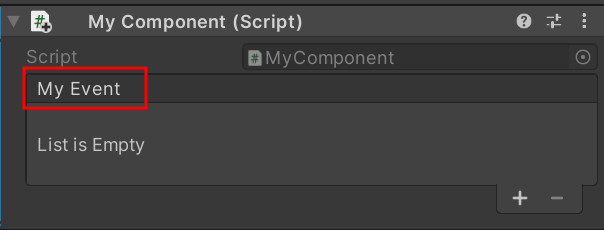
UnityEvent - 인스펙터에 노출되는 이벤트
using UnityEngine;
using UnityEngine.Events

public class MyEvent : MonoBehaviour {

    public UnityEvent myEvent;

    private void Awake() {
        if (myEvent == null)
            myEvent = new UnityEvent();

        myEvent.AddListener(SomeFunction);
    }

    public void TriggerEvent() {
        myEvent.Invoke();
    }

    private void SomeFunction() {
        // Do something here
    }
}
event
델리게이트와 유사하지만 이벤트 호출은 본인 클래스만 가능하다.
왜 사용하는가?
- 캡슐화와 모듈화:
Action,Func,Predicate, 그리고 Unity의UnityEvent를 사용하면 코드의 일부를 메서드로 캡슐화하고 쉽게 재사용할 수 있습니다. - 이벤트 기반 프로그래밍: 특정 이벤트가 발생할 때 특정한 동작을 실행하게 함으로써 더 직관적이고 응답성이 높은 코드를 작성할 수 있습니다.
- 유연성: 델리게이트는 런타임에 메서드를 할당할 수 있기 때문에, 코드의 유연성이 높아집니다. 예를 들어, 다른 이벤트 핸들러를 할당하거나, 특정 조건에 따라 다른 메서드를 실행할 수 있습니다.
Action, Func, Predicate
1.1 Action
- 설명:
Action은 반환값이 없는 메서드를 가리키는 델리게이트입니다. 0개 이상의 매개변수를 가질 수 있습니다. - 사용 예: 이벤트 핸들러, 콜백 함수 등에서 반환값이 필요 없는 경우 사용됩니다.
- 예제:
csharp코드 복사
using System;

class Program
{
    static void Main()
    {
        Action<int> printNumber = (num) => Console.WriteLine(num);
        printNumber(10); // 출력: 10
    }
}
1.2 Func
- 설명:
Func은 반환값이 있는 메서드를 가리키는 델리게이트입니다. 마지막 타입 파라미터가 반환 타입을 나타내며, 최대 16개의 입력 매개변수를 받을 수 있습니다. - 사용 예: 계산이나 처리 결과를 반환해야 하는 경우에 사용됩니다.
- 예제:
csharp코드 복사
using System;

class Program
{
    static void Main()
    {
        Func<int, int, int> add = (a, b) => a + b;
        int result = add(5, 3); // result = 8
        Console.WriteLine(result);
    }
}
1.3 Predicate
- 설명:
Predicate는 특정 조건을 만족하는지 검사하는 메서드를 가리키는 델리게이트로, 항상 하나의 매개변수를 받고bool값을 반환합니다. - 사용 예: 리스트에서 조건에 맞는 항목을 필터링하거나 검사할 때 사용됩니다.
- 예제:
```csharp
csharp코드 복사
using System;

class Program
{
    static void Main()
    {
        Predicate<int> isEven = (num) => num % 2 == 0;
        bool result = isEven(4); // result = true
        Console.WriteLine(result);
    }
}
```
✏️참고 자료
microsoft-using-delegates
델리게이트의 특징 - daekyoulibrary

행복하세요