
1. HTML 속성 다루기
브라우저가 콘텐츠를 화면에 보여주기 위해 HTML 문서를 해석할 때 DOM 객체가 만들어진다.
이 때, HTML 태그들이 가지고 있는 각각의 속성들은 요소 노드의 property가 된다.
대부분의 HTML 속성들은 이름 그대로 요소 노드의 property로 생성된다.
다만, 모든 HTML 속성이 요소 노드의 property로 생성되지는 않는다.
아래 예시의 href 태그와 같이, HTML 표준을 따르지 않은 경우에는, 호출하였을 때 undefined가 출력될 수 있다.
<!DOCTYPE html>
<html lang="ko">
<head>
  <meta charset="UTF-8">
  <title>JS with Codeit</title>
</head>
<body>
  <div>
    <h1>오늘 할 일</h1>
		<ol id="today">
      <li class="item">자바스크립트 공부</li>
			<li class="item">고양이 화장실 청소</li>
			<li class="item">고양이 장난감 쇼핑</li>
		</ol>
		<h1>내일 할 일</h1>
    <ol id="tomorrow" href="https://www.codeit.kr">
      <li class="item"><a href="https://developer.mozilla.org/ko/docs/Web/JavaScript">자바스크립트 공부</a></li>
			<li class="item">뮤지컬 공연 예매</li>
			<li class="item">유튜브 시청</li>
		</ol>
  </div>
  <script src="index.js"></script>
</body>
</html>
const tomorrow = document.querySelector('#tomorrow');
const item = tomorrow.firstElementChild;
const link = item.firstElementChild;
console.log(tomorrow.href);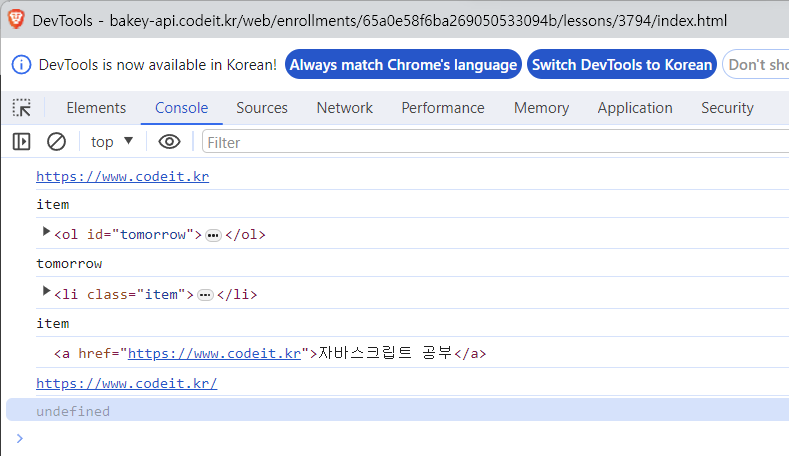
💡 HTML 표준 속성 참고 자료 : https://html.spec.whatwg.org/#attributes-3
또한, HTML 태그의 class 속성은 className이라는 이름으로 property가 생성된다.
1.1 method로 속성 접근하기
property에 직접 접근하는 방식으로는 HTML 비표준 속성에 접근이 불가능하지만, getAttribute method를 활용하면 표준과 비표준 관계없이 접근이 가능하다.
<!DOCTYPE html>
<html lang="ko">
<head>
  <meta charset="UTF-8">
  <title>JS with Codeit</title>
</head>
<body>
  <div>
    <h1>오늘 할 일</h1>
		<ol id="today">
      <li class="item">자바스크립트 공부</li>
			<li class="item">고양이 화장실 청소</li>
			<li class="item">고양이 장난감 쇼핑</li>
		</ol>
		<h1>내일 할 일</h1>
    <ol id="tomorrow" href="https://www.codeit.kr">
      <li class="item"><a href="https://developer.mozilla.org/ko/docs/Web/JavaScript">자바스크립트 공부</a></li>
			<li class="item">뮤지컬 공연 예매</li>
			<li class="item">유튜브 시청</li>
		</ol>
  </div>
  <script src="index.js"></script>
</body>
</html>
const tomorrow = document.querySelector('#tomorrow');
const item = tomorrow.firstElementChild;
const link = item.firstElementChild;
console.log(tomorrow.getAttribute('href'));
console.log(item.getAttribute('class'));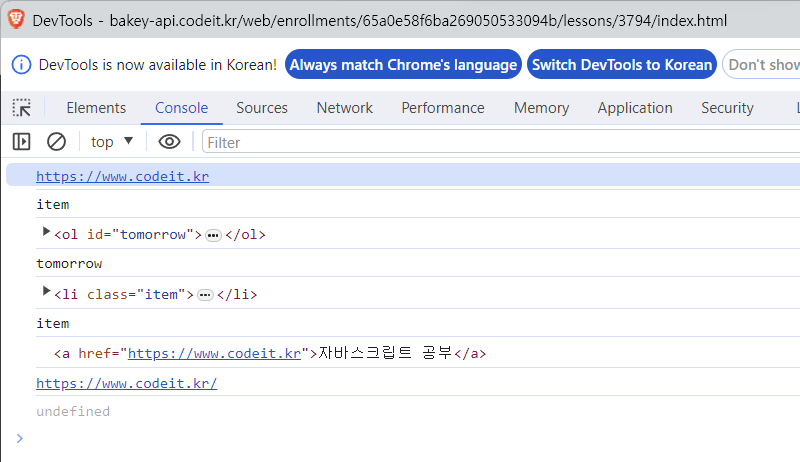
class 속성은 property name으로 접근할 때는 className이지만, getAttribute method를 활용할 때는 class라는 문자열을 그대로 전달해야 한다는 점을 주의하자.
1.2 속성 추가
setAttribute method를 활용하면, 속성을 추가할 수 있다.
첫 번째 parameter에 추가할 속성 이름을 작성하고, 두 번째 parameter에 값을 전달해주면 된다.
만약, 기존에 없었던 속성인 경우라면 추가가 되고, 이미 존재하는 속성인 경우라면 수정되는 형태로 동작한다.
<!DOCTYPE html>
<html lang="ko">
<head>
  <meta charset="UTF-8">
  <title>JS with Codeit</title>
</head>
<body>
  <div>
    <h1>오늘 할 일</h1>
		<ol id="today">
      <li class="item">자바스크립트 공부</li>
			<li class="item">고양이 화장실 청소</li>
			<li class="item">고양이 장난감 쇼핑</li>
		</ol>
		<h1>내일 할 일</h1>
    <ol id="tomorrow" href="https://www.codeit.kr">
      <li class="item"><a href="https://developer.mozilla.org/ko/docs/Web/JavaScript">자바스크립트 공부</a></li>
			<li class="item">뮤지컬 공연 예매</li>
			<li class="item">유튜브 시청</li>
		</ol>
  </div>
  <script src="index.js"></script>
</body>
</html>
const tomorrow = document.querySelector('#tomorrow');
const item = tomorrow.firstElementChild;
const link = item.firstElementChild;
tomorrow.setAttribute('class', 'list');
link.setAttribute('href', 'https://www.codeit.kr');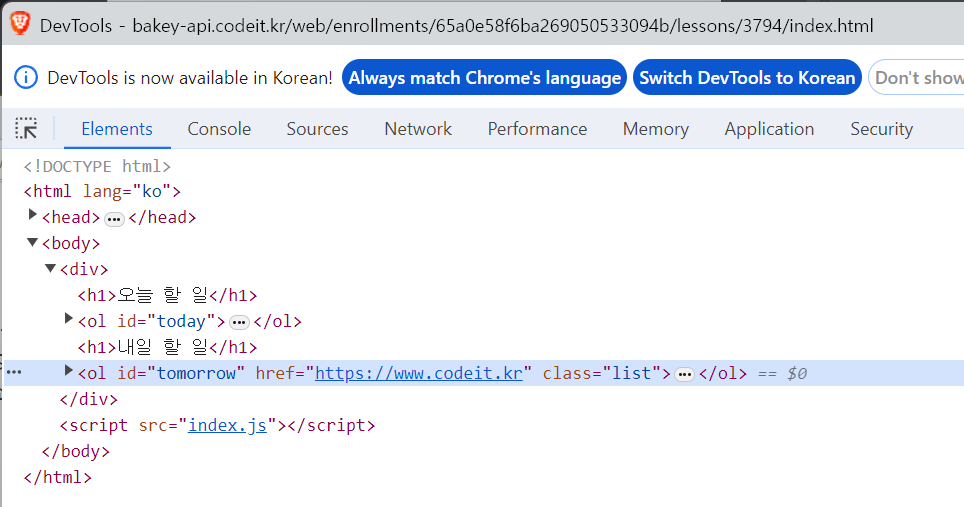
1.3 속성 삭제
removeAttribute method를 활용하여, parameter에 문자열로 속성 이름을 전달하면 해당 속성을 제거할 수 있다.
아래 예시 결과를, 위의 속성 추가 결과와 비교하여 확인해보면, href 속성과 class 속성이 제거된 것을 확인할 수 있다.
const tomorrow = document.querySelector('#tomorrow');
const item = tomorrow.firstElementChild;
const link = item.firstElementChild;

tomorrow.removeAttribute('href');
tomorrow.removeAttribute('class');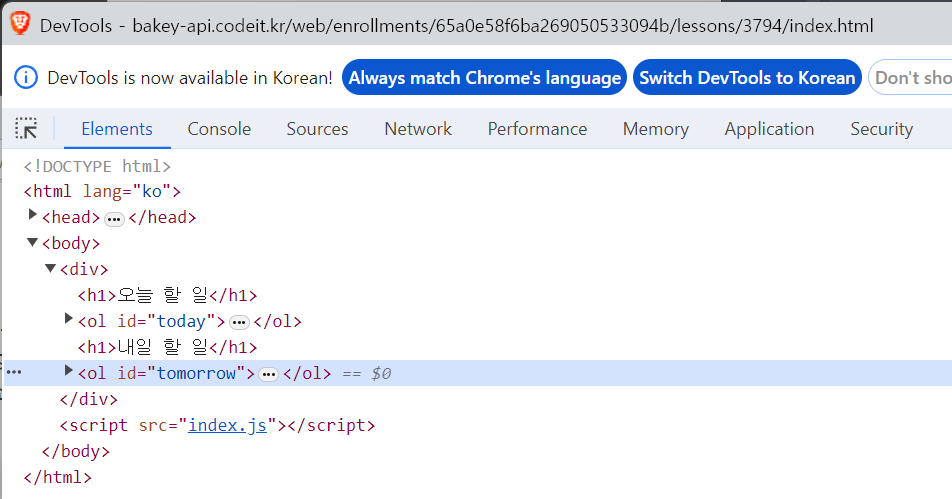
💡 위의 세 가지 method 모두, 속성 이름은 대소문자를 구분하지 않는다. (HTML 표준 속성이 소문자이기 때문)