CloudNet@에서 진행하는 Istio Study 3주차 6장 내용입니다.
📕 This chapter cover
- Understanding the importance of resilience
- Leveraging client-side load balancing
- Implementing request timeouts and retries
- Circuit breaking and connection pooling
- Migrating from application libraries used for resilience
- 분산 시스템의 문제는 시스템이 이따금 예측할 수 없는 방식으로 실패하며 수작업으로 트래픽 전환 조치를 할 수 없다는 것이다.
- 따라서 문제가 발생했을 때 애플리케이션이 스스로 대응할 수 있도록 애플리케이션에 합리적인 동작을 구축할 수 있는 방법이 필요하다.
- Istio를 사용하면 애플리케이션 코드를 변경하지 않고도 타임아웃, 재시도, 서킷 브레이커를 추가할 수 있다.
6.1 Building resilience into the application
복원력 패턴의 필요성
- ‘장애가 발생하지 않도록 구축하면 된다’고 말하는 세상은 현실이 아니다. 장애가 발생하면 모든 서비스를 중단시킬 위험이 있다.
- 네트워크로 통신하는 서비스로 분산 시스템을 구축할 때는 장애 지점을 더 많이 많들어낼 위험이 있으며, 치명적인 장애가 발생할 가능성을 마주하게 된다.
- 소유자는 애플리케이션 및 서비스 전반에 걸쳐 몇 가지 복원력 패턴을 일관되게 채택해야 한다.
- 애플리케이션이 장애를 예상해 요청을 처리할 때 자동으로 복원을 시도하거나 대체 경로로 돌아갈 수 있도록 구축
=> 이번 장 목표로 애플리케이션의 프로그래밍 언어와 상관없이 애플리케이션에 복원력을 올바르고 일관되게 구현하는 것
6.1.1 Building resilience into application libraries
트위터, 네플릭스는 자사들의 복원력 프레임워크(Finagle, Hystrix, Ribbon)들을 오픈소스화했다.
문제점은 프레임워크의 한 가지 문제점은 언어, 프레임워크, 인프라 조합마다 구현 방식이 상이하다 라는 것
여러 언어와 프레임워크에 걸쳐 이런 라이브러리들을 유지 관리하는 것은 마이크로서비스 운영 측면에서 부담
6.1.2 Using Istio to solve these problems
Istio의 Service Proxy는 Application 수준 요청과 메시지(HTTP 요청)을 이해하므로 Proxy안에서 복원력 기능을 구현할 수 있다.
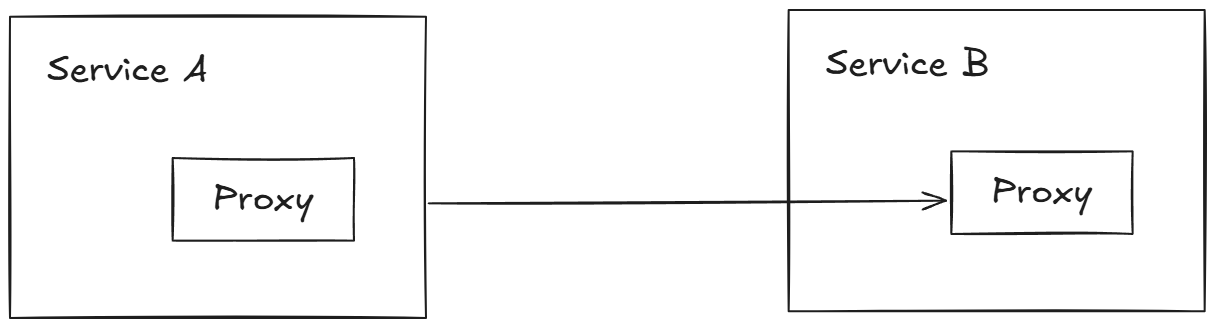
- 예를 들어 서비스 호출 시 HTTP 503 오류가 발생하면 세 번까지 재시도하도록 설정할 수 있다.
- 재시도할 실패, 재시도 횟수, 재시도별 타임아웃을 정확히 설정할 수 있는데, 서비스 프록시가 서비스 인스턴스마다 배포되므로 애플리케이션마다 필요한 대로 재시도 동작을 세밀하게 제어할 수 있다.
Istio의 Service Proxy는 기본적으로 다음과 같은 복원력 패턴을 구현한다.
1. Client-side load balancing
2. Locality-aware load balancing
3. Timeouts and retries
4. Circuit breaking
6.1.3 Decentralized implementation of resilience
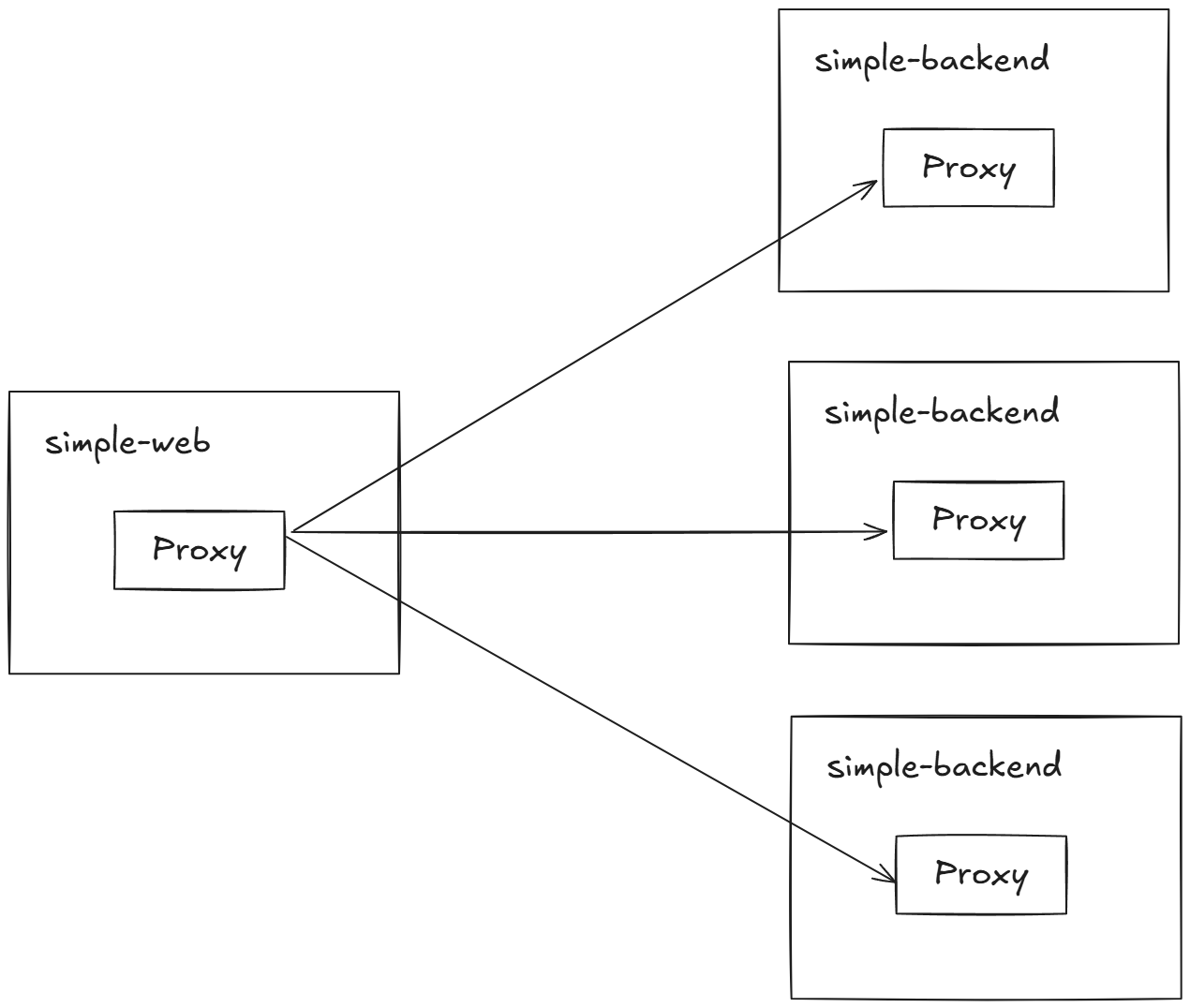
Istio를 사용하여 이전에 사용하던 중앙집중식 게이트웨이 없이, 복원력 패턴 처리를 코드에 함께 두는 애플리케이션 라이브러리를 사용하면 동일한 아키텍처를 얻는다.
예제로 simple-web 서비스가 simple-backend 서비스를 호출한다.
6.2 Client-side load balancing
클라이언트 측 로드 밸런싱이란 엔드포인트 간에 요청을 최적으로 분산시키기 위해 클라이언트에게 서비스에서 사용할 수 있는 여러 엔드포인트를 알려주고 클라이언트가 특정 로드 밸런싱 알고리듬을 선택하게 하는 방식을 말한다.
- 이렇게 하면 병목 현상과 장애 지점을 만들 수 있는 중앙집중식 로드 밸런싱에 의존할 필요성이 줄어들고, 클라이언트가 군더더기 홉을 거칠 필요 없이 특정 엔드포인트로 직접적이면서 의도적으로 요청을 보낼 수 있다
- 서비스 운영자와 개발자는
DestinationRule리소스로 클라이언트가 어떤 로드 밸런싱 알고리듬을 사용할지 설정할 수 있다. - Istio의 Service Proxy는 기반이 엔보이이므로 엔보이의 로드 밸런싱 알고리듬을 지원하며 아래는 일부이다.
- 라운드 로빈(기본값)
- 랜덤
- 가중치를 적용한 최소 요청
6.2.1 Getting started with client-side load balancing
- 예제 서비스 2개와 gw,vs 배포
# (옵션) kiali 에서 simple-backend-1,2 버전 확인을 위해서 labels 설정 : ch6/simple-backend.yaml
open ch6/simple-backend.yaml
...
apiVersion: apps/v1
kind: Deployment
metadata:
  labels:
    app: simple-backend
    version: v1
  name: simple-backend-1
spec:
  replicas: 1
  selector:
    matchLabels:
      app: simple-backend
  template:
    metadata:
      labels:
        app: simple-backend
        version: v1
...
apiVersion: apps/v1
kind: Deployment
metadata:
  labels:
    app: simple-backend
    version: v2
  name: simple-backend-2
spec:
  replicas: 2
  selector:
    matchLabels:
      app: simple-backend
  template:
    metadata:
      labels:
        app: simple-backend
        version: v2
...
kubectl apply -f ch6/simple-web-gateway.yaml -n istioinaction


# gw,vs 배포
cat ch6/simple-web-gateway.yaml
apiVersion: networking.istio.io/v1alpha3
kind: Gateway
metadata:
  name: simple-web-gateway
spec:
  selector:
    istio: ingressgateway
  servers:
  - port:
      number: 80
      name: http
      protocol: HTTP
    hosts:
    - "simple-web.istioinaction.io"
---
apiVersion: networking.istio.io/v1alpha3
kind: VirtualService
metadata:
  name: simple-web-vs-for-gateway
spec:
  hosts:
  - "simple-web.istioinaction.io"
  gateways:
  - simple-web-gateway
  http:
  - route:
    - destination:
        host: simple-web

kubectl apply -f ch6/simple-web-gateway.yaml -n istioinaction- Kiali로 확인
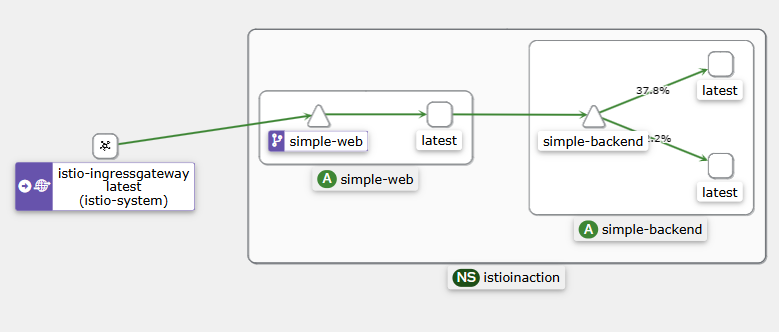
DestinationRule리소스로 simple-backend 서비스를 호출하는 모든 클라이언트의 로드 밸런싱을 ROUND_ROBIN으로 설정하자.DestinationRule는 특정 목적지를 호출하는 메시 내 클라이언트들에 정책을 지정한다.
아래는 simple-backend 용 첫 DestinationRule
# cat ch6/simple-backend-dr-rr.yaml
apiVersion: networking.istio.io/v1beta1
kind: DestinationRule
metadata:
  name: simple-backend-dr
spec:
  host: simple-backend.istioinaction.svc.cluster.local
  trafficPolicy:
    loadBalancer:
      simple: ROUND_ROBIN # 엔드포인트 결정을 '순서대로 돌아가며'
- simple-web 과 simple-backend 간 호출이 여러 simple-backend 엔드포인트로 효과적으로 분산되는 것을 확인할 수 있다.
- 우리는 simple-web 과 simple-backend 간의 클라이언트 측 로드 밸런싱을 보고 있는데, simple-web 과 함께 배포된 서비스 프록시가 모든 simple-backend 엔드포인트를 알고 있고 기본 알고리듬을 사용해 요청을 받을 엔드포인트를 결정하고 있기 때문이다.
- ROUND_ROBIN 로드 밸런싱을 사용하도록
DestinationRule을 설정하기는 했지만, 사실 이스티오 서비스 프록시의 기본 설정도 ROUND_ROBIN 로드 밸런싱 전략을 사용하는 것이다.
6.2.2 Setting up our scenario : Fortio 설치
- 현실적인 환경에서 서비스가 요청을 처리하는 데 시간이 걸린다. 소요 시간은 여러 이유로 달라질 수 있다.
- Request size
- Processing complexity
- Database usage
- Calling other services that take time
- 서비스 외적인 이유도 응답 시간에 영향을 줄 수 있다.
- Unexpected, stop-the-world garbage collections
- Resource contention (CPU, 네트워크 등)
- Network congestion
예제 서비스에 지언과 편차를 도입하여 모방한다. 서비스 응답 시간 차이를 관찰한다.
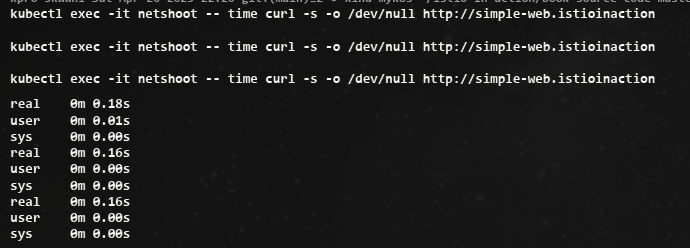
로드 밸런싱은 주기적으로 혹은 예기치 못하게 지연 시간이 급증하는 엔드포인트의 영향을 줄이는 효과적인 전략이 될 수 있다.
6.2.4 Understanding the different load-balancing algorithms
- 로드 테스트 종합해보면,
- 첫째, 여러 로드 밸런서는 현실적인 서비스 지연 시간 동작하에서 만들어내는 결과가 서로 다르다.
- 둘째, 히스토그램과 백분위수는 모두 다르다.
- 마지막으로, 최소 커넥션이 랜덤과 라운드 로빈보다 성능이 좋다. 그 이유를 알아보자.
- 라운드 로빈(또는 next-in-loop)은 엔드포인트에 차례대로 요청을 전달한다.
- 랜덤은 엔드포인트를 무작위로 균일하게 고른다.
- 최소 커넥션 least-connection 로드 밸런서(엔보이에서는 최소 요청 least request으로 구현)는 특정 엔드포인트의 지연 시간을 고려한다.
- 요청을 엔드포인트로 보낼 때 대기열 깊이
queue depth를 살펴 활성 요청 개수를 파악하고, 활성 요청이 가장 적은 엔드포인트를 고른다. - 이런 알고리듬 유형을 사용하면, 형편없이 동작하는 엔드포인트로 요청을 보내는 것을 피하고 좀 더 빠르게 응답하는 엔드포인트를 선호할 수 있다.
- 요청을 엔드포인트로 보낼 때 대기열 깊이
6.3 Locality-aware load balancing
서비스 메시에서 전체 서비스 토폴로지를 이해할 때의 이점은 서비스와 피어 서비스의 위치 같은 휴리스틱 heuristic 을 바탕으로 라우팅과 로드 밸런싱을 자동으로 결정할 수 있다는 점이다.
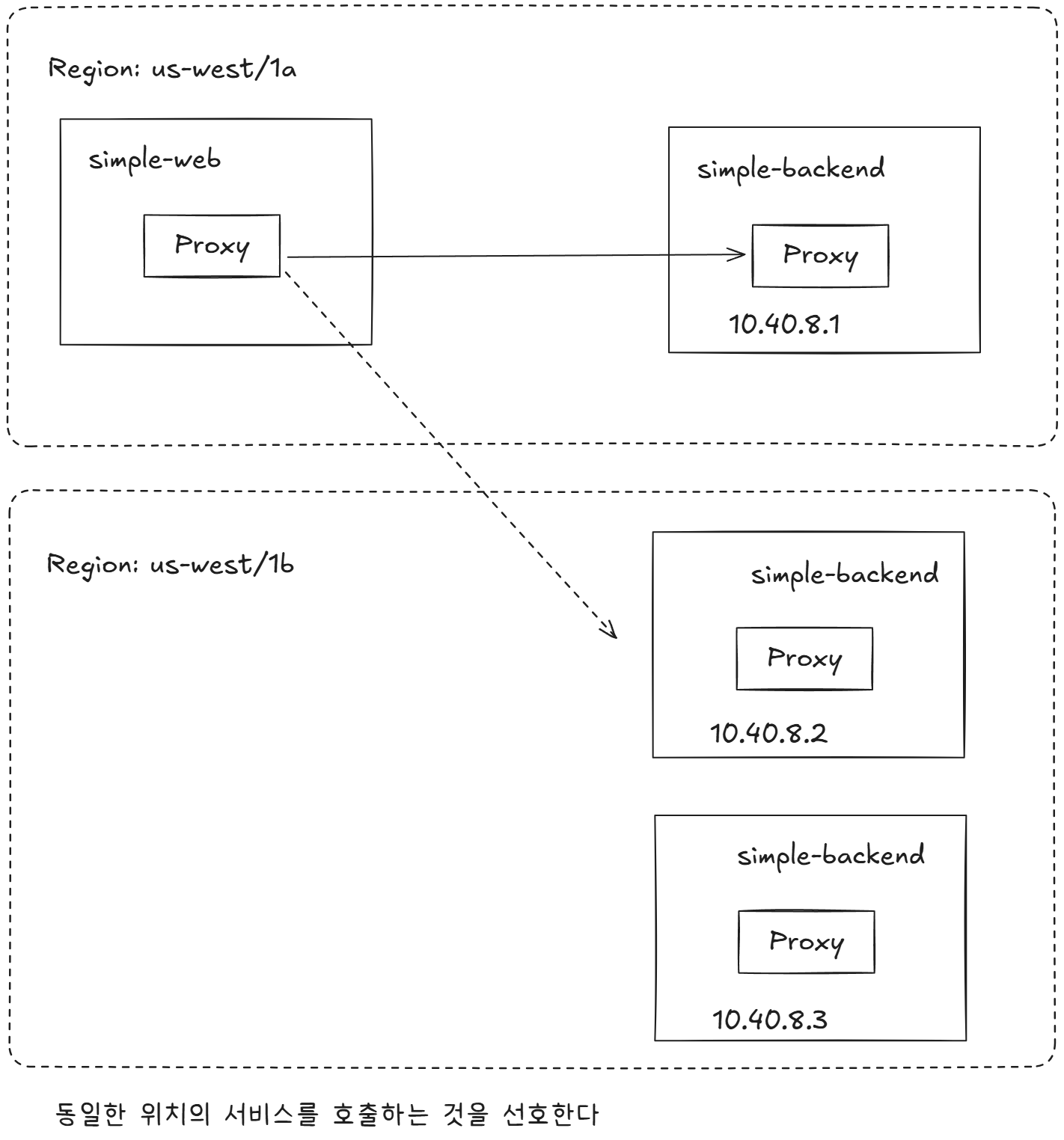
- 이스티오가 지원하는 로드 밸런싱 유형에는 워크로드의 위치에 따라 루트에 가중치를 부여하고 라우팅 결정을 내리는 것이다.
- 예를 들어 이스티오는 특정 서비스를 배포한 리전과 가용 영역을 식별하고, 더 가까운 서비스에 우선순위를 부여할 수 있다.
모든 엔드포인트를 동등하게 취급한다면 리전이나 영역을 넘나들면서 지연 시간이 길어지고 비용이 발생할 가능성이 크다.
6.3.1 Hands-on with locality load balancing
- 지역 인식 로드 밸성싱이 잘 동작하는지 살펴보자. 쿠버네티스에 배포할 때, 리전과 영역 정보를 노드 레이블에 추가할 수 있다.
- 예를 들어
failure-domain.beta.kubernetes.io/region레이블 및failure-domain.beta.kubernetes.io/zone은 각각 리전과 영역을 지정 할 수 있게 해준다. - 최근에는 쿠버네티스 API 정식 버전에서는 이 레이블들을
topology.kubernetes.io/region과topology.kubernetes.io/zone으로 대체했다. - 이런 레이블은 구글 클라우드나 AWS 같은 클라우드 프로바이더가 자동으로 추가하는 경우가 많다.
실습을 위해 1대지만, 파드에 istio-locality 라는 레이블을 달아 리전/영역을 지정할 수 있다.
- 서비스 배포
#
kubectl apply -f ch6/simple-service-locality.yaml -n istioinaction

# 확인
## simple-backend-1 : us-west1-a  (same locality as simple-web)
kubectl get deployment.apps/simple-backend-1 -n istioinaction \
-o jsonpath='{.spec.template.metadata.labels.istio-locality}{"\n"}'
us-west1.us-west1-a

## simple-backend-2 : us-west1-b
kubectl get deployment.apps/simple-backend-2 -n istioinaction \
-o jsonpath='{.spec.template.metadata.labels.istio-locality}{"\n"}'
us-west1.us-west1-b
호출 테스트 1 ⇒ 지역 정보를 고려하지 않고 simple-backend 모든 엔드포인트로 트래픽이 로드 밸런싱 됨
# 신규 터미널 : 반복 접속 실행 해두기
while true; do curl -s http://simple-web.istioinaction.io:30000 | jq ".upstream_calls[0].body" ; date "+%Y-%m-%d %H:%M:%S" ; sleep 1; echo; done

# 호출 : 이 예시 서비스 집합에서는 호출 체인을 보여주는 JSON 응답을 받느다
curl -s http://simple-web.istioinaction.io:30000 | jq ".upstream_calls[0].body"

# 반복 호출 확인 : 파드 비중은 backend-2가 2개임
for in in {1..10}; do curl -s http://simple-web.istioinaction.io:30000 | jq ".upstream_calls[0].body"; done
for in in {1..50}; do curl -s http://simple-web.istioinaction.io:30000 | jq ".upstream_calls[0].body"; done | sort | uniq -c | sort -nr
이스티오에서 지역 인식 로드밸런싱이 작동하려면 헬스 체크를 설정해야 한다.
- 헬스 체크가 없으면 이스티오가 로드 밸런싱 풀의 어느 엔드포인트가 비정상 인지, 다음 지역으로 넘기는 판단 기준은 무엇인지를 알 수 없다.
- 헬스 체크 설정 추가
cat ch6/simple-backend-dr-outlier.yaml
apiVersion: networking.istio.io/v1beta1
kind: DestinationRule
metadata:
  name: simple-backend-dr
spec:
  host: simple-backend.istioinaction.svc.cluster.local
  trafficPolicy:
    outlierDetection:
      consecutive5xxErrors: 1
      interval: 5s
      baseEjectionTime: 30s
      maxEjectionPercent: 100

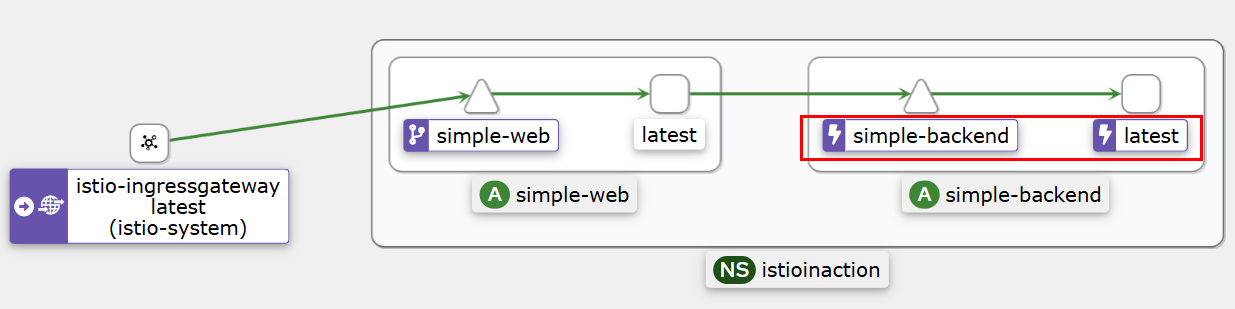
kubectl apply -f ch6/simple-backend-dr-outlier.yaml -n istioinaction- Kiali 확인
모든 트래픽이 simple-web과 동일한 영역에 있는 simple-backend-1 서비스로 가고 있다.
호출 테스트2 >> 오동작 주입 후 확인
- 트래픽이 가용 영역을 넘어가는 것을 보기 위해 simple-backend-1 서비스를 오동작 상태로 만들어보자. simple-web 에서 simple-backend-1 호출하면 항상 HTTP 500 오류를 발생하게 하자
# HTTP 500 에러를 일정비율로 발생
cat ch6/simple-service-locality-failure.yaml
...
        - name: "ERROR_TYPE"
          value: "http_error"
        - name: "ERROR_RATE"
          value: "1"
        - name: "ERROR_CODE"
          value: "500"
...
kubectl apply -f ch6/simple-service-locality-failure.yaml -n istioinaction

                "healthStatus": {
                    "failedOutlierCheck": true,
                    "edsHealthStatus": "HEALTHY"
                },
                ...
                "healthStatus": {
                    "edsHealthStatus": "HEALTHY"
                },
이렇게 특정 지역의 서비스가 제대로 동작하지 않을 때 예상하는 지역 인식 로드 밸런싱 결과를 얻을 수 있다.
6.3.2 More control over locality load balancing with weighted distribution : 가중치 분포로 지역 인식 LB 제어 강화
지역 인식 로드밸런싱에서 마지막으로 알아둬야 하는 내용은 동작 방식 일부를 제어할 수 있다는 것이다.
- 트래픽 일부를 여러 지역에 분산하고 싶다면 이 동작에 영향을 줄 수 있는데, 이를 지역 가중 분포 locality weighted distribution 라고 한다.
- 특정 지역의 서비스가 피크 peak 시간이나 계절성 트래픽으로 인해 과부하될 것으로 예상될 경우 이런 방법을 사용할 수 있다.
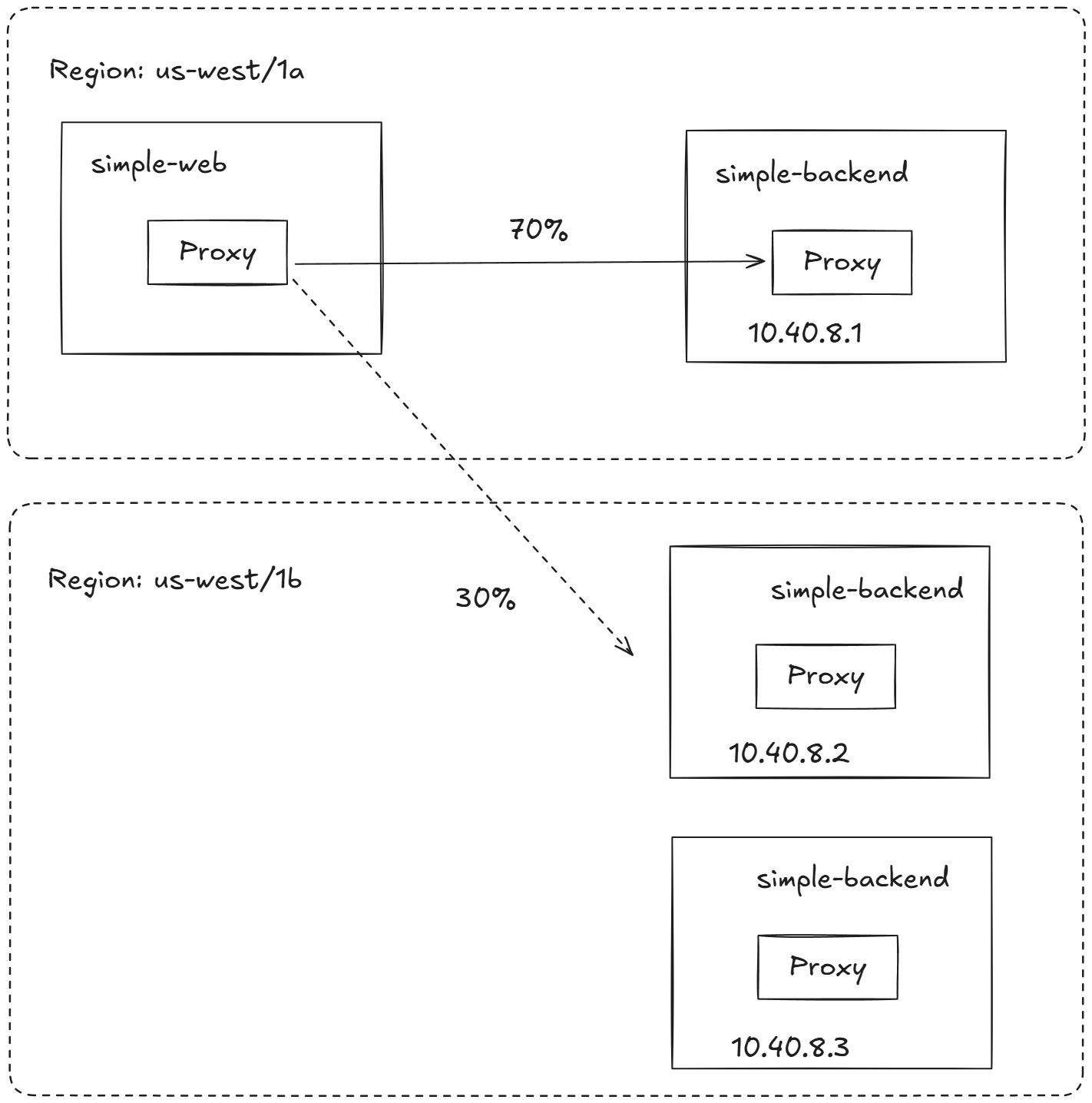
LB에 가중치 적용 실습
simple-backend 서비스로 가는 트래픽 70%를 us-west1-a로, 30%를 us-west1-b로 보낸다.
cat ch6/simple-backend-dr-outlier-locality.yaml
apiVersion: networking.istio.io/v1beta1
kind: DestinationRule
metadata:
  name: simple-backend-dr
spec:
  host: simple-backend.istioinaction.svc.cluster.local
  trafficPolicy:
    loadBalancer: # 로드 밸런서 설정 추가
      localityLbSetting:
        distribute:
        - from: us-west1/us-west1-a/* # 출발지 영역
          to:
            "us-west1/us-west1-a/*": 70 # 목적지 영역
            "us-west1/us-west1-b/*": 30 # 목적지 영역
    connectionPool:
      http:
        http2MaxRequests: 10
        maxRequestsPerConnection: 10
    outlierDetection:
      consecutive5xxErrors: 1
      interval: 5s
      baseEjectionTime: 30s
      maxEjectionPercent: 100

kubectl apply -f ch6/simple-backend-dr-outlier-locality.yaml -n istioinaction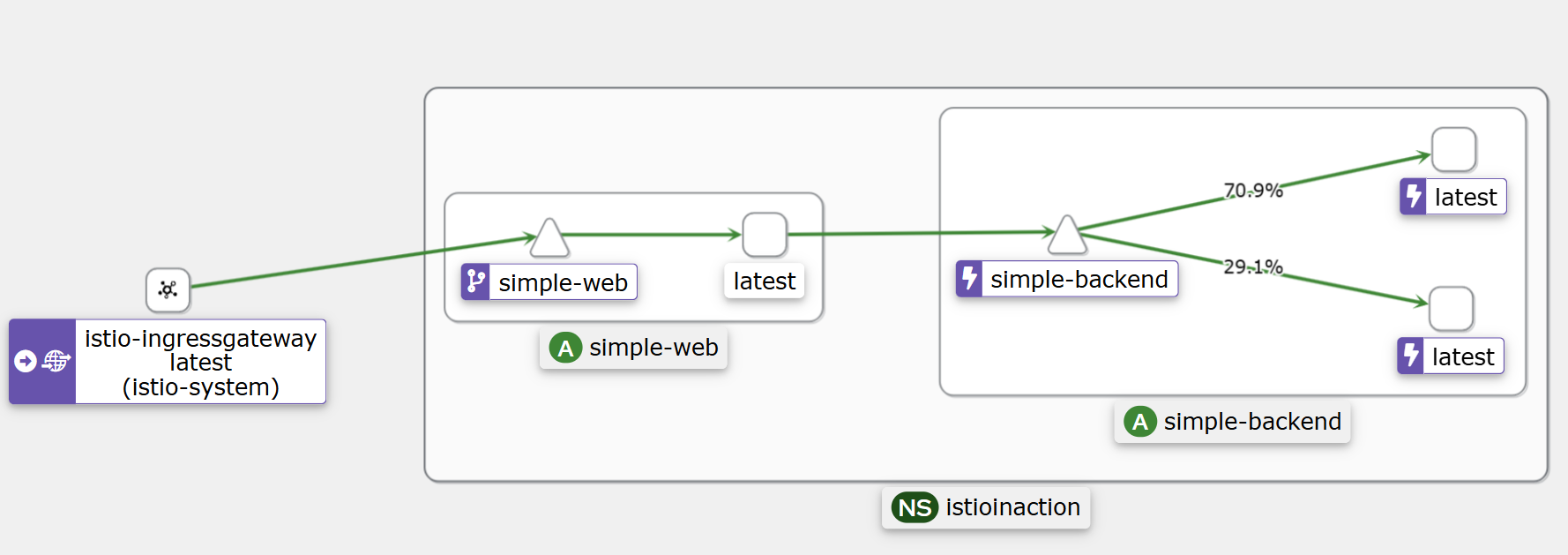
테스트 결과 70과 30으로 나뉘었다.
6.4 Transparent timeouts and retries
네트워크에 분산된 구성 요소에 의존하는 시스템을 구축할 때 가장 큰 문제는 지연 시간과 실패다.
이스티오를 사용하면 다양한 종류의 타임아웃과 재시도를 설정해 네트워크에 내재된 신뢰성 문제를 극복할 수 있다.
6.4.1 Timeouts : 지연 시간
- 분산 환경에서 가장 다루기 어려운 시나리오 중 하나가 지연 시간이다.
- 예기치 못한 시나리오를 방지하려면 커넥션이나 요청, 혹은 둘 다에서 타임아웃을 구현해야 한다.
- 일반적으로 아키텍처의 가장자리(트래픽이 들어오는 곳)에 가까울수록 타임아웃이 길고 호출 그래프의 계층이 깊을수록 타임아웃이 짧은(혹은 더 제한적인)것이 합리적이다.
- 통상, 밖 → 안, backend에 위치할 수록 timeout 을 짧게 설정합니다
호출 테스트: simple-backend-1를 1초 delay로 응답
# 호출 테스트 : 보통 10~20ms 이내 걸림
curl -s http://simple-web.istioinaction.io:30000 | jq .code
time curl -s http://simple-web.istioinaction.io:30000 | jq .code
for in in {1..10}; do time curl -s http://simple-web.istioinaction.io:30000 | jq .code; done

# simple-backend-1를 1초 delay로 응답하도록 배포
cat ch6/simple-backend-delayed.yaml
kubectl apply -f ch6/simple-backend-delayed.yaml -n istioinaction
# 호출 테스트 : simple-backend-1로 로드밸런싱 될 경우 1초 이상 소요 확인
for in in {1..10}; do time curl -s http://simple-web.istioinaction.io:30000 | jq .code; done
...
curl -s http://simple-web.istioinaction.io:30000  0.01s user 0.01s system 6% cpu 0.200 total
jq .code  0.00s user 0.00s system 3% cpu 0.199 total
500
2개의 호출 테스트를 진행했을 때, 2번째 테스트가 지체된 것을 확인했다.
아래는 타임아웃을 0.5로 지정해서 500응답이 발생한다. 결과는 Kiali로 확인
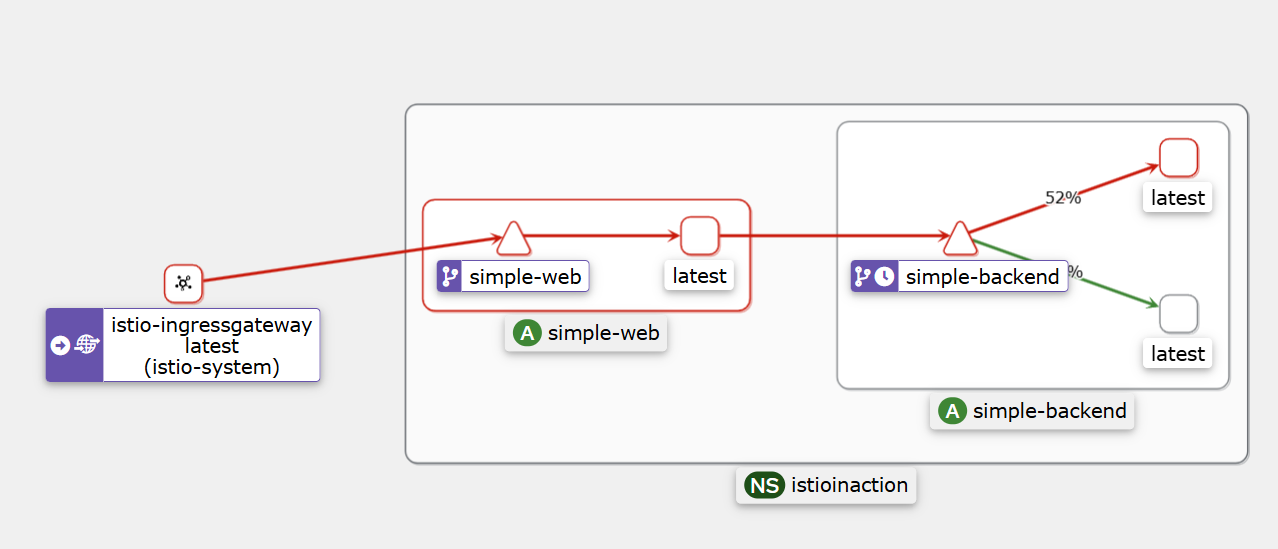
6.4.2 Retries* : 재시도
서비스를 호출할 때 간간이 네트워크 실패를 겪는다면, 애플리케이션이 요청을 재시도하길 원할 수 있다.
한편으로 무분별한 재시도는 연쇄 장애를 야기하는 등 시스템 상태를 저하시킬 수 있으므로 적절히 균형을 맞춰야 한다.
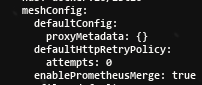
이스티오에서는 재시도가 기본적으로 활성화돼 있고, 두 번까지 재시도한다.
- VirtualService 리소스에서 최대 재시도를 0으로 설정
docker exec -it myk8s-control-plane bash
----------------------------------------
# Retry 옵션 끄기 : 최대 재시도 0 설정
istioctl install --set profile=default --set meshConfig.defaultHttpRetryPolicy.attempts=0
y
exit
----------------------------------------
에러 발생 시 재시도 실습
- 이제 주기적으로(75%) 실패하는 simple-backend 서비스 버전을 배포해보자.
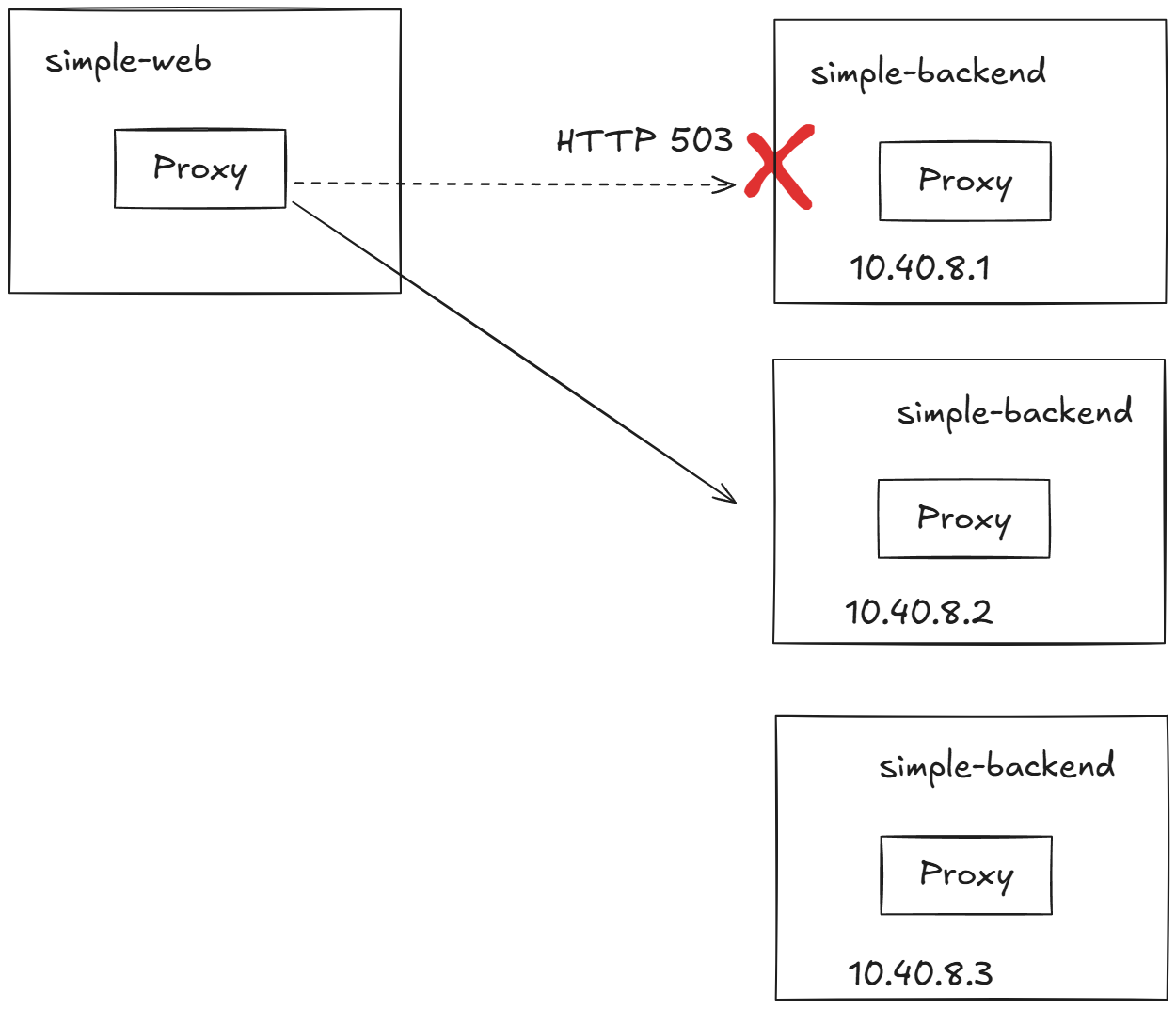
cat ch6/simple-backend-periodic-failure-503.yaml
...
        - name: "ERROR_TYPE"
          value: "http_error"
        - name: "ERROR_RATE"
          value: "0.75"
        - name: "ERROR_CODE"
          value: "503"
...

#
kubectl apply -f ch6/simple-backend-periodic-failure-503.yaml -n istioinaction

#
kubectl exec -it deploy/simple-backend-1 -n istioinaction -- env | grep ERROR

#
kubectl exec -it deploy/simple-backend-1 -n istioinaction -- sh
---------------------------------------------------------------
export ERROR_TYPE=http_error
export ERROR_RATE=0.75
export ERROR_CODE=503
exit
---------------------------------------------------------------

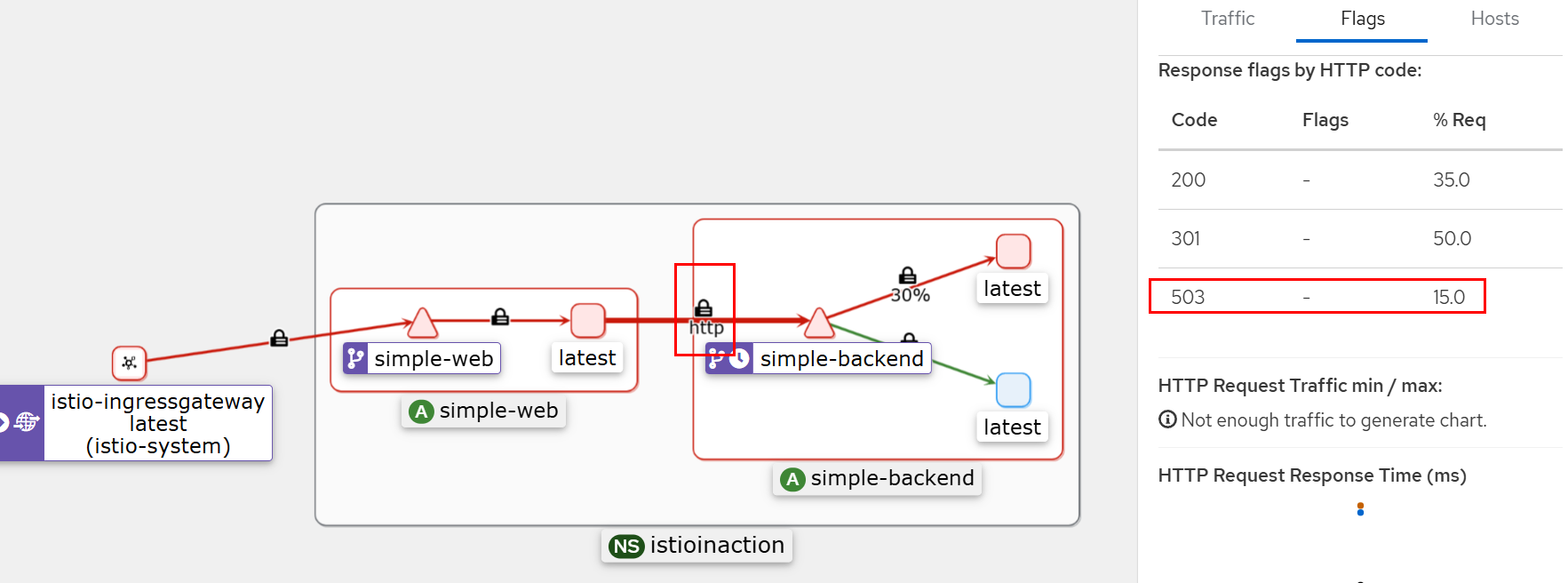
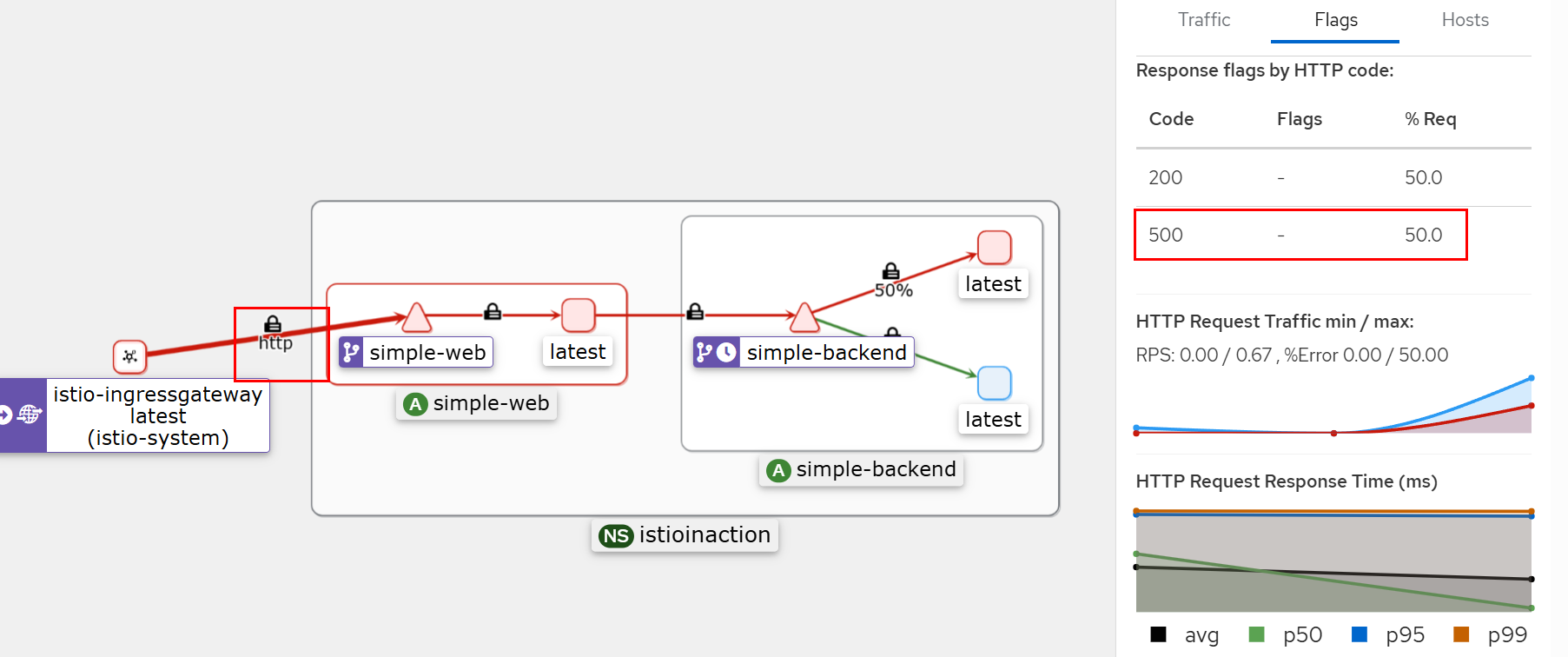
# 호출테스트 : simple-backend-1 호출 시 failures (500) 발생
# simple-backend-1 --(503)--> simple-web --(500)--> curl(외부)
for in in {1..10}; do time curl -s http://simple-web.istioinaction.io:30000 | jq .code; done-
503 응답 확인
-
500 응답 확인
일반적으로 이들 기본 상황에서는 재시도해도 안전한다.
그렇지만, 아래 상황은 - 네트워크 커넥션이 수립되지 않아 첫 시도에서 요청이 전송될 수 없음을 의미하기 때문이다.
- 커넥션 수립 실패 connect-failure
- 스트림 거부됨 refused-stream
- 사용 불가 gRPC 상태 코드 14
- 취소됨 gRPC 상태 코드 1
- 재시도할 수 있는 상태 코드들 이스티오에서 기본값은 HTTP 503
VirtualService 리소스를 사용해 simple-backend 로 향하는 호출에 재시도를 2회로 명시적으로 설정
cat ch6/simple-backend-enable-retry.yaml
apiVersion: networking.istio.io/v1alpha3
kind: VirtualService
metadata:
  name: simple-backend-vs
spec:
  hosts:
  - simple-backend
  http:
  - route:
    - destination:
        host: simple-backend
    retries:
      attempts: 2

kubectl apply -f ch6/simple-backend-enable-retry.yaml -n istioinaction

# 호출테스트 : 모두 성공!
# simple-backend-1 --(503, retry 후 정상 응답)--> simple-web --> curl(외부)
for in in {1..10}; do time curl -s http://simple-web.istioinaction.io:30000 | jq .code; done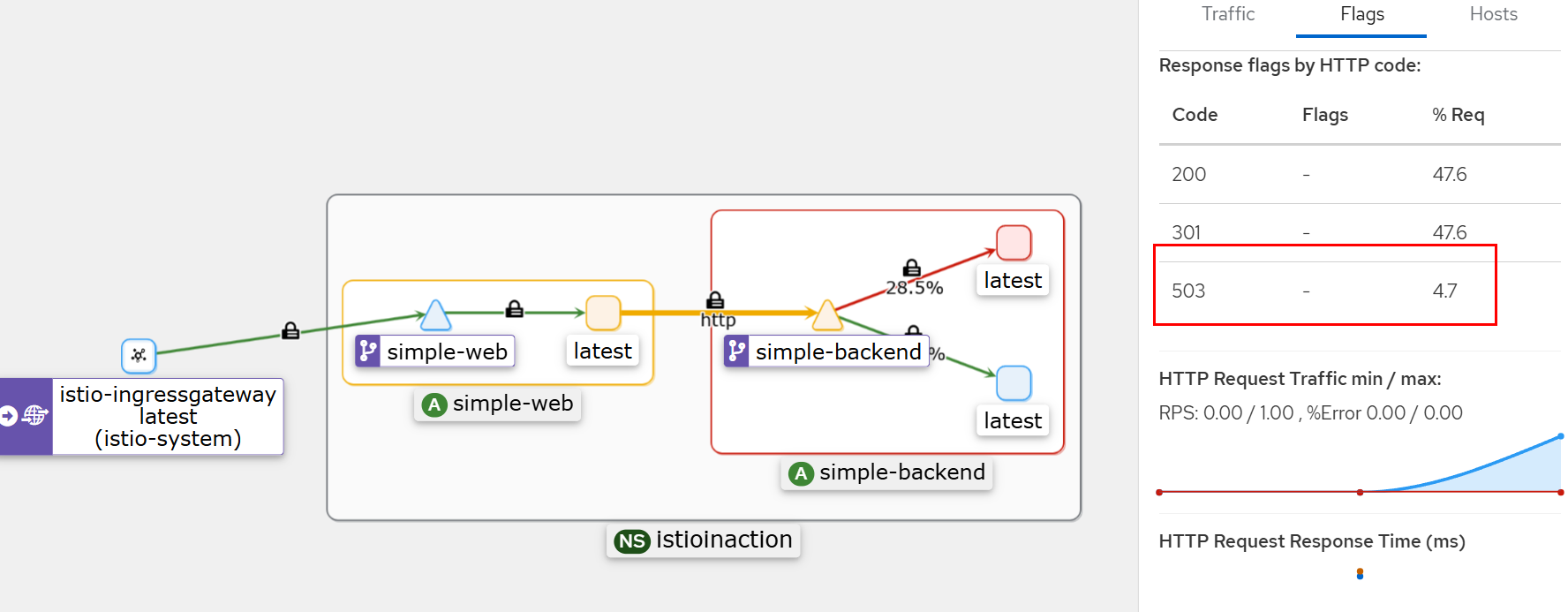
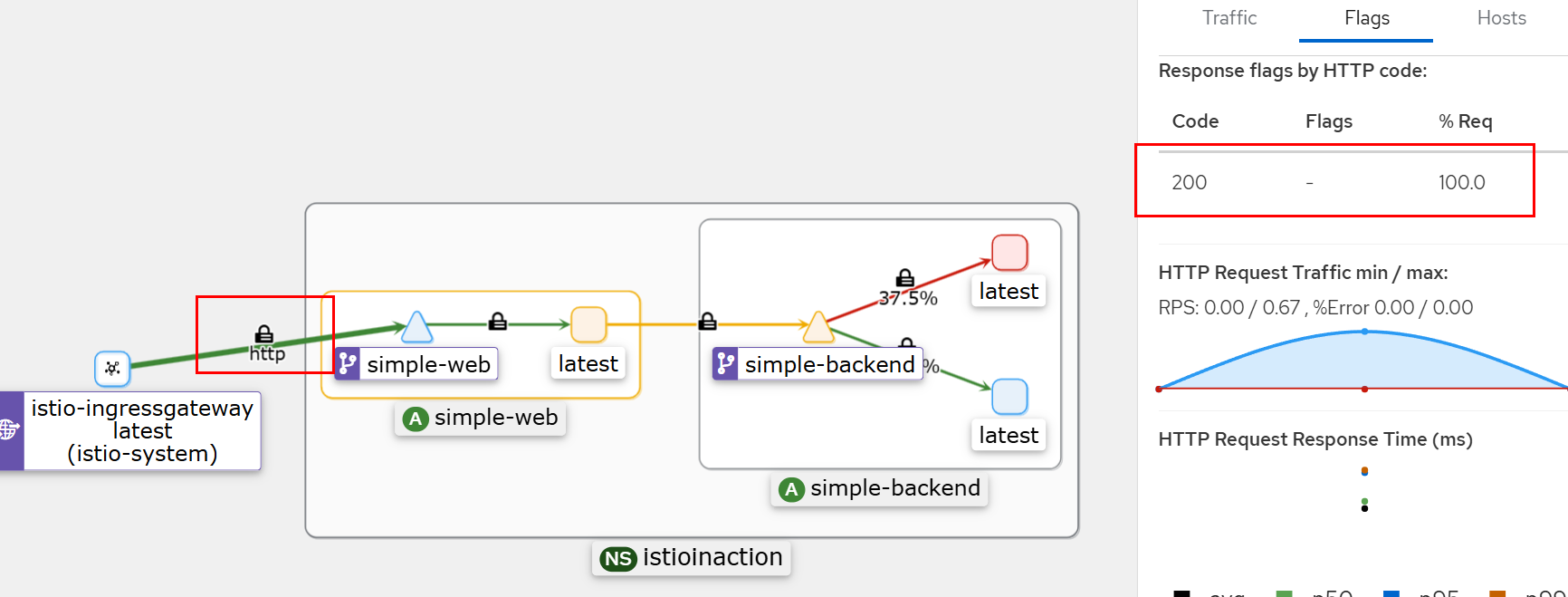
실패는 있지만 호출자에게는 드러나지 않는다. 이스티오의 재시도 정책을 활성화해 이런 오류를 우회하게끔 했기 때문이다.
VirtualService 재시도 정책은 설정할 수 있는 재시도 파라미터를 보여준다.
apiVersion: networking.istio.io/v1alpha3
kind: VirtualService
metadata:
  name: simple-backend-vs
spec:
  hosts:
  - simple-backend
  http:
  - route:
    - destination:
        host: simple-backend
    retries:
      attempts: 2 # 최대 재시도 횟수
      retryOn: gateway-error,connect-failure,retriable-4xx # 다시 시도해야 할 오류
      perTryTimeout: 300ms # 타임 아웃
      retryRemoteLocalities: true # 재시도 시 다른 지역의 엔드포인트에 시도할지 여부
- 모든 요청을 재시도할 수 있거나 해야 하는 것은 아니다.
- 예를 들어 HTTP 500 코드를 반환하는 simple-backend 서비스를 배포하면, 기본 재시도 동작은 실패를 잡아내지 않는다.
- 503 이외의 다른 에러 발생 시에도 retry 가 동작하는지 확인
cat ch6/simple-backend-periodic-failure-500.yaml
...
        - name: "ERROR_TYPE"
          value: "http_error"
        - name: "ERROR_RATE"
          value: "0.75"
        - name: "ERROR_CODE"
          value: "500"
...

kubectl apply -f ch6/simple-backend-periodic-failure-500.yaml -n istioinaction

# 호출테스트 : Retry 동작 안함.
# simple-backend-1 --(500, retry 안함)--> simple-web --(500)> curl(외부)
for in in {1..10}; do time curl -s http://simple-web.istioinaction.io:30000 | jq .code; done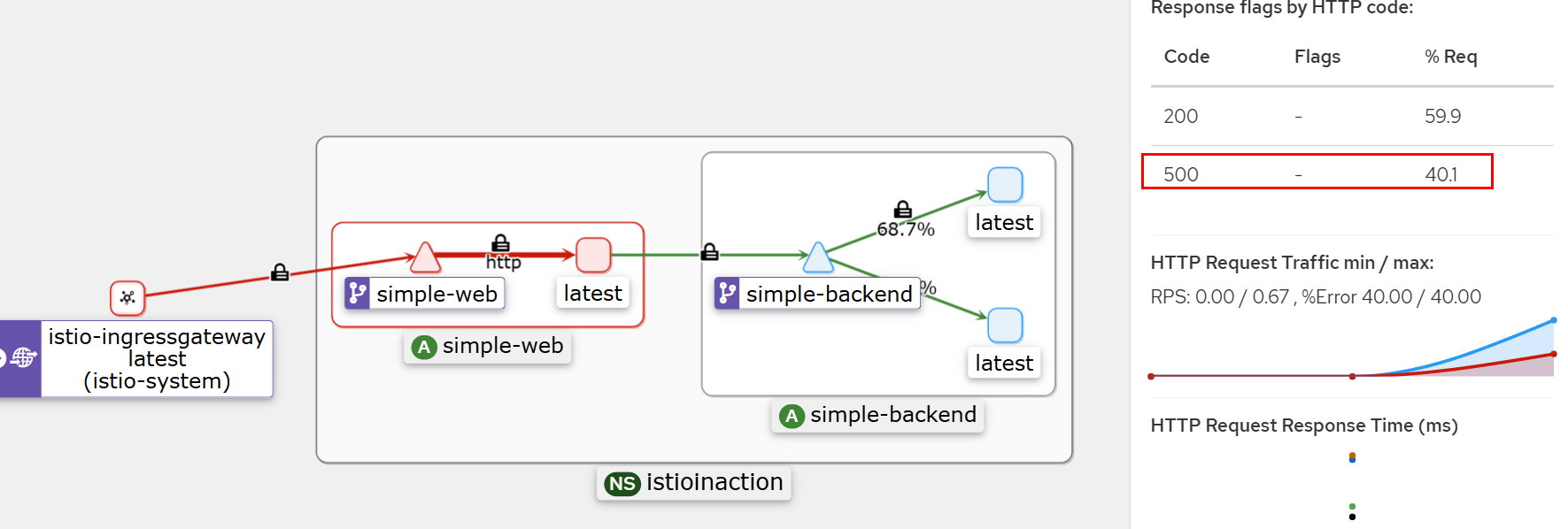
HTTP 500은 재시도하는 상태 코드에 포함되지 않는다.
타임아웃에 따른 재시도
-
각 재시도에는 자체적인 제한 시간(perTryTimeout) 이 있다.
-
이 설정에서 주의할 점은 perTryTimeout에 총 시도 횟수를 곱한 값이 전체 요청 제한 시간(이전 절에서 설명)보다 작아야 한다는 것이다.
perTryTimeout attempts < overall timeout*
-
예를 들어, 총 제한 시간이 1초이고 시도별 제한 시간이 500ms에 3회까지 재시도하는 재시도 정책은 의도대로 동작하지 않는다.
-
재시도를 하기 전에 전체 요청 타임아웃이 발생할 것이다.
-
또 재시도 사이에는 백오프 backoff 지연이 있다는 점도 유념하자.
-
백오프 시간도 전체 요청 제한 시간 계산에 포함된다.
perTryTimeout attempts + backoffTime (attempts-1) < overall timeout
작동 방식
- 요청이 업스트림으로 전달되는 데 실패하면 요청을 ‘실패 failed’로 표시하고 VirtualService 리소스에 정의한 최대 재시도 횟수까지 재시도한다.
- 재시도 횟수가 2이면 실제로는 요청이 3회까지 전달되는데, 한 번은 원래 요청이고 두 번은 재시도다.
- 재시도 사이에 이스티오는 25ms 를 베이스로 재시도를 ‘백오프’ 한다.
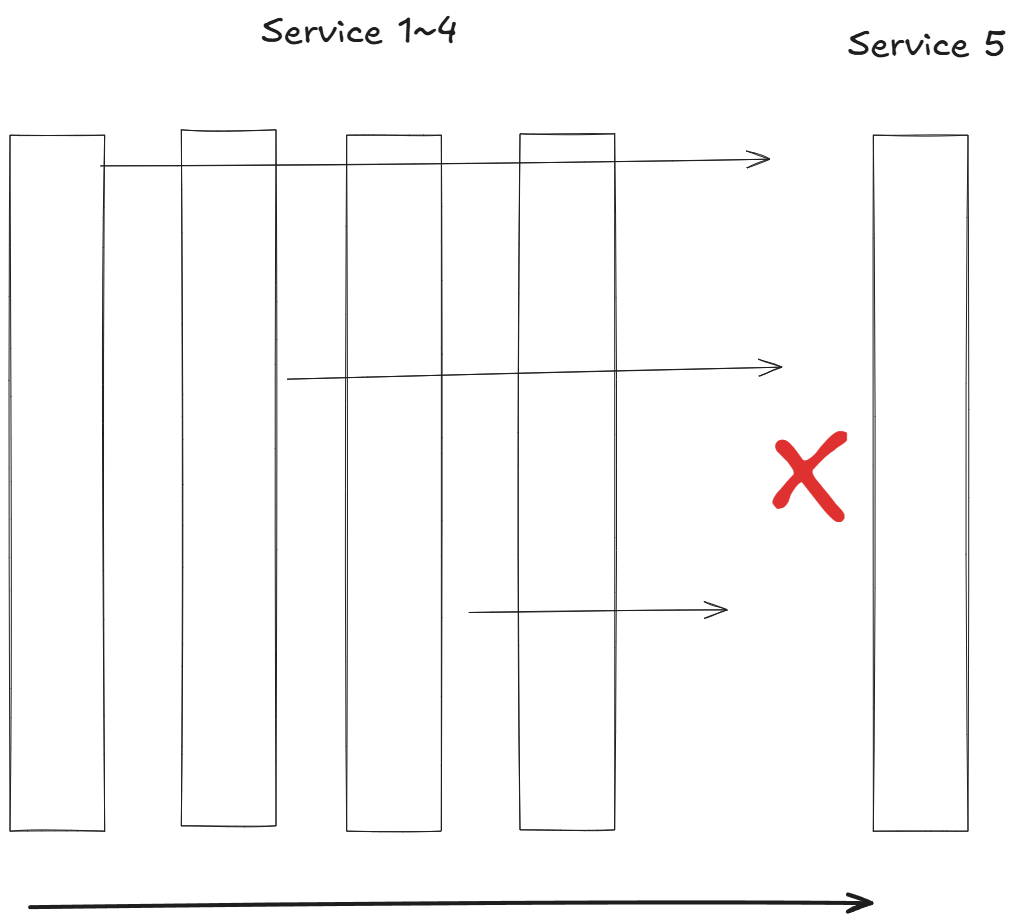
- 즉, 이스티오는 재시도에 시차를 주고자 연속적인 재시도에서 (25ms x 재시도 횟수)까지 백오프한다. (기다린다)
- 시스템 내의 계층이 다르면 재시도 횟수도 다르도록 이 값을 재정의하고 싶을 수도 있다.
- 기본값과 같이 재시도 횟수를 무턱대고 설정하면, 심각한 재시도 ‘천둥 무리 thundering herd’ 문제가 발생할 수 있다.
- 서비스 체인이 5단계 깊이로 연결돼 있고 각 단계가 두 번씩 재시도할 수 있다면, 들어오는 요청 하나에 대해 최대 32회의 요청이 발생할 수 있다.
- 체인 끝부분의 리소스에 과부하가 걸린 상태에서는 이 추가적인 부하가 해당 리소스를 감당할 수 없게 만들어 쓰러뜨릴수 있다.
- 이 상황을해결하는 한 가지 방법은 아키텍처 가장자리에서는 재시도 횟수를 1회 내지 0회로 제한하고, 중간 요소는 0회로 하며, 호출 스택 깊숙한 곳에서만 재시도하게 하는 것이다. 하지만 이 방법도 잘 작동하지는 않는다.
- 또 다른 전략은 전체 재시도 횟수에 상한을 두는 것이다.
- 재시도 예산 budget 를 이용해 조절할 수 있는데, 이 기능은 아직 이스티오 API에서 노출되지 않고 있다.
6.4.3 Advanced retries : Istio Extension API (EnvoyFilter)
-
이스티오 API가 이 설정을 노출하고 있지는 않지만, 이스티오 확장 API를 사용해 엔보이 설정에서 이 값들을 직접 바꿀수 있다. EnvoyFilter API를 사용한다.
-
408 에러 재시도 적용
# cat ch6/simple-backend-ef-retry-status-codes.yaml
apiVersion: networking.istio.io/v1alpha3
kind: EnvoyFilter
metadata:
  name: simple-backend-retry-status-codes
  namespace: istioinaction
spec:
  workloadSelector:
    labels:
      app: simple-web
  configPatches:
  - applyTo: HTTP_ROUTE
    match:
      context: SIDECAR_OUTBOUND
      routeConfiguration:
        vhost:
          name: "simple-backend.istioinaction.svc.cluster.local:80"
    patch:
      operation: MERGE
      value:
        route:
          retry_policy: # 엔보이 설정에서 직접 나온다?
            retry_back_off:
              base_interval: 50ms # 기본 간격을 늘린다
            retriable_status_codes: # 재시도할 수 있는 코드를 추가한다
            - 408
            - 400

kubectl apply -f ch6/simple-backend-ef-retry-status-codes.yaml -n istioinaction

kubectl apply -f ch6/simple-backend-vs-retry-on.yaml -n istioinaction

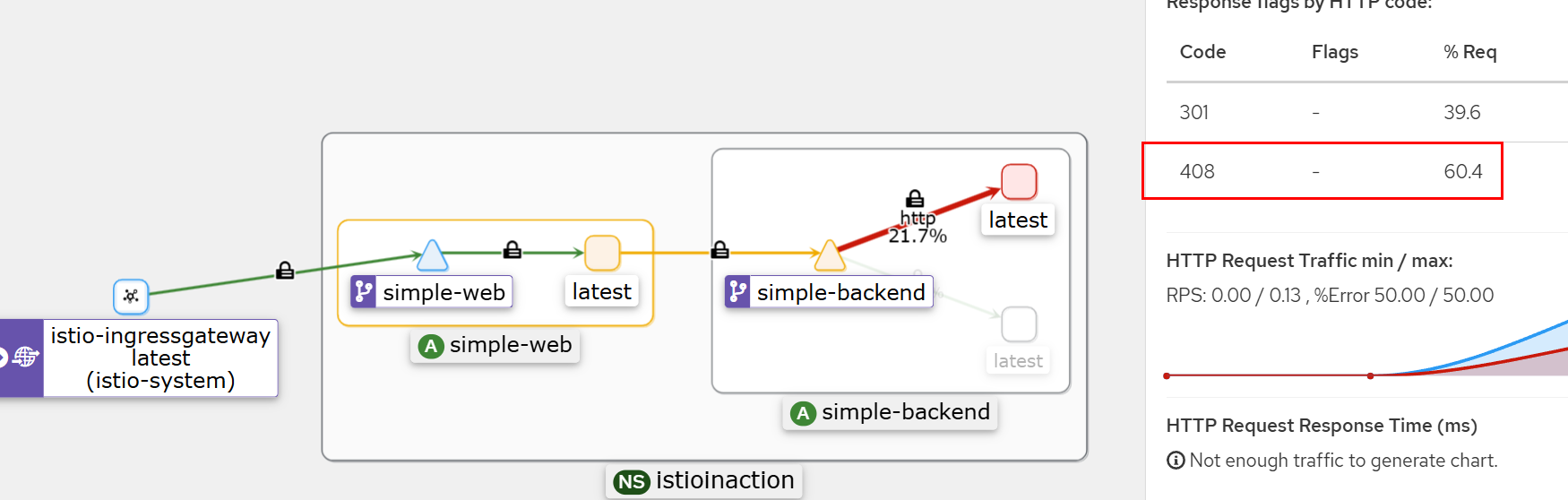
# 호출테스트 : 성공
# simple-backend-1 --(408, retry 성공)--> simple-web --> curl(외부)
for in in {1..10}; do time curl -s http://simple-web.istioinaction.io:30000 | jq .code; done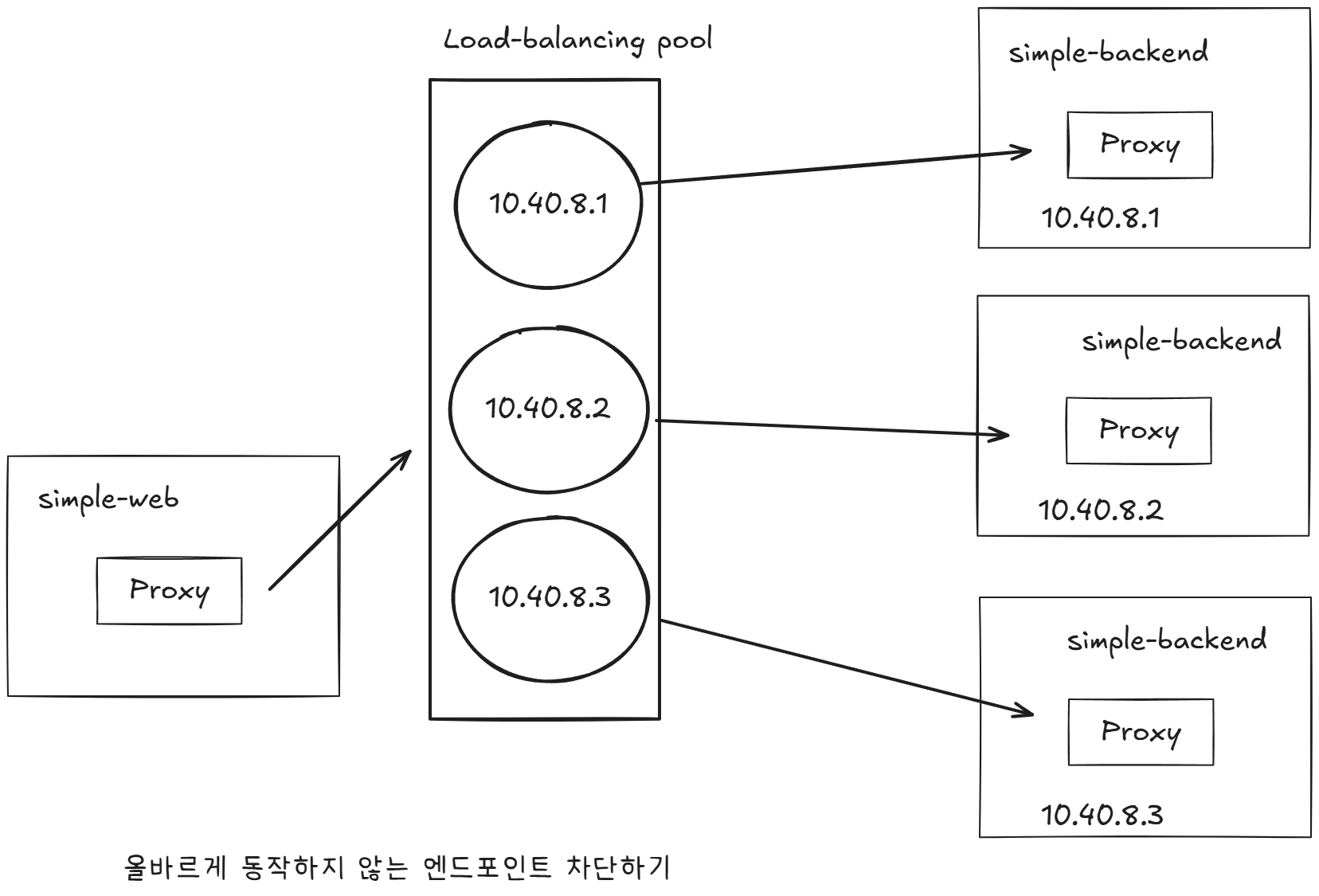
요청 헤징 REQUEST HEDGING
- 요청이 임계값에 도달해 시간을 초과하면 요청 헤징을 수행하도록 선택적으로 엔보이를 설정할 수 있다.
- 요청 헤징 request hedging 이란, 요청이 타임아웃되면 다른 호스트로도 요청을 보내 원래의 타임아웃된 요청과 ‘경쟁 race’ 시키는 것을 말한다.
- 경쟁한 요청이 성공적으로 반환되면, 그 응답을 원래 다운스트림 호출자에게 보낸다.
apiVersion: networking.istio.io/v1alpha3
kind: EnvoyFilter
metadata:
  name: simple-backend-retry-hedge
  namespace: istioinaction
spec:
  workloadSelector:
    labels:
      app: simple-web
  configPatches:
  - applyTo: VIRTUAL_HOST
    match:
      context: SIDECAR_OUTBOUND
      routeConfiguration:
        vhost:
          name: "simple-backend.istioinaction.svc.cluster.local:80"
    patch:
      operation: MERGE
      value:
        hedge_policy:
          hedge_on_per_try_timeout: true
- 복원력 있는 아키텍처를 구축하는 과정에서 마지막 퍼즐 조작은 재시도를 모두 건너뛰는 것이다.
- 즉, 재시도하는 대신 빠르게 실패한다.
부하를 더 늘리는 대신에 업스트림 시스템이 복구될 수 있도록(회복 시간 벌기) 부하를 잠시 제한할 수 있으며, 이를 위해 서킷 브레이커를 사용할 수 있다.
6.5 Circuit breaking with Istio
서킷 브레이커 기능을 사용하면 부분적이거나 연쇄적인 장애를 방지할 수 있다.
서킷 브레이커 패턴은 네트워크 호출이 실패할 수 있고 실제로 실패한다는 사실을 애플리케이션이 처리하게함으로써 전체 시스템을 연쇄 실패로부터 보호하는 데 도움이 된다.
Istio에 ‘서킷 브레이커’라는 명시적인 설정은 없지만, 백엔드 서비스, 특히 문제가 있는 서비스로의 부하를 제한할 수 있는 방법이 두 가지 있어 서킷 브레이커를 효과적으로 시행할 수 있다.
첫 번째
특정 서비스로의 커넥션 및 미해결 요청 개수를 얼마나 허용할지 관리하는 것이다.
-
DestinationRule 의 connectionPool 설정을 사용해 서비스 호출 시 누적될 수 있는 커넥션 및 요청 개수를 제한할 수 있다.
-
요청이 너무 많이 쌓이면, 요청을 단락(빠르게 실패)시키고 클라이언트에 반환할 수 있다.
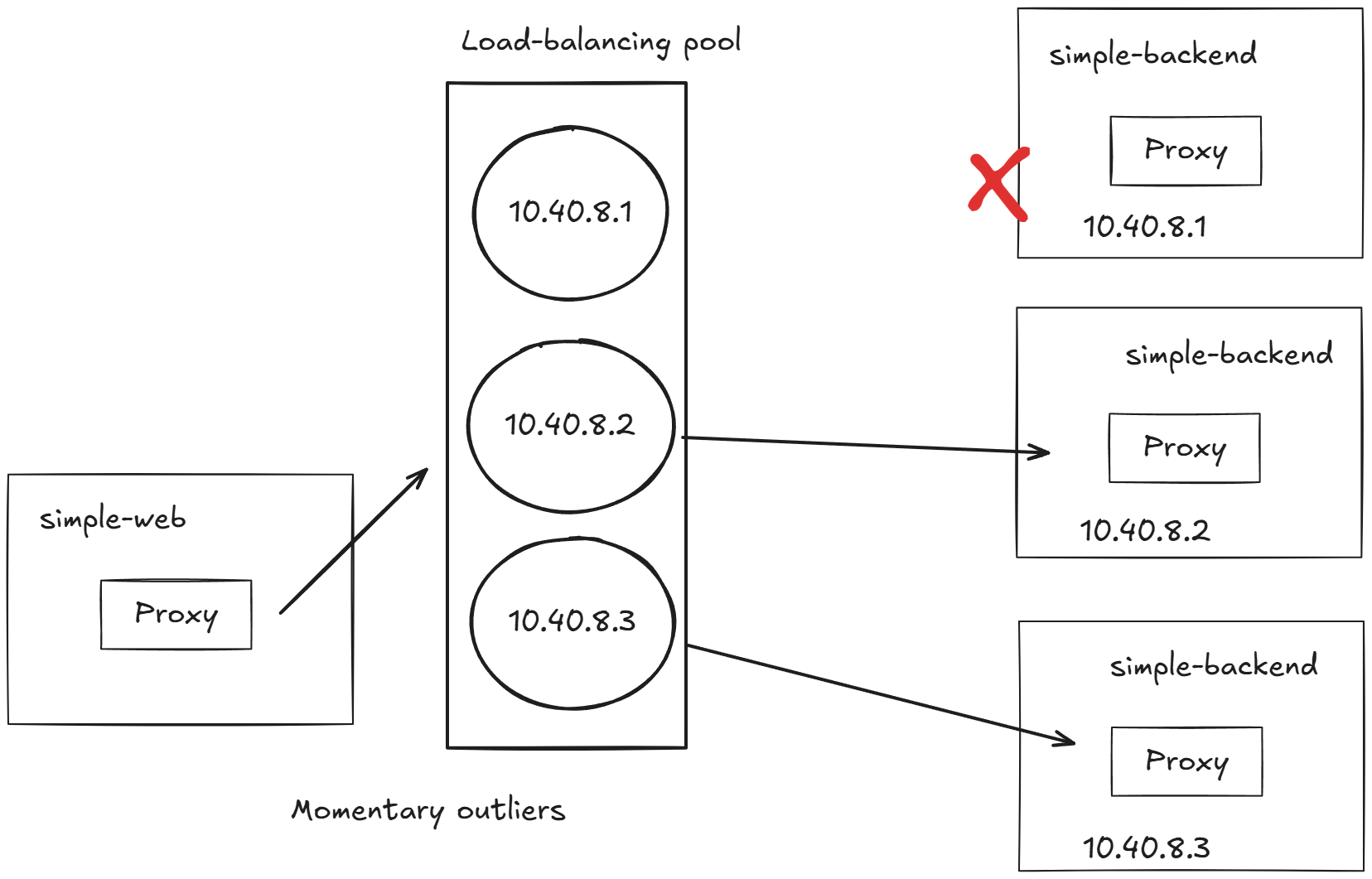
두 번째
로드 밸런싱 풀의 엔드포인트에 상태를 관찰해 오동작하는 엔드포인트를 잠시 퇴출시키는 것이다.
-
서비스 풀의 특정 호스트에 문제가 발생하면 그 호스트로의 트래픽 전송을 건너뛸 수 있다.
-
모든 호스트를 소진하면 회로는 한동안 사실상 ‘개방’된다. If we exhaust all hosts, the circuit is effectively 'open' for a while.
6.5.1 Guarding against slow services wih connection-pool control* : 커넥션 풀 제어로 느린 서비스에 대응하기
- 환경 구성
# 현재 적용되어 있는 상태
kubectl apply -f ch6/simple-web.yaml -n istioinaction
kubectl apply -f ch6/simple-web-gateway.yaml -n istioinaction
kubectl apply -f ch6/simple-backend-vs-retry-on.yaml -n istioinaction

# destinationrule 삭제
kubectl delete destinationrule --all -n istioinaction

# simple-backend-2 제거
kubectl scale deploy simple-backend-2 --replicas=0 -n istioinaction

# 응답지연(1초)을 발생하는 simple-backend-1 배포
kubectl apply -f ch6/simple-backend-delayed.yaml -n istioinaction

# 동작 중 파드에 env 직접 수정..
kubectl exec -it deploy/simple-backend-1 -n istioinaction -- sh
-----------------------------------
export TIMING_50_PERCENTILE=1000ms
exit
-----------------------------------

# 테스트
curl -s http://simple-web.istioinaction.io:30000 | grep duration
  "duration": "1.058699s",
"duration": "1.000934s",- 로드 테스트
# 초당 요청을 하나 보내는(-qps1) 커넥션 하나(-c1)로 진행 : 백엔드가 대략 1초 후 반환하므로 트래픽이 원활하고 성공률이 100%여야 한다.
fortio load -quiet -jitter -t 30s -c 1 -qps 1 http://simple-web.istioinaction.io:30000
...
# target 50% 1.02364
# target 75% 1.02788
# target 90% 1.03042
# target 99% 1.03195
# target 99.9% 1.0321
...
Code 200 : 30 (100.0 %)
All done 30 calls (plus 1 warmup) 1023.868 ms avg, 1.0 qps- 커넥션 및 요청 제한을 도입하고 어떤 일이 일어나는지 살펴보자. 아주 간단한 제한으로 시작한다.
- maxConnections : 커넥션 총 개수, 커넥션 오버플로 connection overflow 를 보고할 임계값이다.
- http1MaxPendingRequests : 대기 중인 요청, 사용할 커넥션이 없어 보류 중인 요청을 얼마나 허용할지를 의미하는 숫자다.
- http2MaxRequests : 모든 호스트에 대한 최대 동시 요청 개수, 안타깝게도 이 설정은 이스티오에서 이름을 잘못 붙였다.
apiVersion: networking.istio.io/v1beta1
kind: DestinationRule
metadata:
  name: simple-backend-dr
spec:
  host: simple-backend.istioinaction.svc.cluster.local
  trafficPolicy:
    connectionPool:
      tcp:
        maxConnections: 1 # 커넥션 총 개수 Total number of connections
      http:
        http1MaxPendingRequests: 1 # 대기 중인 요청 Queued requests
        maxRequestsPerConnection: 1 # 커넥션당 요청 개수 Requests per connection
        maxRetries: 1 # Maximum number of retries that can be outstanding to all hosts in a cluster at a given time.
        http2MaxRequests: 1 # 모든 호스트에 대한 최대 동시 요청 개수 Maximum concurrent requests to all hosts

# DestinationRule 적용 (connection-limiting)
kubectl apply -f ch6/simple-backend-dr-conn-limit.yaml -n istioinaction
정확한 확인을 위해서 이스티오 서비스 프록시에서 더 많은 통계 수집을 활성화하자. ⇒ 서킷 브레이크 영향인지 vs 업스트림의 장애인지 확인
# simple-web 디플로이먼트에 sidecar.istio.io/statsInclusionPrefixes="cluster.<이름>" 애너테이션 추가하자
## sidecar.istio.io/statsInclusionPrefixes: cluster.outbound|80||simple-backend.istioinaction.svc.cluster.local
cat ch6/simple-web-stats-incl.yaml | grep statsInclusionPrefixes
        sidecar.istio.io/statsInclusionPrefixes: "cluster.outbound|80||simple-backend.istioinaction.svc.cluster.local"
kubectl apply -f ch6/simple-web-stats-incl.yaml -n istioinaction

# 정확한 확인을 위해 istio-proxy stats 카운터 초기화
kubectl exec -it deploy/simple-web -c istio-proxy -n istioinaction \
-- curl -X POST localhost:15000/reset_counters

# simple-web 에 istio-proxy 의 stats 조회
kubectl exec -it deploy/simple-web -c istio-proxy -n istioinaction \
 -- curl localhost:15000/stats | grep simple-backend | grep overflow
cluster.outbound|80||simple-backend.istioinaction.svc.cluster.local.upstream_cx_overflow: 0
cluster.outbound|80||simple-backend.istioinaction.svc.cluster.local.upstream_cx_pool_overflow: 0
cluster.outbound|80||simple-backend.istioinaction.svc.cluster.local.upstream_rq_pending_overflow: 0
cluster.outbound|80||simple-backend.istioinaction.svc.cluster.local.upstream_rq_retry_overflow: 0

kubectl exec -it deploy/simple-web -c istio-proxy -n istioinaction \
 -- curl localhost:15000/stats | grep simple-backend.istioinaction.svc.cluster.local.upstream
커넥션 개수와 초당 요청 수를 2로 늘리면 어떨까? 2개의 커넥션에서 요청을 초당 하나씩 보내기 시작해보자.
- 커넥션과 요청이 지정한 임계값(병렬 요청이 너무 많거나 요청이 너무 많이 쌓임)을 충분히 넘겨 서킷 브레이커를 동작시켰음을 확인.
fortio load -quiet -jitter -t 30s -c 2 -qps 2 --allow-initial-errors http://simple-web.istioinaction.io:30000
...
Sockets used: 19 (for perfect keepalive, would be 2)
Code 200 : 30 (63.8 %)
Code 500 : 17 (36.2 %)
All done 47 calls (plus 2 warmup) 925.635 ms avg, 1.5 qps
...
503 UO (Upstream Overflow) : Envoy가 업스트림 서버로의 요청을 처리할 수 없어 오버플로우 발생 - 최대 연결/요청 제한 or 서킷 브레이커
- 요청을 처리하려 했으나, Envoy 내부의 버퍼나 큐(예: 연결 풀, 요청 큐 등)가 가득 차서 더 이상 업스트림으로 요청을 전달할 수 없는 상태
- 업스트림 서버가 느리게 응답하거나, 다운됨
- 트래픽 급증으로 인해 큐에 쌓인 요청이 너무 많음
- Envoy의
circuit breaker설정 (예:max_requests,max_connections)을 초과
보류 대기열 깊이를 2로 늘리고 다시 실행해보자.
# http1MaxPendingRequests : 1 → 2, 'queuing' 개수를 늘립니다
kubectl patch destinationrule simple-backend-dr \
-n istioinaction --type merge --patch \
'{"spec": {"trafficPolicy": {"connectionPool": {"http": {"http1MaxPendingRequests": 2}}}}}'

#
docker exec -it myk8s-control-plane istioctl proxy-config cluster deploy/simple-web.istioinaction --fqdn simple-backend.istioinaction.svc.cluster.local -o json | grep maxPendingRequests
docker exec -it myk8s-control-plane istioctl proxy-config cluster deploy/simple-backend-1.istioinaction --fqdn simple-backend.istioinaction.svc.cluster.local -o json | grep maxPendingRequests
                    "maxPendingRequests": 2,

# istio-proxy stats 카운터 초기화
kubectl exec -it deploy/simple-web -c istio-proxy -n istioinaction \
-- curl -X POST localhost:15000/reset_counters


# 2개의 커넥션에서 요청을 초당 하나씩 보내기 : 모두 성공!
fortio load -quiet -jitter -t 30s -c 2 -qps 2 --allow-initial-errors http://simple-web.istioinaction.io:30000
...
Sockets used: 2 (for perfect keepalive, would be 2) # 큐 길이 증가 덕분에, 소켓을 2개만 사용했다.
Code 200 : 33 (100.0 %)
All done 33 calls (plus 2 warmup) 1846.745 ms avg, 1.1 qps
...

# 'cx_overflow가 45이 발생했지만, upstream_rq_pending_overflow 는 이다!
kubectl exec -it deploy/simple-web -c istio-proxy -n istioinaction \
 -- curl localhost:15000/stats | grep simple-backend | grep overflow
cluster.outbound|80||simple-backend.istioinaction.svc.cluster.local.upstream_cx_overflow: 45
cluster.outbound|80||simple-backend.istioinaction.svc.cluster.local.upstream_cx_pool_overflow: 0
cluster.outbound|80||simple-backend.istioinaction.svc.cluster.local.upstream_rq_pending_overflow: 0
cluster.outbound|80||simple-backend.istioinaction.svc.cluster.local.upstream_rq_retry_overflow: 0

kubectl exec -it deploy/simple-web -c istio-proxy -n istioinaction \
 -- curl localhost:15000/stats | grep simple-backend.istioinaction.svc.cluster.local.upstream
- 요청 서킷 브레이커 임계값을 넘겨 실패하면, 이스티오 서비스 프록시는
x-envoy-overloaded헤더를 추가한다.
테스트하는 한 가지 방법은 커넥션 제한을 가장 엄격한 수준으로 설정하고(커넥션, 보류 요청, 최대 요청을 1로 설정함 1 for connections, pending requests, and maximum requests) 로드 테스트를 다시 수행해보는 것이다.
kubectl patch destinationrule simple-backend-dr \
-n istioinaction --type merge --patch \
'{"spec": {"trafficPolicy": {"connectionPool": {"http": {"http1MaxPendingRequests": 1}}}}}'

kubectl patch destinationrule simple-backend-dr -n istioinaction \
-n istioinaction --type merge --patch \
'{"spec": {"trafficPolicy": {"connectionPool": {"http": {"http2MaxRequests": 1}}}}}'

# 설정 적용 확인
docker exec -it myk8s-control-plane istioctl proxy-config cluster deploy/simple-backend-1.istioinaction --fqdn simple-backend.istioinaction.svc.cluster.local -o json

# istio-proxy stats 카운터 초기화
kubectl exec -it deploy/simple-web -c istio-proxy -n istioinaction \
-- curl -X POST localhost:15000/reset_counters

# 로드 테스트
fortio load -quiet -jitter -t 30s -c 2 -qps 2 --allow-initial-errors http://simple-web.istioinaction.io:30000

# 로드 테스트 하는 상태에서 아래 curl 접속
curl -v http://simple-web.istioinaction.io:30000
{
  "name": "simple-web",
  "uri": "/",
  "type": "HTTP",
  "ip_addresses": [
    "10.10.0.18"
  ],
  "start_time": "2025-04-22T04:23:50.468693",
  "end_time": "2025-04-22T04:23:50.474941",
  "duration": "6.247ms",
  "body": "Hello from simple-web!!!",
  "upstream_calls": [
    {
      "uri": "http://simple-backend:80/",
      "headers": {
        "Content-Length": "81",
        "Content-Type": "text/plain",
        "Date": "Tue, 22 Apr 2025 04:23:50 GMT",
        "Server": "envoy",
        "X-Envoy-Overloaded": "true" # Header indication
      },
      "code": 503,
      "error": "Error processing upstream request: http://simple-backend:80//, expected code 200, got 503"
    }
  ],
  "code": 500
}
6.5.2 Guarding against unhealthy services with outlier detection* : 이상값 감지로 비정상 서비스에 대응하기
오동작 misbehaving 하는 특정 호스트를 서비스에서 제거하는 Istio의 접근법을 다룬다.
- Istio는 이를 위해 Envoy의 이상값 감지 기능을 사용한다.
- 실습 환경 초기화
kubectl delete destinationrule --all -n istioinaction
kubectl delete vs simple-backend-vs -n istioinaction

#
kubectl apply -f ch6/simple-backend.yaml -n istioinaction
kubectl apply -f ch6/simple-web-stats-incl.yaml -n istioinaction # 통계 활성화

# istio-proxy stats 카운터 초기화
kubectl exec -it deploy/simple-web -c istio-proxy -n istioinaction \
-- curl -X POST localhost:15000/reset_counters

# 호출 테스트 : 모두 성공
fortio load -quiet -jitter -t 30s -c 2 -qps 2 --allow-initial-errors http://simple-web.istioinaction.io:30000

# 확인
kubectl exec -it deploy/simple-web -c istio-proxy -n istioinaction \
-- curl localhost:15000/stats | grep simple-backend.istioinaction.svc.cluster.local.upstream- simple-backend-1 엔드포인트는 호출 중 75%가 HTTP 500 실패 설정 배포 및 확인
kubectl apply -n istioinaction -f ch6/simple-backend-periodic-failure-500.yaml
kubectl exec -it deploy/simple-backend-1 -n istioinaction -- env | grep ERROR

#
kubectl exec -it deploy/simple-backend-1 -n istioinaction -- sh
---------------------------------------------------------------
export ERROR_TYPE=http_error
export ERROR_RATE=0.75
export ERROR_CODE=500
exit
---------------------------------------------------------------

# 정보 확인
kubectl get deploy,pod -n istioinaction -o wide
NAME                               READY   UP-TO-DATE   AVAILABLE   AGE   CONTAINERS       IMAGES                                 SELECTOR
deployment.apps/simple-backend-1   1/1     1            1           20h   simple-backend   nicholasjackson/fake-service:v0.14.1   app=simple-backend
deployment.apps/simple-backend-2   2/2     2            2           20h   simple-backend   nicholasjackson/fake-service:v0.17.0   app=simple-backend
deployment.apps/simple-web         1/1     1            1           21h   simple-web       nicholasjackson/fake-service:v0.17.0   app=simple-web

NAME                                   READY   STATUS    RESTARTS   AGE     IP           NODE                  NOMINATED NODE   READINESS GATES
pod/simple-backend-1-bdb6c7ff8-rqqlr   2/2     Running   0          2m25s   10.10.0.30   myk8s-control-plane   <none>           <none>
pod/simple-backend-2-6799f8bf-d4b6t    2/2     Running   0          11m     10.10.0.27   myk8s-control-plane   <none>           <none>
pod/simple-backend-2-6799f8bf-dk78j    2/2     Running   0          11m     10.10.0.29   myk8s-control-plane   <none>           <none>
pod/simple-web-865f4949ff-56kbq        2/2     Running   0          3h32m   10.10.0.18   myk8s-control-plane   <none>           <none>


# 로드 테스트 실행 : 재시도를 끄고, backend-1 엔드포인트에 주기적인 실패를 설정했으니, 테스트 일부는 실패
fortio load -quiet -jitter -t 30s -c 2 -qps 2 --allow-initial-errors http://simple-web.istioinaction.io:30000
...
Sockets used: 19 (for perfect keepalive, would be 2)
Code 200 : 43 (71.7 %)
Code 500 : 17 (28.3 %)
All done 60 calls (plus 2 warmup) 134.138 ms avg, 2.0 qps
...
정기적으로 실패하는 서비스에 요청을 보내고 있는데 서비스의 다른 엔드포인트들은 실패하지 않고 있다면, 해당 엔드포인트가 과부하됐거나 어떤 이유로든 성능이 저하된 상태일 수 있으므로 당분간 그 엔드포인트로 트래픽을 전송하는 것을 멈춰야 한다.
- 이상값 감지를 설정해보자 : 기존 오류율 대비 극적으로 감소. 오동작하는 엔드포인트를 잠시 제거했기 때문이다.
consecutive5xxErrors: 잘못된 요청이 하나만 발생해도 이상값 감지가 발동. 기본값 5, 연속적인 에러 횟수 thresholdinterval: 이스티오 서비스 프록시가 체크하는 주기. 기본값 10초. Time interval between ejection sweep analysisbaseEjectionTime: 서비스 엔드포인트에서 제거된다면, 제거 시간은 n(해당 엔드포인트가 쫓겨난 횟수) * baseEjectionTime.- 해당 시간이 지나면 로드 밸런싱 풀에 다시 추가됨. 기본값 30초.
maxEjectionPercent: 로드 밸런싱 풀에서 제거 가능한 호스트 개수(%).- 100% 설정 시모든 호스트가 오동작하면 어떤 요청도 통과 못함(회로가 열린 것과 같다). 기본값 10%
cat ch6/simple-backend-dr-outlier-5s.yaml
apiVersion: networking.istio.io/v1beta1
kind: DestinationRule
metadata:
  name: simple-backend-dr
spec:
  host: simple-backend.istioinaction.svc.cluster.local
  trafficPolicy:
    outlierDetection:
      consecutive5xxErrors: 1 # 잘못된 요청이 하나만 발생해도 이상값 감지가 발동. 기본값 5
      interval: 5s # 이스티오 서비스 프록시가 체크하는 주기. 기본값 10초. Time interval between ejection sweep analysis
      baseEjectionTime: 5s # 서비스 엔드포인트에서 제거된다면, 제거 시간은 n(해당 엔드포인트가 쫓겨난 횟수) * baseEjectionTime. 해당 시간이 지나면 로드 밸런싱 풀에 다시 추가됨. 기본값 30초.
      maxEjectionPercent: 100 # 로드 밸런싱 풀에서 제거 가능한 호스트 개수(%). 모든 호스트가 오동작하면 어떤 요청도 통과 못함(회로가 열린 것과 같다). 기본값 10%

kubectl apply -f ch6/simple-backend-dr-outlier-5s.yaml -n istioinaction
kubectl get dr -n istioinaction

#
docker exec -it myk8s-control-plane istioctl proxy-config cluster deploy/simple-web.istioinaction --fqdn simple-backend.istioinaction.svc.cluster.local -o json
...
        "outlierDetection": {
            "consecutive5xx": 1,
            "interval": "5s",
            "baseEjectionTime": "5s",
            "maxEjectionPercent": 100,
            "enforcingConsecutive5xx": 100,
            "enforcingSuccessRate": 0
        },
...

docker exec -it myk8s-control-plane istioctl proxy-config endpoint deploy/simple-web.istioinaction --cluster 'outbound|80||simple-backend.istioinaction.svc.cluster.local'
ENDPOINT            STATUS      OUTLIER CHECK     CLUSTER
10.10.0.27:8080     HEALTHY     OK                outbound|80||simple-backend.istioinaction.svc.cluster.local
10.10.0.29:8080     HEALTHY     OK                outbound|80||simple-backend.istioinaction.svc.cluster.local
10.10.0.30:8080     HEALTHY     OK                outbound|80||simple-backend.istioinaction.svc.cluster.local


# 통계 초기화
kubectl exec -it deploy/simple-web -c istio-proxy -n istioinaction \
-- curl -X POST localhost:15000/reset_counters

# 엔드포인트 모니터링 먼저 해두기 : 신규 터미널
	while true; do docker exec -it myk8s-control-plane istioctl proxy-config endpoint deploy/simple-web.istioinaction --cluster 'outbound|80||simple-backend.istioinaction.svc.cluster.local' ; date; sleep 1; echo; done
	ENDPOINT            STATUS      OUTLIER CHECK     CLUSTER
10.10.0.27:8080     HEALTHY     OK                outbound|80||simple-backend.istioinaction.svc.cluster.local
10.10.0.29:8080     HEALTHY     OK                outbound|80||simple-backend.istioinaction.svc.cluster.local
10.10.0.30:8080     HEALTHY     FAILED            outbound|80||simple-backend.istioinaction.svc.cluster.local


# 로드 테스트 실행 : 기존 오류율 대비 극적으로 감소. 오동작하는 엔드포인트를 잠시 제거했기 때문이다.
fortio load -quiet -jitter -t 30s -c 2 -qps 2 --allow-initial-errors http://simple-web.istioinaction.io:30000
...
Sockets used: 5 (for perfect keepalive, would be 2)
Code 200 : 58 (96.7 %)
Code 500 : 2 (3.3 %)
All done 60 calls (plus 2 warmup) 166.592 ms avg, 2.0 qps
...- 오류률을 더 개선해보자. 기본 재시도 설정을 추가해보자. VirtuslService 에 명시적으로 설정 가능
cat ch6/simple-backend-vs-retry-500.yaml
apiVersion: networking.istio.io/v1alpha3
kind: VirtualService
metadata:
  name: simple-backend-vs
spec:
  hosts:
  - simple-backend
  http:
  - route:
    - destination:
        host: simple-backend
    retries:
      attempts: 2
      retryOn: 5x

kubectl apply -f ch6/simple-backend-vs-retry-500.yaml -n istioinaction

# 통계 초기화
kubectl exec -it deploy/simple-web -c istio-proxy -n istioinaction \
-- curl -X POST localhost:15000/reset_counters

# 엔드포인트 모니터링 먼저 해두기 : 신규 터미널
while true; do docker exec -it myk8s-control-plane istioctl proxy-config endpoint deploy/simple-web.istioinaction --cluster 'outbound|80||simple-backend.istioinaction.svc.cluster.local' ; date; sleep 1; echo; done

# 로드 테스트 실행 : 모두 성공!
fortio load -quiet -jitter -t 30s -c 2 -qps 2 --allow-initial-errors http://simple-web.istioinaction.io:30000
...
Sockets used: 2 (for perfect keepalive, would be 2)
Code 200 : 60 (100.0 %)
All done 60 calls (plus 2 warmup) 173.837 ms avg, 2.0 qps
...

# 엔드포인트 이상 감지 전에 3번 실패했지만, 재시도 retry 덕분에 결과적으로 모두 성공!
kubectl exec -it deploy/simple-web -c istio-proxy -n istioinaction \
 -- curl localhost:15000/stats | grep simple-backend | grep outlier

 # 통계 확인
kubectl exec -it deploy/simple-web -c istio-proxy -n istioinaction \
 -- curl localhost:15000/stats | grep simple-backend.istioinaction.svc.cluster.local.upstream | grep retry
cluster.outbound|80||simple-backend.istioinaction.svc.cluster.local.upstream_rq_retry: 4
cluster.outbound|80||simple-backend.istioinaction.svc.cluster.local.upstream_rq_retry_backoff_exponential: 4
cluster.outbound|80||simple-backend.istioinaction.svc.cluster.local.upstream_rq_retry_backoff_ratelimited: 0
cluster.outbound|80||simple-backend.istioinaction.svc.cluster.local.upstream_rq_retry_limit_exceeded: 0
cluster.outbound|80||simple-backend.istioinaction.svc.cluster.local.upstream_rq_retry_overflow: 0
cluster.outbound|80||simple-backend.istioinaction.svc.cluster.local.upstream_rq_retry_success: 4
- 이번 장 이전에는 이스티오의 기능과 API를 사용해, 인그레스 게이트웨이를 사용한 예지에서부터 클러스터 내 통신에 이르기까지 네트워크의 동작을 바꾸는 방법을 살펴봤다.
- 그러나 이번 장의 서두에서 언급했듯이, 끊임없이 변화하는 대규모 시스템에서 예상치 못한 네트워크 오류에 대응하기 위한 수동적인 개입은 불가능에 가까운 것이다.
Summary
- 로드 밸런싱은 DestinationRule 리소스로 설정한다. 지원하는 알고리듬은 다음과 같다.
- ROUND_ROBIN은 요청을 엔드포인트에 차례대로(or next-in-loop) 전달하며 기본 알고리듬이다.
- RANDOM은 트래픽을 무작위 엔드포인트로 라우팅한다.
- LEAST_CONN은 진행 중인 요청이 가장 적은 엔드포인트로 트래픽을 라우팅한다.
- 이스티오는 노드의 영역 및 리전 정보를 엔드포인트 상태 정보(outlierDetection 이 설정돼 있어야 함)와 함께 활용해 트래픽을 동일 영역 내의 워크로드로 라우팅한다. (가능한 경우 그렇게 하고, 그렇지 않을 경우 다음 영역으로 넘긴다)
- DestinationRule 를 사용하면 클라이언트가 여러 지역에 가중치를 부여해 트래픽을 분배하도록 설정할 수 있다.
- 재시도와 타임아웃은 VirtualService 리소스에서 설정한다.
- EnvoyFilter 리소스를 사용하면 이스티오 API가 노출하지 않은 엔보이의 기능을 구현할 수 있다. 요청 헤징으로 이를 보여줬다.
- 서킷 브레이커는 DestinationRule 리소스에서 설정하는데, 이 기능은 트래픽을 더 전송하기 전에 업스트림 서비스가 회복할 시간을 벌어준다.
