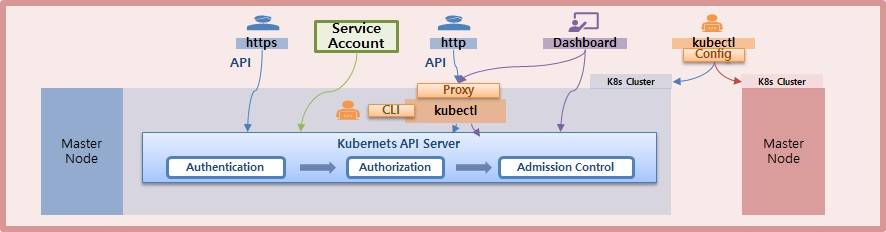
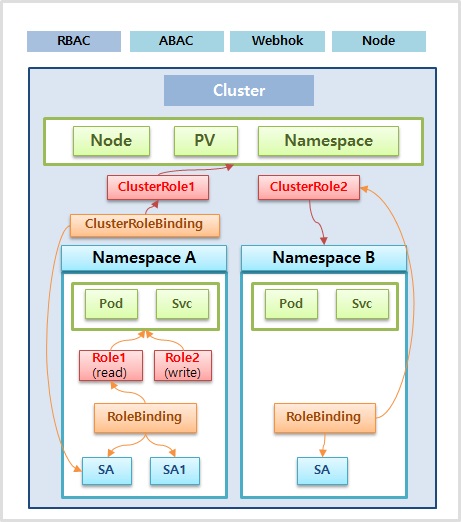
- 자신의 Namespace 내에 Pod들만 조회할 수 있는 권한
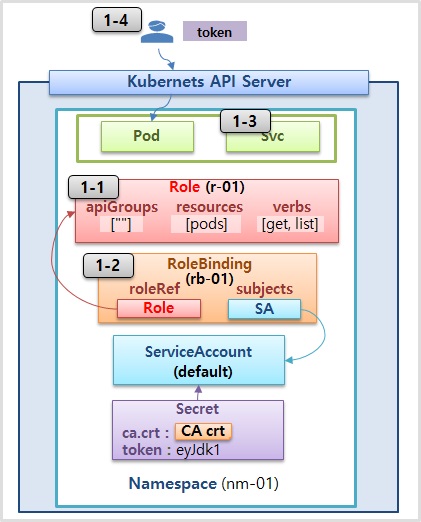
1-1) Role
apiVersion: rbac.authorization.k8s.io/v1
kind: Role
metadata:
  name: r-01
  namespace: nm-01
rules:
- apiGroups: [""]
  verbs: ["get", "list"]
  resources: ["pods"]
1-2) RoleBinding
apiVersion: rbac.authorization.k8s.io/v1
kind: RoleBinding
metadata:
  name: rb-01
  namespace: nm-01
roleRef:
  apiGroup: rbac.authorization.k8s.io
  kind: Role
  name: r-01
subjects:
- kind: ServiceAccount
  name: default
  namespace: nm-01
1-3) Service
apiVersion: v1
kind: Service
metadata:
  name: svc-1
spec:
  selector:
    app: pod
  ports:
  - port: 8080
    targetPort: 8080
- 모든 Namespace 내에 Object들에 대해 모든 권한을 부여
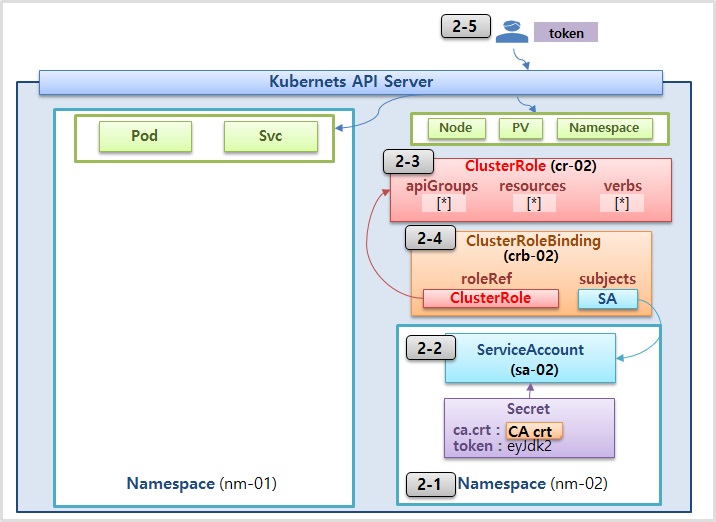
2-1) Namespaces
apiVersion: v1
kind: Namespace
metadata:
  name: nm-02
2-2) ServiceAccount
apiVersion: v1
kind: ServiceAccount
metadata:
  name: sa-02
  namespace: nm-02
2-3) ClusterRole
(여러 네임스페이스에서 설정값 바꿀대 용이해서 role보다 효율적)
apiVersion: rbac.authorization.k8s.io/v1
kind: ClusterRole
metadata:
  name: cr-02
rules:
- apiGroups: ["*"]
  verbs: ["*"]
  resources: ["*"]
2-4) ClusterRoleBinding
apiVersion: rbac.authorization.k8s.io/v1
kind: ClusterRoleBinding
metadata:
  name: rb-02
roleRef:
  apiGroup: rbac.authorization.k8s.io
  kind: ClusterRole
  name: cr-02
subjects:
- kind: ServiceAccount
  name: sa-02
  namespace: nm-02
Cloud Engineer , backend developer