오늘 학습 키워드
-
GameLoop
-
GameMode
-
GameState
-
GameInstance
1. 구현 목표
-
3개의 각 레벨(Basic, Intermediate, Advanced)마다 40개의 랜덤 아이템 스폰
-
모든 코인을 먹거나, 30초의 시간이 지나면 다음 레벨로 이동
- 이렇게 게임이 진행되도록 Game Loop를 구현
2. GameLoop
- 게임 흐름과 전역 상태를 관리할 때
GameMode와GameState를 사용
GameMode
-
서버 전용 로직을 담는 곳
-
클라이언트는 직접 접근할 수 없어 시간, 점수같은 클라이언트도 알아야하는 정보를 담아두면 복잡해짐
-
따라서 멀티플레이에선 게임 규칙(승패 조건 등)같이 중요 규칙만
GameMode에 두고,
Server-Client가 공통으로 알아햐하는 것은GameState를 이용 -
GameMode는 서버에만 1개만 존재
GameState
-
모든 플레이어가 공유해야 하는 상태(전역상태)를 담는 클래스
-
게임이 시작될 때 서버에서 생성되고, 클라이언트는 이를 복제 받아 똑같은 정보를 받음
-
서버에 1개 존재, 클라이언트별로 복제받아 각각 인스턴스로 존재
-
서버만이 업데이트 권한을 가지며, 클라이언트는 읽기전용으로만 접근 가능
-
레벨이 바뀌는 조건인 시간과 코인 개수는 플레이어가 공유해야 하는 상태로 GameState에 저장하고, 따라서 Game Loop도 GameState에서 구현
게임 시작 -> BeginPlay() -> StartLevel() -> Basic 레벨 시작
3. Game Instance
-
GameState와 GameMode의 경우 레벨이 바뀌게 되면, 기존 객체는 사라지고 새로운 객체로 다시 생성됨
-
즉, 이전 레벨과 연결되어야 하는 점수, 전체 플레이 시간같은 변수는 GameState에 저장했을 시 초기화됨
-
이때, 레벨이 바뀐다고 사라지지 않는, 게임 시작부터 종료까지 유지되는 관리 클래스 GameInstance를 사용
-
레벨에 상관없이 지속되어야 하는 데이터(세이브 데이터, 인벤토리 등)를 저장하고 관리
-
엔진 실행 시 생성되어 게임 종료 시까지 존재
-
보통 싱글플레이에서 사용하고, 멀티에서는
Seamless Travel사용 -
이번 프로젝트에서 유지되어야 하는 정보는 점수와 레벨 인덱스
게임 시작 ->
GameInstance생성 ->GameMode,GameState생성
4. 구현 코드
GameState
- GameLoop 구현
- 레벨 시작 시 40개의 랜덤 아이템 스폰
- 모든 코인을 먹거나, 30초의 시간이 지나면 다음 레벨로 이동
헤더
UCLASS()
class SPARTPROJECT_API AMyGameState : public AGameState
{
	// ... //
    // 리플렉션 시스템 매크로는 생략
	int32 SpawnedCoinCount;		// 레벨에 생성된 코인 개수
	int32 CollectedCoinCount;	// 플레이어가 획득한 코인 개수
	float LevelDuration;		// 레벨 전환 타이머
	int32 CurrentLevelIndex;	// 현재 레벨 인덱스
	int32 MaxLevels;			// 레벨 개수
	TArray<FName> LevelMapNames;	// 레벨들 이름을 저장한 배열
	FTimerHandle LevelTimerHandle;		// 레벨 전환 타이머 핸들러

	void AddScore(int32 Amount);
	void OnGameOver();			// 게임 오버 시 호출
	void StartLevel();			// 레벨 시작
	void EndLevel();			// 레벨 종료
	void OnCoinCollected();		// 코인 획득 시
};
cpp
AMyGameState::AMyGameState()
{
	SpawnedCoinCount = 0;
	CollectedCoinCount = 0;
	LevelDuration = 30.0f;		// 타이머는 30초
	CurrentLevelIndex = 0;
	MaxLevels = 3;				// 레벨 개수(Basic, Intermediate, Advanced)
}

void AMyGameState::AddScore(int32 Amount)
{
	// GameInstance에 점수 추가
	if (UGameInstance* GameInstance = GetGameInstance())
	{
		if (UMyGameInstance* MyGameInstance = Cast<UMyGameInstance>(GameInstance))
		{
			MyGameInstance->AddToScore(Amount);
		}
	}
}

void AMyGameState::OnCoinCollected()
{
	CollectedCoinCount++;
	UE_LOG(LogTemp, Warning, TEXT("Coin : %d / %d"),
    		CollectedCoinCount, SpawnedCoinCount)

	// 코인 다 먹었으면 레벨 종료
	if (SpawnedCoinCount > 0 && CollectedCoinCount >= SpawnedCoinCount)
	{
		EndLevel();
	}
}

void AMyGameState::StartLevel()
{
	// GameInstance 통해 현재 레벨 인덱스 가져오기
	if (UGameInstance* GameInstance = GetGameInstance())
	{
		if (UMyGameInstance* MyGameInstance = Cast<UMyGameInstance>(GameInstance))
		{
			CurrentLevelIndex = MyGameInstance->CurrentLevelIndex;
		}
	}

	// 아이템 생성 로직
	TArray<AActor*> FoundVolumes;
	// 현재 World에서 ASpawnVolume들 찾아서 FoundVolume에 넣어줌
	UGameplayStatics::GetAllActorsOfClass(
    									  GetWorld(),
                                          ASpawnVolume::StaticClass(),
                                          FoundVolumes
                                          );

	// 40개 소환
	const int32 ItemToSpawn = 40;
	for (int i = 0; i < ItemToSpawn; i++)
	{
		ASpawnVolume* SpawnVolume = Cast<ASpawnVolume>(FoundVolumes[0]);
		if (SpawnVolume)
		{
			AActor* SpawnedActor = SpawnVolume->SpawnRandomItem();
			// 만약 스폰된 액터가 코인 타입이라면 SpawnedCoinCount 증가
            // 코인의 하위클래스여도 가능
			if (SpawnedActor && SpawnedActor->IsA(ACoinItem::StaticClass()))
			{
				SpawnedCoinCount++;
			}
		}
	}

	// 타이머 끝날 시 다음 레벨로. GetWorld->GetTimerManager와 동일
	GetWorldTimerManager().SetTimer(
		LevelTimerHandle,
		this,
		&AMyGameState::EndLevel,
		LevelDuration,
		false
	);

}

void AMyGameState::EndLevel()
{
	// 코인 다 모아서 레벨 종료된 것일수도 있으니, 타이머 초기화
	GetWorldTimerManager().ClearTimer(LevelTimerHandle);

    // 레벨 정보는 GameInstance에 저장
	CurrentLevelIndex++;
	if (UGameInstance* GameInstance = GetGameInstance())
	{
		if (UMyGameInstance* MyGameInstance = Cast<UMyGameInstance>(GameInstance))
		{
			MyGameInstance->CurrentLevelIndex = CurrentLevelIndex;
		}
	}

	// 레벨 다 클리어 시 게임 종료
	if (CurrentLevelIndex >= MaxLevels)
	{
		OnGameOver();
		return;
	}

	// 아니면, 다음 레벨 열기
	if (LevelMapNames.IsValidIndex(CurrentLevelIndex))
	{
		// 레벨 열기(현재 월드에서, 레벨의 이름으로 오픈)
		UGameplayStatics::OpenLevel(
        							GetWorld(),
                                    LevelMapNames[CurrentLevelIndex]
                                    );
	}
	else
	{
		OnGameOver();
		return;
	}
}

void AMyGameState::OnGameOver()
{
	// 게임 종료 후 UI 등 추후에 구현
	UE_LOG(LogTemp, Warning, TEXT("Game Over"))
}
GameInstance
- 게임 점수와 레벨 인덱스를 저장
cpp
UMyGameInstance::UMyGameInstance()
{
	TotalScore = 0;
	CurrentLevelIndex = 0;
}

void UMyGameInstance::AddToScore(int32 Amount)
{
	TotalScore += Amount;
	UE_LOG(LogTemp, Warning, TEXT("Total Score : %d"), TotalScore)
}
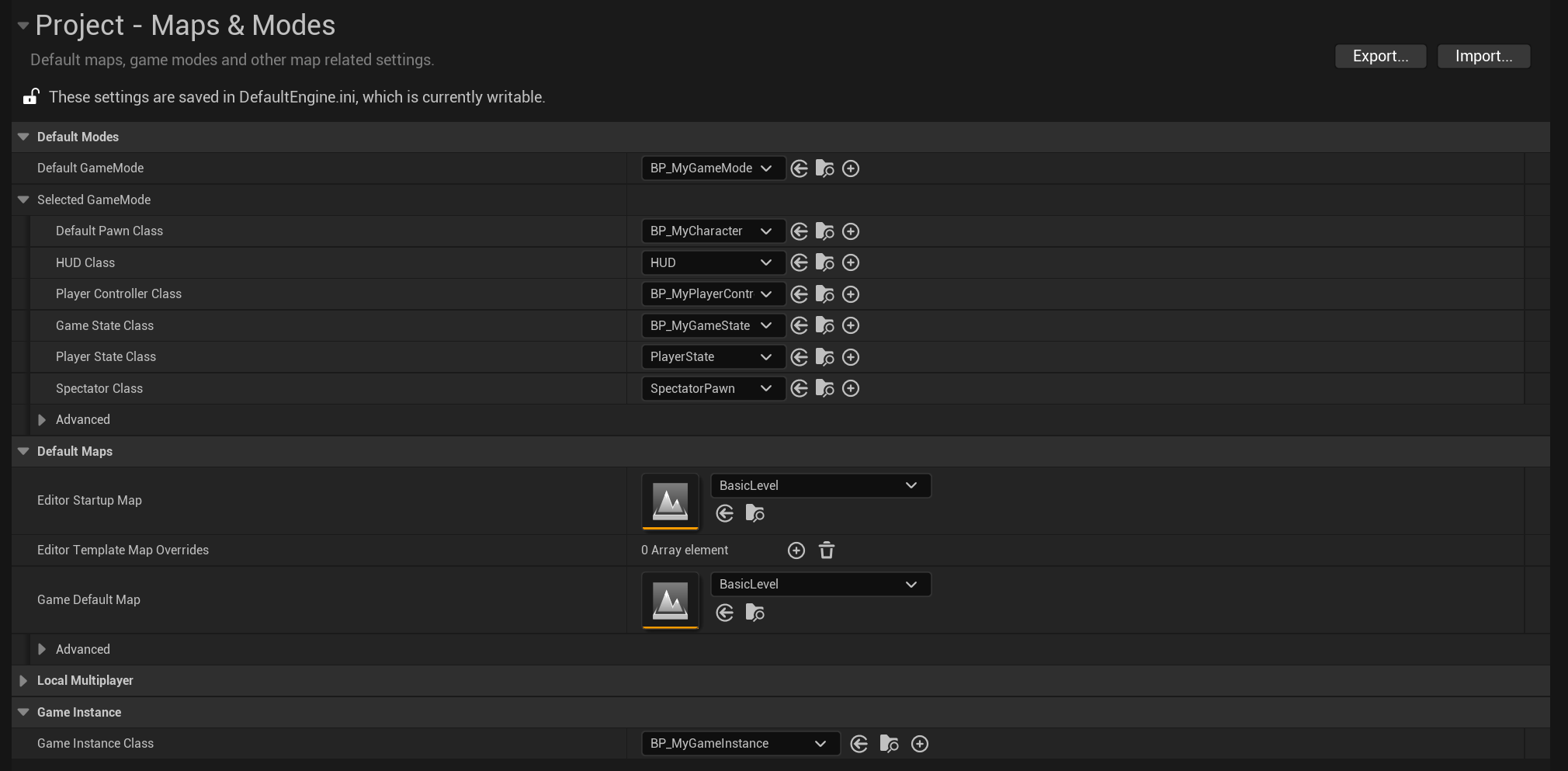
- Project Setting에서 Mode와 Instance를 설정해줌
5. 결과 영상