오늘 학습 키워드
-
캐릭터 컨트롤러 추가
-
액터컴포넌트
-
플레이어 HP / EXP 구현
-
Delegate
1. 컨트롤러 추가
-
언리얼 엔진에서 기본으로 제공하는 캐릭터 클래스 내부를 뜯어본 결과, Enhanced Input System 관련 처리를 캐릭터 내에서 다 하였기에 마찬가지로 플레이어 캐릭터도 이렇게 구현하였음
-
그러나, 나중에 멀티플레이어 게임이나, 복잡한 게임을 개발하게 될 경우에는 보통 Controller라는 객체를 따로 만들어 플레이어의 입력을 처리한다는 것을 알게 되어 기존에 공부했던 방식대로 컨트롤러 객체에 관련 로직을 옮겨 수정함
class INTOTHEPARADOX_API AMyPlayerController : public APlayerController
{
	GENERATED_BODY()

public:
	// ... //
	UPROPERTY(EditAnywhere, BlueprintReadOnly, Category = "Input")
	UInputMappingContext* IMC;
	UPROPERTY(EditAnywhere, BlueprintReadWrite, Category = "Input")
	UInputAction* MoveAction;
	UPROPERTY(EditAnywhere, BlueprintReadWrite, Category = "Input")
	UInputAction* LookAction;
	UPROPERTY(EditAnywhere, BlueprintReadWrite, Category = "Input")
	UInputAction* JumpAction;
	UPROPERTY(EditAnywhere, BlueprintReadWrite, Category = "Input")
	UInputAction* SprintAction;
};
2. C++로 블루프린트 가져오기
-
만든 컨트롤러 객체를 GameMode에 등록하려 함
-
보통 C++로 객체를 만들어도, 블루프린트로 한 번 더 감싸기 때문에 이 블루프린트를 사용하도록 코드를 구현하였음
AIntoTheParadoxGameMode::AIntoTheParadoxGameMode()
{
	// set default pawn class to our Blueprinted character
	static ConstructorHelpers::FClassFinder<APawn> PlayerPawnBPClass(
    	TEXT("/Game/ThirdPerson/Blueprints/BP_MyCharacter"));
	if (PlayerPawnBPClass.Class != NULL)
	{
		DefaultPawnClass = PlayerPawnBPClass.Class;
	}
	else
	{
		DefaultPawnClass = AMyCharacter::StaticClass();
	}
    // 컨트롤러도 마찬가지
}
3. ActorComponent
-
액터에 부착해서 움직임, 체력, 인벤토리, AI 등 게임플레이 로직이나 상태 관리 등 “비시각적” 기능을 담당하는 베이스 클래스
-
트랜스폼(위치/회전/스케일) 정보는 없으며, 오직 기능·데이터만 제공
-
순수 로직을 깔끔하게 모듈화
-
장점
- 여러 액터에 자유롭게 붙여 재사용 가능
- 코드/기능/변수 등을 독립적으로 관리, 유지보수 및 확장에 매우 유리
-
따라서 HP를 단순 int나 float형으로 저장하지 않고, ActorComponent로 구현하였음
4. HP
-
이전처럼 그냥 int로 하면 값이 바뀔 때마다, 값이 올바른 범위에 있는지, 특정 이벤트를 발생시켜야 하는지를 다 관리해줬어야 함
-
컴포넌트를 만들어서 이제는 알아서 관리하도록 구현
-
체력이 0이하일 시, 사망했다는 알림을 Delegate를 이용하여 보냄
Delegate
-
일종의 이벤트 시스템으로, 특정 사건이 발생했을 때 여러 객체가 반응할 수 있게 중간에서 직접 호출을 관리해주는 메커니즘
-
결합도를 낮추고, 여러 이벤트 리스너 등록 및 관리가 편함
-
옵저버 패턴의 실질적 구현체
헤더
DECLARE_DYNAMIC_MULTICAST_DELEGATE(FOnDeath);

UCLASS(ClassGroup = (Custom), meta = (BlueprintSpawnableComponent))
class INTOTHEPARADOX_API UHealthComponent : public UActorComponent
{
	GENERATED_BODY()

public:
	UPROPERTY(BlueprintAssignable)
	FOnDeath OnDeath;
	UFUNCTION(BlueprintCallable, Category = "Health")
	void TakeDamage(float Damage);
	UFUNCTION(BlueprintCallable, Category = "Health")
	void Heal(float Amount);
};-
DECLARE_DYNAMIC_MULTICAST_DELEGATE(FOnDeath);- 멀티캐스트 : 여러 개의 함수가 바인딩될 수 있음
- 다이내믹 : 블루프린트에서도 사용 가능
- FOnDeath라는 이름의 델리게이트 타입을 정의
-
OnDeath: 정의한 델리게이트 타입의 변수 선언 -
BlueprintAssignable: 멀티캐스트 델리게이트 변수를 블루프린트에서 ‘이벤트로 할당’할 수 있게 노출하는 역할
cpp
void UHealthComponent::TakeDamage(float Damage)
{
	CurrentHealth = FMath::Clamp(CurrentHealth - Damage, 0.f, 100.f);
	if (CurrentHealth == 0)	{
		bIsDead = true;
		OnDeath.Broadcast();
	}
}

void UHealthComponent::Heal(float Amount)
{
	CurrentHealth = FMath::Clamp(CurrentHealth + Amount, 0.f, 100.f);
}- 데미지 받았을 시 체력 깎고, 0이하가 되면
OnDeath.Broadcast()를 호출하여 델리게이트에 바인딩된 함수들 모두를 실행
//Character.cpp
APlayerCharacter::APlayerCharacter()
{
	HealthComponent = CreateDefaultSubobject<UHealthComponent>(TEXT("Health"));
}

void APlayerCharacter::BeginPlay()
{
    Super::BeginPlay();
    HealthComponent->OnDeath.AddDynamic(this, &APlayerCharacter::HandleDeath);
}-
Transform기능이 없는 컴포넌트이므로,
SetupAttachment는 필요 없음 -
플레이어 클래스의 BeginPlay에서 OnDeath 델리게이트에 자신의 HandleDeath 함수를 바인딩
-
그럼 이후 체력 컴포넌트에서 OnDeath.Broadcast()가 호출되면 HandleDeath가 실행되어 죽음 처리 동작을 수행하게 된다
동작 확인
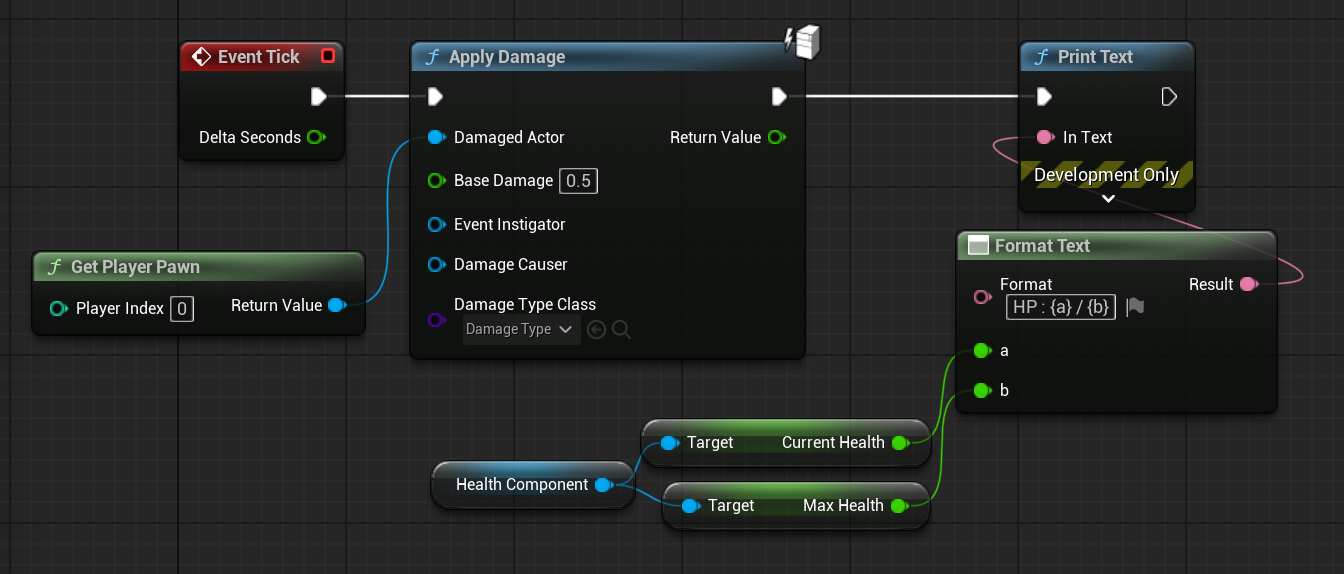
- Apply Damage로 데미지 잘 들어가는지 확인
5. EXP
-
EXP 역시 HP와 비슷하게 컴포넌트 만들고, delegate이용하여 만듦
-
추가로 레벨업 시 delegate 통해 캐릭터가 인지하게 되면, 함수를 호출하여 체력 컴포넌트에서 최대체력과 현재체력이 증가하도록 구현하였음