오늘 학습 키워드
-
화면 내 마우스 방향 회전
-
AI 기초
-
Nav Mesh 생성
-
AI Perception
1. 화면 내 마우스 방향 회전
-
앞서, 마우스 우클릭을 짧게 한 것과 길게 한 것을 구현하였음
-
좀보이드처럼 우클릭을 길게 하였을 때, 캐릭터가 화면 내 마우스 위치를 향하도록 회전시키려 함
2. DeprojectMousePositionToWorld
APlayerController::DeprojectMousePositionToWorld(FVector& WorldLocation, FVector& WorldDirection)
-
커서의 위치를 월드좌표에서의
WorldLocation,WorldDirection으로 반환해줌 (매개인자에 값을 넣어줌) -
그래서 위 함수를 실행 후, 캐릭터의 rotation을
WorldDirection으로 해주었으나 회전이 이상해짐을 발견 -
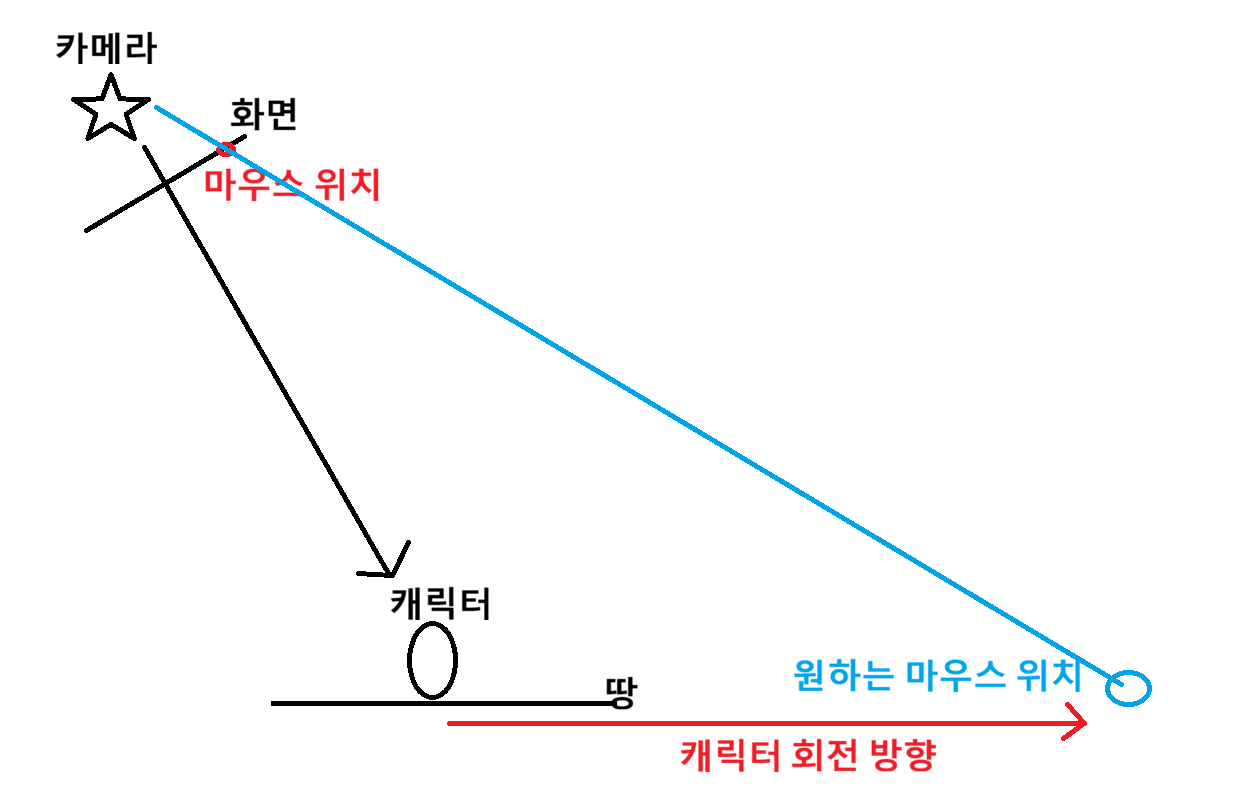
그래서 이 함수를 실행했을 때, 마우스 위치를 디버깅라인으로 찍어보니 내가 원했던 위치가 아니었음
게임 화면 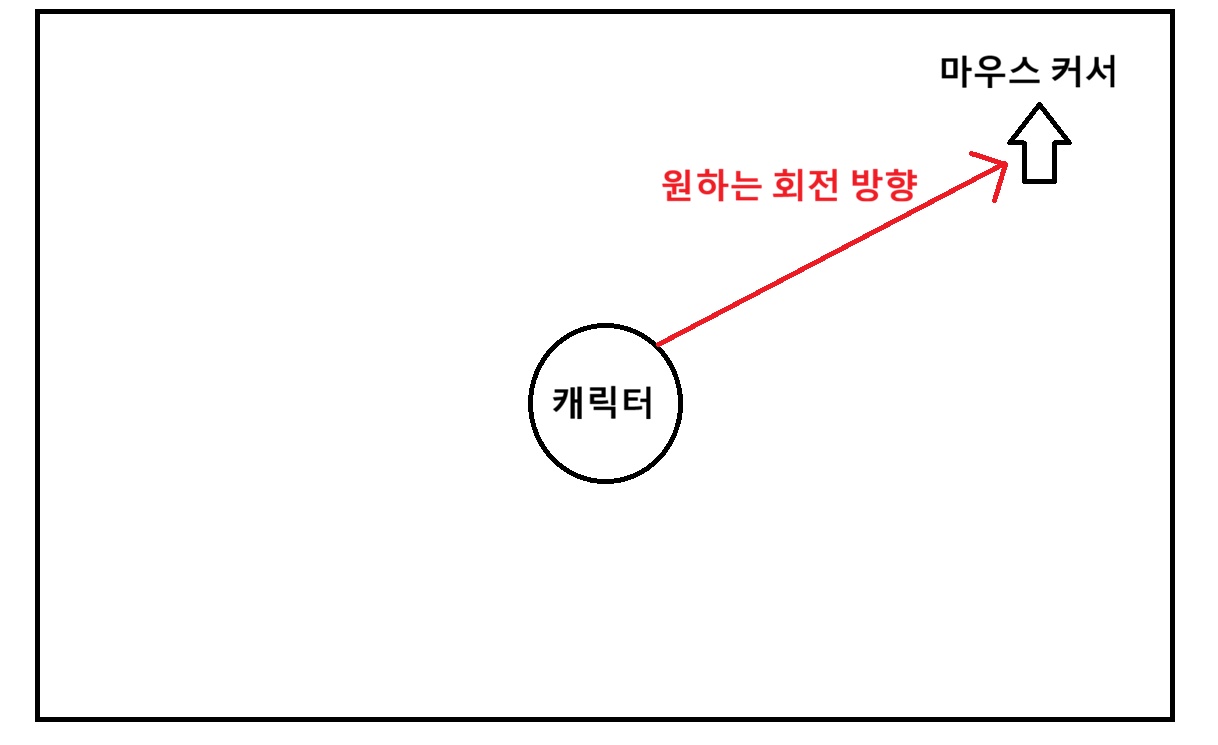 | 월드에서의 실제 마우스 위치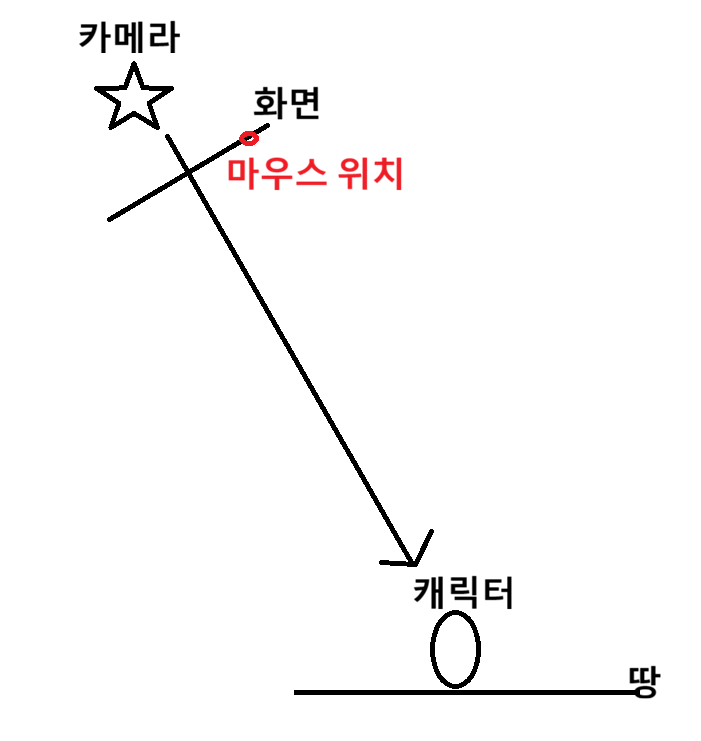 |
|---|
- 따라서 마우스 커서가 내가 원하는 곳으로 잡히도록, 먼저
DeprojectMousePositionToWorld를 통해 화면에서의 마우스 월드좌표를 얻고, 라인트레이싱을 이용
void AMyCharacter::TurnToMouse()
{
	AMyPlayerController* MyPC = GetOwner<AMyPlayerController>();
	if (!IsValid(MyPC))
		return;

	FVector WorldLocation, WorldDirection;
	if (MyPC->DeprojectMousePositionToWorld(WorldLocation, WorldDirection) == false)
		return;

	FVector Start = Camera->GetComponentLocation();
	FVector Direction = WorldLocation - Start;
	FVector End = Start + Direction * 10000.f;

	FHitResult Hit;
	FCollisionQueryParams Params;
	Params.bTraceComplex = true;
	Params.AddIgnoredActor(this);	// 캐릭터는 무시

	if (GetWorld()->LineTraceSingleByChannel(
		Hit, Start, End, ECC_Visibility, Params) == false)
	{
		UE_LOG(LogTemp, Error, TEXT("Line Trace Error"));
		return;
	}
	FVector TargetPoint = Hit.ImpactPoint;
	FRotator TargetRot = {0, (TargetPoint - GetActorLocation()).Rotation().Yaw, 0.f};
	ServerRPC_TurnToMouse(TargetRot);
}
2. AI 기초 생성
-
AAIController를 상속받아 AI전용 컨트롤러를 만들고,ACharacter상속받아 AI캐릭터를 생성 -
Build.cs에 AI관련 모듈 추가
// Copyright Epic Games, Inc. All Rights Reserved.

using UnrealBuildTool;

public class MyAI : ModuleRules
{
	public MyAI(ReadOnlyTargetRules Target) : base(Target)
	{
		PublicDependencyModuleNames.AddRange(new string[] {
        	// ... //
			"AIModule",
			"StateTreeModule",
			"GameplayStateTreeModule",
			"NavigationSystem",
			"GameplayTasks"
		});
	}
}- AICharacter에 AI컨트롤러 설정
AMyEnemyCharacter::AMyEnemyCharacter()
{
	AIControllerClass = AMyAIController::StaticClass();
	AutoPossessAI = EAutoPossessAI::PlacedInWorldOrSpawned;	// Possess 타입 설정
}- 적캐릭터 블루프린트에서 설정도 가능

3. Nav따라 랜덤하게 움직이는 AI
- Navigation Volume을 레벨에 추가해 Nav Mesh 생성
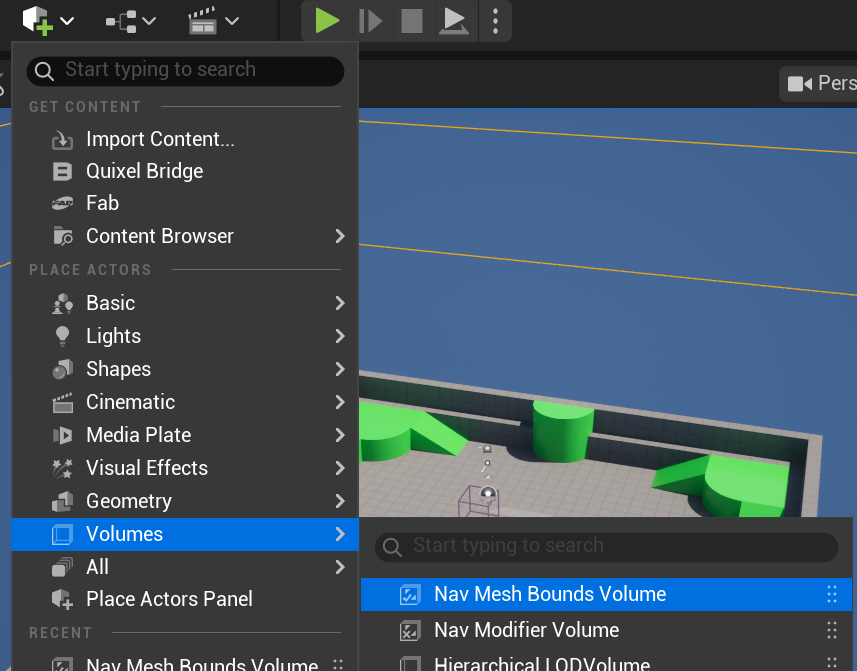 | 원하는 영역만큼 Scale 추가해주고, P눌러 Nav Mesh확인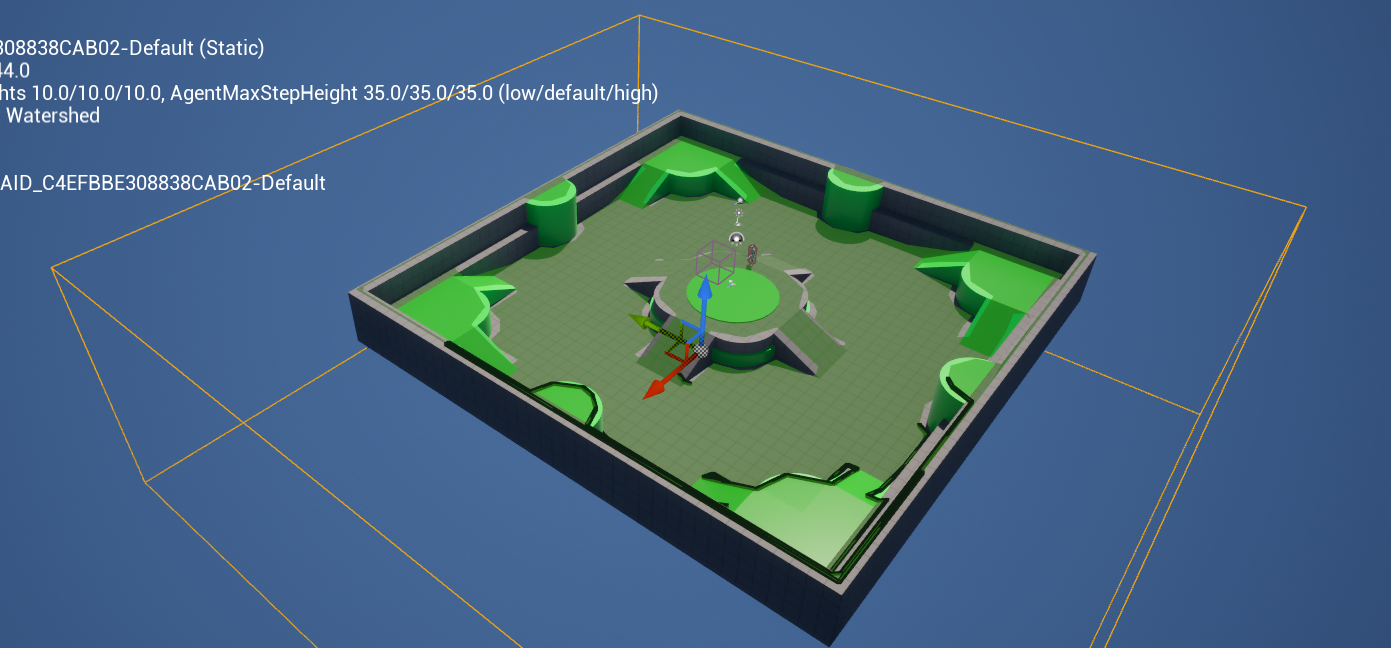 |
|---|
- NavigationSystem을 이용하여 랜덤으로 AI 움직이기
#include "NavigationSystem.h"

void AMyAIController::BeginPlay()
{
	Super::BeginPlay();

	GetWorldTimerManager().SetTimer(
		RandomMoveTimer,
		this,
		&AMyAIController::MoveToRandomLocation,
		3.0f,
		true,
		1.0f
	);
}

void AMyAIController::MoveToRandomLocation()
{
	UNavigationSystemV1* NavSystem = UNavigationSystemV1::GetCurrent(GetWorld());

    // 랜덤 위치 저장할 변수
	FNavLocation RandomLocation;
	bool bFoundLocation = NavSystem->GetRandomReachablePointInRadius(
		MyPawn->GetActorLocation(),
		MoveRadius,
		RandomLocation
	);

	if (bFoundLocation)
    	// 전용 이동 함수
		MoveToLocation(RandomLocation.Location);
}
3.1. 이동 애니메이션 처리
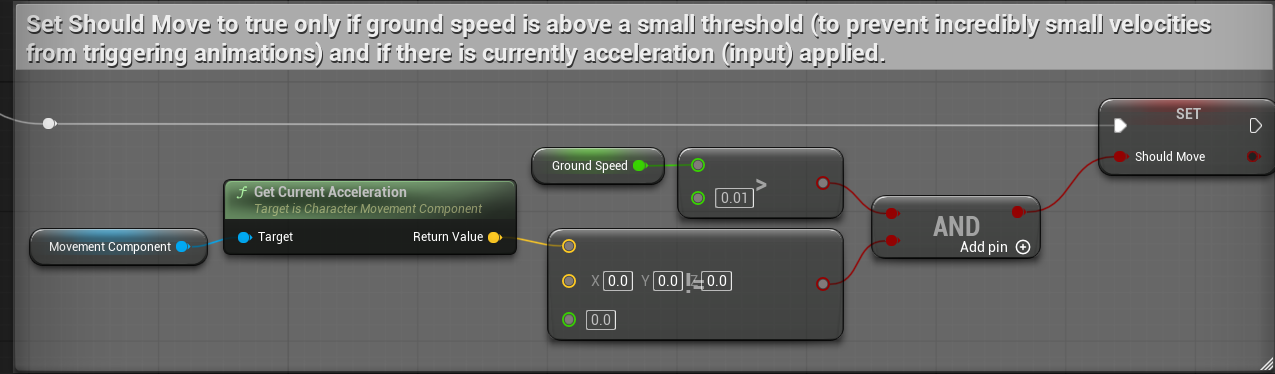
- ThirdPerson에서 제공하는 애니메이션은 MovementComponent를 가져와 이동 애니메이션에 사용하는데, 컨트롤러의 입력이 없으면
Accerlaration값이 0임
-
따라서 입력 없이 이동하는 AI캐릭터는 해당 값이 0이 되어 AND에서 false나와
Sholud Move가false가 되어 이동할 때 이동 애니메이션이 재생 안 됨 -
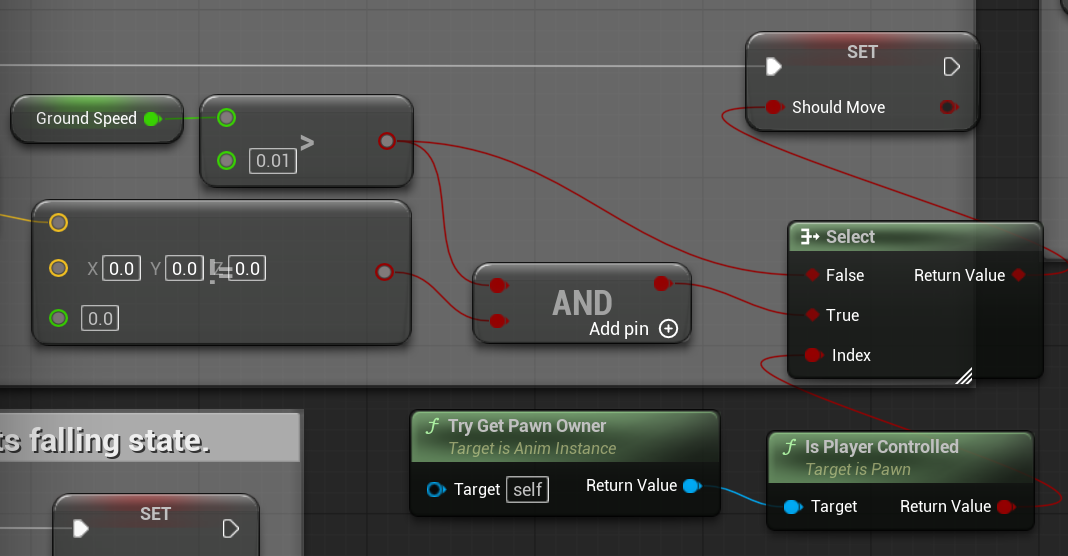
따라서, AI의 경우 아래와 같이 블루프린트 노드를 추가해 그냥
Ground Speed값으로만Should Move를 판단해 이동 애니메이션 잘 작동하도록 함
(Is Player Controlled: 플레이어가 컨트롤하고 있는 폰이면 true반환)
4. AI Perception
-
언리얼에서 AI가 다른 물체나 캐릭터를 감지할 수 있도록 제공하는 기능
-
감지당할 대상은 AI Perception Source를 가지어 감지되도록 함
-
이 컴포넌트를 AI캐릭터가 아닌 AI컨트롤러에 사용
4.1. 감지할 AI에 추가
컨트롤러 헤더
#include "CoreMinimal.h"
#include "AIController.h"
#include "Perception/AIPerceptionTypes.h"
#include "MyAIController.generated.h"

class UAIPerceptionComponent;
class UAISenseConfig_Sight;

UCLASS()
class MyAI_API AMyAIController : public AAIController
{
	GENERATED_BODY()
	// ... //
protected:
	UPROPERTY(VisibleAnywhere, BlueprintReadOnly, Category = "AI")
	UAIPerceptionComponent* AIPerception;

	// 시야 감각으로 인지
	UPROPERTY(VisibleAnywhere, BlueprintReadOnly, Category = "AI")
	UAISenseConfig_Sight* SightConfig;

	UFUNCTION()
	void OnPerceptionUpdated(AActor* Actor, FAIStimulus Stimulus);
};
컨트롤러 cpp
#include "Perception/AIPerceptionComponent.h"
#include "Perception/AISenseConfig_Sight.h"

AMyAIController::AMyAIController()
{
	AIPerception = CreateDefaultSubobject<UAIPerceptionComponent>(TEXT("Percep"));
	SetPerceptionComponent(*AIPerception);	// 컴포넌트로 등록

	// 시야 설정
	SightConfig = CreateDefaultSubobject<UAISenseConfig_Sight>(TEXT("SightConfig"));
	SightConfig->SightRadius = 1500.0f;		// 인지 가능한 거리
	SightConfig->LoseSightRadius = 2000.0f;	// 인지 후 상대를 놓치는 거리
	SightConfig->PeripheralVisionAngleDegrees = 90.0f;	// 시야각(전방기준. 총 180도)
	SightConfig->SetMaxAge(5.0f);	// 인지하고 놓친다음 놓친 대상을 기억하는 시간

	// 시야로 인지할 대상 (적, 중립, 친구)
	SightConfig->DetectionByAffiliation.bDetectEnemies = true;
	SightConfig->DetectionByAffiliation.bDetectNeutrals = true;
	SightConfig->DetectionByAffiliation.bDetectFriendlies = true;

	// 인지컴포넌트에 시야 등록
	AIPerception->ConfigureSense(*SightConfig);
    // 다른 감각들과 같이 인지했을 때 어떤 감각을 우선시 할 것인지
	AIPerception->SetDominantSense(SightConfig->GetSenseImplementation());
}

void AMyAIController::BeginPlay()
{
	Super::BeginPlay();

	if (AIPerception)
	{
    	// 인지하거나 인지 풀렸을 때 부를 함수
		AIPerception->OnTargetPerceptionUpdated.AddDynamic(
			this,
			&AMyAIController::OnPerceptionUpdated
		);
	}
}

void AMyAIController::OnPerceptionUpdated(AActor* Actor, FAIStimulus Stimulus)
{
	// 인지했으면
	if (Stimulus.WasSuccessfullySensed())
	{
		// ... //
	}
	else		// 놓쳤으면
	{
		// ... //
	}
}
4.2. 감지당할 대상에 추가
캐릭터 헤더
#include "Perception/AIPerceptionStimuliSourceComponent.h"

protected:
	// 감지당할 소스 컴포넌트
    UPROPERTY(VisibleAnywhere, BlueprintReadOnly, Category = "AI")
    UAIPerceptionStimuliSourceComponent* StimuliSource;
캐릭터 cpp
#include "Perception/AISense_Sight.h"

AThirdPersonCharacter::AThirdPersonCharacter()
{
    StimuliSource = CreateDefaultSubobject
    	<UAIPerceptionStimuliSourceComponent>(TEXT("StimuliSource"));
}

void AThirdPersonCharacter::BeginPlay()
{
    Super::BeginPlay();

    if (StimuliSource)
    {
    	// 소스 등록
        StimuliSource->RegisterForSense(TSubclassOf<UAISense_Sight>());
        StimuliSource->RegisterWithPerceptionSystem();
    }
}