
Scene Manager란?
Scene을 교체하는 작업을 할 때 사용하는 것
Static Properties
🎞️ loadedSceneCount : load된 Scene의 수
🎞️ sceneCount : 현재 Scene의 수
🎞️ sceneCountInBuildSettings : Build Setting에 존재하는 Scene의 수
Static Methods
🎬 CreateScene(string SceneName)
Create an empty new Scene at runtime with the given name.
⮕ 지정된 이름으로 Runtime에 비어있는 새로운 Scene을 만드는 함수
⮕ Prameters : Scene 이름으로 사용될 string
⮕ Returns : Scene (새로 만들어진 or 만들기에 실패한 invalid Scene)
🎬 GetActiveScene()
Gets the currently active Scene
⮕ 현재 실행 중인 Scene을 가지고 오는 함수
⮕ Returns : Scene (활성화된 Scene)
🎬 GetSceneByBuildIndex(int buildIndex)
Get a Scene struct from a build index
⮕ build index에서 Scene struct를 가져오는 함수
⮕ Prameters : Build Setting 창에 표시된 index
⮕ Returns : Scene (참조하려는 Scene or invalid Scene)
🎬 LoadScene(string sceneName, SceneManagement.LoadSceneMode mode)
Loads the Scene by its name or index in Build Settings.
⮕ build index에서 Scene struct를 가져오는 함수
⮕ Prameters : SceneManagement.LoadSceneMode mode
ㅤㅤ- Scene을 로드할 유형을 선택하는 parameter이다.
ㅤㅤ- string sceneName은 int sceneIndex로 대체 될 수 있다.
🎬 LoadSceneAsync(string sceneName, SceneManagement.LoadSceneMode mode = LoadSceneMode.Single)
Loads the Scene asynchronously in the background.
⮕ Scene을 background에서 비동기적으로 불러 오는 함수
⮕ Prameters
ㅤㅤ- sceneName은 ind sceneBuildIndex 으로 대체 될 수 있다.
ㅤㅤ- LoadSceneMode mode는 LoadSceneParameters parameters 로 대체 될 수 있다.
⮕ Returns : AsyncOperation (비동기 작업을 사용해 작업이 완료되었는지 확인)
Build Setting?
Scene Manager가 무엇이고, 어떤 함수를 가지고 있는지 살펴봤다.
함수 중간 중간 등장하는 Build Setting에 대해 알아보자.
Unity의 File - BuildSetting 에서 설정할 수 있다.
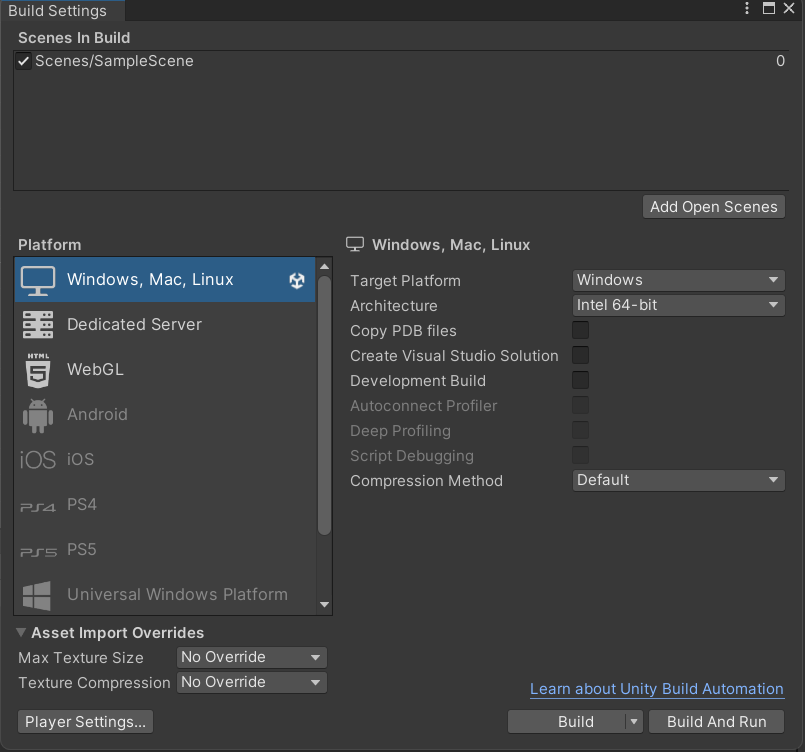
프로젝트에 씬이 여러 개 있어도, 빌드 세팅에 넣어준 씬만 빌드가 된다.
1. Add Open Scene 버튼을 눌러 추가하기
2. Scene을 드래그 앤 드롭해서 추가하기
출처