
# ECMAScript
2009년. ES5 버전 - ECMA-262
2015년. ES6 버전 - ECMA-262 2015
# Chrome Browser , Node.js
대표적인 Javascript Runtime 환경
# Javascript 표현식
Expression - 값을 만들어내는 간단한 코드 표현식
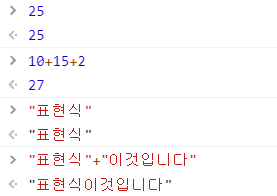
# Statement
한개 혹은 한개 이상의 표현식이 모여 문장 형성
모든 표현식은 문장 가능
문장의 끝에는;( 세미콜론 )
- 문장이 한줄인경우
;생략가능이나, 관례상으로 항상 명시- 한줄 이상이 경우
;으로 문장 구분 필수- 여러 문장 사용시 마지막 문장의 결과를 반환.
[ 조건문,반복문 ] : 문장, {}의 뒤에는;명시하지않는다.
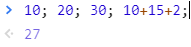
표현식이 모여 -> 문장 | 문장이 모여 -> 프로그램이된다.
# Keywords & Reserved Words
자바스크립트에서 특정한 목적을 위해 사용하는 단어,
이런 키워드들을 예약어로 지정됨.
예약어는 프로그램 작업시 변수명,함수명 등 이름으로 사용불가.
[ Keywords ]
var , const , let
[ Reserved Words ]
break , case , catch , continue , default , delete , do , else , finally , for , funtion , if , in , instanceof , new , return , switch , this , throw , try , typeof , var , void , while , with
[ Future Reserved Words ]
abstract , boolean , byte , char , class , const , debugger , double , enum , export , extends , final , float , goto , implements , import , int , interface , long , native , package , private , protected , public , short , static , super , synchronized , throws , transient , volatile
# 식별자 - Identifier
이름을 식별할 수 있는 형태로 작성
- 코드 내의 변수, 함수, 속성을 식별하는 문자열
- 대소문자를 구분한다.
const Identifier = {name : '식별자', number : 1};

console.log(Identifier.name) //'식별자'
//위의 문장에서 식별자 : Identifier , name , number
식별자는
유니코드문자 ( 한글 ) , $ , _ , 숫자 ( 0-9 )사용가능,
but숫자로 시작 , 예약어 , 공백 문자사용불가
Name은 유지보수를 고려하여, 역할에 맞는 의미있는 Name을 생성해야한다.
# 주석 - Comments
소스코드를 이해할 수 있도록 돕는 역할 ( 유지보수 효율성 )
# 변수 & 상수 - variable & constant
프로그램이 실행하고 하지않을때 값을 보관하는 역할
# 상수 선언법 - const
const name = 값
# 변수 선언법 - let
상수인 const 와 달리 변수 let의 경우 재할당이 가능하다.
let name = 1
let name = 0
# 변수의 유효 범위 - scope of variables
변수가 사용되는 공간이 어느 범위에서 유효한지 정해주는 규칙
# const vs let 범위 : { } ( 블록 ) scope
{ } 내부에 const 선언시 블록 외부에서는 추적 불가
{ } 외부에 let 선언시 블록 내부에서 사용가능
{ { } } - 블록 중첩시 블록 외부에 있는 선언변수는 내부에서 사용가능,
내부에서 선언된 변수는 외부 블록에서 사용불가능
# var의 유효 범위 - ES5 버전 주사용
함수 scope - function( ) { }
함수 스코프 내에서 var 선언후 함수 스코프 외부에서 var 호출시 추적 불가.
# var & Hoisting
Hoisting - 2015년 이전에는 사용된적 없는 용어,
javascript 사용자에게 혼란을 주는 현상. [ var , function() ]
var name을 하단에 선언할경우 변수값을 할당해도, Hoisting에서는 변수 선언부까지만 인식된다. ( 할당한 변수값은 인식안돼서 undefined )- 아래에 있는 함수를 위에서 호출가능
function NextHoisting(){
	console.log('함수 먼저 사용후 호출')
}
NextHoisting(); // '함수 먼저 사용후 호출'PevHoisting(); // '함수전에 호출부터 했다!'
function PevHoisting(){
console.log('함수전에 호출부터 했다!')
}let 선어시 Hoisting 불가
# 자료형 - Data Types
# 변수가 가지는 고정 타입이 없는 동적 타이핑
[ 연관성 높은,정리 잘된 블로깅 - Javascript - 기본타입 표현식 ]
기본제공 타입
- 기본타입 [ Boolean , Null , Undefined , Number [ + NaN (String) ] , String , Symbol ]
- 객체 ( Objects ) - 사용자 정의 환경, 표준 내장객체 [ + null ]
typeOf : 피연산자의 평가 전 자료형을 나타내는 문자열을 반환 - 표현식의 타입 찾는 연산자 [ A ( 표현식 ) , typeOf A ( 표현식 ) ]
- NaN : Number( 'string' ) - 숫자형을 형변환할경우 타입이 NaN,number로 표시
- Symbol : 고유한 값을 만들경우 사용.
const A = Symbol('String');
const B = Symbol('String');

console.log(A,typeOf A); // 'symbol'
console.log(A === B); // false
[ 연관성 높은 참고 블로깅 - node.js_간단 Javascript - 자료형 ]
[ 연관성 높은 참고 블로깅 - node.js_간단 Javascript - ES6 `` ( 빽틱 ) ]
# 조건문 - [ if , if-else , else-if , switch]
- Expression Falsy [ false , 0 , '' , null , undefined , NaN ]
- Expression Truethy [ "String" , 0 , Object , { } , [ ] ]
[ 연관성 높은 블로깅 - Javascript - 기초 if문 ]
[ 연관성 높은 블로깅 - Node.js - Javascript - 조건문 간단 이론 정리 ]
# 논리 연산자, 조건부 실행
- && : 조건문 한개라도 거짓이면 무조건 거짓,
- || : 조거문 한개라도 참이면 무조건 참,
- ! : 조건문에 ! 연산자를 사용할경우 결과의 반대. ( 참이면 거짓결과 )
# 삼항 연산자, 조건부 실행
( 조건 ? 조건이 참이면 실행되는 표현식 : 조건이 거짓일 경우 실행 되는 표현식 )
- ( 조건문 ? A : B )
- { } 사용 불가 문법으로 하나의 표현식만 가능
let n = 5;
console.log(n % 5 === 0 ? '5의 배수입니다.' : '5의 배수가 아닙니다.')

// '5의 배수입니다.'
# switch 조건문
[ 연관성 높은 블로깅 - Node.js - switch 간단사용법 ]
- default : 어떤 조건에 맞지않아도 출력되는 구문
- break : case에 break를 명시하지않을 경우 default 값도 출력된다.
- case 중첩 가능 : if문 중첩과 동일하게 중첩으로 추적이 가능하다
let n = 5;
switch(n%5){
  case 0: console.log('5의 배수'); break;
  default : console.log('n?')
}

// 결과 '5의 배수'
# 반복문 - for , whlie , do-whlie
[ 연관성 높은 블로깅 - 반복문 간단 정리 및 예제문 ]
[ 연관성 높은 블로깅 - 반복문 간단 이론정리 ]
# for문
for(초기화; 반복조건; 반복이 된 후 실행){ 반복이 되는 코드 블럭 }
- 초기화 부분의 선언문은 변화되는 것을 고려해 let으로 선언
📌 초기화 부분 및 반복이 된 후 실행 부분은 1개이상 선언 가능
- break : 반복되는 { }의 반복문 종료가능
- continue : 반복되는 { }의 반복문에서 해당하는 반복문만 패스하고 다음것으로 이어서 반복문 실행
for (let i=0;i<2;i++){
	if(i==1){
      continue;
      console.log('i = 1입니다.');
    }
  console.log('i 반복문 종료');
}
//결과 'i 반복문 종료', (continue;로 인해 i=1패스)
🎈 for(;;){ }
무한루프
for(;;){
	console.log('무한루프 가볼까?');
  if(Math.random() * 100 > 90){
     break;
  }
  //(;;) 자체에서 '무한루프 가볼까?' 구문을 무한루프 돌려지는데,
  // Math.random() * 100 > 90 값중에서 컴퓨터가 랜덤으로 값을 출력후 break하게 설정
}

//결과 : 새로고침할때마다 반복적으로 출력되는 값은 다르다.
# whlie
whlie(조건){ 선언한 조건이 거짓으로 출력될 때까지 반복실행 }
- 조건이 참일때 무한루프
while(true){
	console.log('무한루프 가볼까?');
  if(Math.random() * 100 > 90){
     break;
  }
}
// break 명시안하면 서버 폭발할정도의 무한루프 진행
# do-whlie
do{ 선언한 조건이 거짓으로 출력될 때까지 반복실행 } whlie(조건)
- 조건이 어떠하던 일단 한번 실행후에 조건 따름.do{ console.log('무한루프 가볼까?'); }while(Math.random() * 100 <= 90) // 랜덤으로 '무한루프 가볼까?' 출련됨
# for of - iterable
iterable 객체에 모두 사용가능
- iterable protocol 자체 내장 객체 : 배열
# for in - All property
객체에서도 사용가능, 객체를 하나하나 반복문 가능
Object.prototype.test = function(){};
for(const i in {a: 1, b: 2, c: 3}){
	console.log(i);
}

// 결과 : 'a' 'b` 'c' 'test'
# 함수 - function()
[ 연관성 높은 블로깅 - function 간단 정리 및 간단 예제 ]
전통적인 방식 : function name( ){ }
const name = function( ){ } - 함수를 만들때 사용하는 키워드
ES6 : const name = ( ) => { }
[ 전통방식 ]
function name(){
  console.log('전통방식');
}

console.log(name, typeof name);

//결과 : [funtion: name] 'function'
[ const name = function( ){ } ]
const name = function(){
	console.log('name');
}

//결과 : 'name'
# 선언적 function vs 익명함수 변수할당
선언적 function( ){ }의 경우 호이스팅 발생
선언적 함수의 경우 Javascript 특성상, 어디에 있던지 메모리에 저장하여 사용가능
익명함수 변수 할당의 경우 호이스팅 불가
[ 간단 예제를 통한 이해 ]
hoisting(); //결과 : '호이스팅되네?'
Nohoisting(); //결과 : not a function
NohoistingTry(); //결과 : not defined - 뭔지 모름

//선언전 function(){}
function hoisting(){
	console.log('호이스팅되네?');
}


//익명함수 변수 할당
var Nohoisting = function(){
	console.log('호이스팅 안됨');
}

cont NohoistingTry = function(){
	console.log('호이스팅 안됨');
}
# 생성자 함수로 함수 생성법 - 사용되어지지는 않음
const name = new Function();
선언적 방식이 아닌 익명함수 스타일
[ new Function(인자1, 인자2, ... , 함수의 바디) ]
const sum = new Function('a','b','c','return a + b + c');
sum(1,2,3) // 결과 : 6
🎈 function vs new Function( );
{
  const a = 1;
  const test = new Function('return a');

  test();
} //결과 : a is not defined
{ } 내부에서 지역변수로 선언된 test는 상위에 선언된 a 를 인지하지 못한다.
global.a = 3;
{
  const test = new Function('return a');

 console.log(test());
} //결과 : 3
{ } 스코프 외부에 글로벌 변수로 선언할경우 new Function 인지함
📌 arrow function
[ 연관성 높은 관련 블로깅 - arrow function 간단 사용법 ]
const name = () => {};
- const name = () => ``; : return 할경우 축약 - 간단한 체이닝
const me = name => { return `me ${name}`;};

const me = name => `me ${name}`;
📌 new 함수( ) - 생성자 함수
[ 연관성 높은 블로깅 - 객체함수 간단 깔금 정리 ]
this - 객체로 만들어졌을때, 그 객체를 지칭.
function Person(name , age){
  this.name = name;
  this.age = age;
}

const p = new Person('soyoun', 29);
console.log(p.name, p.age); // 결과 : 'soyoun', 29

const a = new Person('soyoon', 27);
console.log(a.name, a.age); // 결과 : 'soyoon', 27

------------------------------------------------------------------------------------

const Cat = (name , age) => {
  this.name = name;
  this.age = age;
}
const a = new Cat('nabi', 1); //결과 : Cat is not a constructor
arrow function{ }내부에는 this 사용 불가
📌 함수 안에서 함수를 만들어 리턴 가능
function plus(base){
	return function(num){
    	return base + num;
    }
}


// 위에 생성된 함수 사용
const plus5 = plus(5); // -> base = 5
console.log(plus5(10)); //plus5 = 5 | return function(num) = 10

//총결과 : 15

------------------------------------------------------------------------------------

// 함수를 인자로하여 함수호출

function name(callback){
  console.log('name')
  callback();
}

name(function(){
	console.log('콜백')
})# 객체 - Object
함수 || 클래스(틀) => 객체, 개체 , Object
[ 연관성 높은 블로깅 - 간단 예제로 이해하기 좋은 객체 ]
[ 연관성 높은 블로깅 - Object 기초 이론정리 ]
📌 prototype
function Name(name, age){
  this.name = name;
  this.age = age;
  this.hi = function(){
    console.log('hi',this.name, this.age)
  }
}
Name.prototype =결과=> name {}
Name.prototype.toString =결과=> Function: toString
Name.prototype.constructor =결과=> Function: name
Name.prototype.hi =결과=> undefined
[ function 내부에 this.hi = function 할당으로 추적이 안됨. 추적되기 위해서는 아래와 같다 ]
function Name(name, age){
  this.name = name;
  this.age = age;
}

Name.prototype.hi = function(){
	console.log('hi',this.name, this.age)
}
📌 prototype 상속
//부모의 객체생성
function Person(){}

Person.prototype.hi = function(){
  console.log('hi');
}

//자식의 객체
function Korean(region){
  this.region = region;
  this.where = function(){
    console.log('where', this.region)
  }
}


//부모객체를 자식객체에 prototype 할당
Korean.prototype = Person.prototype;

const k = new Korean('Seoul');

k.hi();
k.where();

//결과 : 'where' 'Seoul'

console.log(k instanceof Korean) //(부모)
console.log(k instanceof Person) //(자식)
console.log(k instanceof Object)   // 3개다 true
📌 객체 리터럴
객체 생성시,
const a = {};=> typeof : Object
const test = {
   name : 'test',
   hi() {
     console.log('hi', this)
   },
   hello: function(){
     console.log('hello', this)
   },
   bye: () => {
     console.log('bye', this)
   }
}

test.hi();
/**
hi{name : 'test',
 hi:[Function: hi],
 hello:[Function: hello],
 bye:[Function: bye]}
**/
test.hello();
/**
hello{name : 'test',
 hi:[Function: hi],
 hello:[Function: hello],
 bye:[Function: bye]}
**/
test.bye();
//bye{} =결과=> undefined
👏 표준 내장 객체
대표적 표준 내장객체 : Array
const arr = new Array('red', 'black', 'white');

console.log(arr, typeof arr) // [ 'red', 'black', 'white' ] 'object'
바벨 , Runtime 에서 활용할때 필요한 Class
# class
ES6 추가, 객체를 만들 수 있는 새로운 방법
호이스팅이 발생하지 않음
- 선언적 방식
class A {}
console.log(new A())
- class 표현식을 변수에 할당
const B = class {}
console.log(new B())
# 생성자 - constructor
함수에 인자를 넣어 객체를 생성과 같은 의미로 class에서는 constructor로 최초의 초기값을 객체안에 넣는 기능
class A {}
console.log(new A())

class B {
   constructor(){
     console.log('constructor')
   }
}
console.log(new B())
[ class B ( ){ } 내부에 인자넣어서 간단예시 ]
class B {
   constructor(name,age){
     console.log('constructor', name, age) // 결과 : 'constructor' 'soyoun' 27
   }
}
console.log(new B('soyoun',27))
# 멤버 변수 - 객체의 프로퍼티
function 객체시 - this.name 의 방법으로 class에서 인식되는 방법
class A {
   constructor(name,age){
     this.name = name;
     this.age = age;
   }
}

console.log(new A('soyoun',27))

------------------------------------------------------------------------------------

// [ 더 쉬운 방법 ]

class B {
  name = 'no name';
  age = 0;

  constructor(name,age){
     this.name = name;
     this.age = age;
  }
    // 초기값을 설정했으나, constructor를 통한 값을 새로 할당해서 추적가능
}

console.log(new B('soyoun',27)) // name: 'soyoun', age: 27
# 멤버 함수
class A {
   hi(){
     console.log('hi', this)
   }

  hello=()=>{
    console.log('hello', this)
  }
}

new A().hi();
new A().hello();
/**
'hi' A { hello: [Funtion: hello] }
'hello' A { hello: [Funtion: hello] }
**/

------------------------------------------------------------------------------------

class B {
   name = 'soyoun';
   hi(){
     console.log('hi', this.name)
   }
}

new B().hi(); //'hi' 'soyoun'
# Get & Set
생성자를 생성하고 Get & Set로 주고 받는것.
- _name: 클래스 내부에서 만사용
- get & set : 외부에서 사용하는 퍼블릭
class A{
    _name = 'no name';

    get name(){
       return this._name + '이게 Get';
    }

    set name(value){
       this._name = value + '이게 Set';
    }
}

const a = new A();
console.log(a) // A {_name: 'no name'}

/** set **/
a.name = 'soyoun' // set의 value에 할당
console.log(a) // 'soyoun이게 Set'

/** get **/
console.log(a.name)  //'soyoun이게 Set이게 Get'
console.log(a._name) //'soyoun이게 Set'
[ Set가 없을경우는 readonly처럼 동작됨 ]
class B{
    _name = 'no name';

    get name(){
       return this._name + '이게 Get';
    }
}

const b = new B();

console.log(b); //B {_name: 'no name'}
b.name = 'soyoun'
console.log(b); //B {_name: 'no name'}
# static 변수, 함수
객체가 아닌, 클래스의 변수와 함수
클래스의 이름 = static 변수
-class A{ static name = '클래스의 이름은 A다'; }=>[클래스의 이름은 A다()] '클래스의 이름은 A다'
class A {
    static age = 37;
    static hi(){
       console.log(A.age)
    }
}
console.log(A, A.age)
A.hi()
# static - 클래스의 상속 static 상속
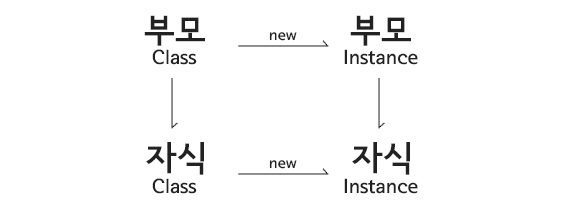
class Parent{
   static age = 27;
}

class Child extends Parent{}
console.log(Parent.age, Child.age) //27 27
# 상속 - extends
이미 만들어져있는 class를 사용.
class Parent{
    name = 'park';
    hi(){
        console.log('hi', this.name)
    }
}

class Child extends Parent{}
const p = new Parent()
const c = new Child()

console.log(p, c) // Parent {name: 'park'} Child { name: 'park'}
# override
클래스의 상속 멤버 변수 및 함수 오버라이딩, 추가
부모에서 구현된 함수 및 변수가 자식에게서 똑같이 구현시킬경우,
class Parent{
    name = 'park';
    hi(){
        console.log('hi', this.name)
    }
}

class Child extends Parent{
   age = 37;
   hi(){
     console.log('hi', this.name, this.age)
   }
}

const p = new Parent()
const c = new Child()

console.log(p, c) // Parent {name: 'park'} Child {name: 'park', age: 37}
📌 super
클래서의 상속 생성자 함수 변경
자식이 생성자에서 추가할경우 super 추가
class Parent{
    name;
    constructor(name){
        this.name = name;
    }
    hi(){
        console.log('hi', this.name)
    }
}

class Child extends Parent{
   age;
   constructor(name, age){
     super(name); // 참조하는 부모의 생성자를 뜻함
     this.age = age;
   }
   hi(){
     console.log('hi', this.name, this.age)
   }
}

const p = new Parent('soyoun')
const c = new Child('soyoun',27)

console.log(p, c) //Parent {name: 'soyoun'} Child {name: 'soyoun', age: 27}
기존에 정리한 블로깅에 연관 링크로 지어 최종본의 Javascript 이론 정리 블로깅입니다.