
오전문제
Optional 문제
- Optional 클래스를 이용해 "Toy1"과 "Toy2"를 각각 저장하고 그것을 람다식과 메소드 참조로 각각 출력해 보자.
package com.test.memo;

import java.util.Optional;

class Organize {
    public static void main(String[] args) {
        Optional<String> o1 = Optional.of("Toy1");
        Optional<String> o2 = Optional.of("Toy2");

        o1.ifPresent(s -> System.out.println(s)); // 람다식
        o2.ifPresent(System.out::println); // 메소드 참조

    }
}
//Toy1
//Toy2- . Optional 클래스를 이용하여 "Optional String"을 감싸고 있는 인스턴스를 만든다. "Optional String"을 감싸고 있는 Optional 인스턴스를 "OPTIONAL STRING"을 저장하는 인스턴스로 만든다. 그리고 그것을 반환받아 출력한다.
"Optional String"을 감싸고 있는 Optional 인스턴스를 공백을 '_' 로 바꾸고, "optional string" 소문자로 바꾼다. 그리고 그것을 반환받아 출력한다.
package com.test.memo;

import java.util.Optional;

class Organize {
    public static void main(String[] args) {
        Optional<String> o1 = Optional.of("OPTIONAL STRING");

        o1.ifPresent(System.out::println);// 출력
        Optional<String> o2 = o1.map(s -> s.toLowerCase()); // 소문자로 변환
        Optional<String> o3 = o2.map(s -> s.replace(" ", "_"));

        o3.ifPresent(s -> System.out.println(s));

    }
}
//OPTIONAL STRING
//optional_string- 저장하고 있는 내용물이 없는, 빈 Optional 인스턴스를 생성한다. "So Basic"이라는 문자열을 감싼 Optional 인스턴스를 생성한다.
String s1에 빈 Optional 인스턴스가 가진 값을 반환하는 데, 그 값이 비어 있으면 "Empty"를 반환하자.
String s2에 "So Basic"이라는 문자열을 감싼 Optional 인스턴스가 가진 값을 반환하는데, 그 값이 비어 있으면 "Empty"를 반환한다.
그리고 s1과 s2를 각각 출력하자.
package com.test.memo;

import java.util.Optional;

class Organize {
    public static void main(String[] args) {
//        Optional<String> nul = Optional.of(null);
//        of()메서드는 null값을 가질 수 없어서 NullPointerException발생
        Optional<String> nul = Optional.empty();
        Optional<String> option = Optional.of("So Basic");

        String n = nul.map(s -> s.toString()).orElse("Empty");

        String o = option.map(s -> s.toString()).orElse("Empty");

        System.out.println(n);
        System.out.println(o);

    }
}
//Empty
//So Basic- Optional 클래스 기반으로 개선해보자.
package com.test.memo;

import java.util.Optional;

class Friend {
    String name;
    Optional<Company> cmp; // null 일 수 있음

    public Friend(String n, Optional<Company> c) {
        name = n;
        cmp = c;
    }

    public String getName() {
        return name;
    }

    public Optional<Company> getCmp() {
        return cmp;
    }
}

class Company {
    String cName;
    Optional<ContInfo> cInfo; // null 일 수 있음

    public Company(String cn, Optional<ContInfo> ci) {
        cName = cn;
        cInfo = ci;
    }

    public String getCName() {
        return cName;
    }

    public Optional<ContInfo> getCInfo() {
        return cInfo;
    }

}

class ContInfo {
    Optional<String> phone; // null 일 수 있음
    Optional<String> adrs; // null 일 수 있음

    public ContInfo(Optional<String> ph, Optional<String> ad) {
        phone = ph;
        adrs = ad;
    }

    public Optional<String> getPhone() {
        return phone;
    }

    public Optional<String> getAdrs() {
        return adrs;
    }

}

class Organize {
    public static void showCompAddr(Optional<Friend> f) {
        String addr = f.flatMap(Friend::getCmp).flatMap(Company::getCInfo).flatMap(ContInfo::getAdrs)
                .orElse("There's no address information");
        System.out.println(addr);
    }

    public static void main(String[] args) {
//        ContInfo ci = new ContInfo("321-444-577", "Republic of Korea");
//        Company cp = new Company("YaHo Co., Ltd.", ci);
//        Friend frn = new Friend("LEE SU", cp);
//
//        // 친구 정보에서 회사 주소를 출력
//        showCompAddr(frn);

        Optional<ContInfo> ci = Optional
                .of(new ContInfo(Optional.ofNullable("321-444-577"), Optional.of("Republic of Korea")));
        Optional<Company> cp = Optional.of(new Company("YaHo Co., Ltd.", ci));
        Optional<Friend> frn = Optional.of(new Friend("LEE SU", cp));

        showCompAddr(frn);
    }
}
//Republic of Korea- "Optional String"을 감싸고 있는 Optional 인스턴스를 생성한다.
위의 인스턴스를 map을 이용하여, "Optional String"을 소문자로 바꾼 후, Optional 인스턴스를 생성한다.
그리고 그 값을 반환하여 출력하자.
"Optional String"을 감싸고 있는 Optional 인스턴스를 flatMap을 이용하여, "Optional String"을 소문자로 바꾼 후, Optional 인스턴스를 생성한다.
그리고 그 값을 반환하여 출력한다.
package com.test.memo;

import java.util.Optional;

class Organize {

    public static void main(String[] args) {
        Optional<String> o1 = Optional.of("Optional String");

        Optional<String> o2 = o1.map(s -> s.toLowerCase()); // 소문자
        System.out.println(o2.get()); // 반환해서 출력

        Optional<String> o3 = o1.flatMap(s -> Optional.of(s.toLowerCase()));
        System.out.println(o3.get());
    }
}
//optional string
//optional string- 다음의 빈 곳을 flatMap을 이용하여 채워보자.
만약 Optional phone 이 null 이면 String phone에 "There is no phone number"가 저장되게 하자.
만약 Optional adrs 이 null 이면 String phone에 "There is no address"가 저장되게 하자.
package com.test.memo;

import java.util.Optional;

class ContInfo {
    Optional<String> phone; // null 일 수 있음
    Optional<String> adrs; // null 일 수 있음

    public ContInfo(Optional<String> ph, Optional<String> ad) {
        phone = ph;
        adrs = ad;
    }

    public Optional<String> getPhone() {
        return phone;
    }

    public Optional<String> getAdrs() {
        return adrs;
    }
}

class Organize {

    public static void main(String[] args) {
        Optional<ContInfo> ci = Optional.of(new ContInfo(Optional.ofNullable(null), Optional.of("Republic of Korea")));

        String phone = ci.flatMap(ContInfo::getPhone).orElse("There is no phone number");
        String addr = ci.flatMap(ContInfo::getAdrs).orElse("There is no address");

        System.out.println(phone);
        System.out.println(addr);

    }
}
//There is no phone number
//Republic of Korea- 다음 소스코드를 OptionalInt를 이용하여 바꿔보자.
package com.test.memo;

import java.util.OptionalInt;

class Organize {

    public static void main(String[] args) {
        OptionalInt oi1 = OptionalInt.of(3);
        OptionalInt oi2 = OptionalInt.empty();

        System.out.print("[Step 1.] : ");
        oi1.ifPresent(i -> System.out.print(i + "\t"));
        oi2.ifPresent(i -> System.out.print(i));
        System.out.println();

        System.out.print("[Step 2.] : ");
        System.out.print(oi1.orElse(100) + "\t");
        System.out.print(oi2.orElse(100) + "\t");
        System.out.println();
    }
}
//[Step 1.] : 3
//[Step 2.] : 3    100
Stream 문제
- 스트림을 이용하여 다음 배열의 홀수의 총합을 구하여 출력하자.
int[] ar = {1, 2, 3, 4, 5};
package com.test.memo;

import java.util.Arrays;

class Organize {

    public static void main(String[] args) {
        int[] ar = { 1, 2, 3, 4, 5 };

        int a = Arrays.stream(ar).filter(n -> n % 2 != 0).sum();
        System.out.println(a);
    }
}
//9- 다음 배열을 가지고 스트림을 생성하고, 각 요소를 출력하자.
String[] names = {"YOON", "LEE", "PARK"};
package com.test.memo;

import java.util.Arrays;

class Organize {

    public static void main(String[] args) {
        String[] names = { "YOON", "LEE", "PARK" };

        Arrays.stream(names).forEach(System.out::println);
    }
}
//YOON
//LEE
//PARK- 다음 배열의 스트림을 생성하고 전체 내용을 출력하자.
다음 배열의 1번째 부터 4번째 요소를 출력하자.(1번째 포함 4번째 불포함)
double[] ds = {1.1, 2.2, 3.3, 4.4, 5.5};
package com.test.memo;

import java.util.Arrays;

class Organize {

    public static void main(String[] args) {
        double[] ds = { 1.1, 2.2, 3.3, 4.4, 5.5 };

        Arrays.stream(ds, 1, 4).forEach(System.out::println);
    }
}
//2.2
//3.3
//4.4- "Toy", "Robot", "Box"로 스트림을 생성하고 각 요소를 출력해 보자.
package com.test.memo;

import java.util.Arrays;

class Organize {

    public static void main(String[] args) {
        String[] str = { "Toy", "Robot", "Box" };

        Arrays.stream(str).forEach(System.out::println);
    }
}
//Toy
//Robot
//Box- 스트림을 이용해서 다음 배열의 홀수만 출력하자.
int[] ar = {1, 2, 3, 4, 5};
스트림을 이용해서 다음 배열의 길이가 3인 문자열만 출력하자.
"Toy", "Robot", "Box"
package com.test.memo;

import java.util.Arrays;
import java.util.stream.IntStream;

class Organize {

    public static void main(String[] args) {
        int[] ar = { 1, 2, 3, 4, 5 };
        IntStream.of(ar).filter(s -> s % 2 != 0).forEach(s -> System.out.print(s + " "));

        System.out.println();
        String[] str = { "Toy", "Robot", "Box" };
        Arrays.stream(str).filter(s -> s.length() == 3).forEach(System.out::println);

    }
}
//1 3 5
//Toy
//Box- 다음 문자열을 "Box", "Robot", "Simple" 스트림을 이용하여 각각의
문자열의 길이를 출력하자.
package com.test.memo;

import java.util.Arrays;

class Organize {

    public static void main(String[] args) {

        String[] str = { "Box", "Robot", "Simple" };
        Arrays.stream(str).map(s -> s.length()).forEach(s -> System.out.println(s));
    }
}
//3
//5
//6- 12번을 병렬처리기반으로 수정해 보자.
package com.test.memo;

import java.util.Arrays;

class Organize {

    public static void main(String[] args) {

        String[] str = { "Box", "Robot", "Simple" };
        Arrays.stream(str).parallel().map(s -> s.length()).forEach(s -> System.out.println(s));
    }
}
//3
//5
//6
Stream
예제 1
import java.util.List;
import java.util.Arrays;
import java.util.stream.Stream;

class StreamOfStream {
    public static void main(String[] args) {
        // ex 1
        Stream.of(11, 22, 33, 44)
            .forEach(n -> System.out.print(n + "\t"));
        System.out.println();

        // ex 2
        Stream.of("So Simple")
            .forEach(s -> System.out.print(s + "\t"));
        System.out.println();

        // ex 3
        List<String> sl = Arrays.asList("Toy", "Robot", "Box");
        Stream.of(sl)
            .forEach(w -> System.out.print(w + "\t"));
        System.out.println();
    }
}

//11    22    33    44
//So Simple
//[Toy, Robot, Box]-
Array.stream()이렇게 하지 않고, 바로 Stream을 생성해서 배열을 담을 수 있고, 스트림에 필요한 데이터를 인자로 직접 전달할 수 있다. > ex1
-
Stream.of(11, 22, 33, 44): 스트림의 생성과정에서 Integer형으로 오토박싱이 진행된다. -
Stream.of("So Simple"): 위와 마찬가지로 문자열로 이루어진 스트림도 바로 생성 가능하다. -
List<String> s1 = Arrays.asList("Toy", "Robot", "Box"); Stream.of(s1): 새개의 문자열로 이뤄진 스트림이 생성된것이 아닌 하나의 인스턴스(객체) 로 이뤄져 있다. >> 위 문장의생성된 스트림에는 하나의 인스턴스만 존재하고, 그 인스턴스는 참조변수 s1이 참조하는 컬렉션 인스턴스다.배열에 저장된 요소로 이뤄진 스트림이 생성
-
예제 2 : XXXStream / range()
import java.util.stream.IntStream;

class CreateIntStream {
    public static void showIntStream(IntStream is) {
        is.forEach(n -> System.out.print(n + "\t"));
        System.out.println();
    }

    public static void main(String[] args) {
        // 인자로 전달하는 값을 스트림으로
        IntStream is3 = IntStream.of(7, 5, 3);
        showIntStream(is3);

        // 숫자 5 부터 8 이전까지 스트림으로
        IntStream is4 = IntStream.range(5, 8);
        showIntStream(is4);

        // 숫자 5 부터 8 까지 스트림으로
        IntStream is5 = IntStream.rangeClosed(5, 8);
        showIntStream(is5);
     }
}

//7    5    3
//5    6    7
//5 6 7 8-
인터페이스 Stream의 타입 매개변수 T에 int와 같은 기본 자료형의 이름이 올 수 없으므로 아래와 같은 인터페이스들이 정의되어 있다.
-
DoubleStream
-
IntStream
-
LongStream
-
-
of 메소드가 위의 인터페이스에 다음과 같이 정의되어 있다.
static DoubleStream of(double...values)// DoubleStream의 메소드static DoubleStream of(double t)// DoubleStream의 메소드static IntStream of(int...values)// IntStream의 메소드static IntStream of(int t)// IntStream의 메소드static LongStream of(long...values)// LongStream의 메소드static LongStream of(long t)// LongStream의 메소드
-
다음 메소드들을 통해서 범위 내에 있는 값들로 스트림을 구성할수도 있다.
static IntStream range(int startInclusive, int endExclusive) // IntStream의 메소드static IntStream rangeClosed(int startInclusive, int endInclusive)// IntStream의 메소드static LongStream range(Long startInclusive, Long endExclusive)// LongStream의 메소드static LongStream rangeClosed(Long startInclusive, Long endInclusive)// LongStream의 메소드
위의 메소드를 통해서 기본 자료형 데이터로 이뤄진 스트림을 생성하면, 불필요한 오토 박싱과 오토 언박싱을 피할 수 있다.
DoubleStream에 range가 없는 이유는 실수는 1~2사이에 수가 무한대로 들어가 있어서 없다.
예제 3 :병렬 스트림
import java.util.List;
import java.util.Arrays;
import java.util.stream.Stream;
import java.util.function.BinaryOperator;

class ToParallelStream {
    public static void main(String[] args) {
        List<String> ls = Arrays.asList("Box", "Simple", "Complex", "Robot");
        Stream<String> ss = ls.stream();

        BinaryOperator<String> lc =
            (s1, s2) -> {
               if(s1.length() > s2.length())
                   return s1;
               else
                   return s2;
            };

        String str = ss.parallel()
                      .reduce("", lc);

        System.out.println(str);
    }
}

//Complex-
스트림을 생성한 상태에서 이를 기반으로 병렬 스트림을 생성하기를 원한다면 다음 메소드를
호출하면 된다.Stream<T> parallel()// Stream의 메소드
-
다음 메소드들도 병렬 스트림으로의 변경을 목적으로 호출하는 메소드들이다.
- DoubleStream parallel() // DoubleStream의 메소드
- IntStream parallel() // IntStream의 메소드
- LongStream parallel() // LongStream의 메소드
parallel 메소드는 Stream, DoubleStream과 같이 스트림을 참조할 수 있는 형의
인터페이스들이 상속하는 BaseStream 인터페이스의 추상 메소드이다.
예제 4 : concat() / 스트림의 연결
import java.util.stream.Stream;

class ConcateStringStream {
    public static void main(String[] args) {
        Stream<String> ss1 = Stream.of("Cake", "Milk");
        Stream<String> ss2 = Stream.of("Lemon", "Jelly");

        // 스트림을 하나로 묶은 후 출력
        Stream.concat(ss1, ss2).forEach(s -> System.out.println(s));
     } //문자열에서 concat() : 문자열을 합칠 떄 >> Strea.concat()은 스트림을 합칠
}

//Cake
//Milk
//Lemon
//Jelly-
두 개의 스트림을 연결하여 하나의 스트림을 생성할 수도 있는데, 이를 위해 호출하는 메소드는 다음과
같다.static <T> Stream<T> concat(Stream<? extends T> a, Stream<? extends T> b)
->static <T> Stream<T> concat(Stream<T> a, Stream<T> b)
-
위의 메소드는 Stream에 정의된 메소드인데, DoubleStream, IntStream, LongStream에도 이에
해당하는 메소드들이 각각 다음과 같이 정의되어 있다.static DoubleStream concat(DoubleStream a, DoubleStream b)static IntStream concat(IntStream a, IntStream b)static LongStream concat(LongStream a, LongStream b)
예제 5 : map() / flatMap() 스트림의 중간 연산
import java.util.Arrays;
import java.util.stream.Stream;

class FlatMapStream {
    public static void main(String[] args) {
        Stream<String> ss1 = Stream.of("MY_AGE", "YOUR_LIFE");

        Stream<String> ss2 = ss1.flatMap(s -> Arrays.stream(s.split("_")));
                                //split(): 언더바를 기준으로 나눠서 배열로 나눈다.
        ss2.forEach(s -> System.out.print(s + "\t"));

        System.out.println();
     }
}

//MY    AGE    YOUR    LIFE

/*-
맵핑(Mapping)에 대한 추가 정리
- [Stream의 map 시리즈 메소드들]
<R> Stream<R> map(Function<T, R> mapper)IntStream mapToInt(ToIntFunction<T> mapper)LongStream mapToLong(ToLongFunction<T> mapper)DoubleStream mapToDouble(ToDoubleFunction<T> mapper)
- [Stream의 map 시리즈 메소드들]
-
[Stream의 flatMap 시리즈 메소드들]
-
<R> Stream<R> flatMap(Function<? super T, ? extends Stream<? extends R>> mapper)<R> Stream<R> flatMap(Function<T, Stream<R>> mapper)
-
IntStream flatMapToInt(Function<? super T, ? extends IntStream> mapper)IntStream flatMapToInt(Function<T, IntStream> mapper)
-
LongStream flatMapToLong(Function<? super T, ? extends LongStream> mapper)LongStream flatMapToLong(Function<T, LongStream> mapper)
-
DoubleStream flatMapToDouble(Function<? super T, ? extends DoubleStream> mapper)DoubleStream flatMapToDouble(Function<T, DoubleStream> mapper)
-
map은 일대 일로 매핑을 진행하였다. 그러나 위 예제에서 보이듯이 flatMap은 일대 다의 매핑을 진행한다.(두 개의 긴 문자열을 대상으로 매핑을 진행해서 네 개의 작은 문자열이 되게 하였다.)
예제 6 : average() / getAsDouble()
import java.util.Arrays;
import java.util.stream.Stream;
import java.util.stream.IntStream;

class ReportCard {
    private int kor;    // 국어 점수
    private int eng;    // 영어 점수
    private int math;    // 수학 점수

    public ReportCard(int k, int e, int m) {
        kor = k;
        eng = e;
        math = m;
    }
    public int getKor() { return kor; }
    public int getEng() { return eng; }
    public int getMath() { return math; }
}


class GradeAverage {
    public static void main(String[] args) {
        ReportCard[] cards = {
            new ReportCard(70, 80, 90),
            new ReportCard(90, 80, 70),
            new ReportCard(80, 80, 80)
        };

        Stream<ReportCard> sr = Arrays.stream(cards);

        IntStream si = sr.flatMapToInt(
               r -> IntStream.of(r.getKor(), r.getEng(), r.getMath()));

        double avg = si.average().getAsDouble(); //평균을 구하고 실수 형태로 반환
        System.out.println("avg. " + avg);
     }
}

// avg. 80.0-
r -> IntStream.of(r.getKor(), r.getEng(), r.getMath()));>> r에 한 객체씩 들어가기때문에 배열하나의 단위로 들어가서 반환된다. -
double avg = si.average().getAsDouble();: 평균을 구하고, Integer를 Double형태로 반환 -
IntStream형 참조변수로 참조하는 스트림을 대상으로는 다음 메소드를 호출할 수 있지만, Stream형 참조변수로 참조하는 스트림을 대상으로는 다음 메소드를 호출할 수 없다
OptionalDouble average()>> 인터페이스 IntStream, LongStream, DoubleStream에 존재하는 메소드- 위 메소드의 반환형이 OptionalDouble이다. 따라서 그 안에 저장된 값은 getAsDouble 메소드 호출을 통해 얻을 수 있다.
스트림의 종류에 따라서 호출할 수 있는 최종 연산의 종류가 나뉜다.
예제 6-2
import java.util.Arrays;
import java.util.stream.IntStream;

class ReportCard {
    private int kor;    // 국어 점수
    private int eng;    // 영어 점수
    private int math;    // 수학 점수

    public ReportCard(int k, int e, int m) {
        kor = k;
        eng = e;
        math = m;
    }
    public int getKor() { return kor; }
    public int getEng() { return eng; }
    public int getMath() { return math; }
}


class GradeAverage2 {
    public static void main(String[] args) {
        ReportCard[] cards = {
            new ReportCard(70, 80, 90),
            new ReportCard(90, 80, 70),
            new ReportCard(80, 80, 80)
        };

        Arrays.stream(cards)
           .flatMapToInt(r -> IntStream.of(r.getKor(), r.getEng(), r.getMath()))
           .average()
           .ifPresent(avg -> System.out.println("avg. " + avg));
     }
}

//avg. 80.0
예제 7 : sorted() 정렬
import java.util.stream.Stream;

class InstSortedStream {
    public static void main(String[] args) {
        Stream.of("Box", "Apple", "Robot")
            .sorted()
            .forEach(s -> System.out.print(s + '\t'));
        System.out.println();

        Stream.of("Box", "Apple", "Rabbit")
            .sorted((s1, s2) -> s1.length() - s2.length()) //오름차순으로 정렬이 되게끔
            .forEach(s -> System.out.print(s + '\t'));
        System.out.println();
    }
}

//Apple    Box    Robot
//Box Apple Rabbit - 정렬 기능을 제공하는 중간 연산 메소드들
Stream<T> sorted(Comparator<? super T> comparator)// Stream의 메소드Stream<T> sorted()// Stream의 메소드IntStream sorted()// IntStream의 메소드LongStream sorted()// DoubleStream의 메소드
- 정렬을 위해서는 스트림을 구성하는 인스턴스가 Comparable 인터페이스를 구현하고 있어야 한다.
Stream<T> sorted()>> 메소드를 호출할 때는 Comparator의 compare 메소드 구현에 해당하는 람다식을 전달해야 한다.
예제 8 : sorted() 기본 자료형에대한 정렬
import java.util.stream.IntStream;
import java.util.stream.DoubleStream;

class PrimitiveSortedStream {
    public static void main(String[] args) {
        IntStream.of(3, 9, 4, 2)
            .sorted()
            .forEach(d -> System.out.print(d + "\t"));
        System.out.println();

        DoubleStream.of(3.3, 6.2, 1.5, 8.3)
            .sorted()
            .forEach(d -> System.out.print(d + "\t"));
        System.out.println();
    }
}

//2    3    4    9
//1.5    3.3  6.2     8.3
예제 9 : Looping
루핑 : 트림을 이루는 모든 데이터 각각을 대상으로 특정 연산을 진행하는 행위를 의미
import java.util.stream.IntStream;

class LazyOpStream {
    public static void main(String[] args) {
        // 최종 연산이 생략된 스트림의 파이프라인
        IntStream.of(1, 3, 5)
            .peek(d -> System.out.print(d + "\t")); //중간연산 >> 최종연산이 없으므로 실행되지 않음
        System.out.println();


        // 최종 연산이 존재하는 스트림의 파이프라인
        IntStream.of(5, 3, 1)
            .peek(d -> System.out.print(d + "\t"))//중간연산
            .sum(); //최종연산
                    //리턴받지는 않으니까 출력은 안됌 그러나 최종연산이 존재하므로 파이프 라인에 데이터가 흘러 중간연산이 실행된다.
        System.out.println();
    }
}

//
//5 3 1 - 중간연산은 최종연산이 없으면 실행이 되지 않는다. 그러므로 두번째 최종연산이 존재하는 부분에서 출력이 진행되고 sum()은 실행되지 않는다.
- 대표적인 루핑 연산으로 forEach가 있다. 그러나 이는 '최종 연산'이다. 중간 연산에도 루핑을 위한 메소드들이 존재한다.
-Stream<T> peek(Consumer<? super T> action>// Stream의 메소드IntStream peek(IntConsumer action)// IntStream의 메소드LongStream peek(LongConsumer action)// LongStream의 메소드DoubleStream peek(DoubleConsumer action)// DoubleStream의 메소드
예제 10 : 최종 연산메소드
import java.util.stream.IntStream;

class OpIntStream {
    public static void main(String[] args) {
        // 합
        int sum = IntStream.of(1, 3, 5, 7, 9)
                          .sum(); //스트림에 존재하는 모든 값을 더함
        System.out.println("sum = " + sum);

        // 개수
        long cnt = IntStream.of(1, 3, 5, 7, 9)
                          .count(); //스트림에 존재하는 개수를 센다.
        System.out.println("count = " + cnt);

        // 평균
        IntStream.of(1, 3, 5, 7, 9)
                .average() //스트림에 존재하는 값들의 평균을 구함
                .ifPresent(av -> System.out.println("avg = " + av));

        // 최소
        IntStream.of(1, 3, 5, 7, 9)
                .min() //스트림에 존재하는 최소값
                .ifPresent(mn -> System.out.println("min = " + mn));

        // 최대
        IntStream.of(1, 3, 5, 7, 9)
                .max() //스트림에 존재하는 최대값
                .ifPresent(mx -> System.out.println("max = " + mx));

    }
}

//sum = 25
//count = 5
//avg = 5.0
//min = 1
//max = 9-
IntStream, LongStream, DoubleStream형 참조변수가 참조하는 스트림을 대상으로만 이 연산들이 가능
- sum(), count(), average(), min(), max()
-
[IntStream의 메소드들] <> LongStream도 마찬가지
- int sum()
- long count()
- OptionalDouble average()
- OptionalInt min()
- OptionalInt max()
-
[DoubleStream의 메소드들]
- double sum()
- long count()
- OptionalDouble average()
- OptionalDouble min()
- OptionalDouble max()
public static void main(STring[] args){
    IntStream is = IntStream.of(1, 3 ,5, 7, 9);
    System.out.println("sum = " + is.sum());
    System.out.println("count = " + is.count());
    ...
}- 위 예제처럼은 불가능하다. sum()메소드로 이미 파이프라인의 마지막을 통과했기 때문에, 이미 플러가버린 스트림을 대상으로는 그 어떤 연산도 추가로 진행할 수 없다. 그러므로 count()에서 막혀버리는 것이다.
- 만약 count()를 사용하고 싶다면 스트림을 새로 생성해야 ㅎ나다.
얻고자 하는 것이 있다면 그때마다 매번 스트림을 생성해야 한다. 그리고 이러한 스트림의 특성 때문에 실제 코드에서 Stream형 참조변수나 IntStream형 참조변수를 선언할 일이 거의 없다.
예제 11 : forEach
import java.util.stream.IntStream;

class MatchStream {
    public static void main(String[] args) {
        boolean b = IntStream.of(1, 2, 3, 4, 5)
                          .allMatch(n -> n%2 == 0); //allMatch() : 하나라도 조건에 부합하지 않으면 false 반환
        System.out.println("모두 짝수이다. " + b);

        b = IntStream.of(1, 2, 3, 4, 5)
                    .anyMatch(n -> n%2 == 0); //antMatch() : 하나라도 참이면 true를 반환
        System.out.println("짝수가 하나는 있다. " + b);

        b = IntStream.of(1, 2, 3, 4, 5)
                    .noneMatch(n -> n%2 == 0); //noneMatch() : 조건에 모두 부합하지 않으면 true반환
        System.out.println("짝수가 하나도 없다. " + b);
    }
}

//모두 짝수이다. false
//짝수가 하나는 있다. true
//짝수가 하나도 없다. false
void forEach(Consumer<? super T> action)// Stream의 메소드void forEach(IntConsumer action)// IntStream의 메소드void forEach(LongConsumer action)// LongStream의 메소드void forEAch(DoubleConsumer action)// DoubleStream의 메소드
forEach와 peek은 각각 최종 연산과 중간 연산이라는 부분에서만 차이가 있다.
forEach는 최종 연산이기 때문에 반환형이 void이다. 반면 peek은 중간 연산이기 때문에 반환형이 void가 아니다. peek 이 반환한 결과를 대상으로 최종연산을 진행해야하기 때문이다.
-
[Stream의 메소드들]
-
boolean allMatch(Predicate<? super T> predicate)
-> 스트림의 데이터가 조건을 모두 만족하는가? -
boolean anyMatch(Predicate<? super T> predicate)
-> 스트림의 데이터가 조건을 하나라도 만족하는가? -
boolean noneMatch(Predicate<? super T> predicate)
-> 스트림의 데이터가 조건을 하나도 만족하지 않는가?
-
-
[IntStream의 메소드들]
- boolean allMatch(IntPredicate predicate)
- boolean anyMatch(IntPredicate predicate)
- boolean noneMatch(IntPredicate predicate)
-
[DoubleStream의 메소드들]
- boolean allMatch(DoublePredicate predicate)
- boolean anyMatch(DoublePredicate predicate)
- boolean noneMatch(DoublePredicate predicate)
예제 12-2
import java.util.Arrays;
import java.util.stream.Stream;
import java.util.stream.DoubleStream;

class ReportCard {
    private int kor;    // 국어 점수
    private int eng;    // 영어 점수
    private int math;    // 수학 점수

    public ReportCard(int k, int e, int m) {
        kor = k;
        eng = e;
        math = m;
    }
    public int getKor() { return kor; }
    public int getEng() { return eng; }
    public int getMath() { return math; }
}


class GradeAverage90 {
    public static void main(String[] args) {
        ReportCard[] cards = {
            new ReportCard(98, 84, 90),
            new ReportCard(92, 87, 95),
            new ReportCard(85, 99, 93)
        };

        boolean b1 = Arrays.stream(cards)
              .mapToDouble(
                  r -> (r.getKor() + r.getEng() + r.getMath()) / 3.0)
              .anyMatch(avg -> avg >= 90.0); //평균이 90이상이 하나라도 있다면
        System.out.println("평균 90 이상이 한 명 이상 존재합니다. " + b1);

        if(b1 == true) {
            boolean b2 = Arrays.stream(cards) //새로운 스트림 생성 >> allMatch()사용하려고
                 .mapToDouble(
                     r -> (r.getKor() + r.getEng() + r.getMath()) / 3.0)
                 .allMatch(avg -> avg >= 90.0); //평균이 모두 90이상이라면
            System.out.println("모두 평균 90 이상입니다. " + b2);
        }
    }
}

//평균 90 이상이 한 명 이상 존재합니다. true
//모두 평균 90 이상입니다. true
예제 13 : collect()
컬렉션 형태로 저장
import java.util.List;
import java.util.Arrays;
import java.util.ArrayList;
import java.util.stream.Stream;

class CollectStringStream {
    public static void main(String[] args) {
        String[] words = {"Hello", "Box", "Robot", "Toy"};
        Stream<String> ss = Arrays.stream(words);

        List<String> ls = ss.filter(s -> s.length() < 5)
                          .collect( //collect() : 람다식을 기반으로 데이터를 저장 할 저장소 생성
                              () -> new ArrayList<>(), //첫번째 인수를 통해서 새로운 List생성
                              (c, s) -> c.add(s), //c에 ArrayList가 들어가고 s에는 스트림에 있는 내용이 들어간다.
                              (lst1, lst2) -> lst1.addAll(lst2)); //null이면 예외가 일어나서 >> 병렬스트림에서만 의미가 있다.

        System.out.println(ls);
    }
}

//[Box, Toy]
한번 파이프라인에 흘려보낸 스트림은 되돌리거나 다른 파이프라인에 다시 흘려보낼수 없다. 때문에 필요하다면 파이프라인을 통해서 가공되고 걸러진 데이터를 최종 연산 과정에서 별도로 저장해야 한다.
-
[Stream의 메소드]
<R> R collect(Supplier<R> supplier- BiConsumer<R, ? suepr T> accumulator
- BiConsumer<R, R> combiner)
-
[LongStream의 메소드]
<R> R collect(Supplier<R> supplier- ObjLongConsumer accumulator
- BiConsumer<R, R> combiner)
-
[DoubleStream의 메소드]
<R> R collect(Supplier<R> supplier- ObjDoubleConsumer accumulator
- BiConsumer<R, R> combiner)
-
(c, s) -> c.add(s)>> c는 collect의 첫 번째 인자를 통해서 생성된 컬렉션 인스턴스이고, s는 스트림을
이루는 데이터들이다. 이 문장을 통해 컬렉션 인스턴스에 스트림의 데이터가 저장 -
(lst1, lst2) -> lst1,addAll(lst2));// 위 예제에서는 의미 없는 람다식- 병렬 스트림이 아닌 '순차 스트림(Sequential Stream)'의 경우 세 번째 인자는 사용되지 않는다. 그렇다고 해서 null을 전달하면 NullPointerException 예외가 발생하니 이어서 설명하는 병렬 스트림을 고려한 람다식을 작성해서 전달해야 한다.
예제 13-2 : 병렬 스트림에서의 collect()
import java.util.List;
import java.util.Arrays;
import java.util.ArrayList;
import java.util.stream.Stream;

class CollectParallelStringStream {
    public static void main(String[] args) {
        String[] words = {"Hello", "Box", "Robot", "Toy"};
        Stream<String> ss = Arrays.stream(words);

        List<String> ls = ss.parallel() //parallel() 병렬 메소드
                          .filter(s -> s.length() < 5)
                          .collect(
                              () -> new ArrayList<>(),
                              (c, s) -> c.add(s),
                              (lst1, lst2) -> lst1.addAll(lst2)); //안넣으면 NumllPointerException발생으로 반드시 넣어줘야한다. >> 병렬스트림에서

        System.out.println(ls);
    }
}
//[Box, Toy]- 저장이 끝난 다음에는 이 저장소에 담긴 데이터들을 하나로 묶는 과정을 거쳐야 하는데 이 때 사용되는 것이 세 번째 전달인자인
(lst1, lst2) -> lst1.addAll(lst2));이다.- 메소드의 호출 결과로 lst2가 저장하고 있는 모든 데이터가 lst1에 담기게 된다.
병렬 처리를 했을 때 오히려 속도가 느려지는 경우도 의외로 많다.처리해야 할 일에 비해 병렬 처리를 위한 전후 과정이 더 소모적인 경우에는 병렬 처리가 방해가 되기 때문이다. 따라서 병렬 처리를 결정했을 때는 테스트를 통해서 병렬 처리의 적합성을 판단해야 한다.
Stream 정리 문제
- 11, 22, 33, 44을 요소로 갖는 스트림을 생성하고 그 각요소를 출력하자.
"So Simple"이라는 요소로 갖는 스트림을 생성하고 그 각요소를 출력하자.
"Toy", "Robot", "Box"를 요소로 갖고 있는 리스트를 요소로 갖는 스트림을 생성하고 그 각요소를 출력하자.
package com.test.memo;

import java.util.stream.Stream;

class Organize {

    public static void main(String[] args) {
        Stream.of(11, 22, 33, 44).forEach(s -> System.out.print(s + " "));
        System.out.println();
        Stream.of("So Simple").forEach(s -> System.out.print(s + " "));
        System.out.println();
        Stream.of("Toy", "Robot", "Box").forEach(s -> System.out.print(s + " "));
    }
}
//11 22 33 44
//So Simple
//Toy Robot Box - 다음을 IntStream을 이용하여 코딩하시오.
7, 5, 3을 인자로 전달해서 스트림으로
숫자 5 부터 8 이전까지 스트림으로
숫자 5 부터 8 까지 스트림으로
그리고 각각의 스트림의 요소를 출력하시오.
package com.test.memo;

import java.util.stream.IntStream;

class Organize {

    public static void main(String[] args) {
        IntStream.of(7, 5, 3).forEach(s -> System.out.print(s + " "));
        System.out.println();
        IntStream.range(5, 8).forEach(s -> System.out.print(s + " "));
        System.out.println();
        IntStream.rangeClosed(5, 8).forEach(s -> System.out.print(s + " "));

    }
}
//7 5 3
//5 6 7
//5 6 7 8 - 다음 문자열을 요소로 가지는 스트림을 생성해서, 가장 긴 문자열을 구해서 출력하자.
병렬스트림을 이용하자.
"Box", "Simple", "Complex", "Robot"
package com.test.memo;

import java.util.function.BinaryOperator;
import java.util.stream.Stream;

class Organize {

    public static void main(String[] args) {

        BinaryOperator<String> bo = (s1, s2) -> {
            if (s1.length() > s2.length())
                return s1;
            return s2;
        };
        String str = Stream.of("Box", "Simple", "Complex", "Robot").parallel().reduce("", bo);
        System.out.println(str);
    }
}
//Complex- "Cake", "Milk"를 요소로 하는 스트림을 생성한다.
"Lemon", "Jelly"를 요소로 하는 스트림을 생성한다.
유소를 하나로 묶은 후에 각 요소를 출력한다.
package com.test.memo;

import java.util.stream.Stream;

class Organize {

    public static void main(String[] args) {

        Stream<String> s1 = Stream.of("Cake", "Milk");
        Stream<String> s2 = Stream.of("Lemon", "Jelly");

        Stream.concat(s1, s2).forEach(System.out::println);

    }
}
//Cake
//Milk
//Lemon
//Jelly- 다음 문자열을 요소로 가지는 스트림을 만들고, 그것을 "_"를 기준으로 문자열을 분리하여 스트림을 만든후 모든 요소를 출력하자.
package com.test.memo;

import java.util.Arrays;
import java.util.stream.Stream;

class Organize {

    public static void main(String[] args) {

        Stream<String> s1 = Stream.of("Hello_Java_Nice", "Today_Hot");

        Stream<String> s2 = s1.flatMap(s -> Arrays.stream(s.split("_")));

        s2.forEach(s -> System.out.print(s + " "));

    }
}
//Hello Java Nice Today Hot - 다음 소스코드의 ReportCard 배열을 스트림으로 만들어 평균을 출력하자.
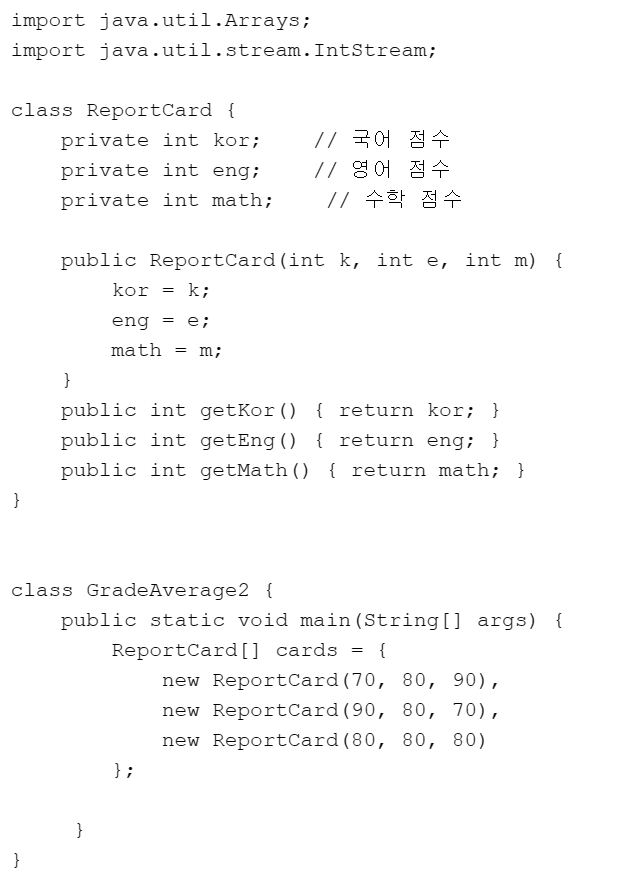
package com.test.memo;

import java.util.Arrays;
import java.util.stream.IntStream;
import java.util.stream.Stream;

class ReportCard {
    private int kor; // 국어 점수
    private int eng; // 영어 점수
    private int math; // 수학 점수

    public ReportCard(int k, int e, int m) {
        kor = k;
        eng = e;
        math = m;
    }

    public int getKor() {
        return kor;
    }

    public int getEng() {
        return eng;
    }

    public int getMath() {
        return math;
    }
}

class Organize {

    public static void main(String[] args) {

        ReportCard[] cards = { new ReportCard(70, 80, 90), new ReportCard(90, 80, 70), new ReportCard(80, 80, 80) };

        Stream<ReportCard> sr = Arrays.stream(cards);

        IntStream is = sr.flatMapToInt(s -> IntStream.of(s.getEng(), s.getKor(), s.getMath()));
        double d = is.average().getAsDouble();
        System.out.println(d);
    }
}
//80.0
선생님 코드
class GradeAverage2 {
    public static void main(String[] args) {
        ReportCard[] cards = {
            new ReportCard(70, 80, 90),
            new ReportCard(90, 80, 70),
            new ReportCard(80, 80, 80)
        };

        Arrays.stream(cards)
           .flatMapToInt(r -> IntStream.of(r.getKor(), r.getEng(), r.getMath()))
           .average()
           .ifPresent(avg -> System.out.println("avg. " + avg));
     }
}- 다음 문자열을 요소로 가지고 있는 스트림을 생성하고, 알파벳 순으로 정렬한 후, 전체요소를 출력하자.
"Box", "Apple", "Robot"
다음 문자열을 요소로 가지고 있는 스트림을 생성하고, 문자열의 길이순으로 정렬한 후, 전체요소를 출력하자.
"Box", "Apple", "Rabbit"
package com.test.memo;

import java.util.stream.Stream;

class Organize {

    public static void main(String[] args) {

        Stream<String> str1 = Stream.of("Box", "Apple", "Robot");
        Stream<String> str2 = Stream.of("Box", "Apple", "Rabbit");

        str1.sorted((s1, s2) -> s1.compareTo(s2)).forEach(s -> System.out.print(s + " "));
        System.out.println();
        str2.sorted((s1, s2) -> s1.length() - s2.length()).forEach(s -> System.out.print(s + " "));
    }
}
//Apple Box Robot
//Box Apple Rabbit - 다음 정수를 요소로 갖고 있는 스트림을 생성하고, 정렬한 후, 모든 요소를 출력하자.
3, 9, 4, 2
다음 실수를 요소로 갖고 있는 스트림을 생성하고, 정렬한 후, 모든 요소를 출력하자.
3.3, 6.2, 1.5, 8.3 틀림 > 정렬을 안했네
package com.test.memo;

import java.util.stream.DoubleStream;
import java.util.stream.IntStream;

class Organize {

    public static void main(String[] args) {

        IntStream.of(3, 9, 4, 2).forEach(s -> System.out.print(s + " "));
        System.out.println();
        DoubleStream.of(3.3, 6.2, 1.5, 8.3).forEach(s -> System.out.print(s + " "));
    }
}
//3 9 4 2
//3.3 6.2 1.5 8.3
정답
import java.util.stream.IntStream;
import java.util.stream.DoubleStream;

class PrimitiveSortedStream {
    public static void main(String[] args) {
        IntStream.of(3, 9, 4, 2)
            .sorted()
            .forEach(d -> System.out.print(d + "\t"));
        System.out.println();

        DoubleStream.of(3.3, 6.2, 1.5, 8.3)
            .sorted()
            .forEach(d -> System.out.print(d + "\t"));
        System.out.println();
    }
}- 다음 소스코드의 실행 결과를 서술하고, 그 이유에 대해서 설명하시오.
import java.util.stream.IntStream;

class LazyOpStream {
    public static void main(String[] args) {
        // 최종 연산이 생략된 스트림의 파이프라인
        IntStream.of(1, 3, 5)
            .peek(d -> System.out.print(d + "\t"));
        System.out.println();


        // 최종 연산이 존재하는 스트림의 파이프라인
        IntStream.of(5, 3, 1)
            .peek(d -> System.out.print(d + "\t"))
            .sum();
        System.out.println();
    }
}- 첫번째 생성된 최종연산이 없는 스트림은 출력이 실행되지 않을 것이고, 두번째 생성된 스트림은 5, 3, 1이 출력되고 sum은 반환값이 없으니까 실행되지 않을 것이다.
- 1, 3, 5, 7, 9로 스트림을 만들고 합, 개수, 평균, 최소, 최대를 구하시오.
 package com.test.memo;

import java.util.stream.IntStream;

class Organize {

    public static void main(String[] args) {

//        IntStream s1 = IntStream.of(1, 3, 5, 7, 9);
//
//        double d = s1.average().getAsDouble();
//        System.out.println("평균 : " + d);
//
//        long l = s1.count();
//        System.out.println("개수 : " + l);
//
//        int sum = s1.sum();
//        System.out.println("합 : " + sum);
//
//        s1.min().ifPresent(s -> System.out.println("최소값 : " + s));
//        s1.max().ifPresent(s -> System.out.println("최대값 : " + s));
        // 합
        int sum = IntStream.of(1, 3, 5, 7, 9).sum(); // 스트림에 존재하는 모든 값을 더함
        System.out.println("sum = " + sum);

        // 개수
        long cnt = IntStream.of(1, 3, 5, 7, 9).count(); // 스트림에 존재하는 개수를 센다.
        System.out.println("count = " + cnt);

        // 평균
        IntStream.of(1, 3, 5, 7, 9).average() // 스트림에 존재하는 값들의 평균을 구함
                .ifPresent(av -> System.out.println("avg = " + av));

        // 최소
        IntStream.of(1, 3, 5, 7, 9).min() // 스트림에 존재하는 최소값
                .ifPresent(mn -> System.out.println("min = " + mn));

        // 최대
        IntStream.of(1, 3, 5, 7, 9).max() // 스트림에 존재하는 최대값
                .ifPresent(mx -> System.out.println("max = " + mx));

    }
}
//sum = 25
//count = 5
//avg = 5.0
//min = 1
//max = 9- 메소드를 쓰고 무조건 새로운 스트림 생성해야한다. 주석처럼 하면 오류남
- 다음 소스코드의 출력결과를 적으시오.
import java.util.stream.IntStream;

class MatchStream {
    public static void main(String[] args) {
        boolean b = IntStream.of(1, 2, 3, 4, 5)
                          .allMatch(n -> n%2 == 0);
        System.out.println("모두 짝수이다. " + b);

        b = IntStream.of(1, 2, 3, 4, 5)
                    .anyMatch(n -> n%2 == 0);
        System.out.println("짝수가 하나는 있다. " + b);

        b = IntStream.of(1, 2, 3, 4, 5)
                    .noneMatch(n -> n%2 == 0);
        System.out.println("짝수가 하나도 없다. " + b);
    }
}-
모두 짝수이다 false
짝수가 하나는 있다. true
짝수가 하나도 없다. false
- 스트림을 이용하여 다음 내용이 출력되도록 소스코드를 완성하자.
//평균 90 이상이 한 명 이상 존재합니다. true
//모두 평균 90 이상입니다. true
package com.test.memo;

import java.util.Arrays;
import java.util.stream.IntStream;
import java.util.stream.Stream;

class ReportCard {
    private int kor; // 국어 점수
    private int eng; // 영어 점수
    private int math; // 수학 점수

    public ReportCard(int k, int e, int m) {
        kor = k;
        eng = e;
        math = m;
    }

    public int getKor() {
        return kor;
    }

    public int getEng() {
        return eng;
    }

    public int getMath() {
        return math;
    }
}

class Organize {

    public static void main(String[] args) {
        ReportCard[] cards = { new ReportCard(98, 84, 90), new ReportCard(92, 87, 95), new ReportCard(85, 99, 93) };

        boolean b1 = Arrays.stream(cards).mapToDouble(r -> (r.getEng() + r.getKor() + r.getMath() / 3))
                .anyMatch(a -> a >= 90.0);
        System.out.println("평균 90 이상이 한 명 이상 존재합니다. " + b1);

        if (b1 == true) {
            boolean b2 = Arrays.stream(cards).mapToDouble(r -> (r.getEng() + r.getKor() + r.getMath()) / 3.0)
                    .allMatch(a -> a >= 90.0);
            System.out.println("모두 평균 90 이상입니다. " + b2);
        }
    }
}
//평균 90 이상이 한 명 이상 존재합니다. true
//모두 평균 90 이상입니다. true- 다음 문자열을 스트림을 이용하여 길이가 5미만인 요소들로 이루어진 ArrayList로 만들자.
"Hello", "Box", "Robot", "Toy"
package com.test.memo;

import java.util.ArrayList;
import java.util.List;
import java.util.stream.Stream;

class Organize {

    public static void main(String[] args) {
        Stream<String> ss = Stream.of("Hello", "Box", "Robot", "Toy");

        List<String> ls = ss.filter(s -> s.length() < 5).collect(
                ArrayList::new,
                ArrayList::add,
                ArrayList::addAll);
        System.out.println(ls);
    }
}
//[Box, Toy]
선생님 코드
import java.util.List;
import java.util.Arrays;
import java.util.ArrayList;
import java.util.stream.Stream;

class CollectStringStream {
    public static void main(String[] args) {
        String[] words = {"Hello", "Box", "Robot", "Toy"};
        Stream<String> ss = Arrays.stream(words);

        List<String> ls = ss.filter(s -> s.length() < 5)
                          .collect(
                              () -> new ArrayList<>(),
                              (c, s) -> c.add(s),
                              (lst1, lst2) -> lst1.addAll(lst2));

        System.out.println(ls);
    }
}- 13번 문제를 병렬스트림으로 처리하는 부분을 추가하자.
package com.test.memo;

import java.util.ArrayList;
import java.util.List;
import java.util.stream.Stream;

class Organize {

    public static void main(String[] args) {
        Stream<String> ss = Stream.of("Hello", "Box", "Robot", "Toy");

        List<String> ls = ss.parallel().filter(s -> s.length() < 5).collect(
                ArrayList::new,
                ArrayList::add,
                ArrayList::addAll);
        System.out.println(ls);
    }
}
//[Box, Toy]
MySQL
일반적으로 SQL문은 대소문자를 구분하지 않는다. 그러나 DB 시스템이나 설정에 따라 대소문자를 구분하는 경우가 있을 수 있다.
기초 문법
접속하기
mysql -u 유저이름 -p>> root가 제일 슈퍼 유저
새로운 사용자 생성
root 계정은 기본적으로 존재
새로운 사용자 생성 - ''@'' 여기 띄어쓰면 안된닷
- CREATE USER 'root'@'%' IDENTIFIED BY '1234';
CREATE USER : 새로운 사용자를 생성하는 SQL 명령문
IDENTIFIED BY : 새로운 사용자의 암호를 설정
-
% 는 모든 호스트(즉, 어디서든)에서 해당 사용자를 나타내므로 이렇게 권한을 준 사용자는 어떤 호스트에서든 접속할 수 있다.
-
EX)
CREATE USER 'root'@'%' IDENTIFIED BY '1234';> 슈퍼유저 생성- root사용자가 모든 호스트에서 암호 1234를 사용해 액세스 할 수 있게 된다.
-
Ex)
create user 'test_user'@'localhost' identified by '1234';> local 유저 생성- test_user사용자를 localhost호스트에 대해 생성하고 암호를 1234로 준것

슈퍼유저 생성은 서버창에서 한번만 하는 것인데, 이미 존재하므로 또 다시 정의하려하면 이와같은 오류가 난다.
슈퍼유저 [root] 패스워드 변경
ALTER user 'root'@'%' IDENTIFIED WITH mysql_native_password BY '변경할 비밀번호';
일반 유저 패스워드 변경
alter user 'sky'@'localhost' identified with mysql_native_password by '5678';
사용자 삭제
- drop user 'test_user'@'localhost' : drop문으로 계정을 삭제할 수 있다.
사용자 항목 보기
- select user from mysql.user;
권한 부여
GRANT : 사용자에게 특정 객체에 대한 특정 작업을 수행할 수 있는 권한을 부여한다.
WITH GRANT OPTION : 해당 사용자가 다른 사용자에게 권한을 부여할 수 있는 권한을 부여한다.
-
GRANT 권한 ON 데이터베이스.테이블 TO '사용자'@'호스트'ㄴ;-
권한 : 사용자에게 부여할 작업 (EX. SELECT, INSERT, UPDATE, DELETE등)
SELECT: 데이터를 조회하는 권한INSERT: 데이터를 삽입하는 권한UPDATE: 데이터를 업데이트하는 권한DELETE: 데이터를 삭제하는 권한CREATE: 새로운 데이터베이스 객체를 생성하는 권한DROP: 데이터베이스 객체를 삭제하는 권한ALL PRIVILEGES: 모든 작업에 대한 권한WITH GRANT OPTION: 해당 사용자가 다른 사용자에게 권한을 부여할 수 있도록 하는 권한
-
데이터베이스.테이블 : 권한을 부여할 데이터베이스와 테이블 이름
-
'사용자' @ '호스트' : 권한을 받는 사용자와 호스트(접속 주소)
-
IDENTIFIED BY 비밀번호 : 사용자의 비밀번호 설정 (CREATE USER문에서만 필요)
-
-
EX)
GRANT ALL PRIVILEGES ON *.* TO 'root'@'%' WITH GRANT OPTION;- 데이터베이스의 모든 객체에 대한 모든 권한을 가진 슈퍼유저인 root에게 모든 DB에 대한 모든 권한을 부여하는 것이다. > root가 다른 사용자에게 권한을 부여할 수 있다.
-
EX2)
grant all privileges on my_database. * to test_user@localhost;- 데이터베이스에 대한 모든 권한을 가진 사용자 test_user를 생성하고, 해당 사용자에게 my_database의 모든 객체에 대한 권한을 부여하고(*), localhost에서 접속할 수있는 권한을 부여하겠다는 의미다.
데이터 베이스
데이터베이스 생성
CREATE DATABASE [database name] CHARACTER SET [character set];
-
create database 데이터베이스 명-
create database my_database; -
create database my_database2;
-
데이터베이스 삭제
DROP DATABASE [database name];
drop database my_database2;
데이터베이스 목록 보기
show databases;
데이터베이스 선택하기
use 데이터베이스 명 : use my_database;
테이블
테이블에서 사용되는 데이터 유형
-
정수형: 정수 값을 저장하는 데 사용됩니다. 예를 들어,
INT,BIGINT,SMALLINT등이 있습니다. > int(3)은 저장되는 데이터에 영향을 미치는게 아닌 최대 출력값이다.만약 3개 이상이 저장되있다면 잘려서 출력될것이고, 부족하다면 0으로 채워서 3에 맞게 출력될것이다.
-
부동 소수점형: 실수 값을 저장하는 데 사용됩니다. 예를 들어,
FLOAT,DOUBLE등이 있습니다. -
문자열: 문자열 값을 저장하는 데 사용됩니다.
VARCHAR,CHAR등이 있습니다. (String 사용 x) > varchar()은 가변적으로 용량에 맞게 줄여주는데, char()은 5로 잡았는데 1byte만 사용한다면 나머지 4byte는 낭비가 된다.-
varchar(8) - 저장공간을 8바이트로만 제한 > 효율적
-
char - 저장공간이 딱 정해져있다. > 검색속도는 char가 더 빠름
-
-
날짜와 시간: 날짜와 시간 정보를 저장하는 데 사용됩니다. 예를 들어,
DATE,TIME,DATETIME,TIMESTAMP등이 있습니다. -
이진 데이터: 이진 데이터를 저장하는 데 사용됩니다.
BLOB,BYTEA등이 있습니다.
테이블 생성
테이블 이름에 '' 따옴표 넣으면 에러
CREATE TABLE [table name] ([column1 name][datatype], …);
-
create table example(name varchar(10), phone varchar(15), id varchar(10), city varchar(10));-
name : 최대 10문자의 문자열을 저장할 수 있는 열
-
phone : 최대 15문자의 문자열을 저장할 수 있는 열
나머지도 마찬가지
-
테이블 삭제
DROP TABLE [table name];
테이블 목록 보기
SHOW TABLES [ table name];
테이블 필드와 타입 보기
DESC [table name];
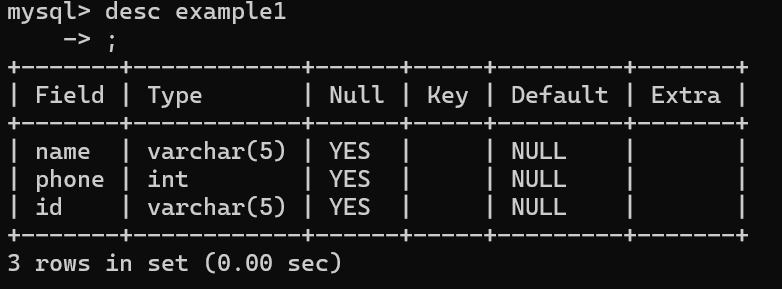
테이블 필드 변경 및 삭제
ALTER TABLE 테이블명 ~
테이블에 필드(열) 추가
ALTER TABLE [table name] ADD [column name][datatype];
alter table example1 add city varchar(10);> city라는 컬럼이 추가되고 자료형이 문자열 10를 저장할 수 있는 것을 알 수 있다.
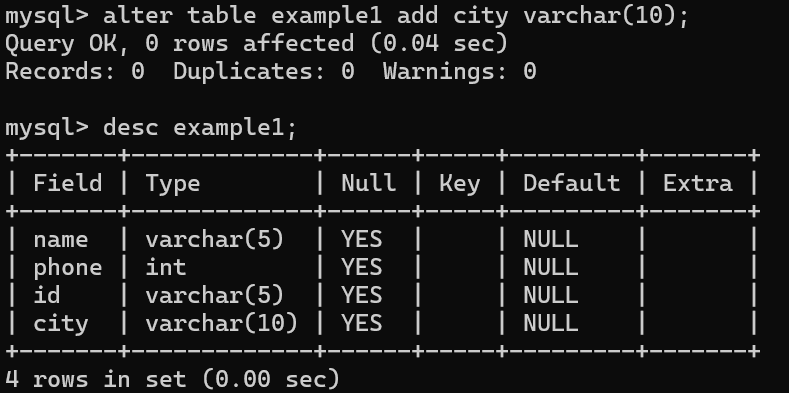
테이블 필드(열) 타입 변경
ALTER TABLE [table name] MODIFY COLUMN [column name][datatype];
ALTER TABLE User MODIFY ID VARCHAR(20);테이블 필드(열) 삭제
ALTER TABLE [table name] DROP [column name];
alter table example1 drop city;테이블 레코드 변경 및 삭제
INSERT INTO, UPDATE, DELETE
테이블에 레코드(행) 추가
INSERT INTO [table name] VALUES (value1, value2, value3…);
//예시) 아래 둘다 같은 기능 컬럼을 함께 적어도, 안적어도 상관 x

insert into example1(name, phone, id) values('정현지', 1233123, '01');
insert into example1 values('이말년', 012344123, '02');
테이블의 레코드(행) 내용 수정
UPDATE [table] SET [column]=[value] WHERE [condition];
예시)

update example1 set name = '홍길동' where name = '정현지';-
set 옆에는 수정할 컬럼과 내용을 적고 where은 어디 위치를 변경할건지
-
name = 'value' 를 정확히 적으면 그곳만 변경되고, name으로만 한다면 name 전체 데이터가 변경된다.
테이블의 레코드(행) 삭제
DELETE FROM [table] WHERE [condition];
예시)

DELETE FROM User WHERE Name = '김태하';
delete from example1;- 아 잘못눌러서 where을 안적었는데, 어쨋든 저렇게 하면 Empty라고 뜸 > 테이블은 존재하는 상태
테이블의 데이터 확인
SELECT * FROM [table];
예시)

SELECT * FROM User;
조건에 맞게 검색하기
-
SELECT : 테이블에서 데이터를 추출하는 기능
-
FROM : 어디 테이블에서 데이터를 추출할 건지 테이블 명
-
WHERE : 조건식을 이용해 DB에서 원하는 데이터를 뽑아낸다.
SELECT * FROM [field] WHERE [condition]
-
이름이 홍길동인 사람의 정보 출력
select * from example where name = '홍길동';
-
홍길동의 거주 도시를 뉴욕으로 변경하기
update example set city='뉴욕' where name='홍길동'; -
데이터 변경 확인하기
select * from example; -
이름이 이고순인 사람의 데이터 삭제하기
delete from example where name='이고순'; -
데이터 변경 확인하기
select * from example;j