pandas를 활용한 데이터 비식별화
pandas 설치
$ pip install pandas
$ python3
Python 3.11.7 (main, Dec 15 2023, 12:09:56) [Clang 14.0.6 ] on darwin
Type "help", "copyright", "credits" or "license" for more information.
>>> import pandas as pd
>>>
위와 같이 pandas를 import 했을 때, 아무런 에러 메세지가 뜨지 않는다면 제대로 설치가 된 것이다.
pandas 메서드 익히기
pandas를 이용한 csv 파일 불러오기
1. read_csv() 메서드
import pandas as pd

df = pd.read_csv('my_csv')

print(df)
해당 메서드를 통해서 간단하게 csv파일을 load 할 수 있다.
pandas 기본적인 메서드 다루기
Pandas DataFrame을 효과적으로 다루기 위해서는 다양한 기본적인 함수와 메서드를 이해하는 것이 중요하다. 함수를 잘 알고 있으면 데이터 분석과 처리를 효율적으로 할 수 있다. 여기서는 Pandas DataFrame을 다룰 때 자주 사용되는 기본적인 함수와 메서드들을 알아보자.
1. DataFrame 생성
-
pd.DataFrame(): 새로운 DataFrame을 생성.import pandas as pd data = {'Name': ['Alice', 'Bob', 'Charlie'], 'Age': [25, 30, 35]} df = pd.DataFrame(data)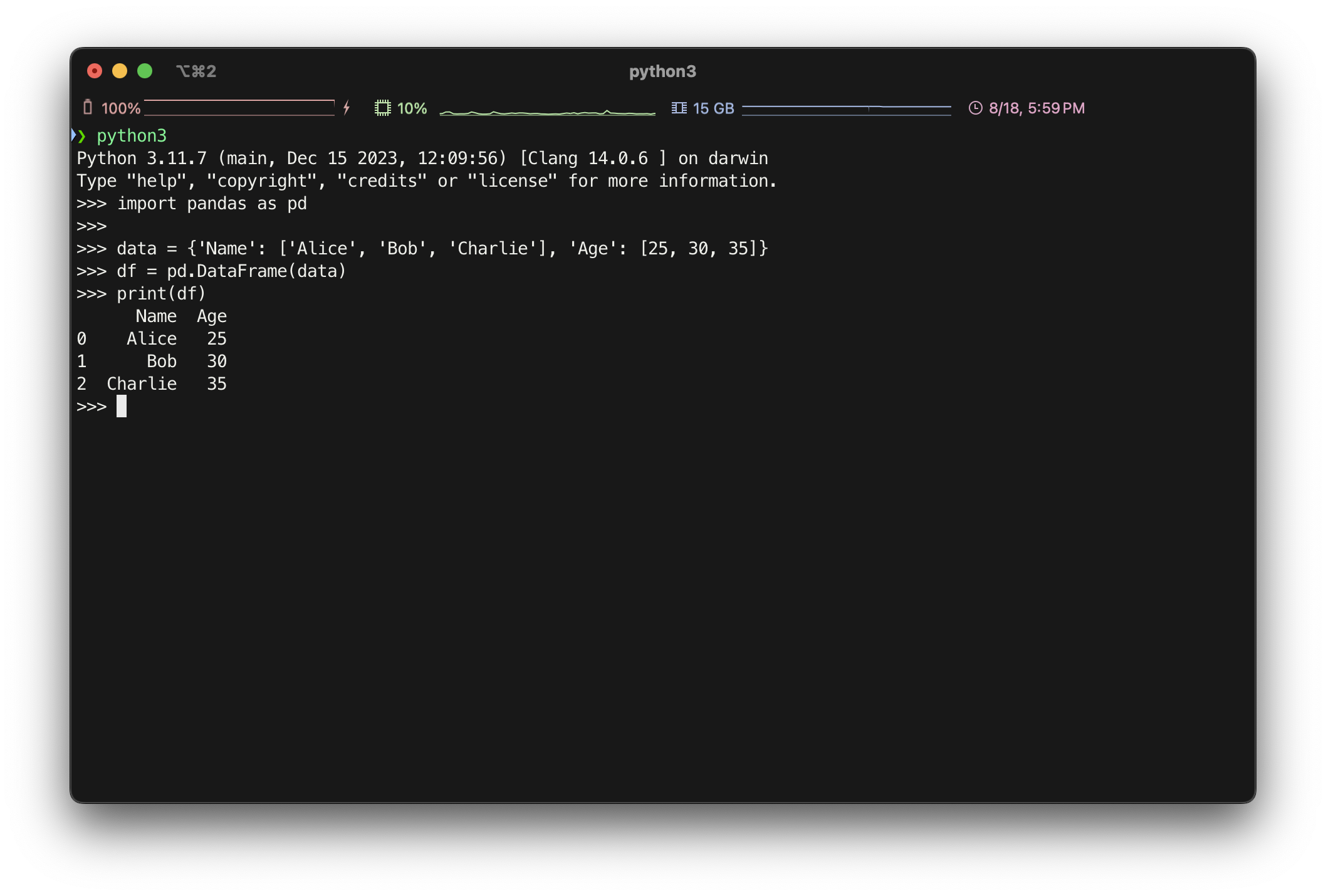
2. DataFrame 정보 확인
df.head(n): 상위 n개의 행을 출력 (기본값: 5)df.tail(n): 하위 n개의 행을 출력 (기본값: 5)df.info(): DataFrame의 기본 정보(컬럼, 데이터 타입, 메모리 사용량 등)를 출력df.describe(): 수치형 데이터의 통계 요약을 제공df.shape: DataFrame의 행과 열의 개수를 튜플로 반환df.columns: DataFrame의 컬럼 이름을 반환df.index: DataFrame의 인덱스를 반환df.dtypes: 각 컬럼의 데이터 타입을 확인
3. 데이터 선택 및 필터링
df['column_name']: 특정 컬럼 선택df[['col1', 'col2']]: 여러 컬럼 선택df.loc[row_indexer, col_indexer]: 라벨을 사용한 행/열 선택df.iloc[row_indexer, col_indexer]: 위치 기반 인덱싱을 통한 행/열 선택df[df['column_name'] > value]: 조건을 사용한 필터링df.query('column_name > value'): 쿼리 구문을 사용한 필터링
4. 데이터 조작
df.assign(new_col=lambda x: x['col'] * 2): 새로운 컬럼 추가df.drop(columns=['col1', 'col2']): 특정 컬럼 삭제df.drop(index=[0, 1]): 특정 행 삭제df.rename(columns={'old_name': 'new_name'}): 컬럼 이름 변경df.sort_values(by='column_name'): 특정 컬럼을 기준으로 정렬df.reset_index(drop=True): 인덱스를 초기화df.set_index('column_name'): 특정 컬럼을 인덱스로 설정df.groupby('column_name').mean(): 특정 컬럼을 기준으로 그룹화하여 연산 수행
5. 결측치 처리
df.isnull(): 결측치 여부를 boolean 형태로 반환.df.dropna(): 결측치가 있는 행 또는 열을 삭제.df.fillna(value): 결측치를 특정 값으로 대체.
6. DataFrame 결합 및 병합
pd.concat([df1, df2]): 두 개 이상의 DataFrame을 연결.df1.merge(df2, on='column_name', how='inner'): 두 DataFrame을 병합(조인).
7. 기타 유용한 메서드
df.apply(func): 각 행/열에 함수를 적용df.value_counts(): 각 값의 빈도수 계산df.pivot_table(values='val', index='index', columns='cols'): 피벗 테이블 생성df.melt(): DataFrame을 길게 변형(피벗 해제)df.duplicated(): 중복된 행을 확인df.drop_duplicates(): 중복된 행 제거
학습 순서
- 기본 정보 확인: DataFrame을 만들고,
head(),info(),describe()로 기본적인 구조를 파악하는 방법을 먼저 익힘 - 데이터 선택 및 필터링: 데이터를 선택하고 조건에 따라 필터링하는 방법을 익힘
- 데이터 조작: 컬럼 추가, 제거, 정렬 등의 기본적인 조작을 연습
- 결측치 처리: 결측치가 있는 데이터를 다루는 방법을 학습
- 데이터 결합 및 병합: 여러 DataFrame을 합치는 방법을 학습
- 그룹화 및 집계: 데이터를 그룹화하고 집계하는 방법을 익힘
데이터 비식별화 알고리즘
비식별화 알고리즘은 개인 식별 정보를 보호하기 위해 데이터를 처리하는 다양한 방법을 의미한다.
1. 마스킹 (Masking)
특정 열의 데이터를 부분적으로 가려 비식별화하는 방법. 예로, 이메일 주소의 일부를 * 로 마스킹할 수 있다.
함수 코드:
def mask_column(df, column, mask_char='*', start=1, end=None):
    df[column] = df[column].apply(lambda x: x[:start] + mask_char * (len(x[start:end]) if end else len(x[start:])) + (x[end:] if end else ''))
    return df
설명:
-
목적: 문자열 데이터의 일부분을
mask_char로 대체하여 민감한 정보를 가린다. 예를 들어, 이메일 주소의 일부를*로 마스킹하여 비식별화한다. -
매개변수:
df:pandas.DataFrame객체. 데이터가 저장된 데이터프레임column:str. 마스킹할 열(column)의 이름mask_char:str. 마스킹에 사용할 문자. 기본값은*.start:int. 마스킹을 시작할 인덱스 위치. 기본값은 1.end:int or None. 마스킹을 종료할 인덱스 위치.None이면 끝까지 마스킹한다.
-
작동 방식:
- 이 함수는 데이터프레임의 지정된 열(column)의 각 값을 반복 처리(
apply메서드 사용)하여 마스킹한다. x[:start]: 마스킹 전의 앞부분을 유지한다.mask_char * (len(x[start:end]) if end else len(x[start:])): 지정된 인덱스 범위(start부터end)를 마스킹 문자로 대체한다.x[end:]: 마스킹되지 않은 뒷부분을 그대로 유지한다.end가None이면, 문자열 끝까지 마스킹이 적용된다.
- 이 함수는 데이터프레임의 지정된 열(column)의 각 값을 반복 처리(
예시:
data = {'email': ['john.doe@example.com', 'jane.doe@example.com']}
df = pd.DataFrame(data)
masked_df = mask_column(df, 'email', start=5, end=8)- 이 코드에서
email열의 5번째부터 8번째 문자까지*로 마스킹된다.
2. 범주화 (Categorization)
함수 코드:
def categorize_column(df, column, bins, labels):
    df[column] = pd.cut(df[column], bins=bins, labels=labels)
    return df
설명:
-
목적: 연속형 데이터를 특정 범주로 변환하여 비식별화한다. 예를 들어, 나이를 범주(청년, 중년, 노년)로 변환한다.
-
매개변수:
df:pandas.DataFrame객체. 데이터가 저장된 데이터프레임.column:str. 범주화할 열(column)의 이름.bins:list. 범주화할 구간을 정의하는 경계값 리스트.labels:list. 각 범주에 대응하는 레이블.bins리스트보다 하나 적어야 한다.
-
작동 방식:
pd.cut()함수는 연속형 데이터를bins로 나누고, 각 구간에labels를 할당한다.- 예를 들어, 나이를 청년, 중년, 노년으로 범주화할 때
bins=[0, 30, 50, 100]을 설정하면 나이 0~30은 청년, 30~50은 중년, 50~100은 노년으로 분류된다. labels는 각 구간에 대응하는 문자열 리스트로,bins구간에 따라 데이터가 범주화된다.
예시:
data = {'age': [23, 45, 67, 34, 25]}
df = pd.DataFrame(data)
bins = [0, 30, 50, 100]
labels = ['청년', '중년', '노년']
categorized_df = categorize_column(df, 'age', bins, labels)- 이 코드에서
age열의 값이 청년, 중년, 노년으로 범주화된다.
3. 암호화 (Encryption)
함수 코드:
def encrypt_column(df, column, hash_function='sha256'):
    hash_func = getattr(hashlib, hash_function)
    df[column] = df[column].apply(lambda x: hash_func(x.encode()).hexdigest())
    return df
설명:
-
목적: 문자열 데이터를 해시 함수를 사용해 암호화하여 비식별화한다. 예를 들어, 이름을 암호화하여 원본 데이터를 알아볼 수 없게 만든다.
-
매개변수:
df:pandas.DataFrame객체. 데이터가 저장된 데이터프레임.column:str. 암호화할 열(column)의 이름.hash_function:str. 사용할 해시 함수의 이름. 기본값은 'sha256'이다.hashlib모듈에서 제공하는 해시 함수('md5', 'sha1', 'sha256', 'sha512' 등)를 사용할 수 있다.
-
작동 방식:
getattr(hashlib, hash_function)은hashlib모듈에서 지정된 이름의 해시 함수를 동적으로 가져온다.df[column].apply(...): 데이터프레임의 지정된 열(column)의 각 값을 반복 처리하여 암호화한다.hash_func(x.encode()).hexdigest(): 문자열x를 바이트로 인코딩(x.encode())한 후, 선택한 해시 함수로 암호화하고, 결과를 16진수 문자열로 변환(hexdigest())한다.- 암호화된 결과는 원본 데이터의 열(column)을 대체한다.
예시:
data = {'name': ['John Doe', 'Jane Doe']}
df = pd.DataFrame(data)
encrypted_df = encrypt_column(df, 'name')- 이 코드에서
name열의 각 이름이 SHA-256 해시 함수로 암호화된다.
전체 코드
import pandas as pd
import hashlib

# create synthetic data
data = {
    'name': ['John Doe', 'Jane Doe', 'Alice Smith', 'Bob Brown'],
    'email': ['john.doe@example.com', 'jane.doe@example.com', 'alice.smith@example.com', 'bob.brown@example.com'],
    'age': [23, 45, 67, 34]
}

df = pd.DataFrame(data)
print("Original Data:")
print(df)
print('\n')

# masking function
def mask_column(df, column, mask_char='*', start=1, end=None):
    df[column] = df[column].apply(lambda x: x[:start] + mask_char * (len(x[start:end]) if end else len(x[start:])) + (x[end:] if end else ''))
    return df

# categorization function
def categorize_column(df, column, bins, labels):
    df[column] = pd.cut(df[column], bins=bins, labels=labels)
    return df

# encryption function
def encrypt_column(df, column, hash_function='sha256'):
    hash_func = getattr(hashlib, hash_function)
    df[column] = df[column].apply(lambda x: hash_func(x.encode()).hexdigest())
    return df


# 비식별화 적용
masked_df = mask_column(df.copy(), 'email', start=3, end=8)
categorized_df = categorize_column(df.copy(), 'age', bins=[0, 30, 50, 100], labels=['청년', '중년', '노년'])
encrypted_df = encrypt_column(df.copy(), 'name')

# 결과 출력
print("\nMasked Data (Email):")
print(masked_df)

print("\nCategorized Data (Age):")
print(categorized_df)

print("\nEncrypted Data (Name):")
print(encrypted_df)

# 모든 비식별화 기법을 적용한 데이터프레임
final_df = df.copy()
final_df = mask_column(final_df, 'email', start=3, end=8)
final_df = categorize_column(final_df, 'age', bins=[0, 30, 50, 100], labels=['청년', '중년', '노년'])
final_df = encrypt_column(final_df, 'name')

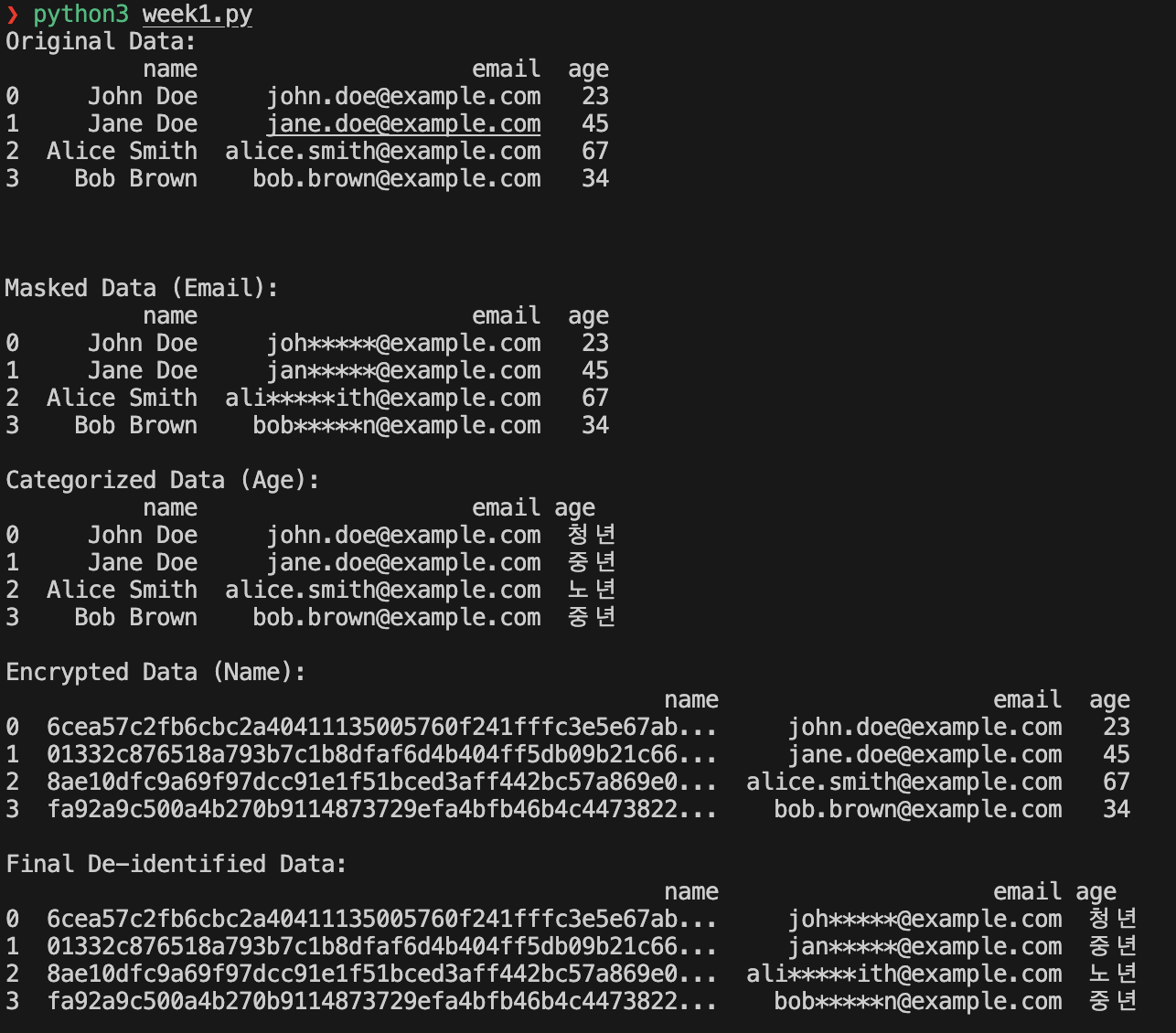
print("\nFinal De-identified Data:")
print(final_df)
결과 화면