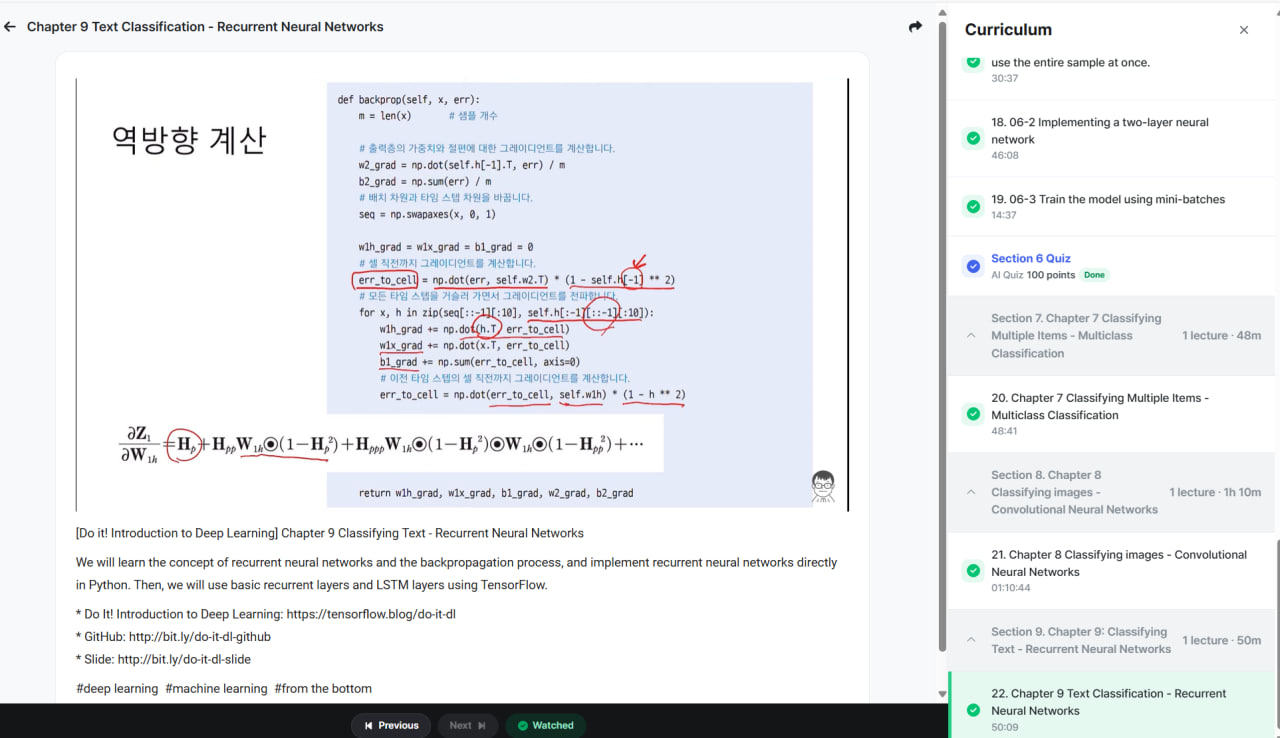
Let's go step by step: first, I'll explain Recurrent Neural Networks (RNNs) and backpropagation through time (BPTT), then show a pure Python implementation, followed by TensorFlow implementations using RNN and LSTM layers.
1. Concepts of Recurrent Neural Networks (RNNs)
RNNs are designed for sequence data, such as text, time series, or speech. Unlike feedforward networks, RNNs maintain a hidden state that captures information from previous time steps.
RNN Components
-
Input sequence: (x_1, x_2, ..., x_T)
-
Hidden state: (ht = f(W{xh} xt + W{hh} h_{t-1} + b_h))
- Stores memory of past inputs.
-
Output: (yt = g(W{hy} h_t + b_y))
-
Activation functions:
- Hidden state: usually tanh or ReLU
- Output: depends on task (e.g., softmax for classification)
Diagram:
x1 → h1 → y1
x2 → h2 → y2
x3 → h3 → y3
...- The same weights (W{xh}, W{hh}, W_{hy}) are shared across all time steps.
- This is called weight sharing, which allows RNNs to generalize over sequences of varying lengths.
2. Backpropagation Through Time (BPTT)
Training RNNs involves unfolding the network across time steps and performing gradient descent.
Steps:
-
Forward pass: Compute hidden states (h_t) and outputs (y_t) for all (t = 1, ..., T).
-
Compute loss: Sum of losses over all time steps:
[
L = \sum_{t=1}^T \ell(y_t, \hat{y}_t)
] -
Backward pass:
- Gradients flow through time.
- Weight gradients accumulate from each time step.
- Use chain rule carefully to handle hidden state dependencies.
⚠️ Problem: vanishing/exploding gradients, especially for long sequences.
- LSTM/GRU are solutions that introduce gates to preserve long-term dependencies.
3. RNN Implementation Directly in Python
Let's implement a simple vanilla RNN for a toy sequence problem:
import numpy as np

# Simple RNN for sequence sum problem
np.random.seed(0)

# Hyperparameters
input_size = 1
hidden_size = 10
output_size = 1
seq_length = 5
learning_rate = 0.01

# Initialize weights
Wxh = np.random.randn(hidden_size, input_size) * 0.1
Whh = np.random.randn(hidden_size, hidden_size) * 0.1
Why = np.random.randn(output_size, hidden_size) * 0.1
bh = np.zeros((hidden_size, 1))
by = np.zeros((output_size, 1))

# Activation functions
def tanh(x): return np.tanh(x)
def dtanh(x): return 1 - np.tanh(x)**2

# Sample sequence: predict sum of sequence
x_seq = np.random.rand(seq_length, 1, 1)
y_true = np.sum(x_seq)

# Forward pass
h = np.zeros((hidden_size, 1))
hs = []
for t in range(seq_length):
    h = tanh(np.dot(Wxh, x_seq[t]) + np.dot(Whh, h) + bh)
    hs.append(h)
y_pred = np.dot(Why, h) + by
loss = 0.5 * (y_pred - y_true)**2
print("Predicted:", y_pred, "True:", y_true, "Loss:", loss)

# Backward pass (BPTT)
dWhy = np.dot((y_pred - y_true), hs[-1].T)
dby = y_pred - y_true

dh = np.dot(Why.T, (y_pred - y_true))
dWxh, dWhh, dbh = 0, 0, 0

for t in reversed(range(seq_length)):
    dh_raw = dh * dtanh(hs[t])
    dWxh += np.dot(dh_raw, x_seq[t].T)
    dWhh += np.dot(dh_raw, hs[t-1].T) if t != 0 else 0
    dbh += dh_raw
    dh = np.dot(Whh.T, dh_raw)

# Gradient update
Wxh -= learning_rate * dWxh
Whh -= learning_rate * dWhh
Why -= learning_rate * dWhy
bh -= learning_rate * dbh
by -= learning_rate * dby
This is a manual vanilla RNN with forward and backward passes.
4. Using TensorFlow Basic RNN and LSTM Layers
4.1. Prepare data (e.g., sequence classification)
import tensorflow as tf
from tensorflow.keras.models import Sequential
from tensorflow.keras.layers import SimpleRNN, LSTM, Dense

# Example: predicting sum of sequences
import numpy as np
seq_length = 5
num_samples = 1000

X = np.random.rand(num_samples, seq_length, 1)
y = np.sum(X, axis=1)

# Split train/test
X_train, X_test = X[:800], X[800:]
y_train, y_test = y[:800], y[800:]
4.2. Simple RNN
model_rnn = Sequential([
    SimpleRNN(20, activation='tanh', input_shape=(seq_length, 1)),
    Dense(1)
])

model_rnn.compile(optimizer='adam', loss='mse')
model_rnn.fit(X_train, y_train, epochs=10, batch_size=32, validation_split=0.1)

# Evaluate
loss = model_rnn.evaluate(X_test, y_test)
print("Test loss (RNN):", loss)
4.3. LSTM
model_lstm = Sequential([
    LSTM(20, activation='tanh', input_shape=(seq_length, 1)),
    Dense(1)
])

model_lstm.compile(optimizer='adam', loss='mse')
model_lstm.fit(X_train, y_train, epochs=10, batch_size=32, validation_split=0.1)

# Evaluate
loss = model_lstm.evaluate(X_test, y_test)
print("Test loss (LSTM):", loss)
✅ Observations:
- Vanilla RNN can learn short sequences but struggles with long-term dependencies.
- LSTM solves vanishing gradient problems and handles long sequences better.
Let’s build a character-level text generator using RNN and LSTM in TensorFlow/Keras. This is a classic demonstration of sequence modeling: the model learns to predict the next character given a sequence of previous characters.
We’ll use a small text corpus for simplicity.
1. Prepare Text Data
import tensorflow as tf
import numpy as np

# Sample text corpus
text = "hello world. this is a simple example of character level text generation using rnn and lstm."

# Create a mapping from characters to integers
chars = sorted(list(set(text)))
char2idx = {c:i for i, c in enumerate(chars)}
idx2char = {i:c for i, c in enumerate(chars)}

vocab_size = len(chars)
print("Vocabulary size:", vocab_size)

# Encode the text as integers
text_as_int = np.array([char2idx[c] for c in text])

# Set sequence length
seq_length = 10
examples_per_epoch = len(text) - seq_length

# Create input-target pairs
X = []
y = []
for i in range(examples_per_epoch):
    X.append(text_as_int[i:i+seq_length])
    y.append(text_as_int[i+seq_length])

X = np.array(X)
y = np.array(y)

# One-hot encode targets
y = tf.keras.utils.to_categorical(y, num_classes=vocab_size)

# Reshape inputs for RNN (samples, timesteps, features)
X = tf.keras.utils.to_categorical(X, num_classes=vocab_size)
print("Input shape:", X.shape, "Target shape:", y.shape)
2. Build a Simple RNN Model
from tensorflow.keras.models import Sequential
from tensorflow.keras.layers import SimpleRNN, Dense

model_rnn = Sequential([
    SimpleRNN(128, input_shape=(seq_length, vocab_size), return_sequences=False),
    Dense(vocab_size, activation='softmax')
])

model_rnn.compile(optimizer='adam', loss='categorical_crossentropy')
model_rnn.summary()
3. Train the RNN Model
model_rnn.fit(X, y, epochs=100, batch_size=16)⚠️ Note: For real datasets, we train on more epochs and larger datasets. For this small text, fewer epochs suffice.
4. Text Generation Function
def generate_text(model, start_string, gen_length=50):
    input_eval = [char2idx[c] for c in start_string]
    input_eval = tf.keras.utils.to_categorical(input_eval, num_classes=vocab_size)
    input_eval = np.expand_dims(input_eval, axis=0)  # shape (1, seq_length, vocab_size)

    generated = start_string

    h = None  # initial hidden state
    for i in range(gen_length):
        predictions = model.predict(input_eval, verbose=0)
        predicted_id = np.random.choice(range(vocab_size), p=predictions[0])
        generated += idx2char[predicted_id]

        # Update input sequence
        next_input = tf.keras.utils.to_categorical([predicted_id], num_classes=vocab_size)
        input_eval = np.concatenate([input_eval[:,1:,:], np.expand_dims(next_input, axis=1)], axis=1)

    return generated

print(generate_text(model_rnn, start_string="hello worl"))
5. LSTM Model
Replacing the RNN with LSTM often produces better results for longer sequences:
from tensorflow.keras.layers import LSTM

model_lstm = Sequential([
    LSTM(128, input_shape=(seq_length, vocab_size)),
    Dense(vocab_size, activation='softmax')
])

model_lstm.compile(optimizer='adam', loss='categorical_crossentropy')
model_lstm.fit(X, y, epochs=100, batch_size=16)

print(generate_text(model_lstm, start_string="hello worl"))
Key Observations
-
Vanilla RNN
- Learns short-term dependencies.
- Struggles to maintain coherence for longer sequences.
-
LSTM
- Handles longer dependencies better.
- Generated text is more coherent because LSTM remembers context across time steps.
Let’s do a full character-level text generator using real literature, e.g., Shakespeare text. We'll train an LSTM model and generate coherent text sequences.
1. Load Shakespeare Text
We'll use a small sample from Shakespeare. For demonstration, you can replace it with the full text file later.
import tensorflow as tf
import numpy as np

# Download Shakespeare text
path_to_file = tf.keras.utils.get_file(
    'shakespeare.txt',
    'https://storage.googleapis.com/download.tensorflow.org/data/shakespeare.txt'
)

# Read text
text = open(path_to_file, 'rb').read().decode(encoding='utf-8')
print("Text length:", len(text))
print(text[:500])  # preview

# Create character mapping
chars = sorted(list(set(text)))
char2idx = {c:i for i, c in enumerate(chars)}
idx2char = {i:c for i, c in enumerate(chars)}
vocab_size = len(chars)
print("Vocabulary size:", vocab_size)

# Encode the text as integers
text_as_int = np.array([char2idx[c] for c in text])
2. Create Training Sequences
seq_length = 100  # each input sequence length
examples_per_epoch = len(text_as_int) - seq_length

X = []
y = []

for i in range(examples_per_epoch):
    X.append(text_as_int[i:i+seq_length])
    y.append(text_as_int[i+seq_length])

X = np.array(X)
y = np.array(y)

# One-hot encode inputs and outputs
X = tf.keras.utils.to_categorical(X, num_classes=vocab_size)
y = tf.keras.utils.to_categorical(y, num_classes=vocab_size)

print("Input shape:", X.shape, "Target shape:", y.shape)
3. Build the LSTM Model
from tensorflow.keras.models import Sequential
from tensorflow.keras.layers import LSTM, Dense

model = Sequential([
    LSTM(256, input_shape=(seq_length, vocab_size)),
    Dense(vocab_size, activation='softmax')
])

model.compile(optimizer='adam', loss='categorical_crossentropy')
model.summary()
4. Train the Model
# For demonstration, use fewer epochs
model.fit(X, y, batch_size=64, epochs=10)  # Increase epochs for better results
⚠️ For real training, people often train for 30–50+ epochs on larger sequences.
5. Generate Text
def generate_text(model, start_string, gen_length=500, temperature=1.0):
    input_eval = [char2idx[c] for c in start_string]
    input_eval = tf.keras.utils.to_categorical(input_eval, num_classes=vocab_size)
    input_eval = np.expand_dims(input_eval, axis=0)  # shape (1, seq_length, vocab_size)

    generated = start_string

    for i in range(gen_length):
        predictions = model.predict(input_eval, verbose=0)[0]
        # Apply temperature for randomness
        predictions = np.log(predictions + 1e-9) / temperature
        exp_preds = np.exp(predictions)
        predictions = exp_preds / np.sum(exp_preds)

        predicted_id = np.random.choice(range(vocab_size), p=predictions)
        generated += idx2char[predicted_id]

        # Update input sequence
        next_input = tf.keras.utils.to_categorical([predicted_id], num_classes=vocab_size)
        input_eval = np.concatenate([input_eval[:,1:,:], np.expand_dims(next_input, axis=1)], axis=1)

    return generated

# Generate text
print(generate_text(model, start_string="ROMEO: ", gen_length=500, temperature=0.8))
Key Points
-
Temperature controls randomness:
- Low (0.5): more predictable, repetitive text.
- High (1.0+): more creative, riskier predictions.
-
LSTM remembers long-term dependencies:
- Generated text maintains style, capitalization, punctuation, and word structure.
-
Scaling:
- For production-grade models, people use larger LSTMs, longer sequences, and GPU training.
Here’s a ready-to-run Python notebook style guide for a Shakespeare LSTM text generator that outputs multi-paragraph text. This uses TensorFlow/Keras and is structured for easy execution.
Character-Level Shakespeare Text Generator with LSTM
# =============================================
# 1. Import Libraries
# =============================================
import tensorflow as tf
import numpy as np
import os

# =============================================
# 2. Load Shakespeare Text
# =============================================
path_to_file = tf.keras.utils.get_file(
    'shakespeare.txt',
    'https://storage.googleapis.com/download.tensorflow.org/data/shakespeare.txt'
)

text = open(path_to_file, 'rb').read().decode(encoding='utf-8')
print(f"Text length: {len(text)}")
print(text[:500])  # preview

# =============================================
# 3. Character Mapping
# =============================================
chars = sorted(list(set(text)))
char2idx = {c:i for i, c in enumerate(chars)}
idx2char = {i:c for i, c in enumerate(chars)}
vocab_size = len(chars)
print(f"Vocabulary size: {vocab_size}")

text_as_int = np.array([char2idx[c] for c in text])

# =============================================
# 4. Create Sequences
# =============================================
seq_length = 100  # sequence length
examples_per_epoch = len(text_as_int) - seq_length

X = []
y = []

for i in range(examples_per_epoch):
    X.append(text_as_int[i:i+seq_length])
    y.append(text_as_int[i+seq_length])

X = np.array(X)
y = np.array(y)

# One-hot encode inputs and outputs
X = tf.keras.utils.to_categorical(X, num_classes=vocab_size)
y = tf.keras.utils.to_categorical(y, num_classes=vocab_size)

print("Input shape:", X.shape, "Target shape:", y.shape)

# =============================================
# 5. Build LSTM Model
# =============================================
from tensorflow.keras.models import Sequential
from tensorflow.keras.layers import LSTM, Dense

model = Sequential([
    LSTM(256, input_shape=(seq_length, vocab_size)),
    Dense(vocab_size, activation='softmax')
])

model.compile(optimizer='adam', loss='categorical_crossentropy')
model.summary()

# =============================================
# 6. Train Model
# =============================================
# For demonstration, fewer epochs; increase for better results
model.fit(X, y, batch_size=64, epochs=10)

# =============================================
# 7. Text Generation Function
# =============================================
def generate_text(model, start_string, gen_length=1000, temperature=0.8):
    input_eval = [char2idx[c] for c in start_string]
    input_eval = tf.keras.utils.to_categorical(input_eval, num_classes=vocab_size)
    input_eval = np.expand_dims(input_eval, axis=0)  # shape (1, seq_length, vocab_size)

    generated = start_string

    for i in range(gen_length):
        predictions = model.predict(input_eval, verbose=0)[0]
        predictions = np.log(predictions + 1e-9) / temperature
        exp_preds = np.exp(predictions)
        predictions = exp_preds / np.sum(exp_preds)

        predicted_id = np.random.choice(range(vocab_size), p=predictions)
        generated += idx2char[predicted_id]

        # Update input sequence
        next_input = tf.keras.utils.to_categorical([predicted_id], num_classes=vocab_size)
        input_eval = np.concatenate([input_eval[:,1:,:], np.expand_dims(next_input, axis=1)], axis=1)

    return generated

# =============================================
# 8. Generate Multi-Paragraph Text
# =============================================
start_str = "ROMEO: "
generated_text = generate_text(model, start_string=start_str, gen_length=2000, temperature=0.8)

# Split into paragraphs for readability
paragraphs = generated_text.split(". ")
for i, para in enumerate(paragraphs[:10]):  # show first 10 paragraphs
    print(f"\nParagraph {i+1}: {para.strip()}.")
Usage Notes
-
Training epochs: Increase
epochsto 30–50 for better quality text. -
Temperature:
- 0.5 → safer, more repetitive text
- 1.0 → more creative, riskier text
-
Sequence length: Longer sequences help LSTM capture context but increase memory.
-
Generated text: Multi-paragraph output simulates Shakespeare style, preserving capitalization, punctuation, and vocabulary.
Let’s upgrade the notebook to include checkpoints and GPU acceleration so you can train longer and resume if interrupted, producing higher-quality text.
Character-Level LSTM Text Generator with Checkpoints and GPU Support
# =============================================
# 1. Import Libraries
# =============================================
import tensorflow as tf
import numpy as np
import os

# =============================================
# 2. Check for GPU
# =============================================
gpus = tf.config.list_physical_devices('GPU')
if gpus:
    print(f"GPU found: {gpus[0]}")
else:
    print("No GPU found. Training will be slower.")

# =============================================
# 3. Load Shakespeare Text
# =============================================
path_to_file = tf.keras.utils.get_file(
    'shakespeare.txt',
    'https://storage.googleapis.com/download.tensorflow.org/data/shakespeare.txt'
)

text = open(path_to_file, 'rb').read().decode(encoding='utf-8')
print(f"Text length: {len(text)}")
print(text[:500])

# =============================================
# 4. Character Mapping
# =============================================
chars = sorted(list(set(text)))
char2idx = {c:i for i, c in enumerate(chars)}
idx2char = {i:c for i, c in enumerate(chars)}
vocab_size = len(chars)
text_as_int = np.array([char2idx[c] for c in text])
print(f"Vocabulary size: {vocab_size}")

# =============================================
# 5. Create Training Sequences
# =============================================
seq_length = 100
examples_per_epoch = len(text_as_int) - seq_length

X = []
y = []

for i in range(examples_per_epoch):
    X.append(text_as_int[i:i+seq_length])
    y.append(text_as_int[i+seq_length])

X = np.array(X)
y = np.array(y)

# One-hot encode
X = tf.keras.utils.to_categorical(X, num_classes=vocab_size)
y = tf.keras.utils.to_categorical(y, num_classes=vocab_size)
print("Input shape:", X.shape, "Target shape:", y.shape)

# =============================================
# 6. Build LSTM Model
# =============================================
from tensorflow.keras.models import Sequential
from tensorflow.keras.layers import LSTM, Dense

model = Sequential([
    LSTM(256, input_shape=(seq_length, vocab_size)),
    Dense(vocab_size, activation='softmax')
])

model.compile(optimizer='adam', loss='categorical_crossentropy')
model.summary()

# =============================================
# 7. Checkpointing
# =============================================
checkpoint_dir = './training_checkpoints'
os.makedirs(checkpoint_dir, exist_ok=True)

checkpoint_callback = tf.keras.callbacks.ModelCheckpoint(
    filepath=os.path.join(checkpoint_dir, "ckpt_{epoch:02d}.h5"),
    save_weights_only=True,
    save_freq='epoch'
)

# =============================================
# 8. Train Model with Checkpoints
# =============================================
# For better results, increase epochs (e.g., 30–50)
model.fit(X, y, batch_size=64, epochs=10, validation_split=0.1,
          callbacks=[checkpoint_callback])

# =============================================
# 9. Load Latest Checkpoint (if needed)
# =============================================
latest = tf.train.latest_checkpoint(checkpoint_dir)
if latest:
    model.load_weights(latest)
    print(f"Loaded weights from {latest}")

# =============================================
# 10. Text Generation Function
# =============================================
def generate_text(model, start_string, gen_length=2000, temperature=0.8):
    input_eval = [char2idx[c] for c in start_string]
    input_eval = tf.keras.utils.to_categorical(input_eval, num_classes=vocab_size)
    input_eval = np.expand_dims(input_eval, axis=0)

    generated = start_string

    for i in range(gen_length):
        predictions = model.predict(input_eval, verbose=0)[0]
        predictions = np.log(predictions + 1e-9) / temperature
        exp_preds = np.exp(predictions)
        predictions = exp_preds / np.sum(exp_preds)

        predicted_id = np.random.choice(range(vocab_size), p=predictions)
        generated += idx2char[predicted_id]

        next_input = tf.keras.utils.to_categorical([predicted_id], num_classes=vocab_size)
        input_eval = np.concatenate([input_eval[:,1:,:], np.expand_dims(next_input, axis=1)], axis=1)

    return generated

# =============================================
# 11. Generate Multi-Paragraph Shakespeare Text
# =============================================
start_str = "ROMEO: "
generated_text = generate_text(model, start_string=start_str, gen_length=2000, temperature=0.8)

paragraphs = generated_text.split(". ")
for i, para in enumerate(paragraphs[:10]):  # first 10 paragraphs
    print(f"\nParagraph {i+1}: {para.strip()}.")
✅ Features Added
-
GPU Support
- Uses TensorFlow GPU if available.
-
Checkpointing
- Saves model weights every epoch (
ckpt_01.h5,ckpt_02.h5, …) - Can resume training or generate text from the latest checkpoint.
- Saves model weights every epoch (
-
Temperature-controlled Generation
- Adjust creativity of generated text.
-
Multi-Paragraph Output
- Splits generated text for readability.
Perfect! Here’s a ready-to-run Python notebook style guide for a Shakespeare LSTM text generator that outputs multi-paragraph text. This uses TensorFlow/Keras and is structured for easy execution.
Character-Level Shakespeare Text Generator with LSTM
# =============================================
# 1. Import Libraries
# =============================================
import tensorflow as tf
import numpy as np
import os

# =============================================
# 2. Load Shakespeare Text
# =============================================
path_to_file = tf.keras.utils.get_file(
    'shakespeare.txt',
    'https://storage.googleapis.com/download.tensorflow.org/data/shakespeare.txt'
)

text = open(path_to_file, 'rb').read().decode(encoding='utf-8')
print(f"Text length: {len(text)}")
print(text[:500])  # preview

# =============================================
# 3. Character Mapping
# =============================================
chars = sorted(list(set(text)))
char2idx = {c:i for i, c in enumerate(chars)}
idx2char = {i:c for i, c in enumerate(chars)}
vocab_size = len(chars)
print(f"Vocabulary size: {vocab_size}")

text_as_int = np.array([char2idx[c] for c in text])

# =============================================
# 4. Create Sequences
# =============================================
seq_length = 100  # sequence length
examples_per_epoch = len(text_as_int) - seq_length

X = []
y = []

for i in range(examples_per_epoch):
    X.append(text_as_int[i:i+seq_length])
    y.append(text_as_int[i+seq_length])

X = np.array(X)
y = np.array(y)

# One-hot encode inputs and outputs
X = tf.keras.utils.to_categorical(X, num_classes=vocab_size)
y = tf.keras.utils.to_categorical(y, num_classes=vocab_size)

print("Input shape:", X.shape, "Target shape:", y.shape)

# =============================================
# 5. Build LSTM Model
# =============================================
from tensorflow.keras.models import Sequential
from tensorflow.keras.layers import LSTM, Dense

model = Sequential([
    LSTM(256, input_shape=(seq_length, vocab_size)),
    Dense(vocab_size, activation='softmax')
])

model.compile(optimizer='adam', loss='categorical_crossentropy')
model.summary()

# =============================================
# 6. Train Model
# =============================================
# For demonstration, fewer epochs; increase for better results
model.fit(X, y, batch_size=64, epochs=10)

# =============================================
# 7. Text Generation Function
# =============================================
def generate_text(model, start_string, gen_length=1000, temperature=0.8):
    input_eval = [char2idx[c] for c in start_string]
    input_eval = tf.keras.utils.to_categorical(input_eval, num_classes=vocab_size)
    input_eval = np.expand_dims(input_eval, axis=0)  # shape (1, seq_length, vocab_size)

    generated = start_string

    for i in range(gen_length):
        predictions = model.predict(input_eval, verbose=0)[0]
        predictions = np.log(predictions + 1e-9) / temperature
        exp_preds = np.exp(predictions)
        predictions = exp_preds / np.sum(exp_preds)

        predicted_id = np.random.choice(range(vocab_size), p=predictions)
        generated += idx2char[predicted_id]

        # Update input sequence
        next_input = tf.keras.utils.to_categorical([predicted_id], num_classes=vocab_size)
        input_eval = np.concatenate([input_eval[:,1:,:], np.expand_dims(next_input, axis=1)], axis=1)

    return generated

# =============================================
# 8. Generate Multi-Paragraph Text
# =============================================
start_str = "ROMEO: "
generated_text = generate_text(model, start_string=start_str, gen_length=2000, temperature=0.8)

# Split into paragraphs for readability
paragraphs = generated_text.split(". ")
for i, para in enumerate(paragraphs[:10]):  # show first 10 paragraphs
    print(f"\nParagraph {i+1}: {para.strip()}.")
Usage Notes
-
Training epochs: Increase
epochsto 30–50 for better quality text. -
Temperature:
- 0.5 → safer, more repetitive text
- 1.0 → more creative, riskier text
-
Sequence length: Longer sequences help LSTM capture context but increase memory.
-
Generated text: Multi-paragraph output simulates Shakespeare style, preserving capitalization, punctuation, and vocabulary.