제작 중에 생각보다 스트레스가 생긴다.
TMP의 폰트 글씨를 크기를 설정하고 싶었다... 하지만
Assets/Script/ChoiceTextManager.cs(92,8): Method is not exposed to Udon: 'textMesh.rectTransform'
fontSize로 설정하면 되지 않겠는가? 싶지만 는 오류가 뜬다.
textMesh.fontSize
마찬가지로 이것을 사용하여도 Udon(U#)에서는 사용 불가하기에...
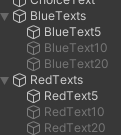
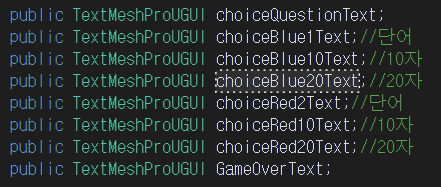
문자의 갯수에 따라 오브젝트를 불러오도록 만들어봐야겠다.
//폰트 크기 조절
private void AdjustFontSize(TextMeshProUGUI textMesh)
{
    int textLength = textMesh.text.Length;

    // 폰트 크기에 따라 텍스트 활성화/비활성화
    if (textLength <= 5)
    {
        SetTextVisibility(true, false, false, true, false, false);
    }
    else if (textLength <= 10)
    {
        SetTextVisibility(false, true, false, false, true, false);
    }
    else if (textLength <= 20)
    {
        SetTextVisibility(false, false, true, false, false, true);
    }
}
private void SetTextVisibility(bool blue1, bool blue10, bool blue20, bool red2, bool red10, bool red20)
{
    choiceBlue1Text.gameObject.SetActive(blue1);
    choiceBlue10Text.gameObject.SetActive(blue10);
    choiceBlue20Text.gameObject.SetActive(blue20);
    choiceRed2Text.gameObject.SetActive(red2);
    choiceRed10Text.gameObject.SetActive(red10);
    choiceRed20Text.gameObject.SetActive(red20);
}

public void GameOver()
{
    GameOverText.text = "게임 종료!";
    Debug.Log("게임 종료");
}
평범하게(?) 글자 갯수에 따라 오브젝트가 켜지고 꺼지게 만들었다.

부족함이 많지만 항상 배우고 있는 학부생입니다 :>