
📡 axios 이용한 API 호출
🪄 axios 설치
npm i axios --save📂 API 관련 파일 추가
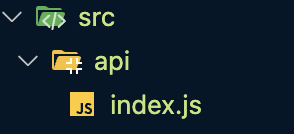
📂 NewsView.vue
methods: {
  fetchData: function() {
    axios.get('https://api.hnpwa.com/v0/news/1.json')
      .then(function(response) {
      console.log(response);
    })
      .catch(function(error) {
      console.log(error);
    });
  }
}- axios 응답제어는
.then으로 콜백을 인자로 받아 결과값을 처리할 수 있으며.catch를 통해 오류를 처리한다.
📡 axios의 api 함수 구조화 방법
📂 index.js
import axios  from "axios";

// 1. HTTP Request & Response와 관련된 기본 설정
const config = {
    baseUrl: 'https://api.hnpwa.com/v0/'
};

// 2. API 함수들 정리
function fetchNewsList() {
    return axios.get(`${config.baseUrl}news/1.json`)
}
function fetchJobsList() {
    return axios.get(`${config.baseUrl}jobs/1.json`)
}
function fetchAskList() {
    return axios.get(`${config.baseUrl}ask/1.json`)
}

export { fetchNewsList,fetchJobsList,fetchAskList } - axios HTTP 요청을 할 때 config 설정이 가능하다.
baseUrl은 axios 인스턴스를 생성할 때, 인스턴스의 기본 URL 값을 정할 수 있는 속성이다.
📂 NewsView.vue
<template>
    <div v-for="user in users" v-bind:key="user">{{ user.title }}</div>
</template>

<script>
import { fetchNewsList } from '../api/index.js'

export default {
    data() {
        return {
            users: []
        }
    },
    created() {
        fetchNewsList()
            .then(response => {
                this.users = response.data
            })
            .catch(error => {
                console.log(error)
            })
    }
}
</script>

<style>

</style>data는 HTTP 요청 bodyd에 실어서 보낼 데이터를 의미한다.

🛁 역시 TIL은 프로젝트 끝나고 쓰는게 제 맛이지!