FPGA 장치에서 Deep Learning 실행하기
version
Tensor Flow 2.12.0
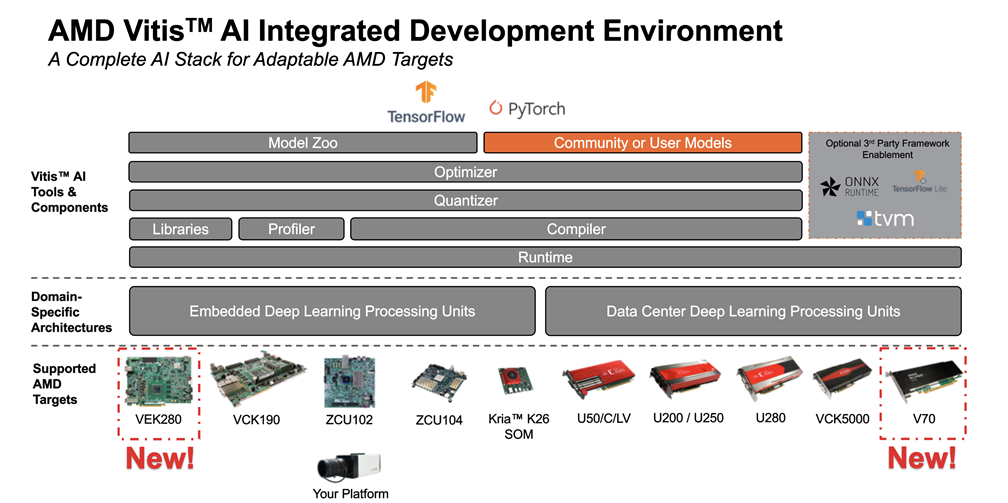
Vitis AI 3.5target board : ZCU102, ZCU102, VCK190, VEK280, Alveo V70
AMD Vitis AI Tutorial-github
순서
-
Model Inspector를 이용하여 원본 모델(ResNet18)이 타겟 보드의 AMD DPU에서 동작 가능한지 확인하기. 그렇지 않은 경우 CNN 수정하여 다시 train
-
Model Quantization 과정을 통해 32비트 floating point CNN을 int8 모델로 생성
-
Vitis AI 환경에서 양자화한 모델로 inference 실행하고, 정확도가 너무 크면 PTQ를 QAT로 fine-tune
-
int8 모델을 컴파일하여 target board의 DPU IP soft-core에 맞는
.xmodel코드 생성 -
VART(Vitis AI RunTime) API 를 통해 C++ 또는 Python 으로 대상 보드의 DPU가 있는 ARM CPU에서 실행되는 애플리케이션을 컴파일
Workspace 구성
-
Vitis-AI github clone 해오기
git clone https://github.com/Xilinx/Vitis-AI -
해당 폴더에
tutorials란 이름의 하위 폴더 만들고
2-1. tutorials 폴더 하위에RESNET18,TF2-Vitis-AI-Optimizer폴더 만들기mkdir tutorials
cd tutorials
mkdir RESNET18; mkdir TF2-Vitis-AI-Optimizer -
Vitis-AI/docker경로에docker_build.sh실행
3-1. docker 설치docker docs 참고
cd docker
./docker_build.sh -t gpu -f tf2
tensorflow2와 gpu 사용하는 docker 다운받음 -
nvidia/cuda docker image 설치
docker run --gpus all nvidia/cuda:12.2.2-cudnn8-runtime-ubuntu22.04 -
docker workspace 실행
설치된 버전들
NVIDIA-SMI 535.154.05 Driver Version: 535.154.05 CUDA Version: 12.2
REPOSITORY TAG IMAGE ID xilinx/vitis-ai-tensorflow2-gpu 3.5.0.001-810814926 11724f44738c xilinx/vitis-ai-gpu-tf2-base latest b507f55f8ef5 nvidia/cuda 12.2.2-cudnn8-runtime-ubuntu22.04 3a3173a161de cd Vitis-AI
./docker_run.sh xilinx/vitis-ai-tensorflow2-gpu:3.5.0.001-810814926 -
anaconda 실행
conda activate vitis-ai-tensorflow2
Docker Command
- docker commit
그래픽 편집기 같은 추가 패키지를 설치해야 할때가상환경 내에서
pip install image-classifiers터미널에서
docker images: 설치된 도커 이미지 확인
sudo docker ps -l: 실행중인 도커 가상환경 확인
sudo docker commit -m"latest" <610b2e7e6e5d> xilinx/vitis-ai-tensorflow2-gpu:latest: 커밋
docker images: 바뀐거 확인
docker ps: 현재 가동중인 컨테이너 리스트
docker ps -a: 멈춘 컨테이너도 포함
docker rm <컨테이너 id>: 컨테이너 삭제
docker images: 설치된 이미지 확인
docker rmi <이미지 id>: 도커 이미지 삭제
docker stop <컨테이너 id>: 도커 중지
ResNet18 연습
- anaconda 까지 열고
$ cd /workspace/tutorials/RESNET18/files
$ source run_all.sh run_clean_dos2unix
$ source run_all.sh cifar10_dataset
$ source run_all.sh run_cifar10_training

$ source run_all.sh quantize_resnet18_cifar10
$ source run_all.sh compile_resnet18_cifar10
$ source run_all.sh prepare_cifar10_archives
run_all.sh에서 확인해 보면 마지막 command는prepare_cifar10_archives이다.
또한, 실행 완료 시에 피드백이 없으므로 마지막 줄에
echo " Complete "를 작성해 주면 보기 편함
- 해당 디렉토리(/workspace/tutorials/RESNET18/files/target)의 tree
.
|-- cifar10
| |-- build_cifar10_test.sh
| |-- cifar10_labels.dat
| |-- cifar10_performance.sh
| |-- code
| | |-- build_app.sh
| | |-- build_get_dpu_fps.sh
| | `-- src
| | |-- check_runtime_top5_cifar10.py
| | |-- get_dpu_fps.cc
| | `-- main_int8.cc
| |-- get_dpu_fps
| |-- rpt
| | |-- kv260_train1_resnet18_cifar10_results_fps.log
| | |-- predictions_cifar10_resnet18.log
| | `-- results_predictions.log
| |-- run_all_cifar10_target.sh
| |-- v70_train1_resnet18_cifar10.xmodel
| |-- v70_train2_resnet18_cifar10.xmodel
| |-- vck190_train1_resnet18_cifar10.xmodel
| |-- vck190_train2_resnet18_cifar10.xmodel
| |-- vck5000_train1_resnet18_cifar10.xmodel
| |-- vck5000_train2_resnet18_cifar10.xmodel
| |-- vek280_train1_resnet18_cifar10.xmodel
| |-- vek280_train2_resnet18_cifar10.xmodel
| |-- zcu102_train1_resnet18_cifar10.xmodel
| `-- zcu102_train2_resnet18_cifar10.xmodel
|-- common
| |-- common.cpp
| `-- common.h
|-- imagenet
| |-- code_resnet50
| | |-- build_resnet50.sh
| | `-- src
| | |-- check_runtime_top1_imagenet.py
| | |-- config
| | | |-- __pycache__
| | | | `-- imagenet_config.cpython-38.pyc
| | | `-- imagenet_config.py
| | `-- main_resnet50.cc
| |-- get_dpu_fps
| |-- imagenet_performance.sh
| |-- resnet18_result_predictions.log
| |-- resnet50_result_predictions.log
| |-- rpt
| | |-- kv260_resnet18_imagenet_results_fps.log
| | |-- kv260_resnet50_imagenet_results_fps.log
| | |-- predictions_resnet18_imagenet.log
| | `-- predictions_resnet50_imagenet.log
| |-- run_all_imagenet_target.sh
| |-- val.txt
| `-- words.txt
`-- run_all_target.sh
ResNet50 연습
-
ILSVRC2012_img_val.tar 다운
torrent 주소 - 6.74GB
에서 토렌트 파일 다운 받고 transmission으로 tar 압축 파일 설치
Download 폴더에 있는 ILSVRC2012_img_val.tar 파일을 아래 경로로 mv
sudo mv ILSVRC2012_img_val.tar /Vitis-AI/tutorials/RESNET18/files/modelzoo/ImageNet/ -
아나콘다까지 열고
$ cd /workspace/tutorials/RESNET18/files/
$ cd modelzoo/ImageNet/ # 여기에 ILSVRC2012_img_val.tar 파일이 있어야 함
$ mkdir val_dataset
$ mv ILSVRC2012_img_val.tar ./val_dataset/
$ cd val_dataset
$ tar -xvf ILSVRC2012_img_val.tar > /dev/null
$ mv ILSVRC2012_img_val.tar ../
$ cd ..

# check all the 50000 images are in val_dataset folder
$ ls -l ./val_dataset | wc
아래와 같이 떠야 한다는데
$ ls -l ./val_dataset | wc
50001 450002 4050014나는 이렇게 나옴
50001 450002 4100014
50001개 맞으면 됐겠지
- 500개의 images 만들기
$ python3 imagenet_val_dataset.py # /workspace/tutorials/RESNET18/files/modelzoo/ImageNet 에 코드 존재
$ cp -i val_dataset.zip ../../target/imagenet
source run_all.sh prepare_imagenet_test_images 로 가능
-
추가
quantize_resnet50_imagenet() 실행 시, model.evaluate() 부분에서 경로에 이미지 없다는 오류 발생 → 해당 경로로 가서unzip[ WARN:0@2.497] global /io/opencv/modules/imgcodecs/src/loadsave.cpp (239) findDecoder imread_('/workspace/tutorials/RESNET18/files/target/imagenet/val_dataset/ILSVRC2012_val_00049501.JPEG'): can't open/read file: check file path/integrity
Traceback (most recent call last):
File "./code/eval_resnet50.py", line 162, in <module>
res50 = model50.evaluate(imagenet_seq50, steps=EVAL_NUM/eval_batch_size, verbose=1)
File "/opt/vitis_ai/conda/envs/vitis-ai-tensorflow2/lib/python3.8/site-packages/keras/utils/traceback_utils.py", line 70, in error_handler
raise e.with_traceback(filtered_tb) from None
File "./code/eval_resnet50.py", line 86, in __getitem__
height, width = img.shape[0], img.shape[1]
AttributeError: 'NoneType' object has no attribute 'shape'
해당 파일(tf2_resnet50_3.5.zip)을
Vitis-AI/tutorials/RESNET18/files/modelzoo에 옮기고unzip
tree targettarget
|-- cifar10
| |-- build_cifar10_test.sh
| |-- cifar10_labels.dat
| |-- cifar10_performance.sh
| |-- code
| | |-- build_app.sh
| | |-- build_get_dpu_fps.sh
| | `-- src
| | |-- check_runtime_top5_cifar10.py
| | |-- get_dpu_fps.cc
| | `-- main_int8.cc
| |-- get_dpu_fps
| |-- rpt
| | |-- _train1_resnet18_cifar10_results_fps.log
| | |-- predictions_cifar10_resnet18.log
| | `-- results_predictions.log
| |-- run_all_cifar10_target.sh
| |-- v70_train1_resnet18_cifar10.xmodel
| |-- v70_train2_resnet18_cifar10.xmodel
| |-- vck190_train1_resnet18_cifar10.xmodel
| |-- vck190_train2_resnet18_cifar10.xmodel
| |-- vck5000_train1_resnet18_cifar10.xmodel
| |-- vck5000_train2_resnet18_cifar10.xmodel
| |-- vek280_train1_resnet18_cifar10.xmodel
| |-- vek280_train2_resnet18_cifar10.xmodel
| |-- zcu102_train1_resnet18_cifar10.xmodel
| `-- zcu102_train2_resnet18_cifar10.xmodel
|-- common
| |-- common.cpp
| `-- common.h
|-- imagenet
| |-- code_resnet50
| | |-- build_resnet50.sh
| | `-- src
| | |-- check_runtime_top1_imagenet.py
| | |-- config
| | | |-- __pycache__
| | | | `-- imagenet_config.cpython-38.pyc
| | | `-- imagenet_config.py
| | `-- main_resnet50.cc
| |-- get_dpu_fps
| |-- imagenet_performance.sh
| |-- resnet18_result_predictions.log
| |-- resnet50_result_predictions.log
| |-- rpt
| | |-- _resnet18_imagenet_results_fps.log
| | |-- _resnet50_imagenet_results_fps.log
| | |-- predictions_resnet18_imagenet.log
| | `-- predictions_resnet50_imagenet.log
| |-- run_all_imagenet_target.sh
| |-- v70_resnet18_imagenet.xmodel
| |-- v70_resnet50_imagenet.xmodel
| |-- val.txt
| |-- val_dataset.zip
| |-- vck190_resnet18_imagenet.xmodel
| |-- vck190_resnet50_imagenet.xmodel
| |-- vck5000_resnet18_imagenet.xmodel
| |-- vck5000_resnet50_imagenet.xmodel
| |-- vek280_resnet18_imagenet.xmodel
| |-- vek280_resnet50_imagenet.xmodel
| |-- words.txt
| |-- zcu102_resnet18_imagenet.xmodel
| `-- zcu102_resnet50_imagenet.xmodel
`-- run_all_target.shimagenet폴더 안에 원래는val_dataset이란 폴더가 있고 해당 폴더 안에val_dataset.zip을 압축헤제한 결과가 있어야 하지만 너무 많아서 지워버림
Imagenet dataset으로 비교하기
$ source run_all.sh quantize_resnet50_imagenet
$ source run_all.sh quantize_resnet18_imagenet

$ source run_all.sh compile_resnet50_imagenet
$ source run_all.sh compile_resnet18_imagenet

$ source run_all.sh prepare_imagenet_archives
resnet18 quantize result
16/16 [==============================] - 3s 84ms/step - loss: 1.6770 - sparse_categorical_accuracy: 0.6460 - sparse_top_k_categorical_accuracy: 0.8750
Quantized ResNet18 top1, top5: 0.6460000276565552 0.875resnet50 quantize result
16/16 [==============================] - 5s 172ms/step - loss: 1.0823 - sparse_categorical_accuracy: 0.7550 - sparse_top_k_categorical_accuracy: 0.9230
Quantized ResNet50 top1, top5: 0.7549999952316284 0.9229999780654907
Run on a VEK280
ResNet18 with cifar10
root@xilinx-vek280-es1-20231: ~# tar -xvf target_vek280.tar
root@xilinx-vek280-es1-20231:~/target_vek280# ./run_all_target.sh vek280- log 파일의 일부
+ tee ./rpt/results_predictions.log
+ python3 ./code/src/check_runtime_top5_cifar10.py -i ./rpt/predictions_cifar10_resnet18.log
./rpt/predictions_cifar10_resnet18.log  has  35008  lines
number of total images predicted  4999
number of top1 false predictions  816
number of top1 right predictions  4183
number of top5 false predictions  37
number of top5 right predictions  4962
top1 accuracy = 0.84
top5 accuracy = 0.99
+ echo ' CIFAR10 RESNET18 PERFORMANCE (fps)'
 CIFAR10 RESNET18 PERFORMANCE (fps)
+ echo ' '

+ tee ./rpt/log1.txt
+ ./get_dpu_fps ./vek280_train1_resnet18_cifar10.xmodel 1 10000
./get_dpu_fps ./vek280_train1_resnet18_cifar10.xmodel 1 10000
WARNING: Logging before InitGoogleLogging() is written to STDERR
I20231011 14:42:24.632606 1926522 get_dpu_fps.cc:107] create running for subgraph: subgraph_quant_add
XAIEFAL: INFO: Resource group Avail is created.
XAIEFAL: INFO: Resource group Static is created.
XAIEFAL: INFO: Resource group Generic is created.
outSize   10
inSize    3072
outW      1
outH      1
inpW      32
inpH      32
inp scale 64
out scale 0.25
# classes 10
batchSize 14
[average calibration high resolution clock] 0.06015us


 number of dummy images per thread: 9996

 allocated 30707712 bytes for  input buffer

 allocated 99960 bytes for output buffer


[DPU tot Time ] 785744us
[DPU avg Time ] 7.86058e+07us
[DPU avg FPS  ] 12721.7
ResNet50 with Imagenet
+ tee resnet50_result_predictions.log
+ python3 ./code_resnet50/src/check_runtime_top1_imagenet.py -i ./rpt/predictions_resnet50_imagenet.log
./rpt/predictions_resnet50_imagenet.log  has  3510  lines
number of total images predicted  499
number of top1 false predictions  151
number of top1 right predictions  348
top1 accuracy = 0.70
+ echo ' '

+ echo ' '

+ echo ' IMAGENET RESNET18 TOP1 ACCURACY ON DPU'
 IMAGENET RESNET18 TOP1 ACCURACY ON DPU
+ echo ' '

+ python3 ./code_resnet50/src/check_runtime_top1_imagenet.py -i ./rpt/predictions_resnet18_imagenet.log
+ tee resnet18_result_predictions.log
cannot open  ./rpt/predictions_resnet18_imagenet.log
Traceback (most recent call last):
  File "/home/root/target_vek280/imagenet/./code_resnet50/src/check_runtime_top1_imagenet.py", line 61, in <module>
    for ln in range(0, tot_lines):
NameError: name 'tot_lines' is not defined
+ echo ' '

+ echo ' '

+ echo ' IMAGENET RESNET18 PERFORMANCE (fps)'
 IMAGENET RESNET18 PERFORMANCE (fps)
+ echo ' '

+ ./get_dpu_fps ./vek280_resnet18_imagenet.xmodel 1 1000
+ tee ./rpt/log1.txt
./get_dpu_fps ./vek280_resnet18_imagenet.xmodel 1 1000
WARNING: Logging before InitGoogleLogging() is written to STDERR
I20231011 14:43:12.314563 1927193 get_dpu_fps.cc:107] create running for subgraph: subgraph_quant_add
XAIEFAL: INFO: Resource group Avail is created.
XAIEFAL: INFO: Resource group Static is created.
XAIEFAL: INFO: Resource group Generic is created.
outSize   1000
inSize    150528
outW      1
outH      1
inpW      224
inpH      224
inp scale 0.25
out scale 0.25
# classes 1000
batchSize 14
[average calibration high resolution clock] 0.0809us


 number of dummy images per thread: 994

 allocated 149624832 bytes for  input buffer

 allocated 994000 bytes for output buffer


[DPU tot Time ] 240645us
[DPU avg Time ] 2.42098e+08us
[DPU avg FPS  ] 4130.56
+ python3 ./code_resnet50/src/check_runtime_top1_imagenet.py -i ./rpt/predictions_resnet50_imagenet.log
+ tee resnet50_result_predictions.log
./rpt/predictions_resnet50_imagenet.log  has  3510  lines
number of total images predicted  499
number of top1 false predictions  151
number of top1 right predictions  348
top1 accuracy = 0.70
+ echo ' '

+ echo ' '

+ echo ' IMAGENET RESNET18 TOP1 ACCURACY ON DPU'
 IMAGENET RESNET18 TOP1 ACCURACY ON DPU
+ echo ' '

+ python3 ./code_resnet50/src/check_runtime_top1_imagenet.py -i ./rpt/predictions_resnet18_imagenet.log
+ tee resnet18_result_predictions.log
./rpt/predictions_resnet18_imagenet.log  has  3510  lines
number of total images predicted  499
number of top1 false predictions  203
number of top1 right predictions  296
top1 accuracy = 0.59
+ echo ' '

+ echo ' '

+ echo ' IMAGENET RESNET18 PERFORMANCE (fps)'
 IMAGENET RESNET18 PERFORMANCE (fps)
+ echo ' '

+ ./get_dpu_fps ./vek280_resnet18_imagenet.xmodel 1 1000
+ tee ./rpt/log1.txt
./get_dpu_fps ./vek280_resnet18_imagenet.xmodel 1 1000
WARNING: Logging before InitGoogleLogging() is written to STDERR
I20231011 14:43:28.414808 1927331 get_dpu_fps.cc:107] create running for subgraph: subgraph_quant_add
XAIEFAL: INFO: Resource group Avail is created.
XAIEFAL: INFO: Resource group Static is created.
XAIEFAL: INFO: Resource group Generic is created.
outSize   1000
inSize    150528
outW      1
outH      1
inpW      224
inpH      224
inp scale 0.25
out scale 0.25
# classes 1000
batchSize 14
[average calibration high resolution clock] 0.0807us


 number of dummy images per thread: 994

 allocated 149624832 bytes for  input buffer

 allocated 994000 bytes for output buffer


[DPU tot Time ] 240883us
[DPU avg Time ] 2.42337e+08us
[DPU avg FPS  ] 4126.49