Assimp 빌드
Open Asset Import Library에서
Ass Imp로 줄인 줄임말임
그 tiny renderer만들때
Bresenham’s line drawing algorithm
이부분에서 모델링 구현을 직접 하긴했었음
근데 이건 wavefront obj형식에 대해서만 매핑이 가능한거구,,,
실제로는 fbx니 뭐니 많아서
그걸 직접 구현해서 사용하기는 좀 번거롭지비
그래서 그걸 해결해주는 라이브러리가 Assimp임
여기 들어가서 하라는대로 하면됨
cmake --build .까지 끝났으면
slnx프로젝트 열어서 빌드해준다음
include는 우리가 사용할 include에 넣어주고
lib도 옮겨주고, 프로젝트 링커 추가 종속성에 해당 lib파일 추가해주고,
/bin.../assimpxxxxx.dll이 파일을
우리 프로젝트의 debug에 넣어주면 됨
Assimp 사용
먼저 mesh.h, mesh.cpp를 만들거임
mesh.h
#ifndef MESH_H
#define MESH_H

#include <glad/glad.h>

#include <glm/glm.hpp>
#include <glm/gtc/matrix_transform.hpp>

#include "Shader.h"

#include <string>
#include <vector>

struct Vertex
{
    glm::vec3 Position;
    glm::vec3 Normal;
    glm::vec2 TexCoords;
};

struct Texture
{
    uint32_t id;
    std::string type;
};

class Mesh {
public:
    // mesh data
    std::vector<Vertex>       vertices;
    std::vector<uint32_t> indices;
    std::vector<Texture>      textures;

    Mesh(std::vector<Vertex> vertices, std::vector<uint32_t> indices, std::vector<Texture> textures);
    void Draw(Shader &shader);
private:
    //  render data
    uint32_t VAO, VBO, EBO;

    void setupMesh();
};

#endif
mesh.cpp
#include "Mesh.h"

Mesh::Mesh(std::vector<Vertex> vertices, std::vector<uint32_t> indices, std::vector<Texture> textures)
{
    this->vertices = vertices;
    this->indices = indices;
    this->textures = textures;

    setupMesh();
}

void Mesh::Draw(Shader& shader)
{

}

void Mesh::setupMesh()
{
    //VAO, VBO, EBO 생성
    glGenVertexArrays(1, &VAO);
    glGenBuffers(1, &VBO);
    glGenBuffers(1, &EBO);

    //ArrayBuffer = VAO 바인딩, ArrayBuffer에 VBO 바인딩
    glBindVertexArray(VAO);
    glBindBuffer(GL_ARRAY_BUFFER, VBO);

    //ArrayBuffer에 정점 데이터 전달
    glBufferData(GL_ARRAY_BUFFER, vertices.size() * sizeof(Vertex), &vertices[0], GL_STATIC_DRAW);

    //ElementArrayBuffer = EBO 바인딩
    glBindBuffer(GL_ELEMENT_ARRAY_BUFFER, EBO);
    //ElementArrayBuffer에 정점으로 만들 fragment의 인덱스들 데이터 전달
    glBufferData(GL_ELEMENT_ARRAY_BUFFER, indices.size() * sizeof(uint32_t), &indices[0], GL_STATIC_DRAW);

    // vertex positions
    glEnableVertexAttribArray(0);
    glVertexAttribPointer(0, 3, GL_FLOAT, GL_FALSE, sizeof(Vertex), (void*)0);
    // vertex normals
    glEnableVertexAttribArray(1);
    glVertexAttribPointer(1, 3, GL_FLOAT, GL_FALSE, sizeof(Vertex), (void*)offsetof(Vertex, Normal));
    // vertex texture coords
    glEnableVertexAttribArray(2);
    glVertexAttribPointer(2, 2, GL_FLOAT, GL_FALSE, sizeof(Vertex), (void*)offsetof(Vertex, TexCoords));

    glBindVertexArray(0);
}
먼저 draw는 빼고 위처럼 선언함
위 cpp파일에는 꼼수가 숨겨져 있음
1. cpp의 구조체 특성
std::vector<Vertex>       vertices;

glBufferData(GL_ARRAY_BUFFER, vertices.size() * sizeof(Vertex), &vertices[0], GL_STATIC_DRAW);
이걸 봐보자
vertex는
struct Vertex
{
    glm::vec3 Position;
    glm::vec3 Normal;
    glm::vec2 TexCoords;
};
이렇게 생김
std::vector는 연속적인 메모리 공간에 데이터를 배치함- cpp의 구조체는 변수를 연속적인 메모리 공간에 데이터를 배치하도록 함
따라서
position, normal, texCoords
이 세 변수 모두 연속적인 메모리 공간에 배치가 되고
이게 모두 배열로 들어가서
vertices[0].Position > vertices[0].Normal > vertices[0].TexCoords > vertices[1].Position > vertices[1].Normal > vertices[1].TexCoords > ...
이런식으로 메모리 공간에 모든 vertex데이터가 할당되게 됨
glBufferData(GL_ARRAY_BUFFER, vertices.size() * sizeof(Vertex), &vertices[0], GL_STATIC_DRAW);따라서 이렇게 &vertices[0]으로 데이터를 전달하고 vertices배열의 크기만 잘 전달하면
데이터 매핑이 제대로 된다는거임
2. offsetof 매크로
위 구조체 특성에 의해 사용할 수 있는 매크로가 있음
offsetof라는 매크로인데
그냥 단순하게 구조체 내부에서 원하는 멤버변수의 시작 메모리 참조주소를 얻을 수 있는 매크로임
	// vertex positions
    glEnableVertexAttribArray(0);
    glVertexAttribPointer(0, 3, GL_FLOAT, GL_FALSE, sizeof(Vertex), (void*)0);
    // vertex normals
    glEnableVertexAttribArray(1);
    glVertexAttribPointer(1, 3, GL_FLOAT, GL_FALSE, sizeof(Vertex), (void*)offsetof(Vertex, Normal));
    // vertex texture coords
    glEnableVertexAttribArray(2);
    glVertexAttribPointer(2, 2, GL_FLOAT, GL_FALSE, sizeof(Vertex), (void*)offsetof(Vertex, TexCoords));
이걸 보면 순서대로 position, normal, texcoords의 멤버변수 시작 주소를 offset으로 지정하고있는걸 볼 수 있음
offsetof 매크로 - Microsoft team
이해 안되면 이거 봐보쟝
즉, 그래픽스와 C의 구조체는 거의 완벽호환된다는거임! ㄷㄱㄷㄱ
draw 메서드 완성
기존의 draw를 하는 로직을 봐보자
	//texture load
    uint32_t diffuseMap = loadTexture("D:/01_Develope/CPP/learn_opengl/learn_opengl/Resources/container2_diffuse.png");
    uint32_t specularMap = loadTexture("D:/01_Develope/CPP/learn_opengl/learn_opengl/Resources/container2_specular.png");
    normalCubeShader.use();
    //diffuse map
    normalCubeShader.setInt("mat.diffuse", 0);
    //specular map
    normalCubeShader.setInt("mat.specular", 1);

    //...

    //while내부
    //bind texture
    //diffuse map
    glActiveTexture(GL_TEXTURE0);
    glBindTexture(GL_TEXTURE_2D, diffuseMap);
    //specular map
    glActiveTexture(GL_TEXTURE1);
    glBindTexture(GL_TEXTURE_2D, specularMap);
주요 포인트만 딱 짚음
GL_TEXTURE0~15: texture unit에 텍스쳐 바인딩- 바인딩된 텍스쳐 유닛에 알맞은 텍스쳐를 넣음
이렇게 2가지가 필요함
텍스쳐 유닛 필수사항
glUniform1i("some_tex_loc", 0);
glUniform1i("some_int_loc", 0);

glActiveTexture(GL_TEXTURE0);
이렇게 한다고 해보자
어떻게 texture unit 0번이 사용되는걸까?
이게 glsl내부에서 자체적으로
sampler2D와 같은 타입에 대한 uniform에 대해
숫자를 넣으면, 그건 텍스쳐 유닛으로 작동함
근데 일반적인 int나 다른 타입에
숫자를 넣으면 그건 그냥 값으로 작동함
그러니까 저렇게 해도 gpu내부에서는 잘 알아서 동작한다는거임
그럼 draw로직을 보자
void Mesh::Draw(Shader& shader)
{
    uint32_t diffuseNr = 1;
    uint32_t specularNr = 1;
    for(uint32_t i = 0; i < textures.size(); i++)
    {
        glActiveTexture(GL_TEXTURE0 + i);

        std::string number;
        std::string name = textures[i].type;

        if(name == "texture_diffuse")
            number = std::to_string(diffuseNr++);
        else if(name == "texture_specular")
            number = std::to_string(specularNr++);

        shader.setInt(("mat." + name + number).c_str(), i);
        glBindTexture(GL_TEXTURE_2D, textures[i].id);
    }
    glActiveTexture(GL_TEXTURE0);

    // draw mesh
    glBindVertexArray(VAO);
    glDrawElements(GL_TRIANGLES, indices.size(), GL_UNSIGNED_INT, 0);
    glBindVertexArray(0);
}
위에서 봤듯이 우리는 diffuse와 specular를 다르게 분리해야됨
그리고 그걸 material에 넣어줘야함
그리고 한 오브젝트에서 여러개의 diffuse와 specular를 사용할 수 있음
심지어는 다른 texture를 사용할수도 있음
그래서 네이밍 규칙을 정해놓고 하면 편함
texture_diffuse1-> GL_TEXTURE0
texture_diffuse2-> GL_TEXTURE1
texture_diffuse3-> GL_TEXTURE2
texture_specular1-> GL_TEXTURE3
texture_specular2-> GL_TEXTURE4
texture_specular3-> GL_TEXTURE5이런식으로 texture_diffuse, texture_specular에 맞춰 숫자를 증가시키는 방식으로 텍스쳐 매핑할거임!
따라서 우리는 텍스쳐를 넣어줄때
struct Texture
{
    uint32_t id;
    std::string type;
}; - id라는
uint32_t diffuseMap와 같은uint32_t타입의 텍스쳐 - texture의 타입인 diffuse, specular
를 정해서 넣어줘야함
그리고 어짜피 이제부턴 vao만으로 그리지 않고
element buffer로 그릴거라
vao바인딩 -> EBO그리기 -> vao바인딩 해제
이 순서로 작동하게 하면 됨
모델
위에는 모델의 베이스가 되는 메쉬를 그리는 코드를 짯음
이제는 메쉬로 모델을 그리도록 하면됨
먼저 모델 클래스를 만들자
모델은 위에 설명한 wavefront obj파일과 같이
응용 프로그램에서 뽑은 모델을 가져와서 사용하는거임
먼저 헤더파일을 보쟝~
헤더
Model.h
#ifndef MODEL_H
#define MODEL_H

#include <glad/glad.h>

#include <glm/glm.hpp>
#include <glm/gtc/matrix_transform.hpp>

#include "Shader.h"

#include <string>
#include <vector>
#include <assimp/Importer.hpp>
#include <assimp/scene.h>
#include <assimp/postprocess.h>

#include "Mesh.h"
#include "stb_image.h"

using namespace std;

class Model
{
public:
    Model(char *path);
    void Draw(Shader &shader);
private:
    // model data
    vector<Mesh> meshes;
    string directory;

    void loadModel(string path);
    void processNode(aiNode *node, const aiScene *scene);
    Mesh processMesh(aiMesh *mesh, const aiScene *scene);
    vector<Texture> loadMaterialTextures(aiMaterial *mat, aiTextureType type, string typeName);
};

//utility
inline unsigned int TextureFromFile(const char *path, const string &directory, bool gamma = false)
{
    string filename = string(path);
    filename = directory + '/' + filename;

    unsigned int textureID;
    glGenTextures(1, &textureID);

    int width, height, nrComponents;
    unsigned char *data = stbi_load(filename.c_str(), &width, &height, &nrComponents, 0);
    if (data)
    {
        GLenum format;
        if (nrComponents == 1)
            format = GL_RED;
        else if (nrComponents == 3)
            format = GL_RGB;
        else if (nrComponents == 4)
            format = GL_RGBA;

        glBindTexture(GL_TEXTURE_2D, textureID);
        glTexImage2D(GL_TEXTURE_2D, 0, format, width, height, 0, format, GL_UNSIGNED_BYTE, data);
        glGenerateMipmap(GL_TEXTURE_2D);

        glTexParameteri(GL_TEXTURE_2D, GL_TEXTURE_WRAP_S, GL_REPEAT);
        glTexParameteri(GL_TEXTURE_2D, GL_TEXTURE_WRAP_T, GL_REPEAT);
        glTexParameteri(GL_TEXTURE_2D, GL_TEXTURE_MIN_FILTER, GL_LINEAR_MIPMAP_LINEAR);
        glTexParameteri(GL_TEXTURE_2D, GL_TEXTURE_MAG_FILTER, GL_LINEAR);

        stbi_image_free(data);
    }
    else
    {
        std::cout << "Texture failed to load at path: " << path << std::endl;
        stbi_image_free(data);
    }

    return textureID;
}

#endif
중요한건 밑의 texture load하는 유틸리티 메서드임
LearnOpenGL(4) - Texture, 텍스쳐 로딩예시
이 부분을 보고 뭘하는건지 알아보쟈~
대충설명하면
- path에 해당되는 경로에 있는 이미지 파일을 stbi를 이용해 로드
- 로드된 이미지가 RED, RGB, RGBA인지 확인 후 format 지정
- gl에게 텍스쳐바인딩 후 텍스쳐 데이터 매핑
- 밉맵, 텍스쳐 래핑, 텍스쳐 축소, 텍스쳐 확대 환경 설정 지정
- 로드된 이미지 데이터 할당 해제
cpp파일
Model.cpp
#include "Model.h"

Model::Model(char* path)
{
    loadModel(path);
}

void Model::Draw(Shader& shader)
{
    for (Mesh& m : meshes)
    {
        m.Draw(shader);
    }
}

void Model::loadModel(string path)
{
    Assimp::Importer import;
    const aiScene *scene = import.ReadFile(path, aiProcess_Triangulate | aiProcess_FlipUVs);

    if(!scene || scene->mFlags & AI_SCENE_FLAGS_INCOMPLETE || !scene->mRootNode)
    {
        cout << "ERROR::ASSIMP::" << import.GetErrorString() << endl;
        return;
    }
    directory = path.substr(0, path.find_last_of('/'));

    processNode(scene->mRootNode, scene);
}

void Model::processNode(aiNode* node, const aiScene* scene)
{
	//노드의 모든 메쉬 추가
    for(unsigned int i = 0; i < node->mNumMeshes; i++)
    {
        aiMesh *mesh = scene->mMeshes[node->mMeshes[i]];
        meshes.push_back(processMesh(mesh, scene));
    }
    // 노드의 자식 노드에 대해서도 동작
    for(unsigned int i = 0; i < node->mNumChildren; i++)
    {
        processNode(node->mChildren[i], scene);
    }
}

Mesh Model::processMesh(aiMesh* mesh, const aiScene* scene)
{
    vector<Vertex> vertices;
    vector<unsigned int> indices;
    vector<Texture> textures;

    for(unsigned int i = 0; i < mesh->mNumVertices; i++)
    {
        Vertex vertex;

        // 정점,노말,텍스쳐 좌표 처리
        //정점 좌표
        glm::vec3 vector;
        vector.x = mesh->mVertices[i].x;
        vector.y = mesh->mVertices[i].y;
        vector.z = mesh->mVertices[i].z;
        vertex.Position = vector;

        //노말 좌표
        vector.x = mesh->mNormals[i].x;
        vector.y = mesh->mNormals[i].y;
        vector.z = mesh->mNormals[i].z;
        vertex.Normal = vector;

        //텍스쳐 좌표, 최초 1개만 있을경우 처리
        if(mesh->mTextureCoords[0]) // assimp에서는 텍스쳐 좌표 8개까지 매핑 가능함
        {
            glm::vec2 vec;
            vec.x = mesh->mTextureCoords[0][i].x;
            vec.y = mesh->mTextureCoords[0][i].y;
            vertex.TexCoords = vec;
        }
        else
            vertex.TexCoords = glm::vec2(0.0f, 0.0f);

        vertices.push_back(vertex);
    }

    //인덱스 처리
    for(unsigned int i = 0; i < mesh->mNumFaces; i++)
    {
        aiFace face = mesh->mFaces[i];
        for(unsigned int j = 0; j < face.mNumIndices; j++)
            indices.push_back(face.mIndices[j]);
    }

    //머티리얼 처리
    if(mesh->mMaterialIndex >= 0)
    {
        aiMaterial *material = scene->mMaterials[mesh->mMaterialIndex];

        vector<Texture> diffuseMaps = loadMaterialTextures(material, aiTextureType_DIFFUSE, "texture_diffuse");
        textures.insert(textures.end(), diffuseMaps.begin(), diffuseMaps.end());

        vector<Texture> specularMaps = loadMaterialTextures(material, aiTextureType_SPECULAR, "texture_specular");
        textures.insert(textures.end(), specularMaps.begin(), specularMaps.end());
    }

    return Mesh(vertices, indices, textures);
}

vector<Texture> Model::loadMaterialTextures(aiMaterial *mat, aiTextureType type, string typeName)
{
    vector<Texture> textures;
    for(unsigned int i = 0; i < mat->GetTextureCount(type); i++)
    {
        aiString str;
        mat->GetTexture(type, i, &str);
        Texture texture;
        texture.id = TextureFromFile(str.C_Str(), directory);
        texture.type = typeName;
        texture.path = str.C_Str();
        textures.push_back(texture);
    }
    return textures;
}
1. Draw메서드
void Model::Draw(Shader& shader)
{
    for (Mesh& m : meshes)
    {
        m.Draw(shader);
    }
}
그냥 멤버 변수인 meshes를 하나씩 순회하면서 각 mesh의 draw를 호출하여 화면에 출력함
2. Model 생성자
Model::Model(char* path)
{
    loadModel(path);
}
모델 생성자가 호출되면 loadModel메서드가 실행됨
3. loadModel 메서드
void Model::loadModel(string path)
{
    Assimp::Importer import;
    const aiScene *scene = import.ReadFile(path, aiProcess_Triangulate | aiProcess_FlipUVs);

    if(!scene || scene->mFlags & AI_SCENE_FLAGS_INCOMPLETE || !scene->mRootNode)
    {
        cout << "ERROR::ASSIMP::" << import.GetErrorString() << endl;
        return;
    }
    directory = path.substr(0, path.find_last_of('/'));

    processNode(scene->mRootNode, scene);
}
Assimp의 importer를 이용해 path로 지정된 경로의 모델을 읽음
이때 ReadFile메서드를 실행하게 되는데,
몇가지 플래그를 지정해줄 수 있음
Assimp - Importer::ReadFile - aiPostProcessSteps
aiProcess_Triangulate: 모델이 완전 삼각형으로 구성되어 있지 않을때 자동적으로 모든 모델의 primitive를 삼각형으로 바꿔줌aiProcess_FlipUVs: 모델의 y축을 기준으로 텍스쳐 좌표 반전시켜줌
gl에서는 이미지가 y축을 기준으로 반전되어 있어서 이걸 써야함aiProcess_GenNormals: 모델에 노말이 없는 경우 각 정점에 대해 계산하여 추가해줌aiProcess_SplitLargeMeshes: 메쉬가 클때, 작은 메쉬로 분할해줌aiProcess_OptimizeMeshes: 여러개의 메쉬를 하나의 큰 메쉬로 합병해줌
그렇게 반환된 scene객체 포인터가
- null이거나
- flag가 미완료 되었거나
- rootNode가 null이면
에러 넣고 리턴~~
잘 로딩 됐다면
멤버변수인 directory에 path를 넣고
processNode메서드 실행
여기서 확인해봐야하는건
scene, root, node이런 단어임
Scene, Root, Node
Scene은 하나의 모델 전체를 관리하는 관리자 역할의 객체임
예를들어 Scene에는 해당 모델의 모든 메쉬 정보가 들어있음
그리고 Node는 모델의 각 부품단위임
모델이 인간이라고 하면
몸통 -> 어깨 -> 팔 -> 손 -> 손가락
각각이 Node이고 각 Node는 부모 자식관계로 이뤄져있음
Root는 이런 모든 Node의 부모가 되는 조상Node를 의미함
4. processNode메서드
void Model::processNode(aiNode* node, const aiScene* scene)
{
	//노드의 모든 메쉬 추가
    for(unsigned int i = 0; i < node->mNumMeshes; i++)
    {
        aiMesh *mesh = scene->mMeshes[node->mMeshes[i]];
        meshes.push_back(processMesh(mesh, scene));
    }
    // 노드의 자식 노드에 대해서도 동작
    for(unsigned int i = 0; i < node->mNumChildren; i++)
    {
        processNode(node->mChildren[i], scene);
    }
}
각 Node에 대해서
- Scene에 저장되어있는 node의 mesh를 순차적으로 불러옴
processMesh메서드를 호출하여 해당 메쉬를 meshes배열에 넣음- node에 대하여 모든 mesh가 meshes에 들어갔다면
해당 node의 모든 child node에 대해서도 같은 작업 반복
근데 재귀로 할 필요가 없긴함
그냥 scene의 모든 메쉬에 대해서 차례대로 meshes에 넣기만 하면 되긴함
하지만!!!
모든 모델이 node의 구조에 맞춰 mesh가 순서대로 되어있을거란 장담은 하지 말것
5. processMesh메서드
Mesh Model::processMesh(aiMesh* mesh, const aiScene* scene)
{
    vector<Vertex> vertices;
    vector<unsigned int> indices;
    vector<Texture> textures;

    for(unsigned int i = 0; i < mesh->mNumVertices; i++)
    {
        Vertex vertex;

        // 정점,노말,텍스쳐 좌표 처리
        //정점 좌표
        glm::vec3 vector;
        vector.x = mesh->mVertices[i].x;
        vector.y = mesh->mVertices[i].y;
        vector.z = mesh->mVertices[i].z;
        vertex.Position = vector;

        //노말 좌표
        vector.x = mesh->mNormals[i].x;
        vector.y = mesh->mNormals[i].y;
        vector.z = mesh->mNormals[i].z;
        vertex.Normal = vector;

        //텍스쳐 좌표, 최초 1개만 있을경우 처리
        if(mesh->mTextureCoords[0]) // assimp에서는 텍스쳐 좌표 8개까지 매핑 가능함
        {
            glm::vec2 vec;
            vec.x = mesh->mTextureCoords[0][i].x;
            vec.y = mesh->mTextureCoords[0][i].y;
            vertex.TexCoords = vec;
        }
        else
            vertex.TexCoords = glm::vec2(0.0f, 0.0f);

        vertices.push_back(vertex);
    }

    //인덱스 처리
    for(unsigned int i = 0; i < mesh->mNumFaces; i++)
    {
        aiFace face = mesh->mFaces[i];
        for(unsigned int j = 0; j < face.mNumIndices; j++)
            indices.push_back(face.mIndices[j]);
    }

    //머티리얼 처리
    if(mesh->mMaterialIndex >= 0)
    {
        aiMaterial *material = scene->mMaterials[mesh->mMaterialIndex];

        vector<Texture> diffuseMaps = loadMaterialTextures(material, aiTextureType_DIFFUSE, "texture_diffuse");
        textures.insert(textures.end(), diffuseMaps.begin(), diffuseMaps.end());

        vector<Texture> specularMaps = loadMaterialTextures(material, aiTextureType_SPECULAR, "texture_specular");
        textures.insert(textures.end(), specularMaps.begin(), specularMaps.end());
    }

    return Mesh(vertices, indices, textures);
}
차례대로
- mesh의
- vertex좌표 처리
- vertex normal처리
- 텍스쳐 좌표 처리
- 편의상 해당 교재에서는 1개의 텍스쳐 좌표만 사용하기로 함
를 해줌
그리고 이거를 VBO와 VAO로 사용하기 위해 하나의 배열에 순서대로 저장함
- mesh의
- face인덱스 처리
메쉬를 이루는 작은 단위인 face에 대하여
해당 메쉬의 모든 face를 EBO로 사용하기 위해
mesh->face->index를 인덱스 배열에 추가
- mesh의
- 머티리얼 처리
하나의 메쉬는 여러개의 머티리얼을 가질 수 있음
specular, diffuse, metalic, normal 등등
따라서 이러한 메쉬에 해당되는 모든 머티리얼을
순서대로 loadMaterialTextures메서드를 이용하여
텍스쳐를 로딩한 후
원하는 형식의 머티리얼을 지정해주고
연속된 메모리 공간에 로드된 텍스쳐를 범위로 쑤셔넣음
- mesh를 만들어줌
끝!
6. loadMaterialTextures메서드
vector<Texture> Model::loadMaterialTextures(aiMaterial *mat, aiTextureType type, string typeName)
{
    vector<Texture> textures;
    for(unsigned int i = 0; i < mat->GetTextureCount(type); i++)
    {
        aiString str;
        mat->GetTexture(type, i, &str);
        Texture texture;
        texture.id = TextureFromFile(str.C_Str(), directory);
        texture.type = typeName;
        texture.path = str.C_Str(); //캐싱
        textures.push_back(texture);
    }
    return textures;
} processMesh메서드에서 각 mesh에 대해 material을 뽑아서 여기로 넘겨주는거임
중요한건
모델에는 material에 대해서도 값이 지정되어있다는거임
파일명, 파일 타입, 파일 속성 다 지정되어있음
mat->GetTexture(type, i, &str);이걸 하면
지정된 머티리얼[i]의 타입(diffuse, specular...)에 대한 파일명을 읽어서 str에 저장하고
파일명을 이용해 위에 헤더쪽에서 설명한 texture loading유틸리티 메서드인TextureFromFile에게 넘겨준 후
Texture구조체를 정의해줌
이때 기존의 Texture구조체를 보면
struct Texture
{
    uint32_t id;
    std::string type;
};
이런데,
path라는 변수를 추가하여
텍스쳐 경로를 캐싱해주기까지함!
optimization
위에서 캐싱하는게 최적화를 위한거임
계속 경로를 찾을필요없이
그냥 텍스쳐에 저장된 경로만 딸깍하면 되기때문에!
struct Texture
{
    uint32_t id;
    std::string type;
    std::string path;
};
이렇게 수정함
먼저 헤더에
vector<Texture> textures_loaded;를 추가해서
캐싱된 텍스쳐는 다시 불러오는 과정을 거치지 않도록 함
그리고
loadMaterialTextures메서드를 약간 수정!
vector<Texture> Model::loadMaterialTextures(aiMaterial *mat, aiTextureType type, string typeName)
{
    vector<Texture> textures;

    for(unsigned int i = 0; i < mat->GetTextureCount(type); i++)
    {
        aiString str;
        mat->GetTexture(type, i, &str);
        bool skip = false;

        //캐싱확인
        for(unsigned int j = 0; j < textures_loaded.size(); j++)
        {
            if(std::strcmp(textures_loaded[j].path.data(), str.C_Str()) == 0)
            {
                textures.push_back(textures_loaded[j]);
                skip = true;
                break;
            }
        }

        //캐싱되어있지 않으면 기존의 텍스쳐 매핑로직 추가
        if(!skip)
        {
            Texture texture;
            texture.id = TextureFromFile(str.C_Str(), directory);
            texture.type = typeName;
            texture.path = str.C_Str();
            textures.push_back(texture);
            textures_loaded.push_back(texture);
        }
    }

    return textures;
}
걍 쉬움
- 모델의 메쉬의 특정 머티리얼의 texture count만큼 반복문 순회
- 각 순회마다
texture_loaded와 현재 머티리얼의 텍스쳐와 비교 - 비교값이 0이면, 동일하다는 뜻이므로 Mesh객체로 만들때 필요한 textures배열에 해당
texture_loaded추가 - 비교값이 0이 아니면,
texture_loaded에 존재하지 않다는 의미이므로,
기존의 stbi의 이미지 로드를 이용해서 directory의 이미지 파일 로드 후 넘기기
쉽지??
물체 추가해보기
그냥 연습임
먼저 obj파일과 머티리얼을 한곳에 다 모아서 저장해줌
난 Resources/objs/backpack 이 하위에 전부 저장함
먼저
- fragment shader
#version 330 core
struct Material
{
    float shininess;
};

struct DirLight
{
    vec3 direction;

    vec3 ambient;
    vec3 diffuse;
    vec3 specular;
};

struct PointLight {
    vec3 position;

    float constant;
    float linear;
    float quadratic;

    vec3 ambient;
    vec3 diffuse;
    vec3 specular;
};
#define NR_POINT_LIGHTS 4

struct SpotLight
{
    vec3 position;
    vec3 direction;

    vec3 ambient;
    vec3 diffuse;
    vec3 specular;

    float constant;
    float linear;
    float quadratic;

    float cutoff; //radian degree
    float outerCutoff; //radian degree
};

out vec4 FragColor;

in vec3 FragPos;
in vec3 Normal;
in vec2 TexCoords; //light map용 텍스쳐 좌표

uniform vec3 viewPos;
uniform Material mat;
uniform sampler2D texture_diffuse1;
uniform sampler2D texture_specular1;

uniform DirLight dirLight;
uniform PointLight pointLights[NR_POINT_LIGHTS];
uniform SpotLight spotLight;

vec3 CalcDirLight(DirLight light, vec3 normal, vec3 viewDir);
vec3 CalcPointLight(PointLight light, vec3 normal, vec3 fragPos, vec3 viewDir);
vec3 CalcSpotLight(SpotLight light, vec3 normal, vec3 fragPos, vec3 viewDir);

void main()
{
    // properties
    vec3 norm = normalize(Normal);
    vec3 viewDir = normalize(viewPos - FragPos);

    // phase 1: directional lighting
    vec3 result = CalcDirLight(dirLight, norm, viewDir);

    // phase 2: point lights
    /*for(int i = 0; i < NR_POINT_LIGHTS; i++)
    {
        result += CalcPointLight(pointLights[i], norm, FragPos, viewDir);
    }*/

    // phase 3: spot light
    result += CalcSpotLight(spotLight, norm, FragPos, viewDir);

    FragColor = vec4(result, 1.0);
}

vec3 CalcDirLight(DirLight light, vec3 normal, vec3 viewDir)
{
    vec3 lightDir = normalize(-light.direction);

    // diffuse shading
    float diff = max(dot(normal, lightDir), 0.0);

    // specular shading
    vec3 reflectDir = reflect(-lightDir, normal);
    float spec = pow(max(dot(viewDir, reflectDir), 0.0), mat.shininess);

    // combine results
    vec3 ambient  = light.ambient  * vec3(texture(texture_diffuse1, TexCoords));
    vec3 diffuse  = light.diffuse  * diff * vec3(texture(texture_diffuse1, TexCoords));
    vec3 specular = light.specular * spec * vec3(texture(texture_specular1, TexCoords));

    return (ambient + diffuse + specular);
}

vec3 CalcPointLight(PointLight light, vec3 normal, vec3 fragPos, vec3 viewDir)
{
    vec3 lightDir = normalize(light.position - fragPos);

    // diffuse shading
    float diff = max(dot(normal, lightDir), 0.0);

    // specular shading
    vec3 reflectDir = reflect(-lightDir, normal);
    float spec = pow(max(dot(viewDir, reflectDir), 0.0), mat.shininess);

    // attenuation
    float distance    = length(light.position - fragPos);
    float attenuation = 1.0 / (light.constant + light.linear * distance + light.quadratic * (distance * distance));

    // combine results
    vec3 ambient  = light.ambient  * vec3(texture(texture_diffuse1, TexCoords));
    vec3 diffuse  = light.diffuse  * diff * vec3(texture(texture_diffuse1, TexCoords));
    vec3 specular = light.specular * spec * vec3(texture(texture_specular1 , TexCoords));
    ambient  *= attenuation;
    diffuse  *= attenuation;
    specular *= attenuation;

    return (ambient + diffuse + specular);
}

vec3 CalcSpotLight(SpotLight light, vec3 normal, vec3 fragPos, vec3 viewDir)
{
    vec3 lightDir = normalize(light.position - fragPos);

    // diffuse shading
    float diff = max(dot(normal, lightDir), 0.0);

    // specular shading
    vec3 reflectDir = reflect(-lightDir, normal);
    float spec = pow(max(dot(viewDir, reflectDir), 0.0), mat.shininess);

    // attenuation
    float distance = length(light.position - fragPos);
    float attenuation = 1.0 / (light.constant + light.linear * distance + light.quadratic * (distance * distance));

    // spotlight intensity
    float theta = dot(lightDir, normalize(-light.direction));
    float epsilon = light.cutoff - light.outerCutoff;
    float intensity = clamp((theta - light.outerCutoff) / epsilon, 0.0, 1.0);

    // combine results
    vec3 ambient = light.ambient * vec3(texture(texture_diffuse1, TexCoords));
    vec3 diffuse = light.diffuse * diff * vec3(texture(texture_diffuse1 , TexCoords));
    vec3 specular = light.specular * spec * vec3(texture(texture_specular1 , TexCoords));
    ambient *= attenuation * intensity;
    diffuse *= attenuation * intensity;
    specular *= attenuation * intensity;

    return (ambient + diffuse + specular);
}
point라이트는 배제할것이므로
주석처리함
다음은
Model.h,Mode.cpp
#ifndef MODEL_H
#define MODEL_H

#include <glad/glad.h>

#include <glm/glm.hpp>
#include <glm/gtc/matrix_transform.hpp>

#include "Shader.h"

#include <string>
#include <vector>
#include <assimp/Importer.hpp>
#include <assimp/scene.h>
#include <assimp/postprocess.h>

#include "Mesh.h"
#include "stb_image.h"

using namespace std;

class Model
{
public:
    Model(const char *path, bool gamma = false); //감마보정
    void Draw(Shader &shader);

private:
    // model data
    vector<Texture> textures_loaded;
    vector<Mesh> meshes;
    string directory;
    bool gammaCorrection; //감마보정

    void loadModel(string path);
    void processNode(aiNode *node, const aiScene *scene);
    Mesh processMesh(aiMesh *mesh, const aiScene *scene);
    vector<Texture> loadMaterialTextures(aiMaterial *mat, aiTextureType type, string typeName);
};

//utility
unsigned int TextureFromFile(const char *path, const string &directory, bool gamma = false)
{
    string filename = string(path);
    filename = directory + '/' + filename;

    unsigned int textureID;
    glGenTextures(1, &textureID);

    int width, height, nrComponents;
    unsigned char *data = stbi_load(filename.c_str(), &width, &height, &nrComponents, 0);
    if (data)
    {
        GLenum format;
        if (nrComponents == 1)
            format = GL_RED;
        else if (nrComponents == 3)
            format = GL_RGB;
        else if (nrComponents == 4)
            format = GL_RGBA;

        glBindTexture(GL_TEXTURE_2D, textureID);
        glTexImage2D(GL_TEXTURE_2D, 0, format, width, height, 0, format, GL_UNSIGNED_BYTE, data);
        glGenerateMipmap(GL_TEXTURE_2D);

        glTexParameteri(GL_TEXTURE_2D, GL_TEXTURE_WRAP_S, GL_REPEAT);
        glTexParameteri(GL_TEXTURE_2D, GL_TEXTURE_WRAP_T, GL_REPEAT);
        glTexParameteri(GL_TEXTURE_2D, GL_TEXTURE_MIN_FILTER, GL_LINEAR_MIPMAP_LINEAR);
        glTexParameteri(GL_TEXTURE_2D, GL_TEXTURE_MAG_FILTER, GL_LINEAR);

        stbi_image_free(data);
    }
    else
    {
        std::cout << "Texture failed to load at path: " << path << std::endl;
        stbi_image_free(data);
    }

    return textureID;
}

#endif

//--------------------------------------------

Model::Model(const char* path, bool gamma) : gammaCorrection(gamma)
{
    loadModel(path);
}
그리고 전체적으로 main을 수정함
이제는 더이상 vertices직접 뭐 선언하고 indices직접 뭐
다필요없음
그냥 모델을 갖다쓰면됨
main.cpp
#include <glad/glad.h>
#include <GLFW/glfw3.h>

#include <glm/glm.hpp>
#include <glm/gtc/matrix_transform.hpp>
#include <glm/gtc/type_ptr.hpp>

#include <iostream>
#include "Shader.h"
#include "Camera.h"
#include "Model.h"

void framebuffer_size_callback(GLFWwindow* window, int width, int height);
void mouse_callback(GLFWwindow* window, double xpos, double ypos);
void scroll_callback(GLFWwindow* window, double xoffset, double yoffset);
void processInput(GLFWwindow *window);

// 윈도우 사이즈
const uint32_t SCR_WIDTH = 1280;
const uint32_t SCR_HEIGHT = 720;

// 카메라
Camera camera(glm::vec3(0.0f, 0.0f, 3.0f));
float lastX = SCR_WIDTH / 2.0f;
float lastY = SCR_HEIGHT / 2.0f;
bool firstMouse = true;

// 프레임 보정
float deltaTime = 0.0f;
float lastFrame = 0.0f;

int main()
{
    // glfw 초기화, 설정
    // ----------------
    glfwInit();
    glfwWindowHint(GLFW_CONTEXT_VERSION_MAJOR, 3);
    glfwWindowHint(GLFW_CONTEXT_VERSION_MINOR, 3);
    glfwWindowHint(GLFW_OPENGL_PROFILE, GLFW_OPENGL_CORE_PROFILE);

    // glfw 창 생성
    // ------------
    GLFWwindow* window = glfwCreateWindow(SCR_WIDTH, SCR_HEIGHT, "흑45", nullptr, nullptr);
    if (window == nullptr)
    {
        std::cout << "Failed to create GLFW window" << std::endl;
        glfwTerminate();
        return -1;
    }
    glfwMakeContextCurrent(window);
    // glfw 인풋 콜백 처리
    glfwSetFramebufferSizeCallback(window, framebuffer_size_callback);
    glfwSetCursorPosCallback(window, mouse_callback);
    glfwSetScrollCallback(window, scroll_callback);

    // glfw 사용자 마우스 설정
    glfwSetInputMode(window, GLFW_CURSOR, GLFW_CURSOR_DISABLED);

    // glad로 openGL모든 함수 포인터 로딩
    // -------------------------------
    if (!gladLoadGLLoader((GLADloadproc)glfwGetProcAddress))
    {
        std::cout << "Failed to initialize GLAD" << std::endl;
        return -1;
    }

    // openGL 설정
    // -----------
    stbi_set_flip_vertically_on_load(true);
    glEnable(GL_DEPTH_TEST);

    // 쉐이더 프로그램 만들기
    // -------------------
    Shader modelMatShader("VertexShaders/MaterialShader.vsh", "FragmentShaders/MaterialShader.fsh");

    //우리 모델
    Model model_3D("D:/01_Develope/CPP/learn_opengl/learn_opengl/Resources/objs/backpack/backpack.obj");


    // 렌더링 루프(매 프레임 실행)
    // -----------
    // 렌더링 루프(매 프레임 실행)
    // -----------
    while (!glfwWindowShouldClose(window))
    {
        // 프레임 보정
        // --------------------
        float currentFrame = static_cast<float>(glfwGetTime());
        deltaTime = currentFrame - lastFrame;
        lastFrame = currentFrame;

        // input
        // -----
        processInput(window);

        // render
        // ------
        glClearColor(0.05f, 0.05f, 0.05f, 1.0f);
        glClear(GL_COLOR_BUFFER_BIT | GL_DEPTH_BUFFER_BIT);

        // 쉐이더 uniform 설정 시작
        modelMatShader.use();

        //----- 빛 정보 전달 시작 -----

        // 1. 카메라(관찰자) 위치 전달 (Specular 계산용)
        modelMatShader.setVec3("viewPos", camera.Position);
        // 재질 기본값 설정
        modelMatShader.setFloat("mat.shininess", 32.0f);

        // 2. Directional Light
        modelMatShader.setVec3("dirLight.direction", -0.2f, -1.0f, -0.3f);
        modelMatShader.setVec3("dirLight.ambient", 0.05f, 0.05f, 0.05f); // 약한 주변광
        modelMatShader.setVec3("dirLight.diffuse", 0.4f, 0.4f, 0.4f);    // 기본 빛 색상
        modelMatShader.setVec3("dirLight.specular", 0.5f, 0.5f, 0.5f);   // 반사광

        // 3. Spot Light
        modelMatShader.setVec3("spotLight.position", camera.Position);
        modelMatShader.setVec3("spotLight.direction", camera.Front);
        modelMatShader.setVec3("spotLight.ambient", 0.0f, 0.0f, 0.0f);
        modelMatShader.setVec3("spotLight.diffuse", 1.0f, 1.0f, 1.0f);
        modelMatShader.setVec3("spotLight.specular", 1.0f, 1.0f, 1.0f);
        modelMatShader.setFloat("spotLight.constant", 1.0f);
        modelMatShader.setFloat("spotLight.linear", 0.09f);
        modelMatShader.setFloat("spotLight.quadratic", 0.032f);
        modelMatShader.setFloat("spotLight.cutoff", glm::cos(glm::radians(12.5f)));
        modelMatShader.setFloat("spotLight.outerCutoff", glm::cos(glm::radians(15.0f)));

        //----- 빛 정보 전달 끝 -----

        // 뷰/projection 변환 행렬
        glm::mat4 projection = glm::perspective(glm::radians(camera.Zoom), (float)SCR_WIDTH / (float)SCR_HEIGHT, 0.1f, 100.0f);
        glm::mat4 view = camera.GetViewMatrix();
        modelMatShader.setMat4("projection", projection);
        modelMatShader.setMat4("view", view);

        // 모델 변환 행렬
        glm::mat4 model = glm::mat4(1.0f);
        model = glm::translate(model, glm::vec3(0.0f, 0.0f, 0.0f)); // 씬의 중앙에 위치하도록 조정
        model = glm::scale(model, glm::vec3(1.0f, 1.0f, 1.0f));     // 모델 크기에 맞게 스케일 조정
        modelMatShader.setMat4("model", model);

        // 모델 렌더링
        model_3D.Draw(modelMatShader);

        // glfw: swap buffers and poll IO events (keys pressed/released, mouse moved etc.)
        // -------------------------------------------------------------------------------
        glfwSwapBuffers(window);
        glfwPollEvents();
    }

    //프로그램 종료시 glfw도 끝내기!
    // ----------
    glfwTerminate();
    return 0;
}

//...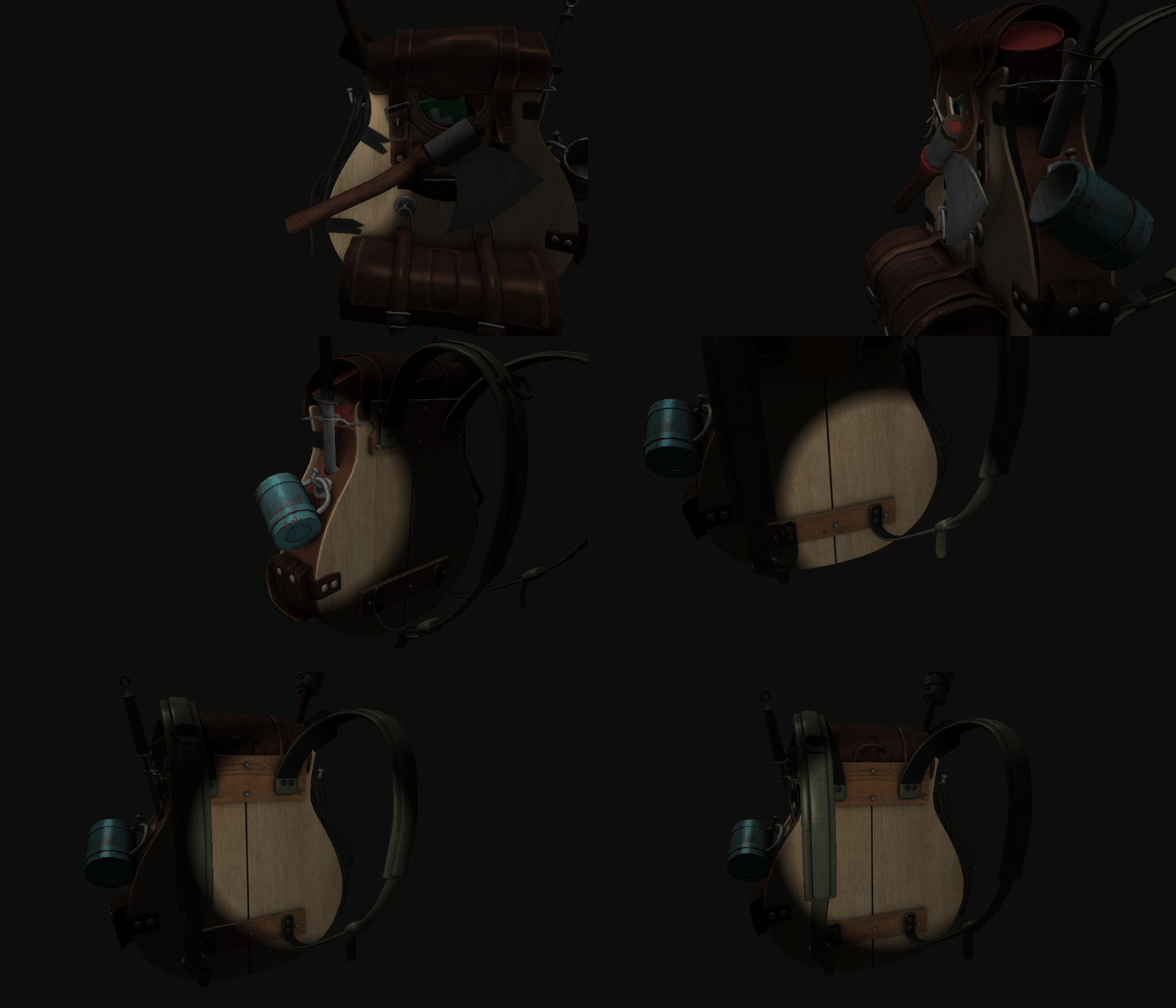
빛 적용까지 완료!!
구욷~~