
import rclpy as rp
from rclpy.node import Node

# 구독할 토픽의 메세지 타입들
from turtlesim.msg import Pose
from geometry_msgs.msg import Twist
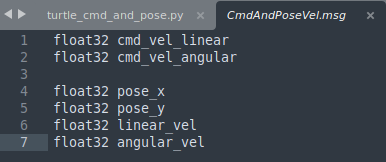
from my_first_package_msgs.msg import CmdAndPoseVel

class CmdAndPose(Node):

	def __init__(self):
		super().__init__('turtle_cmd_pose')
        # (topic_msg 타입, 구독할 토픽명, 실행함수, 주기) 순서
		self.sub_pose = self.create_subscription(Pose, "/turtle1/pose", self.callback_pose, 10)
		self.sub_cmdvel = self.create_subscription(Twist, "/turtle1/cmd_vel", self.callback_cmd, 10)

		self.timer_period = 1.0
        # (배포할 msg 타입, msg명, 주기)
		self.publisher = self.create_publisher(CmdAndPoseVel, "/cmd_and_pose", 10)
		self.timer = self.create_timer(self.timer_period, self.timer_callback)

		self.cmd_pose = CmdAndPoseVel()

	# 출력할 msg 변수 수정
	def callback_pose(self, msg):
		self.cmd_pose.pose_x = msg.x
		self.cmd_pose.pose_y = msg.y
		self.cmd_pose.linear_vel = msg.linear_velocity
		self.cmd_pose.angular_vel = msg.angular_velocity

	def callback_cmd(self, msg):
		self.cmd_pose.cmd_vel_linear = msg.linear.x
		self.cmd_pose.cmd_vel_angular = msg.angular.z

	def timer_callback(self):
		self.publisher.publish(self.cmd_pose)

def main(args=None):
	rp.init(args=args)

    # class node 설정 및 실행
	turtle_cmd_pose_node = CmdAndPose()
	rp.spin(turtle_cmd_pose_node)

	turtle_cmd_pose_node.destroy_node()
	rp.shutdown()

if __name__ == "__main__":
	main()
ROS, Python, Cpp 공부 중입니다.