플레이어가 원거리 공격 시에 발사 될 플레이어 Bullet 을 만들고 이 투사체를 처리할 스크립트를 만들어보았다.
투사체 관련 스크립트
using System.Collections;
using System.Collections.Generic;
using UnityEngine;

public class PlayerBulletController : MonoBehaviour
{
    [SerializeField] private GameObject RangeHitEffect; // 히트 효과 프리팹

    // Start is called before the first frame update
    void Start()
    {
        Invoke("DestroyTime", 2.0f);
    }

    void DestroyTime()
    {
        Destroy(gameObject);
    }

    private void OnTriggerEnter2D(Collider2D collision)
    {
        if (collision.gameObject.CompareTag("Ground") || collision.gameObject.CompareTag("Platform"))
        {
            Debug.Log("벽에 충돌!");
            Instantiate(RangeHitEffect, transform.position, Quaternion.identity); // 히트 효과 생성
            Destroy(gameObject);
        }
        else if (collision.gameObject.CompareTag("Monster"))
        {
            Debug.Log("몬스터에게 충돌!");
            Instantiate(RangeHitEffect, transform.position, Quaternion.identity); // 히트 효과 생성
            // collision.SendMessage("Demaged", 10); // Demaged 함수 호출, 원거리 공격력(10, 임시)만큼 피해  TODO
            Destroy(gameObject);
        }
    }
}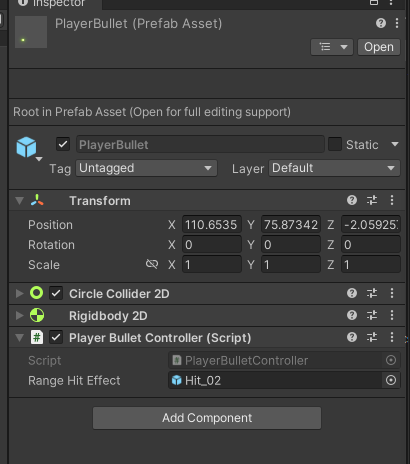
벽이나 적에게 충돌시 발생 할 Hit Effect를 담을 프리팹도 준비해서 인스펙터에서 연결.
부딪힌 개체에 따라 다르게 처리되도록 했다.
(ex. 몬스터인 경우 데미지도 주는 경우)
플레이어 공격 스크립트
using System.Collections;
using System.Collections.Generic;
using UnityEngine;

public class PlayerAttacks : MonoBehaviour
{
    [SerializeField] GameObject bulletPref;

    [SerializeField] private float firePower = 15f; // 발사 힘
    [SerializeField] private float fireDelay = 0.1f; // 발사 딜레이
    private float lastFireTime = 0; // 마지막 발사 시간


    public void Fire()
    {

        if (Time.time - lastFireTime >= fireDelay)
        {
            Vector3 direction = transform.right * transform.localScale.x; // 플레이어의 방향에 따라 발사 방향 결정
            GameObject bullet = Instantiate(bulletPref, transform.position + direction, Quaternion.identity);

            // 플레이어의 방향에 따른 투사체 스프라이트 스케일 반전
            float bulletDirection = transform.localScale.x > 0 ? 1f : -1f;
            bullet.transform.localScale = new Vector3(bulletDirection, 1f, 1f);

            bullet.GetComponent<Rigidbody2D>().AddForce(direction * firePower, ForceMode2D.Impulse);

            lastFireTime = Time.time; // 마지막 발사 시간 업데이트
        }
    }

}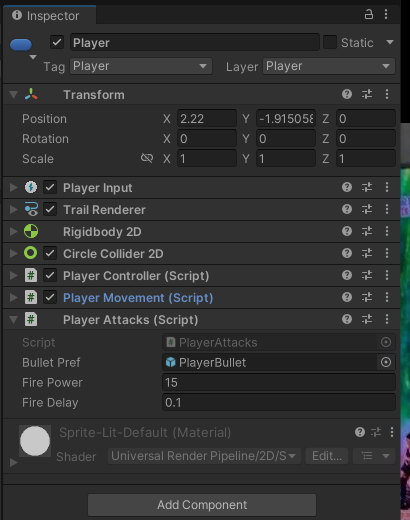
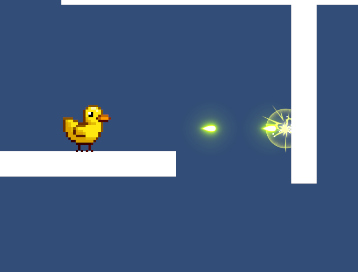
Fire() 입력이 들어오면 바라보는 방향으로 발사한다.
2D 사이드 뷰 게임이기 때문에, 플레이어가 바라보는 방향에 따라 투사체의 스프라이트도 반전되게 해주었다.


개발 모코코