1. pivot table
- index, columns, values, aggfunc로 이루어짐
> df.head( )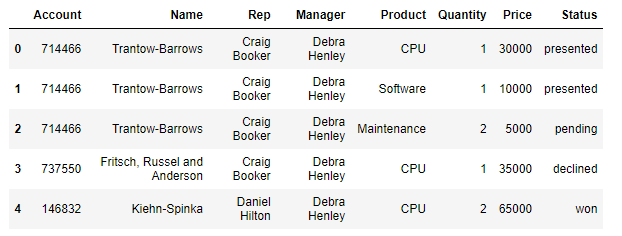
2. index 설정
- 위의 데이터에서 "Name" 컬럼을 index로 설정해보자
- 또한 values는 숫자형 데이터를 가진 컬럼들로만 설정해보자
> pd.pivot_table(df,index="Name", values=["Account", "Price"]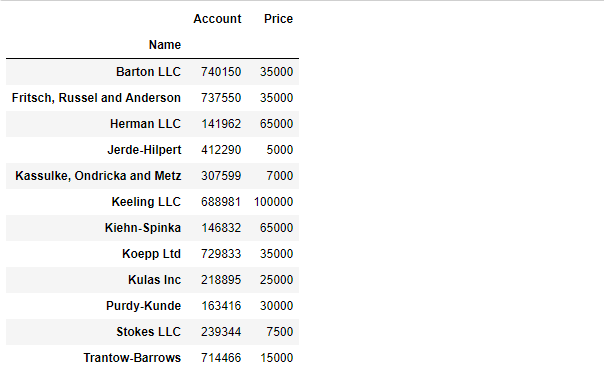
- 멀티 인덱스 설정
> pd.pivot_table(df,index=["Name", "Rep", "Manager"],values=["Account","Price","Quantity"])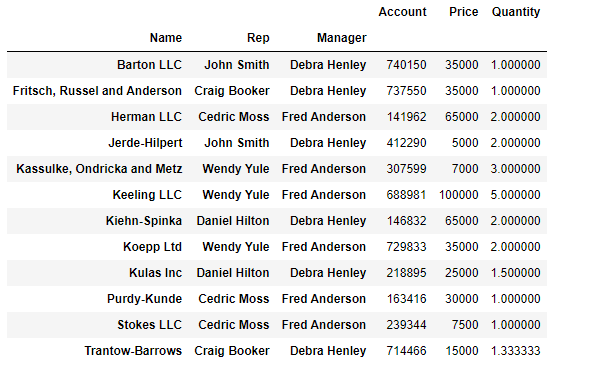
> pd.pivot_table(df,index=["Manager", "Rep"],values=["Account","Price"])
3. values 설정
> df.head( )
> df.pivot_table(index=["Manager", "Rep"], values="Price")
- aggfunc 설정 가능
> df.pivot_table(index=["Manager", "Rep"], values="Price", aggfunc=np.sum)
> df.pivot_table(index=["Manager", "Rep"], values="Price", aggfunc=[np.sum, len])
4. columns 설정
- 분류를 지정하는 것임
> df.head( )
- "Product"을 컬럼으로 지정해보자
> df.pivot_table(index=["Manager", "Rep"], values="Price", columns="Product", aggfunc=np.sum)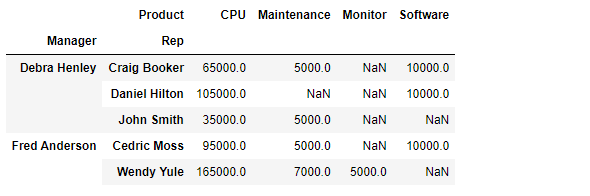
- NaN 값을 채워보자
> df.pivot_table(index=["Manager", "Rep"], values="Price", columns="Product", aggfunc=np.sum, fill_value=0)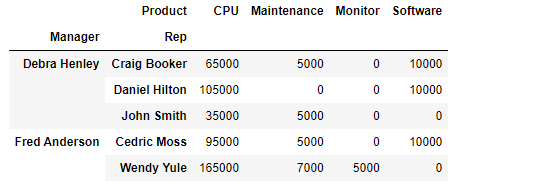
- 표 끝에 총계를 추가할 수도 있다
> df.pivot_table(
    index=["Manager", "Rep", "Product"],
    values=["Price", "Quantity"],
    aggfunc=[np.sum, np.mean],
    fill_value=0,
    margins=True) # 총계(All) 추가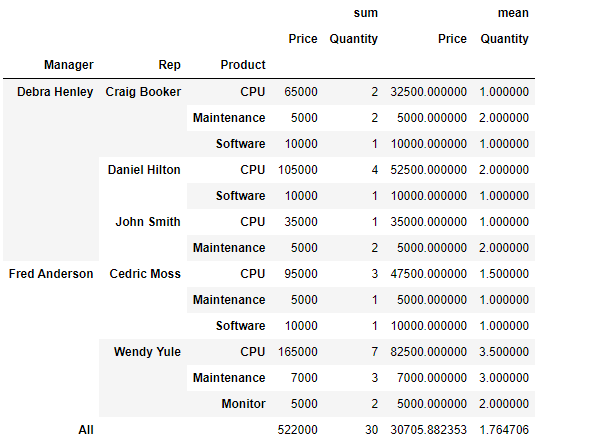

데이터 관련 학습 일지