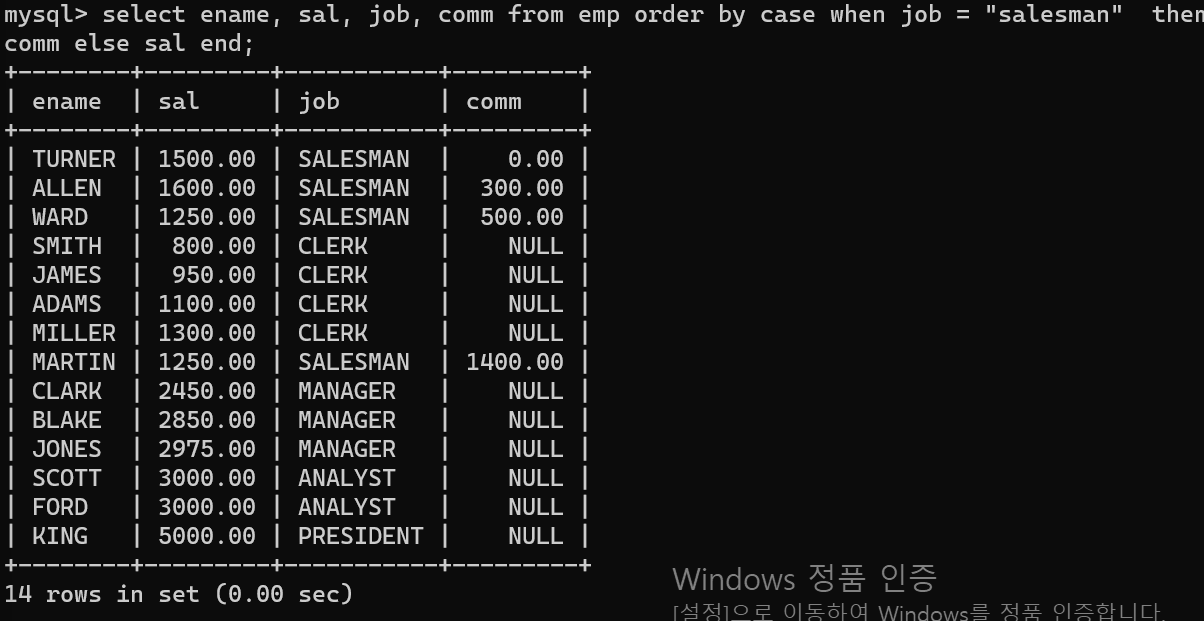
- 오늘 첫번 쨰 코드는 두 테이블의 자료 비교이다.
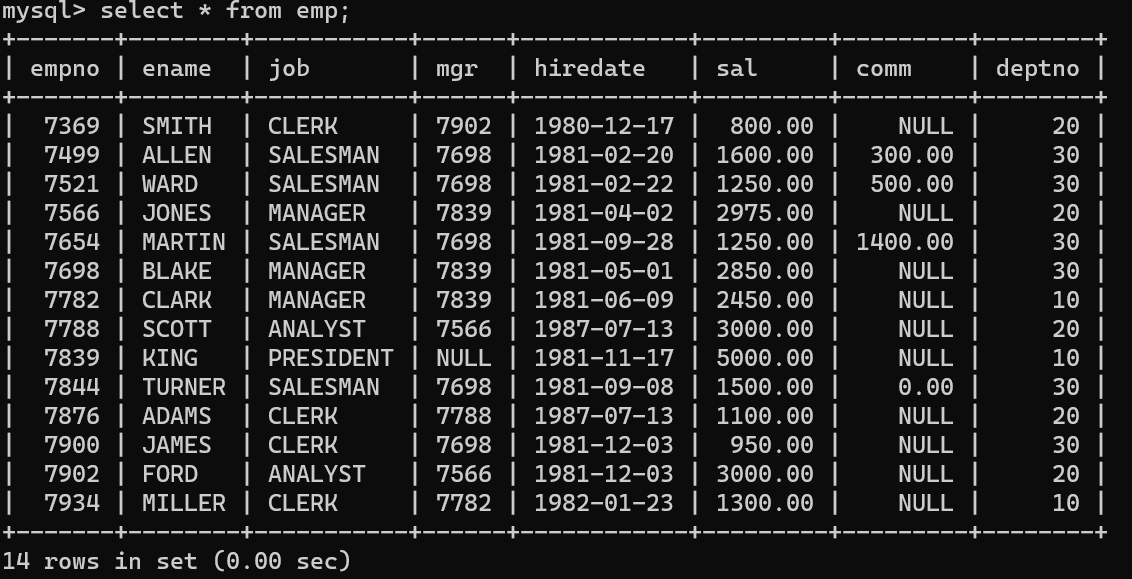
- 먼저 비교할 첫번 째 테이블의 자료이며,
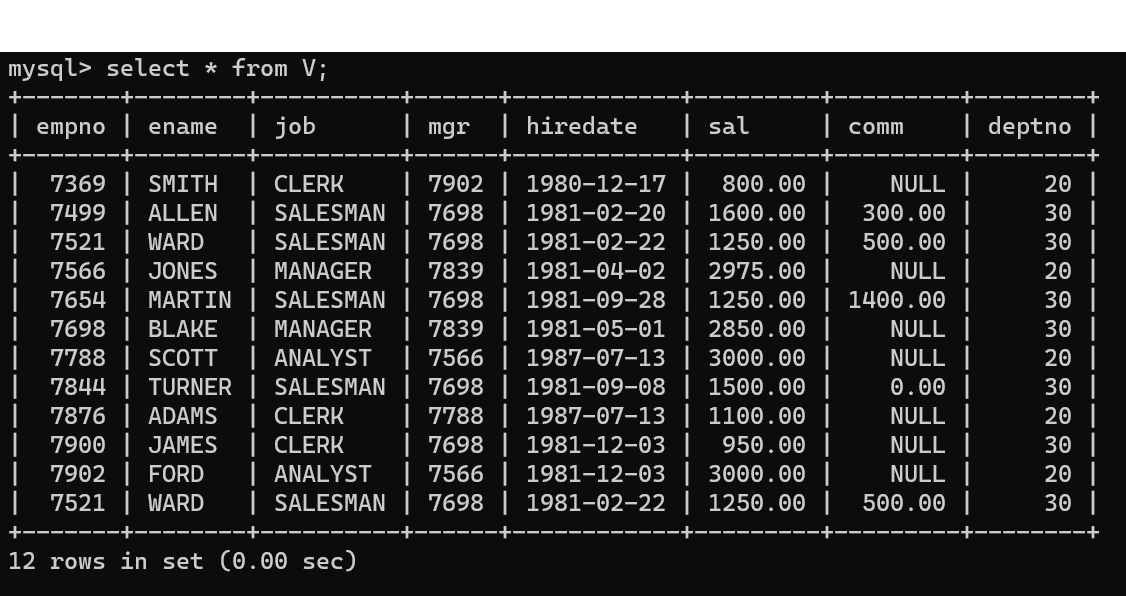
- 두번 째 테이블이다.
- 두 테이블의 앞에 테이블에는 ename이 중복되는 값이 없고 deptno이 10인 자료가 존재하지만, 두번 째 테이블의 경우 ename이 WARD인 값이 2개 존재하며 deptno가 10인 데이터는 존재하지 않는다.
- 동일한 자료를 제외한 나머지 자료를 출력하는 코드는 다음과 같다.
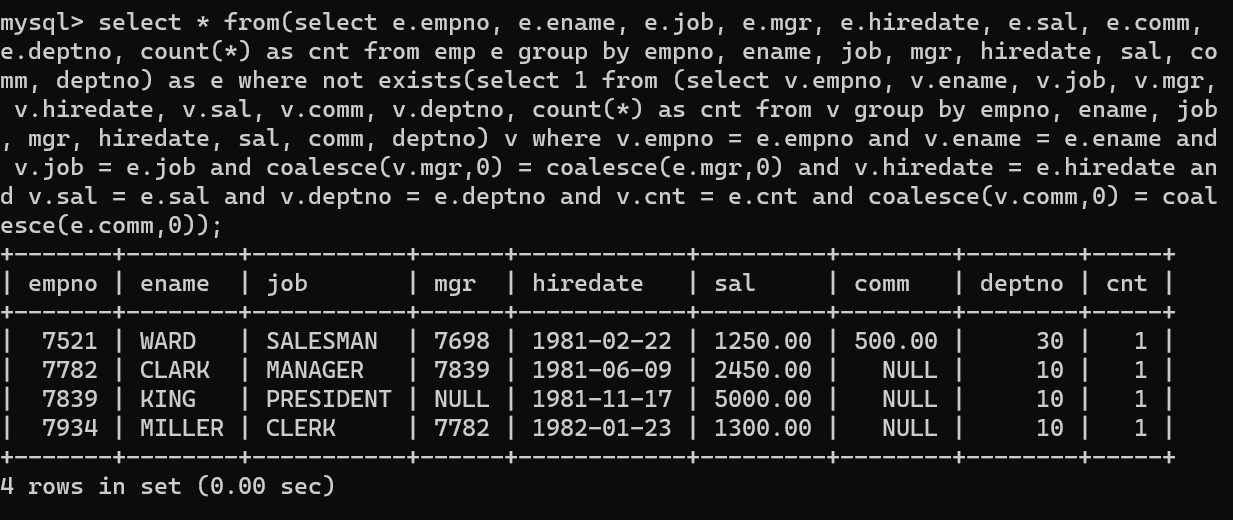
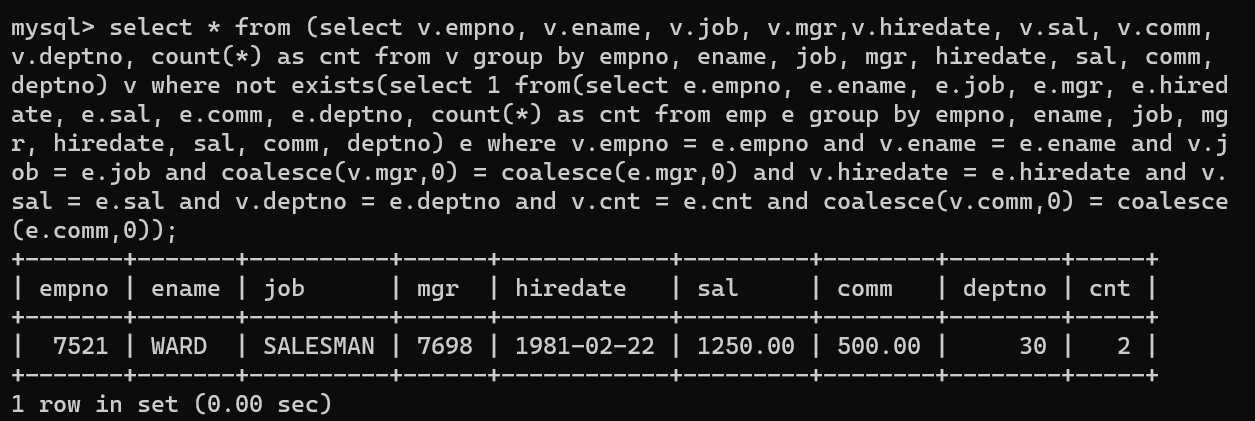
- 먼저 V테이블에 존재하지 않는 emp 테이블을 출력한다.
select *
    from (
  select e.empno,e.ename,e.job,e.mgr,e.hiredate,
         e.sal,e.comm,e.deptno, count(*) as cnt
    from emp e
   group by empno,ename,job,mgr,hiredate,
           sal,comm,deptno
         ) e
   where not exists (
  select null
    from (
  select v.empno,v.ename,v.job,v.mgr,v.hiredate,
         v.sal,v.comm,v.deptno, count(*) as cnt
    from v
   group by empno,ename,job,mgr,hiredate,
            sal,comm,deptno
         ) v
    where v.empno     = e.empno
       and v.ename    = e.ename
       and v.job      = e.job
       and coalesce(v.mgr,0) = coalesce(e.mgr,0)
       and v.hiredate = e.hiredate
       and v.sal      = e.sal
       and v.deptno   = e.deptno
       and v.cnt      = e.cnt
       and coalesce(v.comm,0) = coalesce(e.comm,0)
  )
- 그리고 emp테이블에 존재하지 않는 V테이블 자료를 출력 후
select *
      from (
    select v.empno,v.ename,v.job,v.mgr,v.hiredate,
           v.sal,v.comm,v.deptno, count(*) as cnt
      from v
    group by empno,ename,job,mgr,hiredate,
             sal,comm,deptno
          ) v
    where not exists (
   select null
     from (
   select e.empno,e.ename,e.job,e.mgr,e.hiredate,
          e.sal,e.comm,e.deptno, count(*) as cnt
     from emp e
    group by empno,ename,job,mgr,hiredate,
             sal,comm,deptno
          ) e
    where v.empno     = e.empno
      and v.ename     = e.ename
      and v.job       = e.job
      and coalesce(v.mgr,0) = coalesce(e.mgr,0)
      and v.hiredate  = e.hiredate
      and v.sal       = e.sal
      and v.deptno    = e.deptno
      and v.cnt       = e.cnt
      and coalesce(v.comm,0) = coalesce(e.comm,0)
  )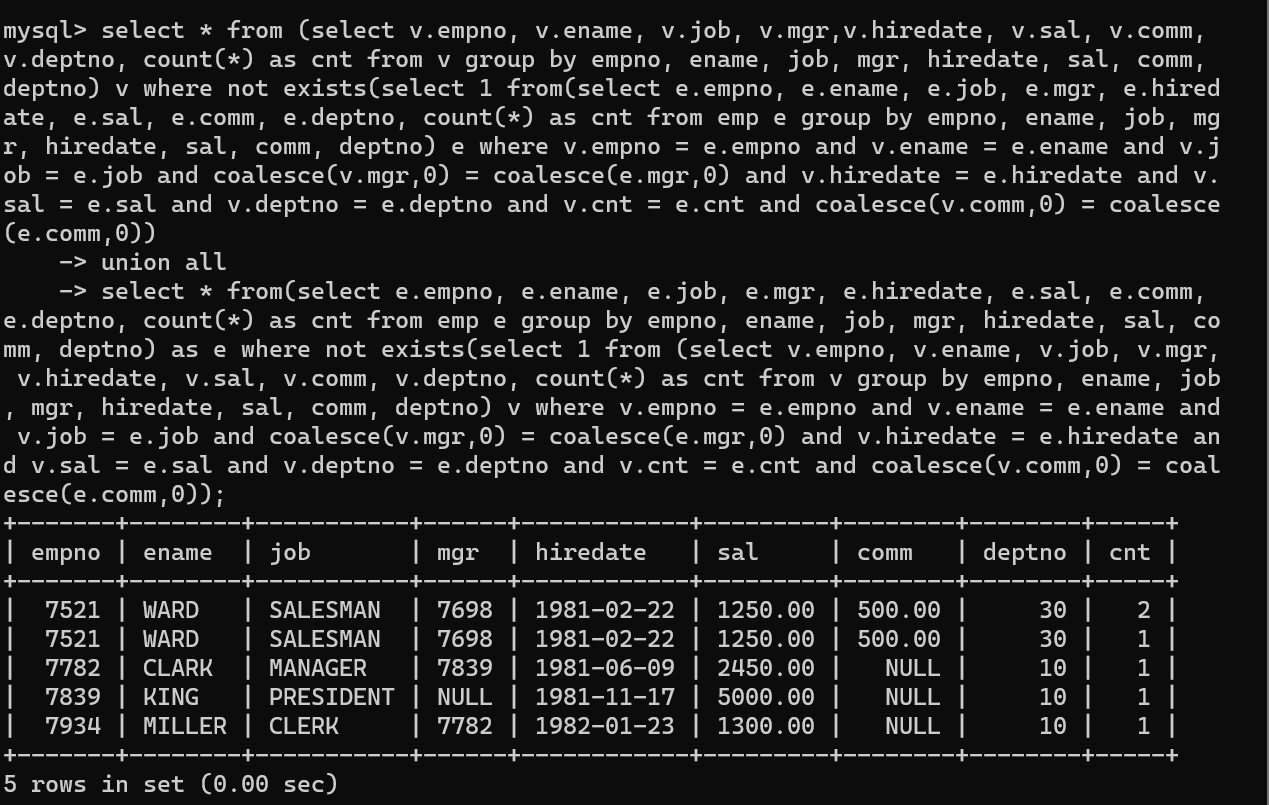
- 두 개의 테이블은 union all로 병합 시 두 테이블에서 중복되지 않은 값을 출력하면 중복되는 값을 확인 할 수 있고, 만약 출력되는 값이 없다면 두 테이블의 자료가 동일하다 것을 알 수 있다.
- 여기서 봐야 포인트가 되게 많은데 먼저, exists문법과 group by문법이다. 두 문법을 사용해서 WARD네임의 count를 확인할 수 있었으며, 중복 데이터 여부를 알 수 있었다.
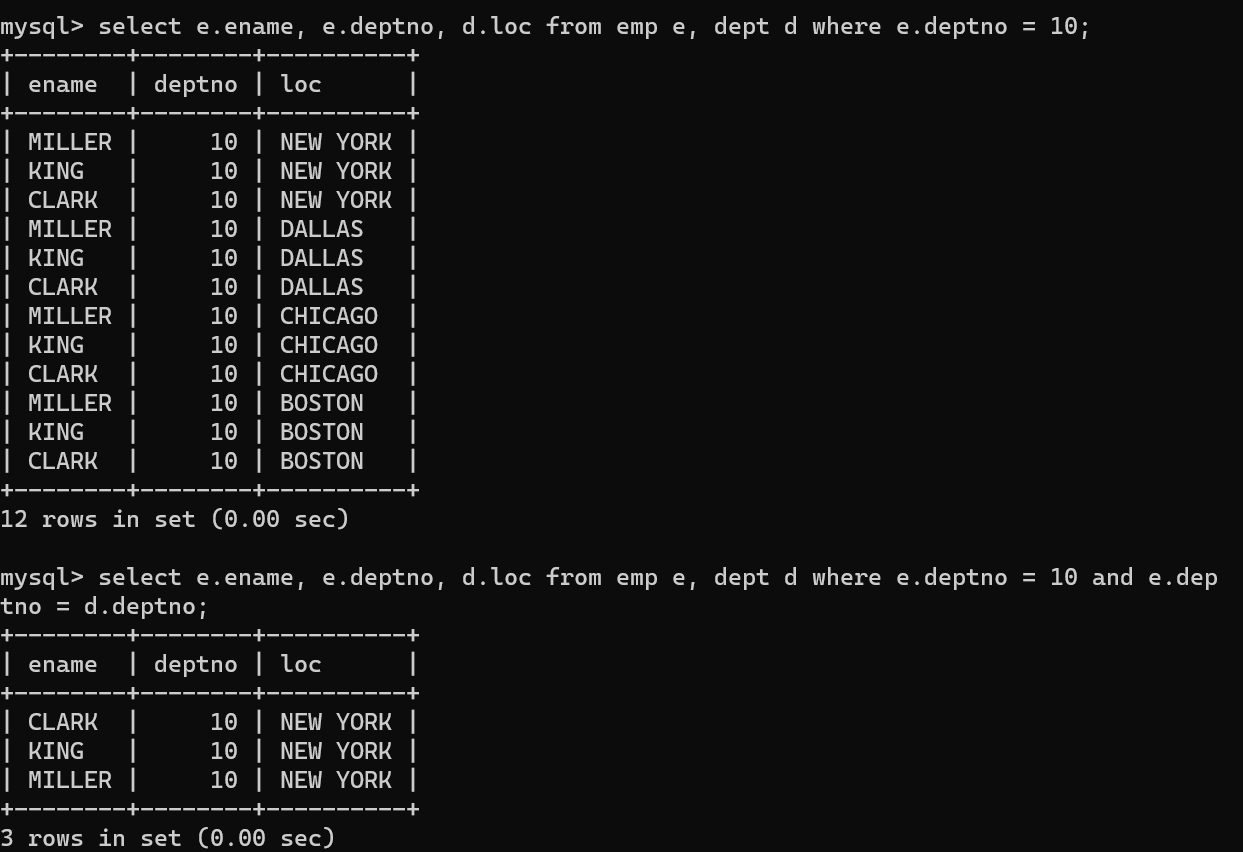
- 위 코드는 데카르트 곱하기 문제가 발생한 코드와 그, 문제를 해결한 코드다.
- 둘 중 위의 코드 같은 경우 emp table에서 조건에 충족하는 3개의 레코드가 dept 레코드 4개에 각자 곱해서 결과가 출력되 라는 결과가 출력됐다.
- 해당 문제를 해결하기 위해 두 가지 조건을 넣어서 원하는 결과값이 3개만 출력했다.
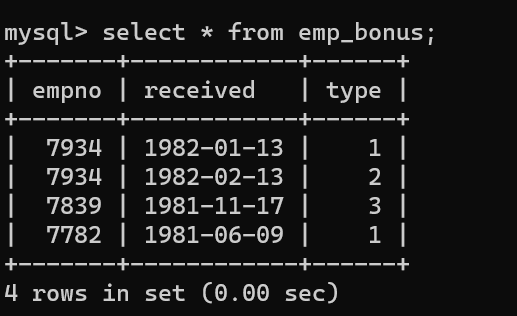
- emp_bonus라는 만들고, emp 테이블과 집계와 조인의 기능을 수행했다.
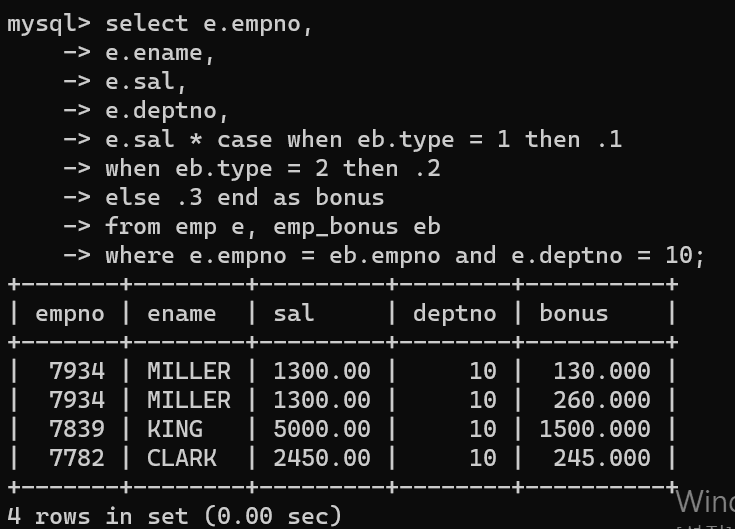
- 먼저 두 테이블을 조인해서 사원번호, 이름, 급여, 부서 사무실, 보너스를 출력했는데, 정상적으로 출력됐다.
- emp_bonus type에 따라 10%, 20%, 30% 급여에서 추가되면 보너스 값이 나온다.
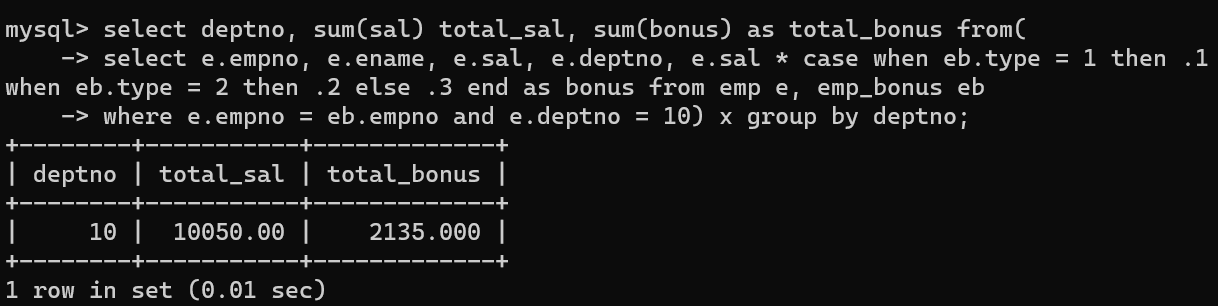
- 하지만 집계 함수를 사용한 순간 total_sal에 금액이 이상하다.
- MILLER의 급여가 2번 중복되서 계산이 되면서 total_sum이 이상해졌다.
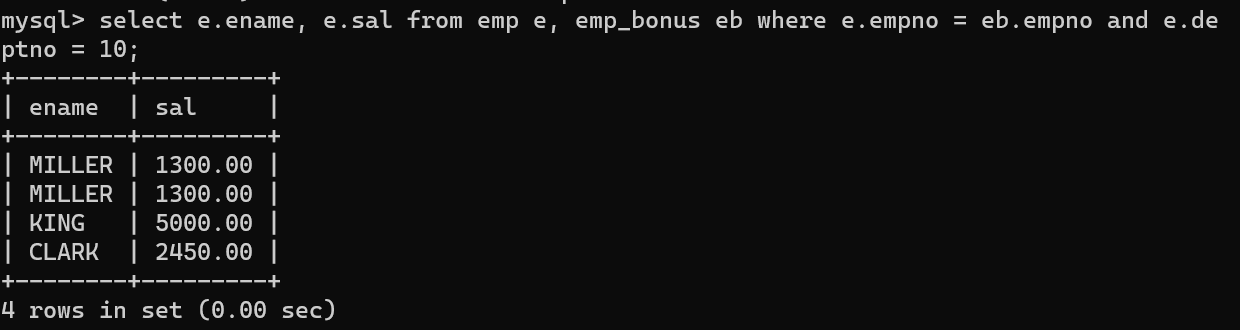
- 급여와 이름만 밨을 때 두 가지 값이 중복되어 있다.
- 해당 문제를 해결하기 위해
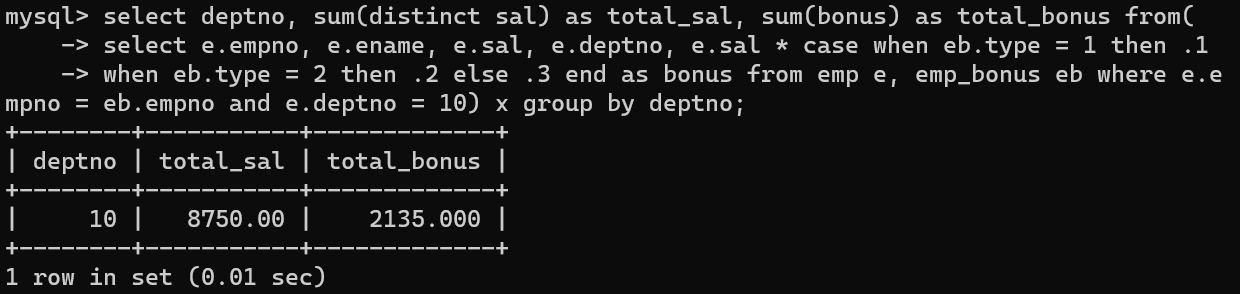
- sum(sal) 부분을 sum(distinct sal)로 바꿈으로써 중복값을 제외하고 정상적으로 급여의 합계를 나타낼 수 있다.
select deptno,
         sum(distinct sal) as total_sal,
         sum(bonus) as total_bonus
    from (
  select e.empno,
         e.ename,
         e.sal,
         e.deptno,
         e.sal*case when eb.type = 1 then .1
                   when eb.type = 2 then .2
                   else .3
               end as bonus
   from emp e, emp_bonus eb
   where e.empno = eb.empno
    and e.deptno = 10
        ) x
  group by deptno
상황을 바꿀 수 없다면, 나를 바꾸자