📋 목차
- 현재 슬롯 표시
- 중간 결과 1
- 아이템을 QuickSlot에 등록
- 중간 결과2
- Inventory내에서 아이템 순서 바꾸기
- 최종 결과
- 오늘의 배운 점
- 다음 계획
💡 현재 슬롯 표시
QuickSlot이란 플레이어가 게임을 진행할때, 간편하게 사용 아이템을 변경할 수 있도록 하는 시스템 입니다. 보통은 GetKeyDwon을 이용하여 숫자 입력으로 현재 사용 아이템이 무엇인지 판별합니다.
먼저 UI로 표시할 QuickPanel와 플레이어가 쥐고 있는 모션을 표현할 PlayerItemHandler이라는 스크립트를 생성합니다.
// QuickPanel.cs

using UnityEngine;
using UnityEngine.UI;

public class QuickPanel : MonoBehaviour
{
    [SerializeField] private GameObject player;
    [SerializeField] private int slotIndex;
    [SerializeField] private GameObject[] quickSlots;

    [HideInInspector] public int currentSlotIndex = 0;

    [HideInInspector] public int maxSlots = 5;
    [HideInInspector] public Item[] quickSlotItems;

    void Start()
    {
        quickSlotItems = new Item[maxSlots];
    }

    public void HoldingItem()
    {
        Item item = quickSlotItems[currentSlotIndex];
        if (item)
        {
            player.GetComponent<PlayerItemHandler>().SetHolding(item);
        }
        else
        {
            player.GetComponent<PlayerItemHandler>().SetHolding(null);
        }
        MarkCurrentSlot();
    }

	// 현재 들고 있는 아이템 슬롯의 Background를 주황색으로 표시함
    private void MarkCurrentSlot()
    {
        Debug.Log("현재 들고 있는 아이템의 QuickSlot 인덱스 :" + currentSlotIndex);
        Image[] quickSlotBackground = new Image[maxSlots];
        for (int i = 0; i < maxSlots; i++)
        {
            quickSlotBackground[i] = quickSlots[i].transform.Find("SlotBackground").GetComponent<Image>();
        }

        if (currentSlotIndex < 0 || currentSlotIndex >= quickSlots.Length) return;

        for (int i = 0; i < quickSlotBackground.Length; i++)
        {
            if (!quickSlotBackground[i]) return;
            if (i == currentSlotIndex)
            {
                quickSlotBackground[i].color = new Color(1f, 0.5f, 0f, 1f);
            }
            else
            {
                quickSlotBackground[i].color = new Color(217, 217, 217, 225);
            }
        }
    }
}
// PlayerItemHandler.cs
using UnityEngine;
public class PlayerItemHandler : MonoBehaviour
{
void Start()
{
}
public void SetHolding(Item item)
{
// 플레이어가 들고있는 아이템을 쥔 로직
}
}// PlayerController.cs
// 이 함수를 Update()에서 호출
void HandleQuickSlot()
{
for (int i = 0; i < quickPanel.maxSlots; i++)
{
int key = i + 1;
if (Input.GetKeyDown(key.ToString()))
{
quickPanel.currentSlotIndex = i;
quickPanel.HoldingItem();
}
}
}🎮 중간 결과 1
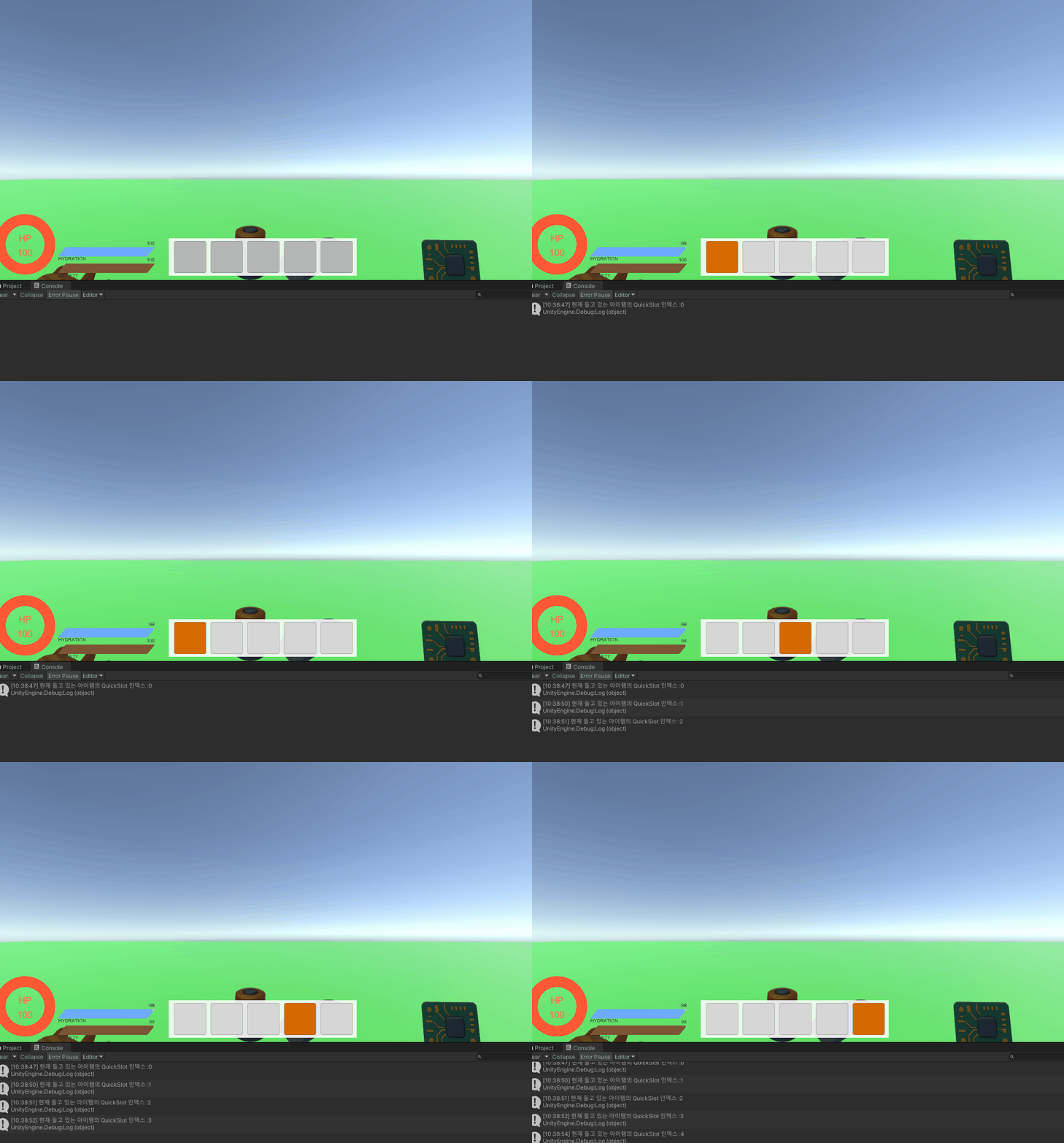
현재 들고 있는 QuickSlot 아이템의 위치가 표시됩니다.
🎞️ 아이템을 QuickSlot에 등록
그러면 이 QuickSlot에 어떻게 아이템을 등록할까요?
보편적인 방법은 Inventory창에서 Hover한 아이템이 있고, 해당하는 QuickSlot의 키를 입력할 경우 그 QuickSlot칸에 아이템이 이동하게 됩니다.
또한 QuickSlot에 이미 있는 A아이템을 B아이템이 있는 곳에 옮길 경우, A와 B의 QuickSlot자리가 바뀌게끔 하겠습니다.
1. 현재 Hover한 아이템 인식
// InventorySlot.cs

public void OnPointerEnter(PointerEventData eventData)
{
    inventory.SetHoverIndex(slotIndex);
}
public void OnPointerExit(PointerEventData eventData)
{
    inventory.SetHoverIndex(-1);
}
// Inventory.cs
public bool isHovering = false;
public int hoverIndex = -1;
public void SetHoverIndex(int index)
{
if (index < 0 || !items[index])
{
hoverIndex = -1;
isHovering = false;
return;
}
hoverIndex = index;
isHovering = true;
}2. QuickSlotItems에 아이템 추가
// QuickPanel.cs

public int maxSlots = 5;

// 현재 QuickSlot에 있는 아이템을 인벤토리의 Index로 판별함
public int[] QuickSlotItems;

void Start()
{
  quickSlotsIndex = new int[] { -1, -1, -1, -1, -1 };
}

 public void SwitchQuickSlotItem()
 {
     for (int i = 0; i < maxSlots; i++)
     {
         int key = i + 1;
         if (Input.GetKeyDown(key.ToString()))
         {
             ItemData itemData = inventory.items[inventory.hoverIndex];

             if (itemData)
             {
                 // A 아이템이 이미 퀵슬롯에 있는지 찾기
                 int aItemSlotIndex = -1;
                 for (int j = 0; j < maxSlots; j++)
                 {
                     if (quickSlotsIndex[j] == inventory.hoverIndex)
                     {
                         aItemSlotIndex = j; // A 아이템이 j번째에 있음
                         break;
                     }
                 }

                 if (aItemSlotIndex != -1) // A 아이템이 이미 퀵슬롯에 있을 때
                 {
                     // 스와핑 로직
                     SwapQuickSlotItems(aItemSlotIndex, i);
                 }
                 else // A 아이템이 퀵슬롯에 없을 때
                 {
                     // 일반 추가
                     AddQuickSlotItem(i, inventory.hoverIndex, itemData);
                 }
             }
             else
             {
                 RemoveQuickSlotItem(i);
             }
             return;
         }
     }
 }

 private void SwapQuickSlotItems(int fromIndex, int toIndex)
 {
     if (fromIndex == toIndex) return; // 같은 자리면 아무것도 안 함

     // 임시 저장
     int tempFromItem = quickSlotsIndex[fromIndex];  // A 아이템 인덱스
     int tempToItem = quickSlotsIndex[toIndex];      // B 아이템 인덱스 (없을 수도 있음)

     // A 아이템을 toIndex로 이동
     if (tempFromItem != -1)
     {
         ItemData aItemData = inventory.items[tempFromItem];
         AddQuickSlotItem(toIndex, tempFromItem, aItemData);
     }

     // B 아이템을 fromIndex로 이동 (B 아이템이 있었다면)
     if (tempToItem != -1)
     {
         ItemData bItemData = inventory.items[tempToItem];
         AddQuickSlotItem(fromIndex, tempToItem, bItemData);
     }
     else
     {
         // B 아이템이 없었다면 fromIndex는 비우기
         RemoveQuickSlotItem(fromIndex);
     }

     Debug.Log($"퀵슬롯 {fromIndex}번과 {toIndex}번 아이템을 교체했습니다.");
 }

public void AddQuickSlotItem(int index, ItemData itemData)
{
    quickSlotItems[index] = itemData;
    Image[] quickSlotIcons = new Image[maxSlots];
    for (int  i = 0;  i < maxSlots; i++)
    {
        quickSlotIcons[i] = quickSlots[i].transform.Find("ItemIcon").GetComponent<Image>();
    }
    quickSlotIcons[index].sprite = itemData.icon;
    quickSlotIcons[index].color = new Color(1f, 1f, 1f, 1f);
    Debug.Log($"{index}번 퀵슬롯에 아이템을 추가했습니다.");
}

public void RemoveQuickSlotItem(int index)
{
    quickSlotItems[index] = null;
    Image[] quickSlotIcons = new Image[maxSlots];
    for (int i = 0; i < maxSlots; i++)
    {
        quickSlotIcons[i] = quickSlots[i].transform.Find("ItemIcon").GetComponent<Image>();
    }
    quickSlotIcons[index].sprite = null;
    quickSlotIcons[index].color = new Color(1f, 1f, 1f, 0f);
    Debug.Log($"{index}번 퀵슬롯 아이템을 제거했습니다.");
}
3. 맞는 QuickSlot에 아이템 배치
// PlayerController.cs

void Update()
{
	// 현재 인벤토리가 열려있고, 인벤토리 중 한 아이템에 커서를 올려뒀을때만
	if (GameState.IsUIOpen && inventory.isHovering)
	{
 		HandleSetQuickSlot();
	}
}

void HandleSetQuickSlot()
{
    quickPanel.SwitchQuickSlotItem();
}
4. Inventory에서 제거 시 QuickSlot에도 제거
사용하거나 버린 아이템은 QuickSlot에서 제거해야 합니다. 아이템을 버리는 로직과 아이템을 사용하는 로직을 수정합시다.
// Inventory.cs

public bool RemoveItem(int index)
{
    if (items.Length <= index) return false;
    items[index] = null;
    playerState.UpdateInventory(items);
    RemoveFromQuickSlot(index); // 추가
    return true;
}

// QuickSlot에서 삭제하려는 InventoryIndex와 같은 것이 있다면 제거함
public void RemoveFromQuickSlot(int index)
{
    if (!quickPanel) return;
    for (int i = 0; i < quickPanel.quickSlotsIndex.Length; i++)
    {
        if (quickPanel.quickSlotsIndex[i] == index)
        {
            quickPanel.RemoveQuickSlotItem(i);
            return;
        }
    }
}
public void RemoveItemFromName(string itemName)
{
    for (int i = 0; i < items.Length; i++)
    {
        if (items[i] != null && items[i].itemName == itemName)
        {
            items[i] = null;
            RemoveFromQuickSlot(i); // 추가
            return;
        }
    }
}
🎮 중간 결과 2
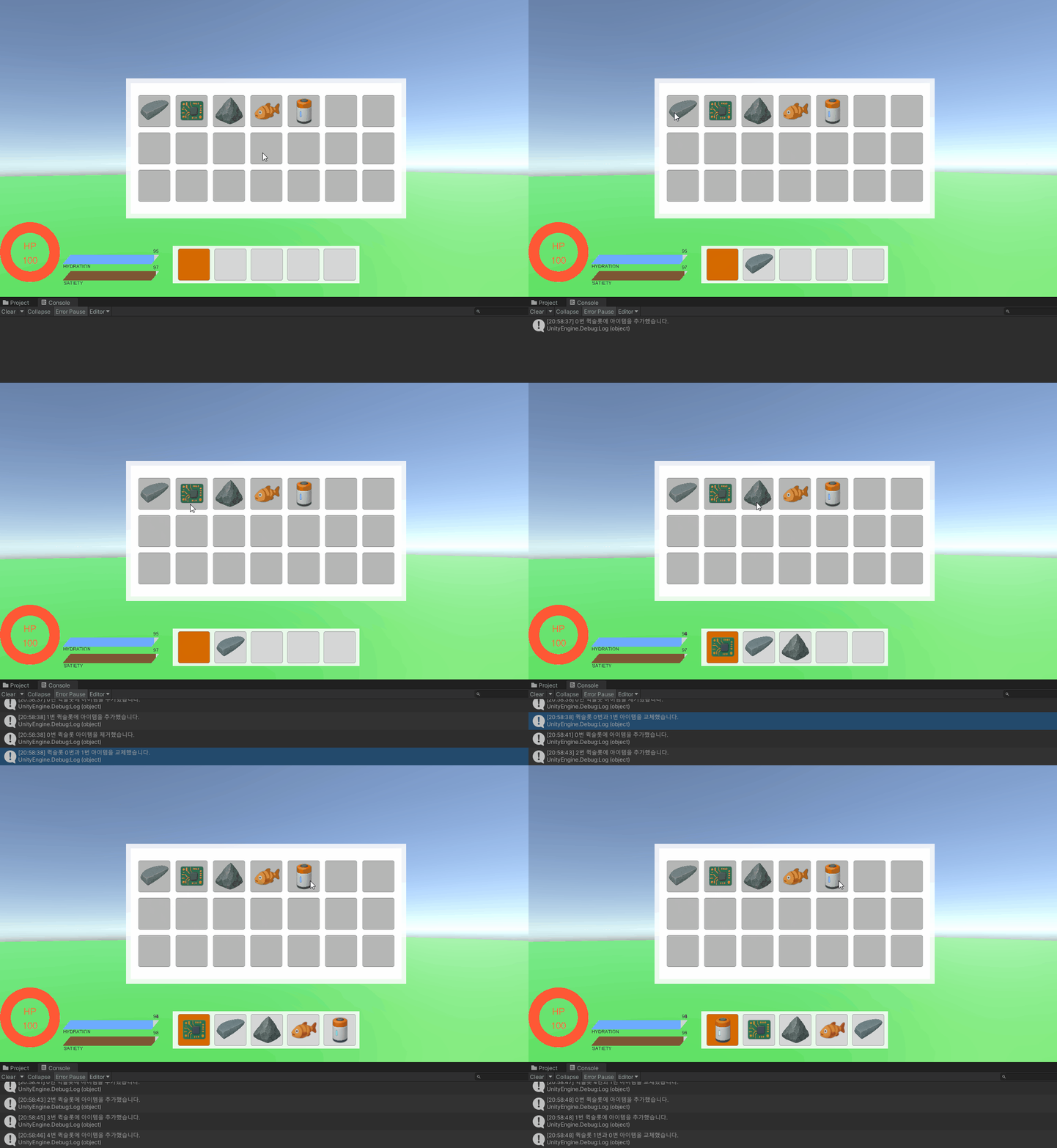
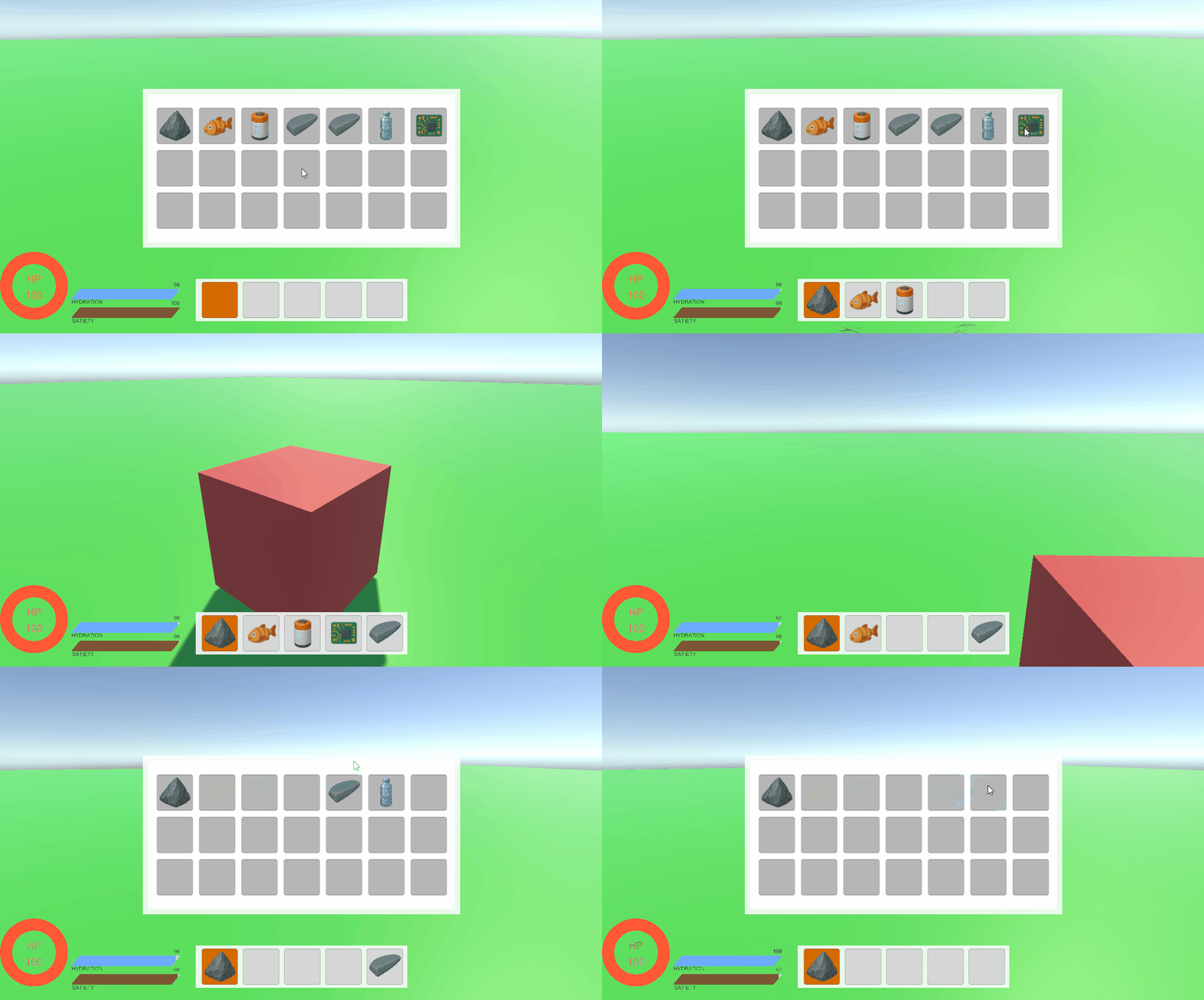
이미 QuickSlot에 해당 아이템이 있다면 새로운 자리로 옮기는 모습을 볼 수 있습니다.
또한, 아이템을 사용하거나 버린다면 QuickSlot에서 사라집니다.
📮 Inventory내에서 아이템 순서 바꾸기
추가적으로 할 사항입니다! Inventory에서 특정 아이템을 다른 슬롯으로 옮기고 싶을때 입니다. Inventory 위치도 바뀌게 해야하지만, 현재 QuickSlot에서는 배열을 Inventory의 SlotIndex로 저장하고 있죠. 그래서 Inventory의 순서가 바뀐다면 QuickSlot의 정보도 바껴야 합니다.
1. OnEndDrag로 아이템 위치 변경
드래그한 오브젝트가 특정 슬롯위에 있다면 해당 슬롯과 위치를 변경합니다.
// InventorySlot.cs

public void OnEndDrag(PointerEventData eventData)
{
	// 기존로직...

    if (mouseX < (screenWidth - backgroundWidth) / 2 || mouseX > (screenWidth + backgroundWidth) / 2 || mouseY < (screenHeight - backgroundHeight) / 2 || mouseY > (screenHeight + backgroundHeight) / 2)
	{
    	if (!inventory || !uiManager) return;
    	inventory.ThrowItem(slotIndex);
    	inventory.RemoveItem(slotIndex);
    	uiManager.UpdateItemUI();
    	CleanupDragIcon(true);
	}
	else
	{
	    CleanupDragIcon(false);
    	inventory.SwapInventoryItem(inventory.hoverIndex, inventory.draggedObjectIndex);

        // 바꾸고 난 후 바로 아이템 퀵슬롯 등록이 가능하게끔 하기 위한 코드 추가
        inventory.isHovering = true;
    }
}
2. Inventory와 QuickSlot의 정보 변경
// Inventory.cs

public void SwapInventoryItem(int indexA, int indexB)
{
    if (indexA < 0 || indexB < 0 || indexA >= items.Length || indexB >= items.Length) return;

	// indexA의 아이템과 indexB의 아이템 정보를 서로 바꿈
	ItemData temp = items[indexA];
	items[indexA] = items[indexB];
	items[indexB] = temp;

    playerState.UpdateInventory(items);
    uiManager.UpdateItemUI();

    if (!quickPanel) return;

    SwapQuickSlots(indexA, indexB);
    Debug.Log(quickPanel.quickSlotsIndex[0] + " " + quickPanel.quickSlotsIndex[1] + " " + quickPanel.quickSlotsIndex[2] + " " + quickPanel.quickSlotsIndex[3] + " " + quickPanel.quickSlotsIndex[4]);
}

// 퀵슬롯의 인덱스 정보를 바꾸는 로직
private void SwapQuickSlots(int indexA, int indexB)
{
	// 바꾼 아이템 Inventoryslot 정보가 QuickSlotIndex의 어느 인덱스에 있는지 알기 위한 변수
    int isIndexA = -1;
    int isIndexB = -1;

	// 존재한다면 0 ~ 4 사이의 수, 존재하지 않는다면 -1
    for (int i = 0; i < quickPanel.quickSlotsIndex.Length; i++)
    {
        if (quickPanel.quickSlotsIndex[i] == indexA)
        {
            isIndexA = i;
        }
        if (quickPanel.quickSlotsIndex[i] == indexB)
        {
            isIndexB = i;
        }
    }

	// 퀵슬롯에 둘다 존재하지 않을 경우 리턴
    if (isIndexA == -1 && isIndexB == -1) return;

    // IndexA만 있을 경우 IndexA만 바꾸고 리턴
    if (isIndexA >= 0)
    {
        quickPanel.quickSlotsIndex[isIndexA] = indexB;
    }
    // IndexB만 있을 경우 IndexB만 바꾸고 리턴
    if (isIndexB >= 0)
    {
        quickPanel.quickSlotsIndex[isIndexB] = indexA;
    }
}
//bench.cs
public int GetItemCount(ItemData[] datas, string name)
{
int count = 0;
for (int i = 0; i < datas.Length; i++)
{
// 중간에 아이템이 없어도 계속 반복하게끔 continue로 변경
if (!datas[i]) continue;
if (datas[i].itemName == name)
{
count++;
}
}
return count;
}🎮 최종 결과
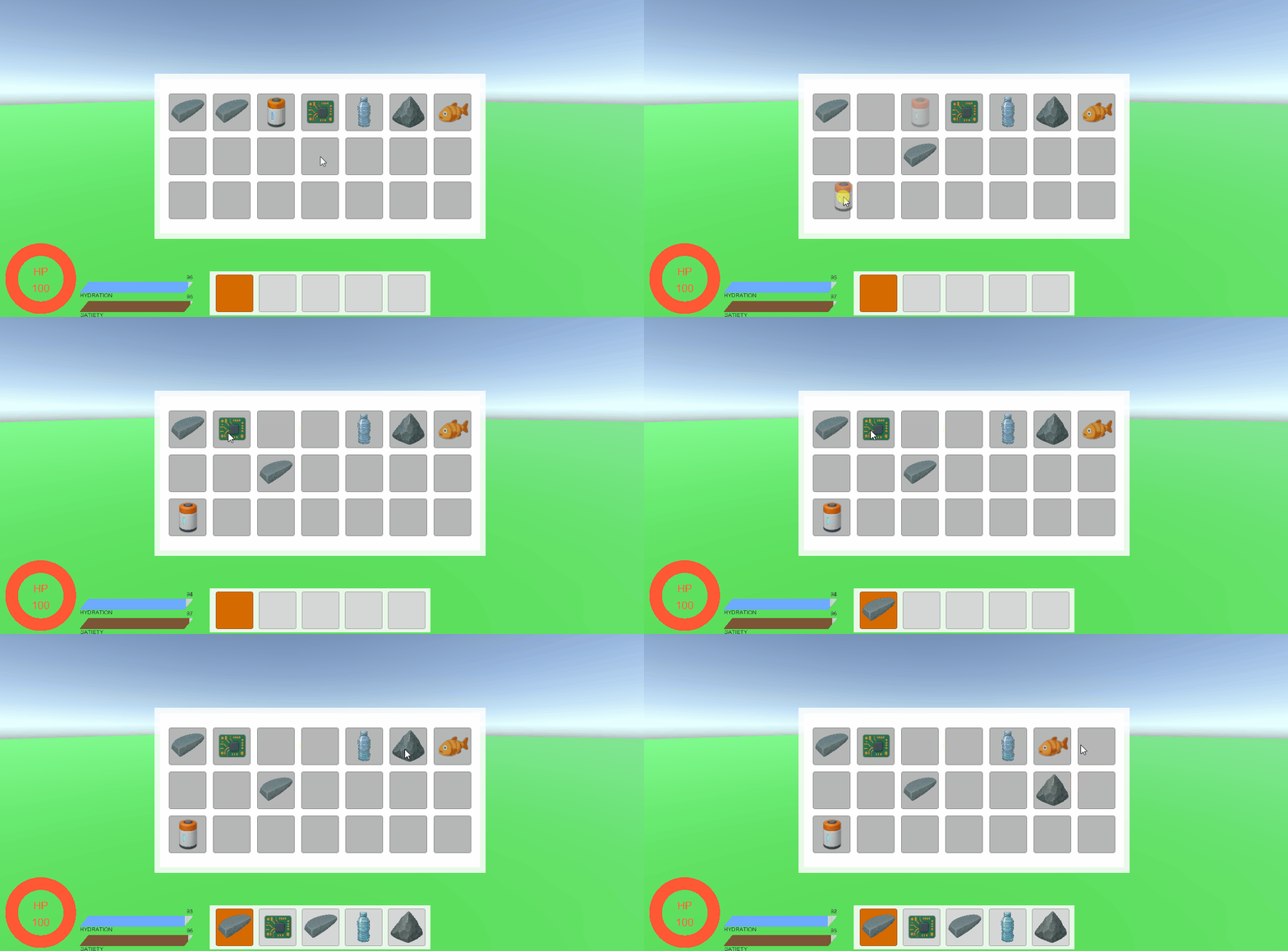
큇슬롯 배치 및 아이템 위치 바꾸기 기능이 완성되었습니다.
📚 오늘의 배운 점
- 마우스 커서 및 키보드 인식
- Drag를 이용한 아이템 순서 변경
🎯 다음 계획
다음 글에서는:
- 우클릭 시 아이템 사용
- Scanner에 기능 추가
- 스캔한 아이템 정보를 등록
