📋 목차
- 아이템 데이터 설정
- 중간 결과
- 최종 결과
- 오늘의 배운 점
- 다음 계획
🖼️ 아이템 효과 적용
현재 있는 소모형 아이템은 체력, 포만감, 수분을 채워주는 것들이 있습니다. 이 데이터는 일전에 만든 ItemData 스크립트에 넣도록 합시다.
// ItemData.cs
[Header("Consumable Properties")]
public ConsumableType consumableType;
public float amount;

public bool UseItem(PlayerState playerState)
{
    if (itemType != ItemType.Consumable || !playerState) return false;

    switch (consumableType)
    {
        case ConsumableType.Healing:
            if (!UseHealItem(playerState)) return false;
            break;
        case ConsumableType.Satiety:
            if (!UseSatietyItem(playerState)) return false;
            break;
        case ConsumableType.Hydration:
            if (!UseHydrationItem(playerState)) return false;
            break;
        default:
            return false;
    }
    return true;
}

// 소모형 아이템 타입
public enum ConsumableType
{
    Healing,
    Satiety,
    Hydration
}

public bool UseHealItem(PlayerState playerState)
{
    if (playerState.stats.health >= GameConstants.MAX_HEALTH && amount >= 0)
    {
        Debug.Log("체력이 최대치입니다.");
        return false;
    }
    playerState.ModifyHealth(amount);
    Debug.Log($"체력 : {amount}, 현재 체력 : {playerState.stats.health}");
    return true;
}

public bool UseSatietyItem(PlayerState playerState)
{
    if (playerState.stats.satiety >= GameConstants.MAX_SATIETY && amount >= 0)
    {
        Debug.Log("포만감이 최대치입니다.");
        return false;
    }
    playerState.ModifySatiety(amount);
    Debug.Log($"포만감 : {amount}, 현재 포만감 : {playerState.stats.satiety}");
    return true;
}

public bool UseHydrationItem(PlayerState playerState)
{
    if (playerState.stats.hydration >= GameConstants.MAX_HYDRATION && amount >= 0)
    {
        Debug.Log("수분이 최대치입니다.");
        return false;
    }
    playerState.ModifyHydration(amount);
    Debug.Log($"수분 : {amount}, 현재 수분 : {playerState.stats.hydration}");
    return true;
}
🎉 아이템 효과 적용
아이템은 인벤토리에서 더블클릭하여 사용하게 됩니다.
// Inventory.cs

public bool UseItem(int index)
{
    if (index < 0 || index >= items.Length || !items[index] || !playerState) return false;
    return items[index].UseItem(playerState);
}
그리고 UIManager에 더블클릭 함수에 넣으면 되겠죠?
// UIManager.cs

    public void OnSlotDoubleClick(int slotIndex)
    {
        if (!inventory.items[slotIndex] || !inventory.UseItem(slotIndex)) return;
        inventory.RemoveItem(slotIndex);
        UpdateItemUI();
    }
🎮 최종 결과
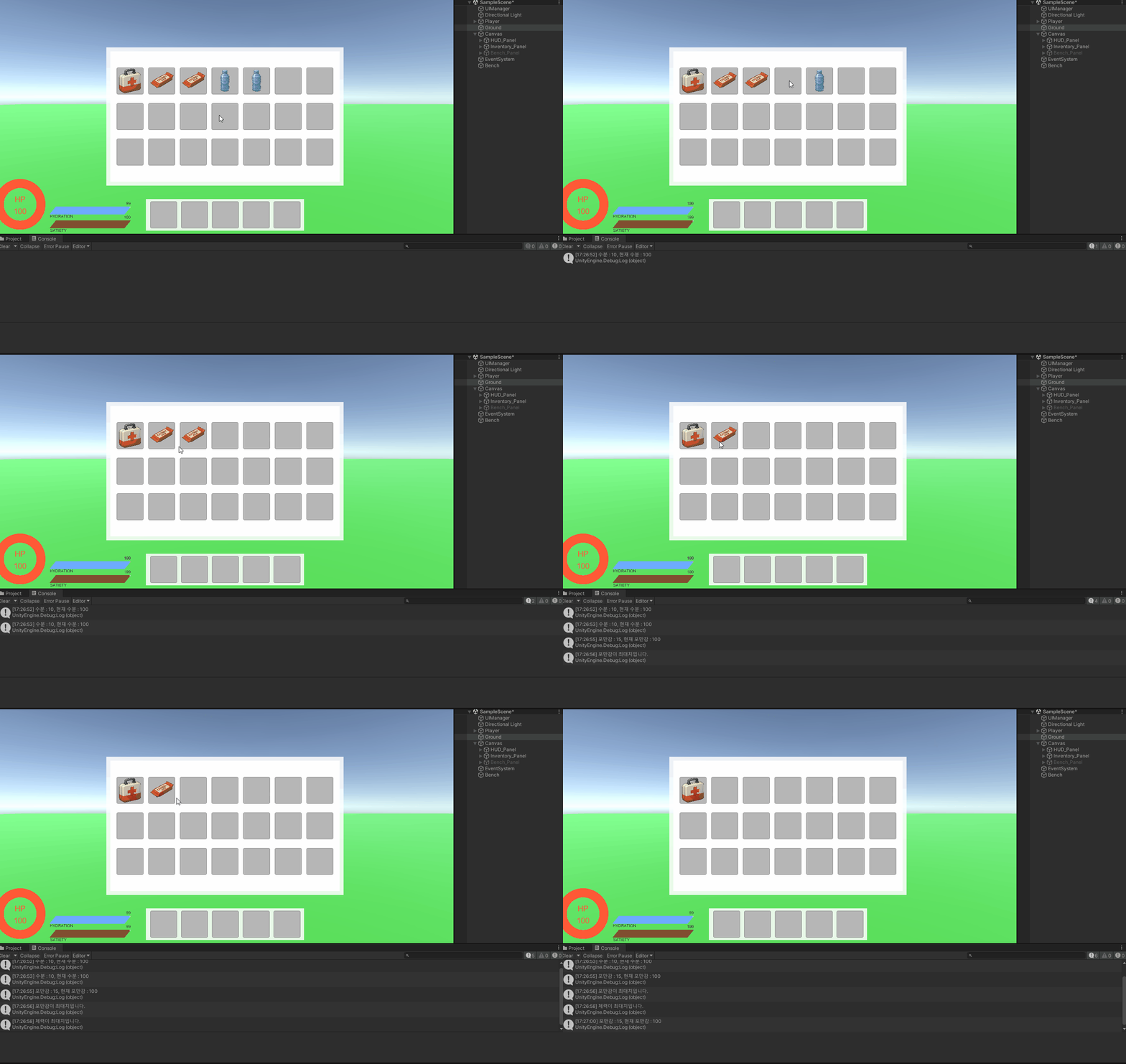
인벤토리 안의 아이템을 더블 클릭하면 사용하게 됩니다. 최대치 (100)을 넘어서면 사용되지 않고, 그 미만이면 아이템이 사용됩니다.
📚 오늘의 배운 점
- 아이템 사용 및 스텟 변화
🎯 다음 계획
다음 글에서는:
- 아이템 드롭 앤 드래그로 맵에 버리기

Unreal Engine & Unity 게임 개발자