Position 란
position 이란 본래 자리를 잡고 있는 위치를 뜻한다.
이와 같은 의미로 CSS에서의 Position도 각각의 요소들의 위치를 자유자재로 배치할 수 있는 속성을 말한다.
Position 속성
Position의 속성으로는 많은 종류가 있지만 그중 대표적으로는 static, relative, third, fixed 가 있다
좌표 지정:left, right, top, bottom을 이용할 수 있다.
| 속성 | 설명 | 특징 |
|---|---|---|
| static | 기본값 | 위치정보를 임의로 설정해줄 수 없으며 요소들을 문서의 흐름에 맞춰 배치할 때 사용한다. |
| relative | 있던 위치 기준으로 좌표 지정 | 이전 요소에 자연스럽게 연결하여 배치할 때 사용하며 static 위치 사용 시 있던 위치를 기준으로 이동한다. |
| absolute | 절대좌표로 위치 지정 | 원하는 위치를 지정하여 배치할 때 사용한다. |
| fixed | 화면에 고정 | 스크롤과 상관없이 문서가 고정된다. |
Position 적용
처음 Position을 작성하기 전 아래와 같이 작성해두었다.
<!DOCTYPE html>
<html lang="en">
<head>
    <meta charset="UTF-8">
    <meta name="viewport" content="width=device-width, initial-scale=1.0">
    <meta http-equiv="X-UA-Compatible" content="ie=edge">
    <title>position</title>

    <style>
    .first{
        background-color: red;
        width: 100px;
        height: 100px;
    }
    .second{
        background-color: orange;
        width: 100px;
        height: 100px;
    }
    .third{
        background-color: yellow;
        width: 100px;
        height: 100px;
    }
    .fourth{
        background-color: green;
        width: 100px;
        height: 100px;
    }
    </style>

</head>
<body>

    <div class="first">static</div>
    <div class="second">relative</div>
    <div class="third">absolute</div>
    <div class="fourth">fixed</div>

</body>
</html>
1. Position:static
먼저 first에만 Position:static을 적용해보자.
Position:static을 적용해보면 기본값이기 때문에 position을 적용하지 않았을 때와 동일하게 적용된다.
이때 static에 좌표를 지정해도 변하지 않고 그대로다.
<!DOCTYPE html>
<html lang="en">
<head>
    <meta charset="UTF-8">
    <meta name="viewport" content="width=device-width, initial-scale=1.0">
    <meta http-equiv="X-UA-Compatible" content="ie=edge">
    <title>position_static</title>

    <style>
    .first{
        background-color: red;
        width: 100px;
        height: 100px;
        position: static;
    }
    .second{
        background-color: orange;
        width: 100px;
        height: 100px;
    }
    .third{
        background-color: yellow;
        width: 100px;
        height: 100px;
    }
    .fourth{
        background-color: green;
        width: 100px;
        height: 100px;
    }
    </style>

</head>
<body>

    <div class="first">static</div>
    <div class="second">relative</div>
    <div class="third">absolute</div>
    <div class="fourth">fixed</div>

</body>
</html>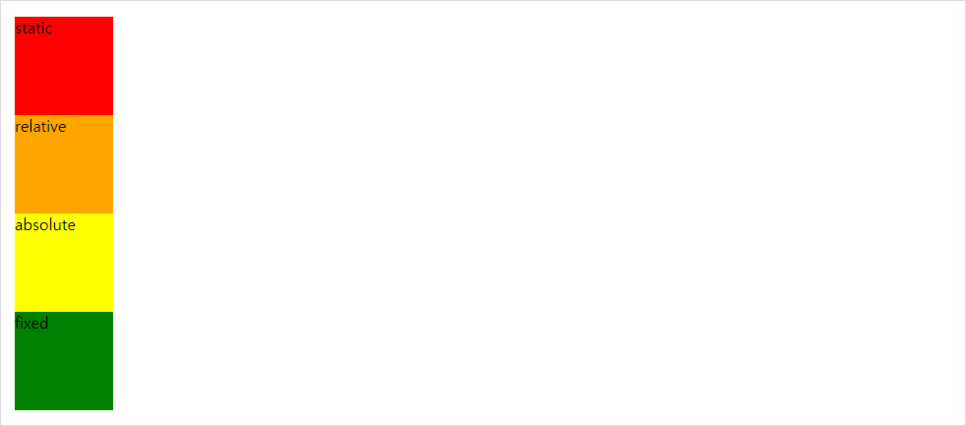
2. Position:relative
Position:relative를 적용하고 좌표값을 지정하면 기존의 위치에서 왼쪽에서 50px 그리고 위에서 10px 떨어진 것을 볼 수 있다.
이로부터 Position:relative는 자신의 자리를 잃어버리지 않고 이동한다는 것을 알 수 있다.
<!DOCTYPE html>
<html lang="en">
<head>
    <meta charset="UTF-8">
    <meta name="viewport" content="width=device-width, initial-scale=1.0">
    <meta http-equiv="X-UA-Compatible" content="ie=edge">
    <title>position_relative</title>

    <style>
    .first{
        background-color: red;
        width: 100px;
        height: 100px;
    }
    .second{
        background-color: orange;
        width: 100px;
        height: 100px;
        position: relative;
        left: 50px;
        top: 10px;
    }
    .third{
        background-color: yellow;
        width: 100px;
        height: 100px;
    }
    .fourth{
        background-color: green;
        width: 100px;
        height: 100px;
    }
    </style>

</head>
<body>

    <div class="first">static</div>
    <div class="second">relative</div>
    <div class="third">absolute</div>
    <div class="fourth">fixed</div>

</body>
</html>
3. Position:absolute
Position:absolute를 적용하고 좌표값을 지정하면 브라우저의 상단으로 이동한 후 왼쪽에서 50px 그리고 위에서 10px 떨어진 것을 볼 수 있다.
이로부터 Position:absolute는 자신의 자리를 잃어버리고 브라우저의 상단을 기준으로 이동하는 것을 알 수 있다.
<!DOCTYPE html>
<html lang="en">
<head>
    <meta charset="UTF-8">
    <meta name="viewport" content="width=device-width, initial-scale=1.0">
    <meta http-equiv="X-UA-Compatible" content="ie=edge">
    <title>position_absolute</title>

    <style>
    .first{
        background-color: red;
        width: 100px;
        height: 100px;
    }
    .second{
        background-color: orange;
        width: 100px;
        height: 100px;
    }
    .third{
        background-color: yellow;
        width: 100px;
        height: 100px;
        position: absolute;
        left: 50px;
        top: 10px;
    }
    .fourth{
        background-color: green;
        width: 100px;
        height: 100px;
    }
    </style>

</head>
<body>

    <div class="first">static</div>
    <div class="second">relative</div>
    <div class="third">absolute</div>
    <div class="fourth">fixed</div>

</body>
</html>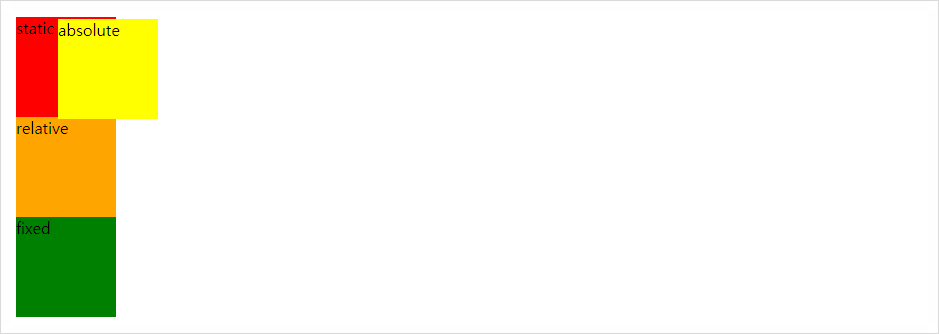
4. Position:fixed
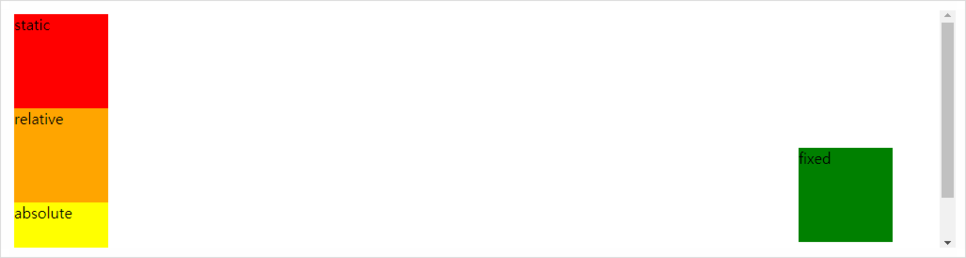
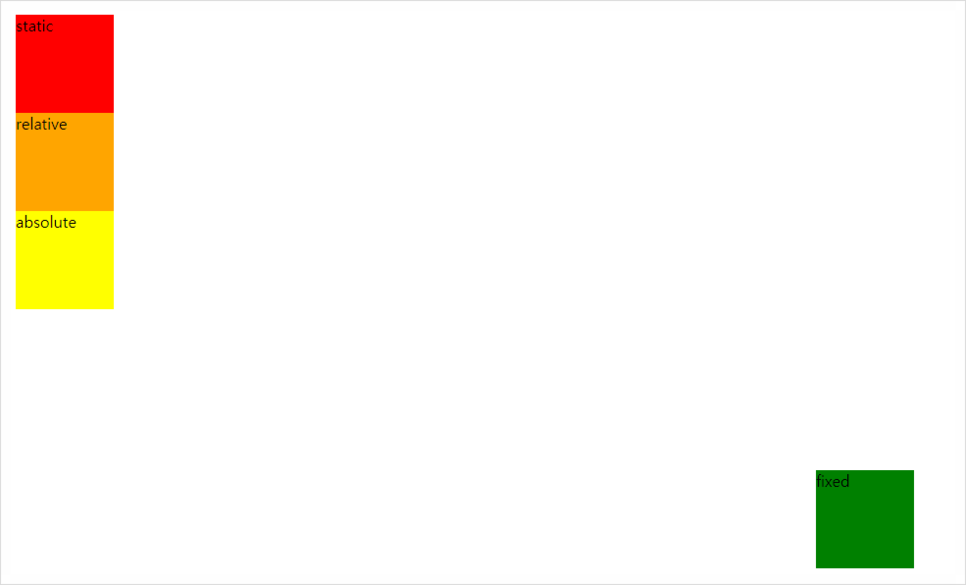
Position:fixed를 적용하면 Position:absolute와 마찬가지로 자신의 자리를 잃어버리고 지정한 좌표값으로 이동하게 된다는 점이 있지만 Position:fixed는 Position:absolute와 다르게 스크롤을 내려도 사라지지 않고 고정된다는 점이다.
위의 Position:fixed는 주어진 좌표값에 맞게 오른쪽에서 50px 그리고 아래에서 10px 떨어진 것을 확인할 수 있다.
<!DOCTYPE html>
<html lang="en">
<head>
    <meta charset="UTF-8">
    <meta name="viewport" content="width=device-width, initial-scale=1.0">
    <meta http-equiv="X-UA-Compatible" content="ie=edge">
    <title>position_fixed</title>

    <style>
    .first{
        background-color: red;
        width: 100px;
        height: 100px;
    }
    .second{
        background-color: orange;
        width: 100px;
        height: 100px;
    }
    .third{
        background-color: yellow;
        width: 100px;
        height: 100px;
    }
    .fourth{
        background-color: green;
        width: 100px;
        height: 100px;
        position: fixed;
        right: 50px;
        bottom: 10px;
    }
    </style>

</head>
<body>

    <div class="first">static</div>
    <div class="second">relative</div>
    <div class="third">absolute</div>
    <div class="fourth">fixed</div>

</body>
</html>
참고
https://www.youtube.com/watch?v=QWkkq_bUg0g
https://degal903.blog.me/221193337846
https://blog.naver.com/bluemind917/221371442143
https://blog.naver.com/choijy9212/221521957965