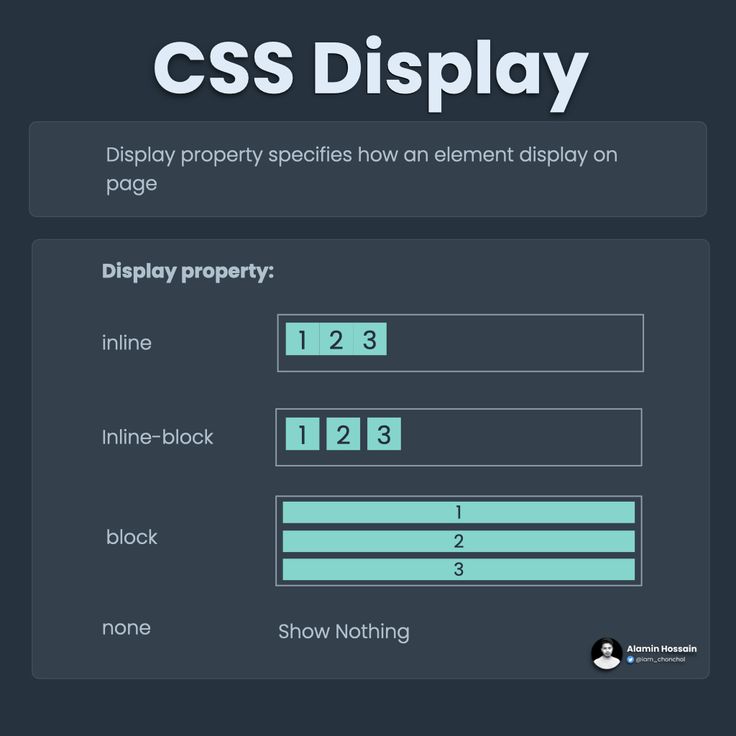
Display 란
Display 란 본래 두 개 이상의 작품 등을 어떤 목적으로 진열하여 보여주는 것을 말하며, 전시라고도 불린다.
이와 같은 의미로 CSS에서의 Display도 어떤 목적으로 특정 요소들을 삭제하거나 생성하여 진열한다.
Display 속성
Display의 속성으로는 많은 종류가 있지만 그중 대표적으로는 none, block, inline, inline-block이 있다.
| 속성 | 줄 바꿈 | 크기 지정 |
|---|---|---|
| none | X | X |
| block | O | O |
| inline | X | X |
| inline-block | X | O |
Display 적용
처음 Display를 작성하기 전 아래와 같이 작성해두었다.
<!DOCTYPE html>
<html lang="en">
<head>
    <meta charset="UTF-8">
    <meta name="viewport" content="width=device-width, initial-scale=1.0">
    <meta http-equiv="X-UA-Compatible" content="ie=edge">
    <title>Display</title>

    <style>
    .first{
        background-color:red;
        width: 100px;
        height: 100px;
    }
    .second{
        background-color:orange;
        width: 100px;
        height: 100px;
    }
    .third{
        background-color:yellow;
        width: 100px;
        height: 100px;
    }
    </style>

</head>
<body>

    <div class="first">1</div>
    <div class="second">2</div>
    <div class="third">3</div>

</body>
</html>
1. Display:none
Display:none을 적용해보면 아래와 같이 아무것도 나타나지 않아 줄바꿈과 크기 지정이 아무것도 적용되지 않는다.
<!DOCTYPE html>
<html lang="en">
<head>
    <meta charset="UTF-8">
    <meta name="viewport" content="width=device-width, initial-scale=1.0">
    <meta http-equiv="X-UA-Compatible" content="ie=edge">
    <title>Display</title>

    <style>
    .first{
        background-color:red;
        width: 100px;
        height: 100px;
        display: none;
    }
    .second{
        background-color:orange;
        width: 100px;
        height: 100px;
        display: none;
    }
    .third{
        background-color:yellow;
        width: 100px;
        height: 100px;
        display: none;
    }
    </style>

</head>
<body>

    <div class="first">1</div>
    <div class="second">2</div>
    <div class="third">3</div>

</body>
</html>
2. Display:block
Display:block을 적용해보면 아래와 같이 줄바꿈과 크기 지정이 적용되는데, 이때 Display를 적용하지 않았을 때와 동일하게 결과가 나온 이유는 본래 Display를 적용하지 않더라도 기본적으로 block으로 적용되기 때문이다.
<!DOCTYPE html>
<html lang="en">
<head>
    <meta charset="UTF-8">
    <meta name="viewport" content="width=device-width, initial-scale=1.0">
    <meta http-equiv="X-UA-Compatible" content="ie=edge">
    <title>Display</title>

    <style>
    .first{
        background-color:red;
        width: 100px;
        height: 100px;
        display: block;
    }
    .second{
        background-color:orange;
        width: 100px;
        height: 100px;
        display: block;
    }
    .third{
        background-color:yellow;
        width: 100px;
        height: 100px;
        display: block;
    }
    </style>

</head>
<body>

    <div class="first">1</div>
    <div class="second">2</div>
    <div class="third">3</div>

</body>
</html>
3. Display:inline
Display:inline을 적용해보면 아래와 같이 줄바꿈과 크기 지정이 적용되지 않는다.
<!DOCTYPE html>
<html lang="en">
<head>
    <meta charset="UTF-8">
    <meta name="viewport" content="width=device-width, initial-scale=1.0">
    <meta http-equiv="X-UA-Compatible" content="ie=edge">
    <title>Display</title>

    <style>
    .first{
        background-color:red;
        width: 100px;
        height: 100px;
        display: inline;
    }
    .second{
        background-color:orange;
        width: 100px;
        height: 100px;
        display: inline;
    }
    .third{
        background-color:yellow;
        width: 100px;
        height: 100px;
        display: inline;
    }
    </style>

</head>
<body>

    <div class="first">1</div>
    <div class="second">2</div>
    <div class="third">3</div>

</body>
</html>
4. Display:inline-block
Display:inline-block을 적용해보면 줄바꿈은 적용되지 않으나 크기 지정은 적용된다.
<html lang="en">
<head>
    <meta charset="UTF-8">
    <meta name="viewport" content="width=device-width, initial-scale=1.0">
    <meta http-equiv="X-UA-Compatible" content="ie=edge">
    <title>Display</title>

    <style>
    .first{
        background-color:red;
        width: 100px;
        height: 100px;
        display: inline-block;
    }
    .second{
        background-color:orange;
        width: 100px;
        height: 100px;
        display: inline-block;
    }
    .third{
        background-color:yellow;
        width: 100px;
        height: 100px;
        display: inline-block;
    }
    </style>

</head>
<body>

    <div class="first">1</div>
    <div class="second">2</div>
    <div class="third">3</div>

</body>
</html>
참고
https://www.youtube.com/watch?v=LsPkjxU51FA&t=248s
https://aboooks.tistory.com/85
https://blog.naver.com/sweetofman/220661402260
https://terms.naver.com/entry.nhn?docId=513752&cid=42407&categoryId=42407