Sherlock Scenario
In this Sherlock, you will familiarize yourself with Sysmon logs and various useful EventIDs for identifying and analyzing malicious activities on a Windows system. Palo Alto's Unit42 recently conducted research on an UltraVNC campaign, wherein attackers utilized a backdoored version of UltraVNC to maintain access to systems. This lab is inspired by that campaign and guides participants through the initial access stage of the campaign.
Task 1
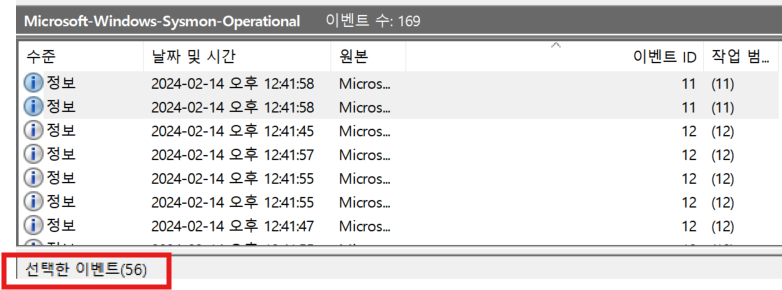
How many Event logs are there with Event ID 11?
ANSWER:
56
Task 2
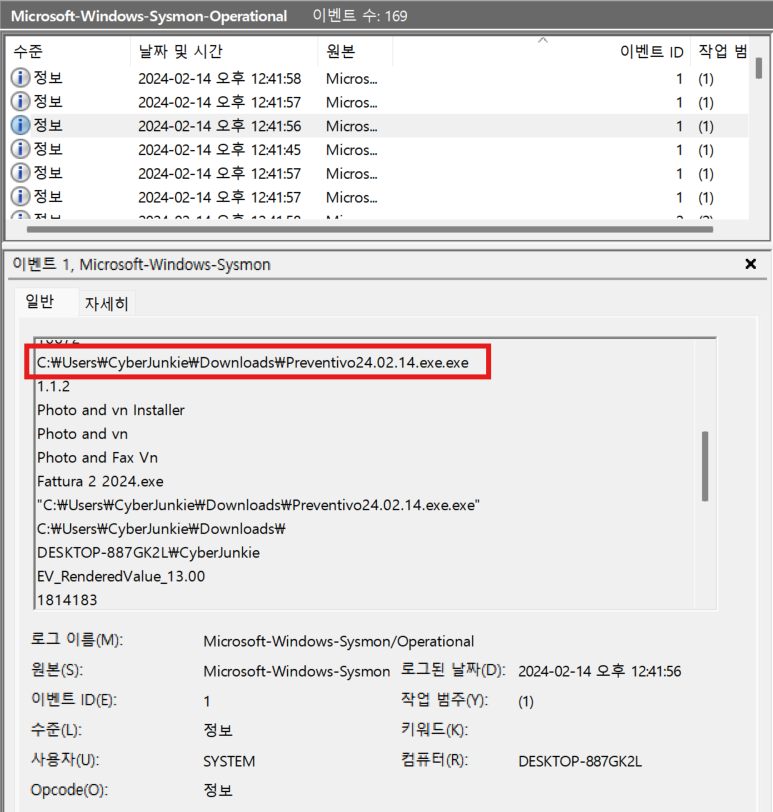
Whenever a process is created in memory, an event with Event ID 1 is recorded with details such as command line, hashes, process path, parent process path, etc. This information is very useful for an analyst because it allows us to see all programs executed on a system, which means we can spot any malicious processes being executed. What is the malicious process that infected the victim's system?
ANSWER:
C:\Users\CyberJunkie\Downloads\Preventivo24.02.14.exe.exe
- 누가봐도 파일명에 .exe라고 적어준 게 수상하다.
Task 3
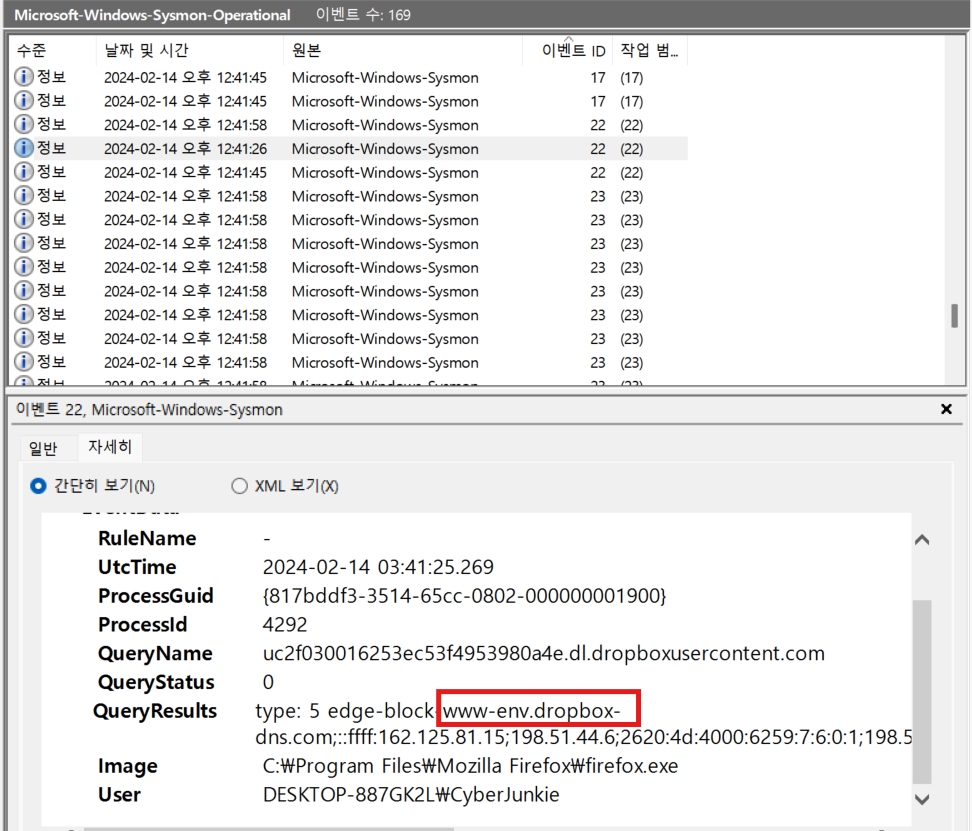
Which Cloud drive was used to distribute the malware?
ANSWER:
dropbox
- 이벤트 ID 22 : 시스템에서 생성된 모든 DNS 쿼리를 찾아볼 수 있음
Task 4
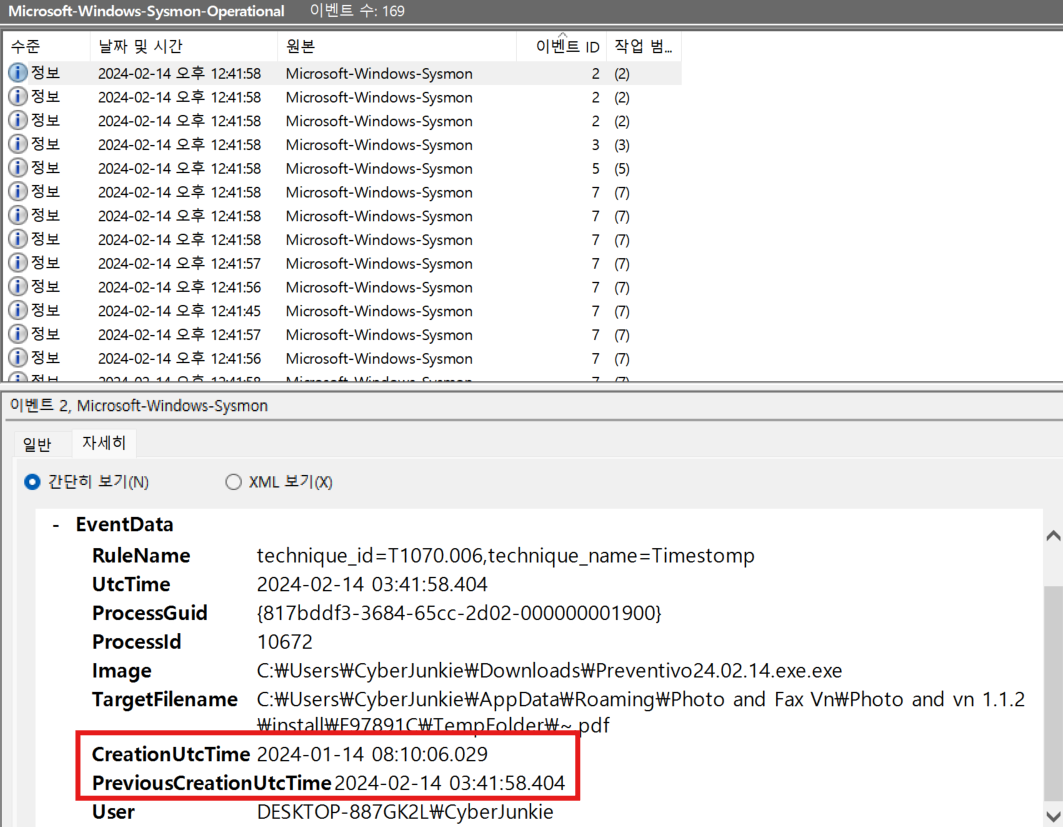
For many of the files it wrote to disk, the initial malicious file used a defense evasion technique called Time Stomping, where the file creation date is changed to make it appear older and blend in with other files. What was the timestamp changed to for the PDF file?
ANSWER:
2024-01-14 08:10:06
- PDF 파일의 타임스탬프라고 했으니, 찾기 기능을 통해 pdf 검색 후, 분석 진행
- CreationUtcTime 과 PreviousCreationUtcTime 이 다름
Task 5
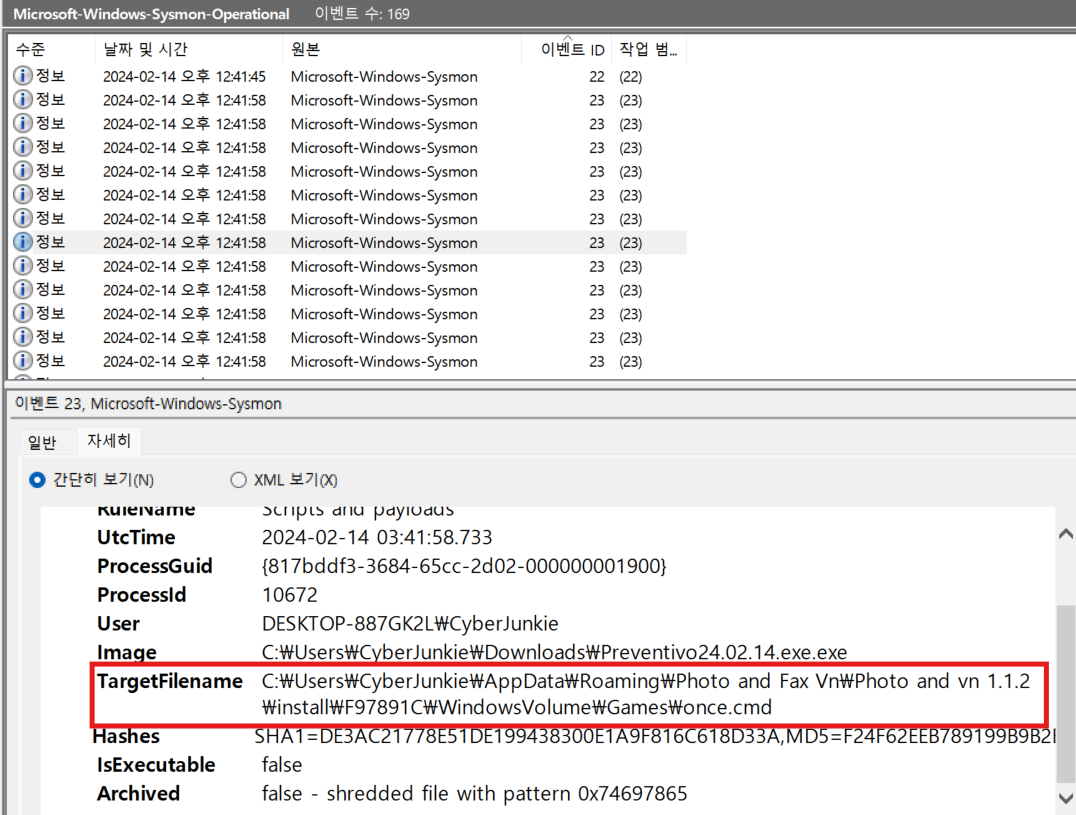
The malicious file dropped a few files on disk. Where was "once.cmd" created on disk? Please answer with the full path along with the filename.
ANSWER:
C:\Users\CyberJunkie\AppData\Roaming\Photo and Fax Vn\Photo and vn 1.1.2\install\F97891C\WindowsVolume\Games\once.cmd
- once.cmd로 필터링해서 확인
Task 6
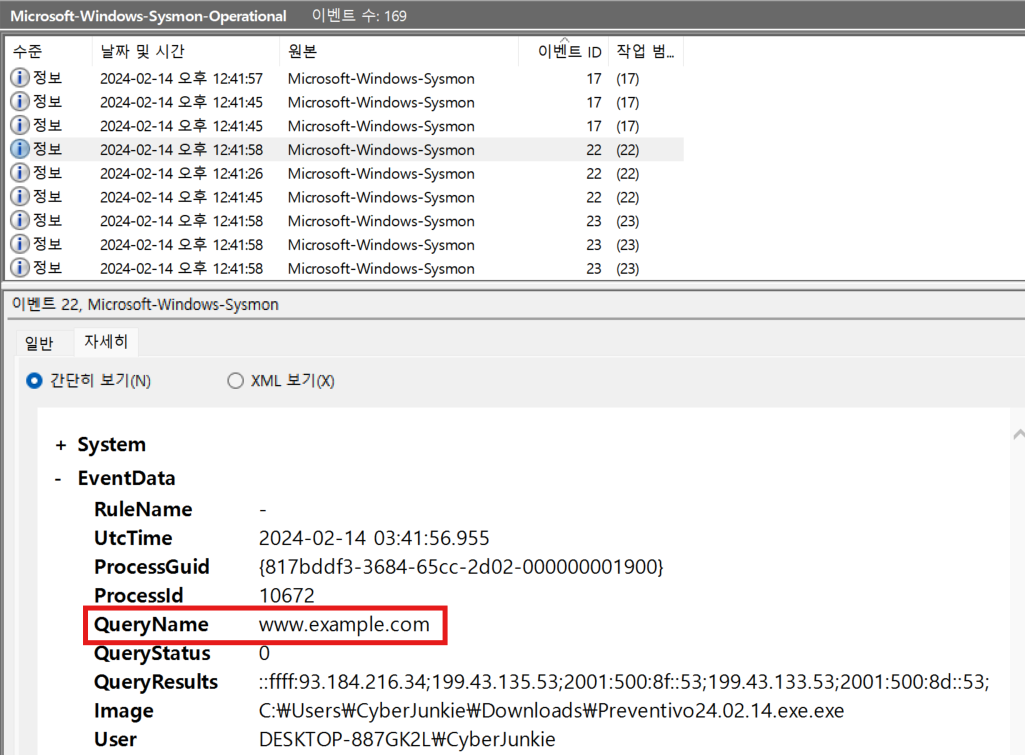
The malicious file attempted to reach a dummy domain, most likely to check the internet connection status. What domain name did it try to connect to?
ANSWER:
www.example.com
- 이벤트 ID 22에서 image 필드 확인
- 프로세스 이름이 연결을 생성하는 악성 파일이어야 함
- QueryName에 www.example.com
Task 7
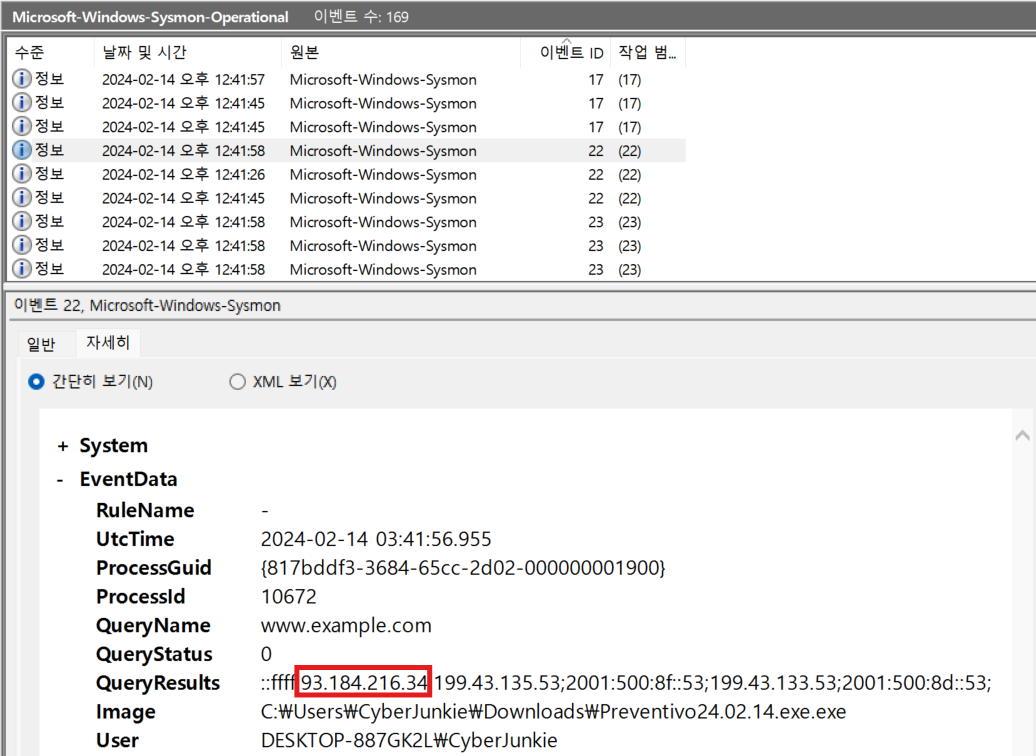
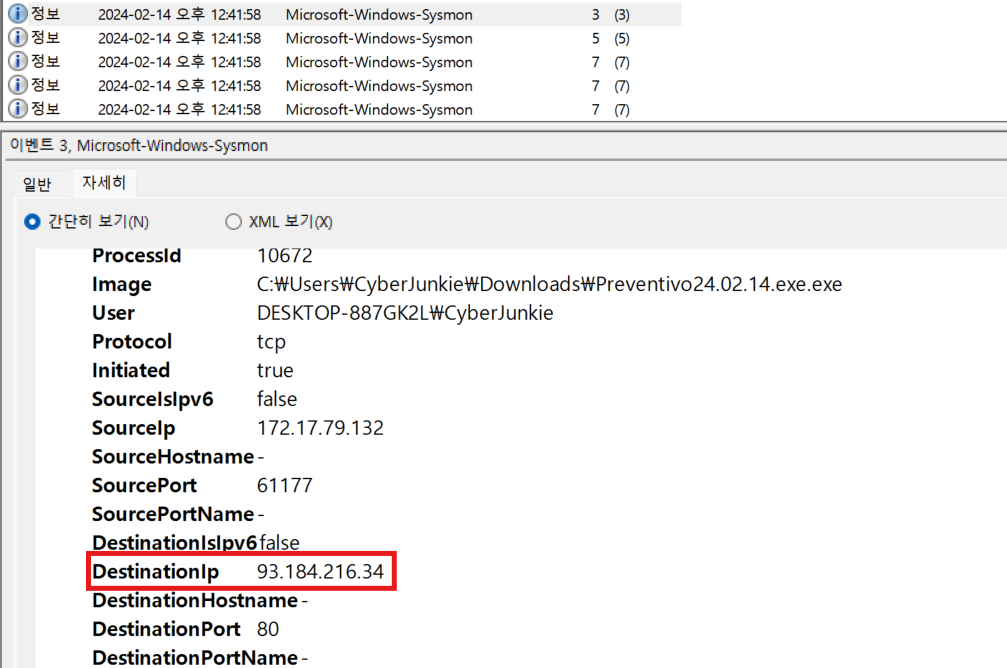
Which IP address did the malicious process try to reach out to?
ANSWER:
93.184.216.34
- 내용을 분석해보자
- UtcTime : 사건 발생 시각
- ProcessGuid : 프로세스 고유 식별자로, 프로세스 추적 시 용이
- ProcessId : OS 상에서 실행된 프로세스 ID
- QueryName : DNS 쿼리한 도메인명
- QueryStatus : DNS 쿼리 수행 여부, 0이 성공/1 이상은 실패 또는 오류
- QueryResults : 도메인에 대해 반환된 IP 주소 목록. IPv4와 IPv6 주소 섞여 있음
- Image : DNS 쿼리를 수행한 실행 파일의 경로와 이름
- User : 프로세스를 실행한 사용자 이름
- 반환된 IP 주소를 자세히 보자
93.184.216.34: example.com 도메인의 실제 IP199.43.133.53,2001:500:~~: 루트 DNS 서버 주소
Task 8
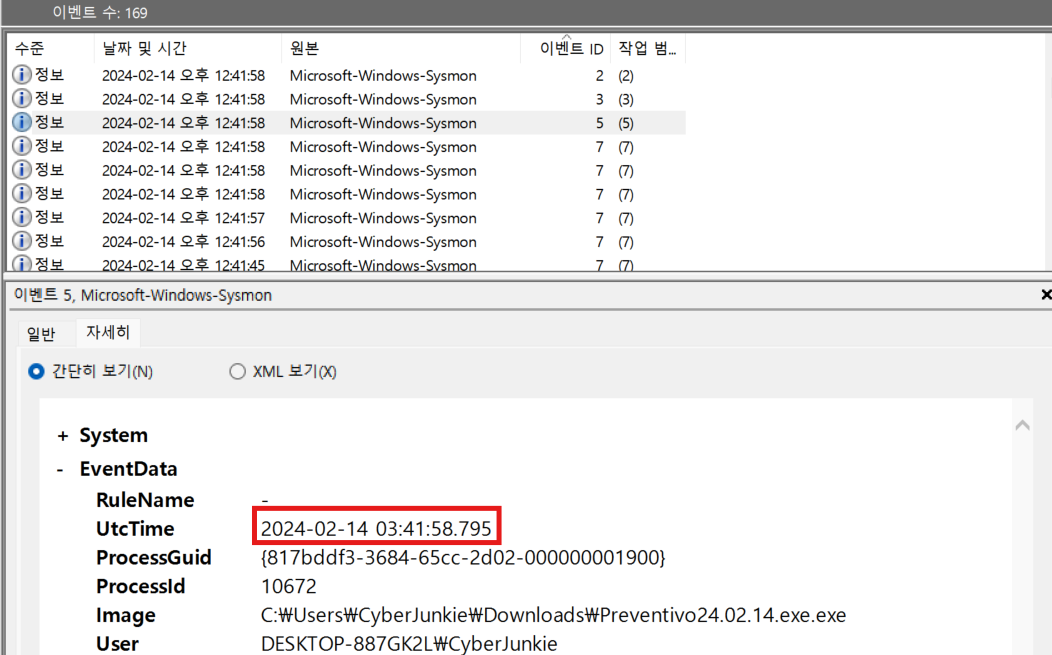
The malicious process terminated itself after infecting the PC with a backdoored variant of UltraVNC. When did the process terminate itself?
ANSWER:
- 이벤트 ID 5번
Sysmon 로그 - Event ID
| Sysmon Event ID | 설명 | 분석 포인트 |
|---|---|---|
| 1 | 프로세스 생성 | 실행된 프로세스 전체 정보 (Image, CommandLine 등) |
| 3 | 네트워크 연결 | TCP/UDP 네트워크 연결 기록, 프로세스와 연결된 정보 |
| 5 | 프로세스 종료 | 프로세스 종료 시 기록, 휘발성 분석에서 유용 |
| 7 | 이미지 로드 | DLL Injection, Code Injection 탐지 |
| 9 | RawAccessRead | 디스크에 직접 접근 시 감지, 은밀한 데이터 수집 탐지 |
| 10 | ProcessAccess | 다른 프로세스 접근 (메모리 접근 등) |
| 11 | 파일 생성 | 자동 실행 파일 또는 Dropper/악성파일 탐지 |
| 12 ~ 14 | 레지스트리 값 설정 | 레지스트리 생성/수정/삭제/이름변경, 자동 실행, 설정 변조 탐지 |
| 15 | FileCreateStreamHash | 파일의 alternate data stream 생성 감지 (ex. Zone.Identifier) |
| 17 ~ 18 | PipeEvent | 파이프 생성 및 연결 기록, IPC 분석에 유용 |
| 22 | DNS 쿼리 | C2 서버 요청, 도메인 기반 공격 탐지 |
| 23, 26 | File Delete/Detection | 파일 삭제 및 로그 기록 (아카이빙 포함) |
| 25 | Process Tampering | 프로세스 위장, Hollowing 등 탐지 |
| 27 ~ 29 | Executable File Control | 실행파일 생성 차단, 탐지 관련 |
| 255 | Sysmon Error | Sysmon 동작 중 에러 발생 시 기록 |
참고 : https://learn.microsoft.com/en-us/sysinternals/downloads/sysmon