- 물체가 보인다라는 것은 빛이 존재한다는 의미
- 물체에서 반사된 빛이 우리 눈에 어떻게 보여지는지가 중요
- 하지만 빛은 정반사뿐만 아니라 난반사도 이루어지기에 모든 빛을 실시간으로 계산하기에는 불가능
- 그렇기에 최소한의 비용으로 퀄리티를 내는 조명 연산식을 사용해서 조명효과를 만드는것
- 대표적으로
Ambient,Diffuse,Specular,Emissive
1. Ambient
- 환경광 (씬 전체에 균일하게 퍼져 있는 빛)
- 특징 : 방향은 없고 모든 물제의 모든 면을 동일하게 밝힘
- 역할 : 완전한 어둠을 방지하는 '기본 조명' 역할
09.Lighting_Ambient.fx
#include "00.Global.fx"

float4 LightAmbient;        // 조명의 앰비언트 색상
float4 MaterialAmbient;     // 재질의 앰비언트 색상 (물체마다)

MeshOutput VS(VertexTetrueNormal input)
{
    MeshOutput output;
    output.position = mul(input.position, W);
    output.position = mul(output.position, VP);


    output.uv = input.uv;
    output.normal = mul(input.normal, (float3x3) W);

    return output;
}

Texture2D Texture0;

// Ambient (주변광/환경광)
// 수많은 반사를 거쳐서 광원이 불분명한 빛
// 일정한 밝기와 색으로 표현

float4 PS(MeshOutput input) : SV_TARGET
{
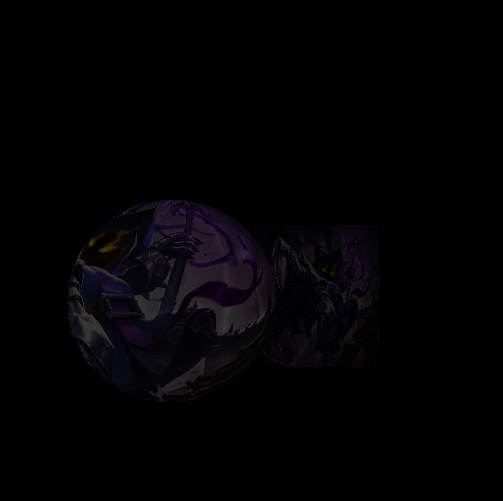
    float4 color = LightAmbient * MaterialAmbient;
    //return color;
    return Texture0.Sample(LinearSampler, input.uv) * color;
}

technique11 T0
{
    PASS_VP(P0, VS, PS)
}
12. AmbientDemo.cpp
#include "pch.h"
#include "12. AmbientDemo.h"
#include "GeometryHelper.h"
#include "Camera.h"
#include "GameObject.h"
#include "CameraScript.h"
#include "MeshRenderer.h"
#include "Mesh.h"

void AmbientDemo::Init()
{
	RESOURCES->Init();
	_shader = make_shared<Shader>(L"09.Lighting_Ambient.fx");

	// Camera
	_camera = make_shared<GameObject>();
	_camera->GetOrAddTransform()->SetPosition(Vec3{ 0.f, 0.f, -10.f });
	_camera->AddComponent(make_shared<Camera>());
	_camera->AddComponent(make_shared<CameraScript>());

	// Object
	_obj = make_shared<GameObject>();
	_obj->GetOrAddTransform();
	_obj->AddComponent(make_shared<MeshRenderer>());
	{

		_obj->GetMeshRenderer()->SetShader(_shader);
	}
	{
		auto mesh = RESOURCES->Get<Mesh>(L"Sphere");
		_obj->GetMeshRenderer()->SetMesh(mesh);
	}
	{
		auto texture = RESOURCES->Load<Texture>(L"Veigar", L"../Resources/Textures/veigar.jpg");
		_obj->GetMeshRenderer()->SetTexture(texture);
	}

	// Object2
	_obj2 = make_shared<GameObject>();
	_obj2->GetOrAddTransform()->SetPosition(Vec3{ 0.5f, 0.f, 2.f });
	_obj2->AddComponent(make_shared<MeshRenderer>());
	{
		_obj2->GetMeshRenderer()->SetShader(_shader);
	}
	{
		auto mesh = RESOURCES->Get<Mesh>(L"Cube");
		_obj2->GetMeshRenderer()->SetMesh(mesh);
	}
	{
		auto texture = RESOURCES->Load<Texture>(L"Veigar", L"../Resources/Textures/veigar.jpg");
		_obj2->GetMeshRenderer()->SetTexture(texture);
	}

	RENDER->Init(_shader);
}

void AmbientDemo::Update()
{
	_camera->Update();

	RENDER->Update();

	//
	Vec4 lightAmbient = Vec4(0.3f);
	_shader->GetVector("LightAmbient")->SetFloatVector((float*)&lightAmbient);

	{
		Vec4 materialAmbient(0.7f);

		_shader->GetVector("MaterialAmbient")->SetFloatVector((float*)&materialAmbient);

		_obj->Update();
	}

	{
		Vec4 materialAmbient(0.4f);

		_shader->GetVector("MaterialAmbient")->SetFloatVector((float*)&materialAmbient);
		_obj2->Update();
	}
}
결과
2. Diffuse
- 확산광 (표면에 난반사되는 빛, 빛의 방향과 표면의 법선각도에 따라 세기가 달라짐)
- 특징 : 표면이 정면일수록 밝고, 비스듬할수록 어두움
- 역할 : 물체의 기본적인 색상.형태를 드러냄
10.Lighting_Diffuse.fx
#include "00.Global.fx"

float3 LightDir;            // 빛 방향
float4 LightDiffuse;        // 빛 색상
float4 MaterialDiffuse;     // 물체가 받아드릴 색상

Texture2D DiffuseMap;


MeshOutput VS(VertexTetrueNormal input)
{
    MeshOutput output;
    output.position = mul(input.position, W);
    output.position = mul(output.position, VP);


    output.uv = input.uv;
    output.normal = mul(input.normal, (float3x3) W);

    return output;
}

// Diffuse (분산광)
// 물체의 표면에서 분산되어 눈으로 바로 들어오는 빛
// 각도에 따라 밝기가 다르다 (Lambert 공식)


float4 PS(MeshOutput input) : SV_TARGET
{
    float4 color = DiffuseMap.Sample(LinearSampler, input.uv);

    float value = dot(-LightDir, normalize(input.normal));
    color = color * value * LightDiffuse * MaterialDiffuse;


    return color;
    //return DiffuseMap.Sample(LinearSampler, input.uv) * color;
}

technique11 T0
{
    PASS_VP(P0, VS, PS)
}
13. DiffuseDeom.cpp
void DiffuseDemo::Update()
{
	_camera->Update();
	RENDER->Update();


	// 라이트 색상
	Vec4 lightDiffuse{ 1.f, 1.f, 0.f ,1.f }; // 노란색
	_shader->GetVector("LightDiffuse")->SetFloatVector((float*)&lightDiffuse);

	Vec3 lightDir{ 1.f , -1.f, 1.f };
	lightDir.Normalize();

	_shader->GetVector("LightDir")->SetFloatVector((float*)&lightDir);

	{
		// 빛을 받아주는 퍼센트
		Vec4 material{ 0.5f, 0.f, 0.5f ,1.f }; // 초록색 제외
		_shader->GetVector("MaterialDiffuse")->SetFloatVector((float*)&material);
		_obj->Update();

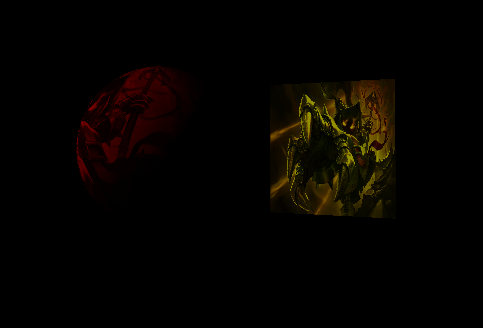
        // 구체는 빨간색 초록색을 가진 빛이 들어오는데
        // material에서 초록색을 제외시켜서 빨간색으로 나타남
	}
	{
		Vec4 material(1.f);
		_shader->GetVector("MaterialDiffuse")->SetFloatVector((float*)&material);
		_obj2->Update();
	}
}
결과
3. Specular
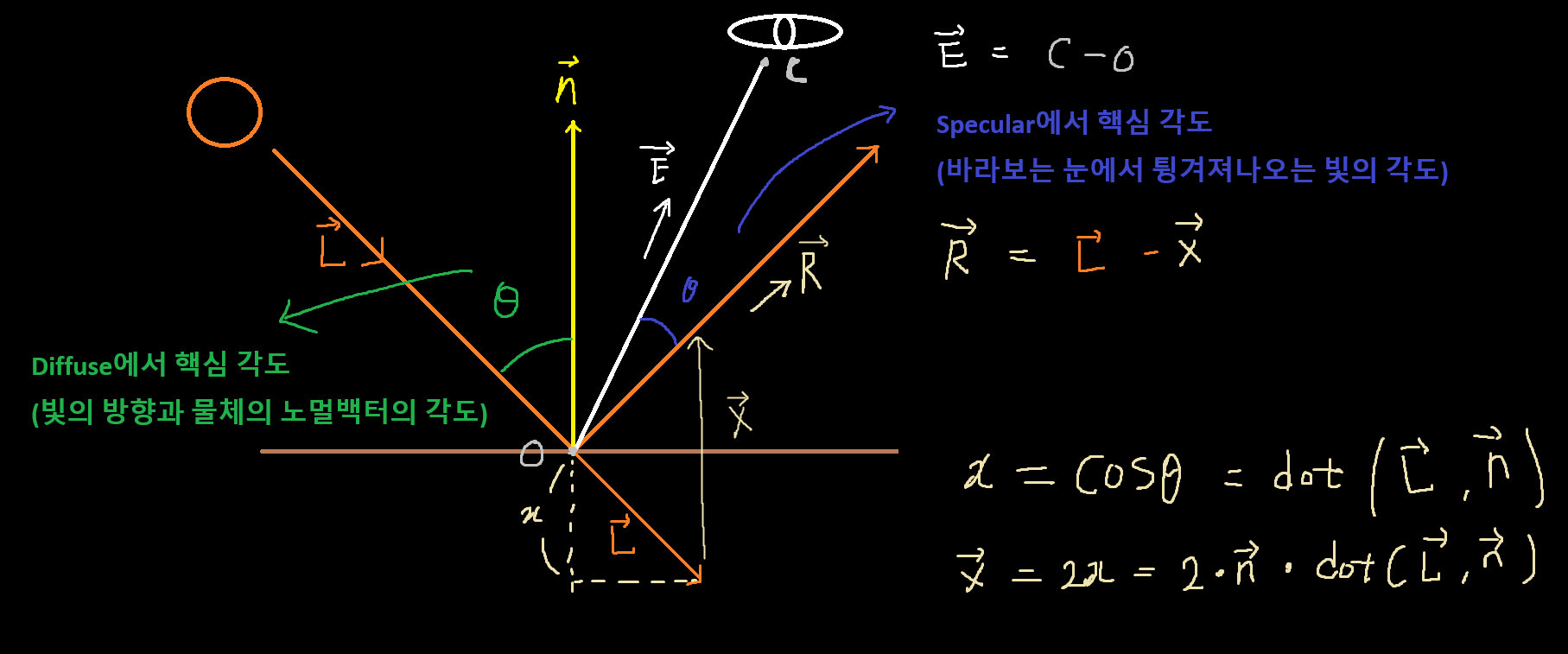
- 정반사광 (빛이 반사되어 눈으로 직접 들어오는 하이라이트)
- 특징 : 매끄러운 표면일수록 선명하고 강함
- 역할 : 금속, 유리 등 반짝이는 질감 표현
참고 이미지
11.Lighting_Specular.fx
#include "00.Global.fx"

float3 LightDir;            // 조명의 방향
float4 LightSpecular;       // 조명의 반사광
float4 MaterialSpecular;    // 재질의 반사광 특성

Texture2D DiffuseMap;


MeshOutput VS(VertexTetrueNormal input)
{
    MeshOutput output;
    output.position = mul(input.position, W);
    output.worldPosition = input.position;
    output.position = mul(output.position, VP);
    output.uv = input.uv;
    output.normal = mul(input.normal, (float3x3) W);

    return output;
}

// Specular (반사광)
// 한방향으로 완전히 반사되는 빛 (Phong)


float4 PS(MeshOutput input) : SV_TARGET
{
    //float3 R = reflect(LightDir, normalize(input.normal));
    // 빛의 반사벡터
    float3 R = LightDir - (2 * input.normal * dot(LightDir, input.normal));

    // 카메라 위치벡터
    float3 cameraPosition = -V._41_42_43;
    // 물체 -> 카메라 방향벡터
    float3 E = normalize(cameraPosition - input.worldPosition);

    float value = saturate(dot(R, E)); // saturate : clamp(0 ~ 1)
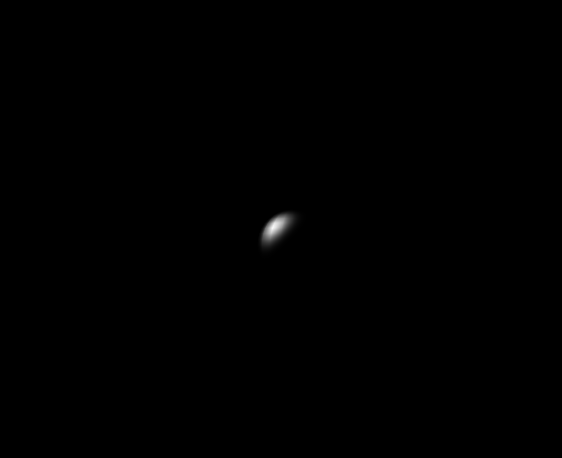
    float specular = pow(value, 5); // 값이 클수록 범위가 작아짐 -> 이유 : value값을 saturate로 제한

    float color = LightSpecular * MaterialSpecular * specular;
    return color;
}

technique11 T0
{
    PASS_VP(P0, VS, PS)
}
14. SpecularDemo.cpp
void SpecularDemo::Update()
{
	_camera->Update();

	RENDER->Update();

	// 라이트 색상
	Vec4 light{ 1.f, 1.f, 0.f ,1.f };
	_shader->GetVector("LightSpecular")->SetFloatVector((float*)&light);

	Vec3 lightDir{ 1.f , -1.f, 0.f };
	lightDir.Normalize();

	_shader->GetVector("LightDir")->SetFloatVector((float*)&lightDir);

	{
		// 빛을 받아주는 퍼센트
		Vec4 material(1.f);

		_shader->GetVector("MaterialSpecular")->SetFloatVector((float*)&material);

		_obj->Update();
	}

	{
		Vec4 material(1.f);

		_shader->GetVector("MaterialSpecular")->SetFloatVector((float*)&material);
		_obj2->Update();
	}
}
결과
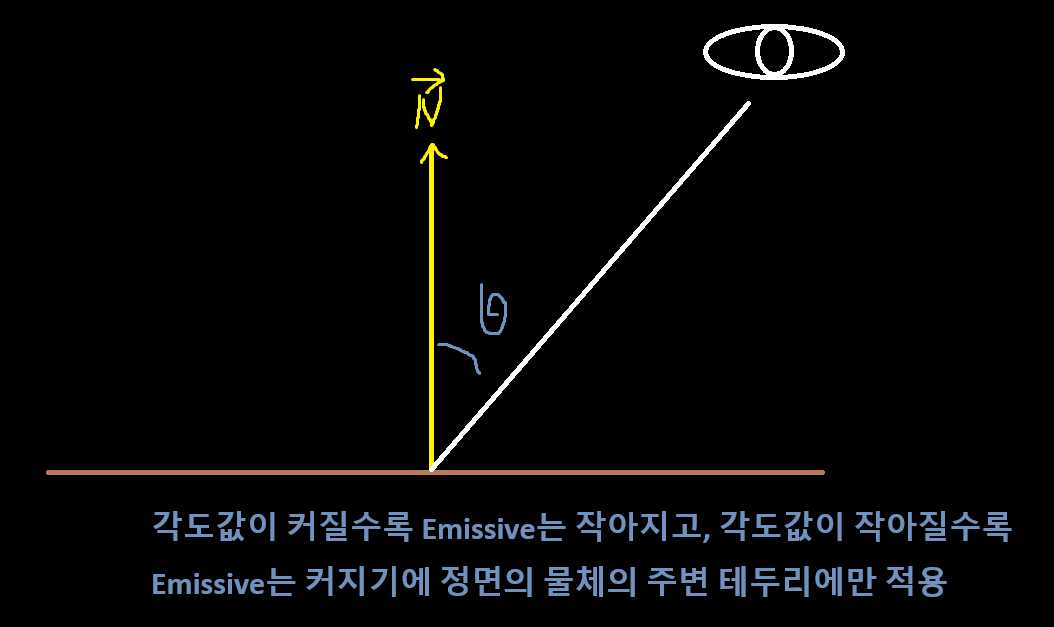
4. Emissive
- 자발광 (물체 스스로 빛을 내는 효과, 외부 조명에 의존하지 않음)
- 특징 : 주변 조명을 받지 않아도 항상 일정하게 밝게 보임
- 예시 : 네온사인, 마법진, 발광체 등
참고이미지
12.Lighting_Emissive.fx
#include "00.Global.fx"

float4 MaterialEmissive;


MeshOutput VS(VertexTetrueNormal input)
{
    MeshOutput output;
    output.position = mul(input.position, W);
    output.worldPosition = input.position;
    output.position = mul(output.position, VP);
    output.uv = input.uv;
    output.normal = mul(input.normal, (float3x3) W);

    return output;
}

// Emissive
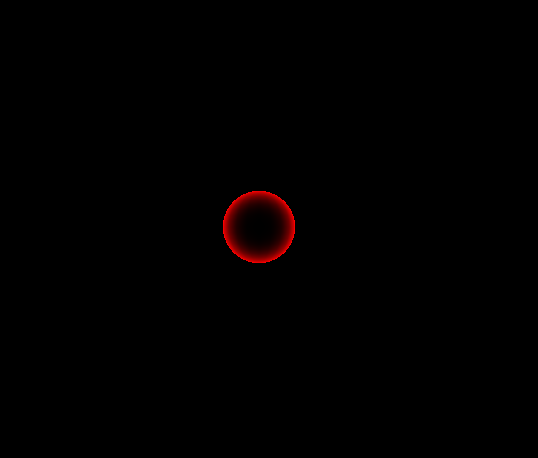
// 외각선 구할때 사용(림라이트)

float4 PS(MeshOutput input) : SV_TARGET
{
    float3 cameraPosition = -V._41_42_43;
    float3 E = normalize(cameraPosition - input.worldPosition);

    float value = saturate(dot(E, input.normal));
    float emissive = 1.0f - value;

    // smoothstep(min, max , x) : x가 [min, max] 구간에 있을 때 0~1로 Hermite 보간, 두 값 사이를 부드럽게 전환
    // ex) 두 색상을 부드럽게 혼합
    emissive = smoothstep(0.0f, 1.0f, emissive);
    emissive = pow(emissive, 1.f); // 감마 보정


    float4 color = MaterialEmissive * emissive;
    return color;
}

technique11 T0
{
    PASS_VP(P0, VS, PS)
}
15. EmissiveDemo.cpp
void EmissiveDemo::Update()
{
	_camera->Update();

	RENDER->Update();

	{
		// 외각선을 빨간색으로
		Vec4 materialEmissive(1.f, 0.f, 0.f, 1.f);

		_shader->GetVector("MaterialEmissive")->SetFloatVector((float*)&materialEmissive);

		_obj->Update();
	}

	{
		Vec4 materialEmissive(1.f, 0.f, 0.f, 1.f);

		_shader->GetVector("MaterialEmissive")->SetFloatVector((float*)&materialEmissive);
		_obj2->Update();
	}
}
결과
5. Light 통합작업
Ambient,Diffuse,Specular,Emissive쉐이더를 하나의Light.fx로 통합하기00.Global.fx와 동일하게 모든 Light의 변수, Buffer, Function을 가지고 있는00.Light.fx를 만들기- 실습용으로 사용할
13.Lighting.fx쉐이더 생성 RenderManager에서LightDesc과MaterialDesc와constBuffer와Effect추가하고 Data 넣기
00.Light.fx
#ifndef _LIGHT_FX_ // if not define
#define _LIGHT_FX_

#include "00.Global.fx"

////////////
// Struct //
////////////

struct LightDesc
{
    float4 ambient;
    float4 diffuse;
    float4 specular;
    float4 emissive;
    float3 direction;
    float  padding;     // 16byte 정렬
};

struct MaterialDesc
{
    float4 ambient;
    float4 diffuse;
    float4 specular;
    float4 emissive;
};

////////////////////
// ConstantBuffer //
////////////////////

cbuffer LightBuffer
{
    LightDesc GlobalLight;
};

cbuffer MaterialBuffer
{
    MaterialDesc Material;
};

/////////
// SRV //
/////////

Texture2D DiffuseMap;
Texture2D SpecularMap;
Texture2D MormalMap;

//////////////
// Function //
//////////////

float4 ComputeLight(float3 normal, float2 uv, float3 worldPosition)
{
    float4 ambientColor = 0;
    float4 diffuseColor = 0;
    float4 specularColor = 0;
    float4 emissiveColor = 0;
    float3 cameraPosition = CameraPosition();

    // Ambient
    {
        float4 color = GlobalLight.ambient * Material.ambient;

        ambientColor = DiffuseMap.Sample(LinearSampler, uv) * color;
    }

    // Diffuse
    {
        float4 color = DiffuseMap.Sample(LinearSampler, uv);
        float value = dot(-GlobalLight.direction, normalize(normal));

        diffuseColor = color * value * GlobalLight.diffuse * Material.diffuse;
    }

    // Specular
    {
        float3 R = GlobalLight.direction - (2 * normal * dot(GlobalLight.direction, normal));
        float3 E = normalize(cameraPosition - worldPosition);
        float value = saturate(dot(R, E)); // saturate : clamp(0 ~ 1)
        float specular = pow(value, 5); // 값이 클수록 범위가 작아짐 -> 이유 : value값을 saturate로 제한

        specularColor = GlobalLight.specular * Material.specular * specular;
    }

    // Emissive
    {
        float3 E = normalize(cameraPosition - worldPosition);
        float value = saturate(dot(E, normal));
        float emissive = 1.0f - value;
        emissive = smoothstep(0.0f, 1.0f, emissive);
        emissive = pow(emissive, 1.f); // 감마 보정

        emissiveColor = GlobalLight.emissive * Material.emissive * emissive;
    }

    return ambientColor + diffuseColor + specularColor + emissiveColor;
}

#endif
13.Lighting.fx
#include "00.Global.fx"
#include "00.Light.fx"

float4 MaterialEmissive;


MeshOutput VS(VertexTetrueNormal input)
{
    MeshOutput output;
    output.position = mul(input.position, W);
    output.worldPosition = input.position.xyz;
    output.position = mul(output.position, VP);
    output.uv = input.uv;
    output.normal = mul(input.normal, (float3x3) W);

    return output;
}

// Emissive
// 외각선 구할때 사용(림라이트)

float4 PS(MeshOutput input) : SV_TARGET
{
    float4 color = ComputeLight(input.normal, input.uv, input.worldPosition);

    return color;
}

technique11 T0
{
    PASS_VP(P0, VS, PS)
}
RenderManager.h
#pragma once
#include "ConstantBuffer.h"

class Shader;

struct GlobalDesc
{
	Matrix V = Matrix::Identity;
	Matrix P = Matrix::Identity;
	Matrix VP = Matrix::Identity;
};

struct TransformDesc
{
	Matrix W = Matrix::Identity;
};

// Light
struct LightDesc
{
	Color ambient = Color(1.f, 1.f, 1.f, 1.f);
	Color diffuse = Color(1.f, 1.f, 1.f, 1.f);
	Color specular = Color(1.f, 1.f, 1.f, 1.f);
	Color emissive = Color(1.f, 1.f, 1.f, 1.f);

	Vec3 direction;
	float padding0;
};

// Material
struct MaterialDesc
{
	Color ambient = Color(0.f, 0.f, 0.f, 1.f);
	Color diffuse = Color(1.f, 1.f, 1.f, 1.f);
	Color specular = Color(0.f, 0.f, 0.f, 1.f);
	Color emissive = Color(0.f, 0.f, 0.f, 1.f);
};


class RenderManager
{
	DECLARE_SINGLE(RenderManager);

public:
	void Init(shared_ptr<Shader> shader);
	void Update();

	void PushGlobalData(const Matrix& view, const Matrix& projection);
	void PushTransformData(const TransformDesc& desc);
	void PushLightData(const LightDesc& desc);
	void PushMaterialData(const MaterialDesc& desc);


private:
	shared_ptr<Shader> _shader;

	GlobalDesc _globalDesc;
	shared_ptr<ConstantBuffer<GlobalDesc>> _globalBuffer;
	ComPtr<ID3DX11EffectConstantBuffer> _globalEffectBuffer;

	TransformDesc _transformDesc;
	shared_ptr<ConstantBuffer<TransformDesc>> _transformBuffer;
	ComPtr<ID3DX11EffectConstantBuffer> _transformEffectBuffer;

	LightDesc _lightDesc;
	shared_ptr<ConstantBuffer<LightDesc>> _lightBuffer;
	ComPtr<ID3DX11EffectConstantBuffer> _lightEffectBuffer;

	MaterialDesc _materialDesc;
	shared_ptr<ConstantBuffer<MaterialDesc>> _materialBuffer;
	ComPtr<ID3DX11EffectConstantBuffer> _materialEffectBuffer;
};
RenderManager.cpp
#pragma once
#include "ConstantBuffer.h"

class Shader;

struct GlobalDesc
{
	Matrix V = Matrix::Identity;
	Matrix P = Matrix::Identity;
	Matrix VP = Matrix::Identity;
};

struct TransformDesc
{
	Matrix W = Matrix::Identity;
};

// Light
struct LightDesc
{
	Color ambient = Color(1.f, 1.f, 1.f, 1.f);
	Color diffuse = Color(1.f, 1.f, 1.f, 1.f);
	Color specular = Color(1.f, 1.f, 1.f, 1.f);
	Color emissive = Color(1.f, 1.f, 1.f, 1.f);

	Vec3 direction;
	float padding0;
};

// Material
struct MaterialDesc
{
	Color ambient = Color(0.f, 0.f, 0.f, 1.f);
	Color diffuse = Color(1.f, 1.f, 1.f, 1.f);
	Color specular = Color(0.f, 0.f, 0.f, 1.f);
	Color emissive = Color(0.f, 0.f, 0.f, 1.f);
};


class RenderManager
{
	DECLARE_SINGLE(RenderManager);

public:
	void Init(shared_ptr<Shader> shader);
	void Update();

	void PushGlobalData(const Matrix& view, const Matrix& projection);
	void PushTransformData(const TransformDesc& desc);
	void PushLightData(const LightDesc& desc);
	void PushMaterialData(const MaterialDesc& desc);


private:
	shared_ptr<Shader> _shader;

	GlobalDesc _globalDesc;
	shared_ptr<ConstantBuffer<GlobalDesc>> _globalBuffer;
	ComPtr<ID3DX11EffectConstantBuffer> _globalEffectBuffer;

	TransformDesc _transformDesc;
	shared_ptr<ConstantBuffer<TransformDesc>> _transformBuffer;
	ComPtr<ID3DX11EffectConstantBuffer> _transformEffectBuffer;

	LightDesc _lightDesc;
	shared_ptr<ConstantBuffer<LightDesc>> _lightBuffer;
	ComPtr<ID3DX11EffectConstantBuffer> _lightEffectBuffer;

	MaterialDesc _materialDesc;
	shared_ptr<ConstantBuffer<MaterialDesc>> _materialBuffer;
	ComPtr<ID3DX11EffectConstantBuffer> _materialEffectBuffer;
};
16. LightingDemo.cpp
void LightingDemo::Update()
{
	_camera->Update();

	RENDER->Update();

	{
		LightDesc lightDesc;
		lightDesc.ambient = Vec4(0.5f);
		lightDesc.diffuse = Vec4(1.f);
		lightDesc.specular = Vec4(1.f, 1.f, 1.f, 1.f);
		lightDesc.direction = Vec3(0.f, -1.f, 0.f);
		RENDER->PushLightData(lightDesc);
	}

	{
		MaterialDesc materialDesc;
		materialDesc.ambient = Vec4(0.2f);
		materialDesc.diffuse = Vec4(1.f);
		materialDesc.specular = Vec4(1.f);
		//materialDesc.emissive = Color(0.3f, 0.f, 0.f, 0.5f);

		RENDER->PushMaterialData(materialDesc);
		_obj->Update();
	}

	{
		MaterialDesc materialDesc;
		//mateirlaDesc.ambient = Vec4(0.2f);
		materialDesc.diffuse = Vec4(1.f);
		//mateirlaDesc.specular = Vec4(1.f);
		//mateirlaDesc.emissive = Color(0.3f, 0.f, 0.f, 0.5f);

		RENDER->PushMaterialData(materialDesc);
		_obj2->Update();
	}
}
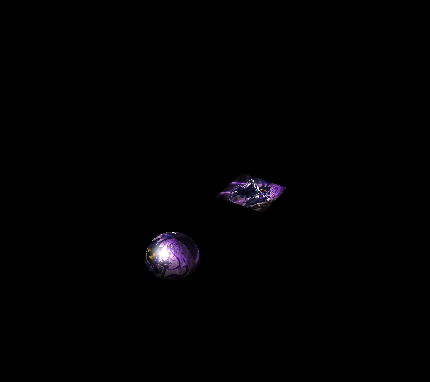
결과
참고 강의

게임 클라이언트 프로그래머 준비중 (공부 및 기록용)