어제 나는 BulletManager.cs를 통해 모든 투사체가 상속받을 속성을 설정했고, 이를 상속받을 기본 투사체의 스크립트를 Bullet.cs에 작성하였다. 이후 에디터에서 Bullet의 TargetTag를 Enemy로 설정하니, 정상적으로 실행되는 것을 확인하였다. 오늘은 BulletManager.cs를 생성함에 맞춰서 다른 스크립트들을 수정하고, 다른 투사체들도 구현해보고, 효과음과 사망 시 이펙트 등을 구현해볼 생각이다.
다양한 투사체 구현
-
BulletManager.cs에 맞춰Enemy.cs도 수정해주었다. -
현재
Enemy가 자동공격을 해도TargetTag가 없어서 투사체의 대상이 없지만,TargetTag를Ally로 바꿔서 투사체가 아군에게 맞도록 수정하였다. -
다음으로
Shooter.cs를 수정하겠다.Shooter.cs는 투사체를 발사하는 방향, 발사체의 속도 등을 구현하는 스크립트였는데, 나는 이것을- 숫자
1,2,3등의 버튼을 눌러서 투사체를 변경. - 투사체마다 다른 속도를 구현
- 투사체 발사 방향 코드는 그대로
- 숫자
-
이렇게 작성해 볼 생각이다. 먼저 기존 스크립트는 다음과 같다.
using UnityEngine;

public class Shooter : MonoBehaviour
{
    public GameObject bulletPrefab;
    public float shootForce = 10f;

    void Update()
    {
        if (Input.GetMouseButtonDown(0))
        {
            Fire();
        }
    }

    void Fire()
    {
        Vector3 mouseWorldPos = Camera.main.ScreenToWorldPoint(Input.mousePosition);
        mouseWorldPos.z = 0f;

        Vector3 direction = (mouseWorldPos - transform.position).normalized;

        GameObject bullet = Instantiate(bulletPrefab, transform.position, Quaternion.identity);

        Rigidbody2D rb = bullet.GetComponent<Rigidbody2D>();
        rb.AddForce(direction * shootForce, ForceMode2D.Impulse);
    }
}- 좌클릭을 하면 마우스 커서 방향으로 발사하는 구조는 유지한 채, 투사체 변경, 변경된 투사체에 따라 다른 힘을 가하는 코드를 추가해주겠다.
- 완성된 코드는 다음과 같다.
using UnityEngine;

public class Shooter : MonoBehaviour
{
    public GameObject BulletPrefab;
    public GameObject healingBulletPrefab;
    public GameObject explosionBulletPrefab;

    private GameObject currentBulletPrefab;
    private string currentTargetTag;

    void Start()
    {
        EquipBullet(BulletPrefab, "Enemy");
    }

    void Update()
    {
        HandleInput();
    }

    void HandleInput()
    {
        if (Input.GetMouseButtonDown(0))
        {
            Fire();
        }

        if (Input.GetKeyDown(KeyCode.Alpha1))
        {
            EquipBullet(BulletPrefab, "Enemy");
            Debug.Log("일반");
        }
        else if (Input.GetKeyDown(KeyCode.Alpha2))
        {
            EquipBullet(healingBulletPrefab, "Ally");
            Debug.Log("회복");
        }
        else if (Input.GetKeyDown(KeyCode.Alpha3))
        {
            EquipBullet(explosionBulletPrefab, "Enemy");
            Debug.Log("폭발");
        }
    }

    void EquipBullet(GameObject prefab, string targetTag)
    {
        currentBulletPrefab = prefab;
        currentTargetTag = targetTag;
    }

    void Fire()
    {
        if (currentBulletPrefab == null) return;

        Vector3 mouseWorldPos = Camera.main.ScreenToWorldPoint(Input.mousePosition);
        mouseWorldPos.z = 0f;

        Vector3 direction = (mouseWorldPos - transform.position).normalized;

        GameObject bullet = Instantiate(currentBulletPrefab, transform.position, Quaternion.identity);

        Rigidbody2D rb = bullet.GetComponent<Rigidbody2D>();
        BulletManager bulletScript = bullet.GetComponent<BulletManager>();

        if (rb != null)
        {
            float force = (bulletScript != null) ? bulletScript.shootForce : 10f;
            rb.AddForce(direction * force, ForceMode2D.Impulse);
        }

        if (bulletScript != null)
        {
            bulletScript.targetTag = currentTargetTag;
        }
    }
}- 먼저, 투사체들의
Prefab을 가져온다. - 다음 코드를 통하여
currentBulletPrefab의 초기값을 설정하고,EquipBullet함수를 정의한다.
    private GameObject currentBulletPrefab;

    void Start()
    {
        EquipBullet(BulletPrefab, "Enemy");
    }

    void EquipBullet(GameObject prefab, string targetTag)
    {
        currentBulletPrefab = prefab;
        currentTargetTag = targetTag;
}- 다음 코드를 통하여
EquipBullet을1,2,3키를 통하여 변경할 수 있도록 한다.
void HandleInput()
    {
    if (Input.GetKeyDown(KeyCode.Alpha1))
        {
            EquipBullet(BulletPrefab, "Enemy");
            Debug.Log("일반");
        }
        else if (Input.GetKeyDown(KeyCode.Alpha2))
        {
            EquipBullet(healingBulletPrefab, "Ally");
            Debug.Log("회복");
        }
        else if (Input.GetKeyDown(KeyCode.Alpha3))
        {
            EquipBullet(explosionBulletPrefab, "Enemy");
            Debug.Log("폭발");
        }
}-
기존
Fire()는 약간의 수정 이후 그대로 사용한다. -
이렇게 구조를 고치고 실행해보니 오류가 발생하여 발사가 실행되지 않았다.
- 나는 오류를 수정하기 위해
Debug.Log를 통해 발사가 실제로 실행됐는지 확인해보았다. - 발사는 실제로 시도되었음을 알 수 있었다.
BulletPrefab들을Player에게 붙이지 않아서 발생한 오류였다.- 빠르게 수정 후 결과를 확인해보았다.
- 나는 오류를 수정하기 위해
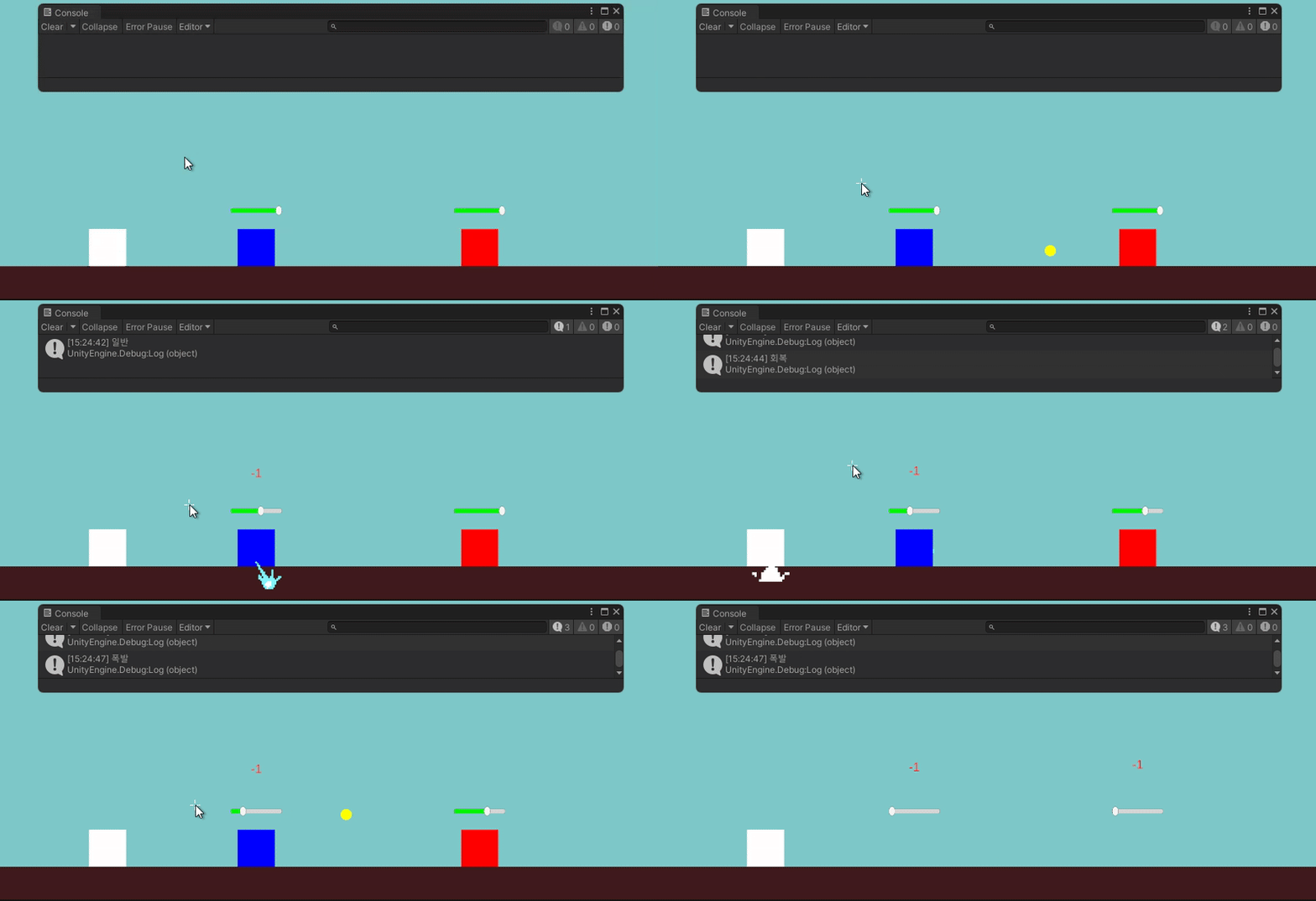
- 회복 투사체가 제대로 발사되지 않고 있었다.
- 회복 투사체가 발사되자마자
Player와 충돌하고 있음을 알았다. - 이를 수정하기 위해
PlayerSprite에 있는AllyTag를Player로 바꿔주었다. - 회복 투사체를 수정하는 김에 제대로
Heal()을 구현할 수 있도록 스크립트를 수정해주었다. - 또, 각 투사체들의 색상을 변경하였다.
- 수정 후 결과를 확인해보았다.
- 회복 투사체가 발사되자마자
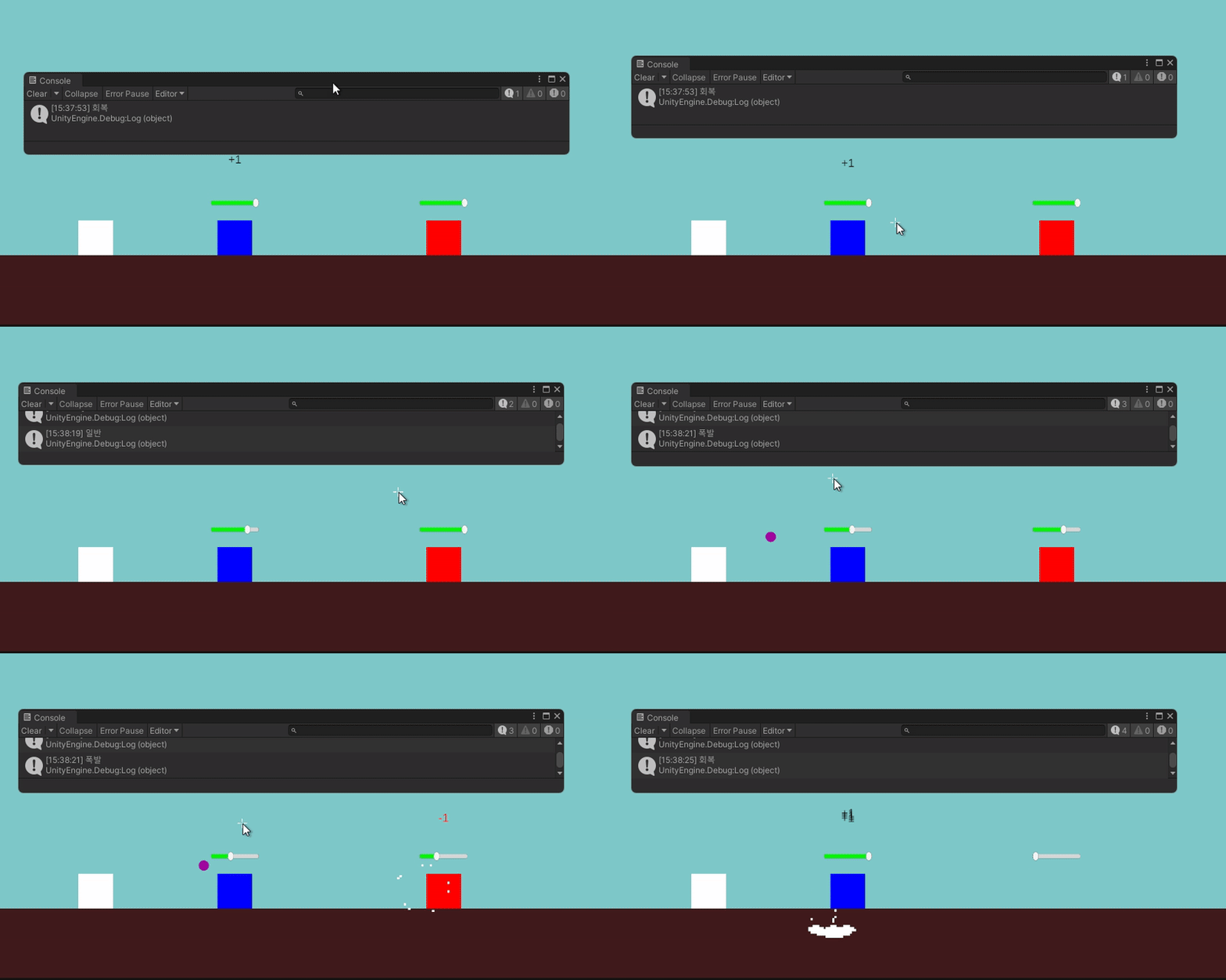
- 각 요소들이 의도한 대로 실행되고 있음을 확인했다.
- 다음은 폭발 투사체에 범위 공격 기능을 구현하고자 한다.
- 범위 공격 기능을 구현하기 위해 어떻게 스크립트를 작성해야 할지 미리 구상해보았다.
- 범위 변수를 선언하고 값 저장하기.
- 범위 안에 있는 모든
EnemyTag를 가진 오브젝트 확인하기. - 해당 오브젝트들에게 모두 데미지 입히기.
- 구상한 내용대로 작성해보겠다.
- 먼저,
explosionRadius변수를 선언하고 2를 저장한다.
public float explosionRadius = 2f;- 다음으로, 투사체가 적과 충돌했을 때, 그 위치를 기준으로
explosionRadius안에 있는 적들을hits배열 안에 넣는다.
protected override void OnHit(Collider2D col) { Collider2D[] hits = Physics2D.OverlapCircleAll(transform.position, explosionRadius); }- 다음으로 배열 안에 있는
collider중targetTag에 있는 오브젝트들을 확인한다.
foreach (Collider2D hit in hits) { if (hit.CompareTag(targetTag))- 그 오브젝트들에게 데미지를 입히고 투사체를 파괴한다.
{ UnitHealth unit = hit.GetComponent<UnitHealth>(); if (unit != null) { unit.TakeDamage(damage); } } } Destroy(gameObject); }- 이후 임시로
Enemy를 더 소환하고 결과를 확인해보았다.
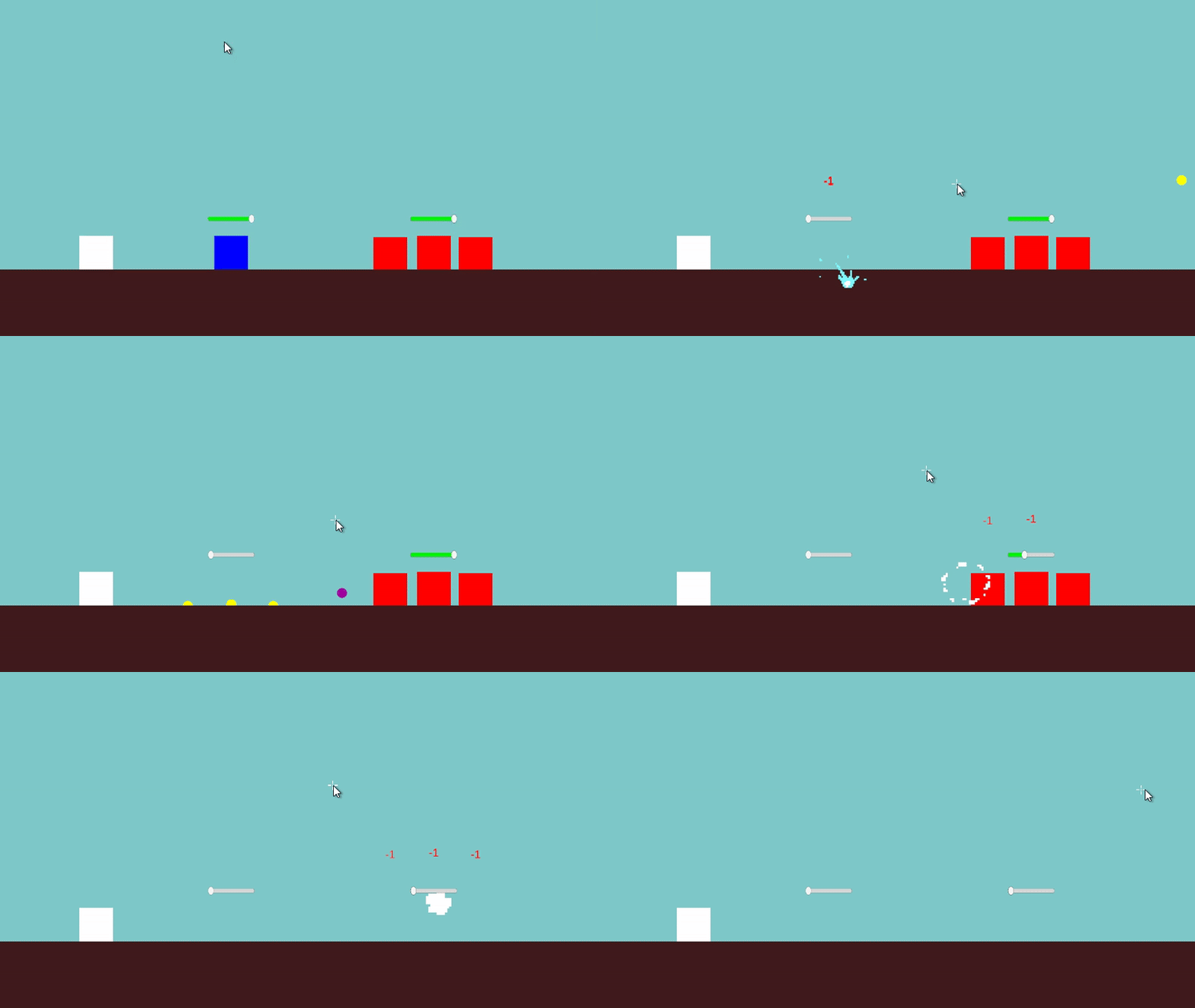
- 범위공격이 의도한대로 실행되고 있음을 확인했다.
- 먼저,
- 투사체가 바닥과 닿았을 때도 폭발할 수 있도록 태그 조건을 넓혔다.
- 기존 코드
if (hit.CompareTag(targetTag))- 변경된 코드
if (hit.CompareTag(targetTag)||hit.CompareTag("Ground"))- 하지만 의도한대로 구현되지 않았다.
BulletManager.cs를 다시 확인해보았다.- 의도한대로 실행이 되기 위해서는 '데미지를 입히는 코드'가 아닌 '충돌 코드'를 수정해야 함을 알았다.
- 따라서 변경한 코드를 되돌리고 다음 코드를 스크립트에 추가해주었다.
    protected override void OnTriggerEnter2D(Collider2D collision)
    {
        if (collision.CompareTag(targetTag) || collision.CompareTag("Ground"))
        {
            if (hitEffectPrefab != null)
            {
                GameObject fx = Instantiate(hitEffectPrefab, transform.position, Quaternion.identity);
                Destroy(fx, 0.5f);
            }

            OnHit(collision);
        }
}targetTag와Ground태그와 '충돌'했을 때hitEffectPrefab을 불러 오고On hit기능도 수행할 수 있도록 코드를 추가하였다.- 이펙트 크기를 늘린 후 이후 실행해보았다.
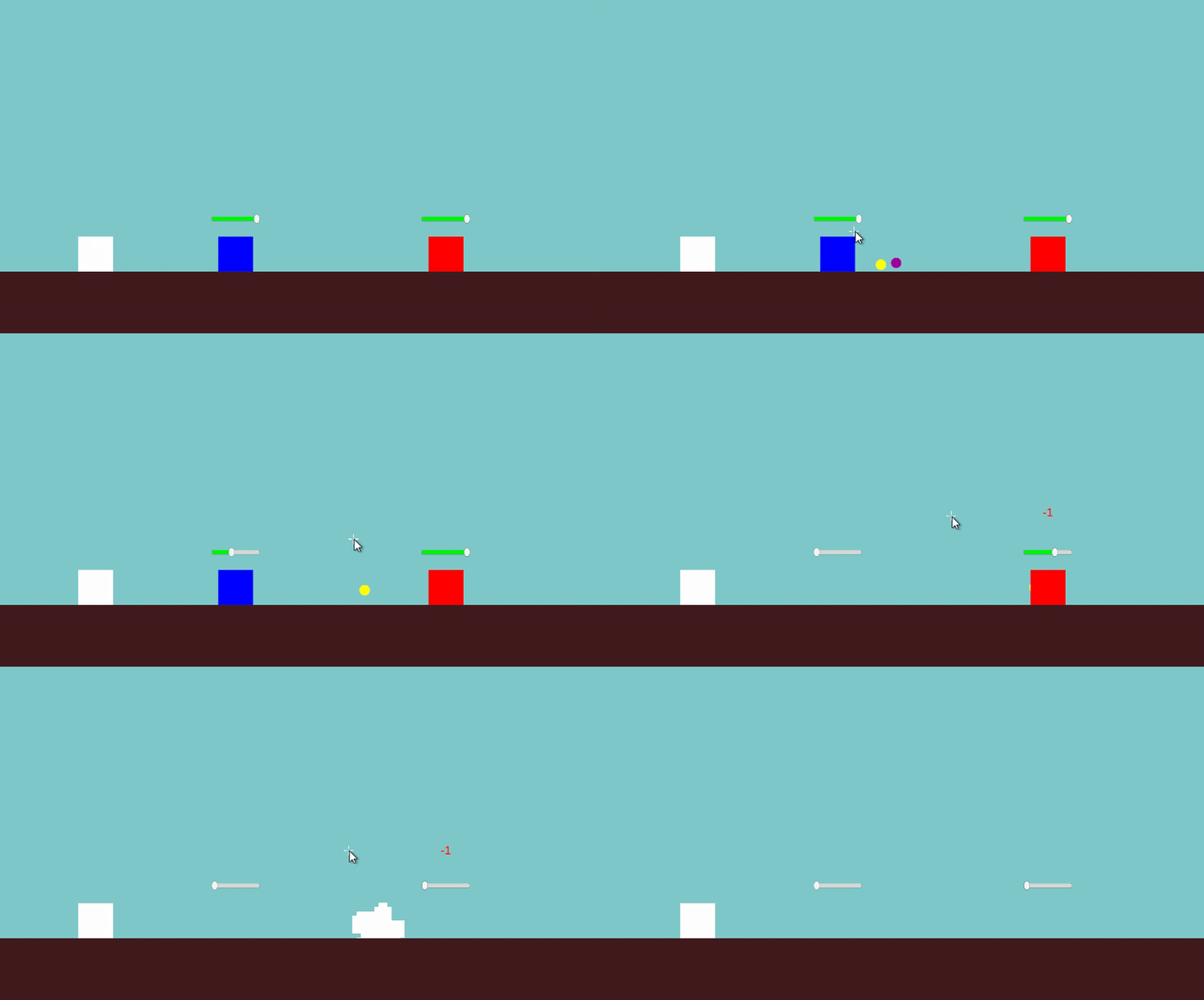
- 의도한대로 실행되고 있음을 확인했다.
파괴 애니메이션 추가
-
다음으로는 적군 혹은 아군이 사망했을 때, 오브젝트가 즉시 사라지는 것이 아니라
잠시 떠오르며 사라지는 애니메이션을 구현하고자 했다. -
먼저 원하는 효과를 키프레임으로 표현하기 위해 애니메이션 클립을 새로 생성하였다.
- 이름은
DeathAnim으로 설정하였다. Position,Rotation,Scale,Color속성들을 조절해서
오브젝트가 위로 살짝 떠오르고 점점 작아지며 사라지는 연출을 만들었다.
- 이름은
-
Animator Controller도 새로 생성하고 (
DeathAnimatorCon) 오브젝트에 연결하였다.- Animator의 State에
DeathAnim을 추가하고Any State에서 해당 State로 트랜지션을 연결하였다. - 트랜지션 조건으로는 Trigger 파라미터인
Death를 생성하고 연결하였다.
- Animator의 State에
-
이후
UnitHealth.cs의OnDeath()함수에서 트리거를 실행하도록 아래와 같이 작성하였다:
protected virtual void OnDeath()
{
    animator.SetTrigger("Death");
    Destroy(gameObject, 1.0f);
}-
그러나 애니메이션을 테스트해본 결과, 게임 시작과 동시에 애니메이션이 자동으로 재생되는 문제가 발생했다.
-
Animator의 기본 상태로 설정된 애니메이션이
DeathAnim이었기 때문에,
오브젝트가 생성되자마자 해당 애니메이션이 실행되어 버린 것이다. -
이를 해결하기 위해
Entry에서DeathAnim으로 이어지는 트랜지션을 제거하거나,
Idle상태를 추가한 뒤, 조건을 통해 Death 상태로 넘어가게 해야 한다는 점을 확인했다. -
현재까지는
Ally오브젝트에만 애니메이션을 적용한 상태이며,
적군(Enemy) 오브젝트에는 아직 적용하지 않았다. -
내일은 다음과 같은 작업을 이어갈 계획이다:
- Animator Controller의 상태 전이 흐름 정비 (Entry → Idle → Death)
- Enemy 오브젝트에도 애니메이션 적용
- 애니메이션 길이에 맞춰 오브젝트 제거 타이밍 조정
- 오늘은 추상 클래스를 통해 다양한 투사체를 구현해보고, 애니메이션 설정과 구조를 정리하고, 애니메이션이 잘못 재생되는 문제까지 확인하였다.
- 내일 이어서 자연스럽게 사망 애니메이션이 재생되도록 마무리해보겠다.