커맨드 패턴
요청을 요청에 대한 모든 정보가 포함된 독립실행형 객체로 변환하는 행동 디자인 패턴
구조
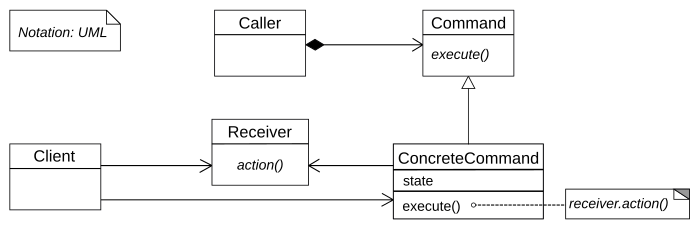
- 발송자: 커맨드 객체에 대한 참조를 저장하는 필드가 있으며 요청을 수신자에게 보내는 대신 해당 커맨드를 작동시킨다.
- 커맨드: 커맨드를 실행하기 위한 단일 메서드를 선언하는 인터페이스
- 구상 커맨드: 요청을 구현한다. 자체적으로 작업을 수행하지 않고 비즈니스 논리 객체에게 호출을 전달한다.
- 수신자: 일부 비즈니스 로직이 포함되어 있으며 커맨드가 요청이 수신자에게 전달되는 방법에 대한 세부 정보만 처리하는 반면 수신자는 실제 작업을 수행한다.
- 클라이언트: 수신자 인스턴스를 포함한 모든 요청 매개변수들을 커맨드 생성자로 전달한다.
예시코드
abstract class Command {
    protected Application app;
    protected Editor editor;
    private String backup;

    public Command(Application app, Editor editor) {
        this.app = app;
        this.editor = editor;
    }

    public void saveBackup() {
        backup = editor.getText();
    }

    public void undo() {
        editor.setText(backup);
    }

    public abstract boolean execute();
}

class CopyCommand extends Command {
    public CopyCommand(Application app, Editor editor) {
        super(app, editor);
    }

    @Override
    public boolean execute() {
        app.setClipboard(editor.getSelection());
        return false;
    }
}

class CutCommand extends Command {
    public CutCommand(Application app, Editor editor) {
        super(app, editor);
    }

    @Override
    public boolean execute() {
        saveBackup();
        app.setClipboard(editor.getSelection());
        editor.deleteSelection();
        return true;
    }
}

class PasteCommand extends Command {
    public PasteCommand(Application app, Editor editor) {
        super(app, editor);
    }

    @Override
    public boolean execute() {
        saveBackup();
        editor.replaceSelection(app.getClipboard());
        return true;
    }
}

class UndoCommand extends Command {
    public UndoCommand(Application app, Editor editor) {
        super(app, editor);
    }

    @Override
    public boolean execute() {
        app.undo();
        return false;
    }
}

class CommandHistory {
    private java.util.Stack<Command> history = new java.util.Stack<>();

    public void push(Command command) {
        history.push(command);
    }

    public Command pop() {
        return history.isEmpty() ? null : history.pop();
    }
}

class Editor {
    private String text = "";

    public String getText() {
        return text;
    }

    public void setText(String text) {
        this.text = text;
    }

    public String getSelection() {
        return "selected text";
    }

    public void deleteSelection() {
        System.out.println("Selection deleted.");
    }

    public void replaceSelection(String text) {
        System.out.println("Replaced with: " + text);
    }
}

class Application {
    private String clipboard;
    private Editor activeEditor;
    private CommandHistory history;

    public Application() {
        this.history = new CommandHistory();
    }

    public void setClipboard(String clipboard) {
        this.clipboard = clipboard;
    }

    public String getClipboard() {
        return clipboard;
    }

    public void setActiveEditor(Editor editor) {
        this.activeEditor = editor;
    }

    public void createUI() {
        Command copy = new CopyCommand(this, activeEditor);
        Command cut = new CutCommand(this, activeEditor);
        Command paste = new PasteCommand(this, activeEditor);
        Command undo = new UndoCommand(this, activeEditor);

        executeCommand(copy);
        executeCommand(cut);
        executeCommand(paste);
        executeCommand(undo);
    }

    public void executeCommand(Command command) {
        if (command.execute()) {
            history.push(command);
        }
    }

    public void undo() {
        Command command = history.pop();
        if (command != null) {
            command.undo();
        }
    }

    public static void main(String[] args) {
        Application app = new Application();
        Editor editor = new Editor();
        app.setActiveEditor(editor);

        app.createUI();

        app.executeCommand(new CopyCommand(app, editor));
        app.executeCommand(new CutCommand(app, editor));
        app.executeCommand(new PasteCommand(app, editor));
        app.undo();
    }
}- 단일 실행 메서드로 커맨드 인터페이스를 선언한다.
- 요청들을 구상 커맨드 클래스로 추출한다. 각 클래스에는 수신자 객체에 대한 참조와 요청 인수들을 저장하는 필드 집합이 있어야 한다.
- 발송자 역할을 할 클래스를 식별한다. 여기에는 커맨드들을 저장하기 위한 필드를 추가한다. 발송자는 일반적으로 자체적으로 커맨드 객체를 생성하지 않고 클라이언트 코드에서 가져온다.
- 수신자에게 직접 요청을 보내는 대신 커맨드를 실행하도록 한다.
- 클라이언트는 수신자 생성 -> 커맨드 생성 -> 발송자 생성의 순서로 객체들을 초기화 한다.
장단점
장점
- 단일 책임 원칙: 작업을 호출하는 클래스와 작업을 수행하는 클래스를 분리
- 개방/폐쇄 원칙: 기존 클라이언트 코드를 손상하지 않고 새 커맨드 도입 가능
- 실행 취소/다시 실행 구현 가능
- 작업들의 지연된 실행을 구현 가능
- 간단한 커맨드들의 집합을 복잡한 커맨드로 조합 가능
단점
- 발송자와 수신자 사이에 완전히 새로운 레이어를 도입하기 때문에 코드가 복잡해질 수 있음
