[유니티 C#] 문자열 - 2
✏️ 문자열 탐색
- 문자열(string) 형식에서 제공하는 탐색 메소드
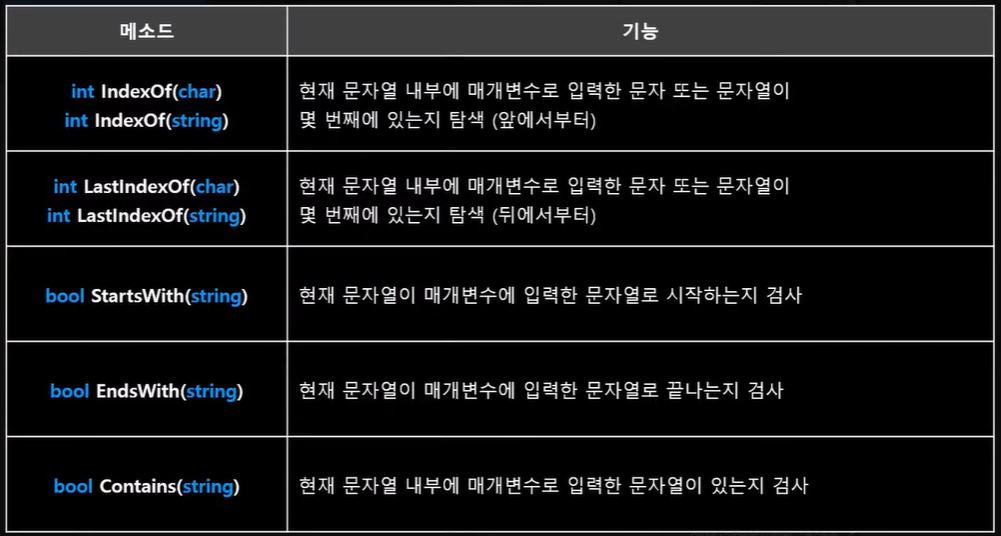
- 문자열(string) 형식에서 제공하는 탐색 메소드
👇 예제 코드
using System.Collections;
using System.Collections.Generic;
using UnityEngine;

public class Test : MonoBehaviour
{
    private void Awake()
    {
        string str = "Hello, World";
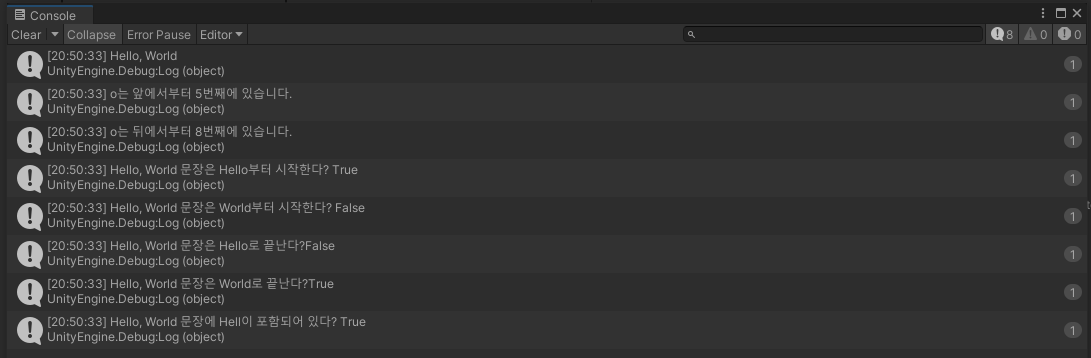
        Debug.Log(str);

        int numeric = str.IndexOf('o');
        Debug.Log($"o는 앞에서부터 {numeric + 1}번째에 있습니다.");

        numeric = str.LastIndexOf('o');
        Debug.Log($"o는 뒤에서부터 {numeric}번째에 있습니다.");

        bool isTrue = str.StartsWith("Hello");
        Debug.Log($"{str} 문장은 Hello부터 시작한다? {isTrue}");

        isTrue = str.StartsWith("World");
        Debug.Log($"{str} 문장은 World부터 시작한다? {isTrue}");

        isTrue = str.EndsWith("Hello");
        Debug.Log($"{str} 문장은 Hello로 끝난다?{isTrue}");

        isTrue = str.EndsWith("World");
        Debug.Log($"{str} 문장은 World로 끝난다?{isTrue}");

        isTrue = str.Contains("Hell");
        Debug.Log($"{str} 문장에 Hell이 포함되어 있다? {isTrue}");
    }
}
👇 실행 결과
✏️ 문자열 변형
- 문자열(string) 형식에서 제공하는 문자열 변형 메소드
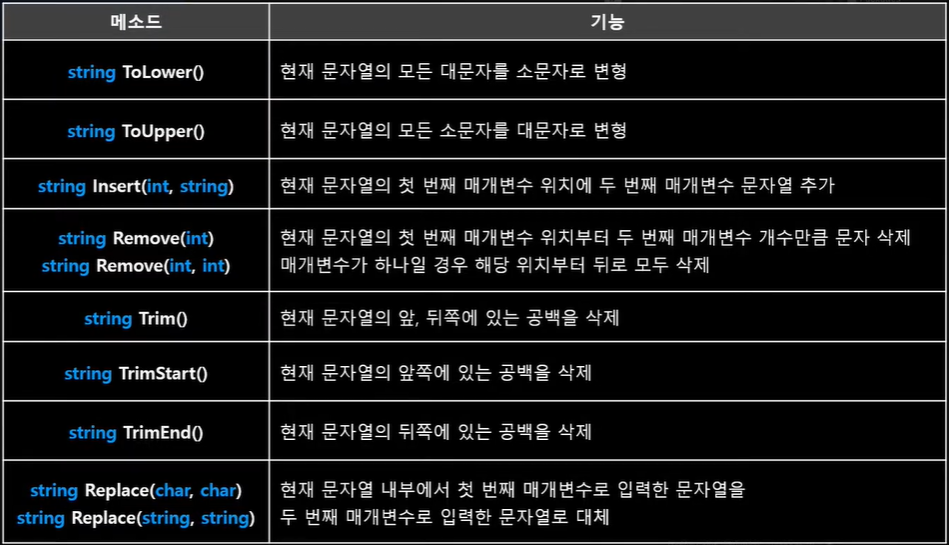
- 문자열(string) 형식에서 제공하는 문자열 변형 메소드
👇 예제 코드
using System.Collections;
using System.Collections.Generic;
using UnityEngine;

public class Test : MonoBehaviour
{
    private void Awake()
    {
        string str = "Hello, World";
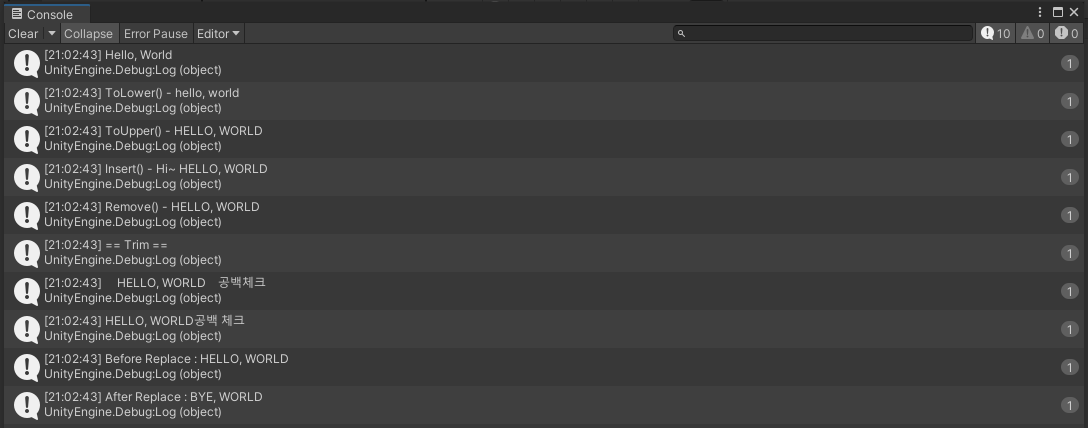
        Debug.Log(str);

        str = str.ToLower();                // 대문자 -> 소문자
        Debug.Log($"ToLower() - {str}");

        str = str.ToUpper();                // 소문자 -> 대문자
        Debug.Log($"ToUpper() - {str}");

        str = str.Insert(0, "Hi~ ");        // 원하는 위치에 문자열 삽입
        Debug.Log($"Insert() - {str}");

        str = str.Remove(0, 4);             // 원하는 범위의 문자열 삭제
        Debug.Log($"Remove() - {str}");

        Debug.Log("== Trim ==");
        // 공백추가
        str = "    " + str + "    ";
        Debug.Log(str + "공백체크");

        str = str.Trim();             // 문자열의 앞, 뒤 공백 제거
        //str = str.TrimStart();      // 문자열의 앞 공백 제거
        //str = str.TrimEnd();        // 문자열의 뒤 공백 제거
        Debug.Log(str + "공백 체크");

        Debug.Log($"Before Replace : {str}");
        str = str.Replace("HELLO", "BYE");      // Hello 문자열을 Bye 문자열로 대체
        Debug.Log($"After Replace : {str}");
    }
}
👇 실행 결과
✏️ 문자열 분할
- 문자열(string) 형식에서 제공하는 문자열 분할 메소드
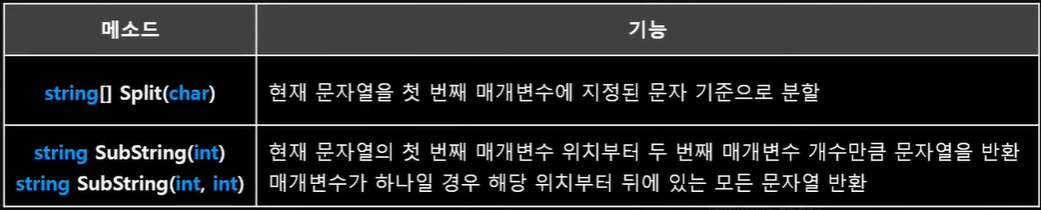
- 문자열(string) 형식에서 제공하는 문자열 분할 메소드
👇 예제 코드
  using System.Collections;
using System.Collections.Generic;
using UnityEngine;

public class Test : MonoBehaviour
{
    private void Awake()
    {
        string position = "3, 5, 6";
        // split()을 이용해 문자열을 분할하면 분할한 개수만큼 배열에 저장
        // 쉼표(,)를 기준으로 분할
        string[] str = position.Split(',');
        Debug.Log($"{str[0]}, {str[1]}, {str[2]}");

        string str2 = "HELLO, WORLD";
        // 7번째 위치부터 뒤에 있는 문자열만 다시 저장
        str2 = str2.Substring(7);
        Debug.Log(str2);
    }
}
👇 실행 결과