헬퍼 클래스 만드는데만 하루종일 걸렸다. 이게 맞나...
학습시간 09:00~02:00(당일17H/누적667H)
◆ 학습내용
SSD 모델을 활용하여 개와 고양이의 얼굴(Face) 영역을 감지하는 Object Detection 작업을 수행
1. 계획
객체탐지는 처음인데다가 이해도 정확히 못한 상태라 너무 막막하다. 그래도 일단 내가 뭘 해야하는지부터 생각해 보자.
목표는 SSD 모델을 사용해서 동물 얼굴을 탐지하는 것이다.
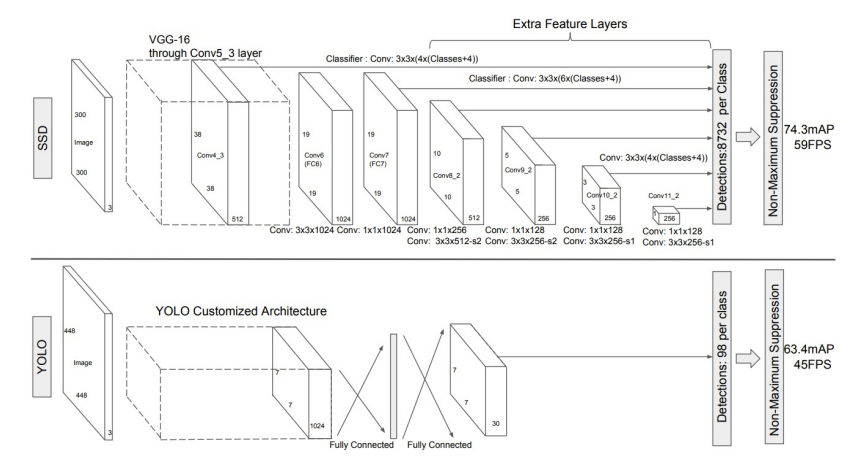
어제 배운 바에 의하면, SSD(Single Shot Multibox Detector) 모델은 VGG16을 기반으로 한 1-stage detection 모델이다.
그렇다면 분류와 회귀를 동시에 진행한다는 것이고, 좌표와 클래스 또한 동시에 예측한다는 것이다.
300과 512 모델이 있다고 했으니, 이번엔 속도가 빠른 300 모델을 써보자. 여유가 되면 500 모델도 써보고(아마도 없을 것 같지만)
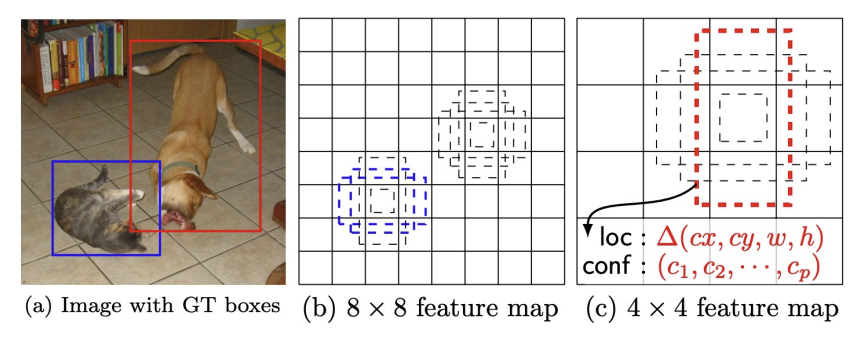
SSD의 특징은 Region Proposal을 사용하지 않는다는 것과, 다양한 크기의 Default Box를 사전 정의해서 오프셋 예측을 한다는 것이다.
그럼 아래와 같은 순서로 진행하면 되지 않을까.
- annotation 파일을 parsing하는 헬퍼 클래스를 만든다.
- 데이터셋 클래스를 만든다.
- 학습용 데이터 로더를 만든다.
- VGG 모델을 불러오고 앵커를 사전 정의한다.
- 학습한다.
- 시각화한다.
- 평가한다.
이번 미션의 벽은 헬퍼 클래스와 앵커 정의인 것 같다.
후 모르겠다. 일단 부딪혀보자.
2. 데이터 다운로드
어떤 데이터인지부터 확인해 보자.
The Oxford-IIIT Pet Dataset라는 캐글 문제다. 강아지와 고양이 37종을 구분하는 문제인 듯하다.
6년 전 문제니 지금까지 내가 마주했던 문제들 중에서 가장 최근 문제다.
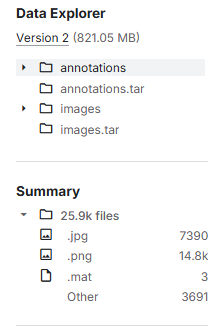
사진은 약 7천 개 가량 있다. 클래스가 37개이기에 클래스당 약 200개정도인 셈이다. 넉넉하진 않은 것 같은데,,, 탐지만 하는거라 상관 없나??
def develop(x):
    if x == 'local':
         return {
            'IMG_DIR': './data/OxfordIIITPet/images',
            'ANN_DIR': './data/OxfordIIITPet/annotations'
        }

    elif x == 'cloud':
        import os, sys; pip = '/content/drive/MyDrive/dev/pip'
        if pip not in sys.path: sys.path.insert(0, pip)

        if not os.path.exists('/content/mission7'):
            os.symlink('/content/drive/MyDrive/dev/mission/mission7', '/content/mission7')
        os.chdir('/content/mission7')

        os.environ['TORCH_HOME'] = '/content/drive/MyDrive/dev/model/pytorch_model'

        return {
            'IMG_DIR': '/content/drive/MyDrive/dev/data/OxfordIIITPet/images',
            'ANN_DIR': '/content/drive/MyDrive/dev/data/OxfordIIITPet/annotations'
        }

DIR = develop('local')
일단 개발환경을 설정해주고,
!mkdir -p ~/.kaggle
!cp /content/kaggle.json ~/.kaggle/
!chmod 600 ~/.kaggle/kaggle.json
!kaggle datasets download -d devdgohil/the-oxfordiiit-pet-dataset -p /content/drive/MyDrive/dev/data/OxfordIIITPet
!unzip /content/drive/MyDrive/dev/data/OxfordIIITPet/the-oxfordiiit-pet-dataset.zip -d /content/drive/MyDrive/dev/data/OxfordIIITPet
캐글 API를 연동해서 클라우드에 다운받고 압축을 풀었다.
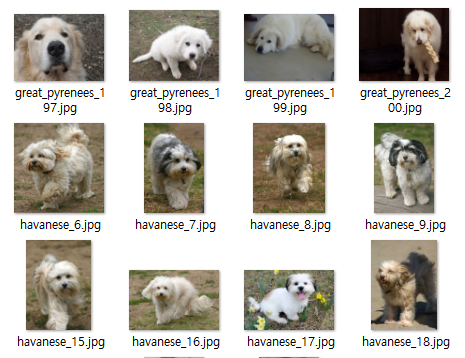
내가 좋아하는 댕댕이들이 한가득 있다.
5분 동안 사진만 본듯.
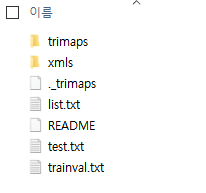
annotations 폴더에는 이런 게 들어있다. 뭔지 1도 모르겠네...
3. 데이터 확인
print(f"Total Images: {len(os.listdir(DIR['img_dir']))}")
print(f"Total Annotations: {len(os.listdir(DIR['ann_dir']))}")
경로가 잘 설정되었는지, 파일이 몇 개 있는지 확인해 보자.
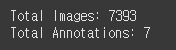
??? 왜 Annotation이 7개 밖에 없지? 좌표 데이터면 이미지 수만큼 있어야 하는 거 아닌가?
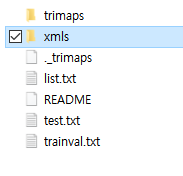
아무래도 경로를 xmls 까지 해줘야 하는 것 같다.
'ann_dir': '/content/drive/MyDrive/dev/data/OxfordIIITPet/annotations/annotations/xmls

print(f"Total Images: {len(os.listdir(DIR['img_dir']))}")
print(f"Total Annotations: {len(os.listdir(DIR['ann_dir']))}")
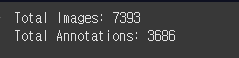
??? 다시 했는데 그래도 비율이 안 맞네.
근데 뭔가 2:1 비율인 것 같다.
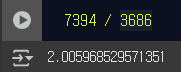
맞네.
그럼 추측해 보건데, 좌표가 있는 이미지는 Train set이고, 없는 건 Test set일 것이다.
시작부터 난관이다. 일단 이미지부터 확인해 보자.
# 이미지 시각화
random_img = random.choice(os.listdir(DIR['img_dir']))
img = Image.open(os.path.join(DIR['img_dir'], random_img))

plt.figure(figsize=(5, 5))
plt.imshow(img)
plt.title(f"{random_img}")
plt.axis('off')
plt.show()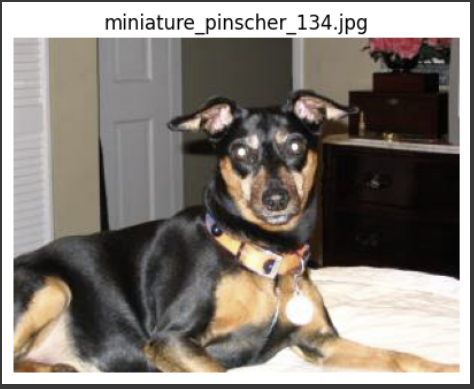
귀엽고 늠름한 미니핀이 나왔다. 화질이 생각보다 괜찮다.
하나만 랜덤으로 볼 땐 for루프 돌면서 index가져오지 않고 random.choice 하면 엄청 쉽게 가져와진다. 왜 이걸 이때까지 몰랐을까.
with open(os.path.join(DIR['ann_dir'], 'miniature_pinscher_134.xml')) as f:
    print(f.read())
miniature_pinscher_134.xml 파일을 열었더니 내용이 한줄로 길게 쭉 나온다.
miniature_pinscher_134의 얼굴 좌표는 xmin 101, ymin 35, xmax 231, ymax 130 이다.
실제 파일에 들어가서 맞나 확인해 보자.
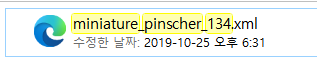
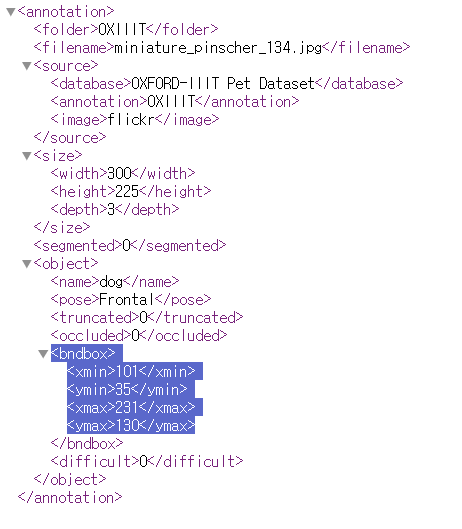
bndbox가 bounding box의 약자인 것 같다.
개발환경에서 불러온 것과 좌표가 일치한다.
이제 진짜 시작해 보자.
4. 헬퍼 클래스 생성
아래는 강사님이 COCO 데이터셋에 사용했던 헬퍼 클래스 코드다.
class CustomCOCO:
    def __init__(self, annotation_file):
        with open(annotation_file, 'r') as f:
            self.data = json.load(f)

        self.images = {img["id"]: img for img in self.data.get("images", [])}
        self.annotations = {}
        for ann in self.data.get("annotations", []):
            img_id = ann["image_id"]
            if img_id not in self.annotations:
                self.annotations[img_id] = []
            self.annotations[img_id].append(ann)

        self.cats = {cat["id"]: cat for cat in self.data.get("categories", [])}

    def loadImgs(self, ids):
        return [self.images[i] for i in ids if i in self.images]

    def getAnnIds(self, imgIds):
        ann_ids = []
        for img_id in imgIds:
            if img_id in self.annotations:
                ann_ids.extend([ann["id"] for ann in self.annotatinos[img_id]])
        return ann_ids

    def loadAnns(self, annIds):
        anns = []
        for ann in self.data.get("annotations", []):
            if ann["id"] in annIds:
                anns.append(ann)

        return anns
캐글 API 연동하면서 JSON 이라는 확장자를 처음 접했는데, 결국엔 이것도 다룰 줄 알아야 하는 것 같다.
근데 지금은 JSON이 아니고 XML로 진행하기 때문에 저 클래스를 똑같이 사용할 수 없다. 어떻게 변경해야 내가 사용할 수 있을까...?
class AnnotationParser:
    def __init__(self, xml_file):
        with open(xml_file, 'r') as f:
            self.data = xml.load(f)


AnnotationParser(os.path.join(DIR['ann_dir'], 'miniature_pinscher_134.xml'))
클래스명은 AnnotationParser로 바꿨다. 일단 __init__ 메서드부터 만들어 보자.
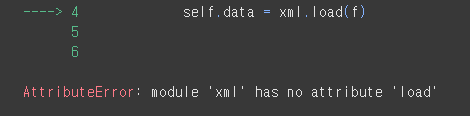
에러가 떴다. xml은 load 함수가 없단다. json형식만 load 함수를 쓸 수 있는 것 같다. 차별 너무하네.
import xml.etree.ElementTree as ET
xml 파싱할 때는 이 라이브러리를 써야한다고 한다. 완전 처음 보는 녀석인걸...
import xml.etree.ElementTree as ET

class AnnotationParser:
    def __init__(self, xml_file):
        tree = ET.parse(xml_file)
        self.root = tree.getroot()


parser = AnnotationParser(os.path.join(DIR['ann_dir'], 'miniature_pinscher_134.xml'))
print(parser.root.find('filename').text)
어찌어찌 쓰는 법을 찾아서 만들었다. 잘 됐는지 모르겠지만 일단 파일명이 나오긴 한다.
    def get_imgs(self, imgs):

    def get_ids(self, ids):

    def get_anns(self, anns):
다음은 함수를 만들 차례다. 근데 이상하다,,,,
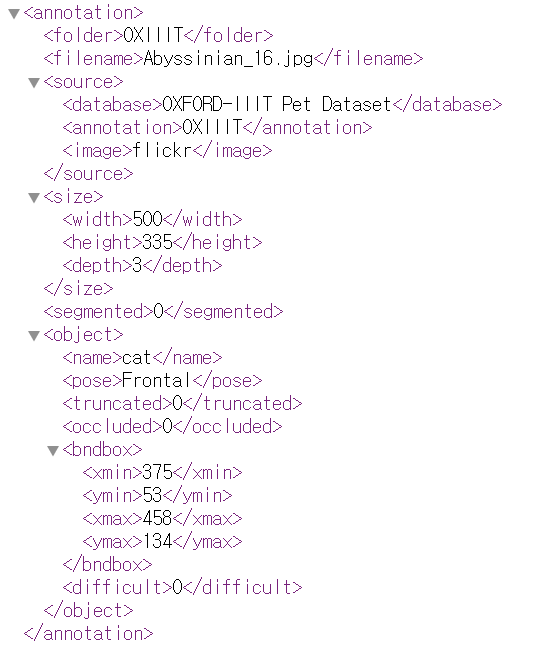
아무리 들여다 봐도 xml 파일 내에서 id를 찾을 수가 없다.
강사님은 imgs, ids, annids 3개에 대한 함수를 만들었던데 뭐지??
찾아보자.. ㅠㅠ
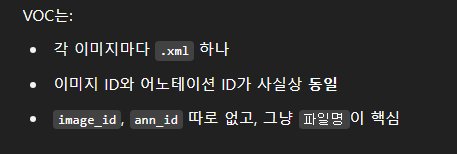
그렇다고 한다.
xml에서는 파일명을 id라 생각하면 되는 것이고, annsid 또한 파일명과 통합이니 구할 필요가 없다.
class AnnotationParser:
    def __init__(self, img_dir, ann_dir):
        self.img_dir = img_dir
        self.ann_dir = ann_dir
        self.xmls = self.get_xmls()

    def get_xmls(self):

    def get_imgs(self):

    def get_bboxes(self):
파서 클래스에 사용할 함수를 정의 후, xml 파일 초기화를 위해 이것만 init에 넣었다. 이제 하나씩 들여다 보자.
    def get_xmls(self):
        return [f.replace('.xml', '') for f in os.listdir(self.ann_dir) if f.endswith('.xml')]
먼저 .xml로 끝나는 파일을 전부 불러와서 확장자명을 전부 제거한다. 나중에 여기다가 .jpg만 붙이면 이름으로 매핑 가능!
    def get_img(self, img_id):
        return Image.open(os.path.join(self.img_dir, img_id + '.jpg'))
나중에 이미지를 찾아서 .jpg 확장자 명을 붙일 함수를 만들었다.
    def get_bboxes(self, img_id):
        tree = ET.parse(os.path.join(self.ann_dir, img_id + '.xml'))
        root = tree.getroot()
        bboxes = []
        for obj in root.findall('object'):
            bbox = obj.find('bndbox')
            coords = [int(bbox.find(t).text) for t in ['xmin','ymin','xmax','ymax']]
            bboxes.append(coords)
        return bboxes
마지막으로 좌표 찾는 함수... 모르겠어서 지선생 도움을 받았다.
ET.parse() 함수는 뭐하는 함수지??
ET.parse(): XML을 ElementTree 객체로 파싱
이미지명에 .xml를 붙여서 좌표 파일을 찾은 후 ET 형태로 파싱한다고 함...
tree.getroot() 함수는 또 뭐야??
tree.getroot(): xml 파일 내의 최상단 노드(보통 annotation)를 가져옴.
이후 root.find('size'), root.findall('object') 같은 방식으로 태그 탐색 가능.
아. 그렇구나! 결국 xml 파일 내에 html처럼 생긴 것을 트리형식이라 부르고, 각각의 계층을 노드라 부르는 것이다.
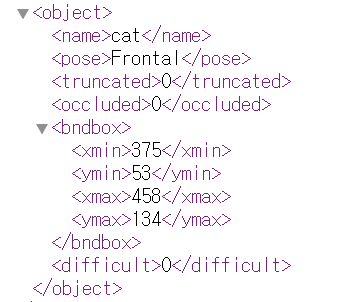
파일 구조를 다시 한번 보자.
for 루프를 돌면서 object 노드를 찾고, 그 노드에 속한 bnbbox 노드 정보('xmin','ymin','xmax','ymax')를 가져온다.
그렇게 가져온 정보를 bboxes = [] 리스트에 넣음
어렵다. 이해가 될듯말듯 하네....
AnnotationParser(DIR['img_dir'], DIR['ann_dir'])
일단 어찌어찌 만든 것 같은데,,, ㅠㅠ 잘 모르겠다. 나중에 에러뜨고 멘붕할 모습이 보인다...
parser = AnnotationParser(DIR['img_dir'], DIR['ann_dir'])일단 parser 변수에 저장...
5. 데이터셋 클래스 생성
드디어 데이터셋 클래스!
transform = v2.Compose([
    v2.Resize((300, 300)),
    v2.ToImage(),
    v2.ToDtype(torch.float32, scale=True),
    v2.Normalize(mean=[0.5, 0.5, 0.5],
                 std=[0.5, 0.5, 0.5])
])
일단 텐서화 하기 위해서 변수부터 만들어준다. SSD300을 쓸거라 해상도를 300으로 했다.
정규화를 해야하는데 mean & std 값을 어디서 찾아야 하지...?
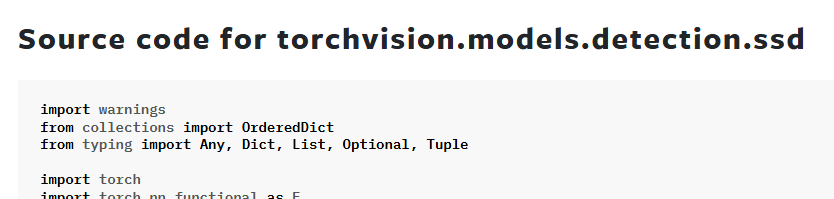
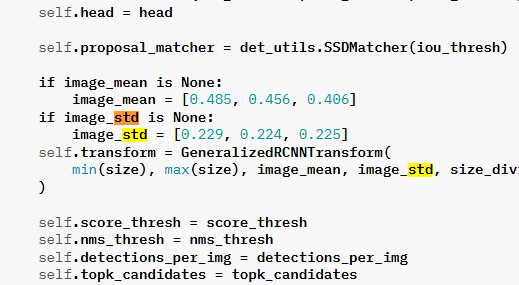
파이토치 홈페이지를 다 뜯어봤다.
image_mean = [0.485, 0.456, 0.406]
image_std = [0.229, 0.224, 0.225]
끝까지 안 나와서 SSD 300 모델이 동작하는 내부코드까지 들어갔다.
이 녀석 여기 숨어있었군!! 어쨌든 찾기 성공!
class PetDataset(Dataset):
    def __init__(self, parser, img_ids, transform=None):
        self.parser = parser
        self.img_ids = img_ids
        self.transform = transform

    def __len__(self):
        return len(self.img_ids)

    def __getitem__(self, idx):
        img_id = self.img_ids[idx]
        image = self.parser.get_img(img_id)
        bbox = self.parser.get_bboxes(img_id)

        if self.transform:
            image = self.transform(image)

        return image, bbox
늘 만들던 데이터셋을 만들었다.
아까 헬퍼 클래스에서 만든 함수를 쓰니까 뭔가 간결해졌다.
일단 오늘은 여기까지 하자...
무슨 클래스 만드는데만 하루종일 걸렸네 ㅠㅠ