문제 출처 : https://www.hackerrank.com/challenges/the-report/problem?isFullScreen=true
Q)
You are given two tables: Students and Grades. Students contains three columns ID, Name and Marks.
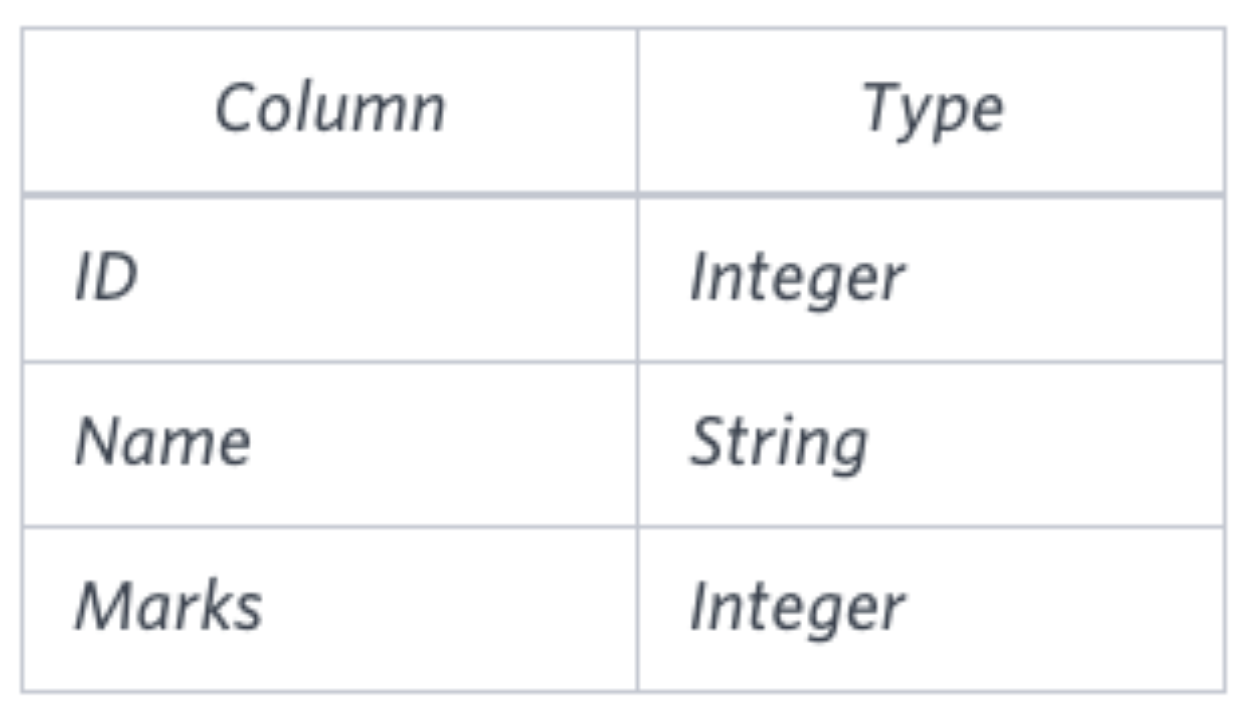
Grades contains the following data:

Ketty gives Eve a task to generate a report containing three columns: Name, Grade and Mark. Ketty doesn't want the NAMES of those students who received a grade lower than 8. The report must be in descending order by grade -- i.e. higher grades are entered first. If there is more than one student with the same grade (8-10) assigned to them, order those particular students by their name alphabetically. Finally, if the grade is lower than 8, use "NULL" as their name and list them by their grades in descending order. If there is more than one student with the same grade (1-7) assigned to them, order those particular students by their marks in ascending order.
Write a query to help Eve.
Sample Input

Sample Output
Maria 10 99
Jane 9 81
Julia 9 88
Scarlet 8 78
NULL 7 63
NULL 7 68
위 문제는 Students,Grade 테이블을 활용하여 각 학생들의 성적을 구하고 8점 이상인 학생은 이름을 표시하고, 8점 미만인 학생은 null 로 표현함과 동시에 조건에 따른 정렬 조건을 만족시키도록 조회하는 문제이다.
이번 문제를 해결하기 위해
BETWEEN A AND B if(Condition,A,B) 두가지 문법을 활용하였다.
우선 학생별 점수를 조회하기 위해 Students 테이블과 Grade 테이블을 Join 해야하는 부분이 파악되었고 각 학생의 점수를 통해 grade를 알아보기 위해 학생별 점수가 어떤 등급에 속하는지 알아내어야 했다.
등급은 어떤 점수사이에 위치하는지로 나눠지게 되어있고 이를 해결하기 위해
BETWEEN A AND B 문법을 사용하였다.
select s.name, g.grade, s.marks
from Students s
join Grades g
on s.marks between g.min_mark and g.max_mark
이처럼 각 학생의 점수가 어떤 등급에 해당하는지 위와 같은 방법으로 알아볼 수 있었다.
이 후 이제 Grade가 8점 이상인지, 아닌지에 따라 이름 표시여부를 나타내기 위해 IF 문법을 사용하였다
select if(g.grade<8,NULL,s.name), g.grade, s.marks
from Students s
join Grades g
on s.marks between g.min_mark and g.max_mark
이처럼 Grade가 8점 미만인 경우 NULL로 표현하고, 그게 아닌 경우 이름을 그대로 표현할 수 있도록 쿼리를 작성하였다.
마지막으로 정렬조건을 지키기 위해 ORDER BY 구문을 추가해줌으로써 쿼리를 완성하였다.
select if(g.grade<8,NULL,s.name), g.grade, s.marks
from Students s
join Grades g
on s.marks between g.min_mark and g.max_mark
order by g.grade DESC, s.name, s.marks;