Call required module and connect to database in AWS RDS
import mysql.connector

conn = mysql.connector.connect(
    host = "your host",
    port = 3306,
    user = "xxx",
    password = "xxx",
    database = "xxx"
)

cursor = conn.cursor(buffered=True)
Problem 1.
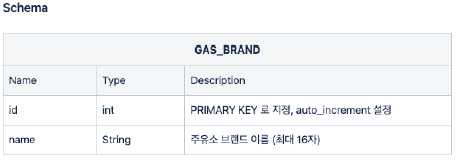
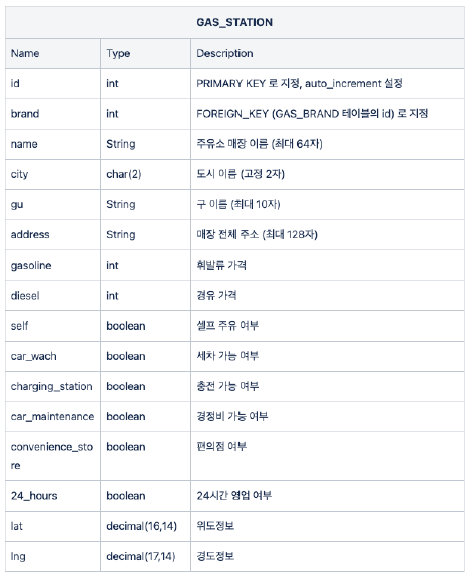
Create a table to store gas station data with the following structure.
# gas_brand
sql_b = "CREATE TABLE GAS_BRAND(" + \
            "id int not null auto_increment primary key, " + \
            "name varchar(16) not null)"

cursor.execute(sql_b)

# gas_station
sql_s = "CREATE TABLE GAS_STATION(" + \
            "id int auto_increment primary key, " +\
            "brand int not null, " +\
            "name varchar(64) not null, " +\
            "city char(2) not null, " +\
            "gu varchar(10) not null, " +\
            "address varchar(128) not null, " +\
            "gasoline int not null, " +\
            "diesel int not null, " +\
            "self boolean not null, " +\
            "car_wash boolean not null, " +\
            "charging_station boolean not null, " +\
            "car_maintenance boolean not null, " +\
            "convenience_store boolean not null, " +\
            "24_hours boolean not null, " +\
            "lat decimal(16,14) not null, " +\
            "lng decimal(17,14) not null, " +\
            "foreign key (brand) references GAS_BRAND(id));"

cursor.execute(sql_s)
Problem 2.
Enter and check the GAS_BRAND data with Python code as follows.
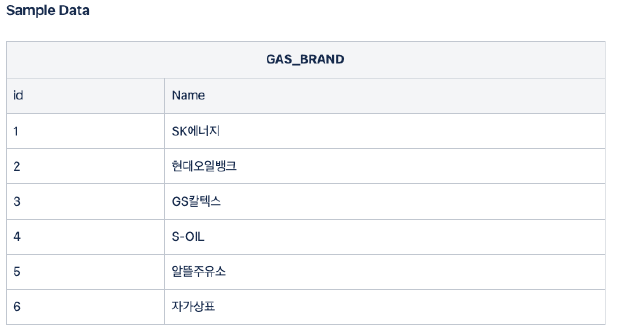
cursor.execute("insert into GAS_BRAND values (1, 'SK에너지')")
cursor.execute("insert into GAS_BRAND values (2, '현대오일뱅크')")
cursor.execute("insert into GAS_BRAND values (3, 'GS칼텍스')")
cursor.execute("insert into GAS_BRAND values (4, 'S-OIL')")
cursor.execute("insert into GAS_BRAND values (5, '알뜰주유소')")
cursor.execute("insert into GAS_BRAND values (6, '자가상표')")
connect.commit()
Table creation result: Desc GAS_BRAND; Desc GAS_STATION;
sql_result = "DESC GAS_STATION"
cursor.execute(sql_result)

result = cursor.fetchall()
for i in result:
    print(i)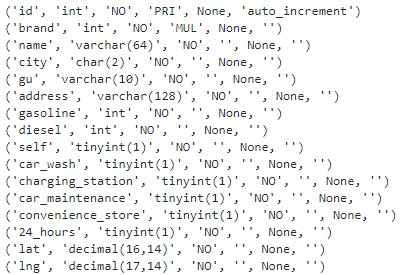
GAS_BRAND query result: SELECT * FROM GAS_BRAND;
sql_result = "SELECT * FROM GAS_BRAND"
cursor.execute(sql_result)

result = cursor.fetchall()
for i in result:
    print(i)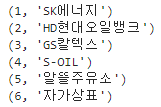
Problem 3.
Write the following function and test it
a. function that takes the currency unit character type as input and returns it as a numeric type (test input: ‘1,000’)
def stringToInt(s):
    if s != '':
        s = s.replace(',', '')
        return int(s)
    else:
        return None

stringToInt('1,000')
b. When a gas station brand is entered, a function returns an ID by referring to GAS_BRAND data (test input: ‘SK Energy’) - A function that receives an address and returns the district name (test input: ‘730 Heolleung-ro, Gangnam-gu, Seoul’)
def getID(brand):
    sql_result = "SELECT * FROM GAS_BRAND"
    cursor.execute(sql_result)
    result = cursor.fetchall()
    for i in result:
        if i[1] == brand:
            return i[0]
        elif brand == '알뜰(ex)':
            return 5

getID('SK에너지')
def getGu(add):
    addList = add.split()
    return addList[1]

getGu('서울시 강남구 헌릉로 730')
c. A function that receives an address and returns latitude and longitude (test input: ‘730 Heolleung-ro, Gangnam-gu, Seoul’)
import googlemaps
gmaps_key = "AIzaSyBn4xqGnCRJRbB-y4uCvBjqNu97pCuXcnc"
gmaps = googlemaps.Client(key = gmaps_key)

def getLL(add):
    tmp = gmaps.geocode(add, language='ko')
    lat = tmp[0].get("geometry")["location"]["lat"]
    lng = tmp[0].get("geometry")["location"]["lng"]

    return lat, lng

getLL('서울시 강남구 헌릉로 730')
Problem 4.
When importing data from the gas station page in the Python code, modify it to enter directly into the GAS_STATION table.
import time
from selenium import webdriver
from selenium.webdriver.common.by import By
from bs4 import BeautifulSoup
from tqdm import tqdm_notebook

url = 'https://www.opinet.co.kr/searRgSelect.do'
driver = webdriver.Chrome()
driver.get(url)
sido_list_raw = driver.find_element(By.ID, "SIDO_NM0")
sido_list = sido_list_raw.find_elements(By.TAG_NAME, "option")seoul_select = sido_list[1].get_attribute("value")
sido_list_raw.send_keys(seoul_select)gu_list_raw = driver.find_element(By.ID, "SIGUNGU_NM0")
gu_list = gu_list_raw.find_elements(By.TAG_NAME, "option")
gu_names = [option.get_attribute("value") for option in gu_list]
gu_names = gu_names[1:]sql = "INSERT INTO GAS_STATION (brand, name, city, gu, address, gasoline, diesel, self, " +\
"car_wash, charging_station, car_maintenance, convenience_store, 24_hours, lat, lng) " +\
"VALUES (%s, %s, '서울', %s, %s, %s, %s, %s, %s, %s, %s, %s, %s, %s, %s)"def check(data, tag):
return 'off' not in data.select_one(tag)['src']sqltmp = "ALTER TABLE GAS_STATION MODIFY diesel int NULL;"
cursor.execute(sqltmp)
conn.commit()
for gu in tqdm_notebook(gu_names):
element = driver.find_element(By.ID, 'SIGUNGU_NM0')
element.send_keys(gu)
time.sleep(0.5)
html = driver.page_source
soup = BeautifulSoup(html, 'html.parser')
cnt = int(driver.find_element(By.ID, 'totCnt').text)
for i in range(1, cnt+1):
station = driver.find_element(By.CSS_SELECTOR, f'#body1 > tr:nth-child({i}) > td.rlist > a')
station.click()
html = driver.page_source
soup = BeautifulSoup(html, 'html.parser')
data = soup.select('#os_dtail_info')[0]
# brand
brand = getID(data.select_one('#poll_div_nm').text)
# name
name = data.select_one('.header').text.strip()
# address
address = data.select_one('#rd_addr').text
# gasoline
gasoline = stringToInt(data.select_one('#b027_p').text)
# diesel
diesel = stringToInt(data.select_one('#d047_p').text)
# self
slf = data.select_one('#SPAN_SELF_VLT_YN_ID')
if type(slf.find('img')) == type(None):
is_self = False
else:
is_self = True
# car_wash
car_wash = check(data, '#cwsh_yn')
# charging_station
charging_station = check(data, '#lpg_yn')
# car_maintenance
car_maintenance = check(data, '#maint_yn')
# convenience_store
convenience_store = check(data, '#cvs_yn')
# 24_hours
sel24 = check(data, '#sel24_yn')
tmp = gmaps.geocode(address, language='ko')
# lat
lat = tmp[0].get('geometry')['location']['lat']
# lng
lng = tmp[0].get('geometry')['location']['lng']
cursor.execute(sql, (brand, name, gu, address, gasoline, diesel,
is_self, car_wash, charging_station, car_maintenance, convenience_store, sel24, lat, lng))
conn.commit()
cursor.execute("select count(*) from GAS_STATION")
result = cursor.fetchall()
print(result[0])
cursor.execute("select * from GAS_STATION limit 10")
result = cursor.fetchall()
for i in result:
print(i)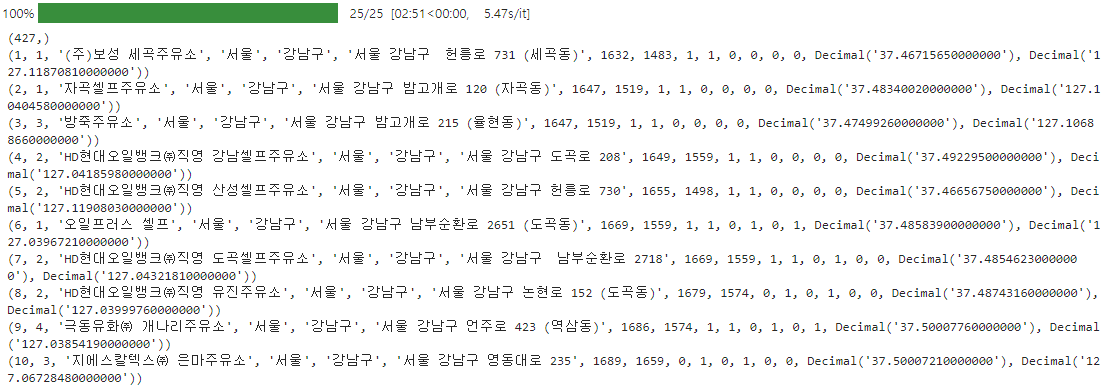
Problem 5.
For visualization, query using the following rules and save as a CSV file. (written in Python code)
-
Full data is being imported, but the brand name should be displayed instead of the gas station brand ID. (Sort by gas station store ID)
-
It must be saved in the following format (note the brand name and column name, id: GAS_STORE.id)
import pandas as pd

sql = "select s.id, b.name 'brand', s.name, s.city, s.gu, s.address, s.gasoline, s.diesel, s.self, " +\
        "s.car_wash, s.charging_station, s.car_maintenance, s.convenience_store, s.24_hours, " +\
        "s.lat, s.lng " +\
        "from GAS_BRAND b, GAS_STATION s " +\
        "where b.id = s.brand ORDER BY s.id"

cursor.execute(sql)
result = cursor.fetchall()

columns = [i[0] for i in cursor.description]
df = pd.DataFrame(result)
df.columns = columns
df.head()
df.to_csv('./sql2_oil_station_data.csv', index=False, encoding='utf-8')
df = pd.read_csv('./sql2_oil_station_data.csv', index_col=0, thousands=',', encoding='utf-8')
df.head()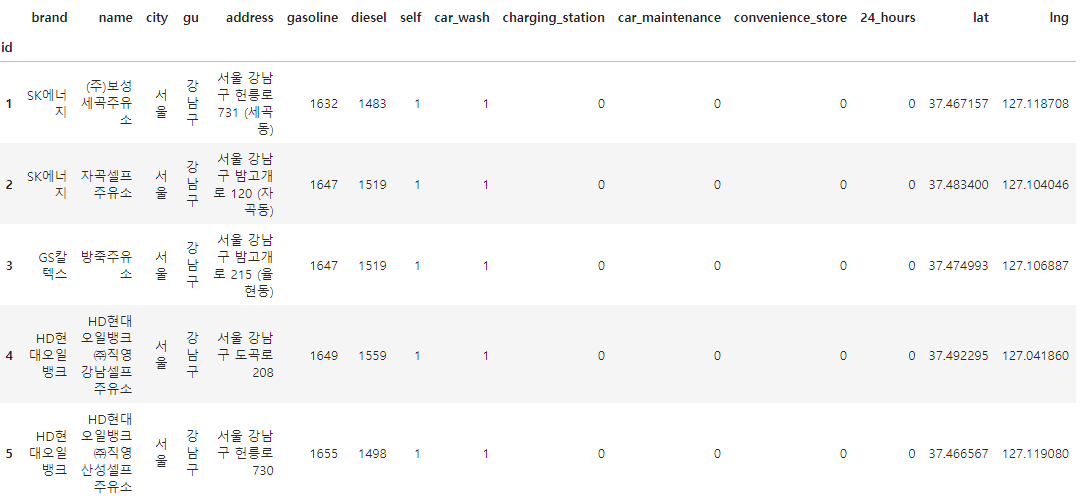
Problem 6.
Search for information on gas stations located within 1 kilometer from Miwang Building using latitude and longitude information.
- Gas station ID, gas station brand name, gas station store name, address, distance from Miwang Building (km)
lat, lng = getLL('서울 강남구 강남대로 364')
lat, lng
cursor.execute('set @location = point(127.02915553846, 37.495435686811)')

sql = "select s.id, b.name 'brand', s.name, s.address, ST_Distance_Sphere(@location, point(lng, lat))/1000 'distance' " +\
        "from GAS_BRAND b, GAS_STATION s " +\
        "where s.brand = b.id " +\
        "having distance <= 1 " +\
        "order by distance"
cursor.execute(sql)
result = cursor.fetchall()

for i in result:
    print(i)
Problem 7.
Using latitude and longitude information, search for the 10 nearest gas stations that allow self-fueling at Miwang Building, are open 24 hours a day, and have a convenience store, sorted in order of lowest gasoline price.
- Gas station ID, gas station brand name, gas station store name, address, gasoline price, additional information (self-service, 24-hour, convenience store), distance from Miwang Building (km)
sql = "select * " +\
        "from (select s.id, b.name 'brand', s.name, s.address, s.gasoline, s.self, s.24_hours, s.convenience_store, ST_Distance_Sphere(@location, point(lng, lat))/1000 'distance'" +\
        "from GAS_BRAND b, GAS_STATION s " +\
        "where s.brand = b.id and s.self=1 and s.24_hours=1 and s.convenience_store=1 " +\
        "order by distance limit 10) as tmp " +\
        "order by tmp.gasoline;"
cursor.execute(sql)
result = cursor.fetchall()

for i in result:
    print(i)
Problem 8.
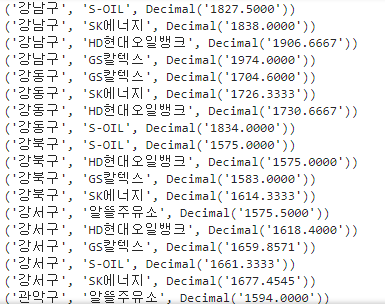
Search for the average price of gasoline by gas station brand and print it in descending order.
- District name, gas station brand name, average price of gasoline
sql = "select s.gu, b.name, avg(s.gasoline) " +\
        "from GAS_STATION as s, GAS_BRAND as b " +\
        "where b.id = s.brand " +\
        "group by s.gu, b.name " +\
        "order by s.gu, avg(s.gasoline)"

cursor.execute(sql)
result = cursor.fetchall()
for i in result:
    print(i)