AI free week course
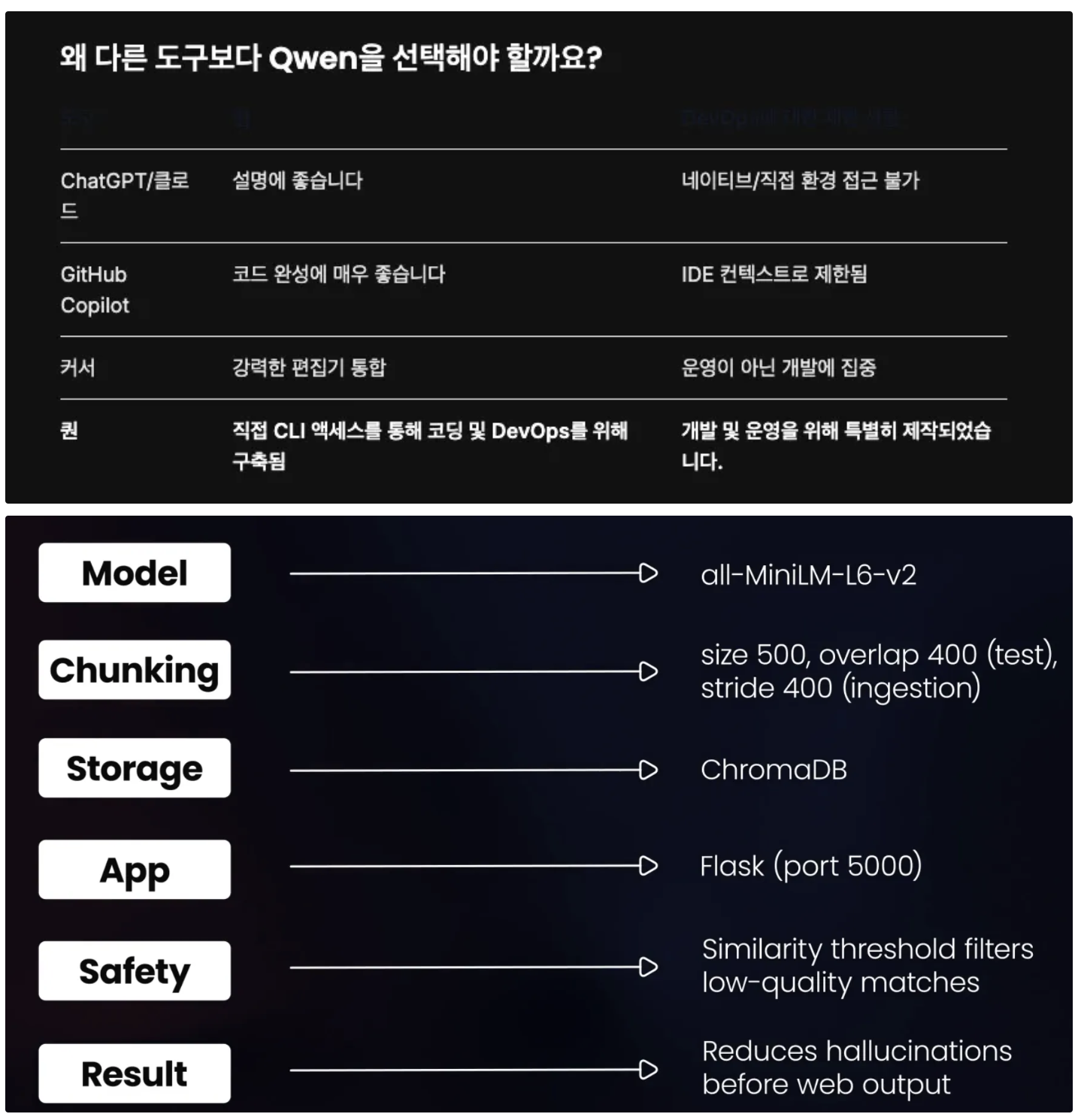
UV 활용하기
# Install UV package manager
echo "⚡ Installing UV package manager..."
pip install uv

# Install required packages
echo "📚 Installing RAG dependencies..."
uv는 Astral(Black, Ruff 제작팀)이 만든 프로젝트로,
Python 생태계의 의존성 설치 속도, 환경 격리, 빌드 캐시 문제를 해결하기 위해 개발되었습니다.
따라서 pip install 대신 uv pip install을 사용하면 더 빠르고 신뢰성 있는 환경 구성이 가능합니다.
원하신다면 uv를 이용해 RAG 환경(langchain, chromadb, faiss, openai, torch 등)을 세팅하는 예시도 함께 보여드릴까요?
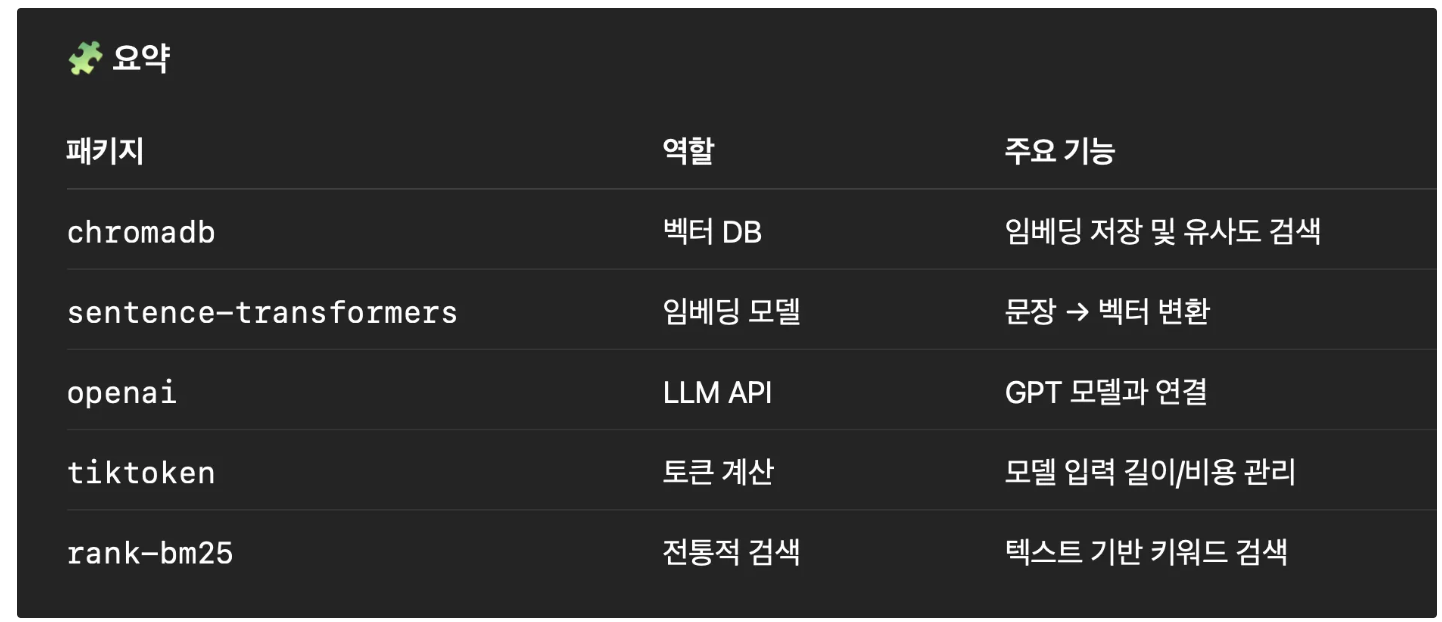
"""
RAG System for AWS Compliance Documentation
This system processes and searches AWS compliance documents.
"""

import chromadb
from sentence_transformers import SentenceTransformer
import os
import glob
from typing import List, Dict
import hashlib
import random

class RAGSystem:
    def __init__(self, persist_path=None):
        """Initialize the RAG system"""
        if persist_path is None:
            # Use absolute path in the rag-system directory
            persist_path = os.path.join(os.path.dirname(os.path.abspath(__file__)), "chroma_db")
        self.client = chromadb.PersistentClient(path=persist_path)
        self.collection = self.client.get_or_create_collection(
            name="aws_compliance",
            metadata={"hnsw:space": "cosine"}
        )
        self.model = SentenceTransformer('all-MiniLM-L6-v2')

    def chunk_text(self, text: str, chunk_size: int = 120) -> List[str]:
        """
        Split text into chunks for processing - INTENTIONALLY BAD
        """
        chunks = []
        # Bad approach: Small fixed size chunks that break mid-sentence
        step = 100  # Step size for moving window
        for i in range(0, len(text), step):
            chunk = text[i:i + chunk_size]
            chunks.append(chunk)
        return chunks

    def process_documents(self, docs_path: str):
        """Process documents for vector storage"""
        print("📚 Processing documents...")

        # Find all markdown and text files
        files = glob.glob(f"{docs_path}/**/*.md", recursive=True)
        files.extend(glob.glob(f"{docs_path}/**/*.txt", recursive=True))

        all_chunks = []
        all_embeddings = []
        all_ids = []
        all_metadatas = []

        for file_path in files:
            print(f"  Processing: {os.path.basename(file_path)}")

            with open(file_path, 'r', encoding='utf-8') as f:
                content = f.read()

            # Split content into chunks with bad size
            chunks = self.chunk_text(content, chunk_size=120)

            for i, chunk in enumerate(chunks):
                # Create unique ID
                chunk_id = hashlib.md5(f"{file_path}_{i}_{chunk[:50]}".encode()).hexdigest()

                # Store basic metadata
                metadata = {
                    "source": os.path.basename(file_path),
                    "chunk_index": i
                }

                # Generate embedding
                embedding = self.model.encode(chunk)

                all_chunks.append(chunk)
                all_embeddings.append(embedding.tolist())
                all_ids.append(chunk_id)
                all_metadatas.append(metadata)

        # Add to ChromaDB
        if all_chunks:
            self.collection.add(
                documents=all_chunks,
                embeddings=all_embeddings,
                ids=all_ids,
                metadatas=all_metadatas
            )
            print(f"✅ Added {len(all_chunks)} chunks to vector store")

    def search(self, query: str, n_results: int = 3) -> List[Dict]:
        """
        Search for relevant documents - INTENTIONALLY DEGRADED
        """
        import numpy as np

        # Direct query without any enhancement
        query_embedding = self.model.encode(query)

        # Set seed for consistent noise (intentionally degrading search)
        np.random.seed(42)
        # Add significant noise to degrade search quality
        noise = np.random.normal(0, 0.15, query_embedding.shape)
        query_embedding = query_embedding + noise

        # Return only 1 result to limit chances of finding correct info
        results = self.collection.query(
            query_embeddings=[query_embedding.tolist()],
            n_results=1  # Return only 1 result
        )

        # Format results
        formatted_results = []
        if results['documents']:
            for i in range(len(results['documents'][0])):
                formatted_results.append({
                    'content': results['documents'][0][i],
                    'metadata': results['metadatas'][0][i] if results['metadatas'] else {},
                    'distance': results['distances'][0][i] if results['distances'] else 0
                })

        return formatted_results


def main():
    """Initialize and test the RAG system"""
    from rag_evaluator import RAGEvaluator

    print("🔬 RAG SYSTEM BASELINE TEST")
    print("Testing AWS Compliance Documentation Search")
    print("=" * 60)

    # Initialize system
    rag = RAGSystem()

    # Process documents (if not already done)
    docs_path = "/root/rag-debugging/aws-compliance-docs"
    if not os.path.exists(docs_path):
        # Try local path relative to script location
        docs_path = os.path.join(os.path.dirname(__file__), "../aws-compliance-docs")

    if os.path.exists(docs_path):
        rag.process_documents(docs_path)
    else:
        print(f"❌ Documents not found at: {docs_path}")
        return

    # Initialize evaluator
    evaluator = RAGEvaluator(rag)

    # Run evaluation
    output_file = '/root/rag-debugging/baseline_accuracy.txt'
    if not os.path.exists('/root'):
        output_file = './baseline_accuracy.txt'

    results = evaluator.run_evaluation(output_file=output_file)

if __name__ == "__main__":
    main()
Qwen 명령
Analyze the RAG system at /root/rag-debugging/rag-system/rag_system.py
The system is only achieving 45% accuracy on compliance queries.

1. Identify the 4 main problems causing poor accuracy
2. For each problem, explain:
   - What's wrong
   - Why it impacts accuracy
   - How to fix it
3. Create a markdown report and save it as /root/rag-debugging/rag_issues.md

Focus on:
- Document chunking strategy
- Metadata extraction
- Search methodology
- Query processing
Based on the problems identified in rag_issues.md, create an improved RAG system that fixes all 4 issues:
1. **Smart Chunking**: Implement sentence-aware chunking with 512 tokens and 50 token overlap
2. **Metadata Filtering**: Extract AWS service, section, and policy IDs for each chunk
3. **Hybrid Search**: Combine 70% semantic + 30% keyword search with BM25
4. **Query Enhancement**: Add acronym expansion and synonym support
Create the improved system as /root/rag-debugging/improved_rag_system.py
Ensure the system:
- Uses tiktoken for proper token counting
- Implements BM25 for keyword search
- Extracts metadata for all AWS services
- Enhances queries with domain-specific terms
- Achieves 90%+ accuracy on the test cases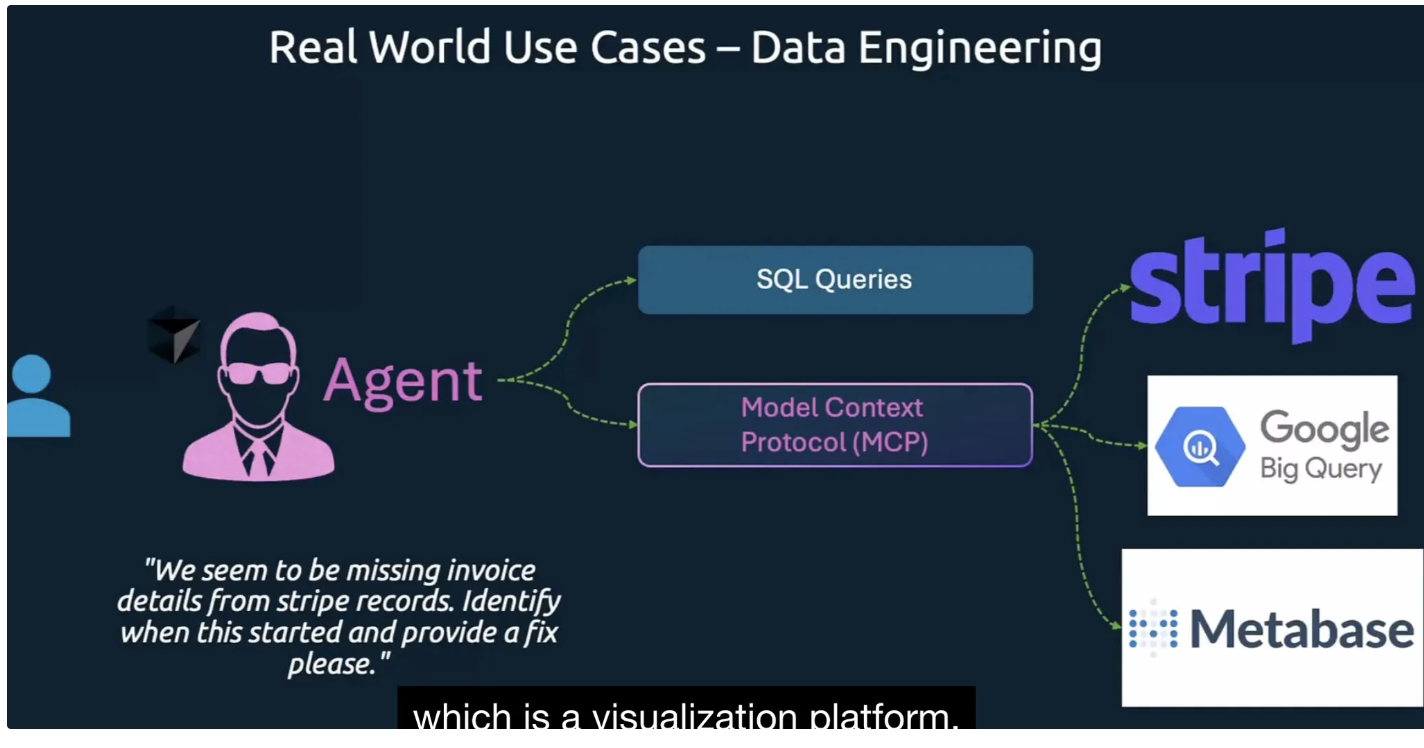
- ~/.qwen/setting.json
{
    "theme": "Qwen Dark",
    "selectedAuthType": "openai",
    "mcpServers": {
      "cfn-mcp-server": {
        "command": "uvx",
        "args": [
          "awslabs.cfn-mcp-server@latest"
        ],
        "env": {
          "AWS_PROFILE": "default"
        },
        "disabled": false,
        "autoApprove": []
      },
      "awslabs.aws-documentation-mcp-server": {
        "command": "uvx",
        "args": ["awslabs.aws-documentation-mcp-server@latest"],
        "env": {
            "FASTMCP_LOG_LEVEL": "ERROR",
            "AWS_DOCUMENTATION_PARTITION": "aws"
        },
        "disabled": false,
        "autoApprove": []
        },
        "awslabs.terraform-mcp-server": {
      "command": "uvx",
      "args": ["awslabs.terraform-mcp-server@latest"],
      "env": {
        "FASTMCP_LOG_LEVEL": "ERROR"
      },
      "disabled": false,
      "autoApprove": []
        }
    },
    "hasSeenIdeIntegrationNudge": true,
    "ideMode": true
  }
qwen mcp list
qwen 접속후
/mcp list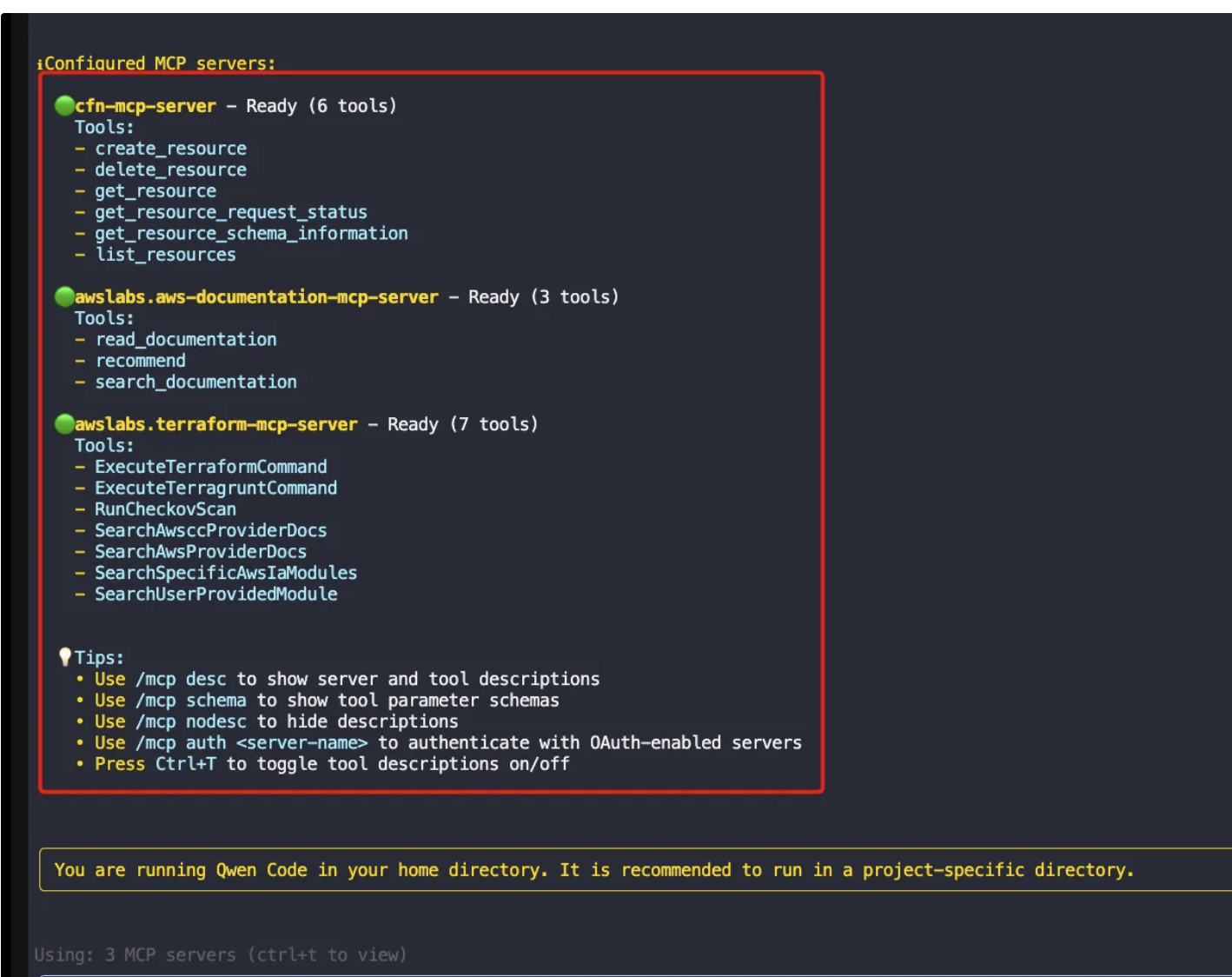
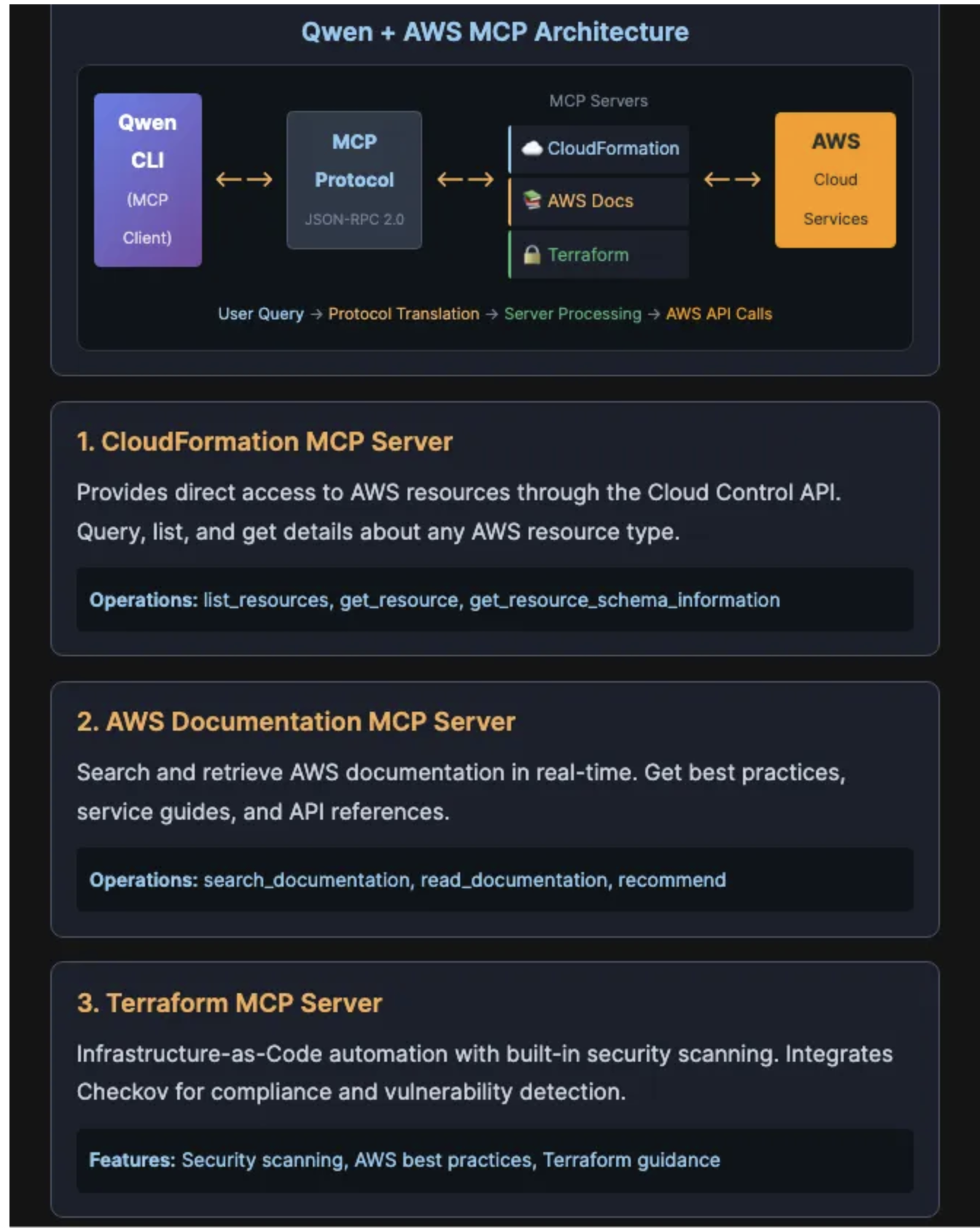
"Using the CloudFormation MCP server, analyze AWS Security Groups:

1. List all security groups (AWS::EC2::SecurityGroup) from us-east-1 and save to /root/aws-security-groups.txt

2. For each security group found, get detailed information including:
   - Ingress rules (inbound traffic)
   - Egress rules (outbound traffic)
   - Associated VPC
   - Save details to /root/sg-details.txt

3. Create a security analysis summary at /root/security-groups-summary.txt that includes:
   - Total number of security groups
   - Any security groups with 0.0.0.0/0 access (potential risk)
   - Security groups allowing SSH (port 22) or RDP (port 3389)
   - Security groups with all ports open

Use the cfn-mcp-server tools to query these resources."
"Using the AWS Documentation MCP server:
Search for 'EC2 Security Group best practices' and save key findings to /root/sg-best-practices.txt
Focus on least privilege and common anti-patterns.
Use the awslabs.aws-documentation-mcp-server tools."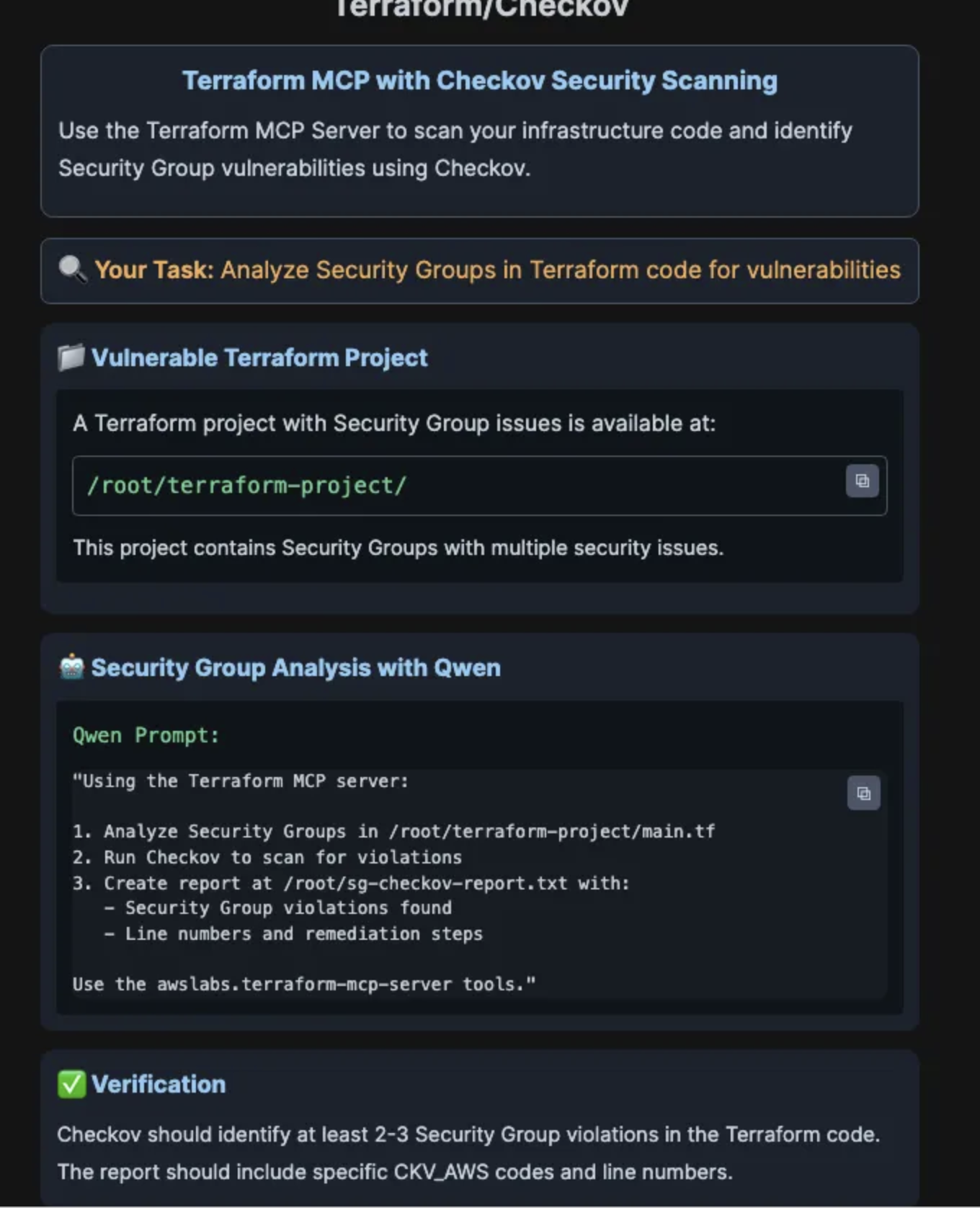
✓"Using the Terraform MCP server:

1. Analyze Security Groups in /root/terraform-project/main.tf
2. Run Checkov to scan for violations
3. Create report at /root/sg-checkov-report.txt with:
   - Security Group violations found
   - Line numbers and remediation steps

Use the awslabs.terraform-mcp-server tools."
Checkov는 **Terraform, CloudFormation, Kubernetes, Docker 등 인프라 코드(IaC)**를 자동으로 보안 및 규정 준수(Compliance) 기준에 맞게 검사하는 오픈소스 보안 스캐너입니다.
즉, 클라우드 인프라를 코드로 관리할 때 보안 취약점이나 잘못된 설정을 미리 찾아내주는 도구입니다."Using the Terraform MCP server:
1. Create /root/terraform-project/secure-security-groups.tf with fixed Security Groups
2. Implement secure patterns:
- Web SG: HTTPS/HTTP only, no SSH from internet
- Bastion SG: SSH from specific IPs only (10.0.0.0/8)
- App SG: Traffic from Web SG only
- DB SG: Traffic from App SG only
3. Run Checkov validation and save results to /root/terraform-project/sg-validation.txt
Use the awslabs.terraform-mcp-server tools."- 스펙 주도 개발
https://github.com/github/spec-kit
#!/bin/bash

echo "========================================="
echo "Setting up Qwen DevOps Team Agents"
echo "========================================="

# Create Qwen agents directory if it doesn't exist
echo "Creating Qwen agents directory..."
mkdir -p ~/.qwen/agents

# Clear any existing agents to prevent duplicates
echo "Clearing existing agents..."
rm -f ~/.qwen/agents/*.md 2>/dev/null

# Copy agent configurations from the correct location
echo "Installing Docker Optimizer agent..."
mv /root/agents/docker-optimizer.md ~/.qwen/agents/
echo "✅ Docker Optimizer agent installed"

echo "Installing Terraform Security agent..."
mv /root/agents/terraform-security.md ~/.qwen/agents/
echo "✅ Terraform Security agent installed"

# Verify installation
echo ""
echo "Verifying agent installation..."
if [ -f ~/.qwen/agents/docker-optimizer.md ] && [ -f ~/.qwen/agents/terraform-security.md ]; then
    echo "✅ All agents successfully installed!"
    echo ""
    echo "Available agents:"
    echo "  🐳 docker-optimizer    - Optimizes Docker images for ECR"
    echo "  🔒 terraform-security  - Scans Terraform for security issues"
else
    echo "❌ Error: Some agents failed to install"
    exit 1
fi

echo ""
echo "========================================="
echo "Setup Complete!"
echo "========================================="
echo ""
echo "Next steps:"
echo "1. Start Qwen interactive mode: qwen"
echo "2. View agents: /agents manage"
echo "3. Create new agents: /agents create"
echo "4. Use agents by describing your needs"
echo ""
echo "Example usage:"
echo '  "Optimize the Docker image in /root/production-issues/bad-docker/"'
echo '  "Check /root/production-issues/bad-terraform/ for security issues"'
echo ""
echo "Note: Qwen will automatically detect which agent to use based on your request!"
echo ""

즐겁게 공부하고 사람들에게 도움을 주는 개발자가 되고 싶습니다.