- alias k="kubectl"
- alias cc="clusterctl"
kind 설치 및 설정
kind 설치
❯ curl -Lo ./kind https://kind.sigs.k8s.io/dl/v0.11.1/kind-linux-amd64
❯ chmod +x ./kind
❯ mv ./kind /usr/bin/kind
❯ kind version
kind v0.11.1 go1.16.4 linux/amd64
manager용 kind 설정 적용
docker로 쓸 경우 적용 필요하다.
❯ cat > kind-cluster-api.yaml <<EOF
kind: Cluster
apiVersion: kind.x-k8s.io/v1alpha4
nodes:
  - role: control-plane
    image: kindest/node:v1.22.5@sha256:d409e1b1b04d3290195e0263e12606e1b83d5289e1f80e54914f60cd1237499d
    extraMounts:
      - hostPath: /var/run/docker.sock
        containerPath: /var/run/docker.sock
EOF
kind-cluster-api.yaml
kind: Cluster
apiVersion: kind.x-k8s.io/v1alpha4
nodes:
  - role: control-plane
    image: kindest/node:v1.22.5@sha256:d409e1b1b04d3290195e0263e12606e1b83d5289e1f80e54914f60cd1237499d
    extraMounts:
      - hostPath: /var/run/docker.sock
        containerPath: /var/run/docker.sock
적용하기
❯ kind create cluster --config ./kind-cluster-api.yaml

❯ docker ps --format "table {{.Names}} {{.Command}}"
NAMES COMMAND
kind-control-plane "/usr/local/bin/entr…"
clusterctl 설치 및 kind에 적용
❯ curl -L https://github.com/kubernetes-sigs/cluster-api/releases/download/v1.1.2/clusterctl-linux-amd64 -o clusterctl
#  2m 11s
❯ chmod +x ./clusterctl
❯ sudo mv ./clusterctl /usr/local/bin/clusterctl

❯ clusterctl version
clusterctl version: &version.Info{Major:"1", Minor:"1", GitVersion:"v1.1.2", GitCommit:"3433f7b769b4e7f5cb899b2742a5a8a1a9f51b3e", GitTreeState:"clean", BuildDate:"2022-02-17T19:14:59Z", GoVersion:"go1.17.3", Compiler:"gc", Platform:"linux/amd64"}
현재 지정한 클러스터에 clusterapi를 적용한다.
# 이전 단계에서 만든 kind 클러스터에 적용될 것.
❯ k config current-context
kind-kind

❯ clusterctl init --infrastructure docker
Fetching providers
Installing cert-manager Version="v1.5.3"
Waiting for cert-manager to be available...
Installing Provider="cluster-api" Version="v1.1.2" TargetNamespace="capi-system"
Installing Provider="bootstrap-kubeadm" Version="v1.1.2" TargetNamespace="capi-kubeadm-bootstrap-system"
Installing Provider="control-plane-kubeadm" Version="v1.1.2" TargetNamespace="capi-kubeadm-control-plane-system"
Installing Provider="infrastructure-docker" Version="v1.1.2" TargetNamespace="capd-system"

Your management cluster has been initialized successfully!

You can now create your first workload cluster by running the following:

  clusterctl generate cluster [name] --kubernetes-version [version] | kubectl apply -f -

❯ k get cluster
No resources found in default namespace.
단일 노드 클러스터 생성
❯ clusterctl generate cluster capi-one --flavor development \
--kubernetes-version v1.22.5 \
--control-plane-machine-count=1 \
--worker-machine-count=0 \
> capi-one.yaml

❯ k apply -f ./capi-one.yaml
cluster.cluster.x-k8s.io/capi-one created
dockercluster.infrastructure.cluster.x-k8s.io/capi-one created
kubeadmcontrolplane.controlplane.cluster.x-k8s.io/capi-one-control-plane created
dockermachinetemplate.infrastructure.cluster.x-k8s.io/capi-one-control-plane created
dockermachinetemplate.infrastructure.cluster.x-k8s.io/capi-one-md-0 created
kubeadmconfigtemplate.bootstrap.cluster.x-k8s.io/capi-one-md-0 created
machinedeployment.cluster.x-k8s.io/capi-one-md-0 created


❯ k get cluster
NAME       PHASE         AGE   VERSION
capi-one   Provisioned   32s

❯ k get kubeadmcontrolplane
NAME                     CLUSTER    INITIALIZED   API SERVER AVAILABLE   REPLICAS   READY   UPDATED   UNAVAILABLE   AGE   VERSION
capi-one-control-plane   capi-one   true                                 1                  1         1             52s   v1.22.5

❯ cc describe cluster capi-one
NAME                                                         READY  SEVERITY  REASON                   SINCE  MESSAGE
Cluster/capi-one                                             False  Info      WaitingForControlPlane   8s
├─ClusterInfrastructure - DockerCluster/capi-one             True                                      5s
└─ControlPlane - KubeadmControlPlane/capi-one-control-plane
  └─Machine/capi-one-control-plane-5llsw                     False  Info      WaitingForBootstrapData  4s     1 of 2 completed

❯ docker ps --format "table {{.Names}} {{.Command}}"
NAMES COMMAND
capi-one-control-plane-5llsw "/usr/local/bin/entr…"
capi-one-lb "haproxy -sf 7 -W -d…"
kind-control-plane "/usr/local/bin/entr…"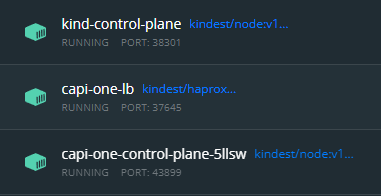
새로 뜬게 보인다.
생성 과정 상세
❯ cc describe cluster capi-one
NAME                                                         READY  SEVERITY  REASON                  SINCE  MESSAGE
Cluster/capi-one                                             False  Info      WaitingForControlPlane  11s
├─ClusterInfrastructure - DockerCluster/capi-one             True                                     9s
└─ControlPlane - KubeadmControlPlane/capi-one-control-plane
  └─Machine/capi-one-control-plane-wfrx8                     False  Info      Bootstrapping           1s     1 of 2 completed

❯ cc describe cluster capi-one
NAME                                                         READY  SEVERITY  REASON                 SINCE  MESSAGE
Cluster/capi-one                                             False  Info      WaitingForKubeadmInit  17s
├─ClusterInfrastructure - DockerCluster/capi-one             True                                    28s
└─ControlPlane - KubeadmControlPlane/capi-one-control-plane  False  Info      WaitingForKubeadmInit  17s
  └─Machine/capi-one-control-plane-wfrx8                     False  Info      Bootstrapping          20s    1 of 2 completed

❯ cc describe cluster capi-one
NAME                                                         READY  SEVERITY  REASON                                                SINCE  MESSAGE
Cluster/capi-one                                             False  Info      Bootstrapping @ Machine/capi-one-control-plane-wfrx8  2s     1 of 2 completed
├─ClusterInfrastructure - DockerCluster/capi-one             True                                                                   33s
└─ControlPlane - KubeadmControlPlane/capi-one-control-plane  False  Info      Bootstrapping @ Machine/capi-one-control-plane-wfrx8  2s     1 of 2 completed
  └─Machine/capi-one-control-plane-wfrx8                     False  Info      Bootstrapping                                         25s    1 of 2 completed

❯ cc describe cluster capi-one
NAME                                                         READY  SEVERITY  REASON  SINCE  MESSAGE
Cluster/capi-one                                             True                     3s
├─ClusterInfrastructure - DockerCluster/capi-one             True                     41s
└─ControlPlane - KubeadmControlPlane/capi-one-control-plane  True                     3s
  └─Machine/capi-one-control-plane-wfrx8                     True                     5s
get kubeconfig
❯ cc get kubeconfig capi-one > capi-one-kconfig.yaml

# server 부분은 docker-desktop에서 확인한 포트로 바꿔줘야 한다.
❯ cc get kubeconfig capi-one | grep server
    server: https://172.18.0.3:6443
capi-one-kconfig.yaml 수정
apiVersion: v1
clusters:
- cluster:
    certificate-authority-data: ---
    # server: https://172.18.0.3:6443
    server: https://localhost:43899
  name: capi-one
 ...
호스트에서 kubectl로 확인 가능함.
❯ k --kubeconfig=./capi-one-kconfig.yaml \
get no
NAME                           STATUS     ROLES                  AGE     VERSION
capi-one-control-plane-5llsw   NotReady   control-plane,master   5m57s   v1.22.5
CNI 설치
❯ k --kubeconfig=./capi-one-kconfig.yaml \
apply -f https://docs.projectcalico.org/v3.21/manifests/calico.yaml
configmap/calico-config created
customresourcedefinition.apiextensions.k8s.io/bgpconfigurations.crd.projectcalico.org created
customresourcedefinition.apiextensions.k8s.io/bgppeers.crd.projectcalico.org created
customresourcedefinition.apiextensions.k8s.io/blockaffinities.crd.projectcalico.org created
customresourcedefinition.apiextensions.k8s.io/caliconodestatuses.crd.projectcalico.org created
customresourcedefinition.apiextensions.k8s.io/clusterinformations.crd.projectcalico.org created
customresourcedefinition.apiextensions.k8s.io/felixconfigurations.crd.projectcalico.org created
customresourcedefinition.apiextensions.k8s.io/globalnetworkpolicies.crd.projectcalico.org created
customresourcedefinition.apiextensions.k8s.io/globalnetworksets.crd.projectcalico.org created
customresourcedefinition.apiextensions.k8s.io/hostendpoints.crd.projectcalico.org created
customresourcedefinition.apiextensions.k8s.io/ipamblocks.crd.projectcalico.org created
customresourcedefinition.apiextensions.k8s.io/ipamconfigs.crd.projectcalico.org created
customresourcedefinition.apiextensions.k8s.io/ipamhandles.crd.projectcalico.org created
customresourcedefinition.apiextensions.k8s.io/ippools.crd.projectcalico.org created
customresourcedefinition.apiextensions.k8s.io/ipreservations.crd.projectcalico.org created
customresourcedefinition.apiextensions.k8s.io/kubecontrollersconfigurations.crd.projectcalico.org created
customresourcedefinition.apiextensions.k8s.io/networkpolicies.crd.projectcalico.org created
customresourcedefinition.apiextensions.k8s.io/networksets.crd.projectcalico.org created
clusterrole.rbac.authorization.k8s.io/calico-kube-controllers created
clusterrolebinding.rbac.authorization.k8s.io/calico-kube-controllers created
clusterrole.rbac.authorization.k8s.io/calico-node created
clusterrolebinding.rbac.authorization.k8s.io/calico-node created
daemonset.apps/calico-node created
serviceaccount/calico-node created
deployment.apps/calico-kube-controllers created
serviceaccount/calico-kube-controllers created
Warning: policy/v1beta1 PodDisruptionBudget is deprecated in v1.21+, unavailable in v1.25+; use policy/v1 PodDisruptionBudget
poddisruptionbudget.policy/calico-kube-controllers created

❯  k --kubeconfig=./capi-one-kconfig.yaml \
get no
NAME                           STATUS   ROLES                  AGE     VERSION
capi-one-control-plane-5llsw   Ready    control-plane,master   8m19s   v1.22.5
master as worker
컨트롤 플레인(=마스터노드)는 정상 상태이지만, 파드를 띄울 노드가 없어서 계속 pending 상태.
❯  k --kubeconfig=./capi-one-kconfig.yaml \
> apply -f https://k8s.io/examples/pods/simple-pod.yaml
pod/nginx created

❯ k --kubeconfig=./capi-one-kconfig.yaml \
> get po
NAME    READY   STATUS    RESTARTS   AGE
nginx   0/1     Pending   0          57s
마스터 노드에 적용해주자.
❯ k --kubeconfig=./capi-one-kconfig.yaml \
get no
NAME                           STATUS   ROLES                  AGE   VERSION
capi-one-control-plane-5llsw   Ready    control-plane,master   11m   v1.22.5

❯ k --kubeconfig=./capi-one-kconfig.yaml \
> taint nodes capi-one-control-plane-5llsw node-role.kubernetes.io/master-
node/capi-one-control-plane-5llsw untainted
이후 상태를 보면 컨테이너가 생성되고 실행되는걸 볼 수 있다.
❯ k --kubeconfig=./capi-one-kconfig.yaml \
get all
NAME        READY   STATUS              RESTARTS   AGE
pod/nginx   0/1     ContainerCreating   0          99s

NAME                 TYPE        CLUSTER-IP   EXTERNAL-IP   PORT(S)   AGE
service/kubernetes   ClusterIP   10.128.0.1   <none>        443/TCP   7m23s

❯ k --kubeconfig=./capi-one-kconfig.yaml \
get po
NAME    READY   STATUS    RESTARTS   AGE
nginx   1/1     Running   0          2m54s
최종 상태 확인
❯ k get kubeadmcontrolplane
NAME                     CLUSTER    INITIALIZED   API SERVER AVAILABLE   REPLICAS   READY   UPDATED   UNAVAILABLE   AGE   VERSION
capi-one-control-plane   capi-one   true          true                   1          1       1         0             23m   v1.22.5

❯ cc describe cluster capi-one
NAME                                                         READY  SEVERITY  REASON  SINCE  MESSAGE
Cluster/capi-one                                             True                     23m
├─ClusterInfrastructure - DockerCluster/capi-one             True                     24m
└─ControlPlane - KubeadmControlPlane/capi-one-control-plane  True                     23m
  └─Machine/capi-one-control-plane-5bdtk                     True                     23m
클러스터 삭제
cluster CR을 직접 삭제한다.
❯ k delete cluster capi-one
cluster.cluster.x-k8s.io "capi-one" deleted
manifest를 지정해서 삭제하는 것도 가능하지만, 권장되지 않는다고 한다.
❯ k delete -f capi-one.yaml
cluster.cluster.x-k8s.io "capi-one" deleted
dockercluster.infrastructure.cluster.x-k8s.io "capi-one" deleted
kubeadmcontrolplane.controlplane.cluster.x-k8s.io "capi-one-control-plane" deleted
dockermachinetemplate.infrastructure.cluster.x-k8s.io "capi-one-control-plane" deleted
dockermachinetemplate.infrastructure.cluster.x-k8s.io "capi-one-md-0" deleted
kubeadmconfigtemplate.bootstrap.cluster.x-k8s.io "capi-one-md-0" deleted
Error from server (NotFound): error when deleting "capi-one.yaml": machinedeployments.cluster.x-k8s.io "capi-one-md-0" not found
+) clusterctl exhausts Github API limits
- Please wait one hour or get a personal API token and assign it to the GITHUB_TOKEN environment variable
# 자주 호출할 경우 발생하는 문제
❯ clusterctl generate cluster capi-one --flavor development \ ...
Error: failed to get repository client for the InfrastructureProvider with name docker: error creating the GitHub repository client: failed to get GitHub latest version: failed to get repository versions: failed to get repository versions: rate limit for github api has been reached. Please wait one hour or get a personal API token and assign it to the GITHUB_TOKEN environment variable

# GitHub 계정에서 토큰 발급
❯ export GITHUB_TOKEN=ghp_kdfjlkdsjkg..fdkjfkfj

# 잘 됩니다.
❯ clusterctl generate cluster capi-one --flavor development \
--kubernetes-version v1.22.5 \
--control-plane-machine-count=1 \
--worker-machine-count=0 \
> capi-one.yaml
참고 문서

이 블로그의 모든 글은 수제로 짜여져 있습니다...
mac에서 사용시 - kind yaml에서 이미지는 제거 (amd64가 안맞는지..)
그리고 도커로 할 때 export kind-experimental~ 이거 꼭 해줘야 함