이 글에서 쓰는 데이터는 다음과 같습니다.
df.info()위 결과는 다음과 같습니다.
<class 'pandas.core.frame.DataFrame'>
RangeIndex: 891 entries, 0 to 890
Data columns (total 12 columns):
 #   Column       Non-Null Count  Dtype
---  ------       --------------  -----
 0   PassengerId  891 non-null    int64
 1   Survived     891 non-null    int64
 2   Pclass       891 non-null    int64
 3   Name         891 non-null    object
 4   Sex          891 non-null    object
 5   Age          714 non-null    float64
 6   SibSp        891 non-null    int64
 7   Parch        891 non-null    int64
 8   Ticket       891 non-null    object
 9   Fare         891 non-null    float64
 10  Cabin        204 non-null    object
 11  Embarked     889 non-null    object
dtypes: float64(2), int64(5), object(5)
memory usage: 83.7+ KB
df.dtypes
df.dtypes는 각 column의 데이터 타입을 확인할 수 있는 속성입니다.
df.dtypes위 코드의 결과는 다음과 같습니다.
PassengerId      int64
Survived         int64
Pclass           int64
Name            object
Sex             object
Age            float64
SibSp            int64
Parch            int64
Ticket          object
Fare           float64
Cabin           object
Embarked        object
dtype: object
df.select_dtypes()
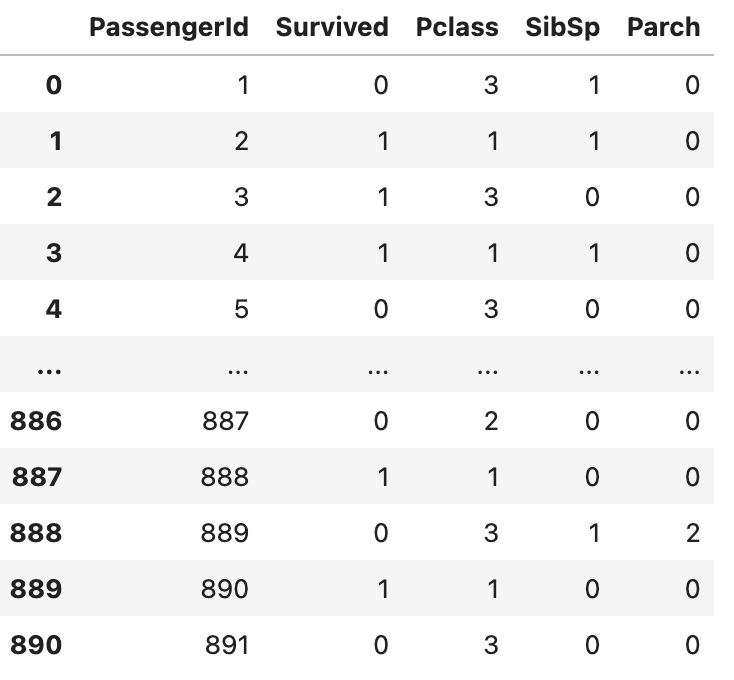
df.select_dtypes()는 사용자가 원하는 데이터 타입의 column을 출력하는 메서드입니다. 메서드의 인수로는 자신이 원하는 데이터 타입을 입력 받습니다.
df.select_dtypes("int")위 코드의 결과는 다음과 같습니다.
df['column_name'].astype()
df[].astype()은 데이터프레임의 특정 열을 변환할 때 사용하는 메서드입니다. 여기서 column_name은 데이터 타입을 바꾸고 싶은 열의 이름을, 함수의 인수로는 바꾸고 싶은 데이터 타입이 들어갑니다.
# 실제 데이터에 타입 변환 적용
df['PassengerId'] = df['PassengerId'].astype(str)
df.info()
위 코드 실행 결과는 다음과 같습니다.
<class 'pandas.core.frame.DataFrame'>
RangeIndex: 891 entries, 0 to 890
Data columns (total 12 columns):
 #   Column       Non-Null Count  Dtype
---  ------       --------------  -----
 0   PassengerId  891 non-null    object
 1   Survived     891 non-null    int64
 2   Pclass       891 non-null    int64
 3   Name         891 non-null    object
 4   Sex          891 non-null    object
 5   Age          714 non-null    float64
 6   SibSp        891 non-null    int64
 7   Parch        891 non-null    int64
 8   Ticket       891 non-null    object
 9   Fare         891 non-null    float64
 10  Cabin        204 non-null    object
 11  Embarked     889 non-null    object
dtypes: float64(2), int64(4), object(6)
memory usage: 83.7+ KB
NaN값이 있는 column 타입 변환
기본적으로 pandas는 column에 정수형 데이터를 보관하더라도 NaN값이 있으면 실수로 데이터를 보관한다. 따라서 NaN값이 있는 column은 데이터 타입 변환이 불가능하다.
따라서 NaN값을 다른 값으로 처리해야 column의 타입을 변환할 수 있다.
위 출력 결과에서 Age속성을 보면 NaN값이 약 170개 정도 존재한다. 따라서 이 속성은 int가 아닌 float형으로 저장되어 있다.
df['Age'].astype(int).head()위의 코드를 진행하면 다음과 같은 오류가 발생한다.
IntCastingNaNError: Cannot convert non-finite values (NA or inf) to integer
따라서 NaN값이 있는 column의 타입을 변환하기 위해서는 다음과 같은 코드를 실행하면 된다.
df['Age'] = df['Age'].fillna(-1).astype(int)
df.tail()
위 코드는 Age속성에 있는 NaN값을 -1로 바꾼 후 데이터 타입을 int로 바꾸는 코드이다. 코드의 실행 결과는 다음과 같다.
0    22
1    38
2    26
3    35
4    35
Name: Age, dtype: int64
위 결과를 보면 타입이 int형으로 바뀐것을 확인할 수 있다.
