오늘 배운 내용
- CSV
- JSON
- Scriptable Object
데이터 관리(저장)을 이해하기 위해서 알아야 할 선수지식
직렬화
객체 -> 파일로 바꾸는 것
[목적]
- HDD/SDD 저장하기 위해서
- 네트워크로 전송하기 위해서
- 유니티 인스텍터 창에 데이터 노출하기 위해
역직렬화
파일 -> 객체로 복원하는 것
데이터 저장방식
1. PlayerPrefs
- 빠르게 사용 가능
- 저장 공간에 제약
- 보안 취약
2. CSV
- 협업 효율 -> 엑셀로 편하게 수치를 기입하고 수정
- 표로 구성되어 있어서, 복잡한 구조에는 치명적
3. JSON
- 리스트, 딕셔너리 같은 복잡한 자료구조를 파일 하나로 묶을 수 있음
4. ScriptableObject
- 유니티 에디터로 지원되는 기능
- 정적 데이터 저장 시 유용
PlayerPrefs
사용처
-
게임 설정 -> 인게임에 크게 영향을 받지 않는 곳에 활용됨
-
사용 가능한곳
- 설정창
- 튜토리얼 완료 여부
-
사용 불가능한곳
- 중요한 정보들 -> 변동성이 심한 데이터
사용법
PlayerPrefs.SetFloat("키", value)
PlayerPrefs.SetInt("키", value)
PlayerPrefs.SetString("키", value)

PlayerPrefs.GetFloat("키", value)
PlayerPrefs.GetInt("키", value)
PlayerPrefs.GetString("키", value)
유니티 PlayerPrefs 저장 장소
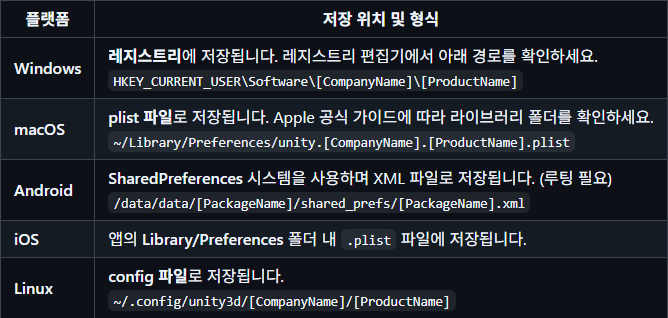
CSV
- Comma Separated Values
ID,HP,ATK
1,100,10
2,200,20
-> 엑셀 -> 텍스트로 저장
CSV 사용하는 이유
"몬스터 스탯 -> 필드 변수 다 선언"
[문제]
- 기획자 접근 불가
- 하드 코딩
- 데이터 변경 용이X -> 나만 알아본다
[CSV 이점]
- 코드(게임 로직) <-> 데이터 분리 ->
기획자가 데이터 값 수정 용이 - 버전 관리 & 협업 용이
[CSV 단점]
- 계층적 구조
Weapon
 ㄴ Sword
ㄴ RareSwordWeapon,Sword,RareSword- 중첩 데이터
Monster
 ㄴ Skills
     ㄴ Fire
     ㄴ Ice
ID,Skill1,Skill2 ...
1,Fire,Ice
2,[CSV 한계]
- 타입 정보 없음 (int, float, bool)
- 구조적 표현이 불가
- 런타임 수정 불편
JSON
- 객체 -> 텍스트로 바꿔 외부와 교환하는 방법
실무 가지는 문제들
1) 하드코딩된 필드 변수
int level = 5;2) 메모리 휘발
- Unity 객체는 메모리
- 게임 종료 시, 데이터 삭제
3) 서버 데이터
{
    "gold": 500,
    "items": ["sword", "potion"]
}
-> 문자열 -> 객체 보완해줘야함
public class Player : MonoBehaviour
{
    public int _level;
    public int _gold;

    public string _path;

    public void Save()
    {
        string json = JsonUtility.ToJson(this);
        File.WriteAllText(_path, json);
    }
}
-> Player.cs 게임 로직 담당
[위 코드의 문제점]
- JSON = 데이터를 직접적으로 만짐
[역할 분리]
1.Player.cs
public class Player : MonoBehaviour
{
    public int _level;
    public int _gold;
}
-> 게임 플레이만 담당
2. JsonHandler.cs
public static class JsonHandler
{
    // 파일 변환
    public static string ToJson(Data data)
    {
        return JsonUtility.ToJson(data)
    }

    // 파일 저장
    public static void Save(string path, string json)
    {
        File.WriteAlltext(path, json)
    }
}
유니티에서 제공하는 JSON 2가지
1) JsonUtility
[특징]
- Unity 기본 제공
- 빠르다
- 제한 많음
[장점]
- 간단한 구조 적합
- 세이브/설정에 충분히 활용 가능
[한계점]
- Dictionary 미지원
- 프로퍼티(Property) 미지원
- 상속 제한
2) Newtonsoft JSON
Package Manager git URL 설치:
com.unity.nuget.newtonsoft-json
JsonUtility는 Unity 저장 규칙 따름 (Inspector에 뜨나/안뜨나)Newtonsoft JSONUnity 규칙 무관 -> C# 객체를 직접 JSON 바꿈
Q. 무조건 Newtonsoft JSON을 쓰면 되지 않을까?
- 기획자와 협업? -> 데이터 수치를 기획자가 만질 일이 많다 ->
CSV - 서버 통신/ 복잡한 데이터 ->
Newtonsoft JSON - 간단한 설정/ 캐싱 ->
JsonUtility
[사용처]
CSV
- 아이템 정보 스탯
- 몬스터 정보
- 퀘스트 리스트
Newtonsoft JSON
-> C# 객체가 JSON 변환해주기 때문에 JsonUtility가 제공하지 않는 것들도 제공함
- NPC 대사
- 유저 인벤토리
JsonUtility
-> Unity에서 제공하는 직렬화 객체들만 가능 = Inspector에서 보이는지 여부
- 설정창
- 업적
ScriptableObject
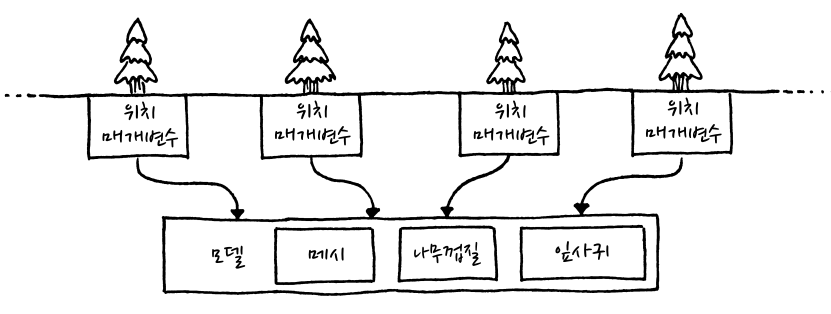
경량 패턴(Flyweight Pattern) 형태 비슷
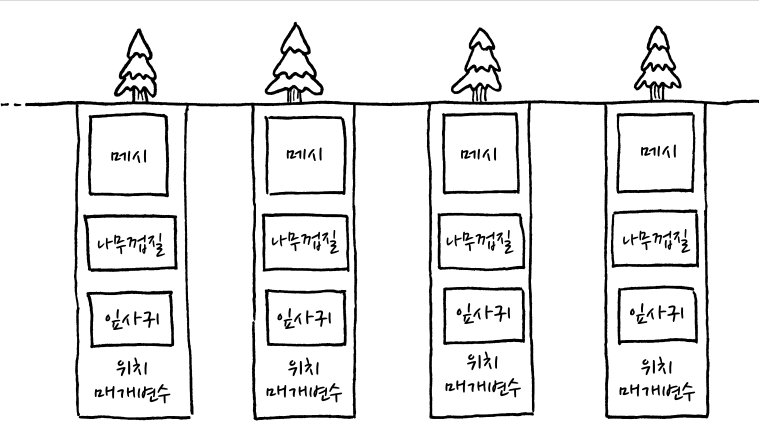
public class TreeModel : MonoBehaviour
{
    Mesh _mesh;
    Texture _bark;
    Texture _leaves;
}
public class Tree
{
TreeModel _model;
Vector3 _position;
double _height;
double _width;
Color _barkTint;
Color _leafTink;
}
ScriptableObject
- 초기 설정값이 되는 것들
- 몬스터 종류
- 프리팹
- HP/MP
- 이동 속도
- 연출 애니메이션
- SFX 등등
CSV - JSON - ScriptableObject
CSV
- 수치 테이블
- 밸런스 기획
JSON
- 직렬화 포맷
- 데이터를 저장, 통신
ScriptableObject
- 유니티에서 제공하는 초기 데이터 설정
- 초기 데이터 타입

.