Components of a RAG architecture
이번에는 이전 챕터에서 봤던 RAG 아키텍쳐의 각 컴포넌트 별 작동 방식을 알아보겠다. 기본 전제는 비구조적 데이터에서 의미있는 정보들을 추출해서 구조화하고, 임베딩 값을 벡터 유사도를 통해 관련 정보를 가져오는 것이다. 교재의 실습 코드는 이 깃헙에서 제공하고 있다.
RAG 아키텍쳐는 크게 Retriever와 Generator 파트로 구분된다.
1️⃣ The retriever
Retriever는 질문에 관련된 정보를 검색해서 가져오는 방식으로 구성되며, 일반적으로Vector 유사도 검색을 활용한다. 벡터 유사도 검색을 위해서는 아래와 같이 데이터를 준비해야 한다.
- Vector Index: 벡터 인덱스는 반드시 필요하진 않지만, 검색의 효율성을 위해서 요규된다. 벡터 인덱스는 exact match방식으로 찾지 않고, 가장 근접한 이웃 검색(approximate nearest neighbor search) 방식을 사용하기 때문에 검색의 범위가 더 넓고, 빠르기 때문이다.
- Vector similarity search functions: 입력값을 넣었을 때 유사한 벡터 리스트를 반환하는 함수를 의미한다. 일반적으로 코사인 유사도(두 벡터 사이의 각도 기반)와 유클리디언 유사도(텍스트의 맥락과 강도를 표현)를 많이 사용한다.
- Embedding model: 텍스트는 수치적 계산을 하기 위해서 벡터 형태로 임베딩 되어야 하며, 임베딩 모델은 동일한 차원의 행렬로 텍스트를 표현해서 연산이 가능하게 한다. 이때 임베딩은 n차원의 숫자 리스트로 표현하는 것으로, 차원이 높을 수록 더 많은 연산이 요구된다.
- Text chunking: chunking은 텍스트를 작은 조각으로 분할하는 것으로, retriever가 반환하는 단위를 의미하기도 한다. 예를 들어 긴 글이 있을 때, 이를 어떻게 쪼개서 저장하냐의 문제는 답변의 구체적과 맥락 유지 차원에 영향을 준다. chunk size는 RAG에 꽤나 큰 영향을 주므로 sliding window를 사용할지, 크기를 고정할지 혹은 필요에 따라 유동적으로 설정할 지는 케이스 바이 케이스로 테스트를 통해 결정해야 한다.
- Retriever pipeline: 위 과정을 종합해서, input이 들어오면 임베딩 벡터로 변환하고, 기존의 벡터로 변환해서 저장되어 있는 값들과 유사도를 각각 계산한 뒤, 가장 유사도가 높은 chunk를 반환하면 된다.
2️⃣ The generator
retriever가 전달해준 참조 정보를 기반으로 generator는 답변을 생성하기만 하면 된다. 이때 generator인 LLM은 모든 정보를 알고 있을 필요가 없으며, 빠르고 더 효율적으로 자연어 답변만 생성하면 된다는 점에서 작은 모델을 사용할 수도 있다.
RAG using vector similarity search
이제 실제 코드를 실행해보며 작동 방식을 확인해보겠다. 순서는 데이터를 준비해서 chunking하고, 임베딩 모델로 벡터화한 뒤, vector index를 포함해서 데이터베이스에 저장하는 과정과 유사도 기반의 벡터 서치, 이 결과를 기반으로 답변 생성으로 진행된다.
Data Setup, Text chunking
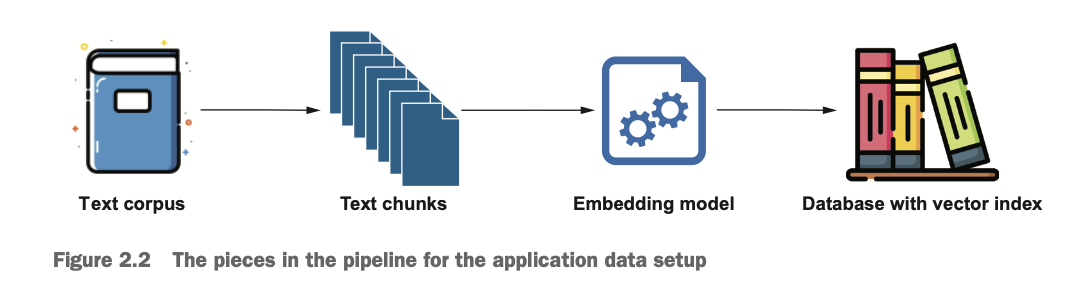
우선 import pdfplumber를 통해서 PDF 문서를 읽어오고, 아래와 같이 500문자씩 분리하고 40문자는 겹치도록 설정한다.
import pdfplumber
from utils import chunk_text

# PDF 읽기
text = ""

with pdfplumber.open(pdf_filename) as pdf:
    for page in pdf.pages:
        text += page.extract_text()

# Chunk 분리하기
chunks = chunk_text(text, 500, 40)
print(len(chunks))
print(chunks[0])
이때 단순히 500 단어로 분리하면 단어 단위에서 끊길 수도 있으므로 split_on_whitespace_only=True 파라미터를 통해서 단어가 끊기지 않도록 한다.
이후 OpenAI의 'text-embedding-3-small' 임베딩 모델을 사용해서 각 chunk를 임베딩한다. chunk는 총 89개이고, 차원은 1536이다. 주의할 점은 DB에 저장할 때 chunk를 임베딩하는 모델과 질의를 임베딩하는 모델은 동일해야 연산 과정에서 에러가 없다는 점이다.
def embed(texts):
    response = open_ai_client.embeddings.create(
        input=texts,
        model="text-embedding-3-small",
    )
    return list(map(lambda n: n.embedding, response.data))

embeddings = embed(chunks)

print(embeddings[0][0:3])
print(len(embeddings))
print(len(embeddings[0]))
Database with vector similarity search function
# vector index 생성
driver.execute_query("""CREATE VECTOR INDEX pdf IF NOT EXISTS
                        FOR (c:Chunk)
                        ON c.embedding""")
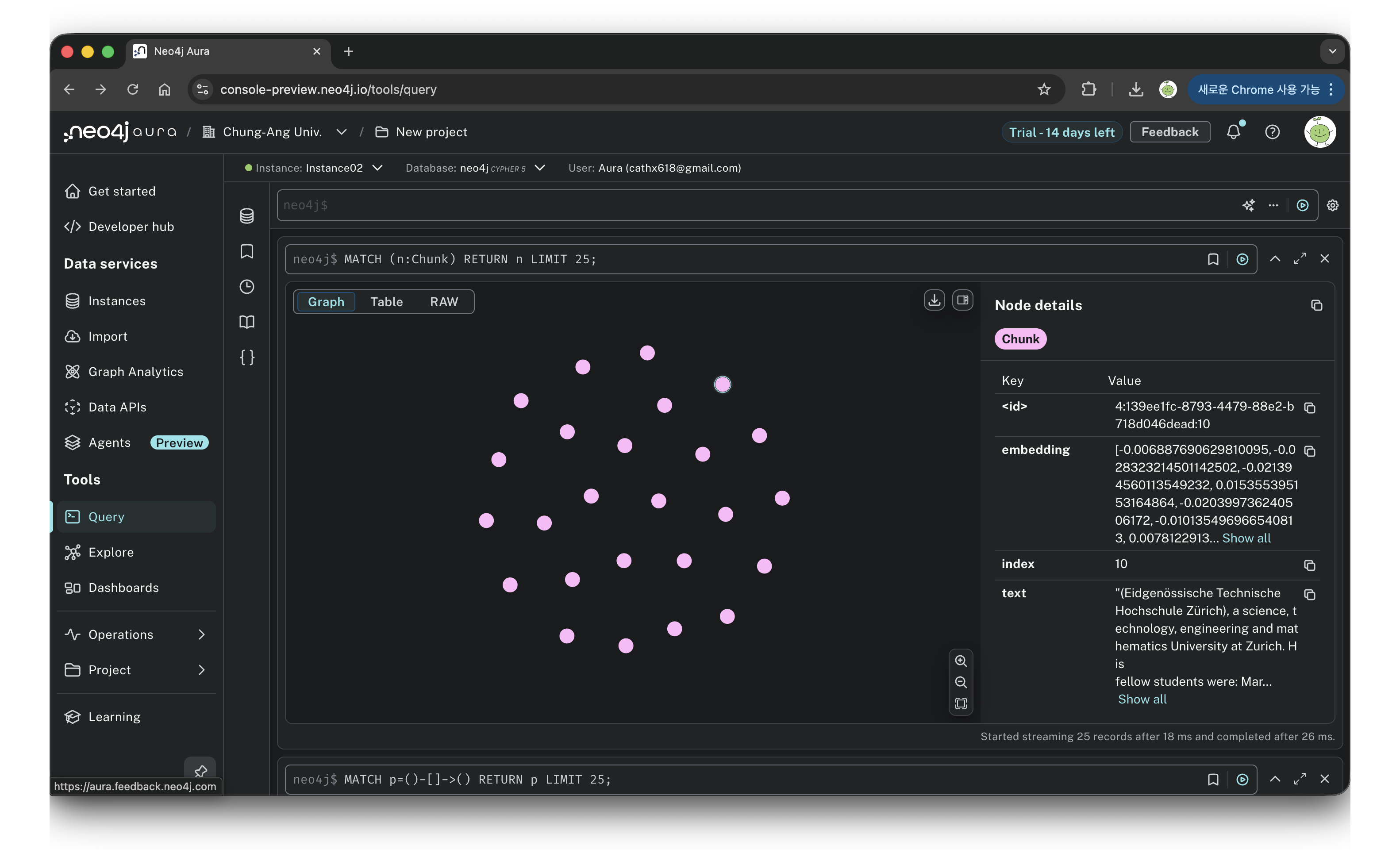
이제 임베딩한 벡터를 저정하기 위해 neo4j에 벡터 인덱스를 생성한다. 인덱스 이름을 pdf로 설정하고 Chunk는 c라는 변수에 저장하고, c의 속성 embedding에 임베딩 벡터를 저장하도록 스키마 설정을 한다.
# Add to neo4j
cypher_query = '''
WITH $chunks as chunks, range(0, size($chunks)) AS index
UNWIND index AS i
WITH i, chunks[i] AS chunk, $embeddings[i] AS embedding
MERGE (c:Chunk {index: i})
SET c.text = chunk, c.embedding = embedding
'''

driver.execute_query(cypher_query, chunks=chunks, embeddings=embeddings)
이후 각 chunk의 텍스트와 임베딩 벡터를 각각의 노드에 넣어주면 된다. 위 쿼리를 실행하면 아래와 같이 89개의 노드가 아무 관계 표현없이 생성된다.
question = "At what time was Einstein really interested in experimental works?"
question_embedding = embed([question])[0]

query = '''
CALL db.index.vector.queryNodes('pdf', $k, $question_embedding) YIELD node AS hits, score
RETURN hits.text AS text, score, hits.index AS index
'''
similar_records, _, _ = driver.execute_query(query, question_embedding=question_embedding, k=4)

for record in similar_records:
    print(record["text"])
    print(record["score"], record["index"])
    print("======")
이제 특정 질문이 있을 때, 이 값과 가장 유사한 chunk를 뽑을 수 있다. 위 코드는 유사도가 높은 상위 4개의 값을 추출한 것이다.
system_message = "You're an Einstein expert, but can only use the provided documents to respond to the questions."
user_message = f"""
Use the following documents to answer the question that will follow:
{[doc["text"] for doc in similar_records]}

---

The question to answer using information only from the above documents: {question}
"""

print("Question:", question)

stream = open_ai_client.chat.completions.create(
    model="gpt-4",
    messages=[
        {"role": "system", "content": system_message},
        {"role": "user", "content": user_message}
    ],
    stream=True,
)
for chunk in stream:
    print(chunk.choices[0].delta.content or "", end="")
추출한 참조 데이터를 정해진 프롬프트 템플릿에 넣어주고 LLM(예시코드에서는 gpt-4를 사용함)을 활용해서 답변을 생성하면 다음과 같은 결과를 얻을 수 있다.
During his ETH days, Einstein was genuinely interested in experimental works. As shown in the documents, he wrote to a friend during that time about his fascination with being directly involved with observation in the physical laboratory.Adding full-text search to the RAG application to enable hybrid search
벡터 유사도는 답변의 품질을 높이는 효율적인 방법이지만, 이것만으로는 정확도 향상에 부족한 경우가 있다. 이번에는 vector search와 full-text search를 모두 활용하는 'hybrid search'에 대해서 알아보겠다.
full-text search는 벡터 기반의 유사도가 아닌 키워드 매칭을 통한 검색 방식을 의미한다. 우선 아래와 같이 neo4j에 'ftPdfChunk'라는 이름의 full-text index를 생성한다.
try :
    driver.execute_query(f"CREATE FULLTEXT INDEX ftPdfChunk FOR (c:Chunk) ON EACH [c.text]")
except:
    print("Fulltext Index already exists")
hybrid search는 vector search와 full-text search의 결과를 합치는 검색 방식이다. 즉, 두 검색 방식을 모두 사용한뒤, 점수를 정규화해서 다시 정렬하여 최종 참조 데이터를 선정하는 것이다. 아래와 같이 union을 사용하면 되고, 중복을 제외한 뒤 top k의 결과를 얻을 수 있다.
hybrid_query = '''
CALL {
    // vector index
    CALL db.index.vector.queryNodes('pdf', $k, $question_embedding) YIELD node, score
    WITH collect({node:node, score:score}) AS nodes, max(score) AS max
    UNWIND nodes AS n
    // We use 0 as min
    RETURN n.node AS node, (n.score / max) AS score
    UNION
    // keyword index
    CALL db.index.fulltext.queryNodes('ftPdfChunk', $question, {limit: $k})
    YIELD node, score
    WITH collect({node:node, score:score}) AS nodes, max(score) AS max
    UNWIND nodes AS n
    // We use 0 as min
    RETURN n.node AS node, (n.score / max) AS score
}
// dedup
WITH node, max(score) AS score ORDER BY score DESC LIMIT $k
RETURN node, score
'''
similar_hybrid_records, _, _ = driver.execute_query(hybrid_query, question_embedding=question_embedding, question=question, k=4)

for record in similar_hybrid_records:
    print(record["node"]["text"])
    print(record["score"], record["node"]["index"])
    print("======")
예시에서는 참조 데이터의 순위 차이가 크지 않지만, 경우에 따라서 full-text search의 성능이 더 좋을 때가 있어서 hybrid search를 적용하는게 정확도 향상에 큰 영향을 주기도 한다.