
이전 챕터에서는 문서를 chunk 단위로 분리한 뒤 임베딩하고 벡터 기반 검색 방법으로 RAG를 수행하는 아주 기본적인 방법을 알아보았다. 이 방법을 테스트 해보면, 참조 데이터로 뽑힌 문장의 길이가 짧아서 원하는 정보가 포함되지 않거나, 불완전한 경우를 경험할 수 있을 것이다.
따라서 Chapter3에서는 RAG의 성능을 높일 수 있는 몇 가지 방법을 소개한다. 첫 번째는 'step-back prompting'으로, 쉽게 말해 input query를 재작성해서 더 적합한 참조데이터를 검색할 수 있도록 하는 방법이다. 또한 원본 데이터를 그대로 저장하는 방식이 아닌, 이 문서에서 잘생할 수 있는 질문들을 미리 뽑아서 저장한 뒤, 이를 기반으로 답변을 찾는 'Hypothetical quesntion strategy'나, 더 작은 단위로 쪼개서 자세하게 검색할 수 있으나 실제 리턴은 해당 문장을 포함한 큰 chunk로 해서 앞뒤 문맥을 담을 수 있도록 하는 'parent document retriever' 방법이 있다.
이런 방식을 적용하면 임베딩 양을 줄이는 대신 정확도는 향상시킬 수 있다는 장점이 있다. 이외에도 다음과 같은 RAG 성능을 높이는 방법이 있다.
- Finetuning the text-embedding model: 특정 도메인 문서로 finetuning해서 텍스트 임베딩 값이 의미를 더 잘 표현하도록 하는 방법이다.
- Reranking strategies: 기존의 방법대로 참조 데이터를 추출한 뒤, 질문의 의도에 맞게 순위만 다시 설정하는 방법이다. 더 성능이 좋은 모델을 사용하거나 휴리스틱한 방법으로 진행할 수 있다.
- Metadata-based contextual filtering: 저자정보, 발행연도, 주제태그, 출처 등의 구조적인 메타데이터를 활용해서 1차적으로 후보를 선정하고, 이후 의미적 매칭을 다시 하는 방법이다. 예를 들어, 최신 정보와 관련된 질문일 경우, 발행연도 기준으로 먼저 필터링을 진행하면 정확도를 쉽게 높일 수 있다.
- Hybrid retrieval(keyword + dense vector search): chapter2에서 잠깐 언급했던 키워드 기반 검색과 의미기반 검색 방법을 합치는 방식이다. 키워드 기반 검색은 용어의 포함여부로 검색하기 때문에 더 직관적인 결과를 반환하고, 의미 기반 검색은 더 포괄적인 검색을 하기 때문에 이 둘을 융합한 뒤 reranking하면 recall과 precision을 모두 만족한 답변을 생성할 가능성이 높아진다.
1️⃣ Step-back prompting
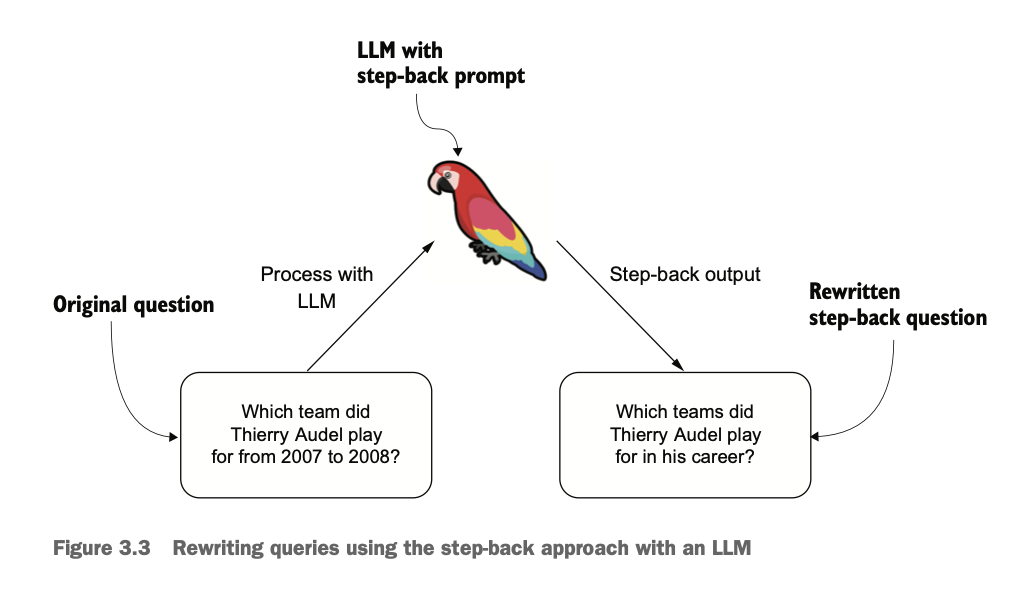
step-back prompting에 대해서 더 자세히 알아보겠다. 예를 들어, 'Which team did Thierry Audel play for from 2007 to 2008?'라는 질문을 사용자가 했을 때, 문서에서는 2007, 2008과 같은 명확한 연도가 없을 수 있다. 따라서 질문의 범위를 보다 넓게 'Which teams did Thierry Audel play for in his career?'와 같은 식으로 수정할 수 있다. few-shot 예제를 포함한 rewriting을 위한 프롬프트 예시는 다음과 같다.
stepback_system_message = """
    You are an expert at world knowledge. Your task is to step back
    and paraphrase a question to a more generic step-back question, which
    is easier to answer. Here are a few examples

    "input": "Could the members of The Police perform lawful arrests?"
    "output": "what can the members of The Police do?"

    "input": "Jan Sindel’s was born in what country?"
    "output": "what is Jan Sindel’s personal history?"
"""
이 프롬프트를 통해서 보다 넓은 범위의 정보를 얻을 수 있는 질의문을 얻을 수 있다.
2️⃣ Parent document retriever
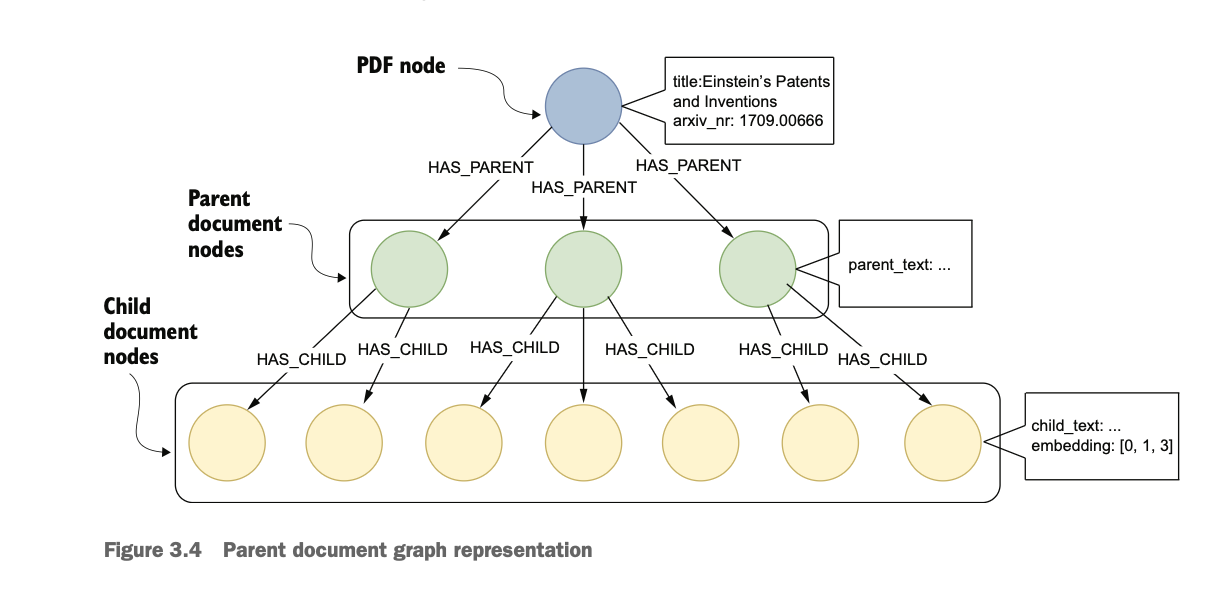
Parent document retriever는 위 figure와 같이 원본 문서를 사이즈에 따라 단계별 노드를 만든다는 특징이 있다. parent document nodes는 더 긴 문장과 포괄적인 정보들을 담고 있고, child document nodes는 더 짧고 세부적인 정보들로 구성된다.
우선 PDF 문서를 불러와서 정규표현식을 통해 섹션을 분리한다. 즉, 소제목 단위로 문서를 분리한다는 의미이다.
def split_text_by_titles(text):
    # A regular expression pattern for titles that
    # match lines starting with one or more digits, an optional uppercase letter,
    # followed by a dot, a space, and then up to 50 characters
    title_pattern = re.compile(r"(\n\d+[A-Z]?\. {1,3}.{0,60}\n)", re.DOTALL)
    titles = title_pattern.findall(text)
    # Split the text at these titles
    sections = re.split(title_pattern, text)
    sections_with_titles = []
    # Append the first section
    sections_with_titles.append(sections[0])
    # Iterate over the rest of sections
    for i in range(1, len(titles) + 1):
        section_text = sections[i * 2 - 1].strip() + "\n" + sections[i * 2].strip()
        sections_with_titles.append(section_text)

    return sections_with_titles


sections = split_text_by_titles(text)
print(f"Number of sections: {len(sections)}")
이렇게 분리하면 총 9개의 섹션이 생긴다. 이제 각 섹션에서 2000단어가 넘는 경우 분리하고(이 과정에서 40 오버랩을 만드는데, 기존에 2000단어가 넘지 않는 문장들은 40 오버랩이 적용되지 않는 것 같다.. 오류 아닐지?), 다시 각 chunk에서 500 단어씩 child chunk를 분리한다.
- parent chunk: (2000, 40)
- child chunk: (500, 20)
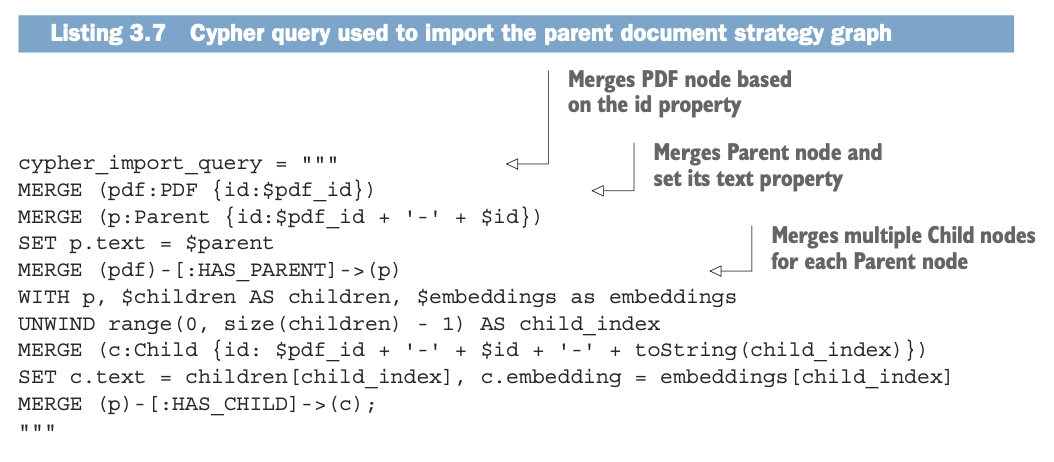
pdf노드와 parent, child 노드들은 위와 같은 Cypher 쿼리를 통해서 속성과 관계를 표현해준다. 이렇게 표현한 그래프를 vector index에 저장한 뒤, 아래와 같은 retrieval query를 사용해서 parent node를 반환한다.
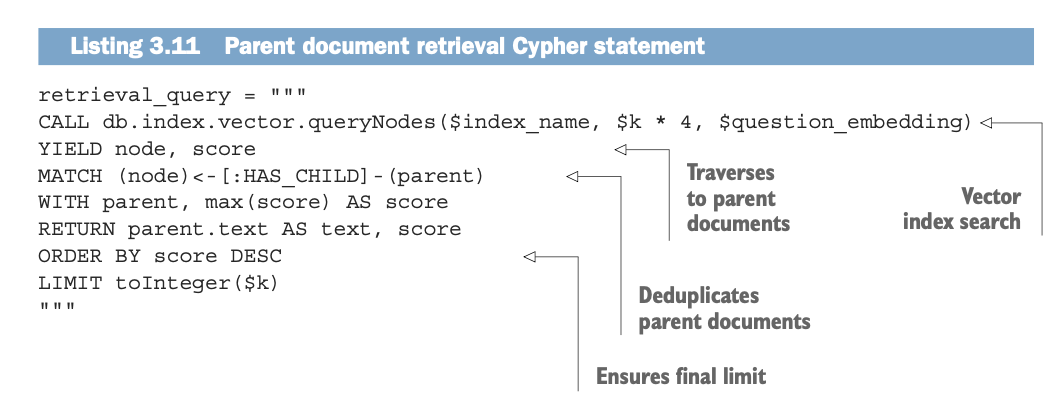
child node를 임베딩한 벡터를 기반으로 유사도를 계산하고, 유사도 점수가 높은 child node의 parent node를 반환한다. k*4개를 반환하는 이유는 중복되는 parent node가 있을 수 있기 때문에 중복값들을 삭제해야 하기 때문이다. 따라서 중복 제거 후에 k개의 고유한 문서를 얻기 위해서 4배수를 먼저 검색하는 것이다.
def rag_pipeline(question: str) -> str:
    stepback_prompt = generate_stepback(question)
    print(f"Stepback prompt: {stepback_prompt}")
    documents = parent_retrieval(stepback_prompt)
    answer = generate_answer(question, documents)
    return answer
최종적으로 step-back prompting을 통해 질의를 수정하고, parent document retriever를 통해서 검색의 정확성과 맥락 반영 측면의 성능을 향상시킨 하나의 rag_pipeline을 구축할 수 있다. 이 예제에서는 별도의 벡터DB를 사용하지 않았으나, 실제로 사용할 땐 DB에서 검색하는 파트를 추가하거나 retriever 방식의 변화를 줄 수 있다.